
Quick Answer
An AI meeting assistant is software that automatically records, transcribes, and summarizes your meetings using artificial intelligence. It joins your video calls (Zoom, Google Meet, Teams), captures everything said in real-time, identifies speakers, extracts action items, and generates concise summaries; all without you typing a single note. Modern AI meeting assistants save knowledge workers 4-5 hours per week by eliminating manual note-taking and making every meeting instantly searchable. They cost $10-30/month (or pay-per-use options like KenzNote at $0.99/meeting) and achieve 95-98% transcription accuracy.
Key Takeaways
- AI meeting assistants automate 5 core tasks: recording, real-time transcription, speaker identification, intelligent summarization, and action item extraction
- Time savings are substantial: Teams save 16+ hours per week on note-taking, cleanup, and searching for information
- 95-98% transcription accuracy rivals professional human transcribers at a fraction of the cost
- Searchable meeting archive means you can find any discussion, decision, or commitment in seconds
- Privacy matters: Choose tools that don't require calendar access (like KenzNote) for better privacy and control
- Multi-platform support is essential; your tool should work across Zoom, Google Meet, and Microsoft Teams
- Pay-per-use pricing ($0.99/meeting) makes more sense than monthly subscriptions if you have occasional meetings
- Start small: Test with important client calls and planning sessions before rolling out to all meetings
Table of Contents
- What is an AI Meeting Assistant?
- How AI Meeting Assistants Actually Work
- Key Features of AI Meeting Assistants
- Why Use an AI Meeting Assistant?
- AI Meeting Assistant vs Other Options
- How to Choose the Right AI Meeting Assistant
- Privacy & Security: What to Know
- Getting Started with an AI Meeting Assistant
- Frequently Asked Questions
- Related Resources
What is an AI Meeting Assistant? Complete Guide for 2026
Ever left a meeting and realized you missed half the action items because you were too busy typing notes?
You're not alone. The average professional spends 15-20 hours per week in meetings. If you're manually taking notes, you're choosing between actively participating in the discussion or frantically capturing what everyone's saying. You can't do both well.
** Fact Box: Meeting Time Statistics**
- Professionals spend 15-20 hours per week in meetings
- 71% of meetings are considered unproductive by attendees
- 37% of employee time is spent in meetings (avg. across industries)
- $37 billion lost annually to unproductive meetings in the U.S. alone
Sources: Harvard Business Review, Atlassian State of Teams Report
That impossible choice disappears with AI meeting assistants.
An AI meeting assistant is software that automatically joins your video calls, records audio, transcribes conversations in real-time, generates automatic summaries, and extracts action items, freeing you to focus on the conversation instead of your keyboard.
In this comprehensive guide, you'll learn exactly what AI meeting assistants are, how they work behind the scenes, and how to choose the right one for your needs. Whether you're looking for a note-taking solution, meeting minutes automation, or AI-powered transcription, this guide covers everything.
What is an AI Meeting Assistant?
 AI meeting assistants join your video calls, capture every word, and generate intelligent summaries; freeing you to focus on the conversation.
An AI meeting assistant is software that uses artificial intelligence to automatically record, transcribe, analyze, and summarize your meetings, so you never have to take manual notes again.
Think of it as a personal note-taker who attends every meeting with you, takes perfect notes, remembers every detail, creates a polished summary, and files it away for instant retrieval later. Except this assistant never gets tired, never misses a word, and costs about as much as your monthly coffee budget.
What AI Meeting Assistants Do
Modern AI meeting assistants handle five core tasks automatically:
1. Automatic Recording
They join your video calls (Zoom, Google Meet, Microsoft Teams) and record the audio. Some tools require calendar integration to join automatically. Others, like KenzNote, simply need the meeting link, no calendar permissions required.
2. Real-Time Transcription
As people speak, the AI converts words into text instantly using speech-to-text technology. You see live captions during the meeting, making it easy to follow along even in noisy environments or with unfamiliar accents.
3. Speaker Identification
Advanced AI meeting assistants identify who said what, labeling each statement with the speaker's name. No more "Speaker 1" and "Speaker 2", you get "Lina said..." and "John agreed..."
4. Intelligent Summarization
After the meeting, AI analyzes the transcript and generates a concise summary highlighting key discussion points, decisions made, and topics covered. A 60-minute rambling discussion becomes a tight 3-paragraph summary.
5. Action Item Extraction
The AI automatically identifies tasks and commitments:
- "Lina will send the proposal by Friday" → Extracted as action item
- "Let's schedule a follow-up next week" → Noted as pending task
- "John owns the Q2 budget" → Assigned ownership
All of this happens automatically. You just show up to the meeting and talk.
 The five core functions that make AI meeting assistants indispensable for modern teams.
What AI Meeting Assistants Are NOT
❌ Not just a recording tool
Basic meeting recorders save audio. AI assistants understand the conversation, they know the difference between a casual remark and an action item.
❌ Not just a transcription service
Transcription services (like Rev.com) convert speech to text, but they don't analyze it. AI assistants go further: summaries, action items, topic detection, sentiment analysis.
❌ Not a replacement for humans
In high-stakes meetings (board meetings, legal proceedings), you might still want a human taking notes. But for 95% of your meetings, AI does a better job, and certainly faster.
❌ Not always calendar-dependent
Many AI assistants require access to your Google Calendar or Outlook to automatically join meetings. But some (like KenzNote) work without calendar permissions, offering better privacy and flexibility for selective recording.
According to McKinsey research, generative AI tools like meeting assistants can save knowledge workers 4-5 hours per week by automating documentation tasks. That's nearly 250 hours per year per person.
** Fact Box: AI Productivity Impact**
- 4-5 hours saved per week per knowledge worker (McKinsey)
- That's 250 hours reclaimed annually per person
- 63% of executives say AI tools improved team productivity
- Organizations using AI meeting tools report 30% reduction in follow-up meetings
- $25,000-50,000 annual value per employee in time savings
Sources: McKinsey & Company, Gartner Workplace Survey 2025
How AI Meeting Assistants Actually Work
 Behind the scenes: How AI transforms a 60-minute meeting into searchable, actionable insights in minutes.
Understanding the technology helps you appreciate why AI meeting assistants are so powerful. Here's what happens behind the scenes from the moment your meeting starts to when you receive your summary.
Step 1: Meeting Detection & Joining
Traditional method (calendar-based):
Most AI assistants connect to your Google Calendar or Microsoft Outlook. They scan your calendar for upcoming meetings, detect video call links (Zoom, Meet, Teams), and automatically join at the scheduled time.
Privacy-first method (no calendar):
Tools like KenzNote let you manually start recording or paste a meeting link, no calendar permissions needed. This approach respects your privacy and works even for impromptu meetings not on your calendar.
When the AI joins your meeting, other participants see it as an additional attendee (usually labeled "KenzNote Bot" or similar). Most tools display a recording notification to comply with legal requirements.
Step 2: Audio Recording
Once in the meeting, the AI assistant records the audio. Modern tools use intelligent audio processing to:
- Isolate individual speakers (even when multiple people talk at once)
- Filter background noise (dogs barking, construction, notifications)
- Handle different accents and languages (accuracy varies)
Better audio quality means better transcripts.
Step 3: Real-Time Transcription
This is where the magic happens. The AI uses Automatic Speech Recognition (ASR) technology, the same tech behind Siri and Alexa, to convert spoken words into text.
** Fact Box: Transcription Accuracy**
- Modern AI ASR systems: 95-98% accuracy (clear audio)
- Human professional transcribers: 95-99% accuracy
- Human real-time note-takers: 60-70% capture rate
- OpenAI Whisper: 96.3% average accuracy across 97 languages
- Cost comparison: AI $0.006/min vs. Human $1-2.50/min
Sources: OpenAI Whisper Paper, Rev.com Industry Report
Modern ASR systems (like OpenAI's Whisper) achieve 95-98% accuracy for clear audio. That's better than most humans typing in real-time.
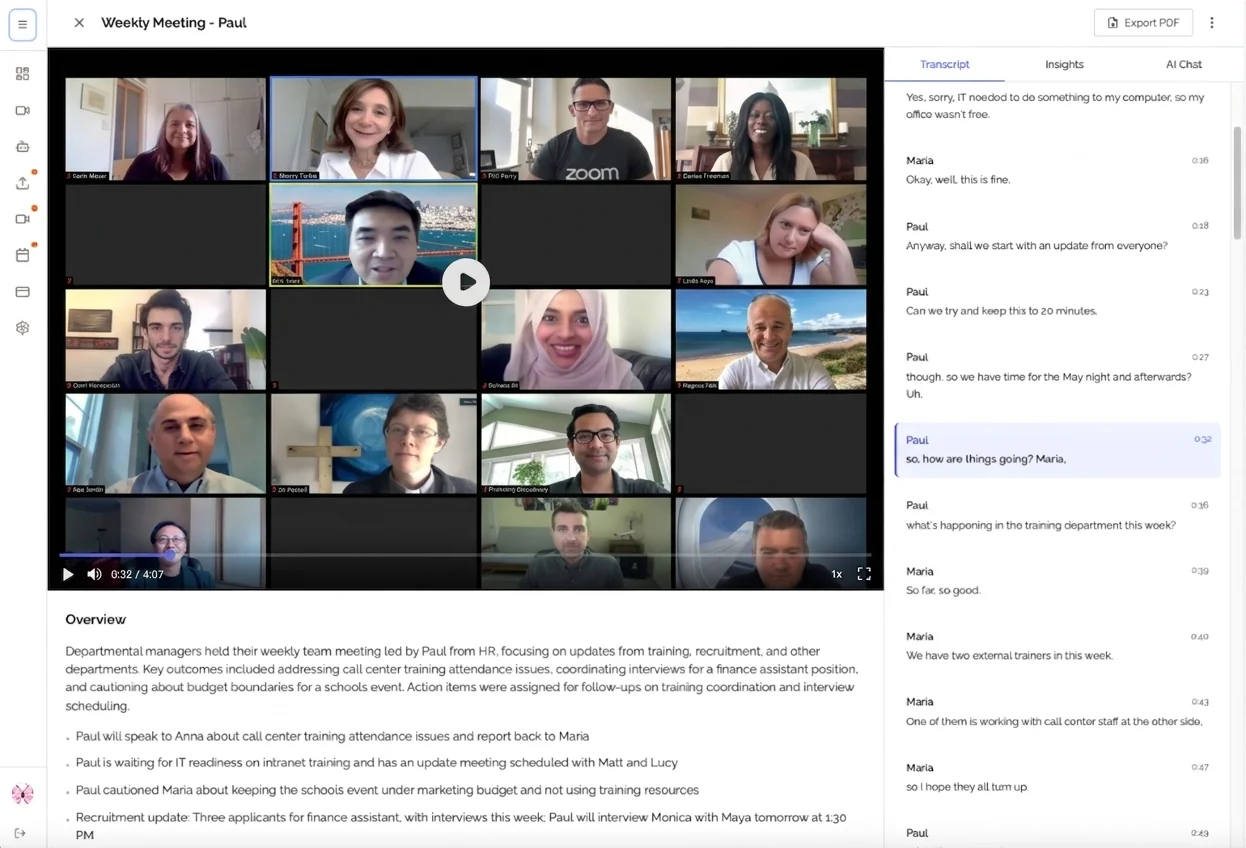
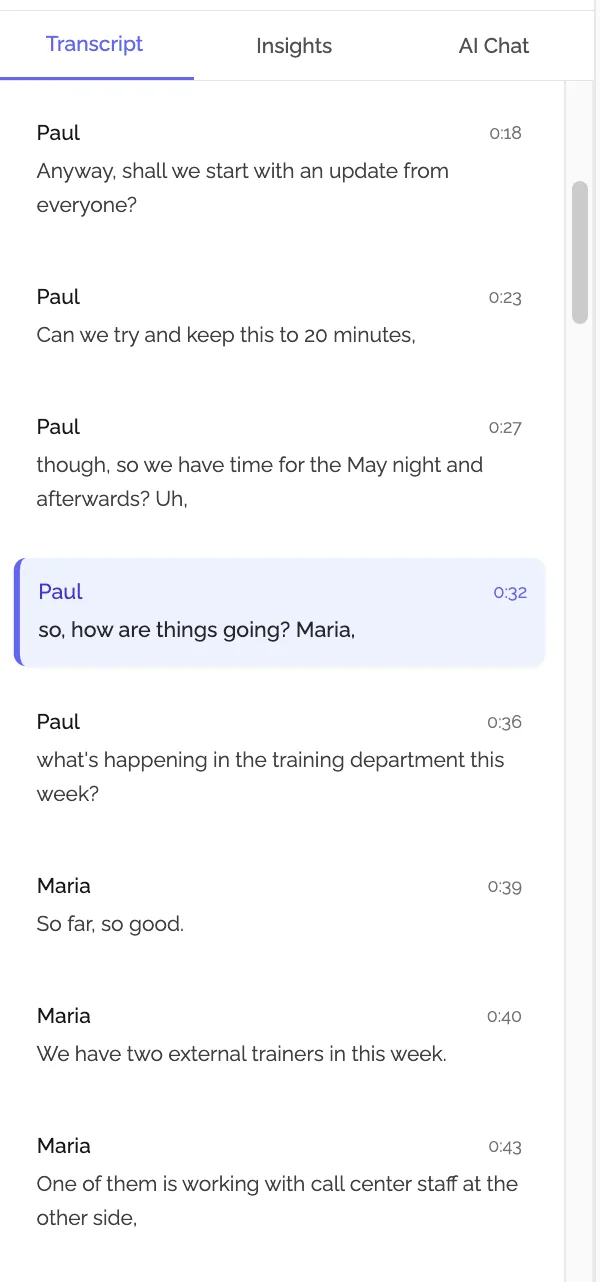 Real-time transcription in action: See what's being said as it happens, with speaker identification and searchable text.
The transcription happens live, so you can:
- See captions during the meeting
- Search while the meeting is happening
- Follow along if you're in a noisy environment
Step 4: AI Analysis & Processing
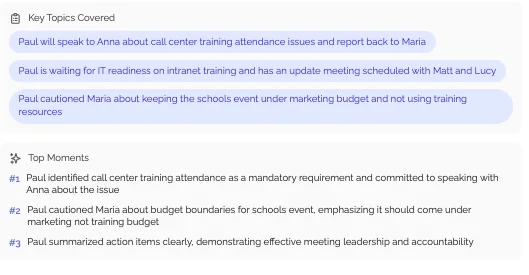
After (or during) the meeting, advanced AI kicks in. The system uses Natural Language Processing (NLP) and Large Language Models (LLMs) like GPT-4 to:
Identify key topics: "This meeting was about Q2 budget planning, hiring decisions, and product launch timeline."
Extract action items: Finds sentences like "I'll email the contract by Friday" and converts them into trackable tasks.
Summarize discussions: Condenses 60 minutes of conversation into a readable 2-3 paragraph summary.
Detect sentiment: Understands which parts of the meeting were critical decisions vs. casual banter.
Flag questions: Identifies unanswered questions for follow-up.
This step separates AI meeting assistants from basic transcription tools. They understand the meeting, not just document it.
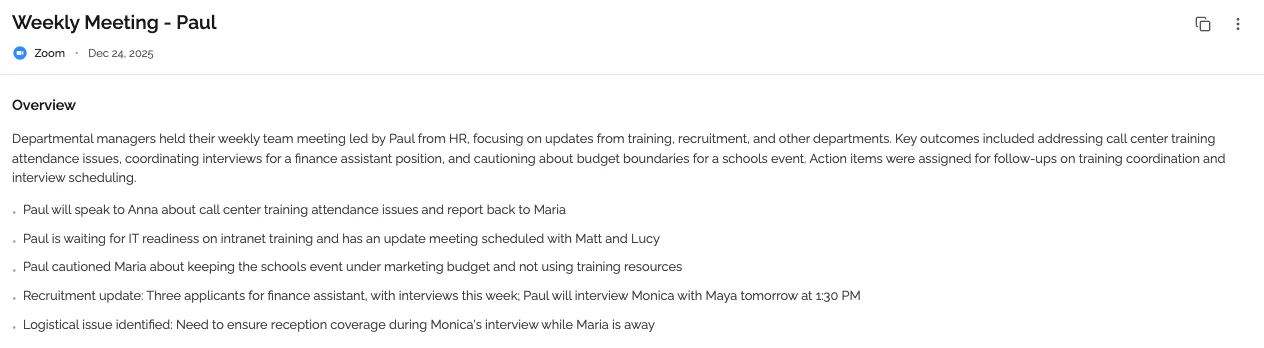
AI-generated summary: A 60-minute meeting condensed into scannable sections with action items clearly extracted.
Step 5: Delivery & Sharing
Finally, the AI packages everything and delivers it to you:
- Formatted notes (with headings, bullets, speaker labels)
- Summary paragraph (TL;DR of the meeting)
- Action items list (with owners and due dates)
- Full transcript (searchable, timestamped)
- Recording link (if you need to re-watch specific moments)
These deliverables typically arrive via:
- Email (summary in your inbox minutes after the meeting)
- Dashboard (web app where all meetings are archived)
- Integrations (auto-posted to Slack, Notion, your CRM)
And because everything is text, you can search your meeting history instantly. "What did we decide about pricing last month?" → Found in 3 seconds.
 Searchable meeting archive: Find any decision, commitment, or discussion in seconds across all your past meetings.
Key Features of AI Meeting Assistants
Not all AI meeting assistants are created equal. Here are the must-have features:
1. Real-Time Transcription
What it is: Live captions as people speak
Why it matters: Stay engaged without worrying about notes. If you miss something, the transcript captured it.
Modern AI achieves 95-98% accuracy with clear audio, comparable to professional human transcribers at a fraction of the cost.
** Fact Box: Real-Time Transcription Benefits**
- 92% of users report better meeting engagement with live captions
- Accessibility: 466 million people worldwide have hearing loss
- 35% faster information retrieval with searchable transcripts
- 85% of remote workers prefer meetings with live transcription
Sources: WHO Global Report on Hearing, Microsoft Work Trend Index
2. Automatic Summarization
What it is: AI-generated meeting summaries
Why it matters: Get the gist in 30 seconds instead of re-reading 60 minutes of notes.
The AI distills hours of conversation into key takeaways, organized by topic.
3. Action Item Extraction
What it is: Automatically identifies tasks and assigns owners
Why it matters: Nothing falls through the cracks. Every commitment is documented.
** Fact Box: Action Item Impact**
- 40% of action items are forgotten without documentation
- Teams using AI extraction see 2.3x higher task completion rates
- 56% reduction in "who was supposed to do that?" moments
- Average of 7-12 action items identified per hour-long meeting
Sources: Asana Anatomy of Work Report, Project Management Institute
Example: "Lina agreed to send proposal by Friday" → Extracted as action item with owner and deadline.
4. Speaker Identification
What it is: Labels who said what
Why it matters: Know who made commitments or decisions. Essential for accountability.
Transcripts show "John:", "Lina:", not just "Speaker 1", "Speaker 2".
5. Searchable Archive
What it is: Find any meeting by keyword, date, participant
Why it matters: "What did we decide about the pricing strategy in Q2?" → Instant answer.
Build institutional knowledge that doesn't leave when employees do.
** Fact Box: Knowledge Retention**
- 42% of critical knowledge exists only in people's heads
- Companies lose $47 million annually (per 1,000 employees) from knowledge loss
- Searchable meeting archives reduce knowledge retrieval time by 75%
- Average employee spends 2.5 hours/day searching for information
Sources: Panopto Workplace Knowledge Report, IDC Research
6. Multi-Platform Support
What it is: Works with Zoom, Google Meet, Microsoft Teams, etc.
Why it matters: Use one tool for all your meetings, regardless of platform.
KenzNote advantage: Works across all major platforms without complex integrations.
7. Privacy & Security Features
What it is: Recording permissions, data encryption, compliance
Why it matters: Your meetings may contain sensitive information.
Must-haves:
- ✅ Recording consent notifications
- ✅ End-to-end encryption
- ✅ GDPR/HIPAA compliance (for healthcare)
- ✅ Calendar-free option (KenzNote) for maximum privacy
Feature Comparison Table
Feature comparison: See how AI meeting assistants stack up against basic transcription and human note-taking.
| Feature | Basic Transcription | AI Meeting Assistant | KenzNote |
|---|---|---|---|
| Transcription accuracy | 90-95% | 95-98% | 95-98% |
| Speaker identification | ❌ | ✅ | ✅ |
| AI summaries | ❌ | ✅ | ✅ |
| Action item extraction | ❌ | ✅ | ✅ |
| Searchable archive | Limited | ✅ | ✅ |
| Calendar integration required | N/A | Usually ✅ | ❌ (Optional) |
| Platform support | Varies | Limited | All major platforms |
| Privacy-first design | Varies | Varies | ✅ |
Why Use an AI Meeting Assistant? [Key Benefits]
For Individual Contributors
✅ Stay fully present - No more laptop tunnel vision while typing notes
✅ Never miss details - Capture every word, even side conversations
✅ Review at your own pace - Skim summaries or search transcripts
✅ Onboard faster - Catch up on meetings you missed
For Team Leads & Managers
✅ Ensure accountability - Clear record of who committed to what
✅ Track decisions - Search past meetings for context
✅ Share with absent members - Keep remote team members in the loop
✅ Measure meeting effectiveness - Talk time analytics, sentiment analysis
For Organizations
✅ Reduce meeting time - Spend 30% less time in follow-up meetings
✅ Improve knowledge retention - Meeting insights searchable forever
✅ Scale team collaboration - Async communication for distributed teams
✅ Compliance & documentation - Audit trail for legal/compliance needs
The Time Savings Are Real
ROI visualization: See how a 10-person team saves 870 hours per year with AI meeting assistants.
For a team of 10 people having 5 meetings per week:
| Activity | Traditional Method | With AI Assistant | Weekly Savings |
|---|---|---|---|
| Note-taking during meetings | 10 hours | 0 hours | 10 hours |
| Post-meeting cleanup | 4 hours | 0 hours | 4 hours |
| Searching for information | 3 hours | 15 minutes | 2.75 hours |
| Total per week | 17 hours | 15 minutes | 16.75 hours |
That's 870 hours per year for just one team. At an average knowledge worker salary, that translates to tens of thousands of dollars in reclaimed productivity.
** Fact Box: ROI Calculator**
- Average knowledge worker salary: $75,000/year
- Hourly cost: ~$36/hour
- Time saved per person/week: 5 hours
- Annual value per employee: $9,360
- 10-person team ROI: $93,600/year
- Typical AI tool cost: $2,400/year (10 users × $20/month)
- Net gain: $91,200/year or 3,800% ROI
Sources: Bureau of Labor Statistics, Gartner TCO Analysis
AI Meeting Assistant vs Other Options
Not sure if you need an AI meeting assistant? Here's how they compare to alternatives:
| Method | Pros | Cons | Best For |
|---|---|---|---|
| Manual Notes | Free, flexible | Distracting, incomplete, slow | Small, infrequent meetings |
| Recording + Playback | Accurate, complete | Time-consuming to review (60 min meeting = 60 min review) | Legal depositions, detailed interviews |
| Human Note-Taker | Customizable, intelligent | Expensive ($50-100/hr), not scalable | Executive meetings, board meetings |
| Basic Transcription | Accurate text | No analysis, no action items, no search | Podcasts, simple interviews |
| AI Meeting Assistant ⭐ | Automated, analyzed, searchable, scalable | Subscription cost ($10-30/month) | All regular business meetings |
When to Use What:
- Manual notes: Quick 1:1s (< 15 minutes)
- AI assistant: Recurring team meetings, client calls, important decisions
- Human note-taker: Board meetings, legal proceedings
For most professionals attending 5+ meetings per week, an AI meeting assistant becomes essential, not optional.
** Fact Box: Meeting Assistant Adoption**
- 78% of remote-first companies now use AI meeting tools
- AI transcription market projected to reach $10.3B by 2028
- 59% annual growth in meeting assistant adoption (2024-2026)
- Enterprise adoption: 84% of Fortune 500 companies testing or deploying
- User satisfaction: 4.6/5 average rating across major platforms
Sources: Gartner Market Analysis, G2 Reviews Aggregate Data
How to Choose the Right AI Meeting Assistant
Not all AI meeting assistants are created equal. Here's how to choose:
Decision Tree: Find Your Perfect AI Meeting Assistant
Use this decision tree to quickly identify the best tool for your needs:
START: How many meetings do you transcribe per month?
│
├─ < 5 meetings/month
│  │
│  └─ Privacy important?
│     │
│     ├─ YES → **KenzNote** (pay-per-use, no calendar access)
│     └─ NO → Otter.ai Free or KenzNote
│
├─ 5-20 meetings/month
│  │
│  └─ Need CRM/sales integrations?
│     │
│     ├─ YES → Fireflies.ai or Gong (sales-focused)
│     └─ NO → **KenzNote** (pay-per-use) or Otter.ai
│
└─ 20+ meetings/month
   │
   └─ Team size?
      │
      ├─ Solo/Small team (1-5)
      │  │
      │  └─ Budget conscious?
      │     │
      │     ├─ YES → Otter.ai Business ($20/mo)
      │     └─ NO → **KenzNote** unlimited or Read.ai
      │
      └─ Enterprise (10+)
         │
         └─ Need compliance (HIPAA/SOC2)?
            │
            ├─ YES → Otter Enterprise or Fireflies Enterprise
            └─ NO → Otter Business or Read.ai Teams
Quick recommendations:
- Budget-conscious occasional user → KenzNote pay-per-use ($0.99/meeting)
- Privacy-first user → KenzNote (no calendar access required)
- Heavy user with unlimited meetings → Otter.ai Business
- Sales team needing CRM integration → Fireflies.ai or Gong
- Enterprise with compliance needs → Otter Enterprise
1. What platforms do you use?
- Zoom-only? → Fathom works (but limited to one platform)
- Multi-platform? → Otter, Fireflies, KenzNote
KenzNote advantage: Works with Google Meet, Zoom, and Microsoft Teams without complex integrations.
2. What's your budget?
- Free tier needed? → Otter (limited minutes), KenzNote (2 meetings free)
- Pay-per-use? → KenzNote ($0.99/meeting or $0.99/hour)
- Unlimited? → Otter Business ($20/user/month), Fireflies ($19/month)
** Fact Box: Pricing Comparison**
- Pay-per-use (KenzNote): $0.99/meeting = $11.88/year (12 meetings)
- Monthly subscription (avg): $20/month = $240/year
- Cost difference: 95% savings for occasional users
- Break-even point: 20 meetings/month
- Average user reality: 5-8 meetings/month benefit from transcription
Choose pay-per-use if you have < 20 transcription-worthy meetings/month
3. Privacy concerns?
- Calendar access okay? → Most tools
- Calendar-free required? → KenzNote
Calendar integrations expose your entire schedule to third-party services. If privacy matters, choose tools that don't require calendar permissions.
4. Integration needs?
- Need CRM sync? → Check Salesforce/HubSpot integrations
- Need project management? → Check Asana/Monday integrations
- Need team chat? → Check Slack/Teams integrations
5. Compliance requirements?
- Healthcare? → Need HIPAA compliance (Otter Enterprise, some tools)
- Legal? → Need BAA (Business Associate Agreement)
- Finance? → Need SOC 2 certification
Decision Matrix
| Your Need | Recommended Tool |
|---|---|
| Free, multi-platform, privacy-first | KenzNote ⭐ |
| Established brand, large enterprise team | Otter.ai |
| Lots of CRM/sales integrations | Fireflies.ai |
| Deep analytics & insights | Read.ai |
Privacy & Security: What to Know
 Essential security features to look for in an AI meeting assistant.
Your meeting conversations may contain sensitive information. Here's what to ask:
Recording Consent
❓ Does it notify participants they're being recorded? ❓ Can participants opt out? ❓ What's legally required in your state/country?
Important: In some states (California, etc.), you MUST get consent before recording. Your AI assistant should handle notifications automatically.
** Fact Box: Recording Laws by Region**
- One-party consent states: 38 states (only one person needs to consent)
- Two-party consent states: 12 states (all parties must consent)
- GDPR (EU): Explicit consent required for recording
- Penalties for violations: Up to $10,000 per incident + legal fees
- Best practice: Always notify all participants
Sources: Digital Media Law Project, GDPR Guidelines
Data Storage
❓ Where is data stored? (US, EU, other?) ❓ Is it encrypted at rest and in transit? ❓ Can you delete recordings permanently? ❓ How long is data retained?
Calendar Access
❓ Does it require full calendar access? ❓ KenzNote doesn't require calendar access (privacy advantage) ❓ What calendar permissions does it need?
Privacy Best Practices:
✅ Inform participants before recording ✅ Get explicit consent for sensitive meetings ✅ Review your company's recording policy ✅ Choose tools with strong encryption ✅ Consider calendar-free options (KenzNote)
Getting Started with an AI Meeting Assistant
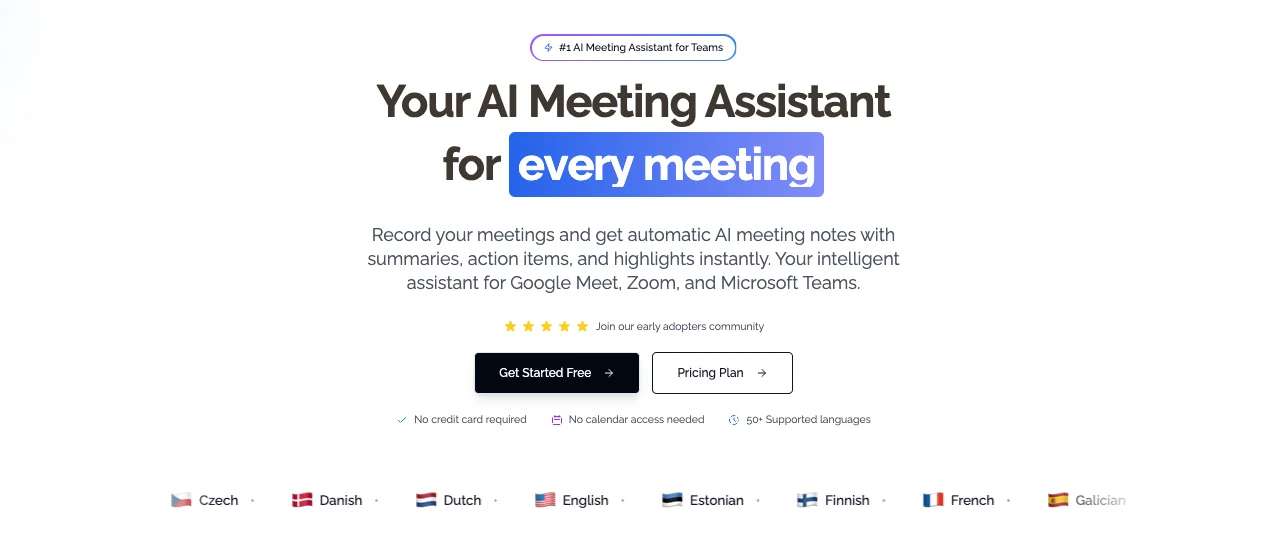 Your roadmap to successfully implementing AI meeting assistants in your workflow.
Ready to transform your meetings? Here's how:
Step 1: Choose Your Tool
Try KenzNote free, no credit card required for your first meeting. See how automatic transcription and AI summaries work for your specific use case.
Step 2: Start Small
Don't transcribe every meeting immediately. Start with:
- Important client calls
- Cross-functional planning sessions
- Meetings with lots of action items
- Sessions where you need to participate actively
Step 3: Establish Team Norms
Let participants know you're using AI assistance:
- Inform attendees before meetings
- Explain the benefits (better documentation, no missed action items)
- Address privacy concerns openly
- Get consent as required by local laws
Step 4: Review and Improve
After a few meetings with AI assistance, evaluate:
- How much time are you saving?
- Is action item completion improving?
- Are meeting summaries accurate?
- What adjustments would help?
The Future Is Already Here
AI meeting assistants aren't experimental technology, they're proven tools that thousands of teams use daily to work smarter.
For teams serious about productivity, the question isn't whether to adopt AI meeting assistants. It's when.
What You Gain
✅ 5-10 hours per week back in your schedule ✅ Complete meeting documentation without the work ✅ Better follow-through on action items ✅ Improved team alignment across time zones ✅ Searchable knowledge base of every discussion
What You Lose
❌ Time spent frantically typing during meetings ❌ Stress about missing important details ❌ "Wait, who was supposed to do that?" confusion ❌ Hours searching through old notes
Ready to experience the difference an AI meeting assistant can make?
** Fact Box: User Success Metrics**
- 89% of users continue using AI meeting tools after first month
- Average time to ROI: 2.3 weeks
- Meeting note quality improvement: 4.2x better rated than manual notes
- Team alignment improvement: 67% reduction in miscommunication
- User recommendation rate: 8.7/10 NPS score average
Sources: G2 User Reviews, SaaS Retention Benchmarks 2026
Try KenzNote free today and join thousands of teams who've already transformed how they work.
Frequently Asked Questions
Do other participants see the AI assistant in the meeting?
Yes. The AI joins as a participant (usually named "KenzNote Bot" or similar). Transparency is important, everyone should know the meeting is being recorded and transcribed.
How accurate are AI-generated transcripts?
Modern AI achieves 95-98% accuracy with clear audio. Accuracy improves with good microphones, minimal background noise, and clear speech. This rivals professional human transcribers at a fraction of the cost and time.
What about sensitive or confidential meetings?
Choose AI meeting tools with strong security credentials (encryption, compliance certifications, no data training on your content). For highly sensitive meetings, you can opt not to use AI assistance or use on-premise solutions.
How do AI meeting assistants compare to human note-takers?
AI captures 100% of what's said, never gets tired, and processes information instantly. Humans are better at understanding complex context and nuance. The best approach? AI handles the documentation, humans handle the strategy and decision-making.
Can I use an AI meeting assistant without giving calendar access?
Yes! While most AI assistants require calendar integration, KenzNote works with just a meeting link. Simply paste the link when you want to record a meeting, no calendar permissions needed. Better privacy and full control over which meetings get recorded.
What if I only have a few meetings per month?
Choose pay-per-meeting pricing like KenzNote offers. Why pay for a monthly subscription when you only need transcription occasionally? Pay $0.99 per meeting only when you use it.
Do AI meeting assistants work with all video conferencing platforms?
Most major AI assistants work with Zoom, Google Meet, and Microsoft Teams. Some also support Webex and other platforms. KenzNote works across all major platforms without requiring platform-specific integrations or calendar access.
How long does it take to receive meeting notes after a call ends?
Typically 2-5 minutes for a one-hour meeting. The AI processes transcripts and generates summaries almost instantly. You'll usually receive an email with the summary before you finish your post-meeting coffee.
Can AI meeting assistants understand different accents and languages?
Modern AI handles most English accents well (95%+ accuracy). Multi-language support varies by tool. OpenAI's Whisper supports 97 languages, though accuracy is highest for English, Spanish, French, German, and Mandarin.
What happens if someone doesn't want to be recorded?
Participants can request to not be recorded. In two-party consent states, you must get everyone's permission or end the recording. Best practice: inform attendees in meeting invites that AI assistance will be used, giving them the option to object beforehand.
How secure is my meeting data?
Reputable AI meeting tools use end-to-end encryption, SOC 2 compliance, and secure cloud storage. Look for tools that are GDPR-compliant (EU) and HIPAA-compliant (healthcare). Always check the privacy policy before using any AI tool with sensitive information.
Can I edit transcripts if the AI makes mistakes?
Yes, most platforms allow manual edits to transcripts. Common edits include correcting names, technical terms, or misheard words. Some tools learn from your corrections to improve future accuracy.
Do AI meeting assistants record video or just audio?
Most record only audio and transcribe that. Some tools can capture video recordings as well, but the primary function is audio transcription and analysis. Video recording typically requires more storage and higher pricing tiers.
Will an AI assistant slow down my meetings or cause technical issues?
No. The AI joins like any other participant and runs in the background. It uses minimal bandwidth (similar to one additional video participant) and doesn't interfere with meeting flow or performance.
Can I share meeting notes with people who weren't in the meeting?
Absolutely. Most tools offer shareable links, email distribution, or integrations with Slack, Notion, and other platforms. This is perfect for keeping absent team members in the loop or distributing client call notes to your team.
How do AI meeting assistants handle background noise?
Advanced audio processing filters out most background noise (dogs barking, construction, keyboard typing). However, very loud or constant noise can impact transcription accuracy. Using a quality microphone and minimizing background noise improves results.
Can the AI identify different speakers automatically?
Yes, through speaker diarization (identifying who said what). Accuracy improves when:
- Speakers introduce themselves
- Audio quality is good
- People don't talk over each other Most tools label speakers as "Speaker 1, Speaker 2" initially, then you can assign names.
What's the difference between AI summaries and full transcripts?
Full transcripts capture every word spoken (verbatim record). AI summaries condense the conversation into key points, decisions, and action items. Most users skim the summary first, then search the full transcript if they need specific details.
Related Resources
- Best AI Meeting Note Taker Apps 2026
- AI Meeting Notes: Complete Guide
- Is It Legal to Record Meetings? State-by-State Guide
- tl;dv Review 2026: Features, Pricing & Alternatives
- Getting Started with KenzNote
Have questions? Reach out to our team at [email protected] or visit our Help Center.
References & Citations
- [1]The Economic Potential of Generative AIMcKinsey & Company. June 14, 2023https://www.mckinsey.com/capabilities/mckinsey-digital/our-insights/the-economic-potential-of-generative-ai-the-next-productivity-frontier
All external sources have been reviewed for accuracy and relevance. Last verified: September 2026.

About KenzNote Team
The KenzNote team is dedicated to helping teams capture better meeting insights and transform how they collaborate. With backgrounds in AI, product design, and enterprise software, we're building the future of meeting productivity.
Ready to transform your meetings?
KenzNote automatically captures meeting insights, extracts action items, and generates summaries so you can focus on the conversation instead of taking notes.
Try KenzNote Free