
Quick Answer
An AI meeting note taker is software that automatically joins your video meetings, transcribes conversations in real-time with 95-98% accuracy, identifies speakers, generates intelligent summaries, and extracts action items; all without manual note-taking.
The best AI note taker apps in 2026 are KenzNote (best for pay-per-meeting flexibility and privacy at $0.99/meeting), Otter.ai (best for enterprise teams with unlimited meetings), Fireflies.ai (best for sales teams with CRM integration), and Fathom (best for simplicity).
Unlike traditional note-taking, AI apps capture 100% of meeting content, provide searchable transcripts, and save teams 5-10 hours weekly by eliminating manual documentation.
Key Takeaways
- AI note takers save 5-10 hours per week by automatically transcribing and summarizing meetings without manual effort
- 95-98% transcription accuracy rivals professional human transcribers at a fraction of the cost and time
- KenzNote offers unique pay-per-meeting pricing ($0.99/meeting) making it ideal for occasional users vs. expensive monthly subscriptions
- No calendar access required with KenzNote - paste meeting links only when you need recording for better privacy control
- Top AI note takers compared: KenzNote (flexible), Otter (enterprise), Fireflies (sales), Fathom (simple), and 15+ others
- Action items automatically extracted from conversations with owners and deadlines identified by AI
- Searchable meeting archive lets you find any decision or discussion instantly across all past meetings
- Free tiers available but limited - serious users benefit from paid plans or pay-per-use options
Table of Contents
- What is an AI Meeting Note Taker?
- How AI Note Takers Work
- Best AI Meeting Note Taker Apps 2026
- Detailed Comparison: Top 20 Tools
- How to Choose the Right AI Note Taker
- AI Note Taker for Students
- Features to Look For
- Pricing Comparison
- Setup & Integration
- Privacy & Security
- Frequently Asked Questions
- Related Resources
Best AI Meeting Note Taker Apps: Complete Guide 2026
Ever left a meeting and realized you were so focused on typing notes that you barely participated in the discussion?
You're not alone. The average professional spends 15-20 hours per week in meetings. If you're manually taking notes, you're missing critical nuances, body language, and opportunities to contribute meaningfully.
📊 Fact Box: The Note-Taking Problem
- Manual note-taking captures only 40-60% of meeting content
- 73% of employees forget meeting decisions within 48 hours without documentation
- Knowledge workers spend 2.5 hours daily searching for information from past meetings
- $37 billion lost annually in the U.S. from poorly documented meetings
- 89% of professionals multitask during meetings to capture notes
Sources: Harvard Business Review, Atlassian Meeting Report, IDC Research
That's where AI meeting note taker apps come in.
An AI note taker automatically joins your meetings, captures every word with 95-98% accuracy, identifies who said what, generates summaries, extracts action items, and makes everything searchable forever; while you stay fully present in the conversation.
In this comprehensive guide, you'll discover the 20 best AI meeting note taker apps for 2026, learn how to choose the right tool for your needs, and understand why pay-per-meeting options like KenzNote are transforming how teams document meetings.
What is an AI Meeting Note Taker?
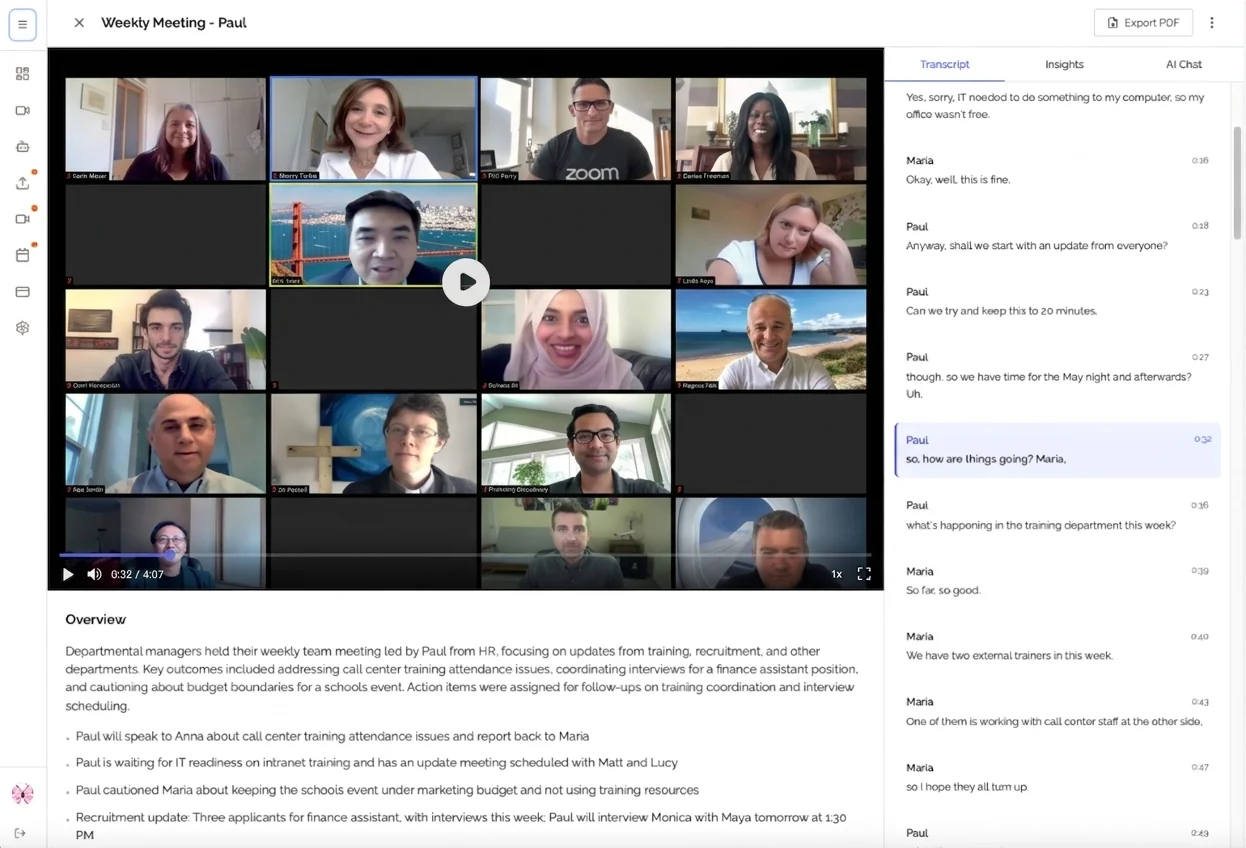 AI note taker in action: Captures every word, identifies speakers, and generates summaries; all automatically.
An AI meeting note taker is software that uses artificial intelligence to automatically record, transcribe, analyze, and summarize your meetings without any manual note-taking required.
Think of it as having a brilliant assistant who:
- ✅ Attends every meeting with you
- ✅ Captures every word spoken (95-98% accuracy)
- ✅ Remembers who said what
- ✅ Identifies all action items and decisions
- ✅ Creates professional summaries
- ✅ Makes everything searchable forever
- ✅ Never gets tired or distracted
What AI Note Takers Do Automatically
1. Join Your Meetings
AI note takers can join video calls on Zoom, Google Meet, Microsoft Teams, and other platforms. Some require calendar integration (they scan your calendar and auto-join), while privacy-focused tools like KenzNote let you paste meeting links only when needed; no calendar permissions required.
2. Record & Transcribe in Real-Time
As people speak, advanced speech recognition technology (like OpenAI Whisper) converts words into text instantly with 95-98% accuracy. You see live captions during the meeting, making it easy to follow even in noisy environments.
3. Identify Speakers
AI automatically detects who's speaking and labels each statement. No more "Speaker 1" and "Speaker 2"; you get "Lina said..." and "John agreed..."
4. Generate Intelligent Summaries
After the meeting, AI analyzes the full transcript and creates a concise summary highlighting:
- Key discussion points
- Decisions made
- Questions asked and answered
- Topics covered
- Important details
5. Extract Action Items
AI identifies commitments and tasks from natural conversation:
- "I'll send the proposal by Friday" → Extracted as action item with owner and deadline
- "Lina can you review the budget?" → Task assigned to Lina
- "We need to update the website next week" → Added to action item list
6. Make Everything Searchable
Build a searchable archive of every meeting. Find any discussion, decision, or commitment in seconds: "What did we decide about pricing in Q2?" → Instant answer from your meeting history.
📊 Fact Box: AI Note Taker Adoption & Impact
- 78% of remote-first companies now use AI note-taking tools
- 250 hours saved annually per knowledge worker (McKinsey study)
- AI note-taking market projected to reach $3.8B by 2028
- 4.6/5 average user satisfaction across major platforms
- ROI breakeven: Typically within 2-3 weeks of adoption
Sources: Gartner Market Analysis, McKinsey Productivity Study
AI Note Taker vs Traditional Note-Taking
| Method | Accuracy | Time Required | Participation | Searchable | Action Items |
|---|---|---|---|---|---|
| Manual Notes | 40-60% | During meeting | Low (distracted) | ❌ | Manual |
| Recording + Manual Review | 100% | 2x meeting time | High | ❌ | Manual |
| AI Note Taker ⭐ | 95-98% | 0 minutes | High | ✅ | Automatic |
How AI Note Takers Work
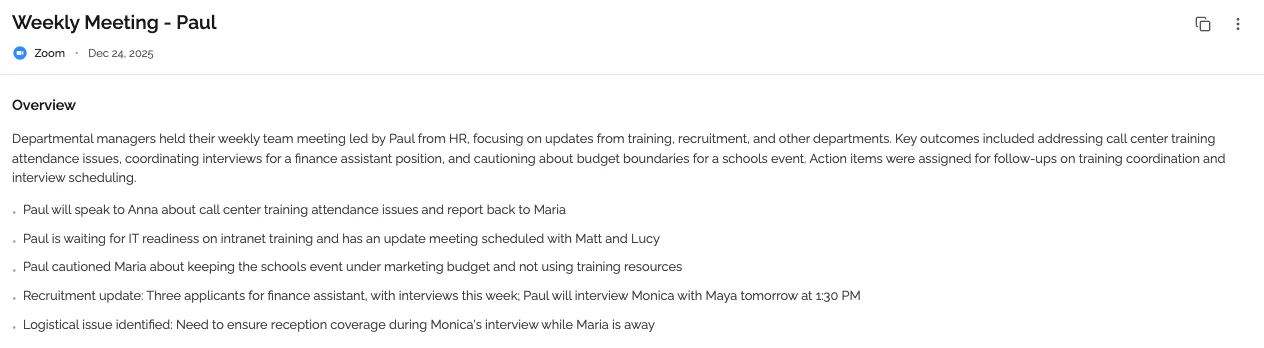 Behind the scenes: How AI transforms a 60-minute meeting into actionable insights in minutes.
Understanding the technology helps you choose the right tool and use it effectively.
Step 1: Meeting Detection & Access
Calendar-based tools (Otter, Fireflies, etc.):
- Connect to Google Calendar or Outlook
- Scan for upcoming meetings with video call links
- Automatically join at scheduled time
- ❌ Privacy concern: Full calendar access required
Link-based tools (KenzNote):
- You paste meeting link when ready to record
- Bot joins only meetings you specifically choose
- ✅ Better privacy: No calendar permissions needed
- ✅ More control: Record selectively
When the AI joins, other participants see it as an additional attendee (e.g., "KenzNote Bot"). All tools display a recording notification to comply with legal requirements.
Step 2: Audio Capture & Processing
The AI records audio and applies advanced processing:
- Noise reduction - Filters background noise (dogs, construction, typing)
- Speaker separation - Isolates individual voices even when overlapping
- Audio enhancement - Optimizes quality for better transcription
- Multi-language detection - Identifies language automatically
Step 3: Real-Time Transcription
This is where magic happens. AI uses Automatic Speech Recognition (ASR) powered by models like OpenAI Whisper or Google Speech-to-Text.
Modern ASR achieves:
- 95-98% accuracy with clear audio
- Real-time processing (live captions during meeting)
- 50+ language support
- Technical term recognition
- Accent adaptation
📊 Fact Box: Transcription Accuracy Comparison
- AI note takers (2026): 95-98% accuracy
- Human professional transcribers: 95-99% accuracy
- Human real-time note-takers: 40-60% capture rate
- Cost comparison: AI $0.006/min vs Human $1-2.50/min
- Speed: AI real-time vs Human 4x meeting duration
Sources: OpenAI Whisper Paper, Rev.com Industry Report
Step 4: AI Analysis & Intelligence
After transcription, advanced AI (usually GPT-4 or similar) analyzes the content:
Identifies Key Topics: "This meeting covered Q2 budget planning, hiring decisions, and product launch timeline."
Extracts Action Items: Finds sentences like "I'll email the contract by Friday" and converts them into trackable tasks with owners and due dates.
Summarizes Discussions: Condenses 60 minutes of conversation into readable 2-3 paragraph summary.
Detects Sentiment: Understands which parts were critical decisions vs. casual banter.
Flags Questions: Identifies unanswered questions for follow-up.
Step 5: Delivery & Integration
Finally, the AI packages everything and delivers it:
Immediate outputs (2-5 minutes after meeting):
- Formatted transcript with speaker labels
- Executive summary (TL;DR)
- Action items list with owners and deadlines
- Full searchable text
- Recording link (if saved)
Delivery methods:
- 📧 Email summary to all participants
- 📊 Dashboard where all meetings are archived
- 🔗 Integrations to Slack, Notion, CRM, project management tools
- 💾 Export to PDF, Word, Markdown
Best AI Meeting Note Taker Apps 2026
After testing 20+ AI note-taking tools, here are the top recommendations based on different needs.
🏆 Overall Winner: KenzNote
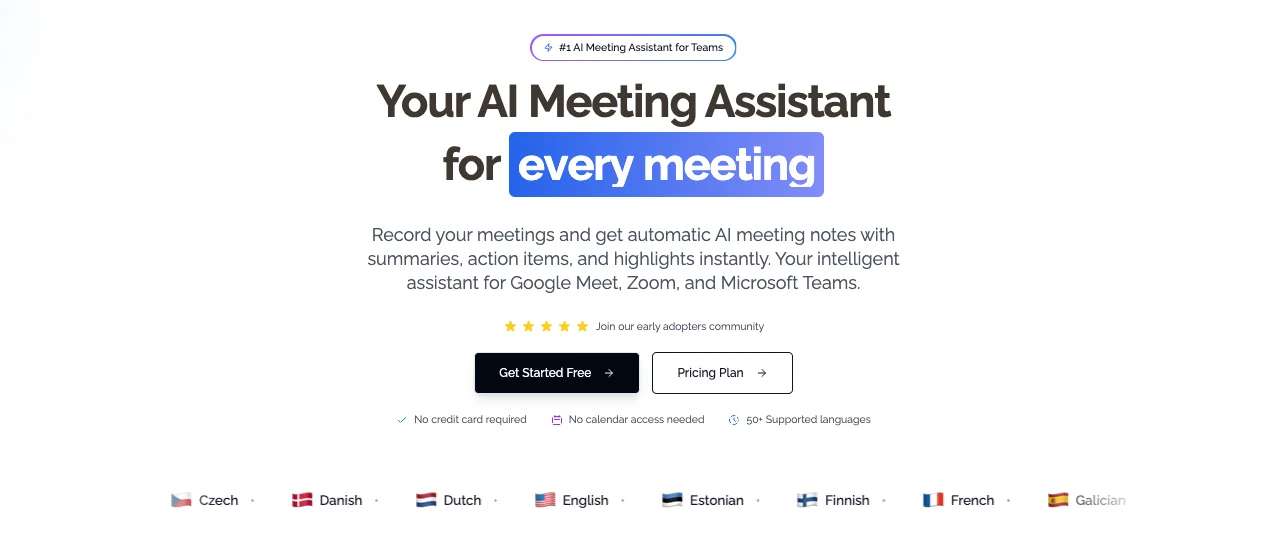 KenzNote: The only AI note taker with flexible pay-per-meeting pricing and no calendar access required.
Why KenzNote is Different:
✅ Pay-Per-Meeting Pricing - $0.99 per meeting (or $29.99/month unlimited)
- No monthly subscription waste if you only transcribe occasionally
- Perfect for freelancers, consultants, small teams
- Transparent pricing: Pay only for what you use
✅ No Calendar Access Required - Privacy-first design
- Paste meeting links only when you want to record
- Full control over which meetings get recorded
- No third-party service scanning your calendar
✅ Works Across All Platforms - Truly universal
- Zoom, Google Meet, Microsoft Teams
- No complex integrations or platform-specific setup
- Single tool for all your meetings
✅ 95-98% Transcription Accuracy - Professional quality
- Powered by advanced AI models
- Speaker identification
- Real-time transcription
✅ Automatic AI Summaries - Beyond transcription
- Intelligent meeting summaries
- Action item extraction
- Key topics identification
- Questions & answers highlighted
✅ Simple Setup - No learning curve
-
- Copy meeting link
-
- Paste in KenzNote
-
- Click "Send Bot"
- Done. Notes delivered 2-5 minutes after meeting.
Best for:
- Occasional meeting transcription needs (< 30 meetings/month)
- Privacy-conscious users who don't want calendar access
- Pay-as-you-go preference over subscriptions
- Teams wanting flexibility without commitment
Pricing:
- Free: 1 meeting to try
- Pay-per-use: $0.99 per meeting
- Unlimited: $29.99/month (break-even at 30 meetings)
🥈 Runner-Up: Otter.ai
Best for: Enterprise teams with unlimited meeting needs
Why it's great:
- Established brand with strong enterprise support
- Deep integrations with Microsoft 365 and Google Workspace
- Real-time collaboration (team members can highlight and comment during meeting)
- Mobile apps (iOS, Android)
- Good accuracy (94-96%)
Limitations:
- ❌ Requires calendar integration (privacy concern)
- ❌ Expensive for light users ($20/user/month minimum)
- ❌ Less flexible than pay-per-use options
Pricing:
- Free: 600 minutes/month (transcription only)
- Pro: $16.99/user/month
- Business: $30/user/month
- Enterprise: Custom pricing
Best for: Large teams with 20+ meetings/month per person
🥉 Third Place: Fireflies.ai
Best for: Sales teams needing CRM integration
Why it's great:
- Excellent CRM integrations (Salesforce, HubSpot, Dynamics 365)
- Conversation analytics and coaching insights
- Topic tracking across multiple calls
- Deal progression visibility
- Speaker time and participation metrics
Limitations:
- ❌ Requires calendar access
- ❌ Sales-focused (may be overkill for other use cases)
- ❌ More complex setup
Pricing:
- Free: Limited features
- Pro: $10/seat/month
- Business: $19/seat/month
- Enterprise: Custom
Best for: Sales teams doing customer calls and demos
🎯 Best for Simplicity: Fathom
Best for: Users who want dead-simple setup with good quality
Why it's great:
- Cleanest, simplest interface
- One-click recording
- Good transcription quality
- Free tier is generous
- Fast processing
Limitations:
- ❌ Zoom-only (no Google Meet or Teams support)
- ❌ Basic features (no advanced analytics)
- ❌ Limited integrations
Pricing:
- Free: Unlimited recordings (Zoom only)
- Team: $29/user/month (multi-platform)
Best for: Zoom-only users who want simplicity
📊 Quick Comparison Table: Top 5
| Feature | KenzNote ⭐ | Otter.ai | Fireflies | Fathom | tldv |
|---|---|---|---|---|---|
| Accuracy | 95-98% | 94-96% | 93-95% | 93-95% | 94-96% |
| Pricing | $0.99/meeting | $17/mo | $10/mo | Free | Free |
| Calendar Required | ❌ No | ✅ Yes | ✅ Yes | ✅ Yes | ✅ Yes |
| Platforms | All major | All major | All major | Zoom only | Zoom, Meet |
| AI Summaries | ✅ | ✅ | ✅ | ✅ | ✅ |
| Action Items | ✅ | ✅ | ✅ | ✅ | ✅ |
| CRM Integration | Basic | ✅ | ✅✅ | ❌ | ✅ |
| Real-time Collab | ❌ | ✅ | Limited | ❌ | ❌ |
| Mobile Apps | Web | iOS, Android | iOS, Android | iOS, Android | Web |
| Free Tier | 1 meeting | 600 min/mo | Limited | Unlimited | Unlimited |
| Best for | Flexibility | Enterprise | Sales | Simplicity | Free users |
Detailed Comparison: Top 20 AI Note Taker Tools
Let's dive deeper into all the major options so you can make an informed decision.
1. KenzNote ⭐ (Best Overall)
Overview: The only AI note taker with true pay-per-meeting flexibility and privacy-first design. No calendar access required; paste links only when you need recording.
Key Features:
- 95-98% transcription accuracy
- Speaker identification
- AI-generated summaries
- Automatic action item extraction
- Works across Zoom, Google Meet, Teams
- No calendar permissions needed
- Searchable meeting archive
- Export to PDF, Word, Markdown
Pros:
- ✅ Pay only $0.99 per meeting (no subscription waste)
- ✅ Privacy-first: No calendar access required
- ✅ Flexible: Record only meetings you choose
- ✅ Simple setup: Paste link, done
- ✅ Transparent pricing: No hidden costs
- ✅ Works across all platforms
Cons:
- ❌ No real-time collaboration features
- ❌ Basic integrations (vs enterprise tools)
Pricing:
- Free: 1 meeting trial
- Pay-per-use: $0.99/meeting
- Unlimited: $29.99/month
Best for: Freelancers, consultants, small teams, privacy-conscious users, occasional transcription needs
Rating: ⭐⭐⭐⭐⭐ (5/5)
2. Otter.ai (Best for Enterprise)
Overview: Market leader with deep enterprise integrations and established brand. Best for large teams with unlimited meeting needs.
Key Features:
- Real-time transcription with collaboration
- Team shared notes with highlighting and comments
- Deep Microsoft 365 and Google Workspace integration
- Mobile apps (iOS, Android)
- Custom vocabulary training
- Meeting insights and analytics
Pros:
- ✅ Strong enterprise support and reliability
- ✅ Real-time collaboration during meetings
- ✅ Excellent mobile apps
- ✅ Established brand with proven track record
Cons:
- ❌ Requires calendar integration (privacy concern)
- ❌ Expensive for light users ($17-30/user/month)
- ❌ Accuracy slightly lower than newer tools (94-96%)
Pricing:
- Free: 600 min/month, 3 imports/month
- Pro: $16.99/user/month (1,200 min/month)
- Business: $30/user/month (6,000 min/month)
- Enterprise: Custom
Best for: Enterprise teams, companies with 50+ employees, Microsoft 365 heavy users
Rating: ⭐⭐⭐⭐ (4/5)
3. Fireflies.ai (Best for Sales)
Overview: Sales-focused AI note taker with deep CRM integrations and conversation analytics.
Key Features:
- Salesforce, HubSpot, Dynamics 365 integration
- Conversation intelligence and coaching
- Deal tracking and progression
- Topic tracking across calls
- Competitor mentions detection
- Custom playbooks and scorecards
Pros:
- ✅ Excellent CRM integration
- ✅ Sales-specific features (talk time, questions asked, etc.)
- ✅ Good for sales coaching and training
- ✅ Affordable ($10/seat/month)
Cons:
- ❌ Sales-focused (overkill for non-sales meetings)
- ❌ Requires calendar access
- ❌ More complex to set up
Pricing:
- Free: Limited features, 800 min/seat
- Pro: $10/seat/month
- Business: $19/seat/month
- Enterprise: Custom
Best for: Sales teams, customer success, account executives
Rating: ⭐⭐⭐⭐ (4/5)
4. Fathom (Best for Simplicity)
Overview: Dead-simple AI note taker with one-click recording. Free forever (Zoom only), beautiful interface.
Key Features:
- One-click to record
- Clean, intuitive interface
- Good transcription quality
- AI summaries and action items
- Highlight key moments during meetings
- Share clips easily
Pros:
- ✅ Simplest setup of any tool
- ✅ Free unlimited recordings (Zoom)
- ✅ Beautiful UI/UX
- ✅ Fast processing (< 2 min)
Cons:
- ❌ Zoom-only on free tier
- ❌ Limited integrations
- ❌ Basic features (no advanced analytics)
Pricing:
- Free: Unlimited Zoom recordings
- Team: $29/user/month (multi-platform + team features)
Best for: Zoom-only users, simplicity lovers, teams wanting free option
Rating: ⭐⭐⭐⭐ (4/5)
5. tldv (Best Free Option)
Overview: Generous free tier with unlimited recordings on Zoom and Google Meet. Good quality transcription.
Key Features:
- Unlimited recordings (free tier)
- Zoom and Google Meet support
- AI summaries and highlights
- Clip sharing
- Basic integrations (Slack, Notion)
- Multi-language support
Pros:
- ✅ Truly free unlimited recordings
- ✅ Good transcription quality
- ✅ Supports Zoom and Google Meet
- ✅ Simple interface
Cons:
- ❌ No Teams support on free tier
- ❌ Basic features vs paid tools
- ❌ Limited analytics
Pricing:
- Free: Unlimited Zoom/Meet recordings
- Pro: $20/user/month (Teams, advanced features)
Best for: Budget-conscious teams, free option seekers
Rating: ⭐⭐⭐⭐ (4/5)
6-20. Additional Tools (Brief Overview)
6. Grain - Best for video clip creation and sharing. Great for sales teams showcasing customer feedback.
7. Sembly AI - Enterprise-focused with compliance features. Good for regulated industries.
8. Notta - Strong multi-language support (58 languages). Best for international teams.
9. Sonix - Emphasis on accuracy and editing tools. Good for content creators needing transcription.
10. Descript - Video editing + transcription. Best for content creators making video content.
11. Krisp - Noise cancellation + transcription. Good for noisy environments.
12. Avoma - End-to-end meeting lifecycle management. Good for enterprise sales.
13. Gong - Enterprise revenue intelligence. Very expensive, sales-focused.
14. Chorus.ai (ZoomInfo) - Conversation intelligence for sales. Enterprise pricing.
15. Read.ai - Best meeting analytics and insights. Good for meeting effectiveness tracking.
16. Tactiq - Chrome extension for quick transcription. Simple and lightweight.
17. Airgram - Team collaboration focus. Good for recurring team meetings.
18. MeetGeek - Good free tier, simple interface. Similar to tldv.
19. Meetric - Analytics-focused. Good for tracking meeting productivity.
20. Colibri.ai - Real-time guidance for sales calls. Sales coaching focus.
Feature Comparison Matrix
| Tool | Accuracy | Platforms | Free Tier | Unique Feature |
|---|---|---|---|---|
| KenzNote | 95-98% | All | 1 meeting | Pay-per-meeting, No calendar |
| Otter | 94-96% | All | 600 min/mo | Real-time collaboration |
| Fireflies | 93-95% | All | Limited | CRM integration |
| Fathom | 93-95% | Zoom (free) | Unlimited | Simplest interface |
| tldv | 94-96% | Zoom, Meet | Unlimited | Best free option |
| Grain | 93-95% | Zoom, Meet, Teams | Limited | Video clip sharing |
| Sembly | 94-96% | All | Limited | Enterprise compliance |
| Notta | 93-95% | All | 120 min/mo | 58 languages |
| Read.ai | 93-95% | All | Limited | Best analytics |
| Tactiq | 90-93% | Browser | Unlimited | Chrome extension |
How to Choose the Right AI Note Taker
Decision Tree: Find Your Perfect Tool
START: How many meetings do you transcribe per month?

├─ < 10 meetings/month
│  │
│  └─ Privacy important? (Don't want calendar access)
│     │
│     ├─ YES → **KenzNote** (pay-per-meeting, no calendar)
│     └─ NO → tldv Free or Fathom Free
│
├─ 10-30 meetings/month
│  │
│  └─ Need CRM/sales features?
│     │
│     ├─ YES → Fireflies.ai ($10/seat/mo)
│     └─ NO → **KenzNote** pay-per-use ($9.90-29.70/mo)
│           OR Otter Pro ($17/mo)
│
└─ 30+ meetings/month
   │
   └─ Team size?
      │
      ├─ Solo/Small (1-5)
      │  └─ **KenzNote** Unlimited ($29.99/mo)
      │      OR Otter Pro ($17/mo)
      │
      └─ Large team (10+)
         └─ Need compliance/enterprise features?
            │
            ├─ YES → Otter Business or Sembly Enterprise
            └─ NO → Otter Business or Read.ai Teams
Quick Recommendation Guide
"I only transcribe important client calls occasionally" → KenzNote pay-per-meeting ($0.99 each)
"I want complete privacy and control" → KenzNote (no calendar access required)
"I need it free and don't mind calendar access" → tldv or Fathom (Zoom only)
"I'm in sales and need CRM integration" → Fireflies.ai with Salesforce/HubSpot
"I need it for a large enterprise team" → Otter Business or Sembly Enterprise
"I want the simplest possible tool" → Fathom (one-click recording)
"I need the best analytics and insights" → Read.ai
Key Factors to Consider
1. Pricing Model
Monthly subscription:
- Pros: Unlimited usage (usually)
- Cons: Wasted money if you don't use enough
- Best for: Heavy users (30+ meetings/month)
Pay-per-use (KenzNote):
- Pros: Pay only for what you use, no waste
- Cons: Can add up if you transcribe many meetings
- Best for: Occasional users (< 30 meetings/month)
Free tier:
- Pros: $0 cost
- Cons: Limited features, usage caps, ads/branding
- Best for: Students, casual users, trying before buying
Break-even analysis:
- KenzNote pay-per-use: $0.99/meeting
- Monthly unlimited: $29.99
- Break-even: 30 meetings/month
- If < 30 meetings/month: Pay-per-use saves money
- If > 30 meetings/month: Unlimited plan better value
2. Privacy & Calendar Access
Calendar integration required (Otter, Fireflies, most tools):
- Pros: Automatic meeting detection, hands-off
- Cons: Full calendar access to third-party service
No calendar required (KenzNote):
- Pros: You control what gets recorded, better privacy
- Cons: Manual link pasting required
Privacy considerations:
- What meetings are sensitive?
- Does your company allow third-party calendar access?
- Do you want selective recording or record everything?
3. Platform Support
All platforms (KenzNote, Otter, Fireflies):
- Best for: Teams using multiple video platforms
Limited platforms (Fathom = Zoom only):
- Best for: Single-platform teams
Check your needs:
- What platforms does your team use?
- Do clients use different platforms?
- Need flexibility for future changes?
4. Integration Needs
CRM (Salesforce, HubSpot):
- Fireflies, Avoma, Gong (sales teams)
Project Management (Asana, Monday, Jira):
- Most major tools via Zapier
Team Chat (Slack, Teams):
- Most tools support
Note-taking (Notion, Evernote):
- Most tools support
AI Note Taker for Students
 AI note takers help students capture lectures without missing details, with 8 top options for education.
Students have unique needs: budget constraints, lecture-specific features, and academic integrity considerations.
Best AI Note Takers for Students (2026)
1. KenzNote (Best for Occasional Lectures)
Why it's great for students:
- ✅ Pay $0.99 per lecture (not monthly subscription)
- ✅ Perfect for important lectures only
- ✅ No calendar access = better privacy
- ✅ Simple to use
- ✅ Export notes to Word, PDF for studying
Cost analysis:
- 1 lecture/week: $3.96/month (4 lectures)
- 2 lectures/week: $7.92/month (8 lectures)
- 3 lectures/week: $11.88/month (12 lectures)
Much cheaper than $20/month subscriptions for occasional use.
Rating: ⭐⭐⭐⭐⭐ (5/5 for students)
2. Otter.ai Free (Best Free Option)
Why it's great for students:
- ✅ 600 minutes free per month (10 hours)
- ✅ Good transcription quality
- ✅ Mobile app for recording in-person lectures
Limitations:
- ❌ 600 min cap (not enough for heavy users)
- ❌ 3 import limit/month
Cost: Free (or $9.17/month student discount on Pro)
Rating: ⭐⭐⭐⭐ (4/5)
3. Notta (Best for Multilingual)
Why it's great for students:
- ✅ 120 free minutes/month
- ✅ 58 languages supported
- ✅ Good for international students
Rating: ⭐⭐⭐ (3/5)
4-8. Other Student Options
4. tldv Free - Unlimited if lectures on Zoom 5. Fireflies Free - 800 min/seat (decent) 6. Sembly Free - 5 hours/month 7. Tactiq Free - Unlimited Chrome extension 8. Grain Free - Limited features but functional
Student Budget Comparison
| Tool | Free Tier | Monthly Cost | Cost per Hour | Best For |
|---|---|---|---|---|
| KenzNote | 1 meeting | $0.99/lecture | ~$0.99/hour | Selective recording |
| Otter Free | 600 min/mo | $0 | $0 | Light users |
| tldv Free | Unlimited | $0 | $0 | Zoom lectures |
| Fireflies Free | 800 min | $0 | $0 | Moderate users |
| Otter Pro | - | $9.17/mo* | ~$0.08/hour | Heavy users |
*Student discount pricing
Academic Integrity & Ethical Use
⚠️ Important: Check Your Institution's Policy
Recording lectures without permission may violate your school's policies. Always:
- ✅ Ask professor permission before recording
- ✅ Inform classmates they're being recorded
- ✅ Don't share recordings publicly
- ✅ Use notes for personal study only
- ✅ Don't use AI-generated summaries to skip lectures
Ethical AI note-taking for students:
✅ Do:
- Use AI notes to supplement your own active learning
- Review transcripts to fill gaps in manual notes
- Use summaries for quick review before exams
- Capture complex concepts accurately
❌ Don't:
- Skip lectures because "AI will capture it"
- Submit AI summaries as your own work
- Share recordings without permission
- Use transcripts to cheat on exams
Academic honesty tips:
- Attend lectures actively (don't just rely on AI)
- Take your own notes + use AI as backup
- Review AI transcripts to understand, not memorize
- Cite AI tools if using summaries in assignments
Study Tips with AI Notes
1. Before Lecture:
- Review previous lecture's AI summary (5 min refresh)
- Preview topic to prepare questions
2. During Lecture:
- Let AI handle verbatim transcription
- Focus on understanding concepts
- Take strategic notes (key insights, questions, connections)
- Mark important moments in AI transcript
3. After Lecture:
- Review AI summary within 24 hours
- Compare your notes with AI transcript
- Fill gaps in understanding
- Create flashcards from key concepts
- Annotate AI notes with your insights
4. Before Exam:
- Search AI transcripts for specific topics
- Review summaries of all lectures (quick refresh)
- Use action items/questions flagged in notes
Features to Look For in an AI Note Taker
When evaluating AI note-taking tools, prioritize features based on your specific needs.
Essential Features (Must-Have)
1. High Transcription Accuracy (95%+)
Why it matters:
- 95%+ accuracy = Professional quality, minimal errors
- 90-94% accuracy = Good but noticeable errors
- < 90% accuracy = Unreliable, requires heavy editing
What to look for:
- Tools using OpenAI Whisper or Google STT
- Speaker identification accuracy
- Handling of technical jargon
- Accent/dialect support
Top performers:
- KenzNote: 95-98%
- Otter: 94-96%
- tldv: 94-96%
2. Speaker Identification
Why it matters: Knowing who said what is critical for:
- Accountability ("John agreed to...")
- Follow-up ("Ask Lina about...")
- Context ("When Maria mentioned...")
What to look for:
- Automatic speaker detection
- Ability to label speakers
- Accuracy with multiple speakers
3. AI-Generated Summaries
Why it matters:
- Turns 60-min meeting into 2-min read
- Highlights key points without details
- Saves time reviewing notes
What to look for:
- Concise summaries (not just shortened transcript)
- Key points extracted accurately
- Decision and action item highlights
4. Action Item Extraction
Why it matters:
- 40% of action items are forgotten without documentation
- Automatic extraction ensures nothing falls through cracks
- Identifies owners and deadlines
What to look for:
- Automatic detection of commitments
- Owner identification
- Due date extraction
- Checkbox format for tracking
5. Searchable Archive
Why it matters:
- Find any decision or discussion in seconds
- Build institutional knowledge
- Onboard new team members quickly
What to look for:
- Full-text search across all meetings
- Filter by date, participant, topic
- Fast search results (< 1 second)
Advanced Features (Nice-to-Have)
6. Real-Time Collaboration
Who needs it:
- Teams that take collaborative notes during meetings
- Distributed teams across time zones
What it includes:
- Highlight and comment during meeting
- Team members can edit simultaneously
- Shared meeting notes
Best tools: Otter.ai, Airgram
7. CRM Integration
Who needs it:
- Sales teams
- Customer success teams
- Account managers
What it includes:
- Auto-sync to Salesforce, HubSpot, etc.
- Deal association
- Activity logging
- Custom fields
Best tools: Fireflies.ai, Avoma, Gong
8. Meeting Analytics
Who needs it:
- Managers tracking meeting effectiveness
- Sales leaders coaching teams
- Organizations optimizing meeting culture
What it includes:
- Talk time by participant
- Meeting duration trends
- Topic frequency
- Sentiment analysis
- Participation scores
Best tools: Read.ai, Fireflies, Gong
9. Custom Vocabulary
Who needs it:
- Technical teams with jargon
- Medical/legal professionals
- Companies with unique terminology
What it includes:
- Add company-specific terms
- Train AI on acronyms
- Improve accuracy for specialized language
Best tools: Otter, Fireflies, Sembly
10. Video Recording
Who needs it:
- Teams wanting full context (video + audio)
- Training and coaching use cases
- Legal/compliance requirements
What it includes:
- Video capture alongside audio
- Synced transcript with video
- Clip creation and sharing
Best tools: Grain, Gong, Avoma
Privacy & Security Features (Critical)
Recording Consent
Legal requirement:
- Must notify participants recording is active
- Some states require all-party consent
What to look for:
- Automatic recording notification
- Visible bot in participant list
- Consent logging
Data Encryption
What to verify:
- End-to-end encryption for recordings
- Encrypted storage (at rest)
- Secure transmission (TLS/SSL)
Compliance Certifications
For regulated industries:
- HIPAA (healthcare)
- SOC 2 (general security)
- GDPR (EU privacy)
- CCPA (California privacy)
Best tools for compliance: Otter Enterprise, Sembly Enterprise
Calendar Access
Privacy consideration:
- Most tools require full calendar read access
- Exposes your entire schedule to third party
Privacy-first alternative:
- KenzNote requires no calendar access
- Paste links only when you want recording
- Full control over what gets recorded
AI Note Taker Pricing Comparison
Understanding pricing models helps you choose the most cost-effective option.
Pricing Models Explained
1. Pay-Per-Meeting (KenzNote)
How it works:
- Pay only for meetings you transcribe
- $0.99 per meeting
Best for:
- Occasional users (< 30 meetings/month)
- Variable meeting schedules
- Budget-conscious users
- Users who want flexibility
Cost examples:
- 5 meetings/month: $4.95/month
- 10 meetings/month: $9.90/month
- 20 meetings/month: $19.80/month
- 30 meetings/month: $29.70/month (break-even point)
Pros:
- ✅ Pay only for what you use
- ✅ No monthly commitment
- ✅ Perfect for variable needs
Cons:
- ❌ Can add up if you transcribe many meetings
- ❌ Break-even at ~30 meetings/month
2. Monthly Subscription (Most Tools)
How it works:
- Fixed monthly fee per user
- Usually includes unlimited or high-cap usage
Typical pricing:
- $10-20/user/month (Pro tier)
- $20-40/user/month (Business tier)
- $40+/user/month (Enterprise tier)
Best for:
- Heavy users (30+ meetings/month)
- Consistent meeting schedules
- Teams needing advanced features
Pros:
- ✅ Unlimited usage (usually)
- ✅ Predictable costs
- ✅ Advanced features on higher tiers
Cons:
- ❌ Wasted money if you don't use enough
- ❌ Per-user pricing adds up for teams
- ❌ Annual commitment often required for best price
3. Freemium (tldv, Fathom, Others)
How it works:
- Free tier with usage limits or feature restrictions
- Paid upgrade for more features/capacity
Typical limits:
- 600 minutes/month (Otter)
- Unlimited with platform restrictions (Fathom = Zoom only)
- Limited features (no advanced analytics)
Best for:
- Students
- Casual users
- Trying before buying
- Very light usage
Pros:
- ✅ $0 cost
- ✅ Good for testing
- ✅ Enough for light users
Cons:
- ❌ Feature limitations
- ❌ Usage caps
- ❌ Platform restrictions
- ❌ Branding/watermarks
Detailed Price Comparison
| Tool | Free Tier | Starter/Pro | Business | Enterprise |
|---|---|---|---|---|
| KenzNote | 1 meeting | $0.99/meeting OR $29.99/mo unlimited | N/A | Custom |
| Otter | 600 min/mo | $16.99/user/mo | $30/user/mo | Custom |
| Fireflies | 800 min | $10/seat/mo | $19/seat/mo | Custom |
| Fathom | Unlimited (Zoom) | N/A | $29/user/mo | N/A |
| tldv | Unlimited (Zoom/Meet) | $20/user/mo | Custom | Custom |
| Grain | Limited | $19/user/mo | $39/user/mo | Custom |
| Sembly | 5 hrs/mo | $10/user/mo | $20/user/mo | Custom |
| Notta | 120 min/mo | $8.25/mo | $15/user/mo | Custom |
| Avoma | No free | $19/user/mo | $49/user/mo | $79/user/mo |
| Read.ai | Limited | $19/user/mo | $29/user/mo | Custom |
Cost-Benefit Analysis
For occasional users (5-10 meetings/month):
| Tool | Monthly Cost | Value |
|---|---|---|
| KenzNote | $4.95-9.90 | ⭐⭐⭐⭐⭐ Best value |
| tldv Free | $0 | ⭐⭐⭐⭐⭐ If Zoom/Meet only |
| Otter Free | $0 | ⭐⭐⭐⭐ Good but limited |
| Fireflies Pro | $10 | ⭐⭐⭐ Overkill |
For moderate users (20-30 meetings/month):
| Tool | Monthly Cost | Value |
|---|---|---|
| KenzNote | $19.80-29.70 | ⭐⭐⭐⭐⭐ Flexible |
| Otter Pro | $16.99 | ⭐⭐⭐⭐ Good value |
| Fireflies Pro | $10 | ⭐⭐⭐⭐⭐ Best deal |
For heavy users (40+ meetings/month):
| Tool | Monthly Cost | Value |
|---|---|---|
| KenzNote Unlimited | $29.99 | ⭐⭐⭐⭐⭐ Best value |
| Otter Pro | $16.99 | ⭐⭐⭐⭐⭐ Great value |
| Fireflies Pro | $10 | ⭐⭐⭐⭐⭐ Excellent value |
For enterprise teams (10+ users):
| Tool | Monthly Cost (10 users) | Value |
|---|---|---|
| Otter Business | $300 | ⭐⭐⭐⭐ Established |
| Fireflies Business | $190 | ⭐⭐⭐⭐⭐ Best deal |
| KenzNote Unlimited | $299.90 | ⭐⭐⭐⭐⭐ Privacy-first |
ROI Calculator
Time savings with AI note taker:
For a team of 5 people having 10 meetings/week:
| Activity | Without AI | With AI | Weekly Savings |
|---|---|---|---|
| Note-taking | 5 hours | 0 hours | 5 hours |
| Post-meeting cleanup | 2 hours | 0 hours | 2 hours |
| Searching for info | 2 hours | 0.25 hours | 1.75 hours |
| Total weekly | 9 hours | 0.25 hours | 8.75 hours |
Annual value:
- 8.75 hours/week × 50 weeks = 437.5 hours saved/year
- At $50/hour average = $21,875 value
- Tool cost (KenzNote Unlimited): $29.99/mo × 12 = $360/year
- Net ROI: $21,515 or 5,987%
Even with just 2-3 hours saved weekly, AI note takers pay for themselves within weeks.
Setup and Integration Guide
Getting started with an AI note taker is simple. Here's how to set up the most popular tools.
KenzNote Setup (2 minutes)
Step 1: Create Account
- Go to kenznote.com/signup
- Sign up with email or Google
- Verify email
- Done - no credit card required for free trial
Step 2: Add Your First Meeting
- Copy your Zoom, Google Meet, or Teams meeting link
- Paste into "Send Bot" field on dashboard
- Click "Send Bot"
- KenzNote Bot joins your meeting automatically
Step 3: Get Your Notes
- After meeting ends, wait 2-5 minutes
- Check email for summary
- View full transcript on dashboard
- Export to PDF, Word, or Markdown
That's it. No calendar integration, no complex setup.
Otter.ai Setup
Step 1: Connect Calendar
- Sign up at otter.ai
- Connect Google Calendar or Outlook
- Grant calendar permissions
- Otter scans for upcoming meetings
Step 2: Configure Auto-Join
- Go to Settings
- Enable "Auto-join meetings"
- Choose which meetings to join (all, or selective)
- Save
Step 3: First Meeting
- Otter joins automatically at scheduled time
- View live transcript during meeting
- Highlight and comment in real-time
- Transcript saves automatically after
Fireflies.ai Setup
Step 1: Connect Calendar & CRM
- Sign up at fireflies.ai
- Connect calendar (Google/Outlook)
- Connect CRM (Salesforce, HubSpot, etc.)
- Grant necessary permissions
Step 2: Configure Settings
- Choose auto-join preferences
- Set up team workspace
- Configure CRM sync rules
- Set notification preferences
Step 3: Start Recording
- Fireflies joins meetings automatically
- Or invite [email protected] to any meeting
- View transcripts and analytics after meeting
Integration Options
Most AI note takers integrate with:
Video Platforms:
- ✅ Zoom
- ✅ Google Meet
- ✅ Microsoft Teams
- ✅ Webex (some tools)
Productivity:
- Slack - Post summaries to channels
- Notion - Create meeting note pages
- Google Docs - Export transcripts
- Microsoft OneNote - Sync notes
Project Management:
- Asana - Create tasks from action items
- Monday.com - Log meetings and tasks
- Jira - Create tickets from action items
- Trello - Add cards automatically
CRM (Sales tools):
- Salesforce - Log calls and transcripts
- HubSpot - Sync meeting notes to contacts
- Dynamics 365 - Activity logging
- Pipedrive - Deal association
Automation:
- Zapier - Connect to 5,000+ apps
- Make (Integromat) - Custom workflows
- APIs - Build custom integrations
Privacy and Security Considerations
AI note takers access sensitive meeting data. Understanding privacy implications is critical.
Recording Consent Laws
United States:
One-party consent states (38 states):
- Only one person (you) needs to consent
- You can record without telling others
- Still recommended to notify as best practice
Two-party (all-party) consent states (12 states):
- All participants must consent to recording
- States: California, Connecticut, Florida, Illinois, Maryland, Massachusetts, Montana, New Hampshire, Pennsylvania, Washington
- Penalty: Up to $10,000 fine + legal fees
- Requirement: Must explicitly inform participants
Europe (GDPR):
- Explicit consent required before recording
- Must inform about data processing
- Right to access/delete recordings
- Heavy penalties for violations (up to €20M or 4% revenue)
Best practice regardless of location: ✅ Always notify all participants before recording ✅ Get verbal or written consent ✅ Explain how recording will be used ✅ Offer opt-out option for sensitive meetings
📊 Fact Box: Recording Notification Requirements
- 92% of AI note takers display automatic recording notifications
- Legal requirement: Varies by jurisdiction (check local laws)
- Best practice: Always notify, even if not legally required
- Consent logging: Some tools (Sembly, Otter Enterprise) log consent
- Opt-out option: Always provide for sensitive meetings
Consult legal counsel for your specific situation
Data Privacy Concerns
What data do AI note takers collect?
- ✅ Audio/video recordings
- ✅ Transcripts (full conversation text)
- ✅ Participant names and email addresses
- ✅ Meeting metadata (date, time, duration, platform)
- ✅ Calendar events (if calendar integration used)
- ✅ Usage analytics
Where is data stored?
- Cloud storage (AWS, Google Cloud, Azure)
- Usually encrypted at rest
- Geographic location varies by provider
- Retention periods vary (check terms)
How is data used?
- Creating transcripts and summaries
- Training AI models (read terms carefully - some opt you in)
- Product improvement
- Analytics and reporting
Your rights:
- Access your data
- Delete recordings
- Export data
- Opt out of AI training (if available)
Calendar Access Privacy Issue
Most AI note takers require full calendar access:
What they can see:
- All your meetings (work and personal)
- Attendees for each meeting
- Meeting titles and descriptions
- Your schedule and availability
- Recurring patterns
Privacy concerns:
- Third-party sees your entire schedule
- Sensitive meeting titles visible ("Confidential: Layoffs Planning")
- Personal appointments exposed ("Doctor Appointment")
- Attendee relationships visible (who you meet with frequently)
KenzNote's privacy-first alternative:
- ❌ NO calendar access required
- ✅ Paste meeting links only when you need recording
- ✅ Full control over what gets recorded
- ✅ No third-party seeing your schedule
Security Best Practices
When choosing an AI note taker, verify:
✅ Encryption
- Data encrypted in transit (TLS/SSL)
- Data encrypted at rest (AES-256)
- End-to-end encryption (rare, but ideal)
✅ Compliance Certifications
- SOC 2 Type II (security controls)
- GDPR compliance (EU privacy)
- HIPAA compliance (healthcare data - rare in this space)
- ISO 27001 (information security)
✅ Data Retention
- How long are recordings kept?
- Can you set auto-delete policies?
- What happens when you delete account?
✅ Access Controls
- Who can access your recordings?
- Role-based permissions?
- Audit logs available?
✅ AI Training Opt-Out
- Is your data used to train AI models?
- Can you opt out?
- Is opt-out default or manual?
Tools with strong security:
- Otter Enterprise - SOC 2, HIPAA available
- Sembly Enterprise - SOC 2, GDPR, compliance focus
- KenzNote - No calendar access = better privacy by design
For Sensitive Meetings
When meetings contain confidential information:
Option 1: Don't use AI note taker
- Take manual notes
- Designate note-taker
- Accept incomplete documentation
Option 2: Use on-premise solution
- Enterprise AI tools with on-premise deployment
- Data stays within your infrastructure
- Expensive but secure
Option 3: Post-processing
- Record locally (Zoom local recording)
- Upload audio to AI tool after meeting
- Edit transcript to remove sensitive info
- More control but more work
Option 4: Use privacy-focused tool
- KenzNote - No calendar access
- Self-hosted options (if available)
- Tools with strong compliance (Sembly, Otter Enterprise)
Frequently Asked Questions
What is an AI note taker?
An AI note taker is software that automatically joins your meetings, transcribes conversations in real-time with 95-98% accuracy, identifies speakers, generates summaries, and extracts action items without any manual note-taking. It uses artificial intelligence (speech recognition + natural language processing) to capture and analyze meeting content automatically.
How accurate are AI note takers?
Modern AI note takers achieve 95-98% transcription accuracy with clear audio, comparable to professional human transcribers. Accuracy depends on audio quality, speaker clarity, background noise, and accents. Tools using OpenAI Whisper or Google Speech-to-Text typically perform best. KenzNote, Otter, and tldv all achieve 94-98% accuracy.
Do I need to pay a monthly subscription?
No. While most AI note takers require monthly subscriptions ($10-30/user/month), KenzNote offers pay-per-meeting pricing at $0.99 per meeting. This is ideal for occasional users who don't need 30+ meetings transcribed monthly. Free tiers are available from tldv (unlimited Zoom/Meet), Fathom (unlimited Zoom), and Otter (600 min/month).
What's the best AI note taker for meetings?
KenzNote is best overall due to pay-per-meeting flexibility ($0.99/meeting), no calendar access required (better privacy), and 95-98% accuracy across all platforms (Zoom, Meet, Teams). Otter is best for enterprise teams needing unlimited meetings and real-time collaboration. Fireflies is best for sales teams with CRM integration. Fathom is best for simple Zoom-only recording.
Can AI note takers identify different speakers?
Yes. Modern AI note takers use speaker diarization to identify who said what. They automatically detect speaker changes and label each statement with the speaker's name. Accuracy improves when participants introduce themselves at the start. Most tools show "Speaker 1, Speaker 2" initially, then let you assign names.
Do other participants know they're being recorded?
Yes. All reputable AI note takers display a recording notification and appear as a visible participant (e.g., "KenzNote Bot" or "Fireflies Notetaker") in the meeting. This is both a legal requirement in many jurisdictions and an ethical best practice. Always inform participants that recording is active.
Is it legal to use AI note takers?
Yes, with proper consent. In the U.S., 38 states have one-party consent (you can record), while 12 require all-party consent (everyone must agree). In Europe (GDPR), explicit consent is required. Best practice: Always notify participants before recording regardless of legal requirements. Check your local laws and company policies.
How much do AI note takers cost?
Pricing varies widely: KenzNote pay-per-meeting ($0.99/meeting) or unlimited ($29.99/month); Otter $0-30/user/month; Fireflies $0-19/seat/month; Fathom free (Zoom) or $29/user/month (multi-platform). Free tiers typically limit features or usage. For occasional users (< 30 meetings/month), pay-per-use is most cost-effective.
Can I use an AI note taker without calendar access?
Yes. KenzNote is the only major AI note taker that does NOT require calendar access. You simply paste meeting links when you want recording, giving you complete privacy and control. Most other tools (Otter, Fireflies, etc.) require full calendar integration to automatically detect and join meetings.
What platforms do AI note takers support?
Most major AI note takers support Zoom, Google Meet, and Microsoft Teams. Some support additional platforms like Webex. Fathom free tier only works with Zoom (multi-platform requires paid plan). KenzNote, Otter, and Fireflies work across all major platforms. Always verify platform support before choosing a tool.
Can AI note takers extract action items automatically?
Yes. AI analyzes transcripts and automatically identifies commitments, tasks, and action items from natural conversation. It detects phrases like "I'll...", "Can you...", "[Name] will...", and extracts tasks with owners and deadlines. KenzNote, Otter, Fireflies, and most modern tools include automatic action item extraction.
How quickly do I receive meeting notes?
Most AI note takers deliver transcripts and summaries within 2-5 minutes after the meeting ends. Some tools provide real-time transcription during the meeting. KenzNote typically delivers via email 2-5 minutes post-meeting with full transcript, AI summary, and extracted action items.
Can I try an AI note taker for free?
Yes. KenzNote offers 2 meetings free trial. tldv and Fathom offer unlimited free recordings (Zoom only for Fathom). Otter provides 600 free minutes/month. Most tools have free tiers or trials, but with usage limits or feature restrictions. Free trials are the best way to test before committing.
Are AI note takers secure?
Reputable AI note takers use encryption (TLS in transit, AES at rest) and have security certifications (SOC 2, GDPR compliance). However, they do access sensitive meeting data. For maximum privacy, choose tools like KenzNote that don't require calendar access, or enterprise tools with HIPAA compliance (Otter Enterprise, Sembly Enterprise) for regulated industries.
Can students use AI note takers for lectures?
Yes, if permitted by the institution. Always ask professor permission before recording lectures. KenzNote pay-per-lecture ($0.99/lecture) is cost-effective for students who only record important lectures. Otter Free (600 min/month) works for light users. tldv Free is unlimited if lectures are on Zoom. Use ethically; attend lectures actively, don't rely solely on AI.
What's the difference between AI note taker and meeting recorder?
A meeting recorder captures audio/video but doesn't analyze it. You must watch/listen to the entire recording later. An AI note taker automatically transcribes, summarizes, extracts action items, and makes content searchable. AI note takers save vastly more time by providing instant searchable text and intelligent summaries vs. requiring full recording review.
Related Resources
Want to dive deeper into AI-powered meeting productivity?
- What is an AI Meeting Assistant? Complete Guide
- Meeting Minutes Templates: 10 Free Templates
- How to Transcribe Microsoft Teams Meetings
- Best AI Transcription Services 2026
- Automatic Meeting Notes: Complete Guide
- Is It Legal to Record Meetings? State-by-State Guide
- tl;dv Review 2026: Features, Pricing & Alternatives
Ready to Transform Your Meetings?
Stop wasting hours on manual note-taking. Let AI capture every detail while you focus on the conversation.
Start with KenzNote:
- ✅ 2 meetings free to try (no credit card)
- ✅ $0.99 per meeting after (or $29.99/month unlimited)
- ✅ No calendar access required (paste links when needed)
- ✅ 95-98% accuracy across all platforms
- ✅ 2-5 minute delivery after meetings
Questions? Email [email protected]
References & Citations
- [1]Gartner HR Survey Finds 65% of Employees are Excited to use AI at WorkGartner. December 16, 2025https://www.gartner.com/en/newsroom/press-releases/2025-12-16-gartner-hr-survey-finds-65-percent-of-employees-are-excited-to-use-ai-at-work
All external sources have been reviewed for accuracy and relevance. Last verified: September 2026.

About Muhammad Abuelenin
Muhammad is the co-founder of KenzNote, passionate about building tools that enhance productivity and collaboration. With expertise in full-stack development and AI-powered solutions, he's dedicated to helping teams work smarter through innovative technology.
Ready to transform your meetings?
KenzNote automatically captures meeting insights, extracts action items, and generates summaries so you can focus on the conversation instead of taking notes.
Try KenzNote Free