AI Notetaker for Every Meeting
Upload your meeting recordings and get accurate transcripts, AI-generated summaries, and action items in 3-5 minutes. No calendar access needed. No meeting bots. Pay only for what you use.
Quick Answer
An AI notetaker is software that automatically transcribes and analyzes meeting recordings. KenzNote's AI notetaker works by uploading your meeting recording (audio or video), then our AI processes it to generate accurate transcripts (95%+ accuracy), AI summaries, action items, and topic breakdowns in 3-5 minutes. It supports 50+ languages, costs $0.99 per meeting with no subscription required, and works with any recording from Zoom, Teams, Google Meet, or any platform.
Key Takeaways
- Best for professionals & students: Upload recordings, get transcripts + summaries in minutes
- No subscription needed: Pay only $0.99 per meeting you transcribe
- 95%+ accuracy: Industry-leading AI with speaker identification
- Cloud-based & searchable: Access notes from any device, search across all meetings
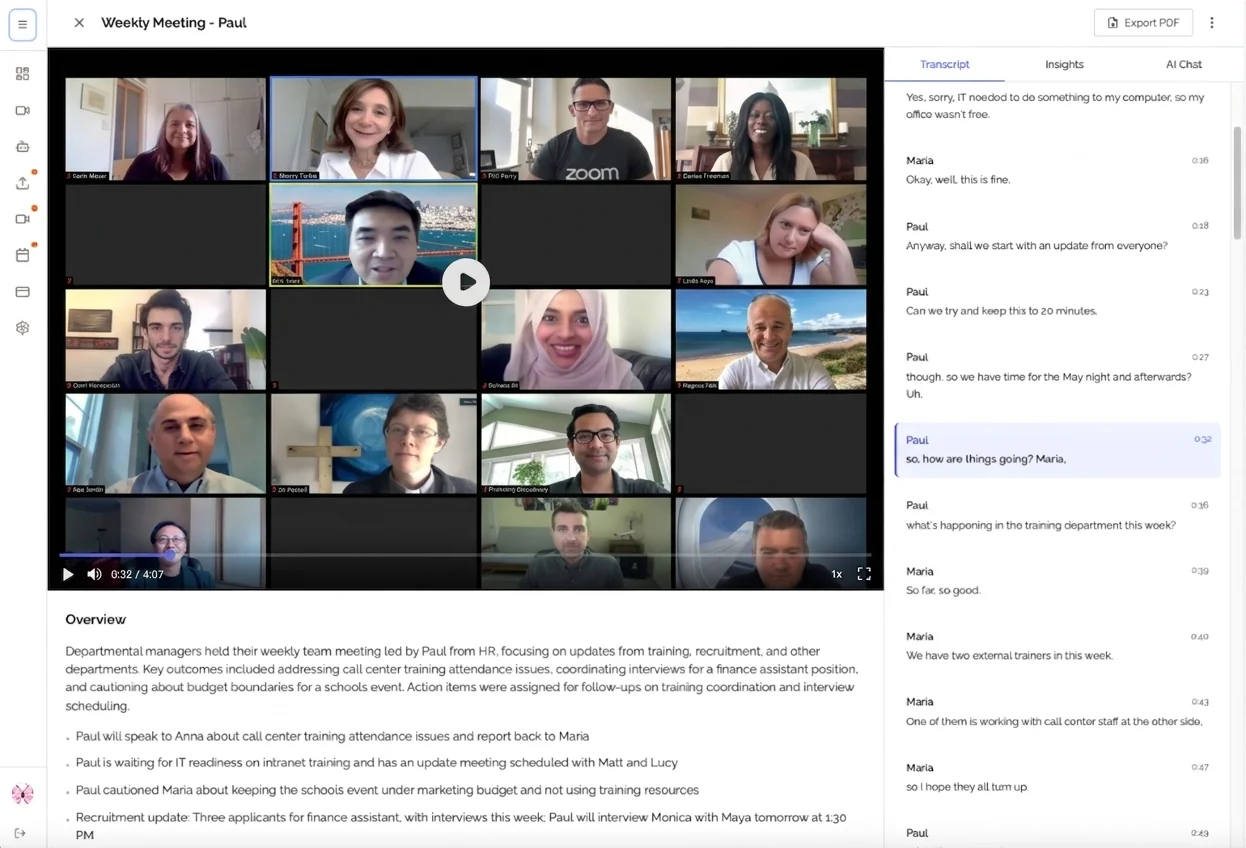
See KenzNote's AI Notetaker in Action
Watch how our AI transforms meeting recordings into comprehensive, searchable documentation
Accurate Transcripts
95%+ accuracy with speaker identification
AI Summaries
Key points and decisions automatically extracted
Action Items
Tasks and commitments auto-detected
Upload your meeting recording and get complete transcripts, intelligent summaries, and action items in just 3-5 minutes.
The Meeting Documentation Problem
Traditional Note-Taking
- ✗Can't focus on conversation while taking notes
- ✗Miss 40-60% of important details
- ✗Spend 30-45 minutes writing up notes
- ✗Action items get lost in lengthy notes
- ✗No way to search or reference later
KenzNote AI Notetaker
- Stay 100% present in conversations
- Capture 95%+ of all discussion content
- Get results in 3-5 minutes automatically
- Action items auto-extracted and organized
- Fully searchable and shareable
Why Teams Choose KenzNote
Upload-Based Workflow
No meeting bots joining your calls. Record locally and upload when ready. Professional and private.
No Calendar Access
Complete privacy. We never see your schedule or meeting metadata. You control what gets transcribed.
Pay Per Meeting
Only pay for what you use. No subscriptions, no hidden fees. Perfect cost control.
Lightning Fast
Get complete transcripts, summaries, and action items in just 3-5 minutes.
Choosing the Right Notetaker Solution
Compare different types of digital notetakers to find the best fit for your needs
AI Voice Notetakers
Software that records audio and uses AI to transcribe automatically
- 95%+ transcription accuracy
- Speaker identification
- Automatic summaries
- Searchable transcripts
✓ Best for: Meetings, interviews, lectures
Example: KenzNote ($0.99/meeting)
Digital Note Apps
Apps for typing or organizing notes manually during meetings
- Organized note structure
- Formatting options
- Requires manual typing
- Miss details while typing
✓ Best for: Personal notes, task lists
Example: Notion, Evernote
Smart Pen Systems
Digital pens that digitize handwritten notes on special paper
- Natural handwriting feel
- Digitize handwritten notes
- Requires special hardware
- No audio transcription
✓ Best for: Sketching, diagrams
Example: Livescribe, Moleskine
Quick Comparison: AI Voice Notetakers vs Traditional Methods
| Feature | AI Notetaker (KenzNote) | Manual Typing | Smart Pen |
|---|---|---|---|
| Captures full conversation | Partial | No | |
| Stay focused on discussion | Difficult | Difficult | |
| Processing time | 3-5 min | 30-45 min | N/A |
| Searchable | Limited | ||
| Multi-device sync | |||
| Cost | $0.99/meeting | Free-$10/mo | $150-300 |
How KenzNote's AI Notetaker Works
Upload Recording
Record your meeting locally and upload the audio or video file to KenzNote.
AI Processes
Our AI transcribes, analyzes, and extracts key insights from your meeting.
Get Results
Receive transcript, summary, action items, and topics in 3-5 minutes.
Powerful AI Notetaker Features
Accurate Transcription
Industry-leading speech recognition with speaker identification and timestamps.
- 95%+ accuracy rate
- Speaker diarization
- Timestamp precision
- Handles accents & noise
AI Summaries
Intelligent summaries that capture key points, decisions, and insights automatically.
- Key points extraction
- Decision highlights
- Context understanding
- Concise & actionable
Action Items
Automatic detection and extraction of tasks, assignments, and commitments.
- Auto-detect tasks
- Assignment tracking
- Deadline extraction
- Linked to context
Topic Navigation
Organize long meetings into clickable topics for instant navigation.
- Automatic segmentation
- Topic timestamps
- Quick navigation
- Visual timeline
Multilingual
Support for 50+ languages with native understanding and formatting.
- 50+ languages
- Regional dialects
- Code-switching
- Cultural formatting
Searchable
Full-text search across all meetings to find information instantly.
- Keyword search
- Topic filtering
- Speaker search
- Date range filters
Works With Every Meeting Platform
Upload-based approach means compatibility with any video conferencing platform
Google Meet
Record your Google Meet sessions and upload for fast AI transcription.
Microsoft Teams
Transform Teams recordings into searchable transcripts with summaries.
Zoom
Upload Zoom recordings to get comprehensive transcripts in minutes.
Plus Any Other Platform
Use Webex, GoToMeeting, Skype, Discord, or any other tool. If you can record it, you can transcribe it with KenzNote.
Frequently Asked Questions
What is an AI notetaker?
An AI notetaker is an intelligent software tool that automatically records, transcribes, and analyzes meetings. It uses artificial intelligence to convert spoken words into written text, extract key insights, identify action items, and generate summaries, saving you hours of manual note-taking work.
How does KenzNote's AI notetaker work?
KenzNote works by allowing you to upload your meeting recordings directly to our platform. Once uploaded, our AI processes the audio file, transcribes it with high accuracy, and generates comprehensive summaries, action items, and topic breakdowns within 3-5 minutes. No calendar integration or meeting bots required.
What are the best note-taking apps for students?
The best note-taking apps for students include KenzNote for recording and transcribing lectures, along with features like searchable transcripts, action items, and AI summaries. KenzNote supports 50+ languages and works with any recording device, making it ideal for students who need to review lectures or create study materials from class discussions.
Do I need a subscription?
No, KenzNote operates on a pay-per-meeting model at $0.99 per meeting. You only pay for the meetings you transcribe, giving you complete cost control without monthly subscription commitments. This makes it more affordable than subscription-based notetaker services.
How long does transcription take?
KenzNote's AI notetaker typically processes and transcribes your meetings in 3-5 minutes, regardless of the meeting length. This includes full transcription with speaker identification, AI-generated summaries, and extracted action items.
What features should I look for in a voice recording notetaker?
Key features of a good voice recording notetaker include: high transcription accuracy (95%+), speaker identification, multi-language support, automatic action item detection, AI summaries, searchable transcripts, cloud storage integration, and fast processing time. KenzNote offers all these features with 3-5 minute processing time.
How do I sync handwritten notes to cloud storage automatically?
For digital handwritten notes, use smart notebooks or tablets with cloud sync. For meeting notes, KenzNote automatically uploads your transcripts and summaries to the cloud, accessible from any device. All your meeting notes are searchable and shareable directly from your account.
What are cloud-based note-taking solutions for teams?
Cloud-based note-taking solutions for teams include AI notetakers like KenzNote that automatically transcribe meetings and store them in the cloud. Team members can access, search, and share meeting transcripts and summaries from anywhere. KenzNote supports collaborative features with searchable archives and easy sharing.
How do I sync notes across multiple devices?
KenzNote automatically syncs all your meeting transcripts and notes across devices through cloud storage. Access your notes from any web browser, mobile device, or desktop. All changes and new transcriptions are instantly available on all your devices.
What is the best method for meeting notes?
The best method for meeting notes is using an AI notetaker like KenzNote. Record your meeting locally, upload the file, and get accurate transcripts with speaker identification, AI summaries, and action items in 3-5 minutes. This ensures you capture 95%+ of meeting content while staying fully present in the conversation.
Can AI notetaker apps support PDF annotation?
While KenzNote specializes in audio/video transcription, it allows you to export meeting transcripts as searchable documents that can be annotated. You can download your transcripts and import them into PDF annotation tools, or use the searchable web interface for adding comments and highlights.
Is my data secure?
Absolutely. KenzNote prioritizes your privacy and security. We don't require calendar access, which means we never see your meeting schedules or metadata. All uploaded recordings are encrypted in transit and at rest with enterprise-grade security.
Which companies offer subscription plans for advanced notetaker software?
Many notetaker companies offer subscription plans, but KenzNote uses a pay-per-meeting model at $0.99 per meeting instead. This gives you more flexibility and cost control compared to monthly subscriptions, especially if you don't have meetings every day.
What are the best notetaker tools for organizing research and project notes?
For research and project meetings, KenzNote helps organize notes through searchable transcripts, topic segmentation, and action item tracking. You can search across all your meeting transcripts to find specific discussions, decisions, or data points related to your research or projects.