TopTopic - Navigate Meetings Instantly
Stop scrubbing through long recordings. AI extracts every topic from your meetings. Click any topic to jump to that exact moment in the transcript and audio. Find key discussions in seconds.
See TopTopic Navigation in Action
Discover how AI organizes your meetings into clickable topics for instant navigation
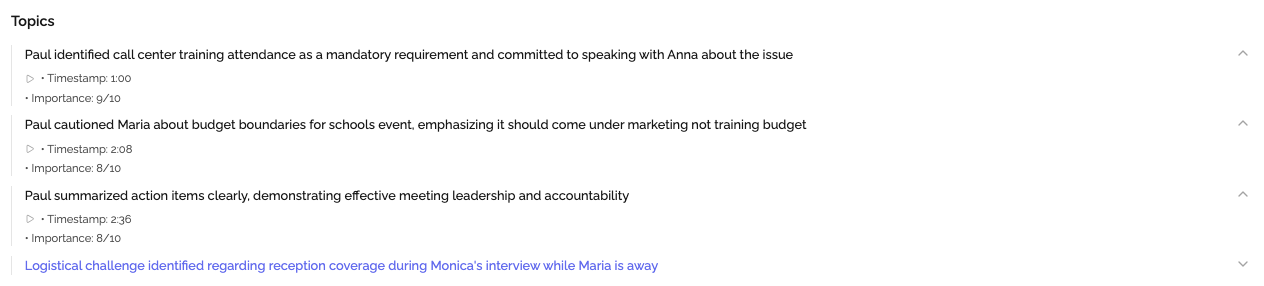
Topics Detected
AI identifies all discussion topics automatically
Precise Timestamps
Each topic linked to exact meeting moment
One-Click Navigation
Jump to any topic and start playback instantly
Our AI automatically identifies discussion topics, creates a visual timeline, and links each topic to exact timestamps. Navigate long meetings in seconds, not minutes.
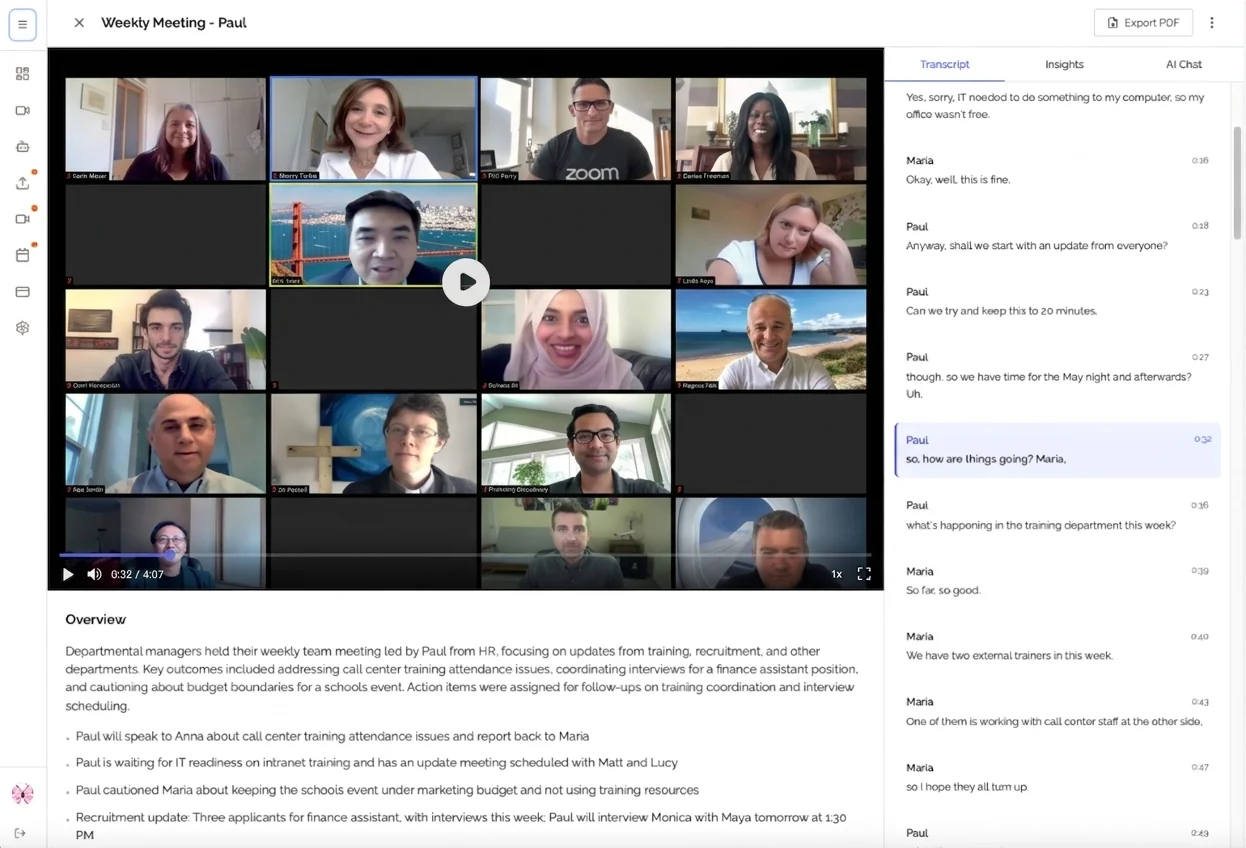
Share Topics
Send links to specific topics for focused collaboration
Search Within Topics
Find keywords within specific topics quickly
Browse all your meetings organized by topics. Click any topic to jump directly to that discussion, search within topics, and share specific moments with stakeholders.
The Long Meeting Navigation Problem
Without Topic Navigation
- ✗Waste 10-15 minutes searching for specific discussions
- ✗No visibility into meeting structure or topics covered
- ✗Must watch entire 2-hour recording to find one point
- ✗Sharing timestamps requires manual timestamp notes
- ✗Key discussions get lost in lengthy transcripts
With KenzNote TopTopic
- Find any discussion in 5-10 seconds with one click
- See all topics at a glance in visual timeline
- Review 2-hour meeting in 3 minutes via topic list
- Share auto-generated links to specific topics
- Every discussion labeled and instantly accessible
Why Teams Love TopTopic
Save Hours on Meeting Review
Stop watching entire recordings. See all topics at a glance and jump directly to what matters. Review a 2-hour meeting in minutes, not hours.
Never Miss Key Discussions
Every topic is captured and labeled automatically. No more losing track of important discussions buried in long meetings.
Navigate Like a Pro
Visual timeline and one-click navigation make it effortless to find any discussion. Browse meetings like chapters in a book.
Share Specific Moments
Send stakeholders directly to relevant discussions with shareable topic links. No more 'see timestamp 47:23' messages.
How TopTopic Navigation Works
AI Analyzes Conversation
After your meeting recording is uploaded, AI identifies topic shifts, themes, and discussion boundaries from the transcription.
Topics Organized Visually
All topics appear in an interactive timeline showing the flow and structure of your meeting.
Navigate Instantly
Click any topic to jump to that exact moment in the transcript and play audio/video from there.
Example: 60-Minute Product Meeting
Click any topic to jump to that exact moment and start playback
Real-World Examples
90-Minute Product Review
"Long meeting covering 12 different product features and 8 customer feedback topics"
20 topics automatically extracted | Click 'Pricing Discussion' to jump to minute 47:30 | Share link to 'Customer Retention' topic with sales team
Client Strategy Session
"2-hour meeting discussing Q4 goals, budget allocation, marketing strategy, and timeline"
8 major topics identified | Navigate to 'Marketing Budget' in one click | Export topic summary showing 18 minutes spent on timeline discussion
Team Retrospective
"Looking for 'What went well' discussion from last week's 45-minute retro meeting"
Search 'went well' → Instantly navigate to 12:45 timestamp | Play audio from that exact moment | Share timestamp with team lead
Complete Topic Navigation Features
Automatic Topic Extraction
AI identifies and names every topic discussed during your meeting without any manual input.
- Detects topic boundaries automatically
- Descriptive topic naming
- Multi-level topic hierarchy
- Topic duration calculation
Interactive Topic Timeline
Visual timeline showing all topics with durations and transitions at a glance.
- Visual topic progression
- Timeline scrubbing
- Topic overlap detection
- Conversation flow visualization
Click-to-Play Navigation
Click any topic to instantly jump to that exact moment in the transcript and start audio/video playback.
- Instant timestamp navigation
- Audio/video sync
- Transcript highlighting
- Seamless playback control
Precise Timestamps
Every topic is linked to exact timestamps in your meeting for pinpoint accuracy.
- Start and end times for each topic
- Duration indicators
- Time-based topic grouping
- Custom timestamp links
Topic Search & Filter
Search within topics to find specific discussions and filter by topic type or duration.
- Full-text topic search
- Filter by topic type
- Duration-based filtering
- Keyword highlighting
Shareable Topic Links
Share links to specific topics so others can jump directly to relevant discussions.
- Unique URL per topic
- Direct timestamp linking
- Social sharing enabled
- Embed topic snippets
Manual Scrubbing vs TopTopic Navigation
| Aspect | Manual Navigation | TopTopic AI |
|---|---|---|
| Finding Specific Discussion | Scrub through entire recording or read full transcript | Click topic name to jump instantly |
| Understanding Meeting Structure | No visibility into topics covered | Visual timeline shows all topics at a glance |
| Time to Find Information | 10-15 minutes of searching | 5-10 seconds with one click |
| Sharing Specific Moments | Write timestamp manually and share | Share auto-generated topic link |
| Topic Identification | Manually review and categorize | Automatic extraction with 90%+ accuracy |
| Long Meeting Review | Watch entire 2-hour recording | Review 15-20 topic summaries in 3 minutes |
Frequently Asked Questions
How does automatic topic extraction work?
KenzNote's AI analyzes your meeting conversation to identify distinct topics and discussion themes. It detects topic boundaries, names them descriptively, and assigns timestamps so you can navigate directly to any topic with a single click.
Can I jump to a specific topic in the audio/video?
Yes! Each topic is linked to its exact timestamp in both the transcript and the audio/video recording. Click any topic to instantly navigate to that moment and start playback from there.
How accurate is topic detection?
Our AI achieves 90%+ accuracy in identifying topic boundaries and themes. It understands conversation context, topic transitions, and can even detect when participants circle back to earlier topics.
Can I search within specific topics?
Absolutely! You can search for keywords within specific topics or across all topics. The search highlights matching topics and shows you exactly where your search term appears in the discussion.
Can I share a link to a specific topic?
Yes! Each topic has a unique shareable link that takes viewers directly to that topic's timestamp in the meeting. Perfect for highlighting specific discussions with stakeholders or team members.
What happens with very long meetings?
TopTopic shines in long meetings! It can identify dozens of distinct topics in multi-hour meetings, making it easy to review specific sections without watching the entire recording. See the structure at a glance and jump to what matters.