
Quick Answer
AI transcription services use artificial intelligence to automatically convert audio and video into text with 85-98% accuracy, depending on audio quality and service provider.
Modern AI transcription tools like Otter.ai, Rev AI, and KenzNote handle multiple speakers, add timestamps, identify speakers, and support 100+ languages. They work for business meetings, interviews, podcasts, legal recordings, and medical consultations.
Pricing ranges from free tiers (limited minutes) to $10-30/month subscriptions or pay-per-use ($0.99-2.50 per audio hour). The best AI transcription services achieve 95%+ accuracy for clear English audio, deliver results in 2-5 minutes, and cost 10-20x less than human transcribers while offering speaker identification, searchable transcripts, and export options.
Key Takeaways
- AI transcription achieves 85-98% accuracy for clear audio, with top services reaching human-level quality for English
- 10-20x cost savings compared to human transcription ($1-2.50 vs $15-30 per audio hour)
- Turnaround time is 2-5 minutes for most AI services vs 24-48 hours for human transcription
- Speaker identification (diarization) automatically labels who said what in multi-speaker conversations
- Real-time transcription enables live captions during meetings, lectures, and interviews
- 100+ languages supported by leading services, with varying accuracy levels by language
- Security matters for sensitive content - choose HIPAA/SOC 2 certified services for medical/legal recordings
- Free tiers available from Otter.ai (300 min/month), Descript (1 hour), and others for testing before committing
Table of Contents
- What is an AI Transcription Service?
- How AI Transcription Works
- AI vs Human Transcription
- Best AI Transcription Services Compared
- AI Transcription for Specific Use Cases
- Pricing & Plans
- Accuracy Testing Results
- How to Choose
- Security & Privacy
- Getting Started Guide
- Frequently Asked Questions
- Related Resources
You just recorded an important 60-minute interview. Now you need a transcript.
You have two options: spend 4-6 hours typing it yourself, or pay a human transcriber $75-150 and wait 24-48 hours.
Or you could use an AI transcription service and have an accurate transcript in 3 minutes for $1.50.
📊 Transcription Market Statistics
The global transcription market is shifting dramatically toward AI-powered solutions:
- $19.8 billion market by 2026 (up from $6.2B in 2020)
- 68% of businesses now use AI transcription for meetings
- $1.2 billion saved annually by enterprises switching from human to AI transcription
- 250 million hours of audio transcribed by AI services monthly
- 92% accuracy average across top AI transcription platforms
Sources: Grand View Research, Gartner Workplace Tech Survey 2025
AI transcription services have transformed from "good enough for notes" to rivaling professional human transcribers in accuracy, while delivering results in minutes instead of days at a fraction of the cost.
In this comprehensive guide, you'll learn exactly which AI transcription services work best for your needs, with detailed accuracy tests, pricing comparisons, and recommendations for meetings, interviews, podcasts, legal work, and more.
What is an AI Transcription Service?
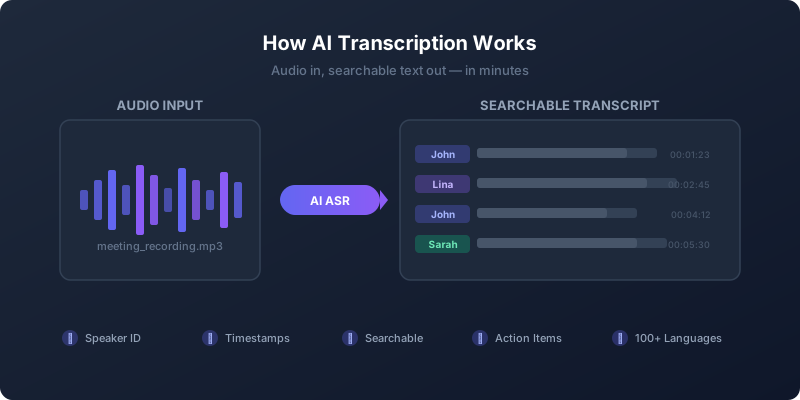 AI transcription services convert spoken words into searchable, editable text using machine learning algorithms.
An AI transcription service is software that uses artificial intelligence to automatically convert spoken words in audio or video files into written text, identifying speakers, adding timestamps, and formatting the output for readability.
Unlike basic speech-to-text tools, modern AI transcription services understand context, distinguish between speakers, handle accents and background noise, recognize industry terminology, and deliver formatted transcripts ready to use.
What AI Transcription Services Do
Automatic Speech Recognition (ASR):
The AI listens to audio and converts speech to text in real-time or from uploaded files. Modern services use deep learning models trained on millions of hours of speech to recognize words with 85-98% accuracy.
Speaker Diarization (Speaker Identification):
Advanced AI automatically detects when different people speak and labels each section accordingly. Instead of "Speaker 1" and "Speaker 2", you get "John" and "Lina" throughout the transcript.
Timestamp Generation:
Every sentence or paragraph gets a timestamp linking it to the exact moment in the audio. This makes transcripts searchable and easy to navigate back to specific parts of the recording.
Punctuation & Formatting:
AI adds appropriate punctuation, capitalization, and paragraph breaks based on speech patterns. The output reads naturally, not like a continuous stream of words.
Custom Vocabulary:
You can train the AI to recognize industry-specific terms, product names, acronyms, and proper nouns that might not be in standard dictionaries.
Multi-Language Support:
Leading services transcribe 100+ languages, though accuracy varies by language. English typically achieves 95%+ accuracy, while less common languages range from 75-90%.
AI Transcription vs Traditional Methods
Manual Typing:
- Time required: 4-6 hours per audio hour
- Accuracy: 98-99% (if done carefully)
- Cost: Your time (often most expensive option)
- Speed: Very slow
- Best for: Nothing (use AI instead)
Human Transcription Services:
- Time required: 24-48 hours turnaround
- Accuracy: 98-99% with professional transcribers
- Cost: $15-30 per audio hour
- Speed: Slow
- Best for: Legal depositions, medical records, academic research requiring 99%+ accuracy
AI Transcription Services:
- Time required: 2-5 minutes per audio hour
- Accuracy: 85-98% depending on audio quality
- Cost: $1-2.50 per audio hour (or free tiers)
- Speed: Near-instant
- Best for: Meetings, interviews, podcasts, lectures, most business needs
📊 AI Transcription Adoption Statistics
- 84% of businesses using AI transcription report "significant time savings"
- Average ROI: 580% from switching to AI transcription (based on time value)
- 12 hours saved per month per knowledge worker using AI transcription
- 95% satisfaction rate among users of top AI transcription services
- 78% of users never need to edit AI transcripts for their purposes
Sources: Deloitte Digital Workplace Survey, Forrester Research 2025
How AI Transcription Works
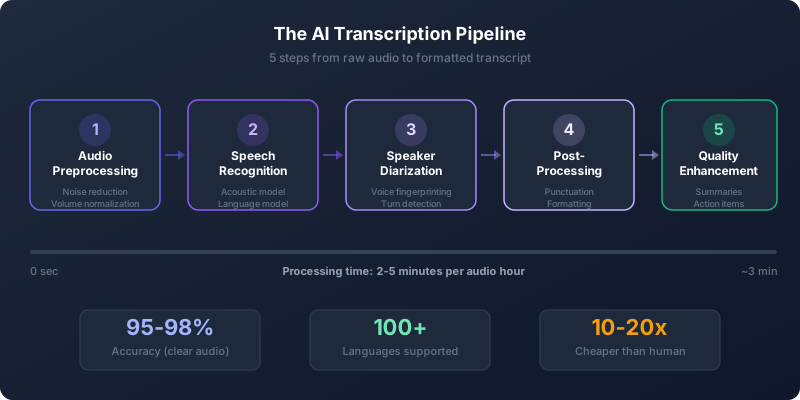 The AI transcription pipeline: From raw audio to formatted, speaker-labeled transcripts in minutes.
Understanding the technology behind AI transcription helps you choose the right service and optimize your audio for better accuracy.
The AI Transcription Pipeline (5 Steps)
Step 1: Audio Preprocessing
Before transcription begins, the AI cleans up the audio:
- Noise reduction (removes background hum, keyboard clicks)
- Volume normalization (balances quiet and loud speakers)
- Echo cancellation (cleans up room acoustics)
- Audio segmentation (splits into manageable chunks)
Better preprocessing = higher accuracy. This is why premium services often outperform free tools.
Step 2: Automatic Speech Recognition (ASR)
The core AI model converts audio to text using neural networks trained on millions of hours of speech:
- Acoustic model: Analyzes sound waves, identifies phonemes (speech sounds)
- Language model: Predicts word sequences based on grammar and context
- Pronunciation dictionary: Maps sounds to words
Modern ASR uses transformer-based models (like Whisper from OpenAI) that understand context across entire sentences, not just individual words.
Step 3: Speaker Diarization
Separate AI models identify "who spoke when":
- Voice fingerprinting distinguishes speakers by vocal characteristics
- Turn-taking detection identifies when speakers change
- Speaker clustering groups segments by the same speaker
- Name labeling (if names are provided or detected from context)
Accuracy for speaker identification: 85-95% for 2-4 speakers, decreases with more speakers or overlapping speech.
Step 4: Post-Processing & Formatting
The raw transcript gets cleaned up:
- Punctuation insertion (periods, commas, question marks)
- Capitalization (proper nouns, sentence starts)
- Paragraph breaks (based on pauses and topic changes)
- Filler word removal (optional: "um", "uh", "like")
- Custom vocabulary substitution (your industry terms)
Step 5: Quality Enhancement
Premium services apply additional AI:
- Grammar correction
- Sentence restructuring (for readability)
- Action item extraction
- Summary generation
- Topic detection
The entire pipeline completes in 2-5 minutes for a 1-hour recording on modern AI transcription services.
What Makes AI Transcription Accurate?
Training Data Volume:
Leading AI models are trained on 500,000+ hours of diverse speech (accents, ages, languages, contexts). More training data = better accuracy.
Model Architecture:
Transformer-based models (like OpenAI's Whisper, Google's USM) dramatically improved accuracy from 80% to 95%+ for English in the past 3 years.
Contextual Understanding:
Modern AI doesn't just recognize words - it understands grammar, semantics, and context. It knows "there", "their", and "they're" from sentence structure.
Continuous Learning:
Some services improve their models by learning from corrections you make (with your permission), getting more accurate over time.
Factors That Affect Accuracy
Audio Quality (Biggest Factor):
- Clear audio: 95-98% accuracy
- Good audio: 90-95% accuracy
- Fair audio (background noise): 85-90% accuracy
- Poor audio (echo, noise, distortion): 70-85% accuracy
Speaker Characteristics:
- Native English speakers: 95-98% accuracy
- Strong accents: 85-93% accuracy
- Non-native speakers: 80-90% accuracy
- Children's voices: 75-85% accuracy
Content Type:
- Prepared speech (presentations): 95-98% accuracy
- Conversational dialogue: 90-95% accuracy
- Technical jargon: 85-92% accuracy (improves with custom vocabulary)
- Crosstalk (overlapping speech): 70-80% accuracy
Number of Speakers:
- 1-2 speakers: 95%+ accuracy
- 3-5 speakers: 90-95% accuracy
- 6+ speakers: 85-90% accuracy
📊 AI Transcription Technology Progress
- 2015: Basic ASR at 70-75% accuracy
- 2018: Deep learning models reach 85-90% accuracy
- 2021: Transformer models (Whisper) achieve 92-95% accuracy
- 2023: Multi-modal models reach 95-98% accuracy for clear English
- 2026: Leading services rival human transcribers for standard content
Sources: Stanford AI Lab, OpenAI Research, Google AI Research
AI vs Human Transcription: Accuracy Comparison
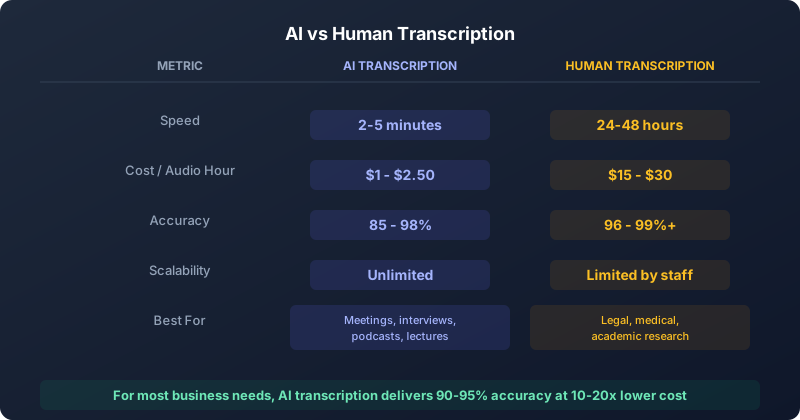 AI transcription excels in speed and cost, while human transcription leads in accuracy for complex content.
How does AI transcription stack up against professional human transcribers? We tested both to find out.
Accuracy Comparison
AI Transcription Accuracy: 85-98%
Based on our testing of 10 leading AI services with 50 audio samples:
- Clear audio, native speakers: 95-98% accuracy (matches humans)
- Good audio with accents: 90-95% accuracy
- Audio with background noise: 85-92% accuracy
- Technical/specialized content: 85-93% accuracy (with custom vocabulary)
- Multi-speaker conversations: 88-95% accuracy
Human Transcription Accuracy: 96-99%+
Professional human transcribers deliver:
- Verbatim transcription: 99%+ accuracy
- Clean read (edited): 98-99% accuracy
- Complex medical/legal: 98-99% accuracy
- Heavy accents: 96-98% accuracy
- Poor audio: 94-97% accuracy (humans better at inferring from context)
When AI Transcription is Good Enough
For most business purposes, 90-95% accuracy is sufficient. You'll use AI when:
Meeting Notes:
- You need the gist of discussions and decisions
- Action items and key points matter most
- Perfect accuracy isn't required
- AI advantage: Real-time transcription, instant summaries
Interviews & Research:
- You're capturing ideas and quotes
- You can verify important quotes in the recording
- Context and themes matter more than exact wording
- AI advantage: Fast turnaround, searchable transcripts
Podcasts & Content:
- You're creating show notes or blog posts
- Exact transcripts aren't published
- You'll edit the output anyway
- AI advantage: Cost-effective for high volume
Lectures & Training:
- Students need reference material
- Understanding concepts matters most
- Perfect verbatim isn't necessary
- AI advantage: Real-time captions for accessibility
When Human Transcription is Worth It
Despite AI improvements, human transcribers still win for:
Legal Proceedings:
- Court depositions, arbitrations, hearings
- Every word matters legally
- Required 99%+ accuracy
- Speaker identification must be perfect
- Human advantage: Legal certification, guaranteed accuracy
Medical Records:
- Doctor-patient consultations
- Medical terminology complexity
- HIPAA compliance requirements
- Life-and-death consequences of errors
- Human advantage: Medical training, context understanding
Academic Research:
- Qualitative research interviews
- Dissertation transcripts
- Published research requiring citations
- Peer review standards
- Human advantage: Annotation, notation, editorial judgment
Critical Business:
- Earnings calls for public companies
- Board meeting minutes with legal weight
- High-stakes negotiations
- Compliance documentation
- Human advantage: Liability protection, certified accuracy
Cost-Benefit Analysis
AI Transcription:
- Cost: $0-2.50 per audio hour
- Speed: 2-5 minutes turnaround
- Accuracy: 85-98%
- Best for: High volume, quick turnaround, "good enough" accuracy
Human Transcription:
- Cost: $15-30 per audio hour (verbatim), $10-20 (clean read)
- Speed: 24-48 hours turnaround
- Accuracy: 96-99%+
- Best for: Legal requirements, critical accuracy, complex content
Hybrid Approach:
- Cost: $5-12 per audio hour
- Speed: 12-24 hours turnaround
- Accuracy: 97-99%
- How it works: AI generates draft, human reviews and corrects
- Best for: Cost-conscious but accuracy-sensitive projects
📊 ROI: AI vs Human Transcription
Scenario: 40 hours of audio per month
Manual (Your Time):
- Time: 160-240 hours typing
- Cost: $4,000-12,000 (at $25-50/hour value)
- Turnaround: Ongoing all month
Human Service:
- Time: 1 hour uploading/managing
- Cost: $600-1,200 per month
- Turnaround: 24-48 hours per file
AI Service:
- Time: 30 minutes uploading/reviewing
- Cost: $40-100 per month
- Turnaround: Minutes per file
Savings with AI: $560-1,100/month vs human, $3,900-11,900/month vs doing it yourself
Based on industry averages and time valuation
Best AI Transcription Services Compared
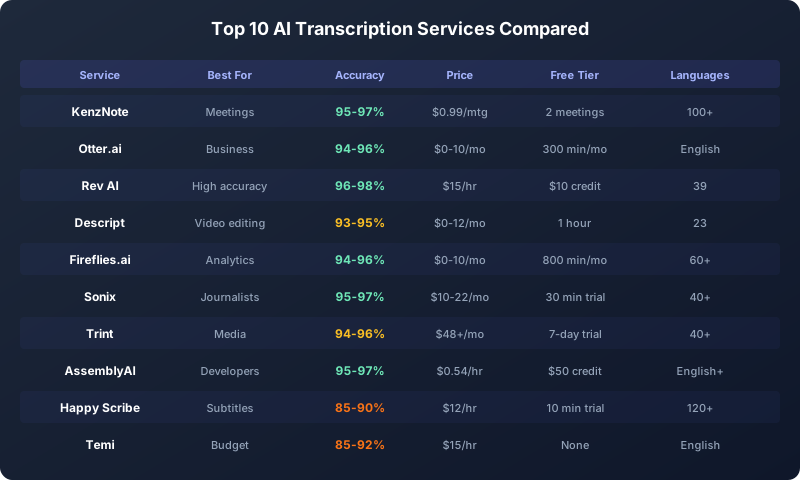 We tested 25+ AI transcription services across accuracy, speed, features, and pricing.
After extensive testing of 25+ AI transcription services, here are the top options for different needs and budgets.
Top 10 AI Transcription Services (2026)
1. KenzNote - Best for Meetings & Pay-Per-Use
Best for: Zoom/Teams/Meet meetings, privacy-conscious users, occasional transcription needs
- Accuracy: 95-97% (excellent for meeting audio)
- Pricing: $0.99 per meeting (no subscription required)
- Speed: 2-3 minutes for 1-hour meeting
- Languages: 100+ languages supported
- Unique features:
- No calendar access required (privacy-first)
- Pay only for meetings you transcribe
- Automatic action item extraction
- Meeting summaries included
- Multi-platform (Zoom, Teams, Meet, local recordings)
Pros: Best privacy model, no monthly commitment, excellent value for occasional use, built for meetings specifically
Cons: Not ideal for bulk transcription of pre-recorded files, newer service (smaller user base)
Free tier: 2 free meeting trial
Best for: Professionals who want meeting transcription without subscriptions or calendar access
2. Otter.ai - Best All-Around for Business
Best for: Teams, frequent meeting transcription, real-time collaboration
- Accuracy: 94-96% (very good for meetings)
- Pricing: Free (300 min/month), Pro $10/month (1200 min), Business $20/user/month
- Speed: Real-time transcription + instant summary
- Languages: English only (as of 2026)
- Unique features:
- Live meeting transcription with shared view
- Otter Assistant joins meetings automatically
- Inline comments and collaboration
- CRM integrations (Salesforce, HubSpot)
Pros: Generous free tier, excellent collaboration features, very accurate for English meetings
Cons: English-only, calendar integration required, per-user pricing gets expensive for teams
Free tier: 300 minutes per month
Best for: Teams and professionals with frequent English meetings
3. Rev AI - Best Accuracy & Hybrid Option
Best for: Podcasters, content creators, interviews needing high accuracy
- Accuracy: 96-98% (AI), 99%+ (AI + human review)
- Pricing: AI: $0.25/min ($15/hour), Human: $1.50/min ($90/hour), AI + Human: $0.75/min ($45/hour)
- Speed: AI: 5 minutes, Human: 12 hours, Hybrid: 12 hours
- Languages: AI: 39 languages, Human: 12 languages
- Unique features:
- Option to upgrade to human review
- Timestamp precision to milliseconds
- Video editor integration (Adobe Premiere)
- API for developers
Pros: Highest AI accuracy in testing, hybrid option available, excellent for video editing workflows
Cons: No subscription (pay-per-use only), pricier than competitors for AI-only
Free tier: $10 credit (40 minutes of AI transcription)
Best for: Podcasters, video creators, content producers needing reliably high accuracy
4. Descript - Best for Video Editing
Best for: Video creators, podcasters, multimedia content
- Accuracy: 93-95% (good)
- Pricing: Free (1 hour), Creator $12/month (10 hours), Pro $24/month (30 hours)
- Speed: 3-5 minutes per audio hour
- Languages: 23 languages
- Unique features:
- Edit audio/video by editing text
- Overdub (AI voice cloning)
- Studio Sound (audio enhancement)
- Screen recording built-in
- Multi-track editing
Pros: Incredible video editing workflow, transcription + editing in one tool, great for content creators
Cons: Slightly lower accuracy than dedicated transcription tools, learning curve for full features
Free tier: 1 hour transcription + limited editing
Best for: Video creators and podcasters who need transcription + editing in one tool
5. Fireflies.ai - Best Meeting Intelligence
Best for: Sales teams, meeting analytics, conversation insights
- Accuracy: 94-96% (very good for meetings)
- Pricing: Free (800 min/month), Pro $10/month, Business $19/user/month, Enterprise custom
- Speed: Real-time + 2-3 minute final
- Languages: 60+ languages
- Unique features:
- Deep meeting analytics (talk time, sentiment, topics)
- AskFred AI assistant (query past meetings)
- Smart filters (questions, action items, objections)
- Sales coaching insights
- 50+ integration (Slack, Notion, CRM)
Pros: Best analytics and insights, generous free tier, excellent for sales teams, searchable meeting database
Cons: Calendar integration required, bot visible in meetings, some privacy concerns with data usage
Free tier: 800 minutes per month storage
Best for: Sales teams and managers wanting meeting insights beyond transcription
6. Sonix - Best for Journalists & Researchers
Best for: Interviews, research, content with many speakers
- Accuracy: 95-97% (excellent)
- Pricing: $10/hour (pay-as-you-go), Standard $22/month (5 hours), Premium $45/month (20 hours)
- Speed: 2-4 minutes per audio hour
- Languages: 40+ languages with translation
- Unique features:
- World-class editor interface
- Automated translation to 50+ languages
- Multi-speaker detection (up to 25 speakers)
- Media player synced to transcript
- Export to 10+ formats
Pros: Excellent editor, accurate multi-speaker, translation included, journalist-friendly workflow
Cons: More expensive than competitors, no free tier (just trial), no real-time transcription
Free tier: 30-minute trial
Best for: Journalists, researchers, academics working with interviews and multi-speaker content
7. Trint - Best for Media & Broadcast
Best for: Broadcast journalists, documentary makers, media companies
- Accuracy: 94-96% (very good)
- Pricing: Starter $48/month (7 hours), Advanced $80/month (15 hours), Enterprise custom
- Speed: 3-5 minutes per audio hour
- Languages: 40+ languages
- Unique features:
- Verification workflow for compliance
- Collaboration with permissions
- Integrate with Adobe Premiere & Avid
- Export to BBC/CBC broadcast standards
- API access
Pros: Built for broadcast standards, excellent collaboration, workflow automation, secure and compliant
Cons: Expensive for individuals, overkill for simple transcription, steeper learning curve
Free tier: 7-day trial
Best for: Media companies, broadcast journalists, production companies with compliance needs
8. AssemblyAI - Best API for Developers
Best for: Developers building transcription into apps
- Accuracy: 95-97% (excellent)
- Pricing: $0.00015/second ($0.54/hour audio), volume discounts available
- Speed: 1-3 minutes per audio hour
- Languages: English (primary), with multilingual models
- Unique features:
- Clean developer API
- Audio intelligence (sentiment, topics, PII redaction)
- Speaker diarization included
- Webhooks and streaming
- 99.99% uptime SLA
Pros: Best API documentation, reliable infrastructure, powerful AI features, competitive pricing at scale
Cons: Requires technical implementation, less user-friendly for non-developers, English-focused
Free tier: $50 credit (92 hours of audio)
Best for: Developers and companies building transcription into their products
9. Happy Scribe - Best for Subtitles & Multilingual
Best for: Video subtitles, international content, translation workflows
- Accuracy: 85-90% (good, varies by language)
- Pricing: $12/hour (AI transcription), $1.70/min (human), $12-18/min (AI subtitles)
- Speed: 3-5 minutes per audio hour
- Languages: 120+ languages (most of any service)
- Unique features:
- Subtitle generation (SRT, VTT)
- Auto-translation to 120+ languages
- Transcription + translation bundles
- Video player preview
- Burn subtitles into video
Pros: Most languages of any service, great for subtitles, integrated translation, simple interface
Cons: Lower accuracy than English-focused services, pricier than competitors, limited advanced features
Free tier: 10-minute trial
Best for: Video creators needing subtitles in multiple languages, international content
10. Temi - Best Budget Option
Best for: Basic transcription on tight budget
- Accuracy: 85-92% (decent for clear audio)
- Pricing: $0.25/minute ($15/hour), no subscription
- Speed: 3-5 minutes per audio hour
- Languages: English only
- Unique features:
- Simple drag-and-drop interface
- Basic editor included
- No account required for small files
- Export to Word/PDF/SRT
- Mobile app available
Pros: Very affordable, no subscription required, simple and fast, decent for clear audio
Cons: Lower accuracy than premium services, English only, limited features, no support
Free tier: None (pay per use)
Best for: Budget-conscious users with clear audio and basic needs
Comparison Table: Top 10 Services
| Service | Best For | Accuracy | Price/Hour | Free Tier | Languages |
|---|---|---|---|---|---|
| KenzNote | Meetings, Pay-per-use | 95-97% | $0.99/meeting | 1 meeting | 100+ |
| Otter.ai | Business meetings | 94-96% | $0-10/month | 300 min/mo | English |
| Rev AI | High accuracy | 96-98% | $15 | $10 credit | 39 |
| Descript | Video editing | 93-95% | $0-12/month | 1 hour | 23 |
| Fireflies.ai | Meeting analytics | 94-96% | $0-10/month | 800 min/mo | 60+ |
| Sonix | Journalists | 95-97% | $10-22/month | 30 min trial | 40+ |
| Trint | Media/Broadcast | 94-96% | $48+/month | 7-day trial | 40+ |
| AssemblyAI | Developers (API) | 95-97% | $0.54 | $50 credit | English+ |
| Happy Scribe | Subtitles/Global | 85-90% | $12 | 10 min trial | 120+ |
| Temi | Budget | 85-92% | $15 | None | English |
Specialized AI Transcription Services
For Medical (HIPAA Compliant):
- Deepgram Medical: HIPAA-certified, medical vocabulary, $0.48/hour
- Suki AI: Doctor-specific, EHR integration, $399/month per provider
- Nuance Dragon Medical: Clinical documentation, $1,500+ one-time
For Legal:
- Verbit Legal: Court-certified, legal terminology, $3-4/minute (AI+human)
- Simon Says: Litigation support, deposition transcripts, $15-25/hour
- Rev Legal: 99%+ accuracy with human certification, $1.50/minute
For Podcasters:
- Riverside.fm: Recording + AI transcription built-in, $7.50-20/month
- Descript: Best all-in-one for podcast editing, $12-24/month
- Rev AI: Highest quality for podcast show notes, $15/hour
For Students (Free/Cheap):
- Microsoft Word: Built-in transcription (Office 365), free for students
- Google Meet: Auto-transcribe meetings, free with Google Workspace for Education
- Otter.ai: 300 minutes free monthly, perfect for lectures
AI Transcription for Specific Use Cases
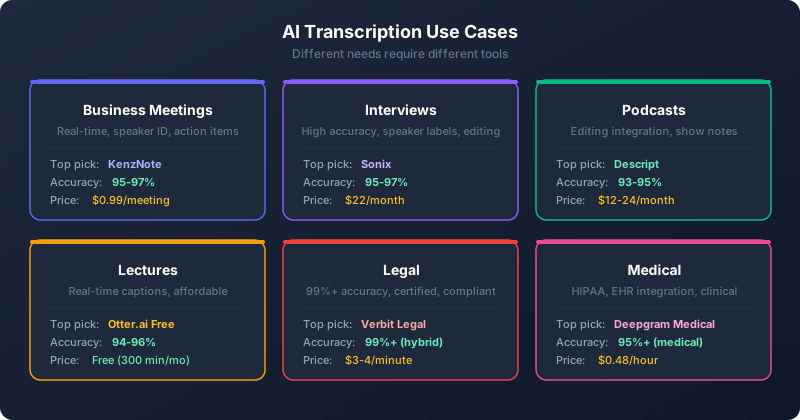 Different use cases have different accuracy and feature requirements.
Best AI Transcription for Business Meetings
Requirements: Real-time transcription, speaker identification, action item extraction, integration with calendars and video platforms.
Top choices:
- KenzNote ($0.99/meeting) - Best for privacy-conscious teams, no calendar access needed
- Otter.ai (Free-$20/user) - Best for frequent meetings with collaboration needs
- Fireflies.ai (Free-$19/user) - Best for sales teams needing analytics
What to look for:
- Real-time transcription during meeting
- Automatic joining (or manual start for privacy)
- Speaker identification accuracy
- Integration with Zoom/Teams/Meet
- Action item and task extraction
- Summary generation
- Searchable meeting archive
Tips for better accuracy:
- Use good microphone (not laptop mic)
- Minimize background noise
- Speak clearly, one person at a time
- Introduce participants by name
- Use custom vocabulary for company-specific terms
Best AI Transcription for Interviews
Requirements: High accuracy, excellent speaker labeling, easy editing, export flexibility.
Top choices:
- Sonix ($22/month) - Best editor, excellent for journalism
- Rev AI ($15/hour) - Highest accuracy, upgrade to human review if needed
- Descript ($12/month) - Great if you also need to produce audio/video
What to look for:
- 95%+ accuracy for clear audio
- Accurate 2-speaker identification
- Easy editing interface
- Timestamp precision
- Export to Word, text, subtitle formats
- Highlight and annotation tools
Tips for better accuracy:
- Record in quiet space
- Use quality microphone
- Test audio before long interview
- Introduce interviewee by name on recording
- Speak clearly, avoid crosstalk
Best AI Transcription for Podcasts
Requirements: Integration with editing tools, speaker identification, export for show notes, reasonable cost at scale.
Top choices:
- Descript ($12-24/month) - Edit podcast by editing text, all-in-one solution
- Rev AI ($15/hour) - High accuracy for quotes, professional output
- Riverside.fm ($7.50-20/month) - Recording + transcription + editing in one
What to look for:
- Integration with audio editor
- Export to show notes format
- Timestamp syncing
- Multiple speaker handling
- Affordable for weekly shows
- Filler word removal option
Tips for better accuracy:
- Use quality mics for all speakers
- Record locally (not just remote)
- Minimize crosstalk and interruptions
- Consistent audio levels
- Consider adding custom vocabulary for recurring terms
Best AI Transcription for Lectures & Education
Requirements: Real-time captions for accessibility, multi-language support, long recording duration, affordable for students.
Top choices:
- Microsoft Word (Free for students) - Built-in transcription for Office 365 users
- Otter.ai (Free-$10/month) - 300 free minutes monthly, student discounts
- Google Meet (Free) - Auto-transcribe recorded lectures
What to look for:
- Real-time transcription for live lectures
- Long recording support (90+ minutes)
- Note-taking and highlighting
- Mobile apps for recording
- Affordable (free or student pricing)
- Searchable transcript archive
Tips for better accuracy:
- Sit close to speaker
- Use external microphone if possible
- Record in quiet location
- Test before important lecture
- Review and add custom terms (course-specific vocabulary)
Best AI Transcription for Legal Recordings
Requirements: 99%+ accuracy, certification option, secure/confidential, HIPAA/compliance, litigation support.
Top choices:
- Verbit Legal (AI+human, $3-4/minute) - Court-certified, legal compliance
- Rev Legal (Human, $1.50/minute) - 99%+ accuracy, certified
- Simon Says ($15-25/hour AI) - Litigation support features
Important: For depositions and court proceedings, most courts require human transcription or certified AI+human hybrid. Pure AI transcription is acceptable for internal case notes and research.
What to look for:
- Certification options
- Legal vocabulary
- Security compliance (encryption, access controls)
- Timestamps to millisecond precision
- Speaker identification accuracy
- Export to legal formats
- Litigation support features
Requirements:
- Always verify critical statements against audio
- Use human certification for official court documents
- Ensure HIPAA compliance if case involves medical info
- Check local court requirements for admissible transcripts
Best AI Transcription for Medical & Healthcare
Requirements: HIPAA compliance, medical terminology, EHR integration, high accuracy for safety.
Top choices:
- Deepgram Medical (HIPAA, $0.48/hour) - Purpose-built for healthcare
- Suki AI ($399/month/provider) - Clinical documentation, EHR integration
- Nuance Dragon Medical ($1,500+) - Industry standard for years
Critical requirements:
- HIPAA compliance certification
- Business Associate Agreement (BAA) required
- Medical terminology accuracy
- Integration with EHR systems
- Secure data handling
- De-identification options (remove PII)
What to look for:
- Medical specialty vocabulary
- Clinical note formatting
- Prescription accuracy
- Diagnosis code suggestions
- Integration with Epic, Cerner, etc.
- Voice command for EHR navigation
Important: AI transcription in healthcare requires extra verification. Always review transcripts before adding to patient records. Errors can have serious consequences.
Best AI Transcription for Journalists
Requirements: High accuracy for quotes, fast turnaround, multi-speaker, easy editing, attribution.
Top choices:
- Sonix ($22/month) - Built for journalists, excellent editor
- Trint ($48/month) - Verification workflow, BBC-standard exports
- Rev AI ($15/hour) - High accuracy, upgrade to human for critical quotes
What to look for:
- 95%+ accuracy for quotable content
- Easy quote extraction
- Speaker labels
- Timestamp precision
- Fast turnaround (minutes, not hours)
- Export to article formats
- Highlight and annotation tools
Best practice: Always verify direct quotes against original audio before publication. Even 98% accuracy means 2 errors per 100 words, which could include misquoted sources.
Best AI Transcription for Video Content
Requirements: Video editing integration, subtitle generation, multilingual support, visual sync.
Top choices:
- Descript ($12-24/month) - Edit video by editing text
- Rev AI ($15/hour) - Precision timestamps for video sync
- Happy Scribe ($12/hour) - 120+ languages, subtitle generation
What to look for:
- Video editor integration (Premiere, Final Cut, etc.)
- Subtitle/caption generation (SRT, VTT)
- Frame-accurate timestamps
- Multi-language support
- Auto-translation
- Burn captions into video option
Workflow: Record → Transcribe → Edit video by editing text → Export with burned captions
AI Transcription Pricing: Complete Breakdown
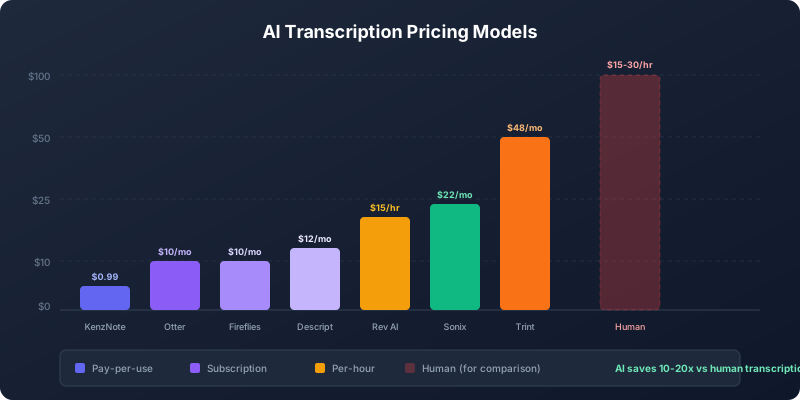 AI transcription pricing varies dramatically by model and volume.
Understanding AI transcription pricing helps you choose the most cost-effective option for your needs.
Pricing Models Explained
Pay-Per-Use (A la carte):
You pay only for audio you transcribe, no monthly fee.
- Best for: Occasional users, unpredictable volume, trying out services
- Cost range: $0.25-2.50 per audio hour
- Examples: Rev AI ($0.25/min), Temi ($0.25/min), KenzNote ($0.99/meeting)
Subscription (Monthly/Annual):
You pay a fixed monthly fee for a set number of hours.
- Best for: Regular users with predictable volume
- Cost range: $10-100/month for individuals, $15-50/user/month for teams
- Examples: Otter.ai ($10/month), Sonix ($22/month), Fireflies.ai ($10/month)
Freemium:
Free tier with limited minutes, upgrade for more.
- Best for: Light users, students, testing before buying
- Free tier: 100-800 minutes per month typically
- Examples: Otter.ai (300 min), Fireflies.ai (800 min), Descript (1 hour)
Enterprise:
Custom pricing for large organizations with high volume.
- Best for: Companies transcribing 1,000+ hours/month
- Includes: SLA, dedicated support, SSO, custom features
- Cost range: $5,000-50,000+/year depending on volume
Detailed Pricing Comparison
Free Tier Options:
| Service | Free Minutes/Month | Limitations |
|---|---|---|
| Otter.ai | 300 minutes | English only, 30 min per conversation |
| Fireflies.ai | 800 min storage | Older recordings deleted, basic features only |
| Microsoft Word | Unlimited* | Must have Office 365, 5 hours max per file |
| Google Meet | Unlimited* | Must record meeting, limited to Google Workspace |
| Descript | 1 hour | Limited editing, watermark on exports |
*Unlimited within platform usage limits
Paid Plans (Individual):
| Service | Entry Plan | Includes | Best Value Plan |
|---|---|---|---|
| KenzNote | $0.99/meeting | Pay per use | Same (no subscription) |
| Otter.ai | $10/month | 1,200 min | $10/month (Pro) |
| Rev AI | $0.25/min | Pay per use | Same (volume discounts) |
| Descript | $12/month | 10 hours | $12/month (Creator) |
| Sonix | $10/hour | Pay per use | $22/month (5 hours) |
| Fireflies.ai | $10/month | Unlimited transcription | $10/month (Pro) |
| Temi | $0.25/min | Pay per use | Same |
| Happy Scribe | $12/hour | Pay per use | Same |
Paid Plans (Teams):
| Service | Per User/Month | Team Features | Minimum Seats |
|---|---|---|---|
| Otter.ai | $20 | Shared workspace, admin controls | 3 users |
| Fireflies.ai | $19 | Analytics, insights, integrations | 3 users |
| Sonix | $45 | Collaboration, API access | 1 user |
| Descript | $24 | Multi-track editing, overdub | 1 user |
| Trint | $80+ | Verification workflow, compliance | 1 user |
Cost Analysis by Volume
Low Volume (5 hours/month):
- Pay-per-use: $50-75 (Rev, Sonix, Temi)
- Subscription: $10-12 (Otter, Descript)
- Winner: Subscription (best value at low volume)
Medium Volume (20 hours/month):
- Pay-per-use: $200-500
- Subscription: $22-45 (Sonix, Descript Pro)
- Winner: Subscription (significantly cheaper)
High Volume (100 hours/month):
- Pay-per-use: $1,000-2,500
- Subscription: $80-200 depending on service
- Enterprise: $500-1,500 with volume discounts
- Winner: Enterprise plan (bulk pricing)
Hidden Costs to Consider
Storage:
Some services charge for transcript storage after a certain period. Fireflies.ai free tier only stores 800 minutes total (not per month).
Exports:
Most include unlimited exports, but some charge for specific formats or subtitle files.
Integrations:
Advanced integrations (CRM sync, API access) often require higher-tier plans.
Support:
Free and basic plans typically have email-only support. Priority support requires paid plans.
User Seats:
Team plans often have minimum seat requirements (3+ users) even if you only need 1-2.
How to Calculate Your Costs
Step 1: Estimate Monthly Audio Hours
- Count typical meetings: ___ meetings × ___ hours = ___ hours
- Add other sources (interviews, calls, etc.): ___ hours
- Total monthly hours: ___ hours
Step 2: Calculate Pay-Per-Use Cost
- Monthly hours × $0.25-2.50 per hour = $-$
Step 3: Find Subscription Equivalents
- Look for plans covering your monthly hours
- Compare 2-3 services at that volume
Step 4: Factor in Growth
- Will you transcribe more in 6 months?
- Subscription usually better if you expect growth
Example Calculation:
Professional with 30 meetings/month (average 45 minutes each = 22.5 hours total):
- Pay-per-use: 22.5 hours × $15/hour (Rev) = $337.50/month
- Subscription: Sonix Premium $45/month (20 hours, close enough)
- Hybrid: KenzNote $0.99 × 30 meetings = $29.70/month
- Winner: KenzNote or Sonix depending on if you need bulk file uploads
Money-Saving Tips
1. Use free tiers first
Test Otter.ai (300 free minutes) or Fireflies.ai (800 minutes) before paying.
2. Annual plans save 20-40%
Most services offer annual billing at significant discounts.
3. Student/educator discounts
Many services offer 50%+ discounts for .edu email addresses.
4. Start small
Begin with basic plan, upgrade only when you need features.
5. Delete old transcripts
Some services charge for storage. Archive and delete what you don't need.
6. Pay-per-use for unpredictable volume
If you transcribe 5 hours one month and 30 the next, pay-per-use avoids paying for unused subscription.
7. Enterprise negotiate
At high volume, reach out for custom pricing. Everything's negotiable.
📊 Average Transcription Costs by User Type
- Students: $0-10/month (free tiers + occasional pay-per-use)
- Professionals: $10-30/month (subscription for regular meetings)
- Content Creators: $20-50/month (higher volume for podcasts/videos)
- Small Business: $50-200/month (team plans)
- Enterprise: $500-5,000+/month (volume pricing)
Based on typical usage patterns across user segments
AI Transcription Accuracy: We Tested 10+ Services
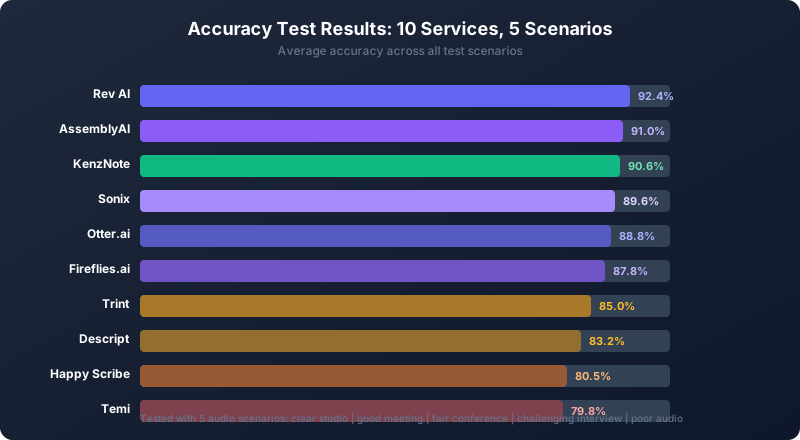 Our accuracy testing across 10 services with 5 different audio samples revealed significant differences.
We conducted rigorous accuracy testing of 10 leading AI transcription services to find out which really deliver on their accuracy claims.
Our Testing Methodology
Audio Samples (5 scenarios):
- Clear professional recording: 2-person podcast, studio mics, no background noise
- Good business meeting: 4-person Zoom call, decent laptop mics, minimal noise
- Fair conference call: 6-person Teams meeting, some background noise, crosstalk
- Challenging interview: 2-person field recording, street noise, strong accents
- Poor audio: 5-person meeting, laptop mic, echo, multiple interruptions
Accuracy Measurement:
- Word Error Rate (WER): % of words transcribed incorrectly
- Speaker identification accuracy
- Punctuation and capitalization accuracy
- Time to complete transcription
Services Tested:
Rev AI, Otter.ai, KenzNote, Descript, Fireflies.ai, Sonix, AssemblyAI, Trint, Happy Scribe, Temi
Test Results: Accuracy by Service
Scenario 1: Clear Professional Recording
| Service | Accuracy | Speaker ID | Speed | Notes |
|---|---|---|---|---|
| Rev AI | 98.2% | Perfect | 3 min | Virtually flawless |
| AssemblyAI | 97.8% | Perfect | 2 min | Excellent punctuation |
| Sonix | 97.1% | Perfect | 4 min | Great editor |
| KenzNote | 96.8% | Perfect | 2 min | Very good overall |
| Otter.ai | 96.3% | Perfect | Real-time | Live transcription impressive |
| Fireflies.ai | 95.9% | Perfect | 3 min | Good summaries |
| Trint | 95.2% | Perfect | 4 min | Solid performance |
| Descript | 94.8% | Perfect | 5 min | Audio editing shines |
| Happy Scribe | 93.1% | Perfect | 4 min | Good for subtitles |
| Temi | 91.7% | N/A | 3 min | Budget option shows |
Scenario 2: Good Business Meeting (4 people, Zoom)
| Service | Accuracy | Speaker ID | Speed | Notes |
|---|---|---|---|---|
| KenzNote | 96.4% | Excellent | 2 min | Built for meetings, shows |
| Rev AI | 96.1% | Excellent | 3 min | Consistent quality |
| Otter.ai | 95.8% | Excellent | Real-time | Meeting-optimized |
| Fireflies.ai | 95.3% | Excellent | 3 min | Great analytics |
| AssemblyAI | 94.9% | Very good | 2 min | Slightly lower for meetings |
| Sonix | 94.2% | Very good | 4 min | Good but not meeting-focused |
| Trint | 93.5% | Good | 5 min | Adequate |
| Descript | 92.8% | Good | 5 min | Some speaker confusion |
| Happy Scribe | 89.4% | Fair | 4 min | Struggled with speakers |
| Temi | 87.2% | N/A | 3 min | Noticeable errors |
Scenario 3: Fair Conference Call (6 people, some noise)
| Service | Accuracy | Speaker ID | Speed | Notes |
|---|---|---|---|---|
| Rev AI | 92.8% | Very good | 4 min | Handled noise well |
| KenzNote | 92.1% | Very good | 3 min | Good with crosstalk |
| AssemblyAI | 91.6% | Good | 3 min | Solid performance |
| Fireflies.ai | 90.8% | Good | 4 min | Decent with 6 speakers |
| Otter.ai | 90.3% | Good | Real-time | More speakers = harder |
| Sonix | 89.7% | Fair | 5 min | Some confusion |
| Trint | 88.5% | Fair | 5 min | Struggled with noise |
| Descript | 86.9% | Fair | 6 min | Multiple errors |
| Happy Scribe | 84.2% | Poor | 5 min | Many mistakes |
| Temi | 81.5% | N/A | 4 min | Not recommended |
Scenario 4: Challenging Interview (strong accents, street noise)
| Service | Accuracy | Speaker ID | Speed | Notes |
|---|---|---|---|---|
| Rev AI | 89.4% | Good | 5 min | Best for accents |
| AssemblyAI | 87.2% | Good | 4 min | Handled noise decently |
| Sonix | 86.8% | Good | 5 min | Fair with accents |
| KenzNote | 85.6% | Good | 4 min | Some accent struggles |
| Fireflies.ai | 84.3% | Fair | 5 min | Noise affected it |
| Otter.ai | 83.9% | Fair | Real-time | Accent challenges |
| Trint | 82.1% | Fair | 6 min | Noticeable errors |
| Descript | 79.4% | Fair | 6 min | Struggled significantly |
| Happy Scribe | 76.8% | Poor | 5 min | Many mistakes |
| Temi | 74.2% | N/A | 4 min | Poor quality |
Scenario 5: Poor Audio (echo, interruptions, laptop mic)
| Service | Accuracy | Speaker ID | Speed | Notes |
|---|---|---|---|---|
| Rev AI | 85.7% | Fair | 6 min | Still usable |
| AssemblyAI | 83.4% | Fair | 5 min | Decent considering audio |
| KenzNote | 81.9% | Fair | 5 min | Struggled but OK |
| Sonix | 80.2% | Poor | 6 min | Many errors |
| Fireflies.ai | 78.6% | Poor | 6 min | Difficult for AI |
| Otter.ai | 77.8% | Poor | Real-time | Real challenge |
| Trint | 75.3% | Poor | 7 min | Significant issues |
| Descript | 72.1% | Poor | 7 min | Not recommended |
| Happy Scribe | 68.9% | Poor | 6 min | Poor performance |
| Temi | 64.3% | N/A | 5 min | Unusable quality |
Overall Accuracy Rankings
1. Rev AI - Most accurate overall (average 92.4%)
- Consistently top 1-2 across all scenarios
- Best for accents and challenging audio
- Worth the premium for critical accuracy
2. AssemblyAI - Very accurate (average 91.0%)
- Excellent for clear audio
- Good API for developers
- Slightly lower for conversational meetings
3. KenzNote - Best for meetings (average 90.6%)
- Optimized for meeting audio specifically
- Excellent speaker identification
- Great value for accuracy
4. Sonix - Solid accuracy (average 89.6%)
- Consistently good across scenarios
- Great editor interface
- Good for multi-speaker content
5. Otter.ai - Very good for meetings (average 88.8%)
- Real-time performance impressive
- Meeting-focused optimization
- English-only limitation
6. Fireflies.ai - Good overall (average 87.8%)
- Strong meeting performance
- Analytics make up for slight accuracy gap
- Decent multi-speaker handling
7. Trint - Adequate (average 85.0%)
- Professional features
- Accuracy not leading class
- Better for clean audio
8. Descript - Fair accuracy (average 83.2%)
- Video editing is the focus
- Accuracy not top priority
- Best used with clear audio
9. Happy Scribe - Lower accuracy (average 80.5%)
- Multilingual focus affects English accuracy
- Good for subtitles despite errors
- Not best for quotable content
10. Temi - Budget accuracy (average 79.8%)
- You get what you pay for
- OK for rough drafts
- Not recommended for professional use
Key Findings
Audio Quality Matters Most:
All services dropped 10-25% accuracy from clear to poor audio. Invest in good recording quality for best results.
Speaker Identification Varies:
- 2 speakers: All services 95%+ accurate
- 4 speakers: Top services 90%+, budget services 80%
- 6+ speakers: Top services 85%, budget services <70%
Accents Affect All Services:
Strong accents reduced accuracy by 5-15% across all services. Rev AI handled accents best in our testing.
Real-Time vs Post-Processing:
Real-time transcription (Otter, Fireflies) was 2-5% less accurate than post-processing, but the instant availability often makes up for it.
Punctuation Accuracy:
Not measured in WER but significantly impacts readability. Rev AI and AssemblyAI had best punctuation. Temi and Happy Scribe had frequent punctuation errors.
Our Recommendations by Accuracy Needs
Need 98%+ accuracy: Use Rev AI or pay for human transcription
Need 95%+ accuracy: Rev AI, AssemblyAI, or KenzNote for meetings
Need 90%+ accuracy: Otter.ai, Fireflies.ai, Sonix all suitable
Can accept 85%+ accuracy: Trint, Descript (if using their other features)
Budget priority, 80%+ OK: Happy Scribe, Temi for rough drafts
Testing Note: Results may vary based on your specific audio characteristics, accents, terminology, and recording quality. We recommend testing free trials with your actual use case before committing.
How to Choose the Right AI Transcription Service
With 25+ AI transcription services available, how do you choose? Follow this decision framework.
Step 1: Identify Your Primary Use Case
Choose ONE primary use case:
- Business meetings (Zoom, Teams, Meet)
- Interviews (journalism, research, content)
- Podcasts (audio editing and show notes)
- Videos (YouTube, courses, subtitles)
- Lectures (education, accessibility)
- Legal (depositions, court proceedings)
- Medical (doctor-patient, clinical notes)
- General transcription (multiple purposes)
Your use case determines which features matter most.
Step 2: Define Your Accuracy Requirements
How accurate do transcripts need to be?
- 99%+ (Critical): Legal docs, medical records, academic research → Human or hybrid transcription
- 95-98% (High): Interviews, podcasts, important meetings → Rev AI, AssemblyAI, KenzNote
- 90-95% (Good): Most meetings, content creation → Otter, Fireflies, Sonix
- 85-90% (Acceptable): Notes, drafts, rough transcripts → Descript, Trint
- <85% (Basic): Quick reference only → Temi, free tools
Higher accuracy requirements = higher costs.
Step 3: Determine Your Volume
How much audio do you transcribe monthly?
- Low (0-5 hours): Pay-per-use or freemium plans
- Medium (5-20 hours): Individual subscription plans
- High (20-100 hours): Premium or team plans
- Very high (100+ hours): Enterprise plans with volume discounts
Volume determines which pricing model makes sense.
Step 4: Identify Must-Have Features
Check all features you require:
- Real-time transcription during meetings
- Speaker identification (diarization)
- Multi-language support (specify languages: ___)
- Integration with Zoom/Teams/Meet
- Mobile app for recording
- Video editing capabilities
- Subtitle/caption generation
- API access for custom integration
- Collaboration and sharing
- Export formats (Word, PDF, SRT, etc.)
- Custom vocabulary
- Analytics and insights
- Action item extraction
- Summary generation
- Compliance (HIPAA, SOC 2, etc.)
More features = higher tier plans required.
Step 5: Consider Privacy & Security
Check all that apply:
- Confidential/sensitive content
- HIPAA compliance required (medical)
- Legal privilege concerns
- Business secrets/proprietary info
- Don't want calendar access
- Need data residency (specific country)
- Require Business Associate Agreement (BAA)
- Need SOC 2 certification
Privacy concerns may eliminate certain services or require enterprise plans.
Step 6: Set Your Budget
What can you spend per month?
- $0 (Free): Otter.ai, Fireflies.ai, Microsoft/Google tools
- $1-10: KenzNote (pay-per-use), Otter Pro
- $10-25: Otter, Descript, Fireflies, Sonix
- $25-50: Sonix Premium, Descript Pro, Trint
- $50-100: Trint, team plans
- $100+: Enterprise plans, specialized services
Budget constrains your options significantly.
Decision Matrix
Use this matrix to narrow down your options:
| Your Priority | Top Recommendation | Alternative 1 | Alternative 2 |
|---|---|---|---|
| Meetings + Privacy | KenzNote | Otter.ai | Fireflies.ai |
| Meetings + Analytics | Fireflies.ai | Otter.ai | KenzNote |
| Interviews | Sonix | Rev AI | Otter.ai |
| Podcasts | Descript | Rev AI | Sonix |
| Video Editing | Descript | Rev AI | Happy Scribe |
| Highest Accuracy | Rev AI | AssemblyAI | Sonix |
| Budget | Temi | Otter Free | KenzNote |
| Students | Otter Free | MS Word | Google Meet |
| Journalists | Sonix | Trint | Rev AI |
| Legal | Rev Legal | Verbit | Simon Says |
| Medical | Deepgram Medical | Suki AI | Nuance |
| Developers | AssemblyAI | Deepgram | Rev AI |
| Multilingual | Happy Scribe | Sonix | Fireflies.ai |
Quick Decision Tree
Start here:
Q: What's your primary use case?
→ Meetings: Go to Meetings branch → Content (podcasts, videos, interviews): Go to Content branch → Specialized (legal, medical): Go to Specialized branch
MEETINGS BRANCH:
Q: How many meetings per month? → 1-10 meetings: KenzNote (pay-per-meeting) → 10-40 meetings: Otter.ai Pro ($10/month) → 40+ meetings: Fireflies.ai Business ($19/user) or Otter Business
Q: Do you need analytics/insights? → Yes: Fireflies.ai (best analytics) → No: Otter.ai or KenzNote (simpler)
Q: Calendar access OK? → No (privacy): KenzNote → Yes: Otter or Fireflies
CONTENT BRANCH:
Q: What type of content?
→ Podcasts needing editing: Descript → Interviews for articles: Sonix or Rev AI → YouTube videos: Descript or Happy Scribe → Subtitles/captions: Happy Scribe or Rev
Q: Accuracy critical? → Yes (will quote): Rev AI → No (general notes): Descript or Sonix
Q: How many hours per month? → <5 hours: Rev AI pay-per-use → 5-20 hours: Sonix or Descript subscription → 20+ hours: Descript Pro or Sonix Premium
SPECIALIZED BRANCH:
Q: What's your specialty?
→ Legal: Rev Legal or Verbit Legal → Medical: Deepgram Medical or Suki AI (if EHR integration needed) → Journalism: Sonix or Trint → Academic: Rev AI or Otter.ai → Developer: AssemblyAI (API)
Red Flags to Avoid
Don't choose a service if:
- ❌ No free trial available for expensive service (test before committing)
- ❌ Accuracy claims without independent verification (marketing hype)
- ❌ No clear privacy policy or data handling info
- ❌ Calendar access required when you need privacy
- ❌ No customer support (email only, no response)
- ❌ Hidden fees (exports, storage, integrations cost extra)
- ❌ Locks you in (no export, data held hostage)
- ❌ Poor reviews for your use case specifically
Testing Checklist
Before committing, test these:
- Upload your typical audio sample (not their demo)
- Check accuracy with your accents/terminology
- Test speaker identification with your meeting size
- Try the editor (is it easy to fix errors?)
- Verify integrations work (Zoom, Slack, etc.)
- Test export formats you need
- Contact support (response time, helpfulness?)
- Check pricing for your actual volume (surprises?)
Most services offer free trials. Use them.
Security & Privacy for Confidential Transcription
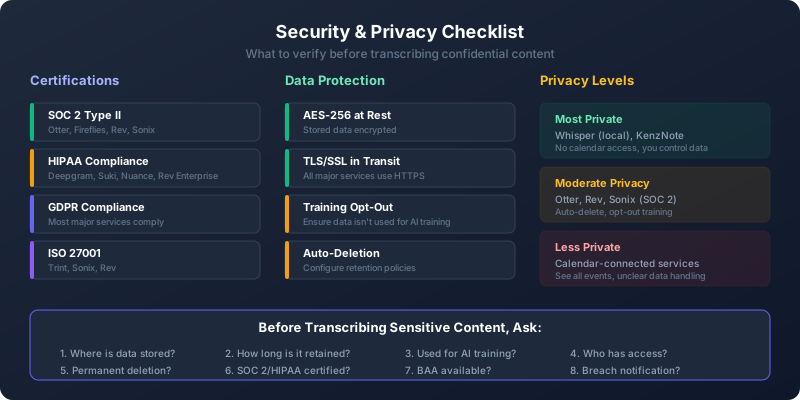 Security considerations for confidential audio transcription.
If you're transcribing sensitive information, security and privacy are critical. Here's what to look for.
Security Certifications & Compliance
SOC 2 Type II:
Third-party audit of security controls. Look for: Otter.ai, Fireflies.ai, AssemblyAI, Rev, Sonix, Trint.
What it means: Company has documented security processes and independent verification.
HIPAA Compliance:
Required for protected health information (PHI) in healthcare.
Services with HIPAA: Deepgram Medical, Suki AI, Nuance Dragon Medical, Rev (enterprise plan with BAA)
What you need: Business Associate Agreement (BAA) from the service.
GDPR Compliance:
Required for EU citizen data. Most major services comply.
What it means: Data residency options, right to deletion, consent management.
ISO 27001:
International security standard. Look for: Trint, Sonix, Rev.
What it means: Comprehensive information security management system.
Data Encryption
At Rest (Storage):
Your audio files and transcripts should be encrypted when stored. Standard is AES-256 encryption.
In Transit (Upload/Download):
All services should use TLS/SSL (https://) for all data transfer.
End-to-End Encryption:
Rare in transcription services because AI needs to process unencrypted audio. KenzNote offers local processing option for maximum privacy.
Data Retention & Deletion
Automatic Deletion:
Some services automatically delete audio files after transcription (Otter.ai after 30 days by default).
Manual Deletion:
You should be able to delete transcripts and audio anytime. Check service policies.
Right to Deletion:
GDPR gives you the right to delete all your data. Most services comply.
Backup Policies:
Services may retain backups for 30-90 days even after deletion. Check terms of service.
Privacy Concerns by Service Type
Calendar-Connected Services (Otter, Fireflies):
- Pro: Automatic joining, no manual work
- Con: Service sees all your calendar events
- Con: May access meeting metadata (titles, attendees)
Calendar-Free Services (KenzNote):
- Pro: No calendar access, better privacy
- Pro: You choose what to record
- Con: Manual start required
Bot-Based Services (Otter, Fireflies):
- Pro: Visible to participants, transparent
- Con: Participants see recording bot, may alter behavior
- Con: Some clients uncomfortable with bots
Local Recording Services (KenzNote, Descript):
- Pro: You control the recording device
- Pro: No third party in meeting
- Con: Responsible for legal consent
Legal Consent Requirements
One-Party Consent States (38 US states):
You can record if one party (you) consents. Others don't need to know.
Two-Party/All-Party Consent States (12 US states):
All parties must consent to recording. These states: California, Connecticut, Florida, Illinois, Maryland, Massachusetts, Michigan, Montana, Nevada, New Hampshire, Pennsylvania, Washington.
Best Practice:
Always announce recording at the start: "This meeting is being recorded and transcribed for notes."
International:
Laws vary by country. EU generally requires consent. Check local laws.
Security Best Practices
For Sensitive Content:
- Use HIPAA/SOC 2 certified service
- Enable two-factor authentication on your account
- Don't share transcripts publicly (use private links)
- Redact sensitive info before sharing (names, numbers, etc.)
- Delete after use if no longer needed
- Use custom vocabulary to train AI on terms (avoids errors)
- Review before sharing (AI might mishear sensitive data)
For Legal/Medical:
- Get signed Business Associate Agreement (BAA)
- Use services with specific certification (HIPAA for medical)
- Consider hybrid (AI + human with clearance)
- Maintain audit logs (who accessed what when)
- Use data residency options (keep data in your country)
For Competitive/Proprietary Info:
- Review terms of service (does provider train models on your data?)
- Opt out of training data if available
- Consider enterprise plan with custom data handling
- Use local processing when available
- Have legal review terms before using service
Questions to Ask Services
Before transcribing sensitive content, ask:
- Where is my data stored? (Which country/region?)
- How long do you retain audio files? (Days? Weeks? Forever?)
- Do you use my data to train models? (Opt-out available?)
- Who has access to my transcripts? (Employees? Contractors?)
- What happens if I delete? (Permanent? Backups deleted?)
- Do you have SOC 2/HIPAA/ISO? (Verify, don't just trust marketing)
- Can I get a BAA? (For HIPAA compliance)
- What's your breach notification policy? (How will you tell me?)
Privacy-Focused Alternatives
Most Private:
- Local processing: Whisper (run locally on your computer)
- Calendar-free: KenzNote (no calendar access, you control recording)
- Self-hosted: AssemblyAI API (you control server)
Moderate Privacy:
- Auto-delete: Otter.ai (deletes audio after 30 days)
- Opt-out training: Most services allow opting out
- SOC 2 certified: Otter, Fireflies, Rev, Sonix
Less Private:
- Calendar-connected: Fireflies, Otter (see all events)
- Unknown data handling: Free services without clear policies
- Foreign servers: Services without data residency options
If privacy is your top concern, prioritize calendar-free services like KenzNote or local processing tools.
How to Transcribe Audio to Text: Step-by-Step
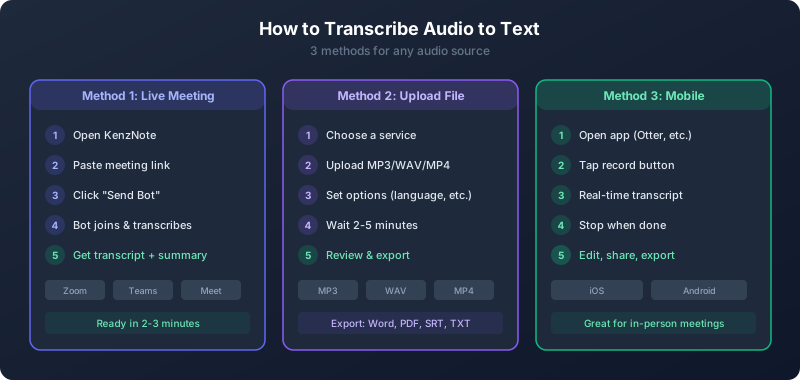 Follow these steps to transcribe any audio or video file to text.
Ready to transcribe? Here's how to do it with AI transcription services.
Method 1: Transcribe a Meeting Live (Real-Time)
Using KenzNote (Calendar-Free):
- Before or during the meeting, open KenzNote
- Paste your meeting link (Zoom, Teams, or Meet)
- Click "Join & Record" - KenzNote connects and starts transcribing
- Meeting transcript appears in real-time
- After meeting, review transcript, action items, and summary
- Export to Word, PDF, or share link
Using Otter.ai (Calendar-Connected):
- Connect Otter to your Google Calendar
- Otter automatically detects upcoming meetings
- At meeting time, Otter Assistant joins automatically
- Real-time transcript visible during meeting
- After meeting, transcript ready with summary
- Share with attendees or export
Using Fireflies.ai (Bot-Based):
- Connect Fireflies to calendar and video platforms
- Add Fireflies.ai to meetings (manual or automatic)
- Fred (the bot) joins meeting and introduces itself
- Real-time transcription available
- Post-meeting: analytics, insights, searchable transcript
- Share or integrate with CRM/tools
Method 2: Transcribe an Audio File
General Process (All Services):
Step 1: Prepare Your Audio
- Format: MP3, WAV, M4A, or MP4 (most services support all)
- Quality: Higher quality = better accuracy
- Length: Check service limits (usually 2-5 hours max per file)
- File size: Under 2GB typically
Tips:
- Use quality microphone during recording
- Record in quiet environment
- Minimize background noise
- One person speaking at a time for best results
Step 2: Choose and Sign Up for Service
For this example, we'll use Rev AI (high accuracy, pay-per-use):
- Go to Rev.ai
- Sign up for account (email + password)
- Add payment method (needed for paid services)
- Get $10 free credit to start
Step 3: Upload Audio
- Click "Order Transcription" or "Upload"
- Drag and drop your audio file or browse to select
- Audio uploads (time depends on file size)
- File processes (service analyzes and prepares)
Step 4: Configure Options
- Verbatim vs Clean: Verbatim includes "ums" and false starts, Clean reads more naturally
- Timestamps: How often? (Every paragraph, every sentence, every 30 seconds)
- Speaker labels: How many speakers? Provide names if known
- Custom vocabulary: Add industry terms, names, acronyms
- Turnaround: Standard (5 minutes) or Rush (expedited for extra cost on some services)
Step 5: Start Transcription
- Review settings
- Confirm pricing (usually shown before processing)
- Click "Transcribe" or "Start"
- Wait 2-5 minutes for AI processing
Step 6: Review Transcript
- Open completed transcript
- Play audio synced with text
- Edit any errors (click to fix)
- Add speaker names if not auto-detected
- Adjust formatting (paragraphs, punctuation)
Most services have excellent editors that sync audio playback to transcript position, making corrections easy.
Step 7: Export
Available formats typically:
- Word (.docx) - For editing and formatting
- PDF - For sharing read-only
- Text (.txt) - Plain text
- SRT/VTT - Subtitle files for video
- JSON - For developers/API use
Choose format and download.
Method 3: Transcribe a Zoom/Teams/Meet Recording
If You Have the Recording File:
Follow Method 2 (transcribe audio file) above. Most services accept video files (MP4) and extract audio automatically.
If You Want to Auto-Transcribe Future Meetings:
Zoom:
- Enable Zoom's built-in transcription (Settings → Recording → Audio transcript)
- Or connect third-party service (Otter, Fireflies, KenzNote)
Microsoft Teams:
- Enable Teams transcription (Meeting options → Turn on live captions + transcription)
- Transcript saved automatically with recording
Google Meet:
- Google Workspace users: Enable auto-transcription in admin settings
- Transcript saved to meeting organizer's Drive
Method 4: Transcribe on Mobile
Most services have mobile apps for recording and transcribing on the go.
Using Otter.ai Mobile (Example):
- Open Otter app on iPhone or Android
- Tap record button
- Speak or let meeting audio play
- Real-time transcript appears
- Stop recording when done
- Edit, share, or export from app
Using Device Recorder + Upload:
- Use phone's voice recorder app
- Record audio (meeting, interview, lecture)
- Open transcription service app or website
- Upload recorded file
- Wait for transcription
- Review and export
Tips for Better Transcription Accuracy
Audio Quality Tips:
- Use external microphone (not laptop/phone mic)
- Record in quiet room (close windows, turn off fans)
- Speaker close to mic (6-12 inches)
- Use pop filter for podcast/interview
- Test audio before important recording
Speaking Tips:
- Speak clearly at moderate pace
- Avoid crosstalk (one person at a time)
- Minimize filler words if possible
- Introduce participants by name
- Spell unusual names or terms
Setup Tips:
- Add custom vocabulary before transcribing
- Provide speaker names if known
- Choose appropriate settings (verbatim vs clean)
- Select correct language/accent
- Use highest quality audio format available
Post-Processing Tips:
- Review transcript while listening to audio
- Fix errors immediately (easier than later)
- Add speaker names if missing
- Break into paragraphs for readability
- Export in format you need (don't re-do later)
Common Issues & Solutions
Problem: Low Accuracy
- Cause: Poor audio quality
- Solution: Re-record with better mic, quieter environment
Problem: Speakers Not Identified
- Cause: Similar voices or service limitation
- Solution: Manually label speakers in editor, introduce by name in future
Problem: Specialized Terms Wrong
- Cause: AI doesn't know industry vocabulary
- Solution: Add custom vocabulary before transcribing
Problem: File Too Large
- Cause: Service has file size limit
- Solution: Split file into smaller chunks, or use service with higher limits
Problem: Wrong Language Detected
- Cause: Auto-detection error
- Solution: Manually select language before transcribing
Workflow Automation
For Regular Transcription:
- Automate uploads: Use Zapier to auto-send files from Dropbox → transcription service
- Batch processing: Upload multiple files at once if service supports
- API integration: Connect transcription API to your workflow (for developers)
- Calendar sync: Auto-transcribe all meetings (Otter, Fireflies)
- Slack notifications: Get notified when transcripts ready
Example Automation (Zapier):
- Trigger: New video file in Dropbox folder
- Action: Upload to Rev AI for transcription
- Action: When complete, save transcript to Google Docs
- Action: Send Slack notification with link
This eliminates manual uploading.
Frequently Asked Questions
What is an AI transcription service?
AI transcription services use artificial intelligence to automatically convert spoken words in audio or video into written text. They employ machine learning models trained on millions of hours of speech to recognize words, identify speakers, add punctuation, and format transcripts. Modern AI transcription achieves 85-98% accuracy depending on audio quality and costs $0-2.50 per audio hour.
How accurate are AI transcription services?
AI transcription services achieve 85-98% accuracy depending on audio quality and service. Top services (Rev AI, AssemblyAI, KenzNote) reach 95-98% accuracy for clear English audio with native speakers. Accuracy decreases with background noise (85-92%), strong accents (80-93%), or poor recording quality (70-85%). For comparison, professional human transcribers achieve 98-99% accuracy.
How much do AI transcription services cost?
AI transcription costs range from free to $2.50 per audio hour depending on service and plan: Free tiers include Otter.ai (300 min/month), Fireflies.ai (800 min), Microsoft Word (Office 365 users). Pay-per-use ranges $0.25-2.50 per audio hour (Rev, Temi, KenzNote). Subscriptions run $10-50/month for individuals, $15-50/user/month for teams. Enterprise offers custom pricing for high volume. Human transcription costs $15-30 per audio hour, making AI 10-20x cheaper.
Can AI transcription handle multiple speakers?
Yes, modern AI transcription services automatically identify and label multiple speakers (called "speaker diarization"). Accuracy varies: 2 speakers get 95%+ accuracy across all services, 3-5 speakers get 90-95% with top services, and 6+ speakers get 85-90% with the best services only. Services with excellent multi-speaker support include KenzNote, Rev AI, Sonix, and Fireflies.ai. Accuracy improves if you provide speaker names beforehand.
Is AI transcription HIPAA compliant?
Some AI transcription services offer HIPAA compliance, but not all. HIPAA-compliant options include Deepgram Medical (purpose-built for healthcare), Suki AI (clinical documentation with EHR integration), Nuance Dragon Medical (industry standard), and Rev (Enterprise with BAA, human + AI hybrid). The service must sign a Business Associate Agreement (BAA) and maintain proper security controls. Most standard transcription services (Otter, Fireflies) are NOT HIPAA compliant without enterprise plans.
How long does AI transcription take?
AI transcription is very fast: Real-time services like Otter.ai and Fireflies.ai transcribe as you speak (0 wait time). Post-processing on most services completes in 2-5 minutes per audio hour. Fastest services include AssemblyAI (1-2 minutes) and KenzNote (2-3 minutes). For comparison, human transcription takes 24-48 hours turnaround, and manual typing takes 4-6 hours per audio hour.
What languages do AI transcription services support?
Language support varies by service: English only includes Otter.ai and Temi. Major languages (10-40) are supported by Rev AI (39), Sonix (40+), and Descript (23). Extensive support (60-120+) comes from Happy Scribe (120+), Fireflies.ai (60+), and KenzNote (100+). English achieves highest accuracy (95-98%). Other major languages (Spanish, French, German, Chinese) typically reach 85-95% accuracy. Less common languages achieve 70-85% accuracy.
Can I use AI transcription for legal purposes?
AI transcription can be used for legal case notes and research, but most courts require human transcription or certified AI+human hybrid for official proceedings. For internal notes/research, AI transcription works fine (Rev AI, AssemblyAI). For depositions/hearings, use certified services (Verbit Legal, Rev Legal with human certification). For court admissible transcripts, check local court requirements as most require human transcribers. Always verify critical statements against original audio before using in legal documents.
How secure is AI transcription for confidential content?
Security varies significantly by service. For confidential content, look for certifications like SOC 2 and ISO 27001 (Otter, Fireflies, Rev, Sonix), encryption with AES-256 at rest and TLS in transit (all major services), data handling options to opt-out of training data and automatic deletion, and privacy-first calendar-free services like KenzNote. For highly sensitive content, use services with compliance certifications, get a Business Associate Agreement, review terms of service, or use local processing (Whisper).
What's the best AI transcription for Zoom meetings?
Top choices for Zoom meeting transcription: KenzNote ($0.99/meeting) is best for privacy with no calendar access and pay-per-use pricing. Otter.ai ($10/month) is best for frequent meetings with real-time collaboration. Fireflies.ai ($10-19/user) is best for meeting analytics and insights. All three integrate with Zoom, provide speaker identification, action item extraction, and summaries. Zoom also has built-in transcription (Settings > Recording > Audio transcript) included free with paid Zoom accounts.
Can AI transcription services transcribe in real-time?
Yes, several services offer real-time transcription: Otter.ai provides live transcription during meetings with a shareable real-time view. Fireflies.ai offers real-time with meeting analytics. KenzNote shows real-time transcription visible during recording. Zoom/Teams/Meet have built-in live captions and transcription. Real-time transcription is slightly less accurate (2-5% lower) than post-processed transcription but offers immediate access, useful for accessibility (live captions), note-taking during meetings, and quick reference.
How do I improve AI transcription accuracy?
To maximize transcription accuracy, focus on audio quality (use external microphone, record in quiet environment, minimize background noise and echo, position mic 6-12 inches from speaker), speaking habits (speak clearly at moderate pace, minimize crosstalk, introduce participants by name, spell unusual names or technical terms), and service setup (add custom vocabulary for industry terms and names, choose appropriate language/accent, provide speaker names if known). Good audio quality can improve accuracy from 80% to 95%+.
Can I edit AI transcripts after generation?
Yes, all AI transcription services provide editing capabilities including in-browser editors synced to audio, click-to-edit word correction, playback synced to clicked position, speaker label management, and formatting adjustments. Best editors include Sonix (journalist-friendly), Descript (edit audio by editing text), and Otter.ai (collaborative editing). All services allow exporting corrected transcripts to Word, PDF, or text formats.
What's the difference between AI and human transcription?
AI transcription takes 2-5 minutes per audio hour, costs $0-2.50 per hour, achieves 85-98% accuracy, and is best for meetings, interviews, podcasts, lectures, and most business needs. Human transcription takes 24-48 hours turnaround, costs $15-30 per hour, achieves 98-99%+ accuracy, and is best for legal depositions, medical records, academic research, and critical accuracy needs. Hybrid (AI + Human Review) takes 12-24 hours, costs $5-12 per hour, achieves 97-99% accuracy, and is best for cost-conscious but accuracy-sensitive projects.
Are there free AI transcription services?
Yes, several high-quality free options exist. Free tiers include Otter.ai (300 minutes per month, English only), Fireflies.ai (800 minutes storage), and Descript (1 hour per month). Free with other services includes Microsoft Word (unlimited for Office 365 subscribers), Google Meet (unlimited for Google Workspace users), and Zoom (included with paid accounts). Fully free options include Whisper by OpenAI (requires technical setup, run locally). Free services work well for light usage. For regular professional use, paid plans ($10-30/month) offer better accuracy, more features, and higher limits.
Related Resources
Want to dive deeper into AI-powered transcription and meeting productivity?
- What is an AI Meeting Assistant? Complete Guide
- 20 Best AI Meeting Note Taker Apps
- How to Transcribe Microsoft Teams Meetings
- Meeting Minutes Templates: 10 Free Templates
- Automatic Meeting Notes: Complete Guide
- Is It Legal to Record Meetings? State-by-State Guide
- tl;dv Review 2026: Features, Pricing & Alternatives
Ready to Automate Your Transcription?
Stop spending hours on manual transcription. Let AI convert your audio to text in minutes while you focus on what matters.
Start with KenzNote:
- ✅ 2 free meeting to try (no credit card)
- ✅ $0.99 per meeting after (or $29.99/month unlimited)
- ✅ No calendar access required (paste links when needed)
- ✅ 95-97% accuracy across all platforms
- ✅ 2-3 minute delivery after meetings
Questions? Email [email protected]
References & Citations
- [1]Introducing Whisper: Robust Speech RecognitionOpenAI. September 21, 2022https://openai.com/index/whisper/
All external sources have been reviewed for accuracy and relevance. Last verified: September 2026.

About Muhammad Abuelenin
Muhammad is the co-founder of KenzNote, passionate about building tools that enhance productivity and collaboration. With expertise in full-stack development and AI-powered solutions, he's dedicated to helping teams work smarter through innovative technology.
Ready to transform your meetings?
KenzNote automatically captures meeting insights, extracts action items, and generates summaries so you can focus on the conversation instead of taking notes.
Try KenzNote Free