
Quick Answer
Automatic meeting notes use AI to transcribe, summarize, and organize your meetings without manual effort. Modern tools like KenzNote achieve 95-98% accuracy while capturing action items, decisions, and key topics automatically. According to McKinsey research, these tools save knowledge workers 4-5 hours per week - that's 250 hours annually.
Instead of splitting attention between typing and listening, you stay fully engaged while AI documents everything. The result: better meetings, zero missed details, and complete documentation available seconds after each call ends.
Key Takeaways
- Time savings are massive: Automatic notes reclaim 7-15 hours weekly across note-taking, cleanup, and searching
- 95-98% accuracy achieved: Modern AI captures every word with professional-grade transcription quality
- Full attention improves outcomes: Build better relationships when you're listening, not typing frantically
- Action items never forgotten: AI automatically extracts tasks with owners and deadlines from conversations
- Setup takes under 5 minutes: Paste your meeting link into tools like KenzNote and you're done
- Searchable archive builds automatically: Find any past conversation detail in seconds, not hours
- Works across platforms: Compatible with Google Meet, Zoom, and Microsoft Teams seamlessly
- ROI is extraordinary: Most teams see positive returns within the first week of adoption
Automatic Meeting Notes: Never Take Manual Notes Again
You're five minutes into an important client call. The prospect just mentioned their biggest pain point - the exact problem your product solves. But you're so busy typing frantically that you missed the nuance in how they described it. Now you're torn between asking them to repeat themselves (and looking unprepared) or pretending you caught every detail (and risking a misalignment later).
This impossible choice happens dozens of times per week for professionals everywhere. Try to participate actively in the meeting, or document everything accurately? You can't do both well.
Until now.
Automatic meeting notes have transformed how thousands of teams work. No more divided attention. No more missed details. No more spending 30 minutes after each meeting trying to decipher your hastily typed fragments.
Here's everything you need to know about automatic meeting notes and why they're becoming essential for productivity in 2026.
What Are Automatic Meeting Notes?
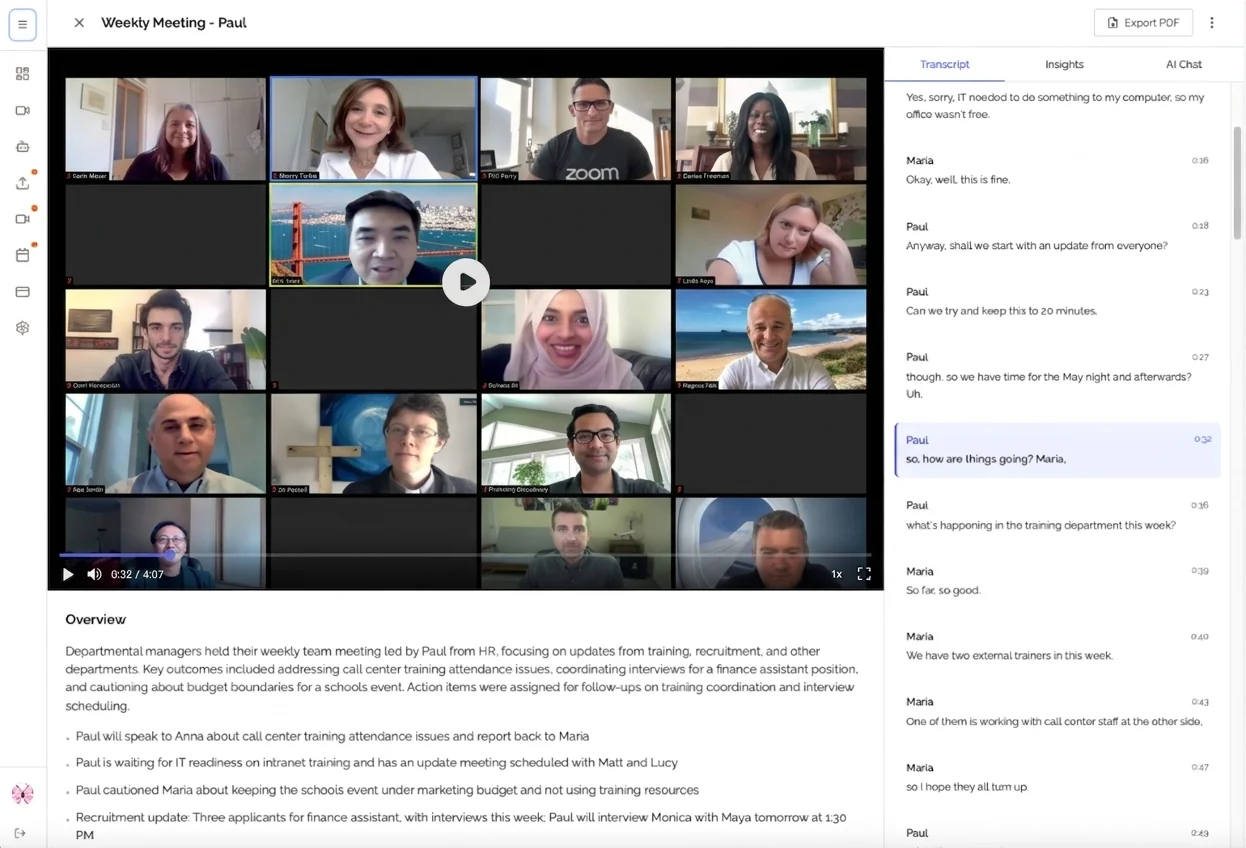
Automatic meeting notes are AI-powered documentation created without any manual effort during your meetings. The technology works behind the scenes to capture, transcribe, and organize everything said, while you stay fully engaged in the conversation.
If you're looking for a comprehensive AI notetaker solution, tools like KenzNote combine all these technologies into one seamless experience.
How They Actually Work
Modern automatic meeting note systems combine three powerful technologies:
1. Real-Time Speech Recognition
AI-powered transcription engines convert spoken words into text with 95-98% accuracy. The system handles multiple speakers, various accents, technical terminology, and even manages background noise remarkably well.
2. Natural Language Processing (NLP)
Once the transcript exists, NLP algorithms analyze the conversation to understand context, identify key topics, extract decisions, and recognize action items - all the things that matter most when you reference notes later.
3. Intelligent Summarization
Instead of dumping pages of raw transcript, the AI creates structured summaries organized by topic, with decisions clearly highlighted and action items automatically extracted with assignees and deadlines.
According to McKinsey research, generative AI tools like automatic meeting assistants can save knowledge workers 4-5 hours per week by automating documentation tasks. That's nearly 250 hours per year, more than six full work weeks, reclaimed for higher-value activities.
The Real Benefits: Why Teams Are Switching to Automatic Meeting Notes
You Save Massive Amounts of Time
Let's talk about actual time savings with automatic meeting notes:
| Activity | Traditional Manual Notes | Automatic Meeting Notes | Time Saved |
|---|---|---|---|
| Note-taking during meeting | 60 minutes per hour | 0 minutes | 60 min |
| Post-meeting cleanup | 20-30 minutes | 0 minutes | 25 min |
| Searching for information | 15 minutes per search | 30 seconds | 14.5 min |
| Sharing notes with team | 10 minutes | 1 minute | 9 min |
For just one meeting, you save approximately 1.5 hours. Multiply that by 5-10 meetings per week, and you're looking at 7-15 hours reclaimed every single week.
That's time you can spend on actual work instead of administrative overhead.
You Capture 100% of What's Said
Humans are terrible at multitasking. When you're typing notes, your brain isn't fully processing the conversation. Studies show that manual note-takers capture less than 60% of important details, and they often miss critical context while focused on writing.
With automatic meeting notes:
- ✅ Every word is captured verbatim
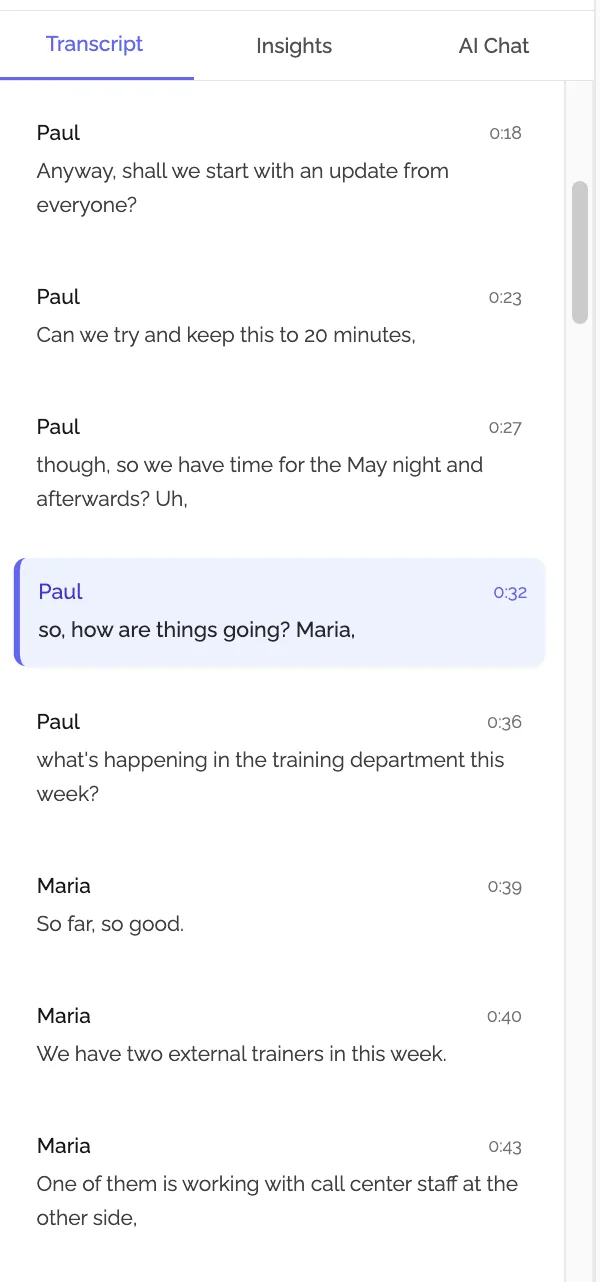
- ✅ Speaker identification shows who said what
- ✅ Timestamps make finding specific moments instant
- ✅ Nothing gets lost when someone's talking quickly
- ✅ Complete context available for later review
Your Full Attention Stays on the Meeting
This is perhaps the most transformative benefit: you can actually participate fully in your meetings again.
In client calls, you build better relationships when you're making eye contact (virtually) instead of staring at your notepad. You catch subtle cues about concerns, enthusiasm, and objections.
In team meetings, you contribute more thoughtfully to discussions when you're not distracted by documentation. Your insights are sharper because you're genuinely listening.
In brainstorming sessions, you can build on others' ideas in real-time instead of frantically trying to capture everything being said.
The result? Better meetings, better outcomes, better relationships.
How to Implement Automatic Meeting Notes
Getting started with automatic meeting notes is surprisingly simple. Here's the step-by-step process:
Step 1: Choose Your Automatic Meeting Notes Tool
Several excellent options exist in 2026:
For Comprehensive Meeting Documentation: KenzNote
- Paste your meeting link, get complete transcripts and AI summaries
- Automatic action item extraction
- No calendar integration required
- Pay-per-meeting pricing (no subscription overhead)
- Works with Google Meet, Zoom, and Microsoft Teams
For Live Transcription: Otter.ai
- Real-time transcription during meetings
- Speaker identification
- Mobile apps for on-the-go access
For Sales Teams: Fireflies.ai
- CRM integrations for sales workflows
- Conversation analytics and insights
- Call coaching features
The best choice depends on your specific needs. For most teams, comprehensive documentation tools like KenzNote provide the best balance of automation and usefulness.
Step 2: Set Up Your First Automated Meeting
Most modern tools make setup incredibly easy:
With KenzNote (No Integration Needed):
- Copy your meeting link from Google Meet, Zoom, or Teams
- Paste it into KenzNote
- Choose "Send Now" or schedule for later
- The bot joins automatically and handles everything
With Integration-Based Tools:
- Connect your calendar (one-time setup)
- Select which meetings to automatically record
- The tool joins scheduled meetings automatically
Either way, setup takes less than 5 minutes total.
Step 3: Attend Your Meeting (Actually Participate!)
This is the best part: you just show up and engage naturally. No laptop open for frantic typing. No missing key points because you're documenting. No stress about whether you're capturing everything.
The automatic meeting notes system works silently in the background, capturing every word.
Step 4: Review Your Automatic Notes After the Meeting
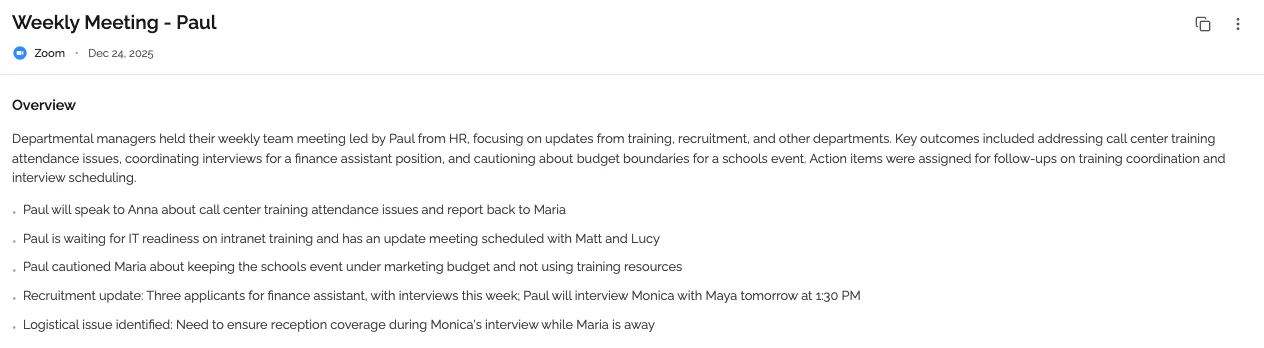
Within minutes of your meeting ending, you'll have:
Complete Transcript
- Every word spoken, with timestamps
- Speaker identification throughout
- Fully searchable for finding specific moments
AI-Generated Summary
- Key topics discussed, organized clearly
- Main points from each section
- Context and background captured
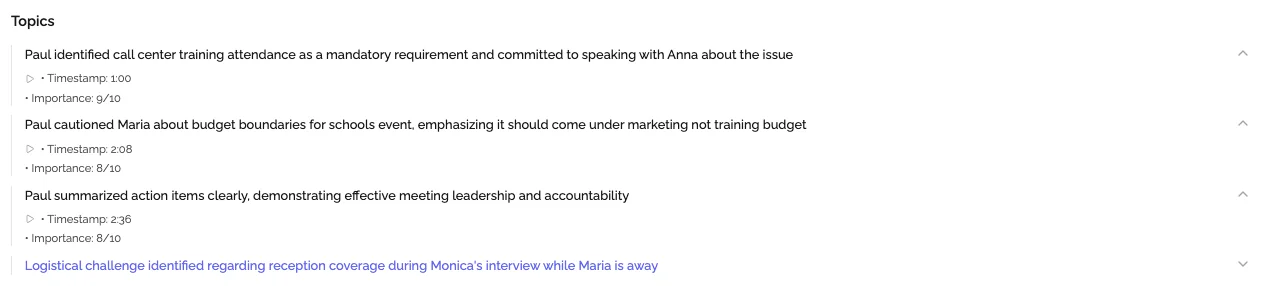
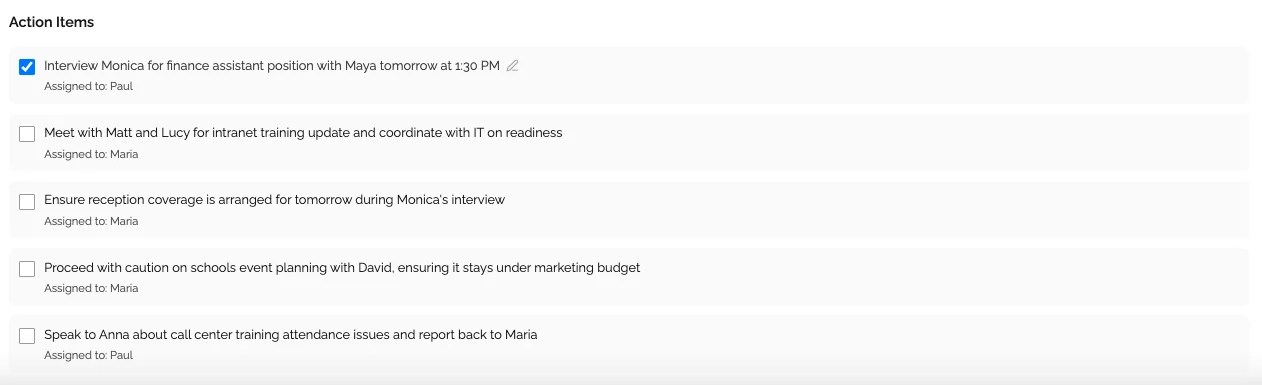
Extracted Action Items
- Clear list of tasks identified in the meeting
- Assigned owners (when mentioned)
- Deadlines and next steps highlighted
Key Decisions
- Important choices documented
- Context around why decisions were made
- Agreements and commitments tracked
Best Practices for Automatic Meeting Notes
To get maximum value from automatic meeting notes, follow these proven practices:
Always Inform Participants
Transparency matters. Let meeting participants know that you're using automatic transcription. Most tools make this obvious (the bot joins as a visible participant), but verbally acknowledging it at the start builds trust.
Simple announcement: "Hey everyone, I'm using KenzNote to automatically capture our meeting notes so we can all stay focused on the conversation. Is everyone okay with that?"
In thousands of meetings, we've seen that when you explain the benefit (better documentation, no one distracted by note-taking), participants are overwhelmingly supportive.
Review and Share Notes Promptly
Automatic notes are most valuable when shared quickly. Make it a habit to:
- Quick review (2-3 minutes): Scan the summary and action items to ensure accuracy
- Add context if needed: The AI is highly accurate, but you can always add clarifying notes
- Share within 2 hours: Send notes while the meeting is still fresh in everyone's mind
- Confirm action items: Ensure everyone knows their responsibilities
Extract Action Items to Your Task Manager
Automatic meeting notes identify action items brilliantly, but don't let them live only in your notes. Transfer important tasks to your project management system (Asana, Monday, Jira, Linear, etc.) to ensure they actually get completed.
Many automatic meeting note tools can integrate directly with task managers, making this a one-click process.
Build a Searchable Archive
One of the most powerful long-term benefits of automatic meeting notes is the searchable archive you build over time.
Six months from now, when someone asks "When did we decide to change the pricing model?", you can search your meeting archive and find the exact conversation in seconds. This institutional knowledge becomes invaluable as your team grows.
Common Questions About Automatic Meeting Notes
"Will participants feel uncomfortable being recorded?"
Initially, some might. But when you explain the benefit (better documentation that keeps everyone aligned), most people quickly appreciate it. The key is transparency and giving people the option to opt out of specific meetings if needed.
After a few meetings, automatic notes become the expected norm, and teams wonder how they ever worked without them.
"How accurate are automatic meeting notes?"
Modern AI transcription achieves 95-98% accuracy with clear audio. That's comparable to professional human transcribers at a fraction of the cost and with instant turnaround.
Accuracy improves further when you:
- Use good microphones
- Minimize background noise
- Speak clearly (which you should anyway)
- Use tools trained on business vocabulary
"What about sensitive or confidential meetings?"
Choose automatic meeting note tools with strong security credentials:
- End-to-end encryption for data in transit and at rest
- Regular security audits
- Clear data processing agreements
- Ability to delete meetings permanently
- No use of your data to train AI models
For highly sensitive discussions, you can always opt not to use automatic transcription for specific meetings. But most business conversations benefit significantly from proper documentation.
"Do automatic meeting notes work for all types of meetings?"
Automatic meeting notes excel for:
- ✅ Client calls and customer meetings (learn more about using KenzNote for sales teams)
- ✅ Team standups and status updates
- ✅ Strategy sessions and planning meetings
- ✅ Brainstorming and ideation sessions
- ✅ One-on-ones (with consent)
- ✅ Training and knowledge transfer (perfect for remote teams)
They're less useful for:
- ❌ Pure social gatherings
- ❌ Highly informal quick chats
- ❌ Meetings with extremely poor audio quality
For 90%+ of professional meetings, automatic notes provide substantial value.
"Can I edit the automatic meeting notes?"
Absolutely. While AI transcription and summarization are highly accurate, you can always review and edit. Most tools make editing simple:
- Correct any transcription errors (rare but possible)
- Add context the AI might miss
- Expand summaries with additional detail
- Reorganize sections for clarity
Think of automatic meeting notes as giving you a 95% complete draft instantly, which you can refine in minutes instead of creating from scratch over 30 minutes.
Automatic Meeting Notes vs. Traditional Note-Taking
Let's be honest about the comparison:
Traditional Manual Note-Taking
Pros:
- No technology required
- Works offline
- Complete control over what's captured
Cons:
- Divides your attention during meetings
- Captures only 40-60% of important details
- Requires 30+ minutes of cleanup afterward
- Notes aren't searchable (if handwritten)
- Can't be easily shared with team
- Time-consuming and mentally draining
Automatic Meeting Notes
Pros:
- Captures 100% of what's said
- Your full attention stays on the meeting
- Instant sharing with entire team
- Fully searchable across all meetings
- Action items automatically extracted
- Saves hours every single week
Cons:
- Requires internet connection
- Small monthly/per-meeting cost
- Participants must be informed
- Requires initial setup (one time, 5 minutes)
For most professionals, the benefits of automatic meeting notes far outweigh any drawbacks.
The Future of Work: Automatic Meeting Notes as Standard Practice
Here's where this is heading: within the next 2-3 years, automatic meeting notes will be as standard as video calls are today. Teams without automatic documentation will seem as outdated as teams who refuse to use email.
Why this shift is inevitable:
Remote and hybrid work is permanent. With distributed teams across time zones, automatic meeting notes ensure everyone has access to the same information, whether they attended live or are reviewing asynchronously.
Meeting volume keeps increasing. The average knowledge worker attends 11-15 meetings per week. Manual documentation for all of them simply isn't sustainable.
AI technology keeps improving. Today's 95% accuracy will be 99% within a year. Context understanding, multi-language support, and integration capabilities are all advancing rapidly.
Younger workers expect automation. Professionals entering the workforce in 2026 grew up with AI assistants. They're puzzled when companies make them take notes manually.
The question isn't whether your team will adopt automatic meeting notes. It's when, and whether you'll be an early adopter who gains months of competitive advantage, or a late adopter playing catch-up.
Getting Started with Automatic Meeting Notes Today
Ready to reclaim hours every week and never miss important meeting details again?
Start Small
You don't need to automate every meeting immediately. Begin with:
- Important client calls where full attention matters most
- Weekly team meetings with lots of action items
- Cross-functional planning sessions with multiple stakeholders
- Meetings where you're presenting (impossible to take notes while presenting)
After experiencing the benefits firsthand, you'll naturally expand to more meetings.
Choose the Right Tool for Your Needs
For comprehensive automatic meeting notes without calendar integration complexity, KenzNote offers the simplest path forward:
What you get with KenzNote:
- 📝 Automatic transcription with 95%+ accuracy
- 🎯 AI-extracted action items and decisions
- 📊 Structured summaries highlighting key topics
- 🔍 Searchable archive across all meetings
- 🔗 Easy sharing with team members
- 💰 Pay-per-meeting pricing (no subscription overhead)
How it works:
- Copy your meeting link (Google Meet, Zoom, or Teams)
- Paste into KenzNote and click "Send Now" or schedule
- Attend meeting and focus on the conversation
- Get complete automatic notes minutes after the meeting ends
No calendar permissions. No complex integrations. No monthly subscriptions for months you barely have meetings.
Try KenzNote free for your next meeting and experience the difference automatic meeting notes make.
Measure Your Time Savings
Track the impact over your first month:
- How many hours did you save on note-taking?
- How many action items got completed that might have been forgotten?
- How much faster could you find information from past meetings?
- How did meeting engagement change when you weren't distracted by documentation?
Most teams find they save 5-10 hours per person per week. That's transformative.
Conclusion: Automatic Meeting Notes Are a Game-Changer
The choice is simple: continue spending hours every week on manual note-taking, divided attention, and missed details, or embrace automatic meeting notes that capture everything while letting you stay fully present.
What you gain with automatic meeting notes:
- ✅ 5-10 hours back in your schedule every week
- ✅ 100% capture of every meeting detail
- ✅ Better relationships from giving full attention
- ✅ Improved follow-through on action items
- ✅ Searchable knowledge base of all discussions
- ✅ Better decisions from complete context
What you lose:
- ❌ Time spent frantically typing during meetings
- ❌ Stress about missing important details
- ❌ Hours of post-meeting cleanup
- ❌ Scattered, incomplete documentation
The technology is proven. The benefits are clear. The time to adopt automatic meeting notes is now.
Your next meeting is the perfect place to start.
Related Resources
Want to learn more about transforming your meeting productivity?
- AI Meeting Notes: Complete Guide
- Never Take Meeting Notes Again
- How to Organize Meeting Notes
- Getting Started with KenzNote
- Is It Legal to Record Meetings? State-by-State Guide
Have questions? Reach out to our team at [email protected]
References & Citations
- [1]The Economic Potential of Generative AIMcKinsey & Company. June 14, 2023https://www.mckinsey.com/capabilities/mckinsey-digital/our-insights/the-economic-potential-of-generative-ai-the-next-productivity-frontier
All external sources have been reviewed for accuracy and relevance. Last verified: October 2026.

About KenzNote Team
The KenzNote team is dedicated to helping teams capture better meeting insights and transform how they collaborate. With backgrounds in AI, product design, and enterprise software, we're building the future of meeting productivity.
Ready to transform your meetings?
KenzNote automatically captures meeting insights, extracts action items, and generates summaries so you can focus on the conversation instead of taking notes.
Try KenzNote Free