
Quick Answer
Effective meeting note organization requires seven key strategies: standardized templates, real-time structured capture, immediate post-meeting processing, consistent naming conventions, centralized storage, strategic tagging, and separate action item tracking. Research shows disorganized notes cost teams 15-20 minutes daily in search time, nearly 2 hours weekly per person.
With 26% of meetings lacking concrete action items, systematic organization prevents tasks from disappearing. The best approach combines consistent templates (separating discussion, decisions, and actions) with AI tools like KenzNote that automatically structure, tag, and extract action items, transforming scattered information into searchable institutional knowledge.
Key Takeaways
- Standardized templates drive consistency: Use the same structure for every meeting to make information instantly findable
- Process notes within 2 hours: Fill gaps and clarify details before memory fades, preventing 40% information loss
- Consistent naming enables search: Format as "YYYY-MM-DD - [Team] - [Type] - [Topic]" for automatic sorting
- Centralize in ONE system: Scattered notes across tools waste 15-20 minutes daily in search time
- Strategic tagging improves discovery: Use 5-7 tags per meeting (project, topic, status, and people tags)
- Extract actions to task manager: Don't rely on notes alone; transfer tasks immediately for 76% better completion
- AI automation saves 20-30 minutes: Tools like KenzNote auto-generate summaries, extract actions, and tag topics automatically
- Review action items at next meeting: Start every meeting reviewing previous commitments to improve 67% follow-through rate
How to Organize Meeting Notes: 7 Proven Strategies for 2026
You've been in this situation before: scrambling through messy notes trying to find who agreed to what in last week's meeting. Important decisions buried in text. Action items forgotten. Hours wasted searching instead of executing.
Poor meeting note organization isn't just frustrating; it's expensive. Inefficient meetings cost U.S. businesses $375 billion annually, with a significant portion of that waste coming from poor documentation and follow-through. When notes are disorganized, critical decisions get lost, deadlines slip, and teams waste time in unnecessary "clarification meetings."
The solution? A systematic approach to organizing meeting notes that transforms scattered information into actionable intelligence. This guide shows you exactly how to capture, structure, and retrieve meeting information so nothing falls through the cracks.
Why Organizing Meeting Notes Actually Matters
Before diving into the how, let's address the why. With employees spending 11.3 hours per week in meetings; nearly 28% of their workweek, effective documentation becomes critical for productivity.
The Cost of Disorganized Meeting Notes
Here's what happens when meeting notes aren't properly organized:
Wasted Time Searching
- Teams spend 15-20 minutes per day searching for meeting information
- That's nearly 2 hours per week just trying to find what was already discussed
- Multiply by your team size for the true cost
Missed Action Items
- Over 26% of meetings end without concrete action items
- Even when tasks are assigned, poor documentation means they get forgotten
- Projects stall waiting for deliverables nobody remembers committing to
Repeated Discussions
- Without clear documentation, teams rehash the same topics
- Decisions get questioned because there's no authoritative record
- New team members can't access historical context
Accountability Problems
- "I thought you were handling that" becomes a common refrain
- No clear ownership of responsibilities
- Blame shifting when things fall through
The Benefits of Well-Organized Notes
When you implement a systematic organization approach, you gain:
✅ Instant Retrieval - Find any decision, discussion, or action item in seconds ✅ Clear Accountability - Everyone knows exactly who owns what ✅ Reduced Meeting Time - No more "catch-up" meetings to clarify past discussions ✅ Better Decision Making - Access to full context and historical decisions ✅ Improved Onboarding - New team members can quickly understand project history ✅ Stronger Follow-Through - Action items don't disappear into note-taking black holes
The 7-Step Framework for Organizing Meeting Notes
Effective meeting note organization isn't about writing more; it's about capturing the right information in the right structure. Follow this proven framework used by high-performing teams.
Step 1: Standardize Your Note-Taking Template
Consistency is the foundation of organization. When every meeting follows the same structure, information becomes instantly findable.
Essential Template Components:
# Meeting Title
**Date:** YYYY-MM-DD
**Attendees:** [Names with roles]
**Purpose:** [One sentence objective]

## Agenda
1. Topic 1 (Time: 10 min)
2. Topic 2 (Time: 15 min)
3. Topic 3 (Time: 20 min)

## Discussion Points
### Topic 1: [Name]
- Key point discussed
- Relevant context
- Decision or outcome

### Topic 2: [Name]
- Key point discussed
- Relevant context
- Decision or outcome

## Decisions Made
1. [Clear decision with context]
2. [Clear decision with context]

## Action Items
- [ ] Task description - @Owner - Due: YYYY-MM-DD
- [ ] Task description - @Owner - Due: YYYY-MM-DD

## Questions & Blockers
- Unanswered question requiring follow-up
- Blocker preventing progress

## Next Steps
- Follow-up meeting scheduled for [date]
- Next milestone: [description]
Why This Works:
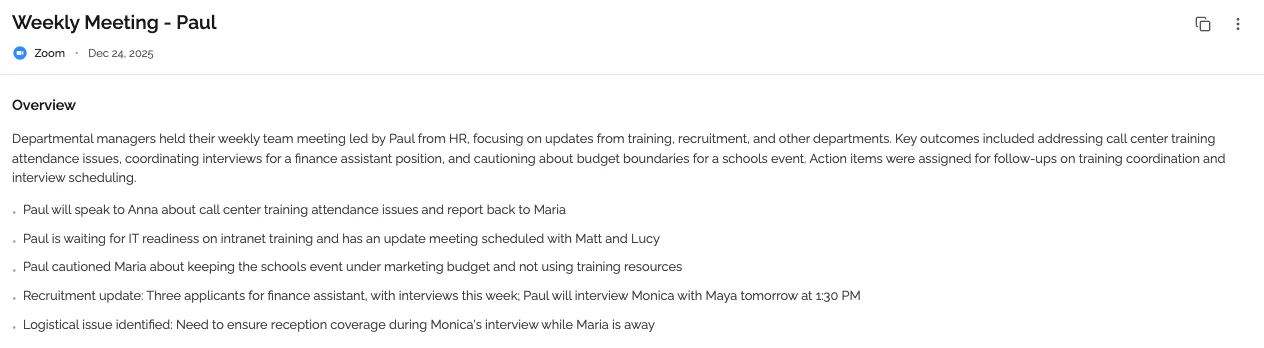
This structure separates what was discussed (Discussion Points) from what was decided (Decisions Made) and what needs to happen (Action Items). This separation makes scanning notes dramatically faster.
Interestingly, nearly 50% of professionals still rely on handwritten notes during meetings. While there's nothing wrong with handwritten notes for capture, they must be transferred to a digital, searchable format using this template for effective organization.
Step 2: Capture Notes in Real-Time with Structure
The best time to organize meeting notes is during the meeting itself. Waiting until afterward means you'll forget critical details and context.
During the Meeting:
Use Your Template Immediately
- Open your standardized template before the meeting starts
- Fill in attendees, purpose, and agenda upfront
- This structure guides what you capture
Focus on Key Information
- Decisions made and why
- Action items with clear ownership
- Questions that need follow-up
- Context for future reference
Skip Verbatim Transcription
- You don't need every word spoken
- Capture the essence, not the transcript
- Use bullet points, not paragraphs
Assign Ownership in Real-Time
- When someone says "I'll handle that," immediately add
@Nameto the action item - Get deadline confirmation before moving on
- Don't leave ownership ambiguous
Pro Tip: If you're leading the meeting, consider having someone else take notes. Research shows that 78% of professionals find it hard to get real work done due to meeting overload, and trying to simultaneously lead discussions and take detailed notes makes both tasks suffer.
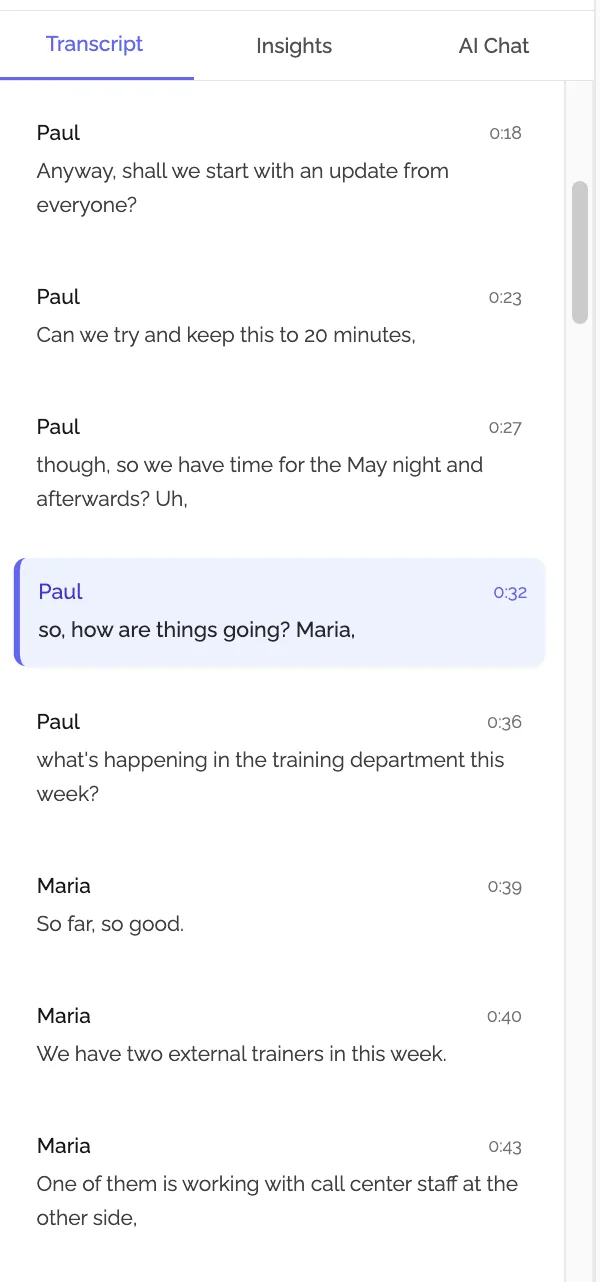
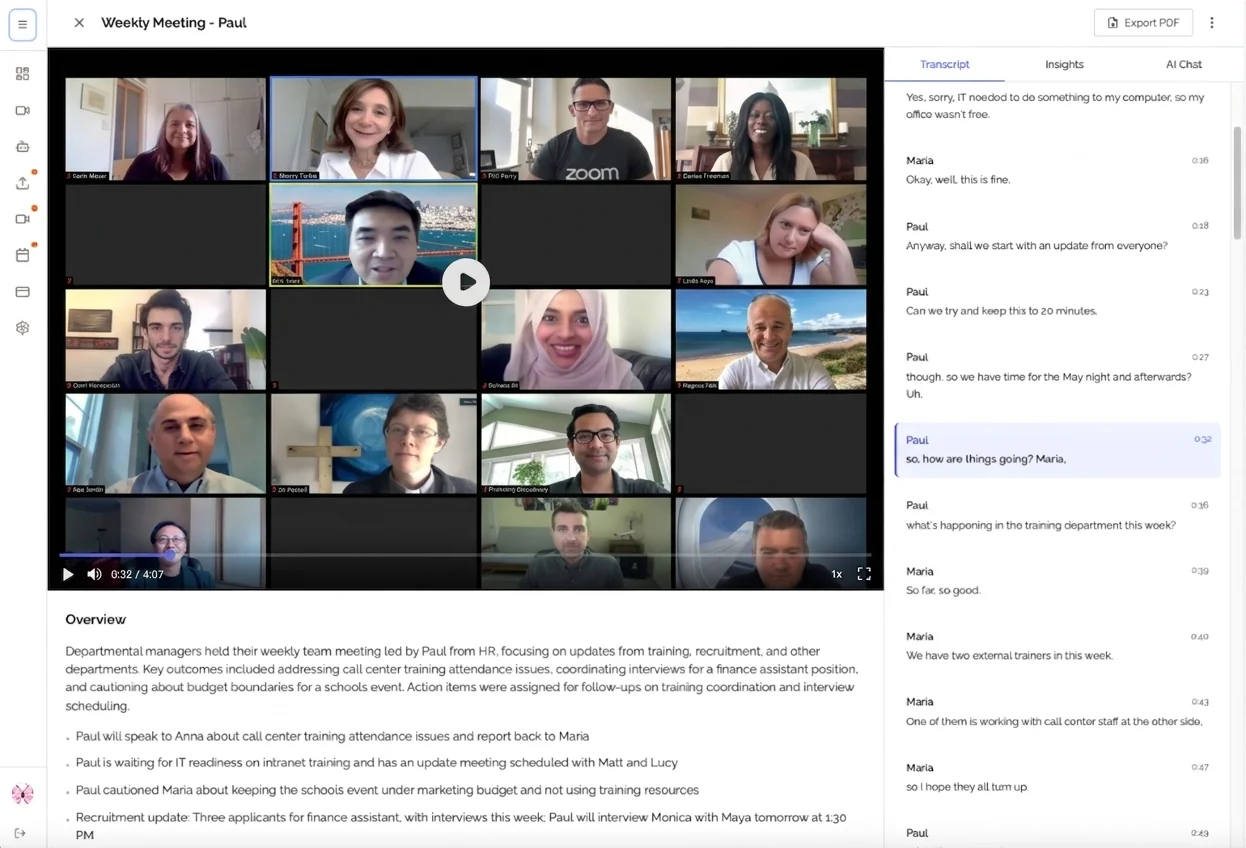
Better yet, use AI-powered meeting assistants to handle transcription automatically, letting you fully engage in the conversation while still capturing everything.
Step 3: Process Notes Immediately After the Meeting
The 10 minutes right after a meeting are critical for organization. Details are fresh, context is clear, and you can fill gaps before memory fades.
Your Post-Meeting Checklist:
1. Review and Clean Up (5 minutes)
- Fill in any gaps or unclear abbreviations
- Add context to cryptic notes while you remember what they mean
- Clarify ambiguous action items
- Verify all decisions have supporting reasoning
2. Categorize and Tag (2 minutes)
- Add relevant tags: project name, department, topic areas
- Link to related documents or previous meetings
- Add to the appropriate folder/project
3. Extract Action Items (2 minutes)
- Create separate task entries in your task management system
- Set deadlines and send calendar reminders
- Notify assignees of their responsibilities
4. Share Promptly (1 minute)
- Send notes to all attendees within 2 hours
- Include a clear subject line: "Meeting Notes: [Topic] - [Date]"
- Request confirmation from action item owners
Why Immediate Processing Matters:
Research shows people forget approximately 40% of new information within 24 hours. If you wait until the end of the day (or worse, tomorrow) to organize your notes, you've already lost critical context and details.
Step 4: Implement a Consistent Naming Convention
You can't organize what you can't find. A standardized naming system makes meetings instantly searchable.
Recommended Naming Format:
YYYY-MM-DD - [Project/Team] - [Meeting Type] - [Brief Topic]
Examples:
2026-02-04 - Product Team - Sprint Planning - Q1 Roadmap2026-02-04 - Client Name - Status Update - Feature Launch2026-02-04 - Engineering - Weekly Sync - Database Migration2026-02-04 - Executive Team - Strategy Review - 2026 Goals
Why This Format Works:
- Date First: Automatic chronological sorting
- Project/Team: Instant context about meeting subject
- Meeting Type: Understand meeting purpose at a glance
- Brief Topic: Quick identification of specific content
Additional Organization Tips:
- Use hyphens (not underscores) for better readability
- Keep total filename under 60 characters when possible
- Use consistent abbreviations for recurring meetings (e.g., "Sprint Planning" vs "Sprint-Planning")
- Include version numbers for iterative meetings:
v2,v3
Step 5: Centralize Storage with Clear Hierarchy
Scattered notes across multiple tools and locations make organization impossible. Centralize everything in a single system with logical hierarchy.
Choose ONE Primary System:
The best system is the one your entire team will actually use. Options include:
- Notion: Flexible databases, excellent for cross-linking
- Confluence: Great for enterprise teams already using Atlassian
- Google Docs: Universal access, easy sharing, robust search
- OneNote: Strong organizational features, Microsoft ecosystem integration
- Dedicated meeting tools: KenzNote
Create a Logical Folder Structure:
📁 Meeting Notes/
├── 📁 By Project/
│   ├── 📁 Project Alpha/
│   │   ├── 📁 2026-Q1/
│   │   │   ├── Sprint Planning/
│   │   │   ├── Client Meetings/
│   │   │   └── Team Syncs/
│   │   └── 📁 2026-Q2/
│   └── 📁 Project Beta/
├── 📁 By Team/
│   ├── 📁 Engineering/
│   ├── 📁 Product/
│   └── 📁 Executive/
├── 📁 By Meeting Type/
│   ├── 📁 1-on-1s/
│   ├── 📁 All-Hands/
│   └── 📁 Client Calls/
└── 📁 Templates/
    ├── Standard Meeting Template
    ├── Sprint Planning Template
    └── Client Call Template
Important: Don't duplicate notes across multiple folders. Instead, use tags or links to make notes discoverable from multiple paths.
Step 6: Make Notes Searchable with Strategic Tagging
Even with perfect organization, you need powerful search capabilities. Strategic tagging makes any meeting findable in seconds.
Effective Tagging Strategy:
1. Project Tags
- Specific project names
- Client names
- Initiative codes
2. Topic Tags
#budget,#hiring,#roadmap,#technical-debt#decision-required,#action-items,#blocker#Q1-2026,#annual-goals,#sprint-23
3. Status Tags
#completed,#in-progress,#pending-review#needs-follow-up,#waiting-on-external
4. People Tags
@stakeholder-namesfor easy filtering- Helpful for 1-on-1 preparation or checking someone's commitments
Tagging Best Practices:
- Limit tags to 5-7 per meeting (too many = meaningless)
- Create a team tagging taxonomy so everyone uses the same tags
- Use hierarchical tags when your tool supports it:
product/feature-a,product/feature-b - Review and consolidate tags quarterly to prevent tag sprawl
Search Tips:
Most note systems support advanced search. Learn your tool's syntax:
- Google Docs:
meeting notes owner:me "Q1 goals" - Notion: Use filters:
Created: Past week,Tag: Product,Has: Action items - Confluence:
title:"Sprint Planning" AND created >= 2026-01-01
Step 7: Extract and Track Action Items Separately
Meeting notes capture context, but action items need their own workflow for accountability.
Action Item Organization System:
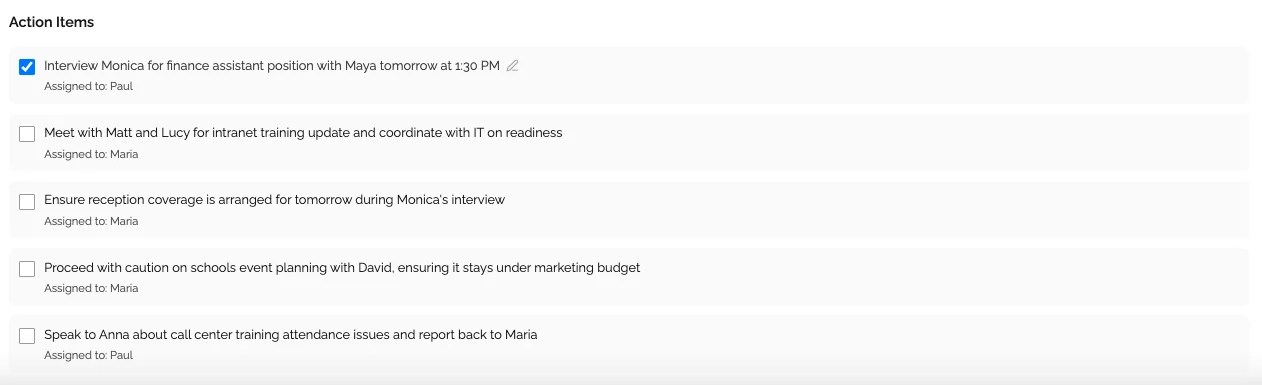
1. Extract to Task Management
Don't let action items live only in meeting notes. Transfer them immediately to your task management system:
- For individuals: Todoist, Things, Microsoft To Do
- For teams: Asana, Monday.com, Jira, Linear, ClickUp
2. Use a Consistent Action Item Format
Every action item should include:
[Action Item] - @Owner - Due: [Date] - Priority: [High/Medium/Low]
Context: [One sentence explaining why this matters]
Meeting Source: [Link to meeting notes]
Example:
Finalize Q1 budget projections - @Lina - Due: 2026-02-15 - Priority: High
Context: Executive team needs data for board meeting on 2/20
Meeting Source: [Link to 2026-02-04 Budget Review]
3. Create a Master Action Item View
Use your task management tool to create filtered views:
- My Action Items: Everything assigned to you
- Team Action Items: Everything assigned to your team
- Overdue Items: Anything past due date
- This Week: Items due in the next 7 days
- By Project: Action items filtered by project tag
4. Review Action Items in Subsequent Meetings
Start every recurring meeting with action item review:
- What was completed since last time?
- What's blocked and why?
- What needs reprioritization?
This simple habit dramatically improves follow-through. Consider that over 26% of meetings end without concrete action items; don't let yours be one of them.
Best Tools for Organizing Meeting Notes in 2026
The right tool can make organization effortless. Here's what to consider based on your team's needs.
For Individual Contributors
Google Docs + Google Calendar
- Pros: Free, universal access, excellent search, integrates with calendar
- Cons: Limited organizational features, manual linking required
- Best for: Solopreneurs, small teams, Google Workspace users
Notion
- Pros: Powerful databases, templates, cross-linking, flexible views
- Cons: Steeper learning curve, can be overwhelming
- Best for: Knowledge workers who want extensive customization
OneNote
- Pros: Excellent organization hierarchy, Microsoft ecosystem integration
- Cons: Slower syncing, less collaborative than modern alternatives
- Best for: Microsoft 365 users, hierarchical thinkers
For Teams and Organizations
Confluence
- Pros: Enterprise-grade, robust permissions, integrates with Jira
- Cons: Can feel heavy for simple needs, requires administration
- Best for: Enterprise teams, engineering organizations
Notion (Team Plans)
- Pros: Collaborative databases, excellent templates, powerful search
- Cons: Pricing can add up for large teams
- Best for: Startups, product teams, distributed teams
For AI-Powered Automation
KenzNote
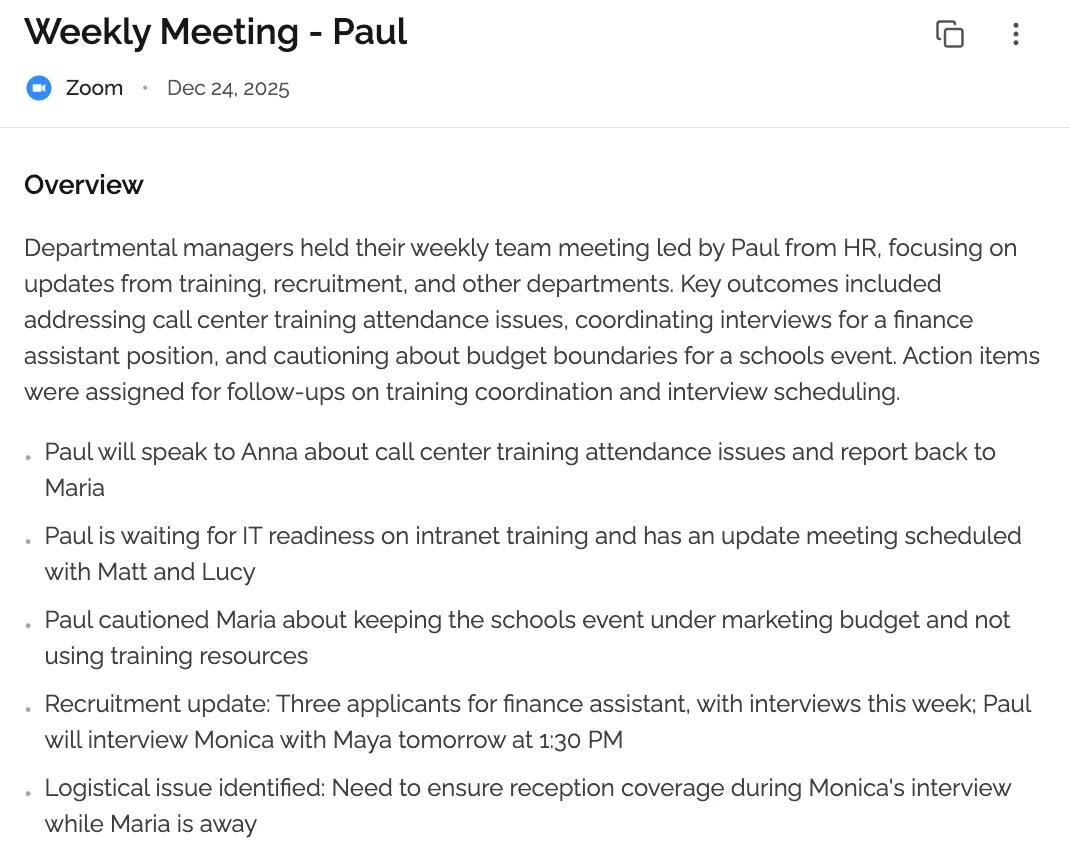
- Pros: Automatic transcription, AI-generated summaries, action item extraction
- Cons: Requires uploading meeting recordings
- Best for: Teams wanting comprehensive documentation without manual note-taking
- Try KenzNote free
Otter.ai
- Pros: Live transcription, speaker identification, mobile apps
- Cons: Transcripts need manual organization afterward
- Best for: Capturing everything said, especially for accessibility
Interestingly, despite the growth of AI tools, only 12% of professionals use AI-powered note-takers, with millennials leading adoption at 32%. The gap represents a massive opportunity for productivity gains.
Common Meeting Note Organization Problems (and Fixes)
Even with a system, challenges arise. Here's how to overcome the most common issues.
Problem 1: Notes Are Too Long and Overwhelming
Symptoms:
- Notes exceed 2-3 pages for a 1-hour meeting
- Contains mostly verbatim transcription
- Takes 10+ minutes to review
Solutions:
Use the 3-30-3 Rule:
- 3 seconds: Identify the meeting topic from the title
- 30 seconds: Understand key decisions and action items
- 3 minutes: Get full context by reading discussion points
Focus on Signal, Not Noise:
- Capture decisions, not discussions
- Record action items, not who suggested them
- Document conclusions, not the path to get there
Create Executive Summaries: Add a 2-3 sentence summary at the top of every meeting:
**Summary:** Approved Q1 marketing budget of $150K. Decided to delay
product launch to March 15 due to engineering constraints. Marketing
team to revise campaign timeline accordingly.
Problem 2: Can't Find Specific Information When Needed
Symptoms:
- Spend 15+ minutes searching for a specific meeting
- Remember discussing something but can't locate the notes
- End up asking colleagues "do you remember when we decided...?"
Solutions:
Implement Full-Text Search
- Use tools with robust search (Google Drive, Notion, Evernote)
- Include key terms in meeting titles and tags
- Create a searchable "decisions log" with one-line entries pointing to full notes
Create Summary Indexes
- Weekly summary: List all meetings that week with one-sentence summaries
- Project summary: All meetings related to specific project
- Decision log: All major decisions with dates and links to full notes
Use Meeting Series Linking
- Link each meeting in a series to previous meetings
- Create a "series index" page listing all meetings chronologically
- Add "Previous Meeting: [link]" and "Next Meeting: [link]" to each note
Problem 3: Action Items Get Forgotten or Overlooked
Symptoms:
- Tasks mentioned in meetings never get completed
- No clear ownership of responsibilities
- "I didn't know I was supposed to do that" is common
Solutions:
Separate Action Item Tracking:
- Don't rely on meeting notes alone for task management
- Extract every action item to dedicated task management system
- Set automated reminders 2 days before due dates
Require Explicit Ownership:
- Never end a meeting without assigning owner to every action item
- Use @mentions in digital notes to create accountability
- Send individual emails to each person with their specific action items
Create Action Item Templates:
WHAT: [Specific task description]
WHO: [@Owner name]
WHY: [Business justification]
WHEN: [Specific due date, not "next week"]
DONE WHEN: [Specific completion criteria]
Review at Start of Next Meeting:
- First agenda item: Review last meeting's action items
- Celebrate completions
- Discuss blockers on incomplete items
- Reschedule or reassign if necessary
Problem 4: Team Members Don't Read Meeting Notes
Symptoms:
- People ask questions answered in distributed notes
- Attendees don't know their action items
- Decisions get re-debated in subsequent meetings
Solutions:
Make Notes Scannable:
- Use formatting: bold for decisions,
code blocksfor action items - Include TL;DR summary at top
- Use emoji or color coding for visual scanning
- Break long paragraphs into bullet points
Distribute Thoughtfully:
- Send within 2 hours while meeting is still fresh in minds
- Use clear subject lines: "📋 Notes + Action Items: [Meeting Topic]"
- Include next steps in email body, not just attachment
- @mention specific people in collaborative notes for notifications
Create Accountability:
- Require attendees to acknowledge reading notes
- Ask action item owners to confirm their tasks
- Make notes accessible where people already work (Slack, Teams, etc.)
Reduce Note Volume:
- Not every meeting needs comprehensive notes
- For quick syncs, just capture action items
- Save detailed documentation for important strategic meetings
Advanced Organization Strategies
Once you've mastered the basics, these advanced techniques take organization to the next level.
Strategy 1: Create a Meeting Knowledge Base
Transform meeting notes from one-time documents into institutional knowledge.
Build Topical Indexes:
Create permanent pages for recurring topics that link to all related meetings:
# Product Pricing Strategy - Master Index

## Overview
[High-level description of pricing strategy and key principles]

## Key Decisions
- 2026-01-15: Decided on value-based pricing model ([meeting notes link])
- 2026-02-01: Approved tier structure ([meeting notes link])

## Related Meetings
- [2026-01-15 - Pricing Strategy Workshop](link)
- [2026-01-22 - Competitive Analysis Review](link)
- [2026-02-01 - Final Pricing Approval](link)

## Resources
- Pricing model spreadsheet
- Competitive analysis document
- Customer research findings
Benefits:
- New team members can quickly get up to speed
- Historical context readily available
- Prevents re-debating already-decided issues
Strategy 2: Use AI to Enhance Organization
AI tools can automate much of the organizational heavy lifting.
Automatic Summarization:
- Tools like KenzNote automatically generate summaries
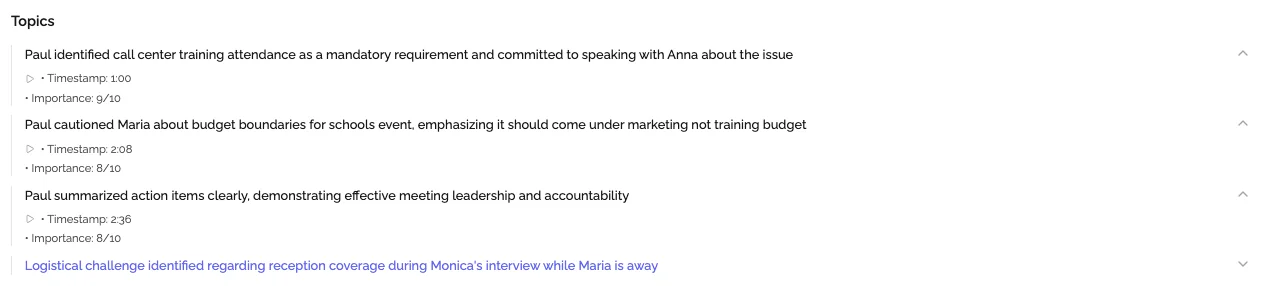
- AI extracts key topics, decisions, and action items
- Saves 20-30 minutes per meeting in manual processing
Smart Categorization:
- AI can suggest tags based on content
- Auto-link related meetings and documents
- Identify recurring topics across meetings
Action Item Extraction:
- Automatically identify tasks from natural conversation
- Suggest owners based on who discussed the topic
- Extract deadlines mentioned in discussion
Given that 73% of professionals multitask during meetings, AI-powered documentation ensures nothing gets missed even when attention wanders.
Strategy 3: Implement Progressive Summarization
Borrowed from note-taking expert Tiago Forte, progressive summarization makes notes more valuable over time.
The Four Layers:
Layer 1: Original Notes (Black)
- Complete meeting notes as captured
- Standard formatting and structure
Layer 2: Bold Highlights
- First pass review: Bold the most important 10-20% of content
- Focus on decisions and action items
Layer 3: Highlighted Sections
- Second pass: Highlight (different color) the most critical 10-20% of bolded content
- These become your "executive summary" points
Layer 4: Executive Summary
- Create a 2-3 sentence summary capturing absolute essence
- Place at top of document for instant context
When to Use:
- For strategic meetings you'll reference frequently
- Project kickoffs and major decision meetings
- Quarterly planning and retrospectives
Benefits:
- Multiple levels of detail for different use cases
- Quick refreshers without rereading everything
- Highlights compound value of notes over time
Strategy 4: Establish Meeting Rhythm and Templates
Different meeting types need different organizational approaches.
Daily Standups:
## YYYY-MM-DD - Daily Standup

**Blockers:**
- [Critical blockers only]

**Decisions:**
- [Any quick decisions made]

**Action Items:**
- [ ] Task - @Owner - Due: Today
Weekly Team Meetings:
## YYYY-MM-DD - Weekly Team Sync

**Wins This Week:**
- [Accomplishments and celebrations]

**Challenges:**
- [Problems that need team input]

**Decisions Made:**
- [Strategic decisions]

**Action Items:**
- [ ] Task - @Owner - Due Date

**Next Week Priorities:**
- [Top 3 team priorities]
Strategic Planning Sessions:
## YYYY-MM-DD - Strategic Planning: [Topic]

**Objective:**
[What we're trying to accomplish]

**Current State:**
[Where we are now]

**Proposed Solutions:**
1. Option A: [Description, pros/cons]
2. Option B: [Description, pros/cons]

**Decision:**
[What we decided and why]

**Implementation Plan:**
- Phase 1: [Description, timeline, owner]
- Phase 2: [Description, timeline, owner]

**Success Metrics:**
- [How we'll measure success]

**Risks and Mitigation:**
- [Key risks and how we'll address them]
Client Meetings:
## YYYY-MM-DD - Client: [Name] - [Topic]

**Attendees:**
- [Names with company/role]

**Client Goals/Needs:**
- [What the client wants to achieve]

**Our Recommendations:**
- [What we proposed]

**Decisions & Agreements:**
- [What was agreed upon]

**Client Action Items:**
- [ ] Task - @Client Contact - Due Date

**Our Action Items:**
- [ ] Task - @Our Team Member - Due Date

**Next Steps:**
- [Follow-up meeting scheduled, next milestones]

**Client Sentiment:**
- [How the meeting went, client satisfaction level]
Putting It All Together: Your 30-Day Implementation Plan
Implementing a new organizational system can feel overwhelming. Here's a phased approach to build habits without disrupting your workflow.
Week 1: Establish Foundation
Day 1-2: Set Up Your System
- Choose your primary note-taking tool
- Create folder structure
- Build your meeting note template
- Set up naming conventions
Day 3-7: Start Using Template
- Use your new template for every meeting
- Don't worry about perfect organization yet
- Focus on consistent capture
- Process notes within 2 hours of each meeting
Goal: Build the habit of using your template consistently
Week 2: Add Organization Layers
Day 8-10: Implement Naming Convention
- Rename all meetings from Week 1 to match convention
- Apply naming to all new meetings
- Create folder structure if not done yet
Day 11-14: Add Tagging
- Define your tag taxonomy (5-10 key tags)
- Go back and tag Week 1-2 meetings
- Tag all new meetings immediately
Goal: Make all meetings findable through search and filtering
Week 3: Optimize Action Items
Day 15-17: Extract Action Items
- Set up task management system if needed
- Extract all action items from Week 1-2 meetings
- Create action item extraction habit for new meetings
Day 18-21: Track and Follow Up
- Create filtered views in task manager
- Send individual action item confirmations
- Review action items at start of each meeting
Goal: Ensure zero action items fall through cracks
Week 4: Build Advanced Habits
Day 22-25: Create Indexes
- Build a topic index for your primary project
- Link all related meetings
- Create meeting series connections
Day 26-30: Refine and Document
- Review what's working and what needs adjustment
- Document your team's organization standards
- Train team members on the system
- Schedule monthly system review
Goal: Create sustainable, team-wide organization habits
Long-Term Maintenance
Weekly:
- Review meeting notes from the past week
- Ensure all action items extracted and tracked
- Clean up any inconsistent naming or tagging
Monthly:
- Review tag taxonomy and consolidate if needed
- Archive or delete obsolete meetings
- Update templates based on lessons learned
Quarterly:
- Audit overall organization system
- Gather team feedback on what's working
- Update documentation and standards
- Celebrate wins and improvements in productivity
Measuring the Impact of Better Organization
How do you know if your organization system is working? Track these metrics:
Time Saved:
- Time to find specific meeting information (target: under 30 seconds)
- Time spent in "clarification meetings" (should decrease significantly)
- Time processing notes after meetings (should be under 10 minutes)
Accountability Improvements:
- Percentage of action items completed on time (target: 90%+)
- Number of missed deadlines due to unclear ownership (target: zero)
- Time between action item assignment and acknowledgment (target: under 24 hours)
Team Satisfaction:
- Survey team on meeting effectiveness quarterly
- Track "I forgot about that" or "Who was supposed to do this?" occurrences
- Measure onboarding time for new team members to understand project context
When 71% of senior executives say meetings are unproductive and inefficient, demonstrating measurable improvements in meeting outcomes becomes a significant competitive advantage.
Conclusion: From Chaos to Clarity
Organizing meeting notes isn't about perfectionism; it's about building systems that make information accessible when you need it. The best organization system is one you'll actually use consistently.
Start with the fundamentals:
- ✅ Use a standardized template for every meeting
- ✅ Implement consistent naming conventions
- ✅ Process notes immediately after meetings
- ✅ Extract and track action items separately
- ✅ Centralize storage in one primary system
- ✅ Make everything searchable with strategic tagging
- ✅ Review and refine your system regularly
With employees spending nearly 28% of their workweek in meetings, effective meeting documentation isn't optional; it's essential for productivity and accountability.
The 30-day implementation plan in this guide gives you a proven path from chaotic notes to organized intelligence. Start with Week 1 today, and you'll be amazed at how quickly clear organization transforms your team's effectiveness.
Take the Next Step: Automate Your Meeting Documentation
Manual note-taking, while better when organized, still pulls your attention away from meaningful discussion. Modern AI tools can handle the documentation entirely, letting you focus on decisions and relationships.
KenzNote automatically captures meeting transcripts, generates structured summaries, and extracts action items-all organized and searchable without any manual effort. No calendar integration required, no complex setup. Just upload your meeting recording and get comprehensive, organized notes in minutes.
What you get with KenzNote:
- 📝 Automatic transcription with 95%+ accuracy
- 🎯 AI-extracted action items with clear ownership
- 📊 Structured summaries highlighting decisions and key topics
- 🔍 Fully searchable meeting archive
- 🔗 Easy sharing and collaboration
Stop spending hours organizing notes and start having more productive meetings. Try KenzNote free today; your first meeting is on us.
Frequently Asked Questions
How long should I keep meeting notes?
Keep notes for active projects indefinitely, as they provide valuable historical context. For completed projects, archive notes for at least 6-12 months. Strategic decision meetings and major milestones should be retained permanently. Set annual reviews to archive or delete outdated meeting notes that no longer provide value.
What's the best way to organize notes for large, multi-hour meetings?
Break long meetings into clear sections with timestamps. Use your template structure but expand it with subsections for each major topic. Consider creating a separate detailed note for each topic and a master summary document that links to all sections. For all-day workshops or planning sessions, assign a dedicated note-taker or use AI transcription to ensure nothing is missed.
Should I take notes during 1-on-1 meetings?
Yes, but keep them focused and private. Use a simplified template capturing talking points, action items, and follow-up topics. Create a running document for each recurring 1-on-1 relationship where you can track conversations over time. This provides continuity and helps you remember commitments and career development discussions.
How do I get my team to actually use an organization system?
Start small with the highest-impact changes: standardized templates and immediate action item extraction. Make the system easy to use-complex systems fail due to friction. Lead by example and demonstrate value ("Remember when we decided X? Found it in 10 seconds using our tags"). Celebrate wins when organized notes prevent missed deadlines or wasted time. Consider designating a rotating "meeting organizer" role responsible for maintaining standards.
What if I don't have time to organize notes immediately after meetings?
Block 10 minutes on your calendar immediately following every meeting. Treat this processing time as non-negotiable; it's part of the meeting, not extra work. If back-to-back meetings prevent this, batch-process notes at end of day while details are still relatively fresh. However, the longer you wait, the more context and details you lose. Consider AI tools like KenzNote that automate organization entirely, eliminating the time requirement.
How can I organize notes when I'm not the one taking them?
If someone else takes notes, provide them with your template and standards. Review shared notes within 24 hours and add any missing context or action items. For important meetings, take parallel notes on key decisions even if someone else is the official note-taker. This ensures you capture what matters most to you and your work.
Related Resources
Want to learn more about transforming your meeting productivity?
- AI Meeting Notes: Complete Guide
- Meeting Productivity Statistics 2026
- How to Transcribe Google Meet Meetings
- Getting Started with KenzNote
Have questions? Reach out to our team at [email protected]
Sources
References & Citations
- [1]100 Surprising Meeting Statistics for 2026Flowtrace. January 1, 2026https://www.flowtrace.co/collaboration-blog/50-meeting-statistics
All external sources have been reviewed for accuracy and relevance. Last verified: September 2026.

About KenzNote Team
The KenzNote team is dedicated to helping teams capture better meeting insights and transform how they collaborate. With backgrounds in AI, product design, and enterprise software, we're building the future of meeting productivity.
Ready to transform your meetings?
KenzNote automatically captures meeting insights, extracts action items, and generates summaries so you can focus on the conversation instead of taking notes.
Try KenzNote Free