
Quick Answer
For Google Meet users in 2026, KenzNote is the best option for privacy-conscious teams and occasional users who want pay-per-meeting pricing. Otter.ai is the best option for Google Workspace power users who want automatic calendar sync and OtterPilot automation. tl;dv is the best option for teams that need strong non-English language support. All three work well with Google Meet; the right choice depends on your priorities.
Key Takeaways
- All major AI notetakers support Google Meet, but they differ in how they integrate: native vs. bot-based
- Otter's OtterPilot and Fireflies' bot join your Meet as a participant; KenzNote does not require a bot
- Google Meet has a built-in transcription feature (available on Workspace plans), but it is basic and does not generate summaries or action items
- KenzNote integrates natively with Google Meet and offers a botless recording option with $0.99/meeting pricing
- Google Workspace data residency preferences (EU storage, for example) are relevant when choosing a tool for organizations with GDPR obligations
- Privacy-conscious teams should verify whether their chosen tool uses Google Calendar access and whether that represents a data exposure risk
Table of Contents
- Google Meet's Built-In Transcription: Worth Using?
- How AI Notetakers Integrate with Google Meet
- Top AI Notetakers for Google Meet Compared
- Comparison Table
- Privacy Considerations for Google Workspace Users
- Pricing Comparison
- Which Tool Should You Choose
- Frequently Asked Questions
- Related Resources
Google Meet has become one of the most widely used video conferencing platforms for business teams, particularly those running Google Workspace. AI notetakers that work with Meet have proliferated, but not all integrate equally well, and the privacy and pricing differences are significant.
This guide focuses specifically on Google Meet use cases: which tools work best, how they integrate, what the trade-offs are, and which one is right for your situation.
Google Meet's Built-In Transcription: Worth Using?
Before comparing third-party tools, it is worth being clear about what Google Meet offers natively.
Google Meet includes a transcription feature on eligible Google Workspace plans (Business Standard, Business Plus, Enterprise editions). It produces a text transcript of the meeting that is automatically saved to Google Drive. You can enable it by clicking "Activities" in the meeting controls and selecting "Transcripts."
What it does:
- Generates a text transcript saved as a Google Doc in your Drive
- Available without any third-party tool
- Integrated directly with Google Workspace storage and sharing
What it does not do:
- Generate AI-powered meeting summaries
- Extract action items or decisions
- Let you ask questions about the meeting content afterward
- Provide speaker-specific analysis or insights
For basic note-keeping where you just need a text record, Meet's native transcription is functional. For teams that want useful summaries, action items, and meeting chat, a dedicated AI notetaker is a meaningfully better experience.
 Google Meet's built-in transcription is basic; third-party AI tools provide significantly more value.
How AI Notetakers Integrate with Google Meet
AI notetakers connect to Google Meet in two main ways:
Bot-based integration: The AI service creates a bot that joins your Meet as a participant. The bot's name appears in the participant list (for example, "Otter Notetaker" or "Fireflies Notetaker"). The bot records the audio directly during the meeting and sends it for processing.
Native integration or file upload: Some tools, including KenzNote, integrate with Google Meet through native recording mechanisms or allow you to upload a recorded Meet file after the fact. No bot joins the call.
The practical difference: bot-based tools are more automatic (the bot joins without you remembering to start recording), but they add a visible participant to the call and involve a third-party service processing audio in real time. Native or upload-based tools require a more deliberate step but keep the recording entirely in your control until you choose to process it.
Top AI Notetakers for Google Meet Compared
KenzNote
KenzNote supports Google Meet through native integration and file upload. No bot joins your call. You get accurate transcription, an AI-generated summary, action item extraction, and the meeting chat feature, which lets you ask natural language questions about the meeting content.
Strengths for Meet users:
- No bot in the participant list
- Contractual guarantee that meeting content is never used for AI training
- Pay-per-meeting pricing at $0.99/meeting makes it cost-effective for irregular users
- Works for any Google Meet recording, including files from past meetings
Limitations:
- Less automated than bot-based tools; requires a deliberate recording or upload step
- No native Google Calendar sync for automatic meeting detection
Otter.ai
Otter integrates tightly with Google Workspace. OtterPilot joins your Meet calls automatically once you connect your Google Calendar. It generates real-time live captions during the meeting and produces a summary afterward.
Strengths for Meet users:
- Deep Google Calendar integration; joins meetings automatically without manual action
- Real-time live captions visible during the meeting
- Strong Google Workspace ecosystem integration
- Well-established, large user base
Limitations:
- Bot is visible in the participant list
- Requires granting Google Calendar access to Otter
- Data training policy on standard plans: your content may be used to improve the product
Fireflies.ai
Fireflies joins Google Meet calls via bot, records and transcribes them, and provides summaries plus CRM integrations. It is a solid option for sales teams that need Salesforce or HubSpot sync.
Strengths for Meet users:
- Wide integration ecosystem including CRM tools
- Searchable transcript archive across all meetings
- Good for sales-focused workflows
Limitations:
- Bot is visible in the participant list
- Data training policy uses customer data on non-enterprise plans
- Free tier is limited (800 minutes lifetime, 3 bot meetings)
tl;dv
tl;dv is a strong option for teams that work in multiple languages or want a European-hosted privacy-conscious product. It integrates with Google Meet via bot and offers strong support for non-English European languages. 7 days Free Trial
Strengths for Meet users:
- Best-in-class non-English language support for European languages
- GDPR-conscious design
- Clip and highlight features for sharing specific meeting moments
- Free tier is relatively generous
Limitations:
- Bot-based recording; participant visible in meeting
- Less CRM integration depth than Fireflies
- Less widely known than Otter or Fireflies
Fathom
Fathom is a free AI notetaker that has gained a following for its clean, simple interface. It integrates with Google Meet via bot and produces usable summaries.
Strengths:
- Free for basic use
- Clean, simple output
- Low friction to start
Limitations:
- Bot-based recording
- Less feature depth than paid tools
- Less control over data handling than privacy-first options
 The right AI notetaker for Google Meet depends on whether automation, privacy, or pricing is your primary priority.
Comparison Table
| Tool | Integration Method | Bot in Meeting | Price | No-Training Guarantee | Live Captions | Non-English |
|---|---|---|---|---|---|---|
| KenzNote | Native / Upload | Yes | $0.99/meeting | Yes, contractual | No | Very Good |
| Otter.ai | Bot (OtterPilot) | Yes | $16.99/mo | Enterprise only | Yes | Good |
| Fireflies.ai | Bot | Yes | $10/seat/mo | Enterprise only | No | Good |
| tl;dv | Bot | Yes | Free tier - 7 days/ paid | Limited | No | Very Good |
| Fathom | Bot | Yes | Free | Not specified | No | Limited |
Privacy Considerations for Google Workspace Users
Google Workspace organizations often have data governance requirements, particularly in regulated industries or for EU-based teams. When choosing an AI notetaker for Google Meet, consider:
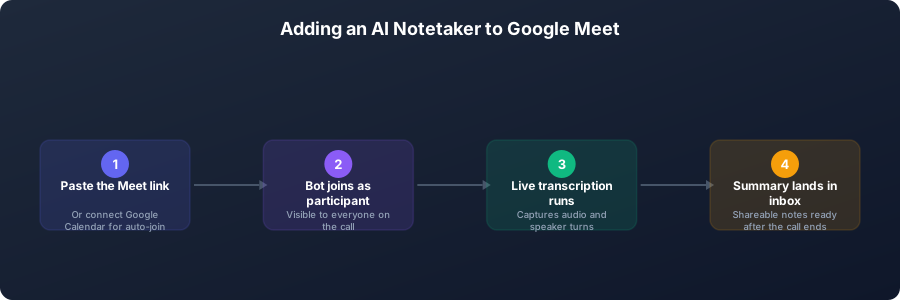 From pasting a Meet link to receiving a shareable summary after the call.
Calendar access. Several tools (Otter, Fireflies) require you to grant Google Calendar access to automatically detect and join meetings. This means a third-party service has ongoing access to your calendar data, including meeting titles, descriptions, attendees, and links. For organizations with strict data governance, this is a non-trivial permission.
Google Workspace data residency. Google allows enterprise Workspace customers to specify data residency regions (EU, US, etc.). When you introduce a third-party notetaker, that data residency preference may not extend to the notetaker's storage, unless the vendor explicitly offers region-specific storage options.
GDPR implications. For EU-based Meet users, any AI notetaker must be evaluated for GDPR compliance. This includes confirming that the vendor offers a Data Processing Agreement and that transcript data is either stored within the EU or transferred under an appropriate legal mechanism.
For a full discussion of how AI meeting tools handle your data, see our guide on AI meeting assistants and data training. For a step-by-step guide specific to Google Meet transcription, see how to transcribe Google Meet meetings.
Pricing Comparison
| Tool | Free Tier | Entry Paid Plan | Notes |
|---|---|---|---|
| KenzNote | 2 meetings | $0.99/meeting | Also $29.99/mo unlimited |
| Otter.ai | 300 min/month | $16.99/month Pro | Annual discount available |
| Fireflies.ai | 800 min lifetime / 3 bot meetings | $10/seat/month Pro | Annual billing required for best price |
For occasional Google Meet users (under 15 meetings per month), KenzNote's pay-per-meeting pricing is almost always the most economical option. For teams with 20+ meetings per month per person, monthly subscriptions from Otter or tl;dv may be more cost-effective.
Which Tool Should You Choose
Choose KenzNote if:
- You want no bot in your participant list
- Privacy and data control are priorities
- You hold meetings irregularly and a subscription is wasteful
- You want to ask natural language questions about past meetings
Choose Otter.ai if:
- You want automatic meeting join with no manual step required
- Real-time live captions are valuable to you or your team
- You are deeply embedded in Google Workspace and want tight integration
- You hold enough meetings to justify $16.99/month
Choose tl;dv if:
- Your team holds meetings in French, German, Spanish, Dutch, or other European languages
- A generous free tier is important while you evaluate
- GDPR compliance and EU hosting are requirements
Choose Fireflies if:
- Your team has high-volume sales calls and needs Salesforce or HubSpot sync
- CRM integrations are central to your workflow
For a comprehensive list of options across all meeting platforms, see our best AI meeting note-taker apps guide and the bot-free AI meeting recorder guide.
Frequently Asked Questions
Does Google Meet have built-in AI meeting notes?
Google Meet includes a basic transcription feature on eligible Workspace plans, which saves a text transcript to Google Drive. It does not generate AI summaries, extract action items, or allow you to query meeting content. For those capabilities, a dedicated AI notetaker is necessary.
Can I use an AI notetaker on Google Meet without a bot joining the call?
Yes. KenzNote supports botless recording by integrating natively with Google Meet or accepting uploaded recording files. You record the meeting (using Meet's own recording or local screen capture) and upload the file for AI processing. No bot appears in the participant list.
Do AI notetakers for Google Meet require Google Calendar access?
Not all of them. Otter and Fireflies use Google Calendar access to automatically detect and join meetings. KenzNote does not require calendar access to function. If granting calendar access to a third-party service is a concern, choose a tool that does not require it.
Is my Google Meet recording data private when I use a third-party AI notetaker?
It depends entirely on the vendor. Most standard-tier subscriptions allow the vendor to use your content for product improvement. Only tools with contractual no-training guarantees, like KenzNote, provide a binding commitment that your meeting content will not be used to train AI models.
What is the best free AI notetaker for Google Meet?
tl;dv and Fathom both offer functional free tiers for Google Meet. tl;dv is stronger for European language support; Fathom is simpler and cleaner. KenzNote offers 2 free meetings to start. For ongoing free use with basic features, tl;dv's free tier is currently the most generous among quality options.
How accurate is AI transcription for Google Meet specifically?
Accuracy depends on audio quality rather than the platform. Google Meet uses generally good audio compression, which means transcription accuracy on Meet is comparable to Zoom or Teams. Clear speech with a good microphone typically achieves 90-95% accuracy. Poor audio conditions reduce accuracy on any platform.
Related Resources
References & Citations
- [1]Most used video conferencing platforms worldwide 2024Statista. January 1, 2024https://www.statista.com/statistics/1258374/most-popular-video-conferencing-apps/
- [2]Hybrid Work Is Just Work. Are We Doing It Wrong?Microsoft WorkLab. September 22, 2022https://www.microsoft.com/en-us/worklab/hybrid-work-is-just-work
All external sources have been reviewed for accuracy and relevance. Last verified: September 2026.

About KenzNote Team
The KenzNote team is dedicated to helping teams capture better meeting insights and transform how they collaborate. With backgrounds in AI, product design, and enterprise software, we're building the future of meeting productivity.
Ready to transform your meetings?
KenzNote automatically captures meeting insights, extracts action items, and generates summaries so you can focus on the conversation instead of taking notes.
Try KenzNote Free