
Quick Answer
Otter.ai is one of the most widely used AI notetakers, with strong real-time captions, Google and Microsoft calendar integrations, and a large established user base. It is a solid general-purpose tool, especially for teams that want every meeting recorded automatically.
KenzNote is a better fit for users who want to pay only for what they use, record meetings for free without a bot, hold meetings in more than one language, or do not want their meetings used for AI training or their calendar read by a notetaker.
The biggest difference is training policy: Otter's standard plans allow it to train its models on de-identified meeting data, while KenzNote's privacy policy rules out AI training on your meetings for every plan.
Key Takeaways
- Otter has a larger user base, more third-party integrations, and real-time live captions
- Otter's policy allows training its own models on de-identified recordings and transcripts on standard plans; KenzNote's privacy policy rules out training on your meetings, on every plan
- Otter's free tier gives 300 minutes per month (30 minutes per conversation); on KenzNote, recording is always free and your first 2 meetings are transcribed free
- KenzNote's pay-as-you-go pricing ($0.99/hour) is cheaper for light users
- Otter joins as a bot from your calendar; KenzNote records from your browser with no bot, or sends its own assistant only when you paste a link
- KenzNote handles meetings that switch between up to 3 languages; Otter transcribes one language per conversation
- Otter has more integrations (Salesforce, HubSpot, Slack); KenzNote has a more focused footprint
- Ask Kenz answers questions across a folder of meetings and cites the exact moment, so you can jump there and replay it
Table of Contents
- Otter.ai Overview
- KenzNote Overview
- Feature Comparison Table
- Pricing Comparison
- Privacy: Where They Differ Most
- Transcription Quality
- Platform and Integration Support
- Who Should Use Which Tool
- The Catch: What Otter's Plans Really Limit
- Frequently Asked Questions
- Related Resources
Otter.ai has been one of the most recognized names in AI transcription since launching in 2016. It has a large user base, a well-documented product, and a free tier that many people use casually before deciding whether to pay for more. If you are evaluating KenzNote as an alternative to Otter, or wondering whether Otter is a better fit, this guide breaks it down honestly.
Otter.ai Overview
Otter.ai is a general-purpose AI transcription and notetaking platform. It launched as a transcription tool and expanded into meeting notes, live captions, and team collaboration. Its key capabilities:
- Real-time live captions during meetings
- OtterPilot: an AI bot that joins Zoom, Meet, or Teams and takes notes automatically
- Automatic meeting summaries with action items
- Google Calendar and Microsoft Calendar integration for automatic meeting detection
- Team features: shared workspaces, comment threads, highlights
- Integrations with Salesforce, HubSpot, Slack, and others
- Mobile apps for iOS and Android, including in-person recording
Otter is genuinely well-built for users who want a frictionless, automated experience. Connect your calendar, and OtterPilot joins your meetings automatically without you having to remember to start recording. For busy professionals who hold many meetings each week, that automation has real value.
KenzNote Overview
KenzNote is an AI meeting assistant focused on privacy, flexible pricing, and simplicity. It supports Google Meet, Zoom, and Microsoft Teams in three ways: record the call from your browser for free with no bot, paste a meeting link (or schedule one) so its assistant "Kenz" joins, or upload a recording. Core capabilities:
- Accurate meeting transcription with AI-generated summaries
- Action item and decision extraction
- Ask Kenz: questions across one meeting or a whole folder, with answers that jump to the exact moment
- Meetings that switch between up to 3 languages
- Share meetings by email with "Can view" or "Can edit"
- Free recording: transcribe only the meetings you want notes from
- No calendar access required; the assistant joins only meetings you send it to
- Pay-as-you-go pricing alongside weekly, monthly, and yearly unlimited plans
- A written commitment in its privacy policy that meeting content is never used for AI training
KenzNote is not trying to replicate Otter's feature set. It is a more focused product, which means it does some things better and does not do others at all. It does not offer live captions. For in-person meetings, upload a recording from your phone.
 Both Otter.ai and KenzNote are capable meeting notetakers; the right choice depends on your priorities.
Feature Comparison Table
Green marks the rows where KenzNote is ahead. Rows without color are a tie or Otter's strength.
| Feature | Otter.ai | KenzNote |
|---|---|---|
| How you pay | Per seat with minute caps: Pro $16.99/month ($8.33 annual), Business $30/user/month | Pay as you go: $0.99 per transcribed hour, hours last a year. No seats, no minute caps |
| Just record, no transcript | Every recording is transcribed and counts against your minutes | Totally free: record from your browser, transcribe later only if you need to |
| A 60-minute meeting on the free plan | Cut off at 30 minutes per conversation | Fully transcribed (first 2 meetings free, up to 120 minutes) |
| Record without a bot | OtterPilot joins as a bot | Free browser recorder, nothing joins the call |
| How the bot gets in | Auto-joins from your calendar | Only when you paste a link or schedule it |
| Calendar access | Yes (for auto-join) | Never needed |
| Meetings that switch languages | One language per conversation; reviewers report garbled transcripts when speakers switch | Up to 3 languages in one meeting |
| Upload a recording | 3 imports ever on Free, 10 a month on Pro | Audio or video files, pay only for hours transcribed |
| Trains AI on your meetings | De-identified data, on standard plans | Never, on any plan, stated in our privacy policy |
| Questions about meetings | AI Chat across meetings and Channels | Ask Kenz across a folder; answers cite the moment, like [12:34 · Sarah], and jump to it |
| Replay a moment | Yes | Yes (recordings kept 30 days) |
| Share notes | Yes | By email, "Can view" or "Can edit" |
| AI summary and action items | Yes | Yes |
| Real-time live captions | Yes | No |
| Phone app | Yes | No; upload a recording from your phone |
| Integrations | Salesforce, HubSpot, Slack | No native CRM or Slack sync |
Otter details from its published plans and third-party reviews, November 2026. Check otter.ai/pricing for current numbers.
Pricing Comparison
Otter.ai pricing (at the time of writing; check otter.ai/pricing for current numbers):
- Free: 300 minutes/month, 30 minutes per conversation
- Pro: $16.99/month, or $8.33/month billed annually
- Business: $30/user/month, or $19.99/user/month billed annually
- Enterprise: Custom
The Otter free tier is reasonably generous. For someone who holds a handful of short meetings per month, it may be enough for basic use.
KenzNote pricing:
- Free: 2 meetings (no credit card required)
- Pay-as-you-go: $0.99 per hour of meetings, hours valid for a year
- Unlimited: $11.99/week, $39.99/month, or $359.99/year
For a user who holds 10 one-hour meetings per month, KenzNote costs $9.90 on pay-as-you-go versus $16.99 for Otter Pro month-to-month. Otter Pro becomes cheaper once you record more than about 17 hours of meetings per month, or about 8 hours if you pay Otter annually.
For light and irregular users, KenzNote's pay-as-you-go pricing is usually the more economical option. For daily heavy users, an annual Otter plan may cost less.
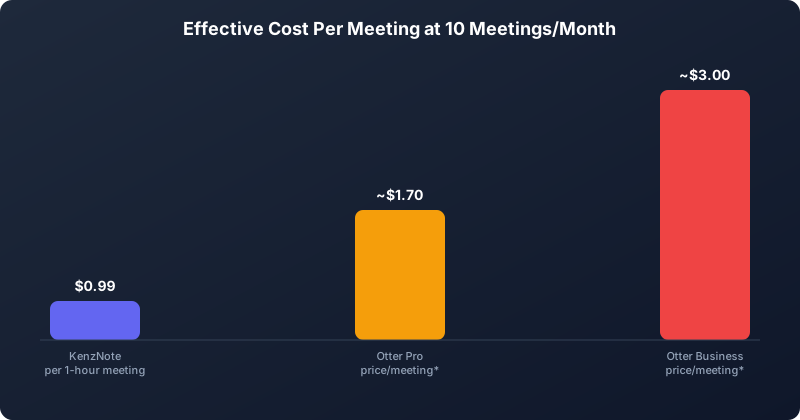 At 10 one-hour meetings a month, plan structure changes the real cost per meeting significantly.
Privacy: Where They Differ Most
This is the most significant structural difference between the two products.
Otter.ai's privacy policy allows the company to train its own speech recognition and AI technology on de-identified recordings and transcripts. Otter says its third-party AI providers may not train on your data, and it reportedly opts Enterprise workspaces out of training by default. On standard Free, Pro, and Business plans, though, de-identified training is part of the deal. Otter's data practices are also the subject of a pending class-action lawsuit over consent and training; the allegations are unproven.
KenzNote's privacy policy states that it does not use your meetings, recordings, or transcripts to train its own or third-party AI models, and that its AI service providers are contractually restricted from doing so. This applies to every plan, including the free tier.
Why does this matter in practice? Meeting transcripts contain some of the most sensitive business information there is: client discussions, personnel matters, strategic planning, financial projections. De-identification removes names and obvious identifiers, but the substance of a conversation can still be revealing, and how well de-identification works is hard to verify from the outside.
For users in regulated industries, professionals with confidentiality obligations, or anyone who simply wants private conversations kept private, the training policy is not a minor footnote.
For more detail on what to look for in vendor terms, see our guide on AI meeting tools and data training.
 Reading the fine print on data training policies is more important than most users realize.
Transcription Quality
Both Otter and KenzNote deliver accurate transcription for clear English audio. At that level, both produce transcripts that are useful as-is, with occasional corrections for proper nouns, technical terms, and heavily accented speech.
Otter has a longer track record and has processed more audio, which generally shows in robust performance across accents and audio conditions. KenzNote uses high-quality underlying transcription models and performs comparably on standard business audio.
Differences tend to emerge with highly technical vocabulary, strong regional accents, overlapping speakers, and poor audio. Neither tool is perfect in those conditions, and the gap between them is smaller than marketing materials typically suggest.
For multilingual teams or non-English meetings, see our guide on AI notetakers for multilingual teams.
Platform and Integration Support
Platform support is the same for online meetings: both tools work with Google Meet, Zoom, and Microsoft Teams. Otter also records in person through its mobile app; with KenzNote you record on your phone and upload the file.
Integration depth differs significantly. Otter has built a broader ecosystem, including:
- Salesforce and HubSpot for CRM logging
- Slack for transcript sharing and notifications
- Google Drive and Dropbox for file storage
KenzNote has a more focused footprint. If your workflow depends on automatic sync to specific downstream tools, check whether KenzNote supports them first.
Calendar integration is the other meaningful difference. OtterPilot connects to Google Calendar and Microsoft Calendar to automatically detect and join meetings. It is convenient, but it requires granting Otter access to your calendar data. KenzNote never needs calendar access: you send its assistant to the specific meetings you want recorded.
Who Should Use Which Tool
Choose Otter.ai if:
- You want real-time live captions during meetings
- You want fully automated recording that joins calls without any manual step
- You record in-person meetings on your phone
- Your workflow depends on Salesforce, HubSpot, or Slack integrations
- You record many hours each month and want the lowest cost at scale
Choose KenzNote if:
- You do not want your meetings used for AI training, even de-identified
- You hold meetings irregularly and a subscription does not make financial sense
- You prefer not to grant calendar access to a third-party service
- You want to ask natural language questions about past meetings
- You want to pay $0.99 per hour instead of a monthly fee
For a broader view of the market, see our best free AI meeting notetaker guide.
The Catch: What Otter's Plans Really Limit
Otter.ai looks free or unlimited at first glance, but the plans have limits you usually find only after you hit them.
| Tool | Price | The catch |
|---|---|---|
| Otter.ai | Pro $16.99/month, or $8.33 if you pay a year upfront. Per user | Free cuts every call at 30 minutes and stops at 300 minutes a month, with 3 file imports ever. Pro stops at 1,200 minutes a month and 90 minutes per call, and unused minutes don't roll over |
| KenzNote | Recording is free. Transcripts $0.99 per hour, hours last a year. No seats, no monthly minute cap. Unlimited is $39.99/month | Free plan transcribes 2 meetings (up to 120 minutes). Pay as you go starts at 5 hours ($4.95). The recorder needs desktop Chrome, Edge or Brave |
Red marks limits that are easy to miss on the pricing page. Green marks where KenzNote is ahead. Limits from each vendor's plans and 2026 reviews (for example Fireflies, Fathom, Krisp), November 2026. Plans change often, so check before you buy.
Not sure a plan fits how often you meet? Record your next meeting free with KenzNote and pay only for the hours you transcribe.
Frequently Asked Questions
Is Otter.ai free?
Otter has a free tier with 300 transcription minutes per month and a 30-minute limit per conversation. It works for light users but caps monthly minutes and some features. KenzNote's free tier covers 2 complete meetings with no credit card required.
Does Otter.ai use my meeting recordings to train its AI?
Otter's privacy policy allows it to train its own models on de-identified recordings and transcripts. Enterprise workspaces are reportedly opted out by default, but standard plans are not. KenzNote's privacy policy states it never uses your meeting data for AI training, on any plan.
Do both tools use a bot?
Yes. Otter's OtterPilot usually joins automatically based on your calendar. KenzNote's assistant, named "Kenz", joins only meetings you paste or schedule, and never needs calendar access. If you need recording with no bot at all, record with your platform's native tools and use an upload-based transcription tool.
How accurate is KenzNote transcription compared to Otter?
Both tools deliver comparable accuracy for standard English business conversations, typically 90-95%. Differences tend to emerge with heavy accents, technical vocabulary, and poor audio. For most business meetings, accuracy is not a practical differentiator.
Which tool is better for Google Workspace users?
Otter integrates tightly with Google Calendar and Google Drive, a genuine advantage if you want seamless automation. KenzNote works with Google Meet without calendar sync. If automation is your priority, Otter has the edge. If you would rather keep your calendar and meeting content to yourself, KenzNote is the better choice.
How do I switch from Otter.ai to KenzNote?
See our getting started guide. Setup takes under five minutes, needs no calendar sync, and your first 2 meetings are free.
Related Resources
References & Citations
- [1]Gartner Predicts 75% of World Population Will Have Personal Data Covered Under Modern Privacy Regulations by 2025Gartner. November 14, 2022https://www.gartner.com/en/newsroom/press-releases/2022-11-14-gartner-predicts-75-of-world-population-will-have-personal-data-covered-under-modern-privacy-regulations-by-2025
- [2]Stop the Meeting MadnessHarvard Business Review. July 1, 2017https://hbr.org/2017/07/stop-the-meeting-madness
All external sources have been reviewed for accuracy and relevance. Last verified: November 2026.

About KenzNote Team
The KenzNote team is dedicated to helping teams capture better meeting insights and transform how they collaborate. With backgrounds in AI, product design, and enterprise software, we're building the future of meeting productivity.
Ready to transform your meetings?
KenzNote automatically captures meeting insights, extracts action items, and generates summaries so you can focus on the conversation instead of taking notes.
Try KenzNote Free