
Quick Answer
KenzNote is an AI meeting assistant that handles all documentation automatically; you simply paste your meeting link and attend. Unlike tools requiring calendar integration and complex setup, KenzNote works in two steps: paste your Google Meet, Zoom, or Teams link, then click "Send Now" or schedule for later. The bot joins automatically, recording and transcribing everything with 95%+ accuracy.
Within minutes after meetings end, you receive full transcripts with speaker identification, AI-generated summaries highlighting key topics, automatically extracted action items with owners, and documented decisions, all organized and searchable. Pay-as-you-go pricing means you only pay for meetings you process.
Key Takeaways
- Setup takes 30 seconds: Copy meeting link, paste into KenzNote, done; no calendar integration or permissions needed
- Two scheduling options: Send bot immediately for live meetings or schedule days/weeks ahead for planned calls
- Zero integration headaches: No calendar access, browser extensions, or complicated permissions to grant or manage
- Complete documentation delivered fast: Transcripts, summaries, and action items arrive within minutes after meetings end
- 95%+ transcription accuracy: AI captures every word with speaker identification and timestamps for easy reference
- Three platforms supported: Works seamlessly with Google Meet, Zoom, and Microsoft Teams meeting links
- Upload recordings works too: Already recorded a meeting? Upload audio/video files for same comprehensive analysis
- Pay-per-use pricing: No subscriptions or monthly fees; only pay for meetings you actually choose to process
Never Take Meeting Notes Again: Meet Kenznote, Your AI Meeting Assistant
The Meeting Notes Problem We All Face
You're in a meeting. Someone's presenting a brilliant idea. Your colleague asks an important question. A critical decision is being made. And you? You're frantically typing, trying to capture every detail while simultaneously trying to contribute to the conversation.
Sound familiar?
It's the impossible juggling act we've all faced: How do you fully participate in a meeting while also documenting everything that happens?
The answer used to be "you can't." But what if you could just... attend the meeting? What if someone else handled all the note-taking, transcription, and action item extraction?
That someone is Kenznote - your AI meeting assistant.
What Is Kenznote? (The Simple Answer)
Kenznote is an AI meeting assistant that does one thing brilliantly: it handles your meetings for you.
Here's how it works: You paste a meeting link. That's it. Seriously, that's all you do.
Kenznote joins your meeting, records everything, transcribes every word, creates an intelligent summary, and extracts action items and key decisions. All automatically. All while you focus on what humans do best: thinking, connecting, and collaborating.
No calendar integrations. No complicated setup. No distractions.
Just paste the link and get back to being present.
How Ridiculously Easy Is It? (Spoiler: Very)
Let's compare the old way of handling meeting notes versus the Kenznote way.
The Old Way (Exhausting):
- Join the meeting
- Open your note-taking app
- Type frantically while trying to listen
- Miss important points because you're typing
- Spend 30 minutes after the meeting cleaning up your notes
- Realize you forgot to write down half the action items
- Email everyone asking "wait, who was supposed to do what?"
The Kenznote Way (Effortless):
- Copy your meeting link (Google Meet, Zoom, or Microsoft Teams)
- Paste it into Kenznote
- Done. Go live your life.
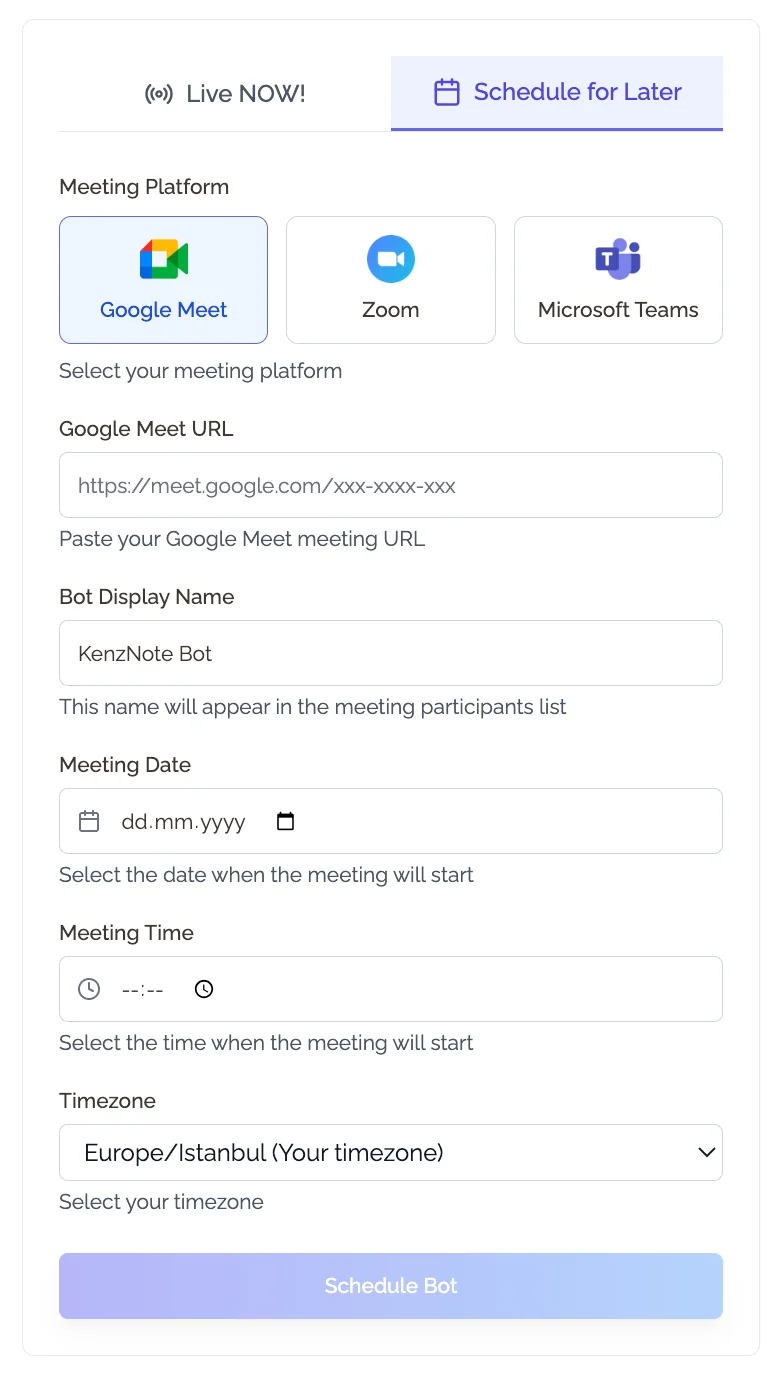
That's it. Two steps. Less than 30 seconds.
While you're fully engaged in your meeting, Kenznote is working in the background, capturing every detail so you don't have to.
Two Ways to Use Kenznote: Now or Later
Life doesn't always go according to plan. That's why Kenznote gives you complete flexibility in how you use it.
Option 1: Send the Bot NOW
Meeting already started? Forgot to set it up earlier? No problem.
- Paste the meeting link
- Click "Send Now"
- The bot joins immediately and starts working
Perfect for: Spontaneous meetings, last-minute calls, "oh crap I forgot" moments. Also great for sales teams who need to capture every client interaction.
Option 2: Schedule for Later
Have a meeting planned for tomorrow? Next week? Three weeks from now? This is especially useful for remote teams coordinating across time zones.
- Paste the meeting link
- Select the date and time
- Kenznote automatically shows up when your meeting starts
Perfect for: Planned meetings, recurring standups, staying organized ahead of time.
The key point? Total flexibility. However you work, whatever your schedule looks like, Kenznote adapts to you - not the other way around.
The Best Part: Zero Integration Required
Here's what makes Kenznote different from every other meeting tool out there.
What you DON'T need to do:
- ❌ Connect your calendar
- ❌ Share your Google or Microsoft account
- ❌ Install browser extensions
- ❌ Grant permissions to everything
- ❌ Spend 30 minutes on complicated setup
- ❌ Navigate confusing integration menus
- ❌ Worry about what data you're sharing
What you DO need:
- ✅ A meeting link
- ✅ 10 seconds of your time
Why this matters: Your privacy is protected. Your calendar stays private. You don't need IT approval. No complicated permissions. No integration headaches.
Just paste the link. That's the whole setup process.
What Happens After Your Meeting? (The Magic)
While you were busy being an engaged participant, Kenznote was working. Here's what's waiting for you when the meeting ends:
Full Transcript
Every word spoken, accurately captured with:
- Complete verbatim transcription
- Speaker identification (who said what)
- Timestamps for easy reference
- Searchable text so you can find any moment instantly
Smart Summary
No need to read through an hour-long transcript. Kenznote distills everything into:
- Key discussion points
- Main topics covered
- Important context and background
- Critical decisions highlighted
Action Items Extracted
Never lose track of what needs to happen next:
- Clear list of tasks identified during the meeting
- Who's responsible (when mentioned in the meeting)
- Deadlines and next steps
- Priority indicators
Key Decisions
The important stuff, front and center:
- Critical choices made during the meeting
- Agreements reached by the team
- Changes to plans or strategy
- Context around why decisions were made
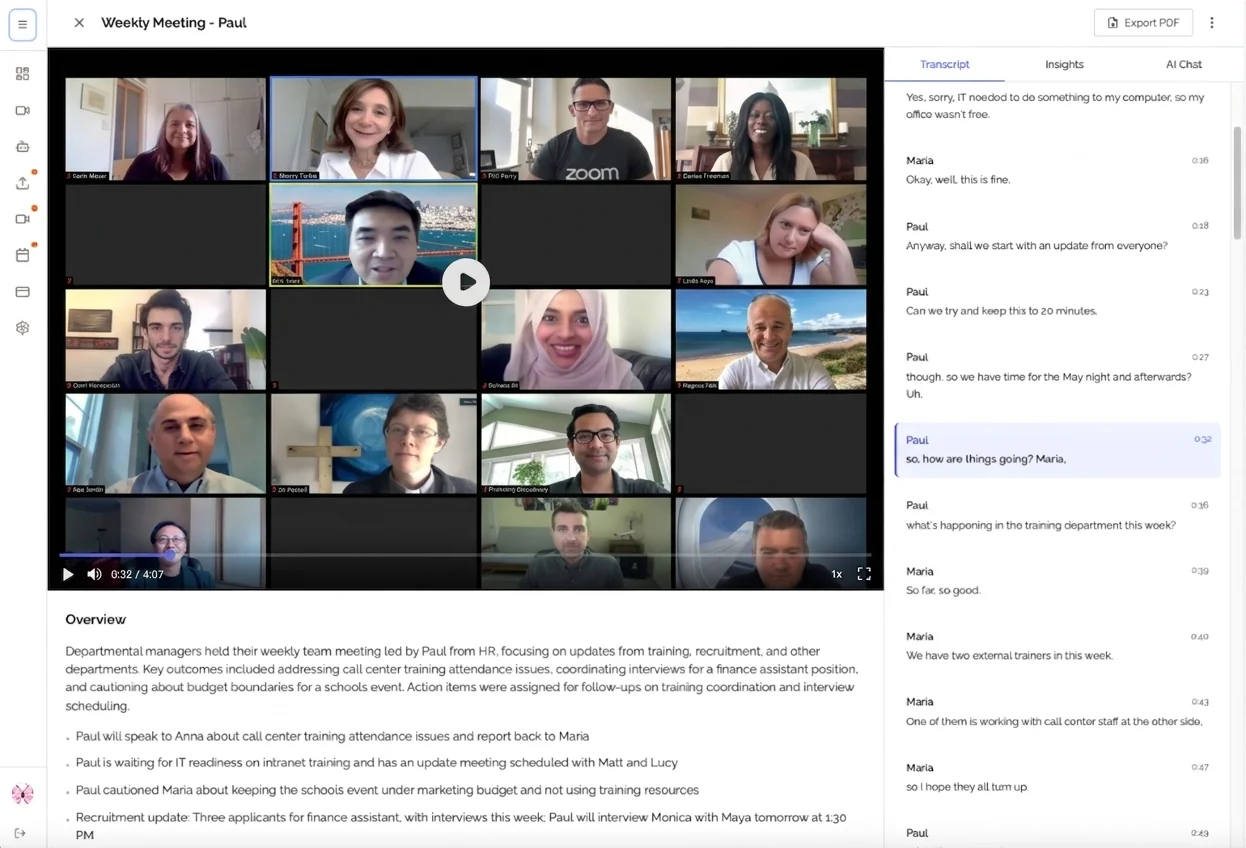
The result? Everything you need in one clean, organized, easy-to-share document. No cleanup required.
Works With Your Favorite Meeting Platforms
Kenznote doesn't force you to change how you work. It works with the platforms you already use:
- Google Meet: ✅ Fully supported
- Zoom: ✅ Fully supported
- Microsoft Teams: ✅ Fully supported
These three platforms cover over 95% of virtual meetings, which means Kenznote works for nearly every meeting you have.
Bonus feature: Already recorded a meeting? Upload the audio or video file directly to Kenznote, and it processes it exactly the same way. Perfect for meetings you missed, recordings your teammates share, or archived calls you need to review.
Real Scenarios: When Kenznote Saves the Day
Let's look at how Kenznote transforms real workday situations.
Scenario 1: The Back-to-Back Day
You have six meetings scheduled today. Normally, you'd be exhausted by meeting three, trying to juggle participation and documentation for every single one.
With Kenznote: In the morning, you spend three minutes scheduling bots for all six meetings. Then you just show up and engage fully. At the end of the day, all six meeting summaries with action items are waiting in your inbox.
Time saved: Hours. Stress saved: Immeasurable.
Scenario 2: The Client Call
You're presenting to a potential client. This is your chance to build rapport, demonstrate expertise, and close a deal. You need to be 100% present - not distracted by note-taking.
With Kenznote: Send the bot, focus entirely on the relationship, and review all the details later. You catch every subtle concern they mentioned, every question they asked, every commitment you made.
Result: Better relationships, better outcomes, zero missed details.
Scenario 3: The Team Standup
It's your daily 15-minute standup. Fast-paced, lots of quick updates, action items flying around.
With Kenznote: Everyone participates naturally. Kenznote captures all the action items. No more "wait, who was supposed to do what?" moments at the end.
Result: Clearer accountability, faster follow-through, happier team.
Scenario 4: The Uploaded Recording
Your teammate attended an important meeting you missed. They recorded it and shared the file with you. Now you need to catch up without spending an hour listening to the entire thing.
With Kenznote: Upload the file, get the summary and transcript in minutes. You're instantly caught up with full context, ready to contribute to the next conversation.
Result: Stay in the loop even when you can't attend everything.
Pricing That Actually Makes Sense
Here's where Kenznote does something different.
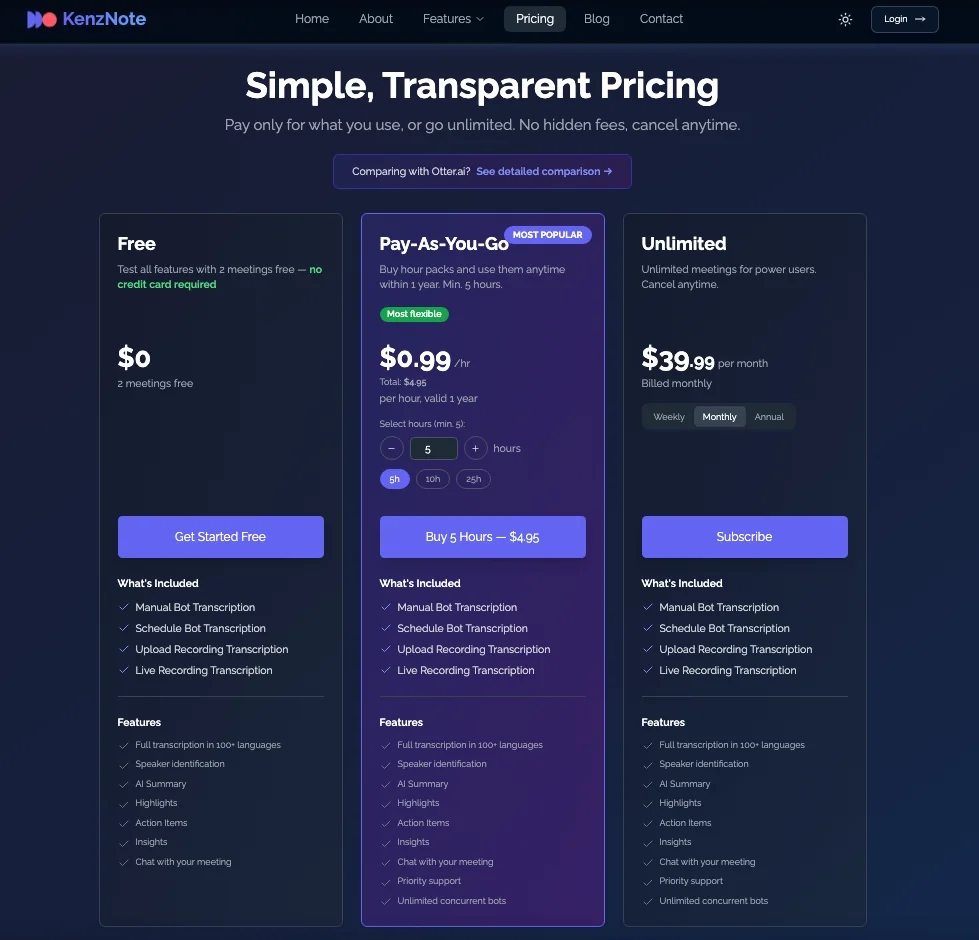
No subscriptions. No monthly fees. Just pay-as-you-go.
- Only pay for the meetings you actually process
- No commitment, no surprise charges
- No paying for months when you barely use it
- Budget exactly what you need
Why this is better:
For individuals: Don't pay for a monthly subscription when you only have 3 meetings this month.
For freelancers: Scale your costs naturally with your workload.
For growing teams: Add team members without worrying about per-seat pricing.
For enterprises: Pay for usage, not projected usage.
The message is simple: Fair, transparent, and designed around YOUR needs, not a software company's revenue model.
Who Is Kenznote Perfect For?
Kenznote transforms how these professionals work:
✅ Busy Professionals: If you're attending 5+ meetings per week, Kenznote gives you hours back.
✅ Remote Workers: Accurate records across time zones mean nobody misses important context.
✅ Team Leaders: Focus on leading, facilitating, and decision-making - not typing.
✅ Consultants: Client calls require your full attention. Let Kenznote handle documentation.
✅ Students: Capture every detail from online lectures and study sessions.
✅ Sales Teams: Review calls and improve your process without missing rapport-building moments.
✅ Project Managers: Track decisions and action items across multiple projects effortlessly.
✅ Anyone: Who's tired of choosing between participating and documenting.
Bottom line: If you're in meetings, Kenznote makes your life easier. Period.
Getting Started Is Actually This Simple
Ready to try it? Here's the complete process:
Step 1: Go to Kenznote and sign up Step 2: Copy your meeting link from Google Meet, Zoom, or Teams Step 3: Paste it into Kenznote Step 4: Choose "Send Now" or schedule for later Step 5: Attend your meeting like a normal human being Step 6: Get your transcript, summary, and action items automatically
Time investment: Less than one minute Mental effort: Basically none Results: Professional meeting documentation every single time
No learning curve. No onboarding process. No training videos to watch.
FAQs: Your Questions Answered
"Is the transcription accurate?"
Yes. Kenznote uses advanced AI transcription technology that handles multiple speakers, different accents, and industry-specific terminology. With clear audio, accuracy is typically 95%+.
"What about privacy and security?"
Your meetings are yours. Kenznote processes and delivers your content securely with encryption. No data mining, no selling your information to third parties, no unauthorized access. Your data stays private.
"Do other participants know there's a bot in the meeting?"
Yes, and that's by design. Transparency is important. The bot joins like any other participant, and most meeting platforms show when recording is happening. This ensures everyone knows the meeting is being documented.
"What if my meeting platform isn't on the list?"
Kenznote currently supports Google Meet, Zoom, and Microsoft Teams - which covers 95%+ of all virtual meetings. If your meeting is on a different platform or in person, you can always upload the audio or video recording afterward.
"Can I try it before committing to anything?"
Absolutely. The pay-as-you-go model means there's no commitment. Try it for one meeting and see the results yourself. No credit card required upfront, no subscription to cancel.
"How fast do I get the results?"
Usually within minutes after your meeting ends. Processing time scales with meeting length, but most meetings are processed very quickly. Longer meetings (2+ hours) take a bit more time but are still ready surprisingly fast.
"Can I edit the transcript or summary?"
Yes. While Kenznote's AI is highly accurate, you can always edit the transcript or summary to add context, clarify points, or correct any misinterpretations.
"What file formats do you support for uploads?"
Kenznote accepts common audio and video formats including MP3, MP4, WAV, M4A, and WEBM. Maximum file sizes vary by format, with video files supporting up to 2GB.
The Future of Meetings Is Here (And It's Easy)
Here's the big idea: Meetings should be about connecting, collaborating, and creating - not furiously typing while trying to keep up.
What Kenznote gives you back:
Your attention during meetings: Be fully present. Listen actively. Contribute meaningfully. Let the AI worry about capturing everything.
Time after meetings: No more spending 30 minutes cleaning up notes, deciphering your hastily typed fragments, or trying to remember who said what.
Confidence you didn't miss anything: Every word is captured. Every decision is documented. Every action item is identified.
Better work-life balance: Fewer late nights reviewing notes. Less anxiety about whether you caught everything. More mental space for what matters.
Professional credibility: Always have accurate records of commitments made, decisions reached, and next steps agreed upon.
The invitation:
Try Kenznote for your next meeting. Just one.
Copy the meeting link. Paste it into Kenznote. See what happens.
See how it feels to be completely present in a meeting instead of distracted by note-taking. See how much time you save afterward. See how much less stressful your workday becomes when you know nothing falls through the cracks.
The final thought:
The best meeting assistant is the one you don't have to think about.
That's Kenznote.
Ready to never take meeting notes again? Start with your next meeting →
About KenzNote
KenzNote is an AI-powered meeting assistant designed to eliminate the burden of manual note-taking. Founded on the principle that professionals should be able to fully engage in meetings without sacrificing documentation quality, KenzNote serves thousands of teams worldwide with simple, effective meeting automation.
Have questions? Reach out to our team at [email protected]

About KenzNote Team
The KenzNote team is dedicated to helping teams capture better meeting insights and transform how they collaborate. With backgrounds in AI, product design, and enterprise software, we're building the future of meeting productivity.
Ready to transform your meetings?
KenzNote automatically captures meeting insights, extracts action items, and generates summaries so you can focus on the conversation instead of taking notes.
Try KenzNote Free