
Quick Answer: The average AI meeting notetaker subscription costs between $10 and $30 per month. If you have 10 meetings a month, that works out to $1 to $3 per meeting. If you have fewer than 30 meetings per month, a pay-as-you-go model at $0.99 per meeting is almost always cheaper.
Key Takeaways
- Most subscription-based notetakers charge $10 to $30 per month regardless of how many meetings you attend.
- At 10 meetings per month, a $20 subscription equals $2.00 per meeting. At 5 meetings per month, it jumps to $4.00 per meeting.
- KenzNote charges $0.99 per meeting with no subscription required, making it the most cost-effective option for anyone with fewer than 30 meetings per month.
- KenzNote also offers unlimited weekly ($11.99) and monthly ($39.99) plans, so you can flip to flat-rate pricing during a heavy week or month and switch back to pay-per-meeting afterward, with no annual contract required.
- Free tiers exist but come with hard caps on hours or storage that make them impractical for professional use.
- Always calculate your actual per-meeting cost before committing to a subscription.
Table of Contents
- Why the Subscription Model Misleads You
- The Math: Per-Meeting Cost Breakdown
- Major Tool Pricing Compared
- Free Tiers: What You Actually Get
- When Pay-As-You-Go Makes Sense
- When KenzNote's Unlimited Plan Makes Sense
- Lifetime Value Comparison
- FAQ
- Related Resources
Why the Subscription Model Misleads You
Subscription pricing is designed to look small. "$10 a month" sounds reasonable until you realize you only had 4 meetings that month. Suddenly you paid $2.50 per meeting for a tool that is supposed to save you time.
The meeting frequency problem is real. Not everyone is in back-to-back calls every day. McKinsey research consistently shows that knowledge workers attend anywhere from 5 to 30+ meetings per week depending on their role. A sales director might genuinely use a $30/month tool heavily enough to justify it. A consultant who has 8 client calls per month probably does not.
The question to ask before signing up for any AI notetaker is simple: how many meetings do I actually attend per month, and what does that divide into?
 Choosing the right pricing model depends on how frequently you actually use the tool.
The Math: Per-Meeting Cost Breakdown
Here is the core formula:
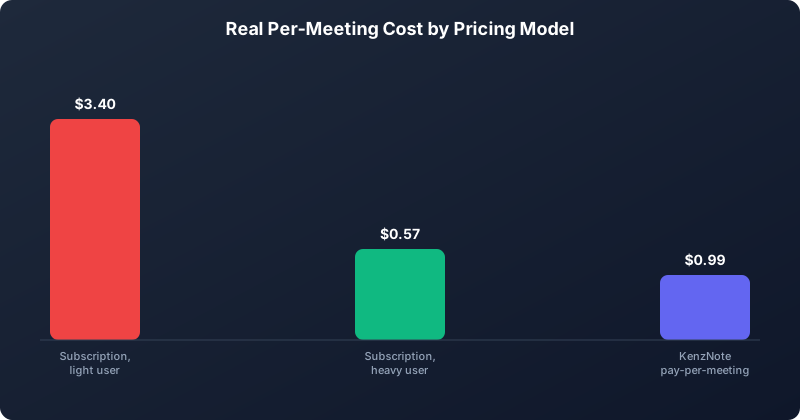 Subscriptions only beat pay-per-meeting pricing once you cross a certain number of meetings a month.
Per-meeting cost = Monthly subscription price / Number of meetings per month
Let's run this across common usage levels:
| Monthly Meetings | $10/mo Plan | $20/mo Plan | $30/mo Plan | $0.99/meeting |
|---|---|---|---|---|
| 5 meetings | $2.00 | $4.00 | $6.00 | $4.95 |
| 10 meetings | $1.00 | $2.00 | $3.00 | $9.90 |
| 15 meetings | $0.67 | $1.33 | $2.00 | $14.85 |
| 20 meetings | $0.50 | $1.00 | $1.50 | $19.80 |
| 30 meetings | $0.33 | $0.67 | $1.00 | $29.70 |
The crossover point for a $10/month plan is around 10 meetings per month. For a $20/month plan, it is around 20 meetings. For $30/month plans, it is around 30 meetings.
If you are below those thresholds, you are overpaying on a subscription. If you are above them, a subscription starts to make mathematical sense.
Major Tool Pricing Compared
Otter.ai
Otter.ai offers a free tier capped at 300 minutes per month. Their Pro plan is $16.99 per month (billed annually) or $20 per month on a rolling basis. The Business plan runs $30 per user per month.
At 10 meetings per month on the Pro annual plan, you are paying roughly $1.70 per meeting. That sounds reasonable, but that number assumes every meeting is captured without hitting limits. Otter Pro caps transcription at 1,200 minutes per month and limits imports. For most professionals, the cap is not an issue. But you are still paying whether you meet or not.
Fireflies.ai
Fireflies offers a free plan with limited storage (800 minutes total, not per month). Their Pro plan is $18 per seat per month billed annually, or $23 month-to-month. The Business plan is $29 per seat per month annually.
At 12 meetings per month on the Pro annual plan, your cost is $1.50 per meeting. Fireflies is genuinely well-featured at this price point, but the annual commitment means you are locked in regardless of whether your meeting cadence changes.
For a more detailed look at Fireflies pricing and features, see our tl;dv review 2026 which covers how bot-based recorders compare on value.
tl;dv
tl;dv has a free plan that is fairly generous, allowing unlimited recordings for Google Meet and Zoom. Their Pro plan is $25 per user per month (billed annually). The main limitation on the free tier is that AI features like summaries and search are limited.
Notion AI (Meeting Notes Add-on)
Notion AI costs $10 per user per month as an add-on to an existing Notion subscription. If you are already paying for Notion, this can look cheap. But if you are not a Notion user, you would be paying for a workspace tool just to get meeting notes, which inflates the real cost significantly.
KenzNote
KenzNote charges $0.99 per meeting with no monthly subscription. You pay only when you record. There are no seat limits, no annual commitments, and no per-minute caps. The per-meeting cost is fixed and predictable.
KenzNote also offers unlimited plans for weeks or months when your meeting volume spikes: $11.99 per week or $39.99 per month, both cancel-anytime with no annual contract. This is the differentiator that most competitors do not offer: instead of forcing you to pick one pricing model and stick with it, KenzNote lets you move between pay-per-meeting and unlimited freely, based on how busy a given week or month actually is.
 The per-meeting math changes dramatically depending on your actual meeting volume.
Free Tiers: What You Actually Get
Free tiers are useful for testing a tool before committing. They are rarely viable for sustained professional use. Here is what the major free offerings actually deliver:
Otter.ai Free: 300 minutes per month. Three import credits. No AI summary exports. Enough for light personal use, not enough for a professional workflow.
Fireflies Free: 800 minutes of storage total (not per month, total lifetime). After that, you either upgrade or lose access to old transcripts. This is a funnel, not a genuine free product.
tl;dv Free: Unlimited recordings on Google Meet and Zoom. Limited AI features. This is the most generous free tier in the market and worth trying if you want to test without spending anything.
KenzNote: No free tier, but no subscription lock-in either. You buy credits as needed, and unused credits do not expire.
For a full comparison of free options, see our guide on the best free AI meeting notetaker apps in 2026.
When Pay-As-You-Go Makes Sense
Pay-as-you-go pricing wins in four situations:
1. Variable meeting volume. Consultants, freelancers, and anyone whose workload fluctuates month to month benefit from paying only for what they use. A month with 5 client calls costs $4.95. A busy month with 25 calls costs $24.75. You never overpay for a quiet period.
2. Small teams with occasional recording needs. A 3-person startup that records weekly standups and monthly all-hands does not need a per-seat subscription. They need 8 recordings per month at $0.99 each.
3. Professionals with specialized use cases. Lawyers, therapists, and healthcare professionals often have specific meetings they need to document carefully but may not record every call. Pay-as-you-go lets them record what matters without committing to a subscription that covers calls they would never record anyway. See our guides on AI note-taking for lawyers and therapists for more context.
4. Testing before committing. Trying out an AI notetaker on a few real calls without a subscription gives you accurate data on whether the tool actually fits your workflow.
The Microsoft WorkLab research on meeting patterns shows that meeting loads are genuinely uneven week to week. Paying a flat monthly fee for a tool you use unevenly is a poor financial fit for most knowledge workers.
When KenzNote's Unlimited Plan Makes Sense
Every other tool in this comparison forces a choice: commit to a monthly (or annual) subscription, or accept the limits of a free tier. KenzNote is the only option here that lets you stay on pay-per-meeting by default and switch to a flat-rate unlimited plan only when you actually need it, with no long-term commitment either way.
The two unlimited options are:
- Weekly unlimited: $11.99. Breaks even against $0.99-per-meeting pricing at roughly 12 meetings in a single week. If you know a specific week is packed with back-to-back calls (a conference, a sprint review week, an end-of-quarter push), subscribing for that one week is cheaper than paying per meeting and you can drop back to pay-as-you-go the following week.
- Monthly unlimited: $39.99. Breaks even at roughly 40 meetings per month. If your meeting load consistently climbs above that, switching to the monthly plan is cheaper than paying per meeting, and you never have to migrate to a different tool to get there.
This matters because Otter and Fireflies only offer their best per-seat pricing on annual billing. If your meeting volume is unpredictable, you are stuck paying for a year of a subscription tier that may only make sense for a few of those months. KenzNote lets you scale the pricing model up or down with your actual usage, month to month, without ever signing an annual contract.
Lifetime Value Comparison
Let's look at what you actually spend over a year at different usage levels.
Scenario A: 8 meetings per month
- Otter Pro (annual): $16.99 x 12 = $203.88/year
- Fireflies Pro (annual): $18 x 12 = $216/year
- KenzNote: 8 x $0.99 x 12 = $95.04/year
KenzNote saves you over $100 per year compared to the cheapest major subscription.
Scenario B: 20 meetings per month
- Otter Pro (annual): $203.88/year
- Fireflies Pro (annual): $216/year
- KenzNote: 20 x $0.99 x 12 = $237.60/year
At 20 meetings per month, subscriptions start to become competitive. At 17 meetings per month, KenzNote at $0.99 per meeting crosses even with the $16.99 Otter plan.
Scenario C: 30+ meetings per month
At this volume, subscriptions win on pure cost. If you have 30 meetings every month without fail, a $20 to $30 per month subscription is your best financial option.
The breakeven point for KenzNote versus a $20/month subscription is approximately 20 meetings per month. Below that threshold, pay-as-you-go is cheaper. Above it, subscriptions compete.
If your volume climbs past roughly 40 meetings a month, KenzNote's own $39.99 unlimited monthly plan becomes cheaper than paying $0.99 per meeting, at which point it is competitive with Otter and Fireflies on pure cost too. The difference is you make that switch inside the same tool and the same account, with no annual commitment, rather than migrating to a new notetaker as your volume grows.
But cost is not the only variable. Privacy, data ownership, and contract terms matter too. KenzNote's contractual guarantee to never train AI on your meeting data is a significant differentiator regardless of price. Most subscription tools reserve rights to use aggregated data for model improvement.
To get started with KenzNote and see how it fits your workflow, see the KenzNote getting started guide.
 Pay-as-you-go pricing removes the financial risk of committing to a tool before you know it works for you.
FAQ
How much does Otter.ai cost per meeting?
Otter.ai's Pro plan costs $16.99 per month billed annually. If you have 10 meetings per month, that is $1.70 per meeting. At 5 meetings per month, you are paying $3.40 per meeting. The per-meeting cost depends entirely on how often you use it.
Is there a truly free AI meeting notetaker?
tl;dv offers the most generous free tier, with unlimited recordings on Google Meet and Zoom. Otter.ai and Fireflies both have free options with meaningful caps. None of the free tiers are designed for sustained heavy use.
Does Fireflies charge per seat?
Yes. Fireflies Pro charges per user per month. If you have a 5-person team where everyone needs access, you multiply the per-seat cost by 5. This can make team subscriptions significantly more expensive than they appear.
When does a subscription beat pay-as-you-go pricing?
When you consistently have 20 or more meetings per month. At that volume, a $20/month subscription typically works out cheaper than $0.99 per meeting. Below 20 meetings, pay-as-you-go wins.
Do KenzNote credits expire?
No. Unused KenzNote meeting credits do not expire. You can buy a block of credits and use them at your own pace without worrying about losing money on unused meetings.
What does the cheapest AI meeting notetaker cost?
KenzNote at $0.99 per meeting is the lowest per-meeting price for a full-featured AI notetaker without meaningful feature restrictions. Free tiers from other tools cost nothing but come with significant limitations on storage, AI features, and monthly usage.
Does KenzNote offer an unlimited plan?
Yes. Alongside the $0.99-per-meeting pay-as-you-go option, KenzNote offers unlimited weekly ($11.99) and unlimited monthly ($39.99) plans, both cancel-anytime with no annual contract. Weekly unlimited breaks even around 12 meetings in a single week; monthly unlimited breaks even around 40 meetings in a month. You can switch between pay-per-meeting and unlimited as your volume changes, without moving to a different tool.
Related Resources
References & Citations
- [1]Meetings and the time wasted in themMcKinsey & Company. June 1, 2023https://www.mckinsey.com/capabilities/people-and-organizational-performance/our-insights/the-organization-blog/time-wasted-in-meetings
- [2]Research Proves Your Brain Needs BreaksMicrosoft WorkLab. March 1, 2024https://www.microsoft.com/en-us/worklab/work-trend-index/brain-research
All external sources have been reviewed for accuracy and relevance. Last verified: October 2026.

About KenzNote Team
The KenzNote team is dedicated to helping teams capture better meeting insights and transform how they collaborate. With backgrounds in AI, product design, and enterprise software, we're building the future of meeting productivity.
Ready to transform your meetings?
KenzNote automatically captures meeting insights, extracts action items, and generates summaries so you can focus on the conversation instead of taking notes.
Try KenzNote Free