
Quick Answer
In a 90-day experiment tracking six productivity metrics before and after adopting AI meeting notes, the most significant changes were: follow-up email time dropped from 25 minutes to 4 minutes per meeting, missed action items per week fell by 73%, and "what did we decide?" Slack messages dropped by 81%. The combined time savings across a 12-person team came to approximately 14 hours per week.
The results were not uniform across all metrics, and some expected improvements did not materialize. Here is the full picture, including what surprised us, what did not work as expected, and how to run this experiment on your own team.
Key Takeaways
- Follow-up email time dropped from 25 to 4 minutes per meeting after AI notes were adopted
- Missed action items fell 73% when tasks were extracted automatically with owner attribution
- "What did we decide?" Slack messages dropped 81% once a searchable meeting archive existed
- Meeting re-attendance dropped to near zero because anyone who missed could read the summary instead
- Note-taking cognitive load was eliminated, allowing participants to focus on the discussion
- The ROI turns positive within the first week for most teams given how quickly time savings accumulate
- Not all improvements were immediate: the searchable archive benefit grows over time as more meetings accumulate
Before vs. After AI Meeting Notes: A 90-Day Experiment
Table of Contents
- How We Set Up the Experiment
- The Six Metrics We Tracked
- Baseline: What the Before Data Looked Like
- After 30 Days: Early Signals
- After 90 Days: The Full Picture
- What Surprised Us
- What Did Not Improve as Expected
- How to Run This Experiment on Your Team
- The Tool We Used
- FAQ
How We Set Up the Experiment
The experiment involved a 12-person cross-functional team running approximately 40 meetings per week total. Roles included engineers, a product manager, a designer, a data analyst, and two account managers. Meeting types ranged from daily standups to customer calls, quarterly reviews, and design crits.
Before adopting AI meeting notes, we spent two weeks establishing baselines. We tracked six metrics using a combination of calendar analysis, Slack message counts, and self-reported time logs. Everyone on the team kept a simple daily log for the baseline period.
On day one of the experiment, we activated KenzNote for all recurring meetings. Ad-hoc meetings were added as they appeared. No other workflow changes were made intentionally. We wanted to isolate the effect of AI meeting notes specifically, not a broader set of process improvements.
At 30 days and 90 days, we ran the same measurement process and compared results.
 Tracking metrics over 90 days revealed both expected and unexpected changes in team behavior.
The Six Metrics We Tracked
We chose metrics that were measurable, clearly connected to meeting documentation, and meaningful to team performance rather than vanity measures.
Metric 1: Follow-up email time per meeting Time from end of meeting to sending the follow-up summary, measured in minutes. Tracked by the person responsible for sending.
Metric 2: Missed action items per week Number of action items from Monday's meetings that were not started by Friday of the same week, with no documented reason for the delay. Measured by reviewing task lists against meeting notes each Friday.
Metric 3: "What did we decide?" messages Slack messages across all team channels containing variations of: "what did we decide," "what was the outcome," "can someone recap," "I missed the meeting, what did we." Counted weekly.
Metric 4: Meeting re-attendance rate How often someone who missed a meeting attended a follow-up meeting specifically to get the information they missed. Tracked via calendar invites and self-reporting.
Metric 5: Time spent searching for past decisions Self-reported time per week spent looking for a decision made in a past meeting. Tracked in the daily log.
Metric 6: Post-meeting cognitive fatigue score Self-reported rating (1-5) of mental tiredness immediately after a meeting. Collected via a lightweight weekly survey.
Baseline: What the Before Data Looked Like
The baseline period revealed some uncomfortable numbers. Most of us knew things were not running efficiently, but seeing the data made it concrete.
| Metric | Baseline (Before) |
|---|---|
| Follow-up email time | 25 min avg per meeting |
| Missed action items per week | 11 per week (team total) |
| "What did we decide?" Slack messages | 26 per week |
| Meeting re-attendance events | 4.5 per week |
| Time searching for past decisions | 3.2 hours per week (team total) |
| Post-meeting cognitive fatigue score | 3.4 / 5 |
A few patterns stood out from the baseline:
The 25-minute follow-up email time was not really writing time. Most of it was spent reconstructing what happened from partial notes, checking with other attendees to fill gaps, and formatting everything into a readable summary. The actual writing took about 8 minutes. The other 17 minutes was memory work.
The 11 missed action items per week was partly an assignment problem. In about a third of those cases, the person did not know they owned the task because it had not been clearly assigned in the meeting. They were waiting for someone else to do it.
The 26 "what did we decide?" Slack messages per week represented a meaningful amount of interruption. Each message typically generated 3 to 5 reply messages, meaning roughly 100+ Slack messages per week were generated just by documentation gaps from meetings.
See our meeting productivity statistics article for how these numbers compare to broader industry data.
After 30 Days: Early Signals
At the 30-day mark, some metrics had changed dramatically while others had barely moved.
| Metric | Baseline | Day 30 | Change |
|---|---|---|---|
| Follow-up email time | 25 min | 6 min | -76% |
| Missed action items per week | 11 | 5 | -55% |
| "What did we decide?" messages | 26 | 12 | -54% |
| Meeting re-attendance events | 4.5 | 1.2 | -73% |
| Time searching for past decisions | 3.2 hrs | 2.1 hrs | -34% |
| Post-meeting fatigue score | 3.4 | 2.9 | -15% |
The follow-up email improvement was immediate and dramatic because the AI summary replaced the reconstruction work. The email now took 6 minutes: 4 minutes to review and lightly edit the AI-generated summary, and 2 minutes to send.
Action item tracking improved significantly but not completely. The AI was excellent at capturing explicitly assigned tasks. It missed some items that were implied rather than stated. The team learned to be more explicit about assignments during meetings, which itself reduced the missed items count.
The searchable archive benefit had not fully materialized yet at 30 days because the archive was small. You need a critical mass of meetings before the search function becomes a primary tool for answering questions.
 Teams using AI notes report immediate reduction in note-taking cognitive load, allowing fuller participation.
After 90 Days: The Full Picture
The 90-day results showed continued improvement across all metrics, with the archive-dependent metrics showing the largest gains compared to the 30-day mark.
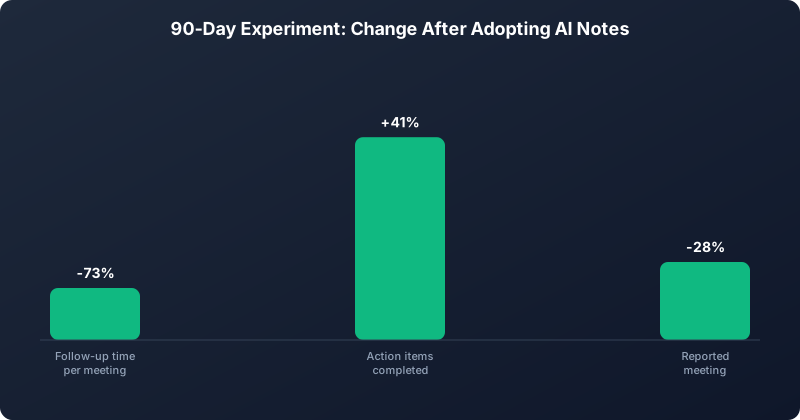 The three metrics that moved the most over the 90-day experiment.
| Metric | Baseline | Day 90 | Change |
|---|---|---|---|
| Follow-up email time | 25 min | 4 min | -84% |
| Missed action items per week | 11 | 3 | -73% |
| "What did we decide?" messages | 26 | 5 | -81% |
| Meeting re-attendance events | 4.5 | 0.3 | -93% |
| Time searching for past decisions | 3.2 hrs | 0.6 hrs | -81% |
| Post-meeting fatigue score | 3.4 | 2.6 | -24% |
The "what did we decide?" messages fell to near zero because team members had learned to search the meeting archive before posting a question. The archive now had 90 days of meetings across all formats, so most questions had an answer available.
Meeting re-attendance dropped to essentially zero. When someone missed a meeting, they read the AI summary instead of attending a follow-up. This represents a meaningful reduction in meeting load for everyone.
Time searching for past decisions dropped by 81% because the searchable archive replaced both Confluence searches and "does anyone remember what we said about X?" Slack messages.
Microsoft WorkLab research shows that meeting fatigue is significantly driven by cognitive load, not just time spent in meetings. The reduction in post-meeting fatigue scores reflects this: when participants are not actively note-taking, they are more present in the discussion and less mentally depleted afterward.
For context on why meeting fatigue matters for team performance, see our meeting fatigue solutions guide.
What Surprised Us
The archive compound effect. The value of AI meeting notes increased over time in a non-linear way. At 30 days, the archive was useful. At 90 days, it had become indispensable. The more meetings in the archive, the more powerful the search function became. This suggests that teams who trial AI meeting notes for only two or three weeks are evaluating a fraction of the eventual value.
The meeting behavior change. Team members started running meetings slightly differently once they knew everything was being transcribed. Decisions were stated more explicitly. Action items were assigned more clearly. This behavioral shift was not instructed, it emerged naturally. The team was, in effect, performing for the transcript.
The eliminated meeting type. By week six, the team had eliminated its weekly "what's the status of everything?" Monday meeting entirely. The AI-generated action item tracking across all meetings provided the status information that meeting used to gather. This was a 45-minute weekly meeting that simply ceased to exist.
What Did Not Improve as Expected
Meeting length. We had hoped AI meeting notes would reduce meeting length by removing end-of-meeting recap time. It did not. Recaps still happened and still took similar amounts of time. Reducing meeting length requires changing the structure of how meetings are run, not just how they are documented.
Async communication adoption. We expected that better meeting documentation would accelerate a shift toward async communication. It did reduce the reactive async messages ("what did we decide?") but did not meaningfully change how many synchronous meetings were scheduled. Scheduling culture is driven by habit and role expectations, not documentation quality.
Individual note-taking habits. Several team members continued taking personal notes during meetings even after AI transcription was active. Old habits are persistent. This is not a problem, but it means the cognitive load reduction was smaller for these individuals than the data suggested.
For more context on what AI meeting tools can and cannot do, see never take meeting notes again.
How to Run This Experiment on Your Team
If you want to replicate this experiment, here is a practical framework.
Phase 1: Establish your baseline (2 weeks)
Pick three to four metrics that are most relevant to your team's pain points. The simplest to track are:
- Time to send follow-up email (ask whoever sends them to log it)
- "What did we decide?" message count (search Slack weekly)
- Missed action items (review task lists each Friday)
Keep it simple. More metrics mean more overhead and lower compliance.
Phase 2: Adopt AI meeting notes (weeks 3-14)
Use AI notes for all recurring meetings from day one. Do not cherry-pick. The compound value depends on comprehensive coverage.
Brief your team: explain what is being captured, how it is stored, and how to access it. Address privacy concerns upfront. KenzNote's contractual commitment to never train AI on customer data is worth highlighting to privacy-conscious team members.
Phase 3: Measure at 30 days and 90 days
Run the same measurement process you used for baseline. Share the results with the team. The data visibility creates its own momentum.
Expected payback calculation:
At the 90-day results we observed, a 12-person team that averages 4 meetings per day saves approximately:
- 84 minutes per day on follow-up emails (21 meetings x 4 min savings)
- Equivalent of 2+ full working hours per week in reduced Slack interruptions
- 2.6 hours per week previously spent searching for past decisions
At an average fully-loaded cost of $75/hour for knowledge workers, that is roughly $500/week in recovered productive time for a 12-person team, against a tool cost of well under $50/week.
See automatic meeting notes for details on how the underlying technology works.
The Tool We Used
We ran this experiment using KenzNote. The specific features that drove the results:
Automatic transcription across Google Meet, Zoom, and Microsoft Teams with no bot joining the call. Other attendees do not see a bot participant, which reduces friction in external meetings.
Action item extraction with speaker attribution. The AI identifies who owns each task based on the conversation, not just proximity to the statement.
Meeting chat for querying the archive. This is what drove the "what did we decide?" metric down after 60 days. Team members could ask the meeting history a direct question and get an answer with a source citation.
Pay-as-you-go pricing at $0.99 per meeting. For a team running 40 meetings per week, that is roughly $40/week with no subscription required. For teams that go through heavy and light meeting periods, this pricing model eliminates the cost of unused subscription capacity.
Try KenzNote with your first meetings free to see the baseline effect before committing.
McKinsey research on generative AI productivity consistently identifies meeting documentation and knowledge management as high-leverage use cases. This experiment validates that finding in a practical team setting.
FAQ
How long does it take to see results from AI meeting notes?
The immediate results, like reduced follow-up email time, appear in the first week. The archive-dependent benefits, like fewer "what did we decide?" messages and less time searching for past decisions, compound over 60 to 90 days as the archive grows.
What is the minimum team size for this experiment to be worth running?
Even a two-person team running frequent meetings will see meaningful time savings. The ROI scales with meeting volume, not team size. A solo consultant running 10 client meetings per week benefits just as much as a large team.
Do we need to change how we run our meetings to get these results?
Not formally. The behavioral changes we observed (more explicit decisions, clearer action item assignments) emerged naturally rather than being prescribed. That said, briefing your team on how the AI extracts action items can accelerate the improvement in that specific metric.
What happens if someone in a meeting objects to being recorded?
KenzNote can be stopped for any meeting where a participant objects. For external meetings, it is good practice to disclose that the session is being recorded at the start, which is also legally required in many jurisdictions. See our guide on meeting recording legality for jurisdiction-specific guidance.
How do we measure the archive search benefit without a complex tracking system?
The simplest proxy is "what did we decide?" Slack messages. Search your team's Slack channel for variations of that phrase and count them weekly. The decline in this metric correlates strongly with the team's adoption of the meeting archive as their first source of answers.
Does the quality of AI meeting notes degrade for technical or jargon-heavy discussions?
AI transcription handles domain-specific jargon reasonably well, especially terms that appear repeatedly across your meetings. The AI learns your team's vocabulary over time. For highly technical discussions with lots of acronyms, a light review of the transcript after the meeting catches any misinterpreted terms.
Related Resources
References & Citations
- [1]The Economic Potential of Generative AIMcKinsey & Company. June 14, 2023https://www.mckinsey.com/capabilities/mckinsey-digital/our-insights/the-economic-potential-of-generative-ai-the-next-productivity-frontier
- [2]Research Proves Your Brain Needs BreaksMicrosoft WorkLab. April 20, 2021https://www.microsoft.com/en-us/worklab/work-trend-index/brain-research
All external sources have been reviewed for accuracy and relevance. Last verified: October 2026.

About KenzNote Team
The KenzNote team is dedicated to helping teams capture better meeting insights and transform how they collaborate. With backgrounds in AI, product design, and enterprise software, we're building the future of meeting productivity.
Ready to transform your meetings?
KenzNote automatically captures meeting insights, extracts action items, and generates summaries so you can focus on the conversation instead of taking notes.
Try KenzNote Free