
Quick Answer
Meeting fatigue is the cognitive and emotional exhaustion caused by too many meetings, particularly back-to-back video calls. According to a 2023 Microsoft survey, 78% of workers report feeling burned out from meetings.
The average professional spends more than 10 hours per week in meetings, a number that grew 250% since 2020 for remote and hybrid workers.
The fastest solutions are: auditing recurring meetings (eliminates 20-40% immediately), blocking no-meeting days, requiring agendas for every call, and using AI meeting tools so teammates can skip non-essential meetings without losing context.
Key Takeaways
- 78% of workers report meeting burnout, according to the 2023 Microsoft Work Trend Index
- Meeting time grew 250% since 2020 for remote and hybrid workers, averaging 10-plus hours per week
- A recurring meeting audit takes 30 minutes and routinely cuts 20-40% of standing meetings
- Deep work requires 23 minutes of recovery after each interruption, making back-to-back schedules structurally damaging
- AI meeting tools let people skip meetings without losing context by reading a 3-minute summary instead of attending 45 minutes live
- Reducing meetings by 40% increases individual productivity by 71%, per a 2022 Nature Human Behaviour study
- KenzNote costs $0.99 per meeting with no calendar access required, making selective recording practical for any team
- Video calls are more draining than in-person, due to four specific mechanisms identified by Stanford researchers
Table of Contents
- What Is Meeting Fatigue?
- Signs You Have Meeting Fatigue
- The Real Cost of Too Many Meetings
- 8 Practical Meeting Fatigue Solutions
- How AI Tools Are Changing the Meeting Equation
- The KenzNote Approach: Record It So Others Can Skip
- Quick Reference Table
- Frequently Asked Questions
- Related Resources
Meeting Fatigue: How AI Tools Help You Reclaim Your Calendar
You blocked two hours to do deep work. Then a meeting request landed. Then another. By noon, your calendar looked like a game of Tetris and your actual work remained untouched.
Sound familiar? You are not alone, and it is not just an annoyance. It is a recognized productivity crisis with a name: meeting fatigue.
According to a 2023 Microsoft survey, 78% of workers report feeling burned out from too many meetings. The average professional spends more than 10 hours per week in meetings, and that number has grown 250% since 2020 for remote and hybrid workers. For managers and senior contributors, 15-20 hours per week is increasingly common.
The cruel irony: the more meetings you attend, the less time you have to do the work those meetings are meant to support.
This article breaks down what causes meeting fatigue, how to recognize it before it breaks you, what it actually costs your team, and most importantly, practical solutions that work, including how AI tools are changing the equation.
📊 Fact Box: The Meeting Fatigue Crisis
- 78% of workers report burnout from too many meetings (Microsoft, 2023)
- 250% increase in meeting time since 2020 for remote workers
- $37 billion lost annually in the U.S. from unproductive meetings
- 23 minutes needed to regain focus after a single interruption
- 71% of meetings are considered unproductive by attendees (Atlassian)
Sources: Microsoft Work Trend Index, Harvard Business Review, Atlassian
What Is Meeting Fatigue?
 Meeting overload has become a recognized productivity crisis, affecting 78% of knowledge workers.
Meeting fatigue is the mental and physical exhaustion that comes from spending too much time in meetings, particularly back-to-back video calls. It goes beyond simple tiredness. Sustained overexposure to meetings leads to cognitive overload, reduced focus, lower motivation, and eventually burnout.
The video call version, often called "Zoom fatigue," has its own layer of problems. Research from Stanford University identified four specific mechanisms behind it:
- Excessive eye contact at unnatural proximity. Staring at faces on screen mimics close-range social intensity the brain reads as confrontational.
- Seeing yourself constantly. The equivalent of holding a mirror in front of your face all day.
- Reduced movement. In-person conversations allow you to look away, pace, and move. Video locks you in place.
- Higher cognitive load. You work harder to read non-verbal cues over a compressed video stream.
The result: a 45-minute video call drains more energy than a 45-minute in-person conversation, yet organizations schedule them back-to-back as if they were equivalent.
Signs You Have Meeting Fatigue
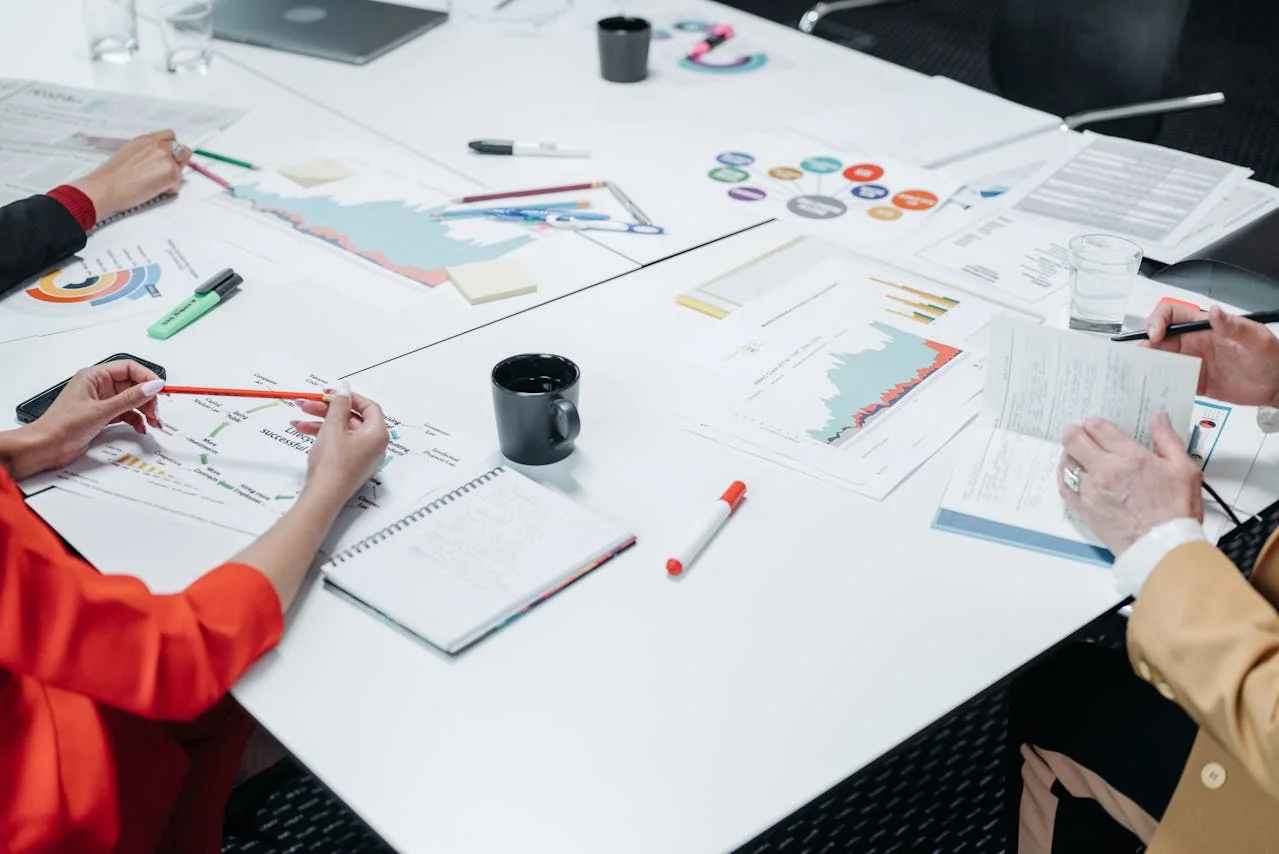 Meeting fatigue builds gradually. Most people mistake it for a rough week until the pattern is undeniable.
Meeting fatigue does not always announce itself loudly. It builds gradually, and many people assume they are just having a rough week. Watch for these signals:
Behavioral signs:
- You dread checking your calendar in the morning
- You multitask during meetings because you feel too behind to be fully present
- You cancel or avoid optional meetings reflexively, even useful ones
- Your best work only happens before 9am or after 5pm, the only windows without meetings
Cognitive signs:
- You leave meetings and cannot recall key decisions made
- You feel mentally foggy after a series of calls
- You struggle to switch from meeting mode back into focused work
- You find yourself in a meeting but have no idea what you are supposed to contribute
Emotional signs:
- You feel resentment toward coworkers who schedule meetings without an agenda
- You feel guilty saying no to meeting requests, even when your calendar is full
- You experience anxiety the night before a meeting-heavy day
If three or more of these resonate, your calendar is working against you.
The Real Cost of Too Many Meetings
This is not just a personal inconvenience. Meeting overload has measurable organizational consequences.
Productivity loss. Harvard Business Review found that the average senior leader spends 23 hours per week in meetings, up from under 10 hours in the 1960s. Much of that time is in meetings rated as unproductive by the attendees themselves.
Deep work disappears. Cal Newport's research on knowledge work shows that meaningful, high-value output (writing, analysis, coding, strategy) requires sustained uninterrupted concentration. A calendar broken into 30-minute blocks between meetings makes deep work structurally impossible. You cannot write a strategy deck in 20-minute sprints.
The recovery cost. Cognitive science research shows it takes an average of 23 minutes to fully regain focus after an interruption. A back-to-back meeting schedule means workers never fully recover their concentration between sessions.
Burnout and attrition. The American Psychological Association links chronic work overload, including excessive meetings, to burnout, which in turn drives turnover. Replacing a single employee costs 50-200% of their annual salary. Meeting culture is a genuine retention risk.
Cascading inefficiency. When the people who make decisions spend all day in meetings, they become the bottleneck. Projects stall waiting for a leader who is stuck in yet another call.
📊 Fact Box: The Financial Cost of Meeting Overload
- $399 billion lost annually by U.S. businesses from unproductive meetings
- 23 hours per week spent in meetings by the average senior leader (HBR)
- 2,600 hours per year lost when a 10-person team each spends 5 hours weekly in unnecessary meetings
- 50-200% of annual salary to replace an employee burned out by meeting overload
- 71% increase in productivity when meetings are reduced by 40% (Nature Human Behaviour, 2022)
Sources: Harvard Business Review, American Psychological Association, Nature Human Behaviour
The numbers add up fast. A team of 10 people, each spending 5 hours per week in unnecessary meetings, loses 2,600 hours per year, roughly 65 weeks of productive capacity.
8 Practical Meeting Fatigue Solutions
 A 30-minute meeting audit routinely eliminates 20-40% of standing meetings for teams that do one honestly.
These are not abstract suggestions. These are tactics that teams implement and notice results within weeks.
1. Audit Your Recurring Meetings
Pull up your calendar and look at every recurring meeting you attend. For each one, ask: what would happen if this meeting did not exist?
If the answer is "not much," that meeting is a candidate for elimination or replacement with a weekly async update. Many recurring meetings were set up for a project or context that no longer exists; they just never got cancelled.
A meeting audit takes 30 minutes and routinely eliminates 20-40% of standing meetings for teams that do one honestly.
2. Institute No-Meeting Days or Blocks
Protected time on the calendar is the simplest structural fix. Companies including Asana, Shopify, and Atlassian have made no-meeting days a formal policy. The results are consistent: deep work output increases, and employee satisfaction improves.
You do not need company-wide buy-in to start. Block two mornings per week as "focus time" and decline meetings during those windows. Most organizations respect it, and once people see you produce better work, the practice tends to spread.
3. Default to Shorter Meetings
Meeting length is almost entirely cultural, not functional. There is no law that requires a meeting to be 60 minutes. Default your calendar to 25-minute and 50-minute slots instead of 30 and 60. The reduced time creates natural pressure to prepare better and stay on topic.
A useful rule of thumb: if you cannot write an agenda in under five minutes, the meeting is not ready to happen.
4. Require an Agenda for Every Meeting
No agenda, no meeting. This one policy alone eliminates a meaningful proportion of low-value meetings, because organizers who cannot write an agenda often realize they need a document or decision, not a meeting.
Agendas also compress meeting length. A 45-minute meeting with a clear three-item agenda almost always finishes in 25 minutes.
5. Replace Status Update Meetings with Async Tools
The most common category of unnecessary meetings is the status update. "Where are we on X?" is a question that should never require 8 people on a call.
Tools like Loom (asynchronous video updates), Notion, Linear, or a simple shared document handle status updates better than meetings do. They are searchable, skippable, and do not interrupt everyone's flow simultaneously.
6. Reduce Your Personal Meeting Load Strategically
Not every meeting requires your presence. Look at meetings where you are a passive listener rather than an active contributor. If someone records and summarizes the meeting, do you actually need to attend?
This is where AI meeting tools change the math significantly. When a meeting is recorded with an AI notetaker, attendees who would have attended passively can skip it and read a summary instead. Tools like KenzNote let someone record a meeting and share a clean AI-generated summary, so team members who do not need to contribute live can catch up in three minutes instead of sitting through 45.
7. Establish Meeting-Free Communication Norms
Many meetings happen because teams default to synchronous communication for everything. A question that could be answered in a Slack message becomes a "quick call." A decision that could be made asynchronously through a shared doc becomes a meeting with six calendar blocks.
Decide, as a team, which types of communication stay async (questions, updates, feedback on documents) and which warrant a meeting (high-stakes decisions, emotionally complex conversations, genuine blockers that require real-time problem-solving).
8. Make It Easy for Others to Skip Non-Essential Meetings
Reducing your own meeting load is one thing. Building a culture where people feel safe opting out of non-essential meetings is more powerful.
If you organize meetings, record them and share summaries as a default. When team members know they can skip a meeting and still stay fully informed, the implicit pressure to attend out of obligation disappears. This is the cultural shift that compounds over time.
How AI Tools Are Changing the Meeting Equation
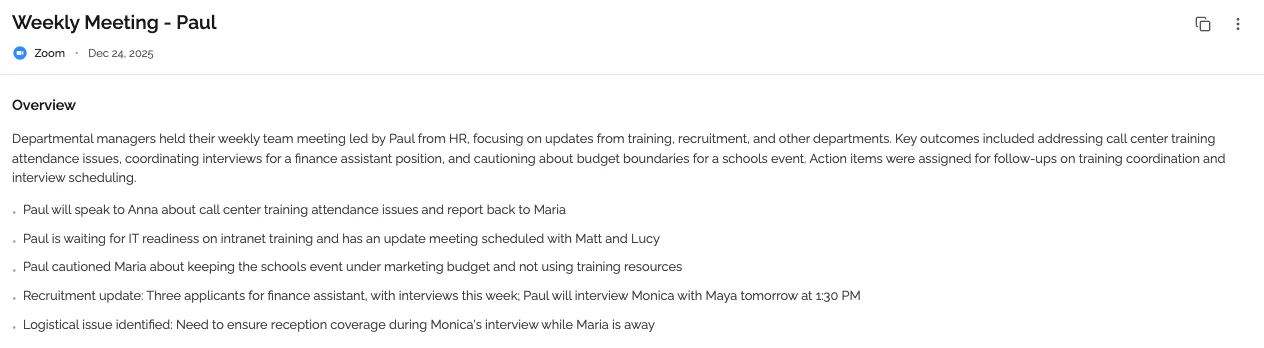 AI meeting tools generate structured summaries with decisions and action items delivered within minutes after a meeting ends.
AI meeting tools have quietly become one of the most practical solutions to meeting overload, not because they make meetings better, but because they make it possible to skip meetings without losing anything.
Here is what a modern AI meeting notetaker does:
- Joins your meeting automatically and records the audio
- Transcribes every word with speaker identification
- Generates a structured summary with key decisions, action items, and discussion highlights
- Delivers the summary to anyone who needs it, including people who were not in the room
The productivity implication is significant. If 6 people attend a one-hour meeting and 3 of them were there primarily to stay informed, you have just consumed 3 hours of collective time that could have been replaced by a 3-minute summary read.
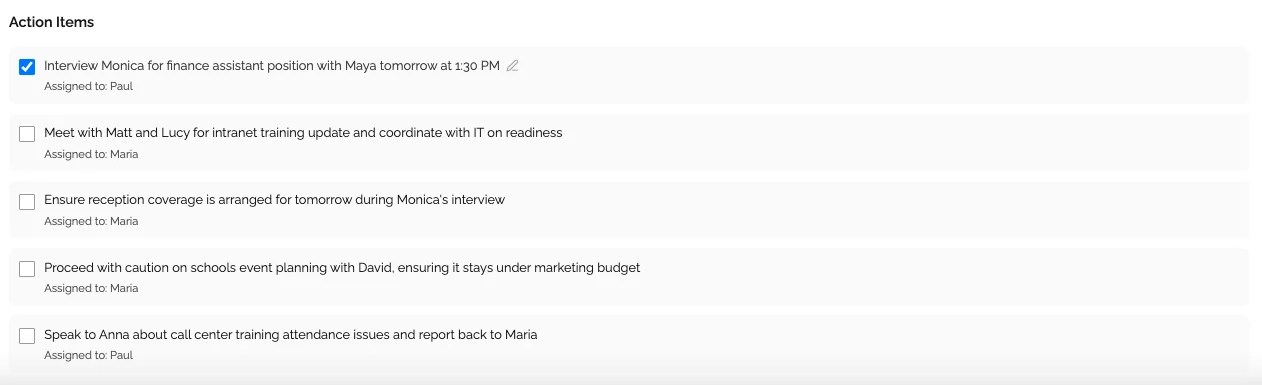 Automatic action item extraction means nothing falls through the cracks, even for people who skipped the meeting.
Over a week, for a team of 10, that kind of selective meeting attendance enabled by reliable AI summaries can recover 5-10 hours of productive capacity.
Beyond coverage, AI meeting tools also reduce the mental load of being in meetings. When you are not responsible for notetaking, you can actually focus on the conversation. Decision quality improves. Recall improves. And the post-meeting scramble to reconstruct what was decided goes away entirely.
📊 Fact Box: AI Meeting Tools and Productivity
- 5-10 hours per week recovered per team when selective attendance is enabled by AI summaries
- 95-98% transcription accuracy from modern AI tools, comparable to professional human transcribers
- 2-5 minutes after meeting end to receive full transcript, summary, and action items
- 71% reduction in individual stress reported alongside productivity gains in the Nature study
- $0.99 per meeting via KenzNote, no subscription required
Sources: McKinsey Productivity Study, Nature Human Behaviour, OpenAI Whisper Paper
The KenzNote Approach: Record It So Others Can Skip
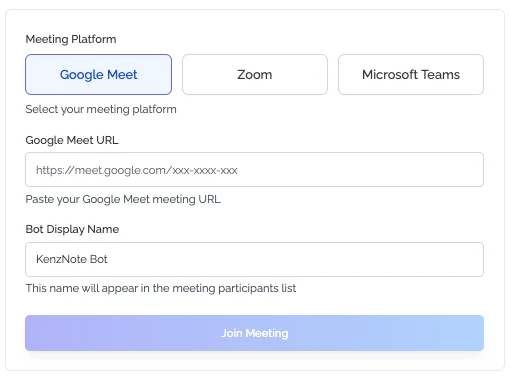 KenzNote works without calendar access. Paste a meeting link when you want it recorded. That is the entire setup.
One specific model worth knowing about: KenzNote works without calendar access. Instead of auto-joining every meeting, you paste a meeting link when you actually want something recorded. This makes it useful for a specific pattern: one person records, everyone else catches up via summary.
The pay-per-use model ($0.99 per meeting, no subscription) fits this use case naturally. If your team records 8-10 key meetings per month and shares summaries instead of requiring attendance, the cost is under $10, and the time recovered is measured in hours.
 Meeting topics are automatically identified and grouped, making it fast to find any part of the conversation.
For teams experimenting with async culture, or individuals trying to protect their focus time without disappearing from team context, this kind of tool removes the friction from opting out of non-essential meetings.
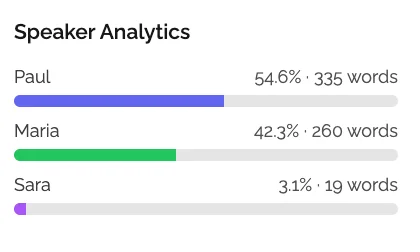 Speaker analysis shows who contributed and how much, giving teams visibility into meeting dynamics.
Quick Reference: Meeting Fatigue Solutions at a Glance
| Solution | Effort to Implement | Time Recovered per Week |
|---|---|---|
| Audit recurring meetings | Low (one-time, 30 min) | 1-5 hours |
| No-meeting days or blocks | Low | 2-4 hours |
| Default to shorter meetings | Low | 30-90 minutes |
| Require agendas | Low | 1-2 hours |
| Replace status updates with async | Medium | 1-3 hours |
| AI notetaker for selective attendance | Low | 2-5 hours |
| Async communication norms | Medium (team alignment) | 2-4 hours |
| Record meetings, share summaries | Low | 1-4 hours |
Frequently Asked Questions
What is meeting fatigue and why is it getting worse?
Meeting fatigue is the cognitive and emotional exhaustion caused by excessive time spent in meetings, particularly back-to-back video calls. It is getting worse because remote and hybrid work normalized video calls as the default mode for collaboration. Between 2020 and 2023, time spent in meetings increased by 250% for the average knowledge worker, according to Microsoft's Work Trend Index. The infrastructure for async communication exists, but most organizations have not built the habits to use it.
How many meetings per day is too many?
There is no universal threshold, but research and practitioner experience converge around a few signals. More than 3-4 hours of meetings in a single day makes sustained deep work structurally impossible. More than two back-to-back meetings without a break creates measurable cognitive fatigue. If you are consistently spending more than 50% of your working day in meetings, that is a structural problem worth addressing, not just a busy week.
Can you have meeting fatigue from working from home?
Yes. Remote workers often experience it more acutely than in-office workers. Without the natural separation of commuting, office layout, and physical transitions, remote workers tend to move from call to call with no buffer. Video calls also impose a specific cognitive tax that in-person meetings do not. Studies from Stanford's Virtual Human Interaction Lab documented this specifically in 2021, finding that video calls require significantly more mental effort to process social cues.
What is the fastest way to reduce the number of meetings you attend?
The most immediate lever is auditing your recurring meetings and cancelling or pausing the ones without a clear ongoing need. For meetings you are invited to but do not need to lead, ask the organizer if you can receive a summary instead of attending live. Many organizers are open to this. They often over-invite out of habit rather than genuine need. AI meeting tools that generate summaries make this conversation easier because you can offer a concrete alternative: "If someone records this, I can stay current without taking up a spot."
Does having fewer meetings actually improve productivity?
Yes, and the evidence is consistent. A 2022 study published in Nature Human Behaviour found that reducing meetings by 40% led to a 71% increase in individual productivity and a significant drop in stress levels. The key mechanism is protecting continuous blocks of uninterrupted time. Knowledge work productivity does not scale linearly with hours. It scales with the quality and continuity of focus. Fewer meetings mean more uninterrupted time, which means the work that actually matters gets done.
How do AI meeting notetakers help with meeting fatigue?
AI notetakers address meeting fatigue at two levels. First, they make it possible to skip meetings without losing context. If a meeting is recorded and summarized, you can opt out of attending and catch up in minutes. Second, they remove the mental load of notetaking from the meetings you do attend, allowing you to be fully present in the conversation instead of split between listening and writing. Over time, this changes the cost-benefit equation for meeting attendance across your team.
What is the difference between meeting fatigue and burnout?
Meeting fatigue is a specific contributor to broader burnout. Burnout is a state of chronic exhaustion spanning all aspects of work, while meeting fatigue refers specifically to the drain caused by excessive meetings. Meeting fatigue can exist without full burnout, but left unaddressed, it reliably contributes to it. Addressing meeting overload is one of the highest-leverage interventions for preventing burnout in knowledge workers, precisely because it is structural and fixable.
How does KenzNote help without requiring calendar access?
KenzNote takes a different approach from most AI meeting tools. Rather than connecting to your calendar and auto-joining every meeting, you paste a meeting link only when you want something recorded. This gives you full control over which meetings are captured, protects the privacy of sensitive calls, and means no third-party service has visibility into your entire schedule. At $0.99 per meeting with no subscription required, it is designed for selective, intentional recording rather than comprehensive capture.
The Bottom Line
Meeting fatigue is not a personality problem. It is a structural one, the result of organizations that default to synchronous meetings for everything without auditing whether each meeting earns its place on the calendar.
The solutions exist and they work. Protecting focus time, requiring agendas, replacing status meetings with async updates, and using AI tools to make selective attendance possible. None of these require a radical organizational overhaul. They require someone to start.
If you are reading this and your calendar is already stressing you out, that is enough information. Pick one change. A recurring meeting audit takes 30 minutes. Blocking two focus mornings per week takes two calendar clicks. Starting to record meetings and share summaries costs less than $10 a month.
The goal is not zero meetings. It is a calendar that reflects how knowledge work actually happens, with enough uninterrupted space to do the thinking your meetings are supposed to support.
Ready to Recover Your Focus Time?
AI meeting summaries make it safe and practical to skip meetings without losing context.
Start with KenzNote:
- ✅ 1 meeting free to try (no credit card)
- ✅ $0.99 per meeting after (or $29.99/month unlimited)
- ✅ No calendar access required (paste the link, done)
- ✅ 95-98% accuracy across Zoom, Google Meet, and Teams
- ✅ Summaries delivered 2-5 minutes after meetings end
Related Resources
- Meeting Productivity Statistics 2026
- Automatic Meeting Notes: Complete Guide
- Best AI Meeting Note Taker Apps 2026
- What Is an AI Meeting Assistant?
- Is It Legal to Record Meetings?
- AI Follow-Up Email After Meeting
- Never Take Meeting Notes Again
References & Citations
- [1]Microsoft Work Trend Index 2023Microsoft. May 9, 2023https://www.microsoft.com/en-us/worklab/work-trend-index
- [2]Stanford researchers identify four causes for Zoom fatigue and their simple fixesStanford News. February 23, 2021https://news.stanford.edu/2021/02/23/four-causes-zoom-fatigue-solutions/
All external sources have been reviewed for accuracy and relevance. Last verified: July 2026.

About KenzNote Team
The KenzNote team is dedicated to helping teams capture better meeting insights and transform how they collaborate. With backgrounds in AI, product design, and enterprise software, we're building the future of meeting productivity.
Ready to transform your meetings?
KenzNote automatically captures meeting insights, extracts action items, and generates summaries so you can focus on the conversation instead of taking notes.
Try KenzNote Free