
Quick Answer
Engineering teams use AI meeting notes differently from sales or executive teams. The most valuable applications are: capturing the reasoning behind architecture decisions during design discussions, documenting retrospective root causes before they are forgotten, extracting commitments and assignments from sprint planning calls, maintaining continuity in 1:1s, and creating structured notes from technical interviews. KenzNote's meeting chat feature is particularly useful for querying past technical decisions in natural language.
Key Takeaways
- Architecture decision records (ADRs) benefit from AI meeting notes because the "why" gets captured in real discussion before it disappears from memory
- Incident retrospectives documented with AI transcripts create searchable records that prevent the same root causes from recurring
- Sprint planning calls generate a large number of small commitments; AI extraction is significantly more reliable than manual note-taking under time pressure
- 1:1s are underused as a source of structured feedback; AI notes help managers track themes and follow through
- Technical interviews with AI notes produce more consistent evaluations and reduce interviewer bias
- KenzNote's meeting chat answers questions like "what did we decide about the API rate limiting?" directly from the transcript
Table of Contents
- Why Engineering Teams Benefit Differently
- Architecture Decision Records from Design Discussions
- Incident Retrospectives
- Sprint Planning: Extracting Commitments
- 1:1 Meetings: Tracking Feedback and Growth
- Technical Interviews: Structured and Fair Evaluation
- Using Meeting Chat to Query Technical Decisions
- Practical Setup for Engineering Teams
- Frequently Asked Questions
- Related Resources
Most content about AI meeting notetakers is written with sales teams or executive workflows in mind. Engineering teams have a distinct set of meeting patterns, and the way AI notes are most useful for developers is genuinely different from how they are most useful for a sales manager.
This guide focuses exclusively on engineering team use cases: the specific meeting types where AI notes provide the most value, the reasons why, and how to get the most out of them in practice.
Why Engineering Teams Benefit Differently
Engineering teams have a few characteristics that make AI meeting notes particularly valuable:
Context decay is fast. A technical decision made in a Tuesday design session is already fuzzy by Thursday and partly forgotten in two weeks. The reasoning behind architectural choices, the alternatives considered, and the constraints that drove the decision all disappear quickly unless they are captured immediately and accurately.
Decisions compound. Unlike many business decisions that can be revisited relatively easily, architecture decisions are often foundational. Getting them wrong has compounding consequences. Knowing why a decision was made matters enormously when evaluating whether to change it later.
Meeting types are varied. Engineering teams hold design reviews, sprint ceremonies, retrospectives, incident post-mortems, 1:1s, and technical interviews, each with distinct documentation needs. A generic meeting summary is less useful than purpose-specific capture.
Developers dislike interrupting flow for note-taking. Manual note-taking during a design discussion pulls cognitive bandwidth away from the actual problem. An engineer who is thinking hard about a distributed systems tradeoff should not also be typing notes. AI capture solves this directly.
 Engineering teams generate critical technical knowledge in meetings; AI notes prevent that knowledge from being lost immediately.
Architecture Decision Records from Design Discussions
Architecture Decision Records (ADRs) are documents that capture significant architectural decisions along with their context, the alternatives considered, and the rationale for the choice made. They are a well-established practice in software engineering, and they are chronically underused because writing them after the fact is tedious.
Here is the problem: the best time to write an ADR is immediately after (or during) the design discussion where the decision is made. That is when the context is fresh, the alternatives are top of mind, and the reasoning is explicit. Two weeks later, the person writing the ADR is reconstructing from memory what was a nuanced discussion.
AI meeting notes change this workflow. A typical design discussion that touches on architectural decisions produces:
- A transcript with the full technical conversation
- An AI summary capturing the main options discussed and the conclusion reached
- Action items including who owns the ADR documentation
With this material, writing a formal ADR takes 15-20 minutes instead of an hour of reconstruction. More importantly, it captures the actual reasoning that was expressed in the conversation, not a post-hoc rationalization.
KenzNote's meeting chat is particularly useful here: after the meeting, you can ask "what reasons did we give for choosing event-sourcing over direct database updates?" and get a direct answer from the transcript, rather than reading through the entire discussion.
Incident Retrospectives
Incident retrospectives (post-mortems) are one of the highest-value meetings an engineering team holds. They are also one of the easiest meetings to document poorly. The typical pattern: a long, free-flowing discussion identifies root causes, explores the timeline, and generates action items. The engineer tasked with writing up the post-mortem does so the next day, working from memory and the Slack thread, and the result omits half the nuance from the conversation.
AI meeting notes applied to retrospectives:
Capture the timeline discussion accurately. When teams are reconstructing an incident timeline in a retrospective, multiple people are offering fragments of the sequence. A transcript captures all of them; a human note-taker misses some.
Record the contributing causes in the words used during the discussion. The specific language used to describe a root cause often matters. "We didn't have alerting on the queue depth" is more precise and actionable than "alerting gaps" in a summary. Transcripts preserve this precision.
Capture dissenting views. In any retrospective, some engineers will have different interpretations of what went wrong. A good post-mortem acknowledges these differences rather than forcing false consensus. An AI transcript shows that the disagreement existed and what each view was.
Generate action items directly. AI extraction of action items from retrospective discussions is highly reliable because action items in retrospectives are usually explicitly stated ("we need to add a runbook for this," "someone should file the ticket for alerting").
Sprint Planning: Extracting Commitments
Sprint planning calls are commitment-dense: in a typical hour-long session, a team makes dozens of small commitments about which stories are being picked up, who is taking what, and what the acceptance conditions are. These commitments are often expressed verbally and quickly, under time pressure.
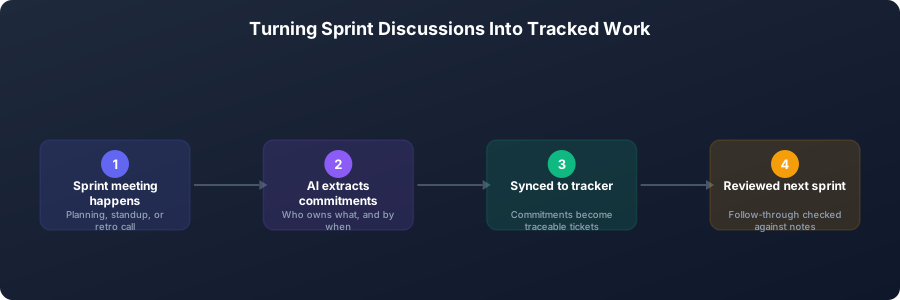 How a sprint conversation becomes a tracked, traceable commitment.
Manual note-taking in sprint planning is unreliable. The velocity is too fast, the commitments too numerous, and the discussion too technical for a note-taker to capture everything accurately. By the time the planning meeting ends, multiple commitments are already fuzzy.
AI meeting notes solve this directly. The transcript captures every commitment as it is made. The AI summary can extract the assignment list. And if there is a question the next day about who agreed to take the authentication story, the meeting chat gives you the answer in seconds.
Practical workflow for sprint planning with AI notes:
- Record or upload the sprint planning meeting
- Review the AI-extracted action items and assignments
- Cross-check against your ticketing system; add any items that were discussed but not yet tickets
- Use the meeting chat to resolve "wait, who took that?" questions during the sprint
This takes about 10 minutes of post-meeting cleanup and produces a reliable, searchable record of sprint commitments.
 Sprint planning calls generate dozens of commitments; AI extraction is more reliable than manual note-taking under time pressure.
1:1 Meetings: Tracking Feedback and Growth
Engineering managers who hold regular 1:1s with their reports face a documentation challenge: the conversations are personal, nuanced, and cumulative. A piece of feedback given in February is only meaningful in August if it was recorded and referenced in the months between.
Most managers take minimal notes in 1:1s. The conversations feel informal; taking notes seems clinical. But without notes, the feedback is lost, growth discussions do not build on each other, and the manager cannot see patterns over time.
AI meeting notes for 1:1s:
- Capture the specific language of feedback, which matters more in 1:1s than in any other meeting type
- Create a searchable record of commitments made by the manager and the report
- Allow the manager to search for patterns: "how often have we discussed this engineer's communication in 1:1s this year?"
- Support structured performance conversations with a documented history
One practical consideration: recording 1:1s requires the report's consent and may feel uncomfortable if introduced abruptly. The right approach is to introduce it as a tool for both parties to benefit from, with the explicit understanding that the notes are shared between manager and report only.
For a template that structures 1:1s for engineering teams, see our one-on-one meeting template.
Technical Interviews: Structured and Fair Evaluation
Technical interviews are a meeting type where AI notes provide a less obvious but genuinely important benefit: consistency and fairness.
The problem with unassisted technical interviews: interviewers who do not take structured notes end up evaluating candidates based on recollection and impression rather than documented performance. Research consistently shows that unstructured recall is influenced by factors unrelated to technical ability. An interviewer who liked a candidate tends to remember their answers as stronger; one who did not like them remembers them as weaker.
AI meeting notes do not solve unconscious bias directly, but they create a factual record of what the candidate actually said. When a hiring panel debates a candidate's system design answer, "let me pull up what they actually said" is a better basis for the conversation than competing recollections.
Practical workflow for technical interviews with AI notes:
- Record the interview with candidate consent (required)
- After the interview, review the AI summary and transcript before submitting your evaluation
- Reference specific things the candidate said rather than impressions
- For panel discussions, use the transcript to anchor disagreements about what the candidate demonstrated
The record also helps identify patterns in your interview process over time: are certain questions consistently generating poor answers? Are certain interviewers outliers in their evaluations?
Using Meeting Chat to Query Technical Decisions
KenzNote's meeting chat feature is one of the most useful tools for engineering teams specifically because technical work generates so many decisions that need to be referenced later.
Common use cases for meeting chat in engineering contexts:
- "What did we decide about the database schema for the user preferences table?" (from a design meeting three weeks ago)
- "Why did we rule out using Redis for session storage?" (from an architecture discussion)
- "Who committed to writing the load testing suite in the sprint planning meeting?"
- "What were the three main concerns raised in the security review?"
Without meeting chat, answering these questions requires either finding the right transcript and reading through it, or asking the person who might remember. Both options are slow and unreliable. Meeting chat gives you the answer in seconds, directly from the source.
This compounds in value as your library of recorded meetings grows. A year of design discussions becomes a searchable knowledge base. New team members can query it to understand why certain decisions were made. Senior engineers can pull up the reasoning behind legacy choices.
For more on how AI meeting notes fit into the broader practice of documenting technical knowledge, see our complete guide to AI meeting notes and our article on automatic meeting notes.
Practical Setup for Engineering Teams
Getting started with AI meeting notes for an engineering team:
Start with retrospectives. They are high-value, already have a documentation expectation, and the team will immediately see the benefit of having an accurate record.
Add sprint planning next. The commitment-extraction use case is immediately practical and reduces friction in daily standups when "who took that story?" questions come up.
Introduce 1:1 recording carefully. Have a direct conversation with your reports about why you want to record 1:1s and what the notes will be used for. Share the notes with the report, not just the manager.
For design reviews, establish a norm. If recording design meetings is standard practice on your team, every engineer knows their architectural reasoning will be captured. This tends to produce more deliberate, documented thinking.
Use KenzNote's pay-per-meeting pricing to test. At $0.99 per meeting, you can run AI notes for a two-week sprint cycle (retrospective, planning, and a few design sessions) for under $10. See what the team finds useful before committing to a subscription. See the getting started guide for setup instructions.
Frequently Asked Questions
Is it appropriate to record technical interviews with AI tools?
Yes, with the candidate's explicit consent. Most candidates in 2026 are familiar with AI meeting tools and will consent if asked professionally. Frame it as supporting a fair, consistent evaluation process. Some companies include AI recording disclosure in their interview confirmation emails.
How do engineering teams typically handle AI notes for sensitive retrospectives?
Restrict access to the transcript and notes to the team members who attended the retrospective. Avoid sharing incident post-mortem transcripts with people outside the team without reviewing them for sensitive content first. Treat retrospective notes as internal documentation.
Can AI meeting notes replace Architecture Decision Records?
No. AI meeting notes are an input to writing ADRs, not a substitute for them. ADRs have a specific format and purpose (a structured, permanent record of a decision and its rationale). AI notes provide the raw material: what was discussed, what alternatives were considered, and what the reasoning was. A human still needs to write the formal ADR.
What is the best way to share sprint planning AI notes with the team?
Extract the action items and assignments into your project management tool (Jira, Linear, GitHub Issues) as the authoritative record. Keep the full transcript and summary in KenzNote for reference if commitments are disputed. The project management tool should be the source of truth for sprint work; the AI notes support it.
Do developers object to having their technical discussions recorded?
Some do, initially. The most common concern is that recorded conversations will be monitored or used against them. Address this directly: clarify who has access to the recordings, that they are for team knowledge capture and not performance surveillance, and that any team member can opt out of having specific meetings recorded. Transparency about purpose and access typically resolves the concern.
How does KenzNote handle privacy for engineering teams specifically?
KenzNote's contractual no-training guarantee means your architecture discussions, incident post-mortems, and technical decisions are never used to train AI models. This is important for teams working on proprietary technology or sensitive systems. See our full guide on what AI meeting assistants do with your data.
Related Resources
References & Citations
- [1]Yes, you can measure software developer productivityMcKinsey. August 31, 2023https://www.mckinsey.com/industries/technology-media-and-telecommunications/our-insights/yes-you-can-measure-software-developer-productivity
- [2]Stop the Meeting MadnessHarvard Business Review. July 1, 2017https://hbr.org/2017/07/stop-the-meeting-madness
- [3]How we're helping developers work smarter with AIMicrosoft WorkLab. June 1, 2023https://www.microsoft.com/en-us/worklab/how-microsoft-is-helping-developers-work-smarter-with-ai
All external sources have been reviewed for accuracy and relevance. Last verified: October 2026.

About KenzNote Team
The KenzNote team is dedicated to helping teams capture better meeting insights and transform how they collaborate. With backgrounds in AI, product design, and enterprise software, we're building the future of meeting productivity.
Ready to transform your meetings?
KenzNote automatically captures meeting insights, extracts action items, and generates summaries so you can focus on the conversation instead of taking notes.
Try KenzNote Free