![One-on-One Meeting Template: 5 Free Templates + Tips [2026]](/images/blog/One-on-One-meeting-1024w.webp)
One-on-One Meeting Template: Manager's Guide + 5 Free Templates [2026]
Quick Answer
A great one-on-one meeting template includes a check-in, agenda items owned by both manager and employee, discussion of progress and blockers, feedback exchange, and clear action items with owners and due dates.
Below you'll find 5 ready-to-use 1:1 templates for every scenario: standard weekly check-ins, new hire onboarding, performance review prep, remote teams, and skip-levels. Copy them, adapt them, and start running better meetings today.
Modern AI tools like KenzNote can auto-generate 1:1 notes and extract action items automatically, so you can stay fully present in the conversation instead of typing notes throughout.
Key Takeaways
- 1:1s drive retention: Employees who have regular, structured one-on-ones with their manager are 3x more likely to be engaged at work
- Consistency is the secret: A recurring format builds psychological safety and makes conversations more honest over time
- Both sides should contribute: The best 1:1 agendas are co-owned, not a status report delivered to the manager
- Action items need owners: Every 1:1 should end with clear next steps, an owner, and a due date
- AI reduces the documentation burden: Tools like KenzNote automatically capture action items and decisions so managers can stay present in the conversation
- Skip the status update trap: 71% of employees report their 1:1s drift into project updates instead of growth and development conversations
- 30 minutes is enough: A focused 30-minute 1:1 with a clear agenda outperforms an open-ended 60-minute conversation with no structure
Table of Contents
- Why One-on-Ones Matter More Than You Think
- What Makes a Great One-on-One Meeting
- Which 1:1 Template Should You Use?
- 5 Free One-on-One Meeting Templates
- How to Run a Great One-on-One: Best Practices
- How AI Is Transforming 1:1 Documentation
- KenzNote for 1:1 Meetings: A Simple Workflow
- Frequently Asked Questions
- Related Resources
You just sat down for your weekly 1:1 with a direct report. The meeting starts. Someone asks: "So, what do you want to talk about?"
Silence. Then a 20-minute project status update that could have been a Slack message.
Sound familiar? You're not alone.
The problem is not that managers don't care about their 1:1s. The problem is that without a clear structure and consistent habits, these meetings drift into status updates, get cancelled when things get busy, and fail to build the kind of trust that makes them genuinely valuable.
A solid one-on-one meeting template fixes that.
In this guide, you'll get 5 free, copy-paste 1:1 templates for every type of manager-employee conversation, from quick weekly check-ins to skip-level conversations with senior leaders. Plus, you'll learn best practices for running better 1:1s and how to automate the documentation so you can actually be present.
Why One-on-Ones Matter More Than You Think
One-on-one meetings are the highest-leverage tool a manager has. Not team meetings. Not all-hands. Not Slack messages. The weekly or biweekly 30-minute conversation between a manager and a direct report is where trust is built, problems surface before they become crises, and careers are shaped.
Fact Box: 1:1 Meeting Effectiveness Statistics
- 3x more likely to be engaged: Employees with regular, structured 1:1s report dramatically higher engagement (Gallup)
- 70% of engagement variance is explained by manager behavior, according to Gallup research
- 67% of employees say their relationship with their direct manager significantly influences their decision to stay or leave (Officevibe)
- Teams with structured 1:1s report 25% higher productivity on average compared to teams without them (Harvard Business Review)
- 43% of highly engaged employees receive feedback at least once a week, and the 1:1 is the primary channel
Sources: Gallup State of the American Manager, Officevibe State of the Manager Report, HBR
The data backs this up. According to Gallup research, managers account for at least 70% of the variance in employee engagement scores. And the single biggest driver of a manager's effectiveness? The quality of their individual conversations with each person on their team.
The problem is not that managers don't know 1:1s are important. The problem is that without a clear structure and consistent habits, these meetings drift into status updates, get cancelled when things get busy, and fail to create the kind of psychological safety that makes them genuinely useful.
A solid one-on-one meeting template fixes that.
What Makes a Great One-on-One Meeting
Before you copy a template, it helps to understand what you're actually trying to achieve. Great 1:1s share four qualities.
1. Consistent Structure
When both parties know what to expect, they come prepared. Consistent structure signals that the meeting is taken seriously. It eliminates the awkward "so, what do you want to talk about?" opener and replaces it with a shared rhythm that both sides can rely on.
2. Employee-Led Agenda
The 1:1 is not a status report. The manager's job is to listen, coach, remove blockers, and provide context; not to download information. The best 1:1 templates reserve the first part of the agenda for the employee to bring their topics, questions, and concerns. Managers add their items second.
3. Forward-Looking Conversation
Great 1:1s spend less time on what happened last week and more time on what needs to happen next week and beyond. That means discussing growth, goals, roadblocks, and how the manager can help; not just ticking through project status.
4. Clear Action Items
Every meeting without documented action items is a meeting where accountability lives only in two people's memory. That rarely works well. Every 1:1 should end with a short list of who does what by when, captured and shared so both parties can follow up.
Fact Box: Action Item Completion Rates
- Vague action items: 23% completion rate
- Clear action items (with owner + deadline): 78% completion rate
- 3.4x improvement with properly specified action items
- Teams using automated extraction: 2.1x higher completion rates
- Average 1:1: 3-5 action items identified per session
Sources: Asana Anatomy of Work, Task Management Research
Which 1:1 Template Should You Use?
Use this decision guide to select the right template for your situation in seconds.
START: What's the purpose of this 1:1?
│
├─ REGULAR CHECK-IN
│  │
│  └─ Is this a recurring weekly or biweekly meeting?
│     │
│     ├─ YES → Template 1: Standard Weekly 1:1
│     │       ✅ Check-in + employee/manager agenda
│     │       ✅ Progress, blockers, feedback
│     │       ✅ Clear action items with owners
│     │
│     └─ NO → Is it a first meeting or early onboarding?
│        │
│        ├─ YES → Template 2: New Hire 1:1
│        │       ✅ Onboarding progress tracking
│        │       ✅ Role clarity and expectations
│        └─ NO → Template 1 (adapt as needed)
│
├─ PERFORMANCE / CAREER CONVERSATION
│  │
│  └─ Is there an upcoming or recent formal review?
│     │
│     ├─ YES → Template 3: Performance Review Prep 1:1
│     │       ✅ Self-assessment + manager assessment
│     │       ✅ Goal alignment and career growth
│     │
│     └─ NO → Use Template 1 with a "Career & Growth" topic added
│
├─ REMOTE / DISTRIBUTED TEAM
│  │
│  └─ → Template 4: Remote Team 1:1
│      ✅ Async and communication check
│      ✅ Visibility and inclusion section
│      ✅ Timezone-aware format
│
└─ SENIOR LEADER TO SKIP-LEVEL EMPLOYEE
   │
   └─ → Template 5: Skip-Level 1:1
       ✅ Team health and culture signal
       ✅ Career exposure and growth
       ✅ Confidential leader notes section
Quick Template Selection Guide:
| Situation | Template | Best For |
|---|---|---|
| Recurring weekly or biweekly | #1 Standard Weekly | Most managers, most of the time |
| New hire (first 90 days) | #2 New Hire | Onboarding momentum and early trust |
| Before or after performance review | #3 Performance Review Prep | Goal alignment and formal feedback |
| Remote or distributed team | #4 Remote Team | Distributed employees, async-first orgs |
| Senior leader + skip-level | #5 Skip-Level | Leadership visibility and culture signal |
5 Free One-on-One Meeting Templates
Each template below is ready to copy and paste. Adapt the sections to fit your context, your team's culture, and the seniority of the person you're meeting with.
Template 1: Standard Weekly 1:1 Template
Best for: Regular weekly or biweekly check-ins with direct reports
# 1:1 Meeting - [Employee Name] & [Manager Name]

**Date:** [MM/DD/YYYY]
**Time:** [Start - End]
**Location/Link:** [In-person / Zoom / Google Meet / Teams]

---

## Check-In (5 min)

How are you doing this week, personally and professionally?

---

## Employee Agenda Items (15 min)

_Employee adds topics before the meeting_

1.
2.
3.

---

## Manager Agenda Items (5 min)

_Manager adds topics before the meeting_

1.
2.

---

## Progress & Priorities

**Current priorities:**
-
-

**Progress since last 1:1:**
-
-

**Blockers or challenges:**
-
-

---

## Feedback Exchange

**Feedback for employee:**
-

**Feedback for manager (from employee):**
-

---

## Action Items

| # | Action Item | Owner | Due Date | Status |
|---|-------------|-------|----------|--------|
| 1 |             |       |          | Open   |
| 2 |             |       |          | Open   |
| 3 |             |       |          | Open   |

---

## Notes

[Free space for additional notes, observations, or context]

---

**Next 1:1:** [Date & Time]
Template 2: New Hire 1:1 Template
Best for: First 30-90 days with a new team member
New hire 1:1s have a different purpose than ongoing check-ins. The goal is onboarding momentum, early trust-building, and surfacing confusion before it becomes frustration.
# New Hire 1:1 - [Employee Name] & [Manager Name]

**Date:** [MM/DD/YYYY]
**Week:** [Week 1 / 2 / 4 / 6 / 8 of onboarding]
**Location/Link:** [In-person / Zoom / Google Meet / Teams]

---

## Check-In (5 min)

How is the first [week/month] going? What's surprised you, positively or negatively?

---

## Onboarding Progress (10 min)

**Completed so far:**
-
-

**Still working through:**
-
-

**Anything unclear or confusing?**
-
-

---

## Role & Expectations Clarity (10 min)

**Questions about the role:**
-

**Questions about success metrics:**
-

**Questions about team dynamics or processes:**
-

---

## Relationship Building

**What should I know about how you work best?**
(Preferred feedback style, communication preferences, working hours, etc.)


**What do you need more of from me as your manager?**


---

## Resources & Access

**Still needs access to:**
-
-

**Still needs introduction to:**
-
-

---

## Action Items

| # | Action Item | Owner | Due Date | Status |
|---|-------------|-------|----------|--------|
| 1 |             |       |          | Open   |
| 2 |             |       |          | Open   |
| 3 |             |       |          | Open   |

---

## Notes

[Observations, context, things to follow up on]

---

**Next 1:1:** [Date & Time]
Template 3: Performance Review Prep 1:1 Template
Best for: The 1:1 session before or after a formal performance review
Performance reviews should never be a surprise. The 1:1 before (or after) a review is the opportunity to align on expectations, give the employee space to self-evaluate, and discuss growth candidly.
# Performance Review Prep 1:1 - [Employee Name] & [Manager Name]

**Date:** [MM/DD/YYYY]
**Review Period:** [Q1 2026 / H1 2026 / Annual]
**Location/Link:** [In-person / Zoom / Google Meet / Teams]

---

## Self-Assessment (Employee Reflects First) (10 min)

**Achievements you're most proud of this period:**
-
-
-

**Areas where you fell short of your own expectations:**
-
-

**Skills you've developed or improved:**
-
-

**Skills or areas you want to develop next period:**
-
-

---

## Manager Assessment (10 min)

**Strengths observed this period:**
-
-

**Areas for growth:**
-
-

**Specific feedback on performance vs. goals:**
-
-

---

## Goal Alignment

**Goals from last period - how did we do?**

| Goal | Status | Notes |
|------|--------|-------|
|      |        |       |
|      |        |       |

**Goals for the next period:**

| Goal | Metric/Definition of Done | Timeline |
|------|--------------------------|----------|
|      |                          |          |
|      |                          |          |

---

## Career & Growth

**Where do you want to be in 12 months?**


**What opportunities would help you get there?**


**How can I support you better?**


---

## Action Items

| # | Action Item | Owner | Due Date | Status |
|---|-------------|-------|----------|--------|
| 1 |             |       |          | Open   |
| 2 |             |       |          | Open   |

---

## Notes

[Anything important to document before the formal review]

---

**Formal Review Date:** [Date]
Template 4: Remote Team 1:1 Template
Best for: Distributed teams and async-first environments
Remote 1:1s require extra intentionality. Isolation, unclear communication, and lack of visibility are all real risks for remote employees. This template addresses them directly.
# Remote Team 1:1 - [Employee Name] & [Manager Name]

**Date:** [MM/DD/YYYY]
**Time (with timezone):** [e.g., 10:00 AM EST / 3:00 PM GMT]
**Video Link:** [Zoom / Google Meet / Teams]

---

## Personal Check-In (5 min)

How's your energy this week? Anything going on outside of work worth sharing?

---

## Remote Work Experience (5 min)

**Collaboration & communication:**
- Is async communication working well for you right now?
- Any tools or processes that are frustrating you?

**Visibility & inclusion:**
- Are you feeling connected to what the broader team is working on?
- Anything making you feel excluded or out of the loop?

**Work environment:**
- Any changes to your setup, schedule, or availability?

---

## Work Update (10 min)

**Current priorities:**
-
-

**Progress since last 1:1:**
-
-

**Blockers (especially cross-timezone or cross-team):**
-
-

---

## Employee Topics (10 min)

_Employee adds ahead of time_

1.
2.
3.

---

## Manager Topics (5 min)

1.
2.

---

## Feedback

**From manager:**
-

**From employee:**
-

---

## Action Items

| # | Action Item | Owner | Due Date | Status |
|---|-------------|-------|----------|--------|
| 1 |             |       |          | Open   |
| 2 |             |       |          | Open   |
| 3 |             |       |          | Open   |

---

## Notes

[Context, observations, things to revisit]

---

**Next 1:1:** [Date & Time, include timezone]
Template 5: Skip-Level 1:1 Template
Best for: Senior leaders meeting with employees two or more levels below
Skip-level 1:1s are one of the most underused tools in a leader's toolkit. They give you unfiltered signal about team health, culture, and manager effectiveness, and they signal to employees that senior leadership cares about them directly.
# Skip-Level 1:1 - [Employee Name] & [Senior Leader Name]

**Date:** [MM/DD/YYYY]
**Direct Manager:** [Name]
**Location/Link:** [In-person / Zoom / Google Meet / Teams]

---

## Opening (5 min)

Set context: This is a casual, confidential conversation. The goal is to understand
how things are going from your perspective; not to check up on your manager.

---

## Employee Experience (15 min)

**What's going well on the team right now?**
-
-

**What's getting in your way or frustrating you?**
-
-

**Do you have the resources, clarity, and support you need to do your best work?**


**What's one thing leadership could change that would make the biggest difference for you?**


---

## Team & Culture Signal (10 min)

**How would you describe the team culture right now?**


**Do you feel like your work is recognized and valued?**


**Are there any issues or dynamics I should be aware of?**


---

## Career & Growth

**Are you learning and growing in this role?**


**Is there anything you'd like more exposure to?**


---

## Open Floor

**Any questions for me? Anything you've been wanting to raise with senior leadership?**


---

## Action Items

| # | Action Item | Owner | Due Date | Notes |
|---|-------------|-------|----------|-------|
| 1 |             |       |          |       |
| 2 |             |       |          |       |

---

## Confidential Leader Notes

_Not shared with employee, for leader's reference only_

[Themes, patterns, or follow-up items to raise with the employee's manager or HR]

---

**Next Skip-Level:** [Date, quarterly recommended]
How to Run a Great One-on-One: Best Practices for Managers
Having the right template is half the battle. Here are the habits that separate managers whose 1:1s employees look forward to from those who have meetings people dread.
Fact Box: 1:1 Meeting Habits Research
- Managers who cancel 1:1s regularly see a 45% drop in team engagement within 3 months
- Employees who own the agenda: 2.8x more likely to raise concerns proactively
- Feedback frequency matters: Monthly feedback sessions increase performance by 12%; weekly increases it by 24%
- Average cancellation rate: 34% of scheduled 1:1s are cancelled or rescheduled in a given quarter
- Best performing managers: Cancel fewer than 5% of scheduled 1:1s across the year
Sources: Gallup Workplace Research, Harvard Business Review Leadership Studies
Schedule them and protect them
Consistency matters more than frequency. A 30-minute weekly 1:1 that always happens builds more trust than an hour-long meeting that gets cancelled three weeks in a row. Put them in the calendar as recurring events and treat them as non-negotiable unless there is a genuine emergency.
Share the agenda in advance
Send a shared doc or use a tool where both parties can add agenda items 24 hours before the meeting. This gives the employee time to think about what they want to raise and prevents the meeting from starting cold.
Start with the employee, not the manager
The first half of every 1:1 should belong to the employee. Ask what's on their mind. Let them set the tone. Your agenda items can wait unless something is genuinely urgent.
Ask good questions
The quality of a 1:1 is largely determined by the quality of questions. Some of the most useful one-on-one meeting questions managers can use:
- "What's the most important thing we should talk about today?"
- "What's getting in your way right now?"
- "What are you learning? What do you wish you had more time to learn?"
- "How are you feeling about the team dynamics?"
- "Is there anything I'm doing, or not doing, that's making your job harder?"
- "What would help you feel more supported?"
- "Where do you want to be in a year, and what can I do to help you get there?"
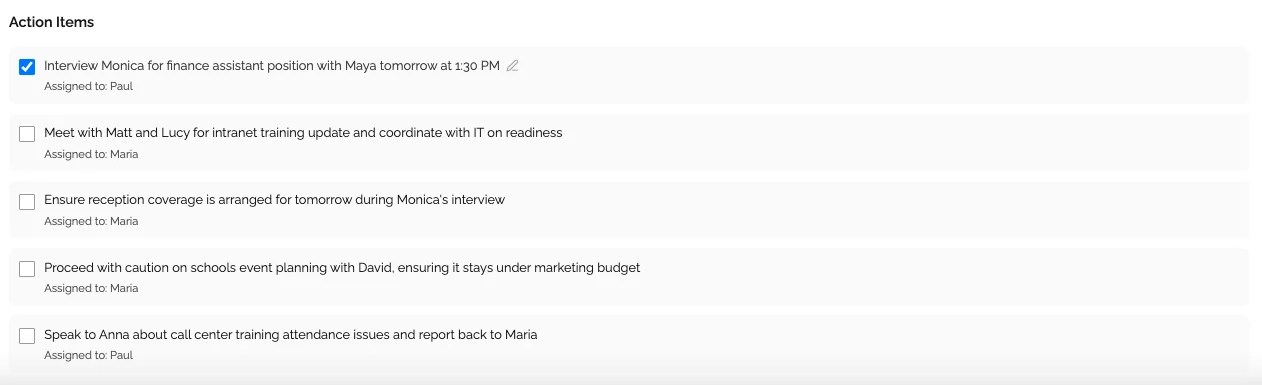
End with clear action items
Before the meeting ends, take 2 minutes to review and agree on action items. Who does what, by when? Both parties should leave with the same list. This is the moment where accountability is created, or lost.
Follow up between meetings
Reference action items from the last 1:1 at the start of the next one. This signals that what was said in the meeting actually mattered. If action items disappear into a void every week, employees will stop bringing real issues to the conversation.
How AI Is Transforming 1:1 Documentation
Here is the honest challenge with 1:1 meetings: capturing good notes while also being fully present in the conversation is nearly impossible. If you're typing notes, you're not listening. If you're listening, your notes are incomplete.
This is where AI-powered meeting tools have made a genuine difference for managers.
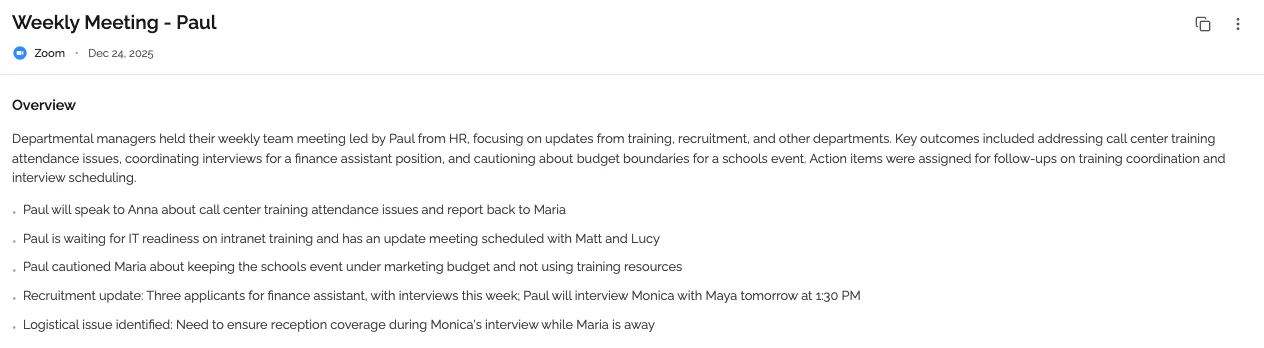
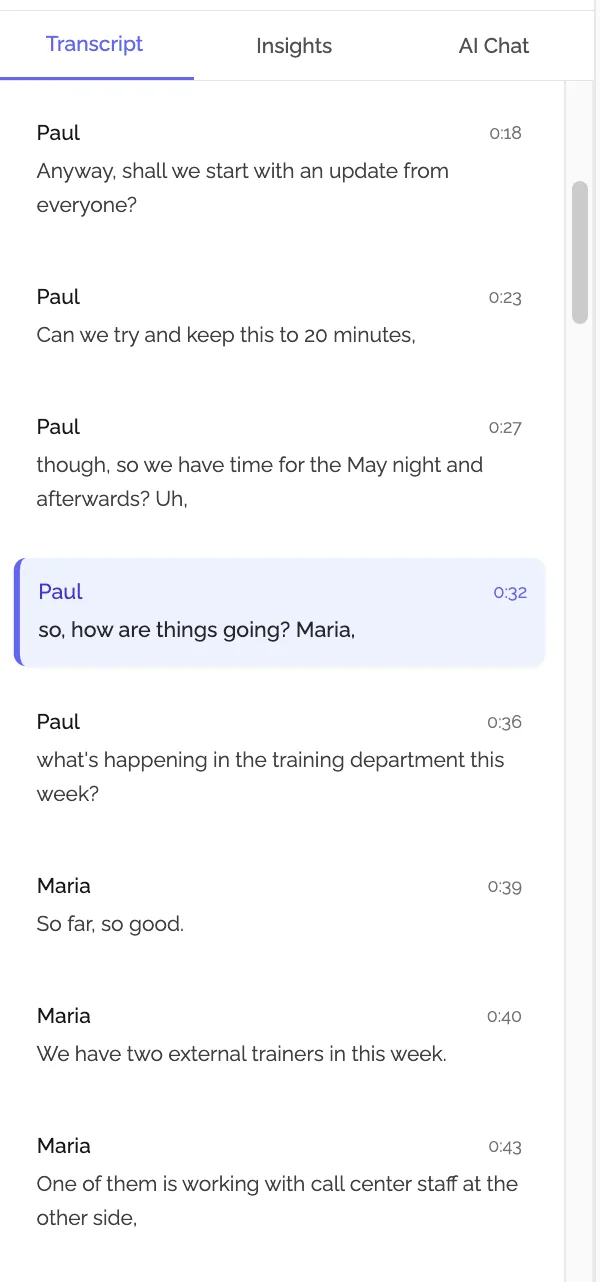
Modern AI note-takers join your 1:1 call, transcribe the conversation in real time, and then automatically generate a summary with extracted action items, decisions, and key discussion points. Instead of scrambling to write notes while nodding along, you can focus entirely on the person in front of you, and get a structured, searchable record of the conversation delivered to you when the call ends.
Fact Box: AI Meeting Notes Adoption
- 78% of Fortune 500 companies now use AI meeting tools for at least some meetings
- Time savings: Manual 1:1 notes take 20-35 minutes to write; AI generates them in under 2 minutes
- Accuracy: AI transcription reaches 95-98% vs. 40-60% content capture with manual notes
- Action item follow-through: Teams using automated action item capture see a 2.1x improvement in completion rates
- Manager cognitive load: 71% of managers report AI note-taking "significantly reduces" meeting fatigue
Sources: Gartner AI Workplace Report, G2 Meeting Software Reviews
The practical benefits for 1:1 management are significant:
- Automatic action item capture: No more action items falling through the cracks because you forgot to write them down
- Searchable conversation history: When an employee says "we talked about a promotion path in March," you can find exactly what was said instead of trying to reconstruct it from memory
- Consistent documentation across your team: Every 1:1 gets the same quality of notes, regardless of whether you were having a great focus day or a chaotic one
- Better follow-through: When action items are automatically documented and accessible, both parties are more accountable to them
- Reduced manager cognitive load: Running good 1:1s is already demanding. Removing the documentation burden makes the meeting itself better
KenzNote for 1:1 Meetings: A Simple Workflow
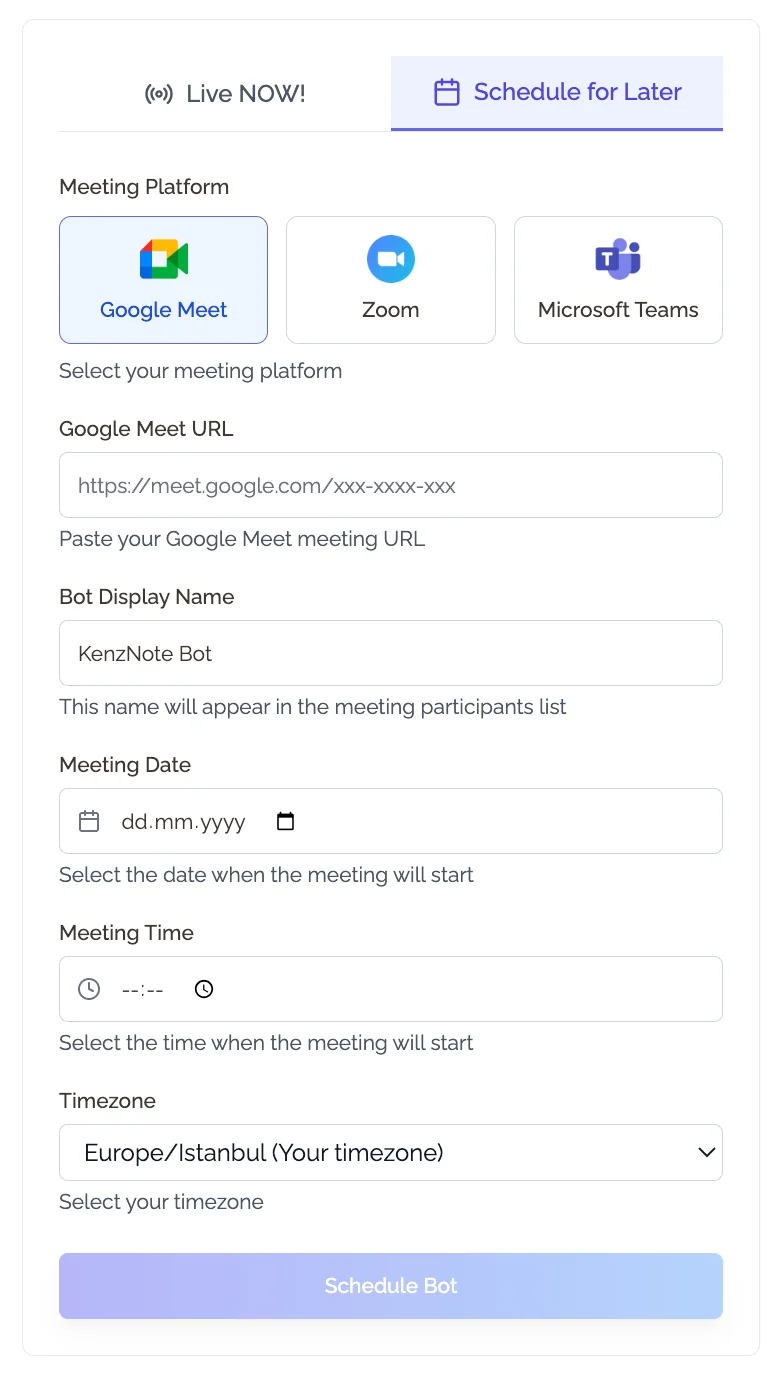
KenzNote is built for exactly this use case. It joins your 1:1 calls on Zoom, Google Meet, or Microsoft Teams with no calendar integration required, and automatically captures the conversation without adding any friction to the meeting itself.
Here is how managers typically use KenzNote for their 1:1s:
- Prepare the agenda using one of the templates above and share it with your direct report before the meeting
- Start the call and let KenzNote join automatically to capture the session
- Run the meeting fully present; no notes app open, no distracted typing
- Receive the summary after the call: action items extracted and attributed to the right person, key decisions documented, discussion points organized by topic
- Share or file the notes: KenzNote makes it easy to send the summary to the employee or save it for your own reference
At $0.99 per meeting, it costs less than a coffee to have a complete, AI-generated record of every 1:1 you run. For managers with five or more direct reports, that adds up to a material reduction in administrative burden, and a much more complete paper trail for performance conversations.
The templates in this article pair naturally with KenzNote: you bring the structure, and KenzNote handles the capture.
Frequently Asked Questions
How long should a one-on-one meeting be?
Most 1:1s work well at 30 minutes for weekly check-ins or 45-60 minutes for biweekly meetings. Shorter is often better: a focused 25-minute 1:1 with a clear agenda is more valuable than an open-ended hour that drifts into small talk. For performance review prep or career development conversations, budget 45-60 minutes.
How often should I have 1:1s with my direct reports?
Weekly 1:1s are the gold standard for most teams, especially for new employees or anyone working through a challenge. Biweekly works for experienced team members with high autonomy. Monthly is generally too infrequent to build real trust or catch problems early. When in doubt, err on the side of more frequent.
Who should set the 1:1 agenda?
Both parties should contribute. Best practice is to use a shared document where the employee adds their topics first, and the manager adds theirs second. The employee's topics take priority. This signals that the 1:1 is for the employee's benefit, not just a status update for the manager.
What should I do if my direct report never has anything to say?
This usually means one of two things: either they don't feel psychologically safe enough to raise real issues, or they aren't sure what the 1:1 is for. Start by explicitly inviting them to own the agenda. Try open-ended prompts like "What's been on your mind?" or "What's one thing I could do differently to support you?" If silence persists, that itself is important signal worth exploring.
Should I take notes during a 1:1?
Taking notes shows you're engaged and creates accountability, but doing it manually while also being present is difficult. The best approach is to use an AI meeting tool like KenzNote that captures and summarizes the conversation automatically, so you can focus on listening and the documentation takes care of itself.
What's the difference between a 1:1 and a performance review?
A performance review is a formal, structured evaluation that typically happens quarterly or annually, is tied to compensation decisions, and goes into official records. A 1:1 is an ongoing, informal conversation focused on the employee's day-to-day experience, growth, and relationship with their manager. Think of 1:1s as the ongoing investment that makes performance reviews less stressful, because nothing in the review should come as a surprise if the 1:1 relationship is healthy.
What should you not do in a 1:1 meeting?
Avoid turning the 1:1 into a status report where the employee just recaps project updates. Don't cancel or reschedule frequently: it signals that the meeting (and by extension, the employee) isn't a priority. Don't dominate the agenda with your own topics. Don't let the conversation end without clear action items. And avoid skipping the check-in: the personal connection is what separates a useful 1:1 from a regular meeting.
How do I structure a 30-minute 1:1?
A good 30-minute 1:1 structure: 5 minutes for a personal check-in, 15 minutes for employee agenda items, 5 minutes for manager topics, and 5 minutes to review and agree on action items. The key is to protect the employee's time at the front of the meeting and end with explicit commitments from both parties.
Can I use AI to take notes in a 1:1 meeting?
Yes, and it's highly effective for 1:1s. AI tools like KenzNote join your call, transcribe the conversation in real time, and automatically extract action items and decisions into a structured summary. This lets you stay fully present in the conversation instead of splitting your attention between listening and note-taking. At $0.99 per meeting, it's a practical solution for managers running multiple 1:1s per week.
What's a skip-level 1:1?
A skip-level 1:1 is a meeting between a senior leader and an employee who reports to one of that leader's direct reports, effectively "skipping" one level of the org chart. Skip-level 1:1s give senior leaders unfiltered signal about team health, culture, and manager effectiveness. They're typically held quarterly and are explicitly framed as informal and confidential to encourage honest conversation.
Related Resources
Want to take your meeting productivity to the next level?
- Meeting Minutes Templates - 10 free templates for every meeting type, from board meetings to standups
- How to Organize Meeting Notes - Proven systems for keeping your meeting records searchable and useful
- AI Follow-Up Email After Meeting - Automate the follow-up that most managers forget
- Automatic Meeting Notes - How AI note-taking works and when to use it
Ready to automate your 1:1 notes?
Try KenzNote free and let AI capture the action items and decisions from every 1:1 so you can stay focused on the conversation. At $0.99 per meeting, it pays for itself the first time you avoid a missed follow-up.
Questions? Email [email protected] or visit our Help Center.

About Muhammad Abuelenin
Muhammad is the co-founder of KenzNote, passionate about building tools that enhance productivity and collaboration. With expertise in full-stack development and AI-powered solutions, he's dedicated to helping teams work smarter through innovative technology.
Ready to transform your meetings?
KenzNote automatically captures meeting insights, extracts action items, and generates summaries so you can focus on the conversation instead of taking notes.
Try KenzNote Free