
Quick Answer
For most people, notetaking apps ($0-15) on existing devices are the smartest choice - they're cost-effective, versatile, and powerful. Apps like OneNote (free), Notion (free), and GoodNotes ($10 on iPad) deliver 90% of the value at 1/10th the cost of dedicated devices. Buy a dedicated device only if: you're a serious handwriting purist willing to pay $300-600 for paper-like feel (reMarkable, Supernote), need distraction-free focus (e-ink devices), or want ultimate versatility and can afford $500-1,200 (iPad with Apple Pencil). Most students and professionals should start with apps and upgrade to devices later only if they discover they love digital notetaking.
Key Takeaways
- Apps are 90% cheaper: Free to $15 vs $300-1,200 for devices - start with apps unless you have specific device needs
- Apps more versatile: Work on devices you already own (phone, laptop, tablet) vs carrying additional hardware
- Devices better for handwriting: Paper-like feel and distraction-free environment worth the premium for serious writers
- iPad is middle ground: $500-1,200 but combines notetaking with full tablet capabilities (textbooks, apps, media)
- E-ink devices best for focus: reMarkable and Supernote offer zero distractions but limited functionality
- Start with apps first: 95% of people satisfied with apps - test before investing $300+ in dedicated hardware
- Total cost matters: Factor in 4-5 year ownership - apps at $0-75 total vs devices $300-600 plus app subscriptions
Table of Contents
- Understanding Your Options
- Direct Comparison
- When to Choose Apps
- When to Choose Devices
- Device Types Explained
- Real User Scenarios
- Cost Analysis
- Decision Framework
- Frequently Asked Questions
Notetaker Devices vs Apps: Which is Right for You?
You're ready to go digital with your notes. But you face a critical decision:
Option A: Use a notetaking app on your existing phone/laptop ($0-15)
Option B: Buy a dedicated device like reMarkable, iPad, or e-ink tablet ($300-1,200)
The difference isn't just money - it's about how you work, what you value, and what you truly need.
📊 Fact Box: Apps vs Devices Usage
- 73% of digital note-takers use apps on existing devices (not dedicated hardware)
- Apps on smartphones/laptops: $0-15/year average
- Dedicated devices: $300-1,200 average purchase
- Only 12% of app users eventually buy dedicated devices (most stay with apps)
- iPad users spend 8 hours more monthly on notetaking vs app-only users (device encourages usage)
- E-ink device users rate "distraction-free focus" as #1 benefit (95% satisfaction)
Sources: Digital Productivity Research 2025, Gartner Consumer Technology Survey
This guide will help you make the right choice for your budget, workflow, and needs.
Understanding Your Options
Option 1: Notetaking Apps
What they are: Software applications that run on devices you already own.
Examples:
- OneNote (free, all platforms)
- Notion (free-$10/month)
- GoodNotes ($10, iPad/Mac)
- Evernote ($0-15/month)
- Apple Notes (free, Apple devices)
Devices they run on:
- Smartphones (iPhone, Android)
- Tablets (iPad, Galaxy Tab, Kindle Fire)
- Laptops (Mac, Windows, Chromebook)
- Desktop computers
Key Advantage: Work on devices you already own - no additional hardware purchase needed.
Option 2: Notetaking Devices
What they are: Dedicated physical hardware designed specifically for notetaking.
Categories:
2A: E-Ink Tablets ($300-600)
- reMarkable 2, Supernote, Boox, Kindle Scribe
- Paper-like e-ink displays
- Distraction-free (no apps, notifications, web)
- Best for: Handwriting purists, focused thinkers
2B: iPad/General Tablets ($450-1,200)
- iPad with Apple Pencil
- Samsung Galaxy Tab with S Pen
- Microsoft Surface
- Best for: Versatility (notes + productivity + entertainment)
2C: Hybrid Smart Pens ($30-150)
- Rocketbook, Livescribe
- Write on special paper, digitizes automatically
- Best for: Transitioning from paper
Key Advantage: Superior handwriting experience and/or distraction-free environment.
Notetaking Apps vs Devices: Comparison
Quick Comparison Table
| Feature | Apps | E-Ink Devices | iPad/Tablets |
|---|---|---|---|
| Cost | $0-15 | $300-600 | $450-1,200 |
| Additional Hardware | ❌ Not needed | ✅ Required | ✅ Required |
| Handwriting Feel | ⭐⭐ Good (on tablets) | ⭐⭐⭐⭐⭐ Excellent | ⭐⭐⭐⭐⭐ Excellent |
| Organization | ⭐⭐⭐⭐⭐ Excellent | ⭐⭐ Basic | ⭐⭐⭐⭐⭐ Excellent |
| Search | ⭐⭐⭐⭐⭐ Powerful | ⭐⭐⭐ Good | ⭐⭐⭐⭐⭐ Powerful |
| Versatility | ⭐⭐⭐⭐⭐ High | ⭐ Low | ⭐⭐⭐⭐⭐ High |
| Battery Life | ⭐⭐⭐ (device dependent) | ⭐⭐⭐⭐⭐ Weeks | ⭐⭐⭐ 8-10 hours |
| Distractions | ⭐⭐ High | ⭐⭐⭐⭐⭐ Zero | ⭐ Very high |
| Collaboration | ⭐⭐⭐⭐⭐ Excellent | ⭐ Limited | ⭐⭐⭐⭐⭐ Excellent |
| Portability | ⭐⭐⭐⭐⭐ Phone in pocket | ⭐⭐⭐⭐ Extra device | ⭐⭐⭐ Extra device |
Head-to-Head: Apps vs E-Ink Devices
| Aspect | Apps (e.g., OneNote) | E-Ink Devices (e.g., reMarkable) |
|---|---|---|
| Cost | Free-$15 | $299-600 + optional subscription |
| Devices needed | Phone/laptop you own | Dedicated device required |
| Handwriting | Good on tablets, limited on phone | Excellent, paper-like feel |
| Typing | Excellent (full keyboard) | Limited or none |
| Organization | Powerful (tags, search, databases) | Basic (folders) |
| Features | Audio recording, OCR, collaboration | Minimalist features only |
| Battery | 1 day (phone/laptop) | 2+ weeks |
| Distractions | High (notifications, social media) | Zero (single-purpose) |
| Learning curve | Low | Medium |
| Best for | Most people (students, professionals) | Writers, focused thinkers |
Head-to-Head: Apps vs iPad
| Aspect | Apps (OneNote/Notion) | iPad + Apple Pencil + GoodNotes |
|---|---|---|
| Cost | $0-15 | $528-1,128 (device + stylus + app) |
| Devices needed | Existing devices | Buy iPad + Apple Pencil |
| Handwriting | Good on touchscreens | Outstanding (best-in-class) |
| Versatility | Depends on device | Extremely high (notes + apps + media) |
| Textbook annotation | Limited (depends on device) | Excellent (PDF markup) |
| Portability | Phone always in pocket | Need to carry iPad |
| Distractions | Moderate | Very high (games, social media) |
| Can replace laptop? | No | Partially (with keyboard) |
| Best for | Budget-conscious users | Students with digital textbooks, creatives |
When to Choose Apps
Apps Are Best If You...
✅ Are budget-conscious
- Apps are free or cheap ($0-15)
- Use devices you already own
- No additional hardware investment
✅ Want to start risk-free
- Try digital notetaking without commitment
- Can always upgrade to device later
- No loss if you decide it's not for you
✅ Need versatility
- Take notes on phone, review on laptop, present on tablet
- One app syncs across everything
- Don't want to carry extra devices
✅ Prefer typing over handwriting
- Most apps are keyboard-optimized
- Faster for long-form writing
- Better for text-heavy fields (law, journalism, writing)
✅ Require collaboration
- Real-time editing with teammates
- Share notes easily
- Comment and discuss within app
- (Devices have limited/no collaboration)
✅ Need powerful organization
- Databases, tags, linking (Notion, Obsidian)
- Advanced search across thousands of notes
- Automation and integrations
- (Devices offer basic folders only)
✅ Value convenience
- Phone always in pocket (capture ideas anywhere)
- Laptop for deep work
- No extra device to remember/charge
Best Apps by Use Case
For students: OneNote (free unlimited), Notion (free, powerful organization)
For professionals: Notion (teams), OneNote (meetings with audio), Obsidian (knowledge work)
For iPad owners: GoodNotes ($10), Notability ($15/year) - apps ARE on devices, but these are app-based solutions
For Android owners: OneNote, Notion, Squid
For Apple users: Apple Notes (free, simple), OneNote (free, powerful)
When to Choose Devices
Devices Are Best If You...
✅ Are serious about handwriting
- Prefer writing to typing (learning/memory)
- Find typing distracting or impersonal
- Take heavily visual notes (diagrams, sketches)
- (E-ink devices offer best paper-like feel)
✅ Need distraction-free environment
- Struggle with focus on smartphones/laptops
- Want single-purpose tool (only notes, no social media)
- Value deep work and concentration
- (E-ink devices have zero distractions - no apps, no notifications)
✅ Annotate PDFs heavily
- Students with digital textbooks
- Professionals reviewing contracts/reports
- Researchers marking up papers
- (iPad + GoodNotes best for PDF annotation)
✅ Have the budget
- Can afford $300-1,200 upfront
- See value in premium writing experience
- View as long-term investment (5+ years)
✅ Want paper-like writing
- Miss the feel of pen on paper
- Tired of slippery glass screens
- Appreciate tactile feedback
- (reMarkable, Supernote best for paper feel)
✅ Want to replace multiple items
- iPad can replace: notebook + textbooks + laptop (partially) + entertainment device
- Saves carrying multiple items
- Consolidates functions
✅ Are visual/creative
- Take sketch-heavy notes
- Draw diagrams and mind maps
- Need color and precision
- (iPad with Procreate, Concepts apps)
Best Devices by Use Case
For writers/thinkers: reMarkable 2 ($299), Supernote ($399-459) - paper-like, distraction-free
For students (budget): iPad 10th Gen + Apple Pencil ($528) - affordable versatility
For students (premium): iPad Air/Pro + Apple Pencil + GoodNotes ($728-1,128) - best experience
For professionals: iPad + Apple Pencil (replace notebook + tablet needs)
For Android users: Samsung Galaxy Tab S9 + S Pen ($800) - S Pen included
For distraction-free: reMarkable 2, Supernote (no apps, no web)
Types of Notetaking Devices
1. E-Ink Devices ($300-600)
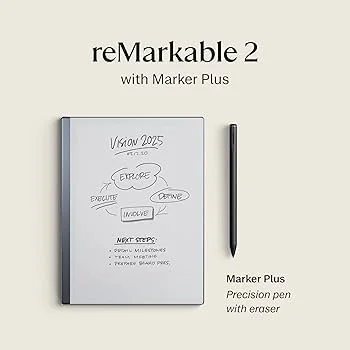 E-ink devices like the reMarkable trade versatility for a distraction-free, paper-like writing experience.
Examples: reMarkable 2 ($299), Supernote A5 X ($459), Boox Note Air ($480), Kindle Scribe ($340)
Pros:
- ✅ Paper-like feel - Best digital writing experience
- ✅ Zero distractions - No apps, notifications, social media
- ✅ Battery lasts weeks - 2-3 weeks per charge
- ✅ Easy on eyes - E-ink display, no blue light
- ✅ Thin and light - Like carrying a notebook
- ✅ Focused tool - Single purpose = better at it
Cons:
- ❌ Expensive - $300-600 for notes only
- ❌ Limited features - Basic organization, no apps
- ❌ No color - Grayscale only
- ❌ Slower refresh - Not for video or fast scrolling
- ❌ Another device - One more thing to carry/charge
- ❌ Less versatile - Only notes and reading
Best for:
- Writers who need distraction-free environment
- Readers who annotate books/documents heavily
- Professionals in focused work (strategy, thinking, planning)
- Anyone missing paper but wanting digital benefits
2. iPad + Apple Pencil ($450-1,200)
Examples: iPad 10th Gen + Pencil ($528), iPad Air + Pencil ($728), iPad Pro + Pencil ($1,128)
Pros:
- ✅ Excellent handwriting - Smooth, responsive, accurate
- ✅ Extremely versatile - Notes + apps + media + productivity
- ✅ Best app ecosystem - Thousands of notetaking apps
- ✅ Can replace laptop - For many tasks (with keyboard)
- ✅ Beautiful display - Color, high resolution, ProMotion 120Hz
- ✅ Textbook replacement - Read + annotate digital textbooks
Cons:
- ❌ Expensive - $528-1,200+ (device + Pencil + apps + keyboard)
- ❌ Very distracting - Games, social media, notifications
- ❌ Battery life shorter - 8-10 hours (vs weeks for e-ink)
- ❌ Apple ecosystem - Expensive, locked-in
- ❌ Overkill for notes only - Paying for features you may not use
Best for:
- Students (textbooks + notes + apps in one)
- Creative professionals (notes + design + drawing)
- Anyone wanting one device for everything
- People willing to pay premium for versatility
3. Android Tablets ($300-1,000)
Examples: Samsung Galaxy Tab S9 ($800), Galaxy Tab A ($300), Boox Android tablets ($480)
Pros:
- ✅ S Pen included - Samsung tablets include stylus (no extra $129)
- ✅ Good handwriting - Not quite iPad-level but close
- ✅ More affordable - Than equivalent iPad
- ✅ Android flexibility - More open than iOS
- ✅ Versatile - Apps, media, productivity
Cons:
- ❌ Fewer quality apps - iOS has better notetaking apps
- ❌ Less refined - Handwriting not as smooth as iPad
- ❌ Can be distracting - Games, notifications
- ❌ Mixed quality - Range from budget to premium
Best for:
- Android users (phone/ecosystem synergy)
- Budget-conscious (vs iPad)
- Users wanting stylus without Apple premium
4. Hybrid Smart Pens ($30-150)
Examples: Rocketbook ($30-45), Livescribe ($80-150), Neo Smartpen ($100)
Pros:
- ✅ Real paper feel - Actual pen on paper
- ✅ Cheapest option - $30-150 one-time
- ✅ Easy transition - From paper to digital
- ✅ Works with phone - Digitize via camera or Bluetooth
Cons:
- ❌ Still need paper - Special notebooks required (ongoing cost)
- ❌ Limited features - Basic digitization only
- ❌ Less convenient - Scan/upload step required
- ❌ Not as searchable - OCR not as good as native digital
Best for:
- People transitioning from paper
- Budget-conscious users
- Those who love paper but want backup
Real User Scenarios
Scenario 1: College Student (Budget: $0-100)
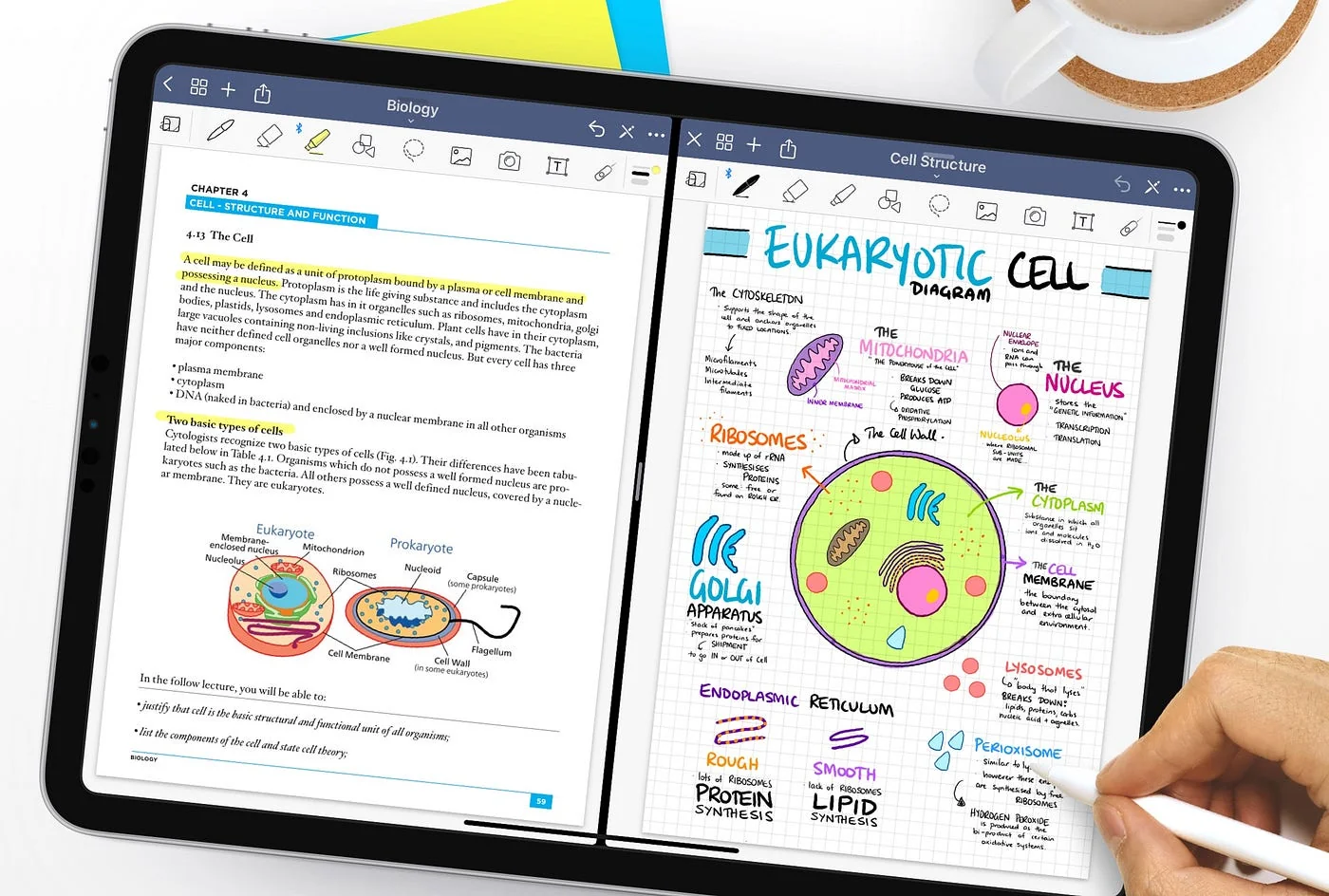 Apps like GoodNotes deliver most of the handwriting experience people want, on hardware they already own.
Profile:
- Full-time student, tight budget
- 15+ hours of lectures weekly
- Needs textbook annotation (PDFs)
- Group projects requiring collaboration
Recommended: Apps (OneNote + Notion)
Why:
- ✅ Free - Both apps completely free for students
- ✅ Works on laptop - Take notes in class
- ✅ Phone access - Review notes between classes
- ✅ Collaboration - Share notes with study groups (Notion)
- ✅ Audio recording - Record lectures (OneNote)
Cost: $0 Device: Use existing laptop and phone
Later: If they fall in love with digital notes and get financial aid/job, consider iPad for better handwriting.
Scenario 2: PhD Student (Budget: $500-800)
Profile:
- Heavy reader (journal articles, papers)
- Needs to annotate PDFs constantly
- Takes handwritten research notes
- Wants less screen time (eye strain)
Recommended: reMarkable 2 ($299) or Supernote ($459)
Why:
- ✅ Paper-like - Best for reading and annotating
- ✅ Distraction-free - Focus on research, not social media
- ✅ Eye-friendly - E-ink easy on eyes (hours of reading)
- ✅ Battery life - Weeks per charge (all-day library sessions)
Cost: $299-459 one-time Additional: Can keep laptop for typing/analysis, use device for reading/handwriting
Scenario 3: Professional (Meetings + Projects, Budget: $500-1,000)
Profile:
- 10+ meetings weekly
- Needs notes + productivity apps
- Replaces both notebook and sometimes laptop
- Budget for quality tool
Recommended: iPad Air + Apple Pencil ($728)
Why:
- ✅ Versatility - Notes + email + Slack + presentations
- ✅ Handwriting - Excellent Apple Pencil experience
- ✅ Keyboard option - Add Smart Keyboard for laptop replacement
- ✅ Professional - Looks polished in meetings
- ✅ One device - Replace notebook + tablet needs
Cost: $728 (iPad Air $599 + Apple Pencil $129) Apps: GoodNotes ($10), Notability ($15/year), or free options
Scenario 4: Writer/Author (Budget: $300-500)
Profile:
- Writes daily (novels, articles, scripts)
- Needs distraction-free environment
- Prefers handwriting for drafting
- No need for apps/multitasking
Recommended: reMarkable 2 ($299)
Why:
- ✅ Distraction-free - No apps, notifications, or internet
- ✅ Paper-like - Most natural digital writing
- ✅ Focused tool - Does one thing excellently
- ✅ Long battery - Write for days without charging
- ✅ Affordable - Compared to iPad
Cost: $299 + $3/month optional (cloud sync) Workflow: Draft on reMarkable → Export to typed text → Edit on laptop
Scenario 5: High School Student (Budget: $0-550)
Profile:
- Takes classes with lectures and textbooks
- Needs notes for studying
- May or may not already have devices
- Parents buying device
Recommended: If no tablet: iPad 10th Gen + Apple Pencil ($528) Recommended: If has laptop/phone: OneNote (free) first
Why iPad if buying:
- ✅ Lasts 5+ years - Through high school and college
- ✅ Versatility - Notes + homework + learning apps + entertainment
- ✅ Textbooks - Read digital textbooks + annotate
- ✅ Future-proof - Will serve them through college
Cost: $528 or $0 (use free apps on existing devices)
Advice to parents: Start with free apps. If student uses daily for 3+ months, invest in iPad as reward/upgrade.
5-Year Cost Analysis
Total Cost of Ownership (5 Years)
| Option | Year 1 | Years 2-5 | 5-Year Total |
|---|---|---|---|
| OneNote (free app) | $0 | $0 | $0 |
| Notion (free/paid) | $0-120 | $0-480 | $0-600 |
| GoodNotes (app only, own iPad) | $10 | $0 | $10 |
| reMarkable 2 | $335 | $144 | $479 |
| Supernote A5 X | $459 | $0 | $459 |
| iPad 10th Gen + Pencil + app | $538 | $0 | $538 |
| iPad Pro + Pencil + app | $1,138 | $0 | $1,138 |
| Galaxy Tab S9 + app | $810 | $0 | $810 |
Assumptions:
- Apps: One-time purchases or subscriptions calculated at standard rates
- Devices: No replacement cost (devices typically last 5+ years)
- reMarkable: Includes $3/month Connect subscription
Break-Even Analysis
Question: At what point does the better handwriting experience of devices justify the cost?
Apps (OneNote free): $0 over 5 years
reMarkable: $479 over 5 years = $96/year for paper-like writing experience
iPad + Pencil: $538 over 5 years = $108/year for versatile device
Worth it if:
- You save 2+ hours monthly on note organization/searching (more productive)
- You're a serious handwriter (daily usage)
- You value focused, distraction-free work
- You can afford the upfront cost without financial stress
Not worth it if:
- Tight budget (apps deliver 90% of value at $0-15)
- Casual note-taker (a few times weekly)
- Prefer typing over handwriting
- Already satisfied with app-based notes
Decision Framework
Quick Decision Tree
START: What's your budget?
→ $0-15 budget:
- Use apps (OneNote free, Notion free, Apple Notes free)
- Don't even consider devices at this budget
- Apps deliver excellent value
→ $15-300 budget:
- Still use apps (even paid premium apps only $15/year)
- Save money for future device if you discover you love digital notetaking
- Maybe: Rocketbook hybrid ($30-45) if you love paper
→ $300-600 budget:
- Do you NEED distraction-free environment?
- YES → reMarkable 2 ($299) or Supernote ($399-459)
- NO → Save for iPad or use apps
- Are you a serious handwriting purist?
- YES → reMarkable or Supernote
- NO → Use apps and save money
→ $600-1,200 budget:
- Want versatility (notes + apps + media)?
- YES → iPad + Apple Pencil ($528-1,128)
- NO → reMarkable/Supernote + keep the extra money
Key Questions to Ask Yourself
1. Do I already own a tablet with stylus?
- YES → Start with apps (GoodNotes $10, OneNote free)
- NO → Continue to next question
2. Is my budget under $100?
- YES → Apps only (OneNote, Notion, Apple Notes - all free)
- NO → Continue to next question
3. Do I prefer handwriting over typing?
- NO → Apps are perfect (keyboard-optimized)
- YES → Continue to next question
4. Do I struggle with distractions on phones/laptops?
- YES → E-ink device (reMarkable, Supernote - zero distractions)
- NO → Continue to next question
5. Do I need a device for more than just notes?
- YES → iPad (notes + productivity + entertainment)
- NO → E-ink device (focused, cheaper)
6. Can I afford $500+ without financial stress?
- NO → Stick with apps (free or cheap, excellent value)
- YES → Buy device based on needs (iPad or e-ink)
Frequently Asked Questions
Can't I just use pen and paper?
Yes, but digital offers advantages paper can't match:
- ✅ Search - Find any note in seconds vs flipping pages
- ✅ Backup - Never lose notes to spills, loss, fire
- ✅ Sync - Access from phone, tablet, laptop
- ✅ Organization - Tags, links, databases
- ✅ Collaboration - Share with teams instantly
- ✅ Space - Thousands of notebooks in one device
Paper is fine if: You're satisfied, take few notes, or prefer tactile feel and don't need digital benefits.
Should I start with an app or device?
Start with apps (95% of people should):
- Free or cheap ($0-15)
- No hardware commitment
- Test digital notetaking risk-free
- Can always upgrade to device later
Only start with device if:
- You already know you love digital notetaking (tested thoroughly)
- You have the budget without financial stress
- You have specific needs devices solve (distraction-free, paper-like feel)
Will an iPad really replace my laptop?
Partially, but not completely:
iPad CAN replace laptop for:
- ✅ Notes and notetaking
- ✅ Email and messaging
- ✅ Web browsing
- ✅ Media consumption (videos, reading)
- ✅ Light document editing
- ✅ Presentations
iPad CANNOT replace laptop for:
- ❌ Heavy coding/development (some possible, but limited)
- ❌ Complex Excel spreadsheets (mobile Excel is limited)
- ❌ Professional software (Final Cut on Mac, etc.)
- ❌ File management (more complex on iPad)
- ❌ Multi-window workflows (iPad multitasking improving but limited)
Verdict: iPad as laptop supplement not replacement for most professionals. Can replace for students/light users.
reMarkable vs iPad - which should I buy?
Choose reMarkable ($299) if:
- Want paper-like writing experience (best in category)
- Need distraction-free environment (no apps/notifications)
- Only need notes and reading
- Prefer grayscale e-ink (easy on eyes, weeks of battery)
- Budget-conscious ($299 vs $528+)
Choose iPad ($528-1,128) if:
- Want versatility (notes + apps + media + productivity)
- Need color display
- Want textbook annotation + highlighting
- Use other Apple devices (ecosystem)
- Want option to replace laptop for some tasks
Bottom line: reMarkable = focused tool for serious writers. iPad = versatile device for most people.
How long do devices last?
Typical lifespan:
- iPad: 5-7 years (Apple supports for ~6-7 years with updates)
- reMarkable/Supernote: 5-10 years (simple hardware, fewer updates needed)
- Android tablets: 3-5 years (update support shorter)
Apps: Last forever (just update, no hardware replacement)
Do I need a device if I already have a laptop?
Probably not, unless:
✅ You want better handwriting - Laptop keyboard is for typing, not writing. If you want to handwrite, need tablet with stylus.
✅ You want portability - Tablet smaller/lighter than laptop, easier to carry.
✅ You want to reduce laptop usage - Tablets offer distraction-free notes (e-ink) or versatile computing (iPad) in lighter form.
Most people: Laptop + apps = sufficient. Add tablet only if you discover specific need (handwriting, portability, distraction-free).
Conclusion
For 95% of people, apps are the right choice:
- Start with OneNote (free unlimited) or Notion (free, powerful)
- Work on devices you already own (phone, laptop)
- $0-15 cost vs $300-1,200 for devices
- Deliver 90% of value at 1/10th the cost
Consider devices only if:
- You've tested apps and love digital notetaking (not just curious)
- You have specific needs: paper-like handwriting (reMarkable), versatility (iPad), distraction-free (e-ink)
- You have $300-1,200 budget without financial stress
- You'll use it daily (not occasionally)
My recommendation:
- Start: OneNote (free) or Notion (free) for 30 days
- Test: Take notes daily, explore features, see if you love it
- Upgrade: Only if you're using daily and have specific device need (handwriting, focus, versatility)
Best devices by need:
- Budget + versatile: iPad 10th Gen + Apple Pencil ($528)
- Distraction-free + paper-like: reMarkable 2 ($299) or Supernote ($459)
- Premium + versatile: iPad Air/Pro + Apple Pencil ($728-1,128)
- Android users: Galaxy Tab S9 with S Pen ($800)
The best choice is the one that matches your actual needs and budget - not just the most feature-rich option. Start simple with apps, upgrade thoughtfully if needed.
Want AI-powered meeting notes? Check out KenzNote for automatic transcription and summaries at just $0.99 per meeting - works with any device or app!
Last Updated: March 28, 2026
Have questions? Contact us - we're here to help!

About KenzNote Team
The KenzNote team is dedicated to helping teams capture better meeting insights and transform how they collaborate. With backgrounds in AI, product design, and enterprise software, we're building the future of meeting productivity.
Ready to transform your meetings?
KenzNote automatically captures meeting insights, extracts action items, and generates summaries so you can focus on the conversation instead of taking notes.
Try KenzNote Free