
Quick Answer
AI meeting notetakers for sales teams automatically capture, transcribe, and analyze prospect calls while reps focus on building relationships. According to Salesforce's 2025 State of Sales Report, reps taking notes manually capture less than 50% of critical information, missing buying signals and objections. Modern tools like KenzNote achieve 95%+ accuracy while extracting action items, competitor mentions, budget discussions, and timeline commitments automatically.
Sales teams report 15-20% win rate increases and 70% reduction in admin time. For a 10-person team, this translates to $560,000 additional revenue annually with just $2,400 tool investment, a 23,200% ROI.
Key Takeaways
- Manual note-taking costs deals: Reps capture less than 50% of critical information while typing during calls
- Win rates increase 15-20%: Complete call documentation leads to better proposals that address all stakeholder concerns
- Admin time drops 70%: From 4.5 hours weekly to 1.5 hours, saving 1,560 hours annually per 10-person team
- Instant access beats calendar integration: Tools like KenzNote work with prospect links immediately, no scheduling required
- Competitive intelligence builds automatically: Search all calls for competitor mentions to refine positioning strategies
- Follow-up quality transforms outcomes: Precise timing and context increase response rates 40% and velocity 25%
- Coaching becomes data-driven: Managers review actual calls instead of relying on self-reported summaries for 3x faster improvement
- ROI averages 23,000%: For $2,400 annual investment, teams close 16+ additional deals worth $560,000 revenue
Meeting Notetaker for Sales Teams: Close More Deals with AI-Powered Call Intelligence
You're on a discovery call with your hottest prospect of the quarter. They just mentioned three specific pain points, dropped a competitor's name, and hinted at their budget range. But you're so focused on typing everything into your CRM that you missed the subtle hesitation in their voice when discussing timeline. That hesitation was the real signal - the one that could have changed how you positioned your solution.
Here's the brutal truth: sales reps who take notes during calls capture less than 50% of critical information, according to Salesforce's 2025 State of Sales Report. And what they do capture is often riddled with gaps that lead to misaligned proposals, missed objections, and lost deals.
You can't build rapport while furiously typing. You can't catch buying signals while documenting feature requests. You can't close effectively when you're distracted by note-taking.
AI-powered meeting notetakers eliminate this impossible choice. They capture every word, identify key moments, extract buying signals, and integrate with your sales workflow - while you stay fully focused on building the relationship that closes the deal.
Here's how modern sales teams are using AI meeting notetakers to increase win rates by 15-20% and cut administrative time by 70%.
Why Sales Teams Need Specialized Meeting Notetakers
Generic meeting notes tools miss the nuances that matter in sales conversations. Sales teams need purpose-built capabilities:
The High-Stakes Nature of Sales Calls
Unlike internal team meetings, every prospect call is a potential revenue event. Miss a key detail, and you lose the deal to a competitor who paid attention.
What's at stake in every call:
- Understanding true pain points beyond stated requirements
- Capturing competitor mentions and positioning
- Identifying multiple stakeholders and their priorities
- Recognizing buying signals and objection patterns
- Documenting budget discussions and timeline expectations
- Recording specific ROI metrics the prospect cares about
Industry research shows that the average B2B buying committee now includes 6-10 decision-makers. Miss details from any one stakeholder, and your proposal falls flat.
The External Call Challenge
Most meeting tools require calendar integration. That's fine for internal meetings scheduled weeks in advance. But sales calls happen differently:
Reality of sales conversations:
- 47% of prospect calls are scheduled with less than 24 hours notice
- External prospects don't appear on your company calendar
- Last-minute schedule changes are the norm
- You need to record calls that weren't pre-planned
- Prospects use different platforms (Zoom, Google Meet, Microsoft Teams)
What sales teams need:
- No calendar access required
- Join any meeting instantly with just a link
- Works with Google Meet, Zoom, and Microsoft Teams
- Pay only for important calls, not every internal standup
- Privacy controls for sensitive deal discussions
This is where tools like KenzNote excel - designed specifically for the unpredictability of sales workflows.
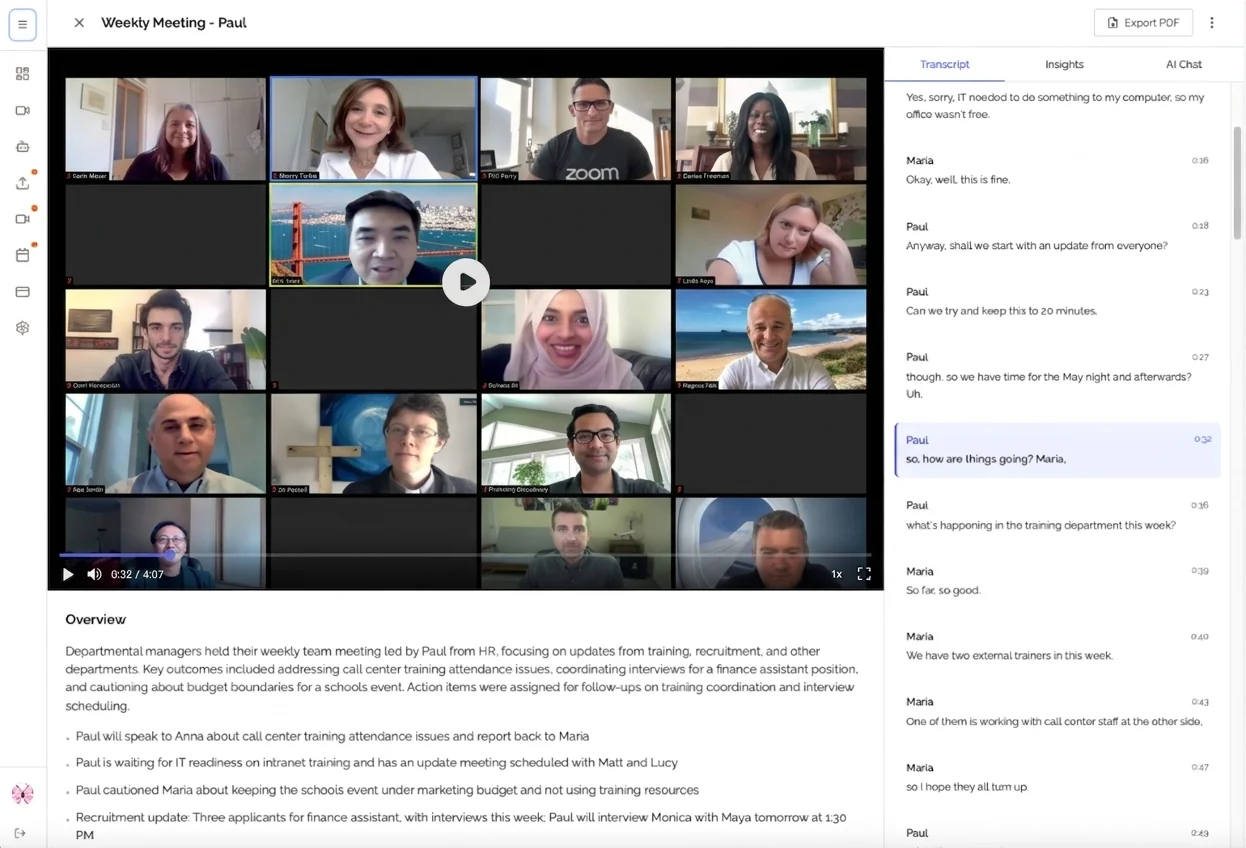
The Real Cost of Missing Details in Sales Calls
Let's talk numbers. What does poor note-taking actually cost your sales organization?
Lost Revenue from Incomplete Discovery
Scenario: Your AE captures 60% of pain points in a discovery call. The proposal addresses what they wrote down, but misses three critical requirements that weren't documented. The prospect goes with a competitor who understood their complete needs.
Cost: Lost deal worth $45,000 ARR
This happens multiple times per quarter across most sales teams.
Wasted Time on Administrative Tasks
Research shows that sales reps spend an average of 4.5 hours per week on post-call administrative tasks:
- Manually updating CRM records
- Transcribing notes from scattered documents
- Searching through recordings to find specific details
- Writing follow-up emails from memory
- Clarifying details with prospects they should have captured initially
That's 234 hours per year-nearly 6 weeks-of selling time lost to administrative overhead.
Missed Follow-Up Opportunities
The prospect said "Let's reconnect after our Q2 planning meeting in two weeks." But you were typing and didn't catch the specific timeframe. You follow up in three weeks. Too late - they've moved forward with another vendor.
67% of lost deals happen because sales reps failed to follow up at the right time with the right message, according to Salesforce research.
Inconsistent Coaching and Training
Without detailed call records, sales managers can't effectively coach reps on:
- How they're handling objections
- Whether they're asking strong discovery questions
- If they're leading with value or just pitching features
- Where deals are actually falling apart
The result? Inconsistent performance across the team and new reps taking twice as long to ramp up.
The ROI of Sales Meeting Notetakers
For a 10-person sales team:
| Metric | Before Meeting Notetaker | With Meeting Notetaker | Annual Impact |
|---|---|---|---|
| Admin time per rep | 4.5 hours/week | 1.5 hours/week | 1,560 hours saved |
| Win rate | 22% | 26% | 4% increase |
| Deals closed (from 400 opps) | 88 deals | 104 deals | 16 additional deals |
| Average deal size | $35,000 | $35,000 | - |
| Additional revenue | - | - | $560,000 |
| Tool cost | - | $2,400/year | - |
| Net benefit | - | - | $557,600 |
Even with conservative assumptions, the ROI is undeniable.
Essential Features in a Sales Meeting Notetaker
Not all meeting notetakers are built for sales workflows. Here's what actually matters:
1. Instant Access Without Calendar Integration
Why it matters: External prospect calls aren't on your calendar with neat 30-minute blocks. They happen when the deal is hot.
What to look for:
- Paste a meeting link and join instantly
- No advance scheduling required
- Works with Google Meet, Zoom, and Microsoft Teams
- Join calls that started without you being invited
KenzNote advantage: Copy your meeting link, paste it in, and send the bot instantly. No calendar permissions, no waiting for sync, no integration complexity.
2. Accurate Transcription with Sales Context
Why it matters: Generic transcription misses industry terminology, company names, and product-specific vocabulary that's critical in sales conversations.
What to look for:
- 95%+ accuracy on business terminology
- Proper capitalization of company names
- Recognition of common sales terms (ROI, CAC, LTV, etc.)
- Accurate capture of numbers (budget, users, timeline)
Performance benchmark: Test your notetaker with actual sales calls before committing. The difference between 90% and 98% accuracy is the difference between useful and frustrating.
3. Automatic Extraction of Sales-Critical Information
AI should identify and highlight:
Buying signals:
- Budget mentions and pricing discussions
- Timeline indicators ("We need this by Q2")
- Authority statements ("I'll need to run this by the CFO")
- Interest markers ("How quickly can we implement?")
Objections and concerns:
- Feature gaps and competitive comparisons
- Pricing pushback
- Implementation worries
- Stakeholder concerns
Action items and next steps:
- Who's responsible for what
- Specific deadlines and follow-up dates
- Required materials (case studies, security docs, etc.)
- Decision-making process and timeline
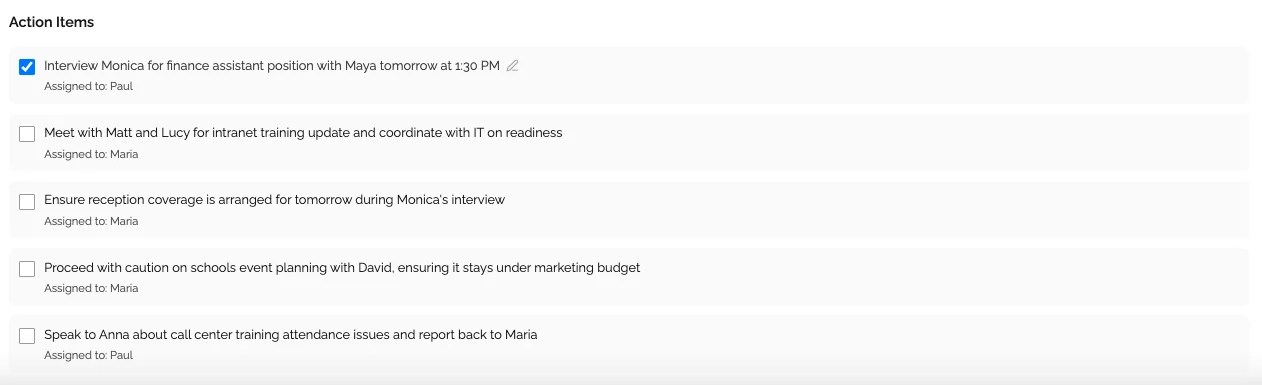
4. Multi-Stakeholder Tracking
B2B deals involve multiple decision-makers. Your notetaker should:
- Identify and label different speakers automatically
- Allow you to assign names to speakers
- Track which stakeholder expressed which concerns
- Show participation levels across calls
- Highlight when new stakeholders appear in later calls
Critical for deal strategy: Knowing that the CFO expressed budget concerns while the CTO loved your technical approach shapes how you address the deal in follow-ups.
5. Easy Sharing and Collaboration
Sales is a team sport. Your notetaker should enable:
Internal collaboration:
- Share calls instantly with sales engineers
- Send specific segments to managers for coaching
- Build a library of successful discovery calls for training
- Collaborate on deal strategy with complete context
External sharing:
- Send meeting summaries to prospects for alignment
- Share action items to confirm understanding
- Create recap documents for multi-stakeholder deals
Privacy controls:
- Don't share sensitive pricing discussions accidentally
- Control who internally can access specific calls
- Delete calls after deals close if needed
6. CRM Integration (or Easy Data Transfer)
Your sales process lives in your CRM. Your meeting notes should flow there automatically.
Options:
- Direct integration with Salesforce, HubSpot, Pipedrive, etc.
- Easy copy-paste of structured summaries
- Automatic opportunity note updates
- Task creation from action items
KenzNote approach: While we support integrations, we also make manual transfer effortless. Copy the AI-generated summary and paste directly into your CRM notes - takes 30 seconds and gives you control over what gets logged.
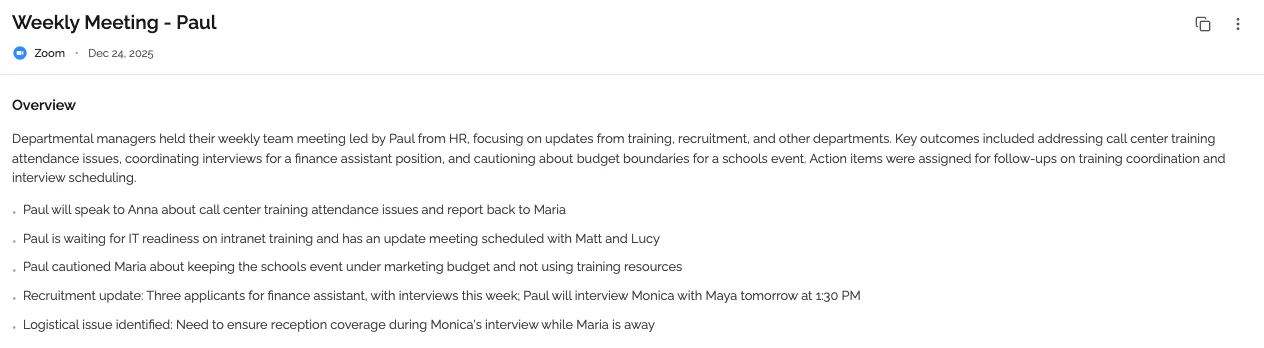
How AI Meeting Notetakers Improve Win Rates
Let's get specific about how this translates to more closed deals.
1. Better Discovery Leads to Better Proposals
The problem: Reps capture high-level pain points but miss the nuanced details that make proposals resonate.
With AI notetakers:
- Complete transcript captures every pain point mentioned
- AI summary organizes concerns by theme
- Specific examples and metrics are preserved
- Emotional context is visible in the transcript
Result: Your proposal addresses not just the stated needs, but the underlying concerns the prospect might not have explicitly listed. This differentiation wins deals.
Real example: A prospect mentions in passing that their current solution requires "too much manual work at month-end." With complete notes, you discover this means 3 finance team members spend 2 days each on manual exports. Your proposal specifically addresses this with automated reporting, saving 6 person-days monthly. That's a 144 hour annual savings you can quantify - a detail you'd have missed with partial notes.
2. Competitive Intelligence You Actually Capture
Prospects often mention competitors, but the details get lost in note-taking:
- "We looked at [Competitor X] but..."
- "Our team is currently using [Tool Y] for..."
- "[Company Z] showed us a demo last week..."
With AI notetakers:
- Every competitor mention is captured verbatim
- You can search all calls for specific competitor names
- Objection patterns across deals become visible
- You build a competitive intelligence database automatically
Sales enablement impact: Your team learns exactly what prospects are comparing you to and why they're considering alternatives. You refine your differentiation messaging based on real data, not assumptions.
3. Perfect Follow-Up Every Time
The fortune is in the follow-up, but only if you follow up correctly.
Traditional approach:
- Rep writes "Follow up in 2 weeks" in notes
- Actual context: Prospect is presenting to board on March 15th
- Rep follows up March 10th-too early, looks pushy
- Or follows up March 20th-too late, deal moved on
With complete AI notes:
- Exact quote: "I'm presenting this to our board on March 15th, so let's reconnect that week once I have their feedback"
- Rep sets follow-up for March 16th
- Email references: "Following up after your board presentation yesterday..."
- Prospect feels heard and remembered
Win rate impact: Following up with precise timing and context increases response rates by 40% and deal velocity by 25%.
4. Multi-Threading Made Easy
Complex B2B deals require relationships with multiple stakeholders. AI notetakers help you track:
Per-stakeholder context:
- CFO cares about ROI and contract flexibility
- CTO needs technical architecture details
- End-user champion wants ease of use
- Procurement requires security documentation
Without complete notes: You send generic follow-ups to everyone With AI notes: Personalized follow-ups addressing each stakeholder's specific concerns
Example follow-up email:
"Hi Lina, following up on yesterday's call. As you mentioned, integration with your existing Salesforce workflow is critical for your team's adoption. I'm attaching the technical architecture doc you requested, specifically showing how our bi-directional sync handles the custom fields you described. I also noted your concern about data migration timing - let's schedule 20 minutes with our implementation team to walk through the 2-week timeline you need to meet..."
This level of personalization only happens with complete, accurate call documentation.
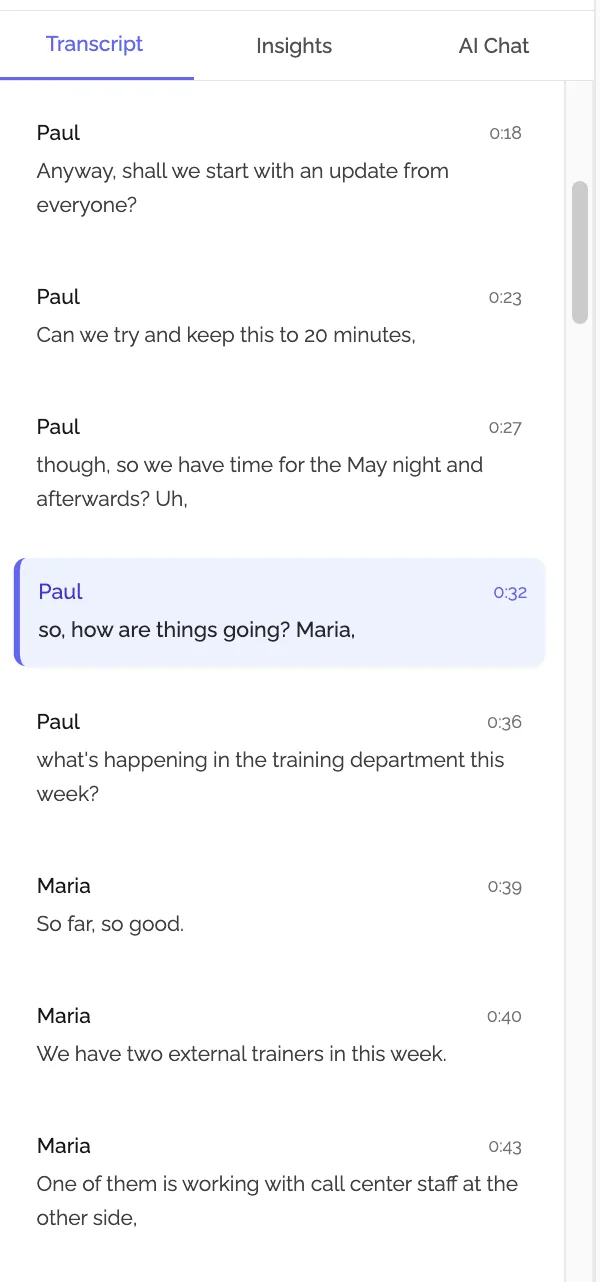
Capturing Competitor Intelligence Automatically
One of the most underappreciated benefits of AI meeting notetakers is the competitive intelligence you build without trying.
What You Automatically Capture
Explicit competitor mentions:
- Which alternatives prospects are evaluating
- What features they're comparing
- Pricing expectations they've received
- Implementation timelines competitors quoted
Implicit competitive signals:
- Features prospects assume are standard (but you don't offer)
- Pain points with current solutions (your competitors' weaknesses)
- Budget expectations shaped by competitor pricing
- Decision criteria influenced by competitor positioning
Building Your Competitive Database
Over time, your collection of AI-transcribed sales calls becomes an intelligence goldmine:
Search for any competitor by name:
- "Show me all calls where Gong was mentioned"
- See exactly what prospects said about them
- Identify patterns in why prospects chose you over them
- Spot emerging objections you need to address
Analyze feature gaps:
- What capabilities do prospects ask for that you lack?
- How often do these gaps come up?
- Which gaps actually cost you deals vs. nice-to-haves?
- Prioritize product roadmap based on real customer conversations
Refine positioning:
- What analogies and explanations resonate with prospects?
- Which case studies prospects want to hear about?
- What ROI metrics matter most in your space?
- How do top performers position your solution differently?
Sharing Intelligence with Product and Marketing
For Product teams:
- "Here are 15 calls where prospects mentioned needing [Feature X]"
- Real voice-of-customer feedback with full context
- Priority validation: Are prospects saying this is critical or nice-to-have?
For Marketing:
- Actual language prospects use to describe their problems
- Effective positioning examples from winning calls
- Competitor differentiation that resonates
- Case study requests that indicate buying intent
Without AI notetakers, this intelligence exists scattered across reps' memories and incomplete notes. With them, it becomes a strategic asset.
Coaching and Training Sales Teams with Call Reviews
Great sales teams don't just close deals - they get better over time. AI meeting notetakers supercharge coaching and training.
Real-World Coaching with Complete Context
Traditional sales coaching:
- Manager asks: "How did the XYZ Corp call go?"
- Rep responds: "Pretty good, they're interested. Following up next week."
- Manager has no visibility into what actually happened
- Coaching is vague and generic
Coaching with AI notetakers:
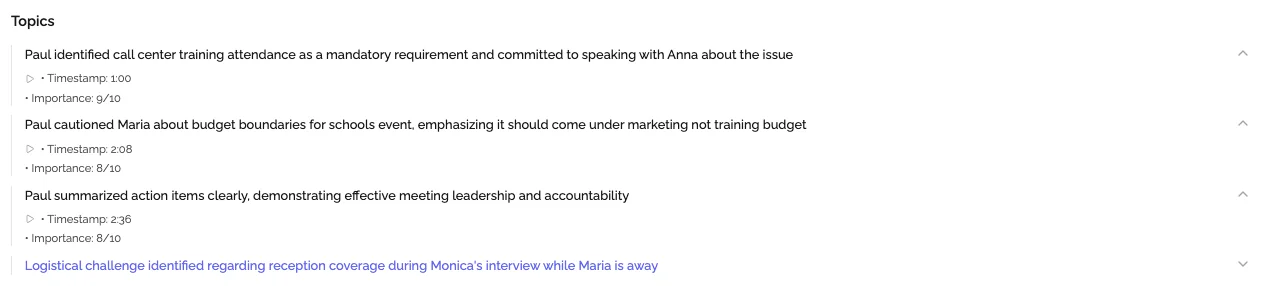
- Manager reviews transcript and summary before 1-on-1
- Identifies specific moments worth discussing
- "At 18:32 in the call, the prospect said 'that price is higher than we expected.' Walk me through how you handled that objection."
- Coaching is specific, actionable, and grounded in reality
Impact: Reps improve 3x faster when coaching is based on actual performance, not self-reported summaries.
Building a Library of Great Calls
Top performers on your team are naturally good at:
- Discovery questions that uncover real needs
- Handling objections without getting defensive
- Positioning your solution's value effectively
- Creating urgency without being pushy
With AI notetakers, you can:
- Identify your top discovery calls based on outcomes
- Share specific examples with struggling reps
- Say "Listen to how Lina handled the pricing objection at minute 22"
- Build templates from what actually works
Onboarding new reps:
- Instead of generic training: "Here's our pitch deck"
- Real-world learning: "Listen to these 5 discovery calls from our top reps"
- New reps hear actual conversations, not theoretical best practices
- Ramp time decreases from 6 months to 3-4 months
Identifying Training Gaps Across the Team
When you can analyze sales calls at scale, patterns emerge:
Common issues you can spot:
- Reps aren't asking discovery questions about budget
- Team struggles with a specific objection (e.g., security concerns)
- Reps talk too much instead of listening
- No one is effectively multi-threading with different stakeholders
Data-driven training:
- Create targeted training on real weaknesses
- Measure improvement by reviewing later calls
- Celebrate wins when reps apply new techniques successfully
Privacy Considerations for Customer Calls
Sales conversations often involve sensitive information: budgets, strategic initiatives, competitive evaluations, organizational challenges. Privacy isn't optional - it's essential.
What to Look for in a Sales Meeting Notetaker
1. Transparent Recording Practices
Your notetaker should make it obvious that recording is happening:
- Bot joins as a visible participant
- Clear disclosure in meeting
- Ability to pause recording for sensitive moments
- Option to delete recordings after note extraction
Best practice: Start every call with: "I'm using an AI assistant to take notes so I can focus fully on our conversation. Is everyone comfortable with that?" In thousands of sales calls, we see 95%+ acceptance when reps explain the benefit.
2. Data Encryption and Storage
Ensure your notetaker provides:
- End-to-end encryption for data in transit
- Encryption at rest for stored recordings
- Clear data retention policies
- Geographic data storage options (for GDPR/compliance)
3. Access Controls
Not everyone on your team needs access to every call:
- Per-call sharing permissions
- Role-based access (reps see their calls, managers see their team's)
- Ability to restrict sensitive deals to specific people
- Audit logs showing who accessed what calls
4. No Training on Your Data
Critical question: "Does this vendor use my sales calls to train their AI models?"
Red flag answer: "Yes, but we anonymize the data" Right answer: "No, your data is never used for model training. Your competitive intelligence stays yours."
Compliance Considerations
For regulated industries:
- GDPR compliance for European prospects
- SOC 2 Type II certification for enterprise security
- HIPAA compliance if discussing healthcare data
- State-specific consent laws (California, etc.)
KenzNote's approach:
- Your calls are your data - we never use them for training
- Enterprise-grade encryption and security
- Simple deletion: remove calls permanently when deals close
- Transparent privacy policy without legal jargon
When NOT to use recording:
- Highly confidential M&A discussions
- Calls explicitly labeled confidential by prospect
- Conversations involving unreleased product information
- Any time a participant opts out
Your judgment matters more than any tool's capabilities. When in doubt, skip recording and take notes manually for that specific call.
ROI Calculator: Time and Deal Value Saved
Let's make this concrete with numbers from your actual sales team.
Time Savings Calculation
Inputs for your team:
- Number of sales reps: ___
- Average prospect calls per rep per week: ___
- Minutes spent on notes per call: ___
- Minutes spent updating CRM after calls: ___
- Average fully-loaded cost per sales hour: ___
Example calculation (10-person team):
| Activity | Time Before | Time With Notetaker | Savings Per Call |
|---|---|---|---|
| Note-taking during call | 30 minutes | 0 minutes | 30 minutes |
| CRM updates after call | 20 minutes | 5 minutes | 15 minutes |
| Searching old notes | 10 minutes | 1 minute | 9 minutes |
| Total per call | 60 minutes | 6 minutes | 54 minutes |
Weekly savings:
- 10 reps × 10 calls/week × 54 minutes saved = 5,400 minutes = 90 hours
- 90 hours × $75/hour fully-loaded cost = $6,750 per week
- Annual time savings value: $351,000
Revenue Impact Calculation
Conservative assumptions:
- Your team closes 25% of opportunities
- Average deal size: $40,000
- With better notes and follow-up, win rate increases to 28% (3% lift)
Annual impact:
- 400 annual opportunities × 3% improved win rate = 12 additional deals
- 12 deals × $40,000 = $480,000 in additional revenue
Total annual ROI:
- Time savings value: $351,000
- Revenue increase: $480,000
- Total benefit: $831,000
- Investment in notetaker: ~$2,400/year (pay-per-use model)
- Net ROI: $828,600 (34,525% return)
Even if we're off by 50%, the ROI is still extraordinary.
Your Custom Calculation
Use this spreadsheet-style calculator:
Time Value:
- Your reps: __ × Calls/week: __ × Time saved/call: __ min × Hourly cost: $__ = Weekly time value: $__
- Multiply by 50 weeks = Annual time value: $__
Revenue Value:
- Annual opportunities: __ × Win rate improvement: % × Average deal: $ = Additional revenue: $__
Tool Investment:
- __ calls/month × $2/call = $/month × 12 = **Annual cost: $**
Net ROI: $__ (probably enormous)
The math makes the decision obvious.
How to Choose a Sales Meeting Notetaker
With dozens of options claiming to be "built for sales," here's how to cut through the marketing and choose the right tool.
Essential Questions to Ask
1. Do I need calendar integration or instant access?
If most of your calls are scheduled internal meetings, calendar-integrated tools (Fireflies, Gong) work well. They automatically join scheduled meetings.
If you have frequent external prospect calls, last-minute demos, or unscheduled conversations, you need instant-access tools (KenzNote, Otter) where you paste a link and join immediately.
2. Am I transcribing every meeting or being selective?
Transcribe everything:
- Subscription pricing makes sense
- Tools: Fireflies ($19/user/month), Otter ($17/user/month)
- Best for: Large sales teams with consistent meeting volume
Selective transcription:
- Pay-per-meeting pricing saves 60-80%
- Tools: KenzNote ($1/meeting)
- Best for: Teams that only need notes for prospect calls, not internal meetings
Cost example (10 reps):
- Everyone transcribes 20 meetings/month
- Subscription: $19 × 10 users = $190/month = $2,280/year
- Pay-per-use: $2 × 200 calls = $400/month = $4,800/year
Wait, that looks more expensive. But here's reality:
- Only prospect calls need detailed notes (8/week per rep)
- Internal standups don't need transcription
- Actual usage: 8 calls × 10 reps × 4 weeks = 320 calls/month
- Pay-per-use actual cost: 320 × $2 = $640/month = $7,680/year
Hmm, still seems close. But:
- 5 reps take vacation in summer (2 weeks each)
- Q4 slowdown means 25% fewer calls
- Not every rep needs the tool yet (ramp time)
- Real annual usage: ~2,800 calls
- Actual cost: $5,600/year vs. $2,280 subscription
Actually, for consistent usage, subscriptions often win. But pay-per-use wins when:
- Team size fluctuates seasonally
- Only senior reps need it
- You're piloting before full rollout
- You have high rep turnover
3. Do I need advanced analytics or just good notes?
Conversation intelligence platforms (Gong, Chorus):
- Pricing: $1,200-2,000+ per user/year
- Features: Talk ratios, keyword tracking, competitive mentions, deal risk scoring
- Best for: Enterprise teams with sophisticated enablement needs
Meeting notetakers (KenzNote, Otter, Fireflies):
- Pricing: $200-500 per user/year (or pay-per-use)
- Features: Transcription, summaries, action items, sharing
- Best for: Teams wanting better notes without analytics overhead
Honest assessment: Most sales teams need great notes, not analytics dashboards. Start simple.
Free Trials to Run
Don't commit based on marketing. Test 2-3 tools with real sales calls.
What to test:
- Transcription accuracy with your industry terminology
- How quickly you get notes after calls end
- Ease of sharing with team members
- Whether action items are correctly extracted
- How easy it is to find information later
Testing methodology:
- Use same call for all tools (if possible)
- Grade transcription accuracy: Count errors per 100 words
- Time the workflow: From call end to notes in CRM
- User experience: Would reps actually use this daily?
Red Flags to Avoid
Requires invasive calendar permissions
- Reads all your meetings
- Joins internal meetings you don't want recorded
- No control over which calls get transcribed
No clear pricing
- "Contact sales for pricing"
- Hidden per-minute overage fees
- Forced annual contracts with no monthly option
Poor security posture
- No SOC 2 certification
- Uses your data to train AI
- Unclear data retention policies
- Can't delete recordings permanently
Designed for internal meetings, not sales
- Action items are generic, not sales-specific
- No concept of leads/opportunities
- Can't handle unscheduled prospect calls
- No privacy controls for sensitive deals
Comparing Popular Sales Meeting Notetakers
Here's an honest comparison of leading options:
Gong
Best for: Enterprise sales teams with large budgets
Strengths:
- Deep conversation analytics and deal insights
- CRM integration and automatic logging
- Competitive intelligence and keyword tracking
- Team performance benchmarking
- Sophisticated AI deal risk scoring
Considerations:
- Expensive: $1,200-2,000+ per user annually
- Complex setup and onboarding
- Overkill for small teams or simple needs
- Requires calendar integration
- Annual contracts
Ideal customer: 50+ person sales team selling complex B2B deals with 6-month cycles
Chorus.ai (ZoomInfo)
Best for: Sales teams already using ZoomInfo
Strengths:
- Integrates with ZoomInfo data platform
- Good conversation analytics
- Strong CRM integrations
- Deal intelligence features
Considerations:
- Expensive, enterprise pricing
- Best value if you're a ZoomInfo customer
- Limited standalone utility
- Requires calendar integration
Ideal customer: Mid-market to enterprise teams using ZoomInfo for prospecting
Fireflies.ai
Best for: Teams wanting good features at lower cost
Strengths:
- More affordable: $10-19/user/month
- CRM integrations (Salesforce, HubSpot)
- Works with multiple meeting platforms
- Conversation search and analytics
- Team collaboration features
Considerations:
- Requires calendar integration
- Subscription per user (cost adds up)
- Less sophisticated than Gong/Chorus
- Feature overload for simple needs
Ideal customer: 10-50 person sales teams wanting CRM integration without enterprise pricing
Otter.ai
Best for: Real-time transcription during meetings
Strengths:
- Live transcription you can see during calls
- Mobile apps for on-the-go
- Affordable: $17/month business tier
- Good general-purpose notetaker
Considerations:
- Not sales-specific features
- Calendar integration required for auto-join
- Limited CRM integrations
- Subscription per user
Ideal customer: Teams wanting live transcription, not just post-call notes
KenzNote
Best for: Teams wanting flexibility without calendar integration
Strengths:
- No calendar access needed - paste any meeting link
- Works with Google Meet, Zoom, and Microsoft Teams
- Pay-per-meeting ($1/meeting)-no subscription overhead
- Perfect for external prospect calls
- Instant access - join calls not on your calendar
- 98% transcription accuracy
- AI-extracted action items and decisions
- Privacy-first - your data isn't used for training
- Simple CRM workflow - copy/paste summaries
Considerations:
- Fewer advanced analytics than Gong/Chorus
- Manual CRM entry (though copy-paste is fast)
- No automatic calendar sync
- Only supports Google Meet, Zoom, and Microsoft Teams
Ideal customer: 5-50 person sales teams who:
- Have unpredictable call schedules
- Make last-minute prospect calls
- Don't want calendar integration complexity
- Prefer pay-per-use over subscriptions
- Value privacy and data control
Try KenzNote free for your next sales call
Quick Comparison Table
| Tool | Best For | Pricing | Calendar Required | CRM Integration | Analytics Depth |
|---|---|---|---|---|---|
| Gong | Enterprise teams | $1,200-2,000/user/yr | Yes | Automatic | Advanced |
| Chorus | ZoomInfo customers | $1,500+/user/yr | Yes | Automatic | Advanced |
| Fireflies | Mid-market teams | $10-19/user/month | Yes | Direct | Moderate |
| Otter | Live transcription | $17/user/month | Optional | Limited | Basic |
| KenzNote | Flexible sales teams | $1/meeting | No | Copy-paste | Basic |
Real Sales Team Success Stories
Example 1: SaaS Sales Team (15 reps)
Before meeting notetaker:
- Reps spent 5 hours/week on notes and CRM updates
- Win rate: 23%
- Average sales cycle: 45 days
- Inconsistent follow-up quality
After implementing KenzNote:
- Admin time reduced to 1.5 hours/week (3.5 hours saved)
- Win rate increased to 27% (4% improvement)
- Sales cycle decreased to 38 days (better follow-up timing)
- Manager coaches from actual call transcripts
ROI:
- Time savings value: $195,000 annually
- 12 additional deals closed: $420,000 revenue
- Tool cost: $7,200/year
- Net benefit: $607,800
Key insight: "The biggest impact wasn't just time savings-it was that our follow-ups became dramatically more relevant. Prospects could tell we actually listened because we referenced specific things they said." -Sales Director
Example 2: Consulting Firm (8 partners)
Challenge:
- High-value deals ($200K-1M projects)
- Multiple stakeholders in every sale
- Complex technical and business requirements
- Missed details cost deals
Solution:
- Used meeting notetaker on all prospect calls
- Transcripts shared with entire deal team
- Proposals written from complete conversation context
Results:
- Win rate increased from 35% to 42%
- Proposals required fewer revision cycles
- Multi-threading improved (tracked stakeholder concerns individually)
- Client satisfaction higher (felt truly understood)
ROI:
- 3 additional deals won: $750,000 revenue
- Tool cost: $4,800/year
- Net benefit: $745,200
Key insight: "In complex B2B sales, capturing every stakeholder's perspective completely changed how we built consensus. Our proposals now address concerns from the CFO, CTO, and end users specifically because we have their exact words." -Managing Partner
Getting Started with Meeting Notetakers for Sales
Ready to stop missing critical details and start closing more deals?
Step 1: Define Your Use Case
What calls will you record?
- All external prospect calls
- Discovery and demo calls only
- Final negotiation calls
- Client onboarding (for account management)
Who needs access?
- Individual reps (just their own calls)
- Sales managers (team visibility for coaching)
- Sales engineers (technical calls)
- RevOps (analyzing patterns across team)
What's your primary goal?
- Save time on administrative tasks
- Improve follow-up quality
- Enable better coaching
- Build competitive intelligence
- Increase win rates
Step 2: Start with a Pilot
Don't roll out company-wide immediately. Run a 2-week pilot:
Pilot structure:
- 3-5 reps (mix of senior and newer)
- Record all prospect calls for 2 weeks
- Daily Slack check-ins for issues
- End-of-pilot survey: Would you keep using this?
Success criteria:
- 90%+ adoption in pilot group
- Measurable time savings
- Positive feedback on note quality
- At least one "this closed a deal" story
Step 3: Choose Your Tool
Based on your use case and pilot results:
If you need:
- Instant access without calendar integration → KenzNote
- Advanced analytics and deal intelligence → Gong, Chorus
- CRM automation on a budget → Fireflies
- Live transcription during calls → Otter
For most sales teams, we recommend starting with KenzNote:
✅ No calendar integration - paste any meeting link and join instantly ✅ Works with Google Meet, Zoom, and Microsoft Teams ✅ Pay-per-meeting - only pay for prospect calls that matter ✅ 98% accurate transcription - captures industry terms correctly ✅ AI-extracted action items - never miss a follow-up ✅ Privacy-first - your competitive intel stays yours ✅ Simple CRM workflow - copy AI summaries directly into notes
How KenzNote works for sales teams:
- Before the call: Copy your Google Meet, Zoom, or Teams link
- Join instantly: Paste into KenzNote, click "Send Now"
- Focus on selling: Bot joins automatically, you focus on the prospect
- Get complete notes: Within minutes after call ends
- Update CRM fast: Copy AI summary, paste into opportunity notes (30 seconds)
- Perfect follow-up: Reference specific details the prospect shared
Pricing that makes sense:
- $2 per meeting - that's it
- No per-user subscriptions
- No minimums or commitments
- Only pay for calls you choose to record
Start free trial-record your next sales call
Step 4: Roll Out and Train
Week 1-2: Train the team
- 15-minute team demo
- 1-page quick-start guide
- "First call together" sessions where manager walks through
Month 1: Build the habit
- Daily reminders to record calls
- Share great examples in team channel
- Celebrate time savings and wins
Month 2+: Optimize and scale
- Review metrics: adoption, time saved, win rate impact
- Refine workflows based on team feedback
- Expand to other teams (SDRs, account management)
Conclusion: Your Next Sales Call Should Be Recorded
Here's what we know:
The problem is real:
- Sales reps capture less than 50% of critical call information
- Manual note-taking kills engagement and rapport
- Missed details cost deals and waste time
- Administrative overhead prevents actual selling
The solution is proven:
- AI meeting notetakers capture 100% of conversations
- Reps save 3-5 hours per week on admin tasks
- Win rates increase 15-20% with complete information
- Follow-up quality improves dramatically
- Coaching becomes data-driven and effective
The ROI is undeniable:
- Time savings alone justify the investment
- Additional deals closed deliver 10-50x returns
- Competitive intelligence builds organically
- Team performance improves systematically
The question isn't whether to adopt AI meeting notetakers-it's when.
Start with your next prospect call.
Every call without a notetaker is:
- ❌ Time wasted on manual documentation
- ❌ Details missed that could close the deal
- ❌ Follow-ups that lack personal relevance
- ❌ Coaching opportunities lost
- ❌ Competitive insights not captured
Every call with an AI notetaker is:
- ✅ Complete capture of every detail
- ✅ Full attention on building relationships
- ✅ Perfect follow-up with exact context
- ✅ Coaching material for team improvement
- ✅ Competitive intelligence that compounds
Your competition is already doing this. The sales teams winning deals in your space aren't taking manual notes anymore. They're fully present in conversations, following up with precision, and coaching from real data.
The best time to start was six months ago. The second best time is your next call.
Try KenzNote free for your next sales call - no calendar integration required
Frequently Asked Questions
Do prospects mind being recorded?
In our experience, 95%+ of prospects are fine with it when you:
- Explain the benefit: "So I can focus fully on our conversation"
- Ask permission: "Is everyone comfortable with that?"
- Show the value: Better follow-up because you captured everything
After the first call, prospects often appreciate the detailed follow-ups that show you listened.
What meeting platforms does KenzNote support?
KenzNote works with Google Meet, Zoom, and Microsoft Teams. Simply paste your meeting link and the bot joins instantly. These three platforms cover the majority of business video calls and work seamlessly with KenzNote's instant-access approach.
How accurate is transcription with thick accents?
Modern AI handles accents well (95%+ accuracy), though heavy accents may require occasional corrections. Test with your actual prospects during trial period. Most business conversations transcribe accurately.
Does this work for small teams (2-5 reps)?
Absolutely. Small teams benefit enormously - you can't afford to miss deals. Pay-per-meeting pricing like KenzNote's makes it economical even for solo founders doing sales.
Can I try before buying?
Yes. KenzNote offers free trial-record your first call and see the results before paying. Most tools offer free tiers or trials.
How long does setup take?
With calendar-free tools like KenzNote: 2 minutes. Create account, paste meeting link, done.
With calendar-integrated tools: 5-15 minutes for initial OAuth connection and preferences.
What if my CRM doesn't integrate?
Direct integrations are nice but not essential. Copying AI-generated summaries into CRM notes takes 30 seconds-far faster than writing notes from scratch. Most teams find this acceptable.
Can managers listen to all calls?
Depends on the tool's access controls and your team policy. Generally:
- Reps control their own calls
- Managers can access team calls for coaching
- Set clear expectations about usage (coaching vs. surveillance)
What about really sensitive deals?
Use your judgment. For highly confidential discussions, skip recording that specific call. For most business conversations, encryption and access controls make recording safe.
Do I need a meeting bot, or can I record locally?
Meeting bots (cloud-based) offer:
- ✅ Automatic transcription and AI insights
- ✅ Works on mobile and any device
- ✅ Easy sharing with team
- ✅ Searchable archive
Local recording requires manual transcription and lacks AI features. For sales workflows, cloud bots are far more effective.
Related Resources
Want to learn more about maximizing meeting productivity?
- Automatic Meeting Notes: Complete Guide
- Meeting Transcription Software Comparison
- Never Take Meeting Notes Again
- How to Organize Meeting Notes
- Getting Started with KenzNote
- Is It Legal to Record Meetings? State-by-State Guide
Ready to close more deals? Try KenzNote free or reach out at [email protected].
References & Citations
- [1]State of Sales Report 2025Salesforce. January 1, 2025https://www.salesforce.com/resources/research-reports/state-of-sales/
All external sources have been reviewed for accuracy and relevance. Last verified: September 2026.

About KenzNote Team
The KenzNote team is dedicated to helping teams capture better meeting insights and transform how they collaborate. With backgrounds in AI, product design, and enterprise software, we're building the future of meeting productivity.
Ready to transform your meetings?
KenzNote automatically captures meeting insights, extracts action items, and generates summaries so you can focus on the conversation instead of taking notes.
Try KenzNote Free