
Quick Answer
Meeting transcription software automatically converts spoken words from meetings into searchable text with AI-extracted insights. Unlike basic recording tools requiring manual playback, modern transcription software achieves 95-98% accuracy while identifying speakers, extracting action items, and generating organized summaries.
According to Forrester Research, organizations report 35-40% time savings and 28% improvement in action item completion. Leading tools like KenzNote offer pay-per-meeting pricing ($2/meeting) instead of per-user subscriptions, saving 60-80% for selective transcription. Essential features include 95%+ accuracy, speaker identification, platform compatibility (Meet, Zoom, Teams), full-text search, and AI insights extraction.
Key Takeaways
- 95-98% accuracy is standard: Modern AI transcription matches professional human transcribers at fraction of cost and instant speed
- Time savings average 35-40%: Organizations report massive productivity gains from automatic documentation according to Forrester
- Speaker identification is essential: Professional tools automatically detect, label, and maintain speaker consistency throughout meetings
- Action completion improves 28%: AI-extracted tasks with clear ownership dramatically increase follow-through rates versus manual capture
- Platform compatibility matters: Verify your tool works with Google Meet, Zoom, and Microsoft Teams before committing
- Pay-per-use saves 60-80%: For selective transcription, per-meeting pricing beats per-user subscriptions significantly ($480/year vs $2,038)
- Search transforms value: Full-text search across all meetings finds any detail in seconds months later
- Security is non-negotiable: Require end-to-end encryption, SOC 2 compliance, and GDPR adherence for business use
Meeting Transcription Software: Complete Guide to Choosing the Best Tool in 2026
You're in back-to-back meetings all morning. The product lead mentions a critical deadline change in the third meeting. Your sales director shares updated pricing in the fourth. By lunch, you're struggling to remember which detail came from which meeting, or worse, whether you even captured it at all.
Manual note-taking during meetings forces an impossible choice: either engage fully in the conversation or document accurately. You simply cannot do both well simultaneously.
Meeting transcription software solves this challenge by automatically capturing every word spoken while you stay fully present in conversations. Modern AI-powered tools achieve 98%+ accuracy and transform raw transcripts into actionable insights within minutes.
What Is Meeting Transcription Software?
Meeting transcription software automatically converts spoken words from video meetings, phone calls, and in-person discussions into written text. Modern solutions incorporate AI to identify speakers, extract action items, generate summaries, and organize information for easy reference.
Basic Recording Tools:
- Capture audio/video files
- Require manual playback to review
- No searchability or organization
- Time-consuming to extract insights
Meeting Transcription Software:
- Automatic speech-to-text conversion
- Speaker identification and timestamps
- Searchable text across all meetings
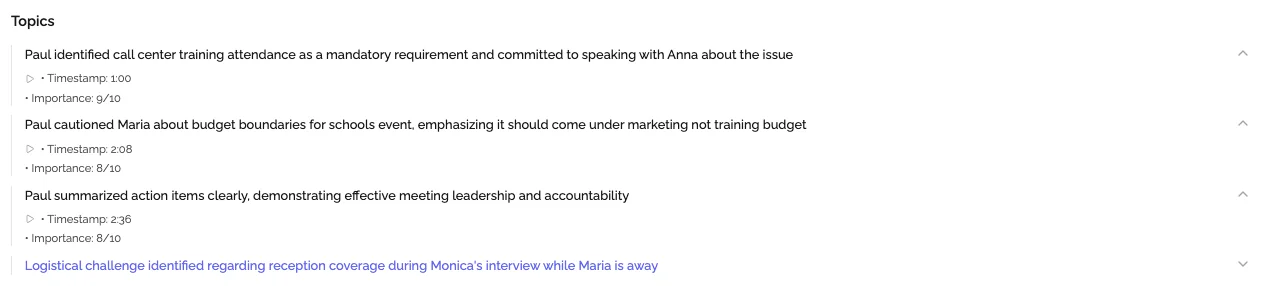
- AI-extracted insights and summaries
- Instant sharing with team members
According to Forrester Research, organizations using meeting transcription software report 35-40% time savings in meeting documentation and 28% improvement in action item completion rates.
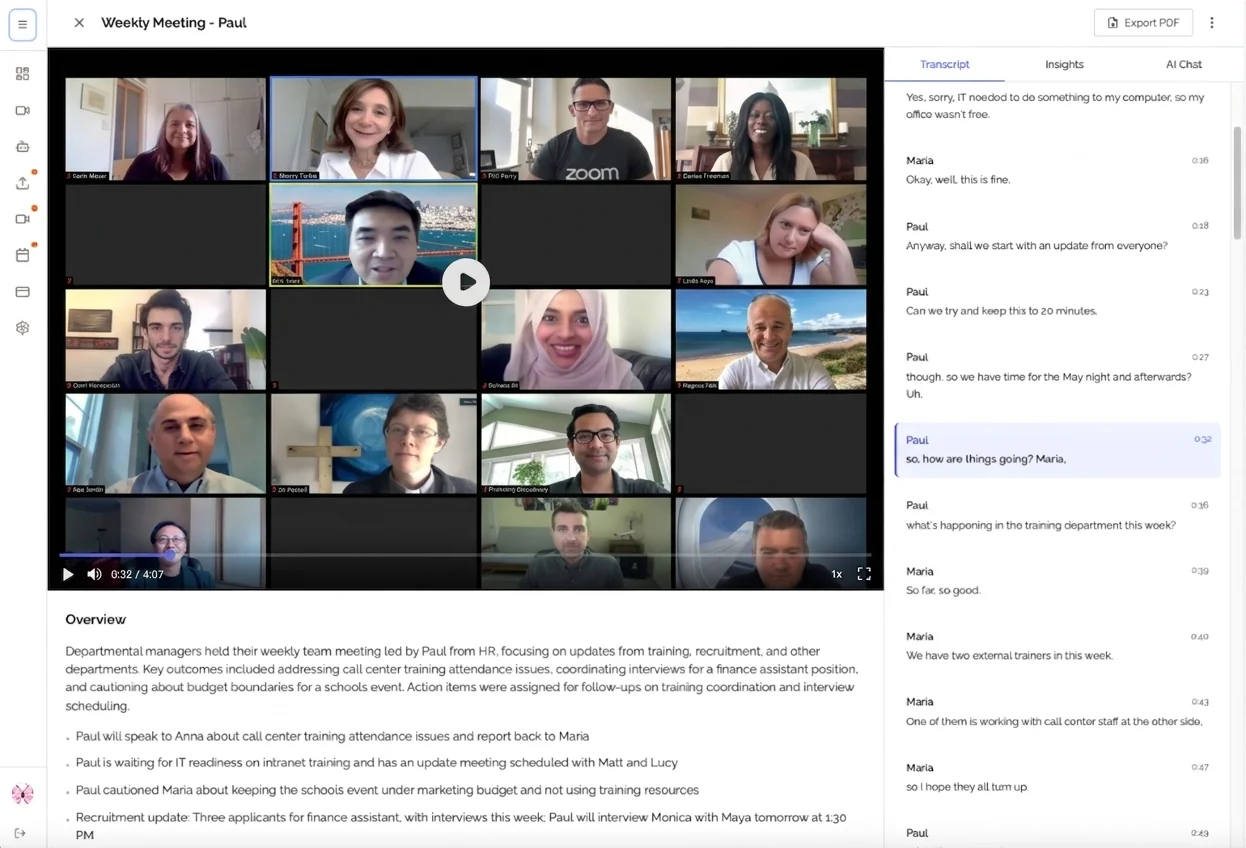
How Meeting Transcription Software Works
Modern transcription tools combine several technologies:
1. Audio Processing: The software captures high-quality audio using noise cancellation, audio normalization, and enhancement before transcription.
2. AI Speech Recognition: Deep learning models convert speech to text with 95-98% accuracy, automatically adding punctuation, identifying speakers, and recognizing technical terminology.
3. Natural Language Processing: AI algorithms analyze the text to identify topics, extract action items, recognize decisions, and map relationships between discussion points.
4. Intelligent Summarization: Instead of raw transcripts, you get executive summaries, topic-organized sections, extracted action items with assignees, and clearly documented decisions.
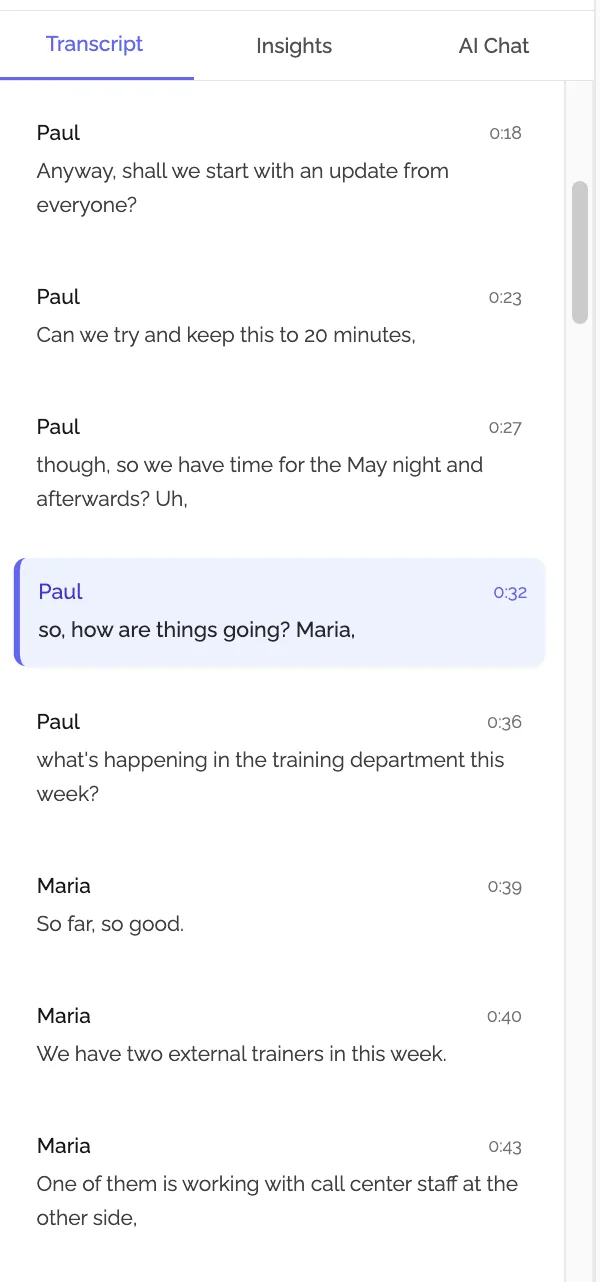
Essential Features to Look For
Transcription Accuracy
Accuracy rates should exceed 95% for business conversations. The best tools achieve 98%+ accuracy with clear audio. Test with your actual meetings since industry jargon, accents, and speaking styles impact performance.
Speaker Identification
Professional tools automatically detect and label different speakers, maintain consistency throughout meetings, allow custom name assignment, and handle meetings with 2-20+ participants.
Platform Compatibility
Your software should work with the platforms your team uses:
- Google Meet - For Google Workspace teams
- Zoom - Most widely used platform
- Microsoft Teams - For Microsoft 365 organizations
- Phone calls - For sales and support teams
Learn more: Google Meet transcription, Zoom transcription, Microsoft Teams transcription.
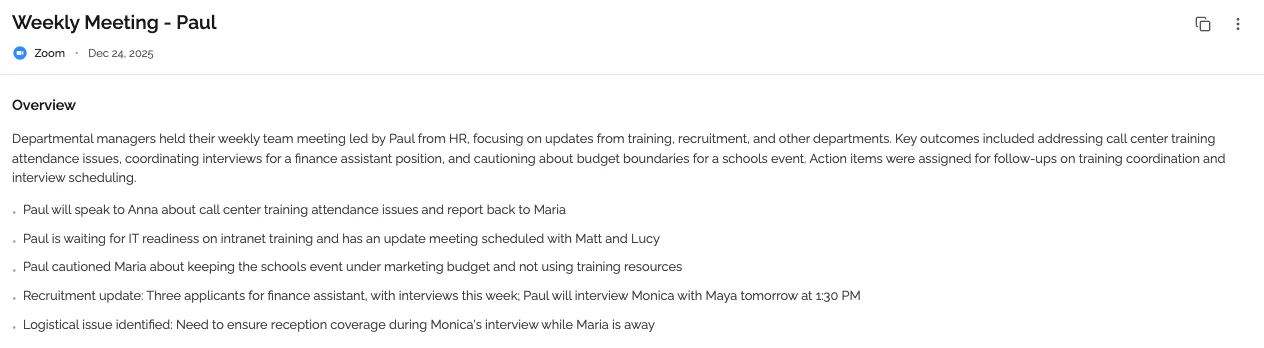
Search and AI Insights
Essential capabilities include:
- Full-text search across all meetings
- Filter by date, participant, or type
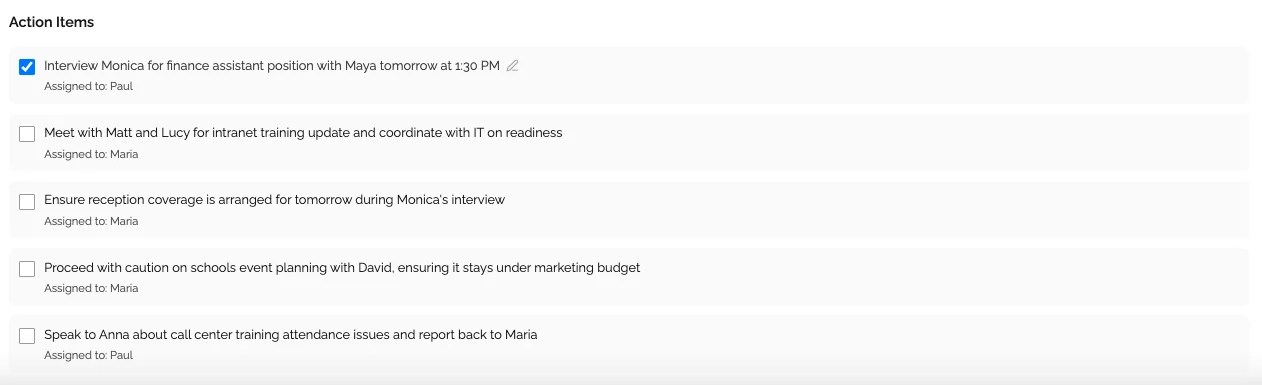
- Automatic action item extraction
- AI-generated summaries by topic
- Smart suggestions and follow-ups
Security and Integrations
For business use, verify end-to-end encryption, SOC 2 Type II compliance, GDPR compliance, and integrations with Slack/Teams, project management tools (Asana, Jira), CRM systems (Salesforce, HubSpot), and document storage.
Top Meeting Transcription Software Compared
KenzNote
Best for: Teams wanting comprehensive documentation without calendar integration
Strengths:
- Paste meeting link - no calendar permissions needed
- 98% transcription accuracy
- Automatic action item extraction
- AI-generated summaries by topic
- Pay-per-meeting pricing
Pricing: Starting at $2/meeting
Otter.ai
Best for: Real-time transcription during meetings
Strengths: Live transcription, speaker identification, mobile apps
Pricing: Free tier; $16.99/month (Business)
Fireflies.ai
Best for: Sales teams needing CRM integration
Strengths: Salesforce/HubSpot integration, conversation analytics, call scoring
Pricing: Free tier; $10/month (Pro); $19/month (Business)
Quick Comparison
| Tool | Platforms | Accuracy | Pricing Model | Best For |
|---|---|---|---|---|
| KenzNote | Meet, Zoom, Teams | 98% | Pay-per-meeting | Selective transcription |
| Otter.ai | Meet, Zoom, Teams | 95% | Subscription | Real-time access |
| Fireflies.ai | Meet, Zoom, Teams, Webex | 96% | Subscription | Sales teams |
How to Choose the Right Tool
Define Your Use Case
- Individual professionals: Look for pay-per-use pricing and ease of use
- Small teams (5-20): Balance features with cost, prioritize collaboration
- Enterprise (100+): Require enterprise security, SSO, dedicated support
Test Accuracy with Real Meetings
Don't trust marketing claims. Use free trials from 2-3 tools, test with your actual meetings, compare accuracy for your terminology and accents, and evaluate AI summary usefulness.
Calculate True Cost
Subscription model example (10-person team, 20 meetings/month):
- $16.99 × 10 users = $169.90/month = $2,038.80/year
Pay-per-use model:
- $2 × 20 meetings = $40/month = $480/year
Savings: $1,558.80 annually with selective transcription
Best Practices
Inform Participants
Let people know transcription is active: "I'm using KenzNote to transcribe our meeting so we have accurate notes and action items. Is everyone comfortable with that?"
Review and Share Promptly
- Quick review (3-5 minutes) for accuracy
- Add context if needed
- Share within 2 hours while fresh
- Confirm action items with owners
Build Searchable Knowledge
Tag meetings by project or client, use naming conventions, archive completed projects, and build institutional knowledge you can search months later.
Extract Action Items
Copy tasks to your project management system (Asana, Jira, Monday), assign owners, set deadlines, and link back to transcripts for context.
Common Questions
How accurate is meeting transcription software?
Leading tools achieve 95-98% accuracy with clear audio. Accuracy improves with good microphones, minimal background noise, clear speech, and standard accents. The best software includes AI post-processing for enhanced accuracy.
Does it work in multiple languages?
Most professional tools support 50+ languages including English, Spanish, French, German, Japanese, Chinese, Arabic, and more. Some offer real-time translation for international teams.
Can it handle multiple speakers?
Yes, through "speaker diarization." Most tools effectively handle 2-20+ speakers, though accuracy decreases with frequent overlapping speech. You can assign names to speaker IDs after transcription.
What about privacy and security?
Reputable providers implement end-to-end encryption, SOC 2 Type II certification, GDPR compliance, clear data processing agreements, and no use of your data for AI training. Always review the privacy policy before committing.
How much does it cost?
Subscription models: $10-50/month per user Pay-per-use: $2-5 per meeting
For teams transcribing selectively, pay-per-use models like KenzNote's pricing deliver 60-80% savings.
Getting Started Today
Start with High-Value Meetings
Begin with client meetings, executive briefings, cross-functional planning, and interviews requiring accurate documentation. Expand naturally after experiencing the benefits.
Choose the Right Tool
For flexible, pay-per-meeting transcription: KenzNote
✅ 98% accurate transcription with speaker identification ✅ Automatic action item and decision extraction ✅ AI-generated summaries organized by topic ✅ Full-text search across all meetings ✅ Pay-per-meeting pricing - no subscription
How it works:
- Copy your meeting link (Google Meet, Zoom, or Microsoft Teams)
- Paste into KenzNote and schedule or send immediately
- Bot joins automatically - you focus on the conversation
- Get complete transcript and AI insights within minutes
Try KenzNote free for your next meeting
Measure Your Impact
Track time saved on note-taking, action items completed, faster information retrieval, and improved meeting engagement. Most teams save 5-10 hours per person per week.
Conclusion
Meeting transcription software transforms how teams document and act on meeting information. The choice is simple: continue with manual note-taking and divided attention, or embrace automation that captures everything while you stay fully present.
What you gain:
- ✅ Perfect accuracy in meeting documentation
- ✅ 5-10 hours back every week
- ✅ Searchable knowledge base of all discussions
- ✅ Better follow-through on commitments
What you eliminate:
- ❌ Frantically typing during discussions
- ❌ Missed details and misunderstandings
- ❌ Hours reviewing recordings
- ❌ Asking "What did we decide?"
The technology is proven. The benefits are substantial. Start with your next meeting.
Related Resources
- AI Meeting Notes: Complete Guide
- Automatic Meeting Notes
- Never Take Meeting Notes Again
- How to Transcribe Google Meet Meetings
- Is It Legal to Record Meetings? State-by-State Guide
- tl;dv Review 2026: Features, Pricing & Alternatives
Have questions? Try KenzNote free or reach out at [email protected].
References & Citations
- [1]The State of AI-Powered TranscriptionForrester Research. January 1, 2025https://www.forrester.com/report/the-state-of-ai-powered-transcription/RES177891
All external sources have been reviewed for accuracy and relevance. Last verified: October 2026.

About Muhammad Abuelenin
Muhammad is the co-founder of KenzNote, passionate about building tools that enhance productivity and collaboration. With expertise in full-stack development and AI-powered solutions, he's dedicated to helping teams work smarter through innovative technology.
Ready to transform your meetings?
KenzNote automatically captures meeting insights, extracts action items, and generates summaries so you can focus on the conversation instead of taking notes.
Try KenzNote Free