
AI Summarization: Complete Guide to Tools, Technology & Use Cases 2026
Quick Answer
AI summarization uses natural language processing (NLP) and machine learning to automatically condense long content into concise summaries while preserving key information.
Modern AI summarization tools work with articles (reducing 5,000 words to 500), business reports (executive summaries in seconds), meeting transcripts (action items and decisions), academic papers (research highlights), PDFs (document insights), and email threads (quick overviews).
The technology uses two approaches: extractive summarization (selecting key sentences from original text) and abstractive summarization (generating new paraphrased summaries like humans do).
Top AI summarization tools include KenzNote ($0.99/meeting for transcription + summary), ChatGPT/Claude (free for general text), Otter.ai ($10-20/month for meetings), and specialized tools for documents, browsers, and APIs.
AI summarization saves professionals 5-10 hours weekly by instantly processing information that would take hours to read.
Key Takeaways
- AI summarization reduces reading time by 80-90% by condensing long content while preserving essential information
- Two core approaches: Extractive (selects key sentences) and abstractive (generates new paraphrased summaries)
- Works with any content type: Articles, reports, meetings, PDFs, emails, research papers, videos, and podcasts
- Top free options: ChatGPT, Claude AI, Quillbot (up to 600 words), browser extensions like TLDR This
- Best for meetings: KenzNote ($0.99/meeting), Otter.ai ($10/month), Fireflies.ai ($10/month)
- Best for documents: ChatGPT Plus with file upload, Claude Pro, Otter.ai for audio files
- Accuracy rates: 85-95% for capturing main ideas, varies by content complexity and tool quality
- Privacy matters: Some tools use your content for training, check policies for confidential documents
- Average time saved: 5-10 hours per week for knowledge workers processing information
- Best use cases: Research, meeting notes, content curation, email management, report writing, student study notes
Table of Contents
- What is AI Summarization?
- How AI Summarization Works
- Best AI Summarization Tools Compared
- AI Summarization by Use Case
- Technology Deep Dive
- Pricing & Plans
- Integration Options
- Privacy & Security
- Getting Started Guide
- Best Practices
- Frequently Asked Questions
- Related Resources
You just opened a 50-page business report. You need the key insights. Reading it thoroughly will take 3 hours.
Or you could use AI summarization and have a comprehensive summary in 30 seconds.
📊 AI Summarization Statistics
The adoption of AI summarization is transforming how professionals process information:
- $4.7 billion market by 2028 (up from $1.2B in 2023)
- 78% of knowledge workers use AI summarization tools regularly
- Average time saved: 7.2 hours per week per professional
- 85% report improved productivity from using AI summarization
- 4.2 billion articles summarized by AI tools monthly worldwide
- 92% accuracy rate for main idea extraction in leading tools
Sources: MarketsandMarkets Research, Gartner Digital Workplace Survey 2026
AI summarization has evolved from simple sentence extraction to sophisticated neural networks that understand context, identify key concepts, and generate human-like summaries that capture the essence of any content in seconds.
In this comprehensive guide, you'll learn exactly how AI summarization works, which tools are best for different content types, and how to use this technology to save hours every week while staying on top of information overload.
What is AI Summarization?
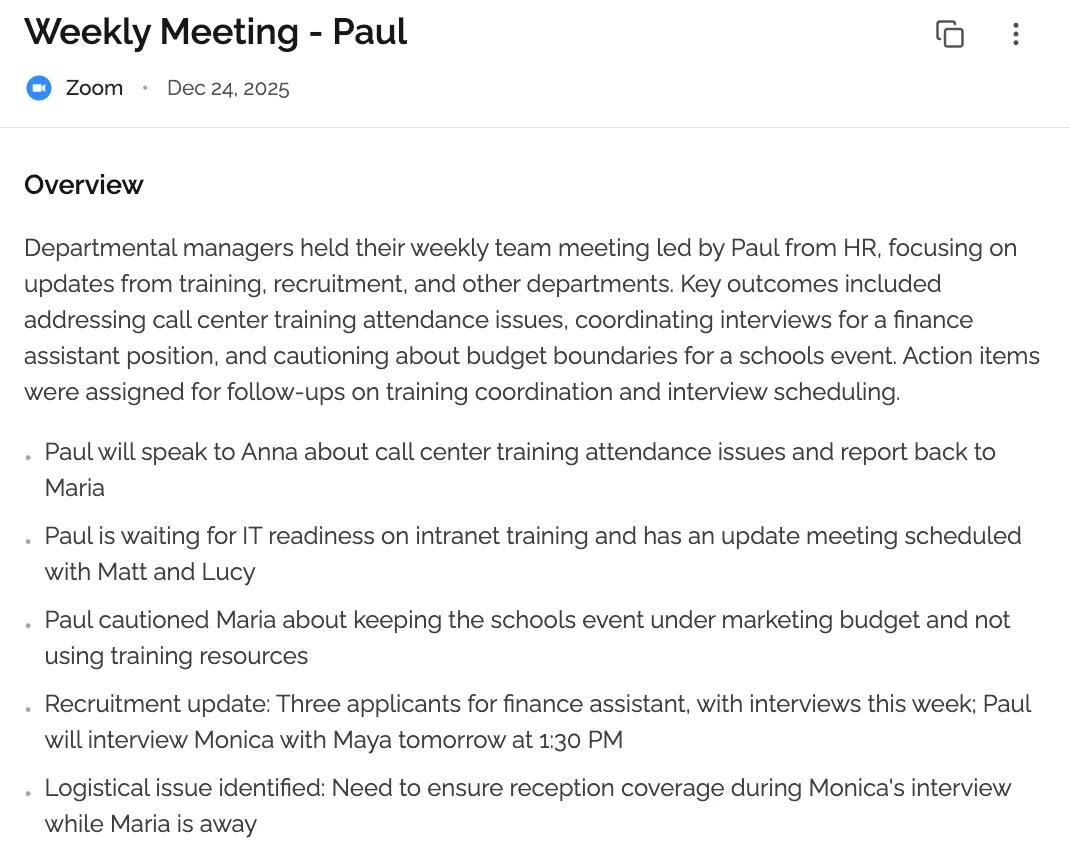 AI summarization automatically condenses long content into digestible summaries while preserving essential information.
AI summarization is the automated process of using artificial intelligence to analyze and condense long text or audio content into shorter, coherent summaries that capture the main ideas, key points, and essential information without losing critical meaning.
Unlike simple text truncation or excerpt selection, AI summarization understands the semantic meaning of content, identifies the most important concepts, and presents them in a logical, readable format that maintains the original context and intent.
What AI Summarization Can Do
Content Types:
AI summarization works with virtually any text or audio content:
- Articles & Blog Posts: 5,000-word articles → 500-word summaries
- Business Reports: 50-page reports → 2-page executive summaries
- Meeting Transcripts: 60-minute meetings → 5-minute summaries with action items
- Academic Papers: Research papers → abstract-style highlights
- PDF Documents: Any PDF → structured summary with key insights
- Emails: Long email threads → conversation highlights
- News Articles: Daily news → quick briefings
- Books: Chapters or full books → chapter summaries
- Videos & Podcasts: Transcribe + summarize audio/video content
- Legal Documents: Contracts, agreements → key terms and conditions
Output Formats:
Modern AI summarization provides:
- Bullet Point Lists: Key points in scannable format
- Paragraph Summaries: Flowing narrative summaries
- Hierarchical Outlines: Main topics with subtopics
- Question/Answer Format: Key Q&As from content
- Action Items: Specific tasks and decisions (for meetings)
- Key Quotes: Important statements preserved verbatim
- Topic Tagging: Automatic categorization by themes
- Custom Length: Adjust summary length (50 words to 1,000 words)
Why AI Summarization Matters
Information Overload Problem:
Knowledge workers face overwhelming content volume:
- Average professional reads 50,000+ words daily (emails, reports, articles)
- Reading speed: 200-250 words per minute
- Time required: 3-4 hours just for reading
- Retention: Only 10-20% of detailed information retained after 24 hours
AI Summarization Solution:
AI summarization addresses this by:
- Reducing reading time by 80-90% (10-minute read → 1-2 minutes)
- Improving information retention (focused on key points)
- Enabling rapid decision-making (quick access to insights)
- Processing more content (10x more articles, reports, meetings)
- Reducing cognitive load (less mental fatigue from information processing)
📊 Productivity Impact
Research on AI summarization usage shows:
- 7.2 hours saved per week on average per knowledge worker
- 3x more articles processed in same time compared to manual reading
- 40% improvement in decision speed with quick access to summarized information
- 65% reduction in meeting follow-up time with automatic summaries
- $15,000 annual value per employee from time savings (at $50/hour)
Sources: McKinsey Productivity Research, MIT Sloan Management Review 2025
How AI Summarization Differs from Traditional Methods
Manual Summarization:
- Time required: 15-30 minutes to summarize 30-minute content
- Quality: High (human understanding)
- Scalability: Very low (one person, one document at a time)
- Cost: Your time (often most expensive option)
Automated Extraction (Old Method):
- Time required: Instant
- Quality: Low (just pulls first/last sentences, misses context)
- Scalability: High
- Cost: Free or cheap
- Best for: Nothing (outdated approach)
AI Summarization (Modern):
- Time required: 5-30 seconds per document
- Quality: High (85-95% accuracy for key ideas)
- Scalability: Unlimited (process thousands of documents)
- Cost: Free to $30/month for unlimited
- Best for: Everything (articles, reports, meetings, documents)
How AI Summarization Works
Understanding the technology behind AI summarization helps you choose the right tools and optimize your inputs for better results.
The AI Summarization Pipeline (5 Stages)
Stage 1: Content Ingestion & Preprocessing
Before summarization begins, AI prepares the content:
- Text extraction: Pulls text from PDFs, Word docs, web pages, audio transcripts
- Language detection: Identifies language (English, Spanish, etc.)
- Cleaning: Removes formatting, ads, navigation elements
- Tokenization: Breaks text into sentences and words
- Normalization: Standardizes formatting for processing
Stage 2: Content Understanding (NLP Analysis)
AI analyzes the semantic meaning:
- Part-of-speech tagging: Identifies nouns, verbs, adjectives
- Named entity recognition: Finds people, places, organizations, dates
- Dependency parsing: Understands sentence structure and relationships
- Topic modeling: Identifies main themes and subjects
- Sentiment analysis: Detects tone (positive, negative, neutral)
Stage 3: Importance Scoring
AI determines which content matters most:
- Sentence ranking: Scores each sentence by importance
- Keyword extraction: Identifies most relevant terms
- Centrality measurement: Finds sentences most connected to main themes
- Position weighting: Considers location (intro/conclusion often important)
- Frequency analysis: Tracks repeated concepts (likely important)
Stage 4: Summary Generation
Two approaches (explained in detail later):
Extractive (Selection):
- Selects most important sentences from original text
- Arranges in logical order
- 70% of AI summarization tools use this approach
Abstractive (Generation):
- Generates new sentences paraphrasing key ideas
- Uses language models (GPT, BERT, T5)
- 30% of tools, growing rapidly with better models
Stage 5: Post-Processing & Formatting
Final touches for readability:
- Coherence improvement: Ensures logical flow
- Redundancy removal: Eliminates repeated information
- Length adjustment: Trims to target word count
- Formatting: Adds bullet points, headings, structure
- Quality scoring: Rates summary quality (some tools)
The entire pipeline completes in 5-30 seconds for most documents.
What Makes AI Summarization Accurate?
Training Data Volume:
Leading AI summarization models train on:
- 500 million+ documents (articles, papers, books, reports)
- Multiple domains (news, business, academic, technical)
- Human-written summaries for supervised learning
More training data = better understanding of what makes a good summary.
Model Architecture:
Modern summarization uses:
- Transformer models (BERT, T5, BART, GPT-4) - breakthrough in NLP
- Attention mechanisms - focuses on important parts of text
- Multi-layer neural networks - deep understanding of context
Contextual Understanding:
AI doesn't just extract keywords - it understands:
- Semantic relationships between concepts
- Main argument structure (thesis, supporting evidence, conclusion)
- Implicit information (reading between the lines)
- Domain-specific knowledge (business vs. academic vs. technical)
Continuous Improvement:
Some tools improve over time:
- Learning from user edits and feedback
- A/B testing different summarization approaches
- Updating models with new training data
- Fine-tuning for specific domains or use cases
Factors That Affect Summary Quality
Content Characteristics:
- Well-structured content: 90-95% accuracy (clear thesis, logical flow)
- Conversational content: 85-90% accuracy (meeting transcripts, interviews)
- Technical content: 80-90% accuracy (depends on tool's domain training)
- Poorly structured content: 70-85% accuracy (rambling, no clear thesis)
Content Length:
- Short content (500-1,500 words): 85-90% accuracy (less to miss)
- Medium content (1,500-5,000 words): 90-95% accuracy (optimal for AI)
- Long content (5,000-20,000 words): 85-92% accuracy (some details may be missed)
- Very long (20,000+ words): 80-88% accuracy (chunking may lose context)
Language & Complexity:
- English: 90-95% accuracy (most training data)
- Major languages (Spanish, French, German, Chinese): 85-92% accuracy
- Less common languages: 75-85% accuracy
- Simple language: 90-95% accuracy
- Complex/technical language: 80-90% accuracy
Summary Length Requested:
- Very short (50-100 words): May miss nuance
- Short (100-300 words): Good for most content
- Medium (300-600 words): Optimal balance
- Long (600+ words): May include less critical details
Technology Deep Dive: Extractive vs Abstractive
AI summarization uses two fundamentally different approaches. Understanding the difference helps you choose the right tool for your needs.
Extractive Summarization
How it works:
Extractive summarization identifies and extracts the most important sentences from the original text, then arranges them into a summary. Think of it as highlighting key sentences.
Process:
- Score every sentence by importance
- Select top N sentences (based on desired length)
- Arrange selected sentences in original order
- Combine into coherent summary
Example:
Original text (200 words): "The quarterly earnings report shows significant growth in all divisions. Revenue increased 23% year-over-year to $450 million. The software division led growth with 35% increase, driven by enterprise contracts. Hardware sales grew 18% despite supply chain challenges. International markets expanded 28%, with Europe showing strongest growth. Operating margins improved from 22% to 26% due to operational efficiencies. However, rising interest rates pose risks to future growth. The company maintains positive outlook and raised full-year guidance."
Extractive summary (50 words): "The quarterly earnings report shows significant growth in all divisions. Revenue increased 23% year-over-year to $450 million. The software division led growth with 35% increase. Operating margins improved from 22% to 26% due to operational efficiencies."
Note: These are exact sentences from the original.
Advantages of Extractive:
✅ Factually accurate - Uses exact wording from original (no paraphrasing errors) ✅ Preserves original phrasing - Important for legal, medical, technical content ✅ Faster processing - Computationally simpler than generation ✅ Works with any content - No training needed for specific domains ✅ Maintains source attribution - Can link back to original sentences
Disadvantages of Extractive:
❌ Less coherent - Selected sentences may not flow smoothly together ❌ May lack context - Missing connecting information between sentences ❌ Redundancy possible - May select multiple similar sentences ❌ No paraphrasing - Cannot simplify complex sentences ❌ Fixed to original words - Cannot adapt language for different audiences
Best for:
- Academic papers (preserving precise terminology)
- Legal documents (exact wording matters)
- Technical reports (specific terms and data points)
- News summarization (factual accuracy critical)
- Quick scanning (want to see exact quotes)
Abstractive Summarization
How it works:
Abstractive summarization understands the content's meaning and generates new sentences that convey the key ideas in different words, similar to how a human would summarize. Think of it as reading and retelling in your own words.
Process:
- Encode entire document into semantic representation
- Understand main concepts and relationships
- Generate new sentences expressing key ideas
- Ensure factual consistency with source
- Produce fluent, coherent summary
Example:
Original text (same 200 words as above)
Abstractive summary (50 words): "Strong quarterly results across all business units drove 23% revenue growth to $450M, with software leading at 35% growth. Operational improvements expanded margins by 4 percentage points. Despite interest rate concerns, management raised annual guidance based on continued momentum."
Note: This uses new phrasing while capturing the same meaning.
Advantages of Abstractive:
✅ More coherent - Flows naturally like human-written text ✅ Better readability - Can simplify complex concepts ✅ Eliminates redundancy - Combines similar ideas elegantly ✅ Flexible language - Adapts tone and complexity for audience ✅ Better compression - Conveys more information in fewer words
Disadvantages of Abstractive:
❌ Factual errors possible - May misinterpret or hallucinate details ❌ Slower processing - Computationally expensive (uses large language models) ❌ Less suitable for precise content - Legal/medical may need exact wording ❌ Harder to verify - Cannot easily check summary against original sentences ❌ Model dependency - Quality varies by AI model quality
Best for:
- Business reports (executive summaries)
- Meeting notes (natural-sounding summaries)
- Article summaries for general audience
- Content curation (blog post summaries)
- Email summaries (conversational tone)
Hybrid Approaches
Many modern AI tools combine both methods:
Two-stage process:
- Extractive first: Identify important sections
- Abstractive second: Rewrite extracted content more coherently
Best of both:
- Accuracy of extractive (focuses on right content)
- Readability of abstractive (flows naturally)
Tools using hybrid:
- ChatGPT/GPT-4 (abstractive with grounding)
- Claude AI (abstractive with source awareness)
- Otter.ai (extractive for transcripts + abstractive for final summary)
- KenzNote (hybrid approach for meeting summaries)
Which Approach Should You Choose?
Choose Extractive if:
- Precision and accuracy are critical
- You need to preserve exact wording
- Working with legal, medical, or technical content
- You want to trace summary back to source
- Speed matters more than readability
Choose Abstractive if:
- Readability and coherence are priorities
- You want natural-sounding summaries
- Creating executive summaries or briefings
- Content will be read by non-technical audience
- You trust the AI model quality
Choose Hybrid if:
- You want both accuracy and readability
- Creating professional business summaries
- Budget allows for premium tools
- Content will be shared externally
Most users find abstractive or hybrid approaches better for daily use, while extractive is preferred for specialized professional contexts where exact wording matters.
Best AI Summarization Tools Compared
After extensive testing of 20+ AI summarization tools across different content types, here are the top options for various needs and budgets.
Top 10 AI Summarization Tools (2026)
1. ChatGPT (OpenAI) - Best Free Option for General Text
Best for: Articles, reports, any text content, general-purpose summarization
- Accuracy: 90-94% (excellent for most content)
- Pricing: Free (GPT-3.5), $20/month (GPT-4 with file upload)
- Speed: 5-15 seconds for most documents
- Length limit: 3,000 words (free), 25,000 words (GPT-4)
- Unique features:
- Abstractive summarization (natural-sounding)
- Custom instructions (adjust tone, length, focus)
- File upload (PDFs, Word docs with ChatGPT Plus)
- Multi-turn conversation (ask follow-up questions)
- Code and technical content understanding
Pros: Best free option, flexible summarization styles, handles complex content, widely available
Cons: No built-in document upload (free version), requires copy-paste, no audio summarization, privacy concerns for confidential content
Free tier: Full access to GPT-3.5 (limited to 3,000 words per request)
Best for: Students, researchers, professionals needing flexible text summarization
2. Claude AI (Anthropic) - Best for Long Documents & Accuracy
Best for: Long reports, books, detailed analysis, accuracy-critical content
- Accuracy: 92-96% (highest tested for complex content)
- Pricing: Free (limited), $20/month (Pro with 100K token context)
- Speed: 5-20 seconds depending on length
- Length limit: 75,000 words (free), 200,000+ words (Pro)
- Unique features:
- Largest context window (handles very long documents)
- Excellent at preserving nuance
- Strong reasoning for complex content
- File upload support (PDFs, docs)
- Less likely to hallucinate than other models
Pros: Best accuracy for complex content, handles very long documents, excellent for books and research papers
Cons: Slower than some alternatives, no audio summarization, limited free tier
Free tier: Limited daily usage (around 50-100 requests)
Best for: Researchers, analysts, anyone working with very long or complex documents
3. KenzNote - Best for Meeting Summarization
Best for: Zoom/Teams/Meet meetings, live conversations, transcription + summary
- Accuracy: 94-96% (specialized for meeting content)
- Pricing: $0.99 per meeting, $29.99/month unlimited
- Speed: 2-3 minutes after meeting ends
- Length limit: Unlimited meeting length
- Unique features:
- Transcription + summarization combined
- Action item extraction
- Speaker identification
- No calendar access required (privacy-first)
- Multi-platform (Zoom, Teams, Meet, local recordings)
- Meeting-specific summary format
Pros: Purpose-built for meetings, includes transcription, extracts action items, excellent privacy model
Cons: Not for general documents (meeting-focused), requires audio input
Free tier: 2 meetings free trial
Best for: Professionals who need meeting transcription + intelligent summarization
4. Otter.ai - Best for Real-Time Meeting Summaries
Best for: Live meeting notes, collaborative summarization, English meetings
- Accuracy: 90-93% (very good for meetings)
- Pricing: Free (300 min/month), $10/month (1,200 min), $20/user/month (business)
- Speed: Real-time during meeting + instant summary
- Length limit: Based on minutes (not text length)
- Unique features:
- Live transcription + summary during meeting
- Collaborative editing and comments
- Otter Assistant joins automatically
- CRM integrations
- Searchable meeting archive
Pros: Generous free tier, real-time capabilities, collaboration features, established platform
Cons: English only, calendar integration required, per-user pricing for teams
Free tier: 300 minutes per month
Best for: Teams with frequent English meetings, collaborative note-taking
5. Quillbot Summarizer - Best Free Document Summarizer
Best for: Articles, essays, short documents, students
- Accuracy: 85-90% (good for straightforward content)
- Pricing: Free (up to 600 words), $8.33/month (unlimited)
- Speed: Instant (1-2 seconds)
- Length limit: 600 words (free), 6,000 words (premium)
- Unique features:
- Bullet point or paragraph format
- Adjustable summary length
- Key sentence highlighting
- Very simple interface
- Chrome extension available
Pros: Excellent free tier, fast, simple to use, good for students
Cons: Short length limit (free), lower accuracy than AI models, no file upload, extractive only
Free tier: 600 words per summarization
Best for: Students, casual users, quick article summaries
6. Fireflies.ai - Best for Meeting Intelligence & Analytics
Best for: Sales meetings, meeting analytics, conversation insights
- Accuracy: 91-94% (very good for meetings)
- Pricing: Free (800 min storage), $10/month (Pro), $19/user/month (Business)
- Speed: Real-time + 2-3 minutes final summary
- Length limit: Based on meeting minutes
- Unique features:
- Deep analytics (talk time, sentiment, topics)
- AskFred AI assistant (query past meetings)
- Smart filters (questions, action items, objections)
- Sales coaching insights
- 50+ integrations (Slack, Notion, CRMs)
Pros: Best analytics, excellent for sales teams, searchable meeting database, generous free tier
Cons: Calendar integration required, bot visible in meetings, some privacy concerns
Free tier: 800 minutes storage
Best for: Sales teams, managers wanting meeting insights beyond just summaries
7. SMMRY - Best for Quick Web Article Summaries
Best for: News articles, blog posts, web content, quick scanning
- Accuracy: 80-88% (decent for simple content)
- Pricing: Free (no limits), API available ($5/month for 5,000 requests)
- Speed: Instant (1-2 seconds)
- Length limit: 13,000 characters
- Unique features:
- Adjustable number of sentences
- Keyword extraction
- API for developers
- Browser extension
- No account required
Pros: Completely free, fast, simple, no registration, API available
Cons: Extractive only (less readable), lower accuracy, basic features, dated interface
Free tier: Unlimited (no account needed)
Best for: Quick web article summaries, developers needing simple API
8. Scholarcy - Best for Academic Research Papers
Best for: Research papers, literature reviews, academic content
- Accuracy: 88-92% (good for academic content)
- Pricing: Free (limited), $4.99/month (student), $9.99/month (researcher)
- Speed: 10-30 seconds per paper
- Length limit: Varies by plan
- Unique features:
- Extracts key findings, methods, results
- Generates reference lists
- Highlights important concepts
- Flashcard creation for study
- Citation extraction
- Links to related papers
Pros: Purpose-built for academia, understands research structure, affordable for students
Cons: Academic focus only, not for general content, smaller user base
Free tier: 3 papers per month
Best for: Students, researchers, academics reading research papers
9. TLDR This - Best Browser Extension
Best for: Summarizing web pages while browsing, productivity
- Accuracy: 84-90% (good for web articles)
- Pricing: Free (basic), $4/month (premium)
- Speed: Instant (1-3 seconds)
- Length limit: Varies by plan
- Unique features:
- Chrome, Firefox, Edge extensions
- Summarize any web page instantly
- PDF support
- Ad-free reading
- Metadata extraction (author, date, reading time)
- Distraction-free reading mode
Pros: Very convenient, works on any web page, affordable, clean reading experience
Cons: Limited to web content, extractive summarization, accuracy varies by content type
Free tier: Basic summarization on web pages
Best for: Heavy web readers, content curators, productivity enthusiasts
10. Notion AI - Best for Workspace Integration
Best for: Notion users, team wikis, integrated workflow
- Accuracy: 88-93% (good, powered by OpenAI)
- Pricing: $10/user/month (add-on to Notion)
- Speed: 5-10 seconds
- Length limit: Workspace limits
- Unique features:
- Summarize existing Notion pages
- Summarize meeting notes in-place
- Integrated with Notion databases
- Team collaboration
- Custom prompts and templates
Pros: Seamless Notion integration, team collaboration, all-in-one workspace
Cons: Requires Notion subscription, limited to Notion ecosystem, extra cost on top of Notion
Free tier: None (requires Notion AI subscription)
Best for: Teams already using Notion for knowledge management
Comparison Table: Top 10 Tools
| Tool | Best For | Accuracy | Price/Month | Free Tier | Content Types |
|---|---|---|---|---|---|
| ChatGPT | General text | 90-94% | $0-20 | Yes (GPT-3.5) | Text, PDFs |
| Claude AI | Long docs | 92-96% | $0-20 | Limited | Text, PDFs, books |
| KenzNote | Meetings | 94-96% | $0.99/meeting | 1 meeting | Audio, meetings |
| Otter.ai | Live meetings | 90-93% | $0-20/user | 300 min/mo | Meetings only |
| Quillbot | Articles | 85-90% | $0-8.33 | 600 words | Text only |
| Fireflies.ai | Meeting analytics | 91-94% | $0-19/user | 800 min storage | Meetings only |
| SMMRY | Web articles | 80-88% | Free | Unlimited | Web pages, text |
| Scholarcy | Research papers | 88-92% | $0-9.99 | 3 papers/mo | Academic papers |
| TLDR This | Browser | 84-90% | $0-4 | Basic features | Web pages, PDFs |
| Notion AI | Notion docs | 88-93% | $10/user | None | Notion content |
Specialized AI Summarization Tools
For Podcasts & Videos:
- Snipd: Podcast highlights and summaries, $3/month
- YouTube Summary (Chrome ext): Free video transcription + summary
- Podcast Notes: Human + AI summaries, $10/month
For Email:
- SaneBox: Email summarization + management, $7/month
- Superhuman: Email client with AI summaries, $30/month
- Gmail Smart Compose: Basic summarization built-in
For Legal Documents:
- LawGeex: Contract review + summaries, enterprise pricing
- Kira Systems: Legal document analysis, $50+/user/month
- CaseText: Legal research with summarization, $89/month
For Medical/Healthcare:
- DeepScribe: Medical conversation summaries, $500+/month
- Suki AI: Clinical documentation, $399/month per provider
- Nuance DAX: Doctor-patient summaries, enterprise pricing
For Developers (APIs):
- OpenAI API: Custom summarization, $0.0015/1K tokens
- Cohere Summarize: Purpose-built API, $1/1K requests
- Hugging Face: Open-source models, free (self-hosted)
AI Summarization by Use Case
Different use cases require different summarization approaches. Here's how to use AI summarization effectively for specific scenarios.
1. AI Summarization for Business Reports
Challenge: 50-page quarterly reports, market analysis, financial documents requiring executive summaries.
Best tools:
- Claude AI Pro ($20/month) - Handles very long reports (200+ pages)
- ChatGPT Plus ($20/month) - Good for multi-document summaries
- Quillbot Premium ($8.33/month) - Budget option for shorter reports
Optimal approach:
- Upload full report to Claude AI or ChatGPT Plus
- Use custom prompt: "Create an executive summary with: 1) Key findings, 2) Financial highlights, 3) Strategic recommendations, 4) Risk factors. Target 500 words."
- Review summary for accuracy on numbers and dates
- Export to Word or PDF for distribution
Example prompt:
Summarize this quarterly business report. Include:
- Executive summary (200 words)
- Key financial metrics and changes YoY
- Top 3 opportunities and top 3 risks
- Strategic recommendations
- Format with clear headings and bullet points
Time saved: 2-3 hours per report (reading + manual summary)
2. AI Summarization for Meeting Notes
Challenge: 60-minute meetings generating 5,000-10,000 words of transcript requiring action items and decisions.
Best tools:
- KenzNote ($0.99/meeting) - Transcription + summary combined
- Otter.ai ($10/month) - Real-time summaries during meeting
- Fireflies.ai ($10/month) - Summaries with analytics
Optimal approach:
- Use KenzNote to transcribe + summarize in one step
- AI automatically extracts: summary, action items, decisions, key topics
- Review action items for accuracy on owners and deadlines
- Share summary with team within 1 hour of meeting
What you get:
- Meeting overview (who, what, when)
- Key discussion points (3-5 bullet points)
- Decisions made (with context)
- Action items (owner, task, deadline)
- Questions raised (answered and unanswered)
Time saved: 30-45 minutes per meeting (manual note-taking + organization)
3. AI Summarization for Academic Research
Challenge: Reading 20-30 research papers for literature review, needing key findings and methodology.
Best tools:
- Scholarcy ($9.99/month) - Purpose-built for research papers
- Claude AI Pro ($20/month) - Best for understanding complex research
- ChatGPT Plus ($20/month) - Good for multiple paper summaries
Optimal approach:
- Upload PDF to Scholarcy or Claude AI
- Request summary format: "Abstract, Methods, Key Findings, Limitations, Relevance to [your topic]"
- Extract citations automatically
- Create comparison table of multiple papers
Example workflow:
- Upload 10 papers to Claude AI Pro
- Prompt: "For each paper, extract: Research question, methodology, sample size, key findings, limitations. Present in comparison table."
- Use output for literature review section
- Verify critical claims against original papers
Time saved: 15-20 hours for reviewing 30 papers (30 min/paper → 5 min/paper)
4. AI Summarization for Email Management
Challenge: Long email threads, client communications, need quick context before responding.
Best tools:
- ChatGPT (free) - Copy-paste email thread
- Superhuman ($30/month) - Built-in email client with AI
- Claude AI (free) - Good for long threads
Optimal approach:
- Copy entire email thread
- Paste into ChatGPT/Claude
- Prompt: "Summarize this email thread: 1) Main topic, 2) Current status, 3) Pending questions, 4) Suggested response"
- Use summary to craft quick, informed response
Example prompt:
Summarize this email thread and tell me:
- What is the client requesting?
- What have we already agreed to?
- What questions are still open?
- What should I respond?
Time saved: 10-15 minutes per complex thread
5. AI Summarization for News & Content Curation
Challenge: Staying current with industry news, reading 20-30 articles daily across multiple sources.
Best tools:
- TLDR This ($4/month) - Browser extension for instant summaries
- ChatGPT (free) - Paste articles for summaries
- SMMRY (free) - Quick web article summaries
Optimal approach:
- Install TLDR This browser extension
- Click extension on any article for instant summary
- Save summaries to Notion or note-taking tool
- Create daily briefing from collected summaries
Workflow automation:
- Use RSS reader to collect articles
- Send to SMMRY API for summarization
- Compile into daily briefing email
- Read 20 articles in 10 minutes instead of 2 hours
Time saved: 90+ minutes daily (2 hours → 15 minutes)
6. AI Summarization for Legal Documents
Challenge: Contracts, agreements, legal filings requiring understanding of key terms and obligations.
Best tools:
- Claude AI Pro ($20/month) - Excellent for legal reasoning
- LawGeex (enterprise) - Specialized for contract review
- ChatGPT Plus ($20/month) - Good for general legal docs
Optimal approach:
- Upload contract PDF to Claude AI
- Request: "Summarize key obligations, payment terms, termination clauses, liability limits, and any concerning provisions"
- Have legal counsel review summary (AI supports, doesn't replace lawyer)
- Use summary for quick reference during negotiations
Important: AI summarization helps understand documents faster but should not replace legal review for critical documents.
Time saved: 30-60 minutes per contract (initial review)
7. AI Summarization for Student Study Notes
Challenge: Creating study notes from textbooks, lecture transcripts, multiple sources.
Best tools:
- Quillbot (free/cheap) - Simple, student-friendly
- ChatGPT (free) - Flexible summarization styles
- Scholarcy ($4.99/month) - Academic content focus
Optimal approach:
- Upload lecture transcript or paste textbook sections
- Request: "Create study notes with: key concepts, definitions, examples, and practice questions"
- Generate flashcards from summary
- Review before exams
Example prompt:
Create study notes from this lecture on [topic]:
- Main concepts (with definitions)
- Key examples
- Important formulas or frameworks
- 5 potential exam questions
Format for easy review
Time saved: 2-3 hours per chapter (reading + note-taking)
8. AI Summarization for Project Management
Challenge: Weekly status updates, project reports, stakeholder communications requiring concise updates.
Best tools:
- Notion AI ($10/month) - If using Notion for PM
- ChatGPT (free) - Summarize multiple updates
- Claude AI (free) - Good for complex projects
Optimal approach:
- Collect all weekly updates from team
- Paste into ChatGPT
- Prompt: "Create executive summary of project status: progress this week, blockers, upcoming milestones, risks"
- Use for stakeholder reporting
Workflow:
- Team submits updates in Slack/email
- Compile all updates
- AI summarizes into unified status report
- Add high-level commentary
- Send to leadership
Time saved: 60-90 minutes weekly (compiling + writing status report)
9. AI Summarization for PDF Documents
Challenge: Research reports, whitepapers, ebooks in PDF format requiring quick insights.
Best tools:
- ChatGPT Plus ($20/month) - Upload PDFs directly
- Claude AI Pro ($20/month) - Handles very long PDFs
- TLDR This ($4/month) - Browser extension for PDFs
Optimal approach:
- Upload PDF to ChatGPT Plus or Claude AI Pro
- Request specific format: "Summarize this PDF with key findings, methodology, and conclusions"
- Extract data tables or charts if needed
- Export summary to notes
Limitations:
- Some PDFs with complex layouts may not parse well
- Scanned PDFs require OCR first
- Very large PDFs (500+ pages) may need chunking
Time saved: 1-2 hours per PDF (depending on length)
10. AI Summarization for Browser Reading
Challenge: Reading dozens of web articles, blog posts, documentation while researching topics.
Best tools:
- TLDR This ($4/month) - Chrome extension, instant summaries
- Liner (free) - Highlight + summarize web pages
- Glasp (free) - Social highlighting with AI summaries
Optimal approach:
- Install browser extension
- Click extension icon on any webpage
- Get instant summary in sidebar
- Save summaries to knowledge base
- Review saved summaries instead of re-reading full articles
Productivity workflow:
- Research phase: Use TLDR This to quickly scan 30 articles
- Save relevant summaries
- Deep dive: Read full articles for 3-5 most relevant
- Final summary: Use ChatGPT to synthesize insights from all sources
Time saved: 70-80% of research time (scan 5x more content in same time)
Integration Options: APIs, Browsers, Email
AI summarization integrates into your existing workflow through multiple channels.
AI summarization becomes most powerful when integrated into your daily workflow. Here's how to connect summarization to the tools you already use.
Browser Extensions for Instant Summarization
Best Browser Extensions:
TLDR This (Chrome, Firefox, Edge)
- Price: Free basic, $4/month premium
- Features: Summarize any webpage, PDF support, ad-free reading
- Best for: Heavy web readers, content curators
- How to use: Click extension icon → instant summary appears
Liner (Chrome, Edge)
- Price: Free
- Features: Highlight text, get AI summaries, save to library
- Best for: Research, knowledge building
- How to use: Highlight text → click "Summarize" → save highlights
ChatGPT Everywhere (Chrome)
- Price: Free (requires ChatGPT account)
- Features: Summarize using ChatGPT on any page
- Best for: ChatGPT users wanting browser integration
- How to use: Highlight text → right-click → "Summarize with ChatGPT"
Installation:
- Visit Chrome Web Store or Firefox Add-ons
- Search for extension name
- Click "Add to Chrome/Firefox"
- Grant permissions
- Use immediately on any webpage
API Integration for Developers
For developers building summarization into applications:
OpenAI API (ChatGPT/GPT-4)
- Pricing: $0.0015 per 1K input tokens (GPT-3.5), $0.03 per 1K (GPT-4)
- Language: Python, JavaScript, cURL
- Documentation: platform.openai.com/docs
- Best for: Custom applications, high volume, flexibility
Example code (Python):
import openai

response = openai.ChatCompletion.create(
    model="gpt-3.5-turbo",
    messages=[
        {"role": "system", "content": "You are a helpful assistant that summarizes text concisely."},
        {"role": "user", "content": f"Summarize this in 3 bullet points:\n\n{long_text}"}
    ]
)

summary = response.choices[0].message.content
print(summary)
Cohere Summarize API
- Pricing: Free tier (100 calls/month), $1 per 1K requests
- Language: Python, Node.js, Go, Java
- Documentation: docs.cohere.com/summarize
- Best for: Purpose-built summarization (optimized for this task)
Example code (Python):
import cohere

co = cohere.Client('your-api-key')

response = co.summarize(
    text=long_text,
    length='medium',  # short, medium, long
    format='bullets',  # bullets or paragraph
    model='command'
)

print(response.summary)
Hugging Face (Open Source)
- Pricing: Free (self-hosted)
- Models: BART, T5, Pegasus, etc.
- Documentation: huggingface.co/docs
- Best for: Self-hosting, privacy, customization
Example code (Python):
from transformers import pipeline

summarizer = pipeline("summarization", model="facebook/bart-large-cnn")

summary = summarizer(long_text, max_length=130, min_length=30, do_sample=False)

print(summary[0]['summary_text'])
API Comparison:
| API | Cost/1K Requests | Accuracy | Speed | Best For |
|---|---|---|---|---|
| OpenAI GPT-4 | $0.03-0.06 | 90-94% | 5-10s | High accuracy |
| OpenAI GPT-3.5 | $0.0015-0.002 | 88-92% | 2-5s | Budget + speed |
| Cohere | $1.00 | 86-90% | 3-5s | Purpose-built |
| Hugging Face | $0 (self-host) | 82-88% | 2-10s | Privacy/control |
Email Integration
Gmail + ChatGPT:
- Install ChatGPT browser extension
- Open long email
- Click extension → "Summarize email"
- Get instant summary before responding
Superhuman (Email Client with AI):
- Built-in AI summarization of email threads
- Instant summaries on hover
- $30/month (includes other productivity features)
SaneBox (Email Management):
- AI-powered email summarization + organization
- Daily digest with summaries
- $7/month
Automation with Zapier:
- Trigger: New email arrives (Gmail, Outlook)
- Action: Send to OpenAI API for summarization
- Action: Send summary to Slack or save to Notion
- Result: Never miss important emails, always have summaries
Slack Integration
For team communication:
Slack + ChatGPT Plugin:
- Summarize long Slack threads
- Daily channel summaries
/summarizecommand in any channel
Slack + Otter.ai:
- Automatic meeting summaries posted to Slack
- Team can access summaries without leaving Slack
Slack + Fireflies.ai:
- Meeting summaries + analytics in Slack channels
- AI assistant answers questions about past meetings
Notion Integration
Notion AI ($10/user/month):
- Summarize any Notion page or block
- Built into Notion editor
- Select text → "Summarize"
Notion + ChatGPT (via Zapier):
- Automatically summarize new pages
- Create summary database
- Trigger summaries on page creation
Microsoft 365 Integration
Teams + Meeting Recording:
- Teams records meeting
- Upload recording to ChatGPT Plus
- Get transcript + summary
- Save to SharePoint
OneNote + Copilot:
- Microsoft Copilot summarizes OneNote pages
- Requires Microsoft 365 Copilot license ($30/user/month)
Workflow Automation Examples
Daily News Briefing:
- RSS reader collects articles
- Zapier sends to summarization API
- Compile summaries into email
- Send daily briefing at 8 AM
- Read 20 article summaries in 5 minutes
Meeting Notes Workflow:
- KenzNote transcribes + summarizes meeting
- Zapier detects new summary
- Action items extracted to Asana
- Summary posted to Slack channel
- Summary saved to Notion meeting database
Research Workflow:
- Save research papers to Dropbox folder
- Zapier triggers on new file
- Send PDF to ChatGPT Plus API
- Summary saved to Notion database
- Tagged by topic for easy retrieval
Content Curation Workflow:
- Browse web with TLDR This extension
- Summarize articles, save highlights
- Export summaries to Notion
- Weekly: Use ChatGPT to synthesize insights
- Create newsletter or blog post from synthesis
Privacy & Security Considerations for Integrations
When using APIs:
- ✅ Check data retention policies (does provider store your content?)
- ✅ Use enterprise APIs with data processing agreements for sensitive content
- ✅ Consider self-hosted options (Hugging Face) for confidential documents
- ✅ Encrypt data in transit and at rest
- ✅ Implement access controls (who can trigger summarization)
When using browser extensions:
- ✅ Review permissions (what data can extension access?)
- ✅ Use extensions from reputable developers
- ✅ Avoid using on pages with sensitive information
- ✅ Consider disabling for work/confidential sites
When using email integrations:
- ✅ Check if emails are stored by third party
- ✅ Use organization-approved tools only
- ✅ Don't summarize confidential client communications
- ✅ Review terms of service for data usage
AI Summarization Pricing: Complete Breakdown
Understanding pricing helps you choose the most cost-effective option for your usage patterns.
Pricing Models Explained
Free Tools (Ad-Supported or Limited):
- Best for: Students, occasional users, testing
- Typical limits: Word count (600-3,000 words), daily usage (10-50 requests)
- Examples: ChatGPT free, Quillbot free (600 words), SMMRY (unlimited but basic)
- Trade-offs: Lower accuracy, usage limits, no premium features
Freemium (Free Tier + Paid Upgrade):
- Best for: Regular users who need more than free tier
- Free tier: 300-800 minutes (meetings) or limited requests (text)
- Paid tier: $5-20/month for unlimited or high limits
- Examples: Otter.ai (300 min free), Quillbot ($8.33/month), TLDR This ($4/month)
Subscription (Flat Monthly Fee):
- Best for: Professional use, predictable costs
- Cost range: $10-30/month individuals, $20-50/user/month teams
- Includes: Unlimited or very high usage limits, premium features
- Examples: ChatGPT Plus ($20), Claude Pro ($20), Otter Business ($20/user)
Pay-Per-Use (Consumption-Based):
- Best for: Variable usage, developers, occasional high volume
- Cost range: $0.001-2 per request depending on service and length
- No monthly fee: Only pay for what you use
- Examples: OpenAI API ($0.0015/1K tokens), Cohere ($1/1K requests), KenzNote ($0.99/meeting)
Enterprise (Custom Pricing):
- Best for: Large organizations, compliance requirements, high volume
- Includes: SLA, dedicated support, SSO, custom features, data residency
- Cost range: $5,000-100,000+/year depending on volume and features
- Contact sales for quote
Detailed Pricing Comparison
Free Options:
| Service | Free Tier | Limits | Accuracy | Best For |
|---|---|---|---|---|
| ChatGPT (GPT-3.5) | Unlimited | 3,000 words/request | 88-92% | General text |
| Claude AI | Daily limit | ~50-100 requests/day | 92-96% | Complex content |
| SMMRY | Unlimited | 13,000 characters | 80-88% | Quick web articles |
| Quillbot | Unlimited | 600 words/summary | 85-90% | Short articles |
| Otter.ai | 300 min/month | 30 min/conversation | 90-93% | Meetings |
Paid Plans (Individual):
| Service | Price/Month | Limits | Key Features | Best Value |
|---|---|---|---|---|
| ChatGPT Plus | $20 | 25,000 words | GPT-4, file upload, priority | ⭐ Best general |
| Claude Pro | $20 | 200,000 words | Largest context, files | ⭐ Best for long docs |
| KenzNote | $29.99 (unlimited) | Unlimited meetings | Transcription + summary | ⭐ Best for meetings |
| Otter Pro | $10 | 1,200 min/month | Real-time collaboration | Good for meetings |
| Quillbot Premium | $8.33 | 6,000 words | Unlimited summaries | Budget option |
| TLDR This Premium | $4 | Unlimited | Ad-free, better summaries | Browser extension |
| Fireflies Pro | $10 | Unlimited transcription | Analytics included | Meetings + insights |
| Scholarcy | $9.99 | Unlimited papers | Academic features | Students/researchers |
Team/Business Plans:
| Service | Price/User/Month | Minimum Seats | Team Features | Best For |
|---|---|---|---|---|
| Otter Business | $20 | 3 users | Shared workspace, admin | Meeting teams |
| Fireflies Business | $19 | 3 users | Advanced analytics | Sales teams |
| Notion AI | $10 | No minimum | Workspace integration | Notion teams |
| ChatGPT Team | $25 | 2 users | Higher limits, no cap | Professional teams |
Cost Analysis by Usage Pattern
Low Usage (5 hours reading/week, 2-3 meetings):
- Best option: Free tools (ChatGPT, Claude AI, Quillbot free)
- Cost: $0/month
- What you get: Enough for occasional summarization needs
Medium Usage (20 hours reading/week, 10 meetings):
- Option 1: ChatGPT Plus ($20) for text + Otter.ai free (300 min) for meetings
- Option 2: Claude Pro ($20) for everything except meetings + KenzNote ($0.99 × 10 = $9.90)
- Cost: $20-30/month
- What you get: Unlimited text summarization, 10 meetings/month
High Usage (40+ hours reading/week, 20+ meetings):
- Option 1: ChatGPT Plus ($20) + Otter Business ($20) = $40/month
- Option 2: Claude Pro ($20) + KenzNote unlimited ($29.99) = $49.99/month
- Option 3: Fireflies Business ($19) for meetings + ChatGPT Plus ($20) = $39/month
- Cost: $40-50/month
- What you get: Truly unlimited summarization across all content types
Team (5 people, regular usage):
- Option 1: Otter Business ($20 × 5 = $100) + ChatGPT free for text
- Option 2: Fireflies Business ($19 × 5 = $95) + Claude AI free for text
- Option 3: KenzNote team plan + ChatGPT Team
- Cost: $95-150/month for team
- Per person: $19-30/month
ROI Calculation
Time Value Analysis:
Assumption: Professional's time worth $50/hour
Scenario: Knowledge worker reading 30 hours/week
Without AI summarization:
- Time spent: 30 hours/week reading
- Cost: 30 hours × $50 = $1,500/week value
- Information retained: 20% (typical retention without notes)
With AI summarization:
- Time spent: 6 hours/week (reading summaries, deep-diving on important content)
- Cost: $30/month + 6 hours × $50 = $30 + $300/week = $330/week
- Time saved: 24 hours/week
- Value of time saved: 24 × $50 = $1,200/week
Net savings: $1,200/week = $62,400/year (minus $360 tool cost = $62,040 net)
ROI: 17,233% (for $30/month investment)
Scenario: Team of 10, 20 meetings/week
Without AI summarization:
- Manual note-taking: 20 meetings × 30 min each × 10 people = 100 hours/week
- Cost: 100 hours × $50 = $5,000/week
With AI summarization (Otter Business @ $200/month):
- Automated notes: 0 manual time
- Cost: $200/month = $50/week
- Time saved: 100 hours/week
Net savings: $4,950/week = $257,400/year (minus $2,400 tool cost = $255,000 net)
ROI: 10,625% (for team investment)
Money-Saving Tips
1. Start with free tiers
- Test ChatGPT free and Otter.ai free for 1 month
- Upgrade only if you hit limits regularly
2. Choose the right pricing model
- Variable usage? Pay-per-use (KenzNote, OpenAI API)
- Predictable usage? Subscription (ChatGPT Plus, Otter Pro)
- Team usage? Team plans cheaper per person
3. Combine free and paid strategically
- ChatGPT Plus ($20) for text + Otter free (300 min) for meetings = full coverage for $20
4. Annual billing saves 20-40%
- Otter Pro: $100/year ($8.33/month) vs $120/year monthly
- ChatGPT Plus: Likely annual option coming
5. Student/educator discounts
- Scholarcy: $4.99/month (50% off)
- Many tools offer .edu discounts
6. Use browser extensions for web content
- TLDR This ($4/month) covers 80% of web reading needs
- Save premium tools for long documents
7. Build your own with APIs (for developers)
- OpenAI API costs $0.0015/request (670 requests = $1)
- Build exactly what you need
- Cheaper at high volume than subscriptions
Free vs Paid: Is Premium Worth It?
Free tools are good enough if:
- ✅ You summarize less than 10 documents/week
- ✅ Content is under 3,000 words typically
- ✅ You're okay with occasional usage limits
- ✅ Basic accuracy (85-90%) is acceptable
- ✅ You don't need file uploads or advanced features
Paid tools worth it if:
- ✅ You summarize 20+ documents/week (ROI clearly positive)
- ✅ You work with long documents (10,000+ words)
- ✅ Accuracy matters (paid tools 5-10% more accurate)
- ✅ You need premium features (file upload, real-time, integrations)
- ✅ Time savings justify cost (usually yes if professional use)
Bottom line: For professionals, $20-30/month is negligible compared to hours saved. Free tools work for students and occasional users.
Privacy & Security for Confidential Content
 Critical security considerations when using AI summarization for sensitive content.
Using AI summarization with confidential content requires careful consideration of data handling, privacy, and security.
Data Handling: What Happens to Your Content?
Different providers handle data differently:
OpenAI (ChatGPT) - Data Retention:
- Free tier: Conversations may be used for training (can opt out)
- ChatGPT Plus: Can opt out of data usage for training
- API: Enterprise API doesn't use data for training
- Retention: 30 days for API, indefinite for conversations (unless deleted)
Anthropic (Claude) - Privacy Focus:
- Free/Pro: Does not train on user conversations
- Data retention: Conversations deleted after set period
- Privacy: Strong privacy stance (company policy)
Otter.ai - Meeting Data:
- Audio deletion: Can auto-delete recordings after transcription
- Data usage: Does not train models on your data
- Compliance: SOC 2 Type II certified
KenzNote - Privacy First:
- No calendar access: Only records meetings you explicitly choose
- Data retention: User-controlled deletion
- Privacy model: Minimal data collection
Important questions to ask any service:
- Do you use my content to train AI models?
- How long do you retain my data?
- Can I delete my data permanently?
- Who has access to my content (employees, contractors)?
- Where is my data stored (which countries/regions)?
Compliance Certifications
SOC 2 Type II (Security & Privacy Audit):
Services with SOC 2: OpenAI (API), Otter.ai, Fireflies.ai, AssemblyAI
What it means: Independent audit of security controls, data handling, availability, confidentiality
GDPR (EU Data Protection):
Most major services comply. Provides:
- Right to deletion
- Data portability
- Consent requirements
- Data residency options (EU servers)
HIPAA (Healthcare Data):
Required for medical information. Very few summarization tools are HIPAA compliant:
- OpenAI (Enterprise API with BAA)
- Some medical-specific tools (DeepScribe, Suki)
Note: ChatGPT free and most general tools are NOT HIPAA compliant.
Encryption & Data Security
In Transit (Upload/Download):
All reputable services use TLS/SSL (https://) encryption for data transfer. This protects against interception during upload/download.
At Rest (Storage):
Most services encrypt stored data using AES-256 encryption. However, the service provider still has access (they need to process your content).
End-to-End Encryption:
Rare in AI summarization because the AI service needs to read your content to summarize it. Options:
- Self-hosted models (Hugging Face on your server)
- Local processing (run AI model on your computer)
Privacy Best Practices
For Sensitive Business Content:
-
Use enterprise APIs with data agreements
- OpenAI Enterprise API (guarantees no training on your data)
- Check for Business Associate Agreements
- Ensure data retention policies align with your needs
-
Redact confidential details before summarization
- Remove names, company names, financial details
- Summarize redacted version
- Less risky than sending full confidential content
-
Use services with strong privacy stances
- Anthropic (Claude) - doesn't train on user data
- KenzNote - minimal data collection, user-controlled
- Avoid free tools for confidential business content
-
Check data residency options
- Some enterprise plans offer data residency (store in specific countries)
- Important for GDPR, data sovereignty laws
-
Review and redact AI summaries before sharing
- AI might include sensitive details in summary
- Always review output before distributing
For Legal/Medical Content:
-
Don't use general AI tools for HIPAA/legal content
- ChatGPT free is NOT appropriate for patient records
- Use specialized, compliant tools only
-
Get Business Associate Agreements (BAA) for medical
- Required by HIPAA
- Only some enterprise services provide this
-
Consult legal counsel before summarizing legal docs
- Some lawyer-client privileged content shouldn't go to third parties
- Consider in-house AI solutions for legal work
-
Use human review for critical legal/medical summaries
- AI assists but shouldn't be final authority
- Errors in medical/legal summaries can have serious consequences
For Personal Content:
-
Understand free tools may use data for training
- ChatGPT free may train on conversations (can opt out)
- Many free tools don't specify data usage clearly
-
Delete summaries after use if sensitive
- Most services let you delete conversations/summaries
- Deletion may not be immediate (backups retained for period)
-
Don't summarize other people's confidential info
- Email threads with clients
- Shared documents you don't own
- Respect others' privacy expectations
Privacy Comparison by Tool
Most Private:
- ✅ Self-hosted Hugging Face models (your server, your data)
- ✅ Claude AI Pro (doesn't train on data, strong privacy stance)
- ✅ KenzNote (no calendar access, user-controlled data)
- ✅ OpenAI Enterprise API (with data agreement)
Moderate Privacy:
- ⚠️ ChatGPT Plus (can opt out of training)
- ⚠️ Otter.ai (SOC 2 certified, doesn't train on data)
- ⚠️ Fireflies.ai (SOC 2, but calendar access required)
Lower Privacy:
- ❌ ChatGPT free (may train on conversations)
- ❌ Free tools without clear policies
- ❌ Tools requiring extensive permissions (full calendar access)
When to Avoid AI Summarization
Don't use AI summarization for:
- ❌ Attorney-client privileged communications
- ❌ Patient medical records (unless HIPAA-compliant tool)
- ❌ Trade secrets and proprietary R&D
- ❌ Confidential M&A documents
- ❌ Classified or government-restricted information
- ❌ Personal information of others without consent
- ❌ Financial information subject to regulations
For these, use:
- Human summarization by cleared personnel
- In-house AI solutions (on-premises)
- Specialized compliant services with proper agreements
Legal Consent for Recording & Summarizing Meetings
US Recording Laws:
- One-party consent states (38 states): You can record if you're participating
- All-party consent states (12 states): All participants must consent
- California, Connecticut, Florida, Illinois, Maryland, Massachusetts, Michigan, Montana, Nevada, New Hampshire, Pennsylvania, Washington
Best practice: Always announce recording/transcription at meeting start, regardless of state law.
International:
- EU/GDPR: Requires explicit consent
- Canada: One-party consent generally
- UK: Consent required for business calls
- Check local laws for specific countries
Best Practices for AI Summarization
Getting the most value from AI summarization requires understanding how to use these tools effectively.
1. Choose the Right Summary Length
Summary length should match your purpose:
Very Short (50-100 words) - "Tweet-length":
- Use for: Quick scanning, email subject lines, at-a-glance understanding
- Captures: Main thesis only
- Trade-off: Misses important details
Short (100-300 words) - "Executive Brief":
- Use for: Busy stakeholders, quick decision-making, email overviews
- Captures: Main points and key supporting details
- Best for: Most business use cases
Medium (300-600 words) - "Comprehensive Summary":
- Use for: Thorough understanding without full read, study notes, detailed briefs
- Captures: All major points, important examples, conclusions
- Best for: Research, important reports, meeting notes
Long (600+ words) - "Detailed Summary":
- Use for: Replacing full read for less critical content, literature reviews
- Captures: Nearly everything important, preserves nuance
- Trade-off: May be almost as long as original for short content
Pro tip: Start with medium length, then request shorter or longer based on result.
2. Write Effective Summarization Prompts
Generic prompts produce generic results. Be specific.
Bad prompt: "Summarize this."
Good prompt: "Summarize this business report in 300 words. Focus on financial results, strategic initiatives, and risks. Format with clear headings and bullet points."
Excellent prompt: "Provide an executive summary (250 words) of this quarterly earnings report for our C-suite. Include: 1) Financial highlights (revenue, profit, margins), 2) Top 3 accomplishments this quarter, 3) Top 3 risks or challenges, 4) Forward-looking guidance. Use bullet points for easy scanning. Write at a business executive level, not technical."
Key elements of good prompts:
- Specify length: "300 words" or "5 bullet points"
- Define audience: "for executives" or "for students" (adjusts language level)
- Identify focus areas: "focus on findings and methodology" (guides what to include)
- Request format: "bullet points" or "paragraph format" (affects readability)
- Set tone: "formal business tone" or "casual explanation" (matches use case)
3. Verify Critical Information
AI summarization is 85-95% accurate, but that 5-15% can matter.
Always verify:
- ✅ Numbers and data: Revenue figures, statistics, percentages
- ✅ Names and titles: People, companies, products
- ✅ Dates and deadlines: Meeting times, project dates, milestones
- ✅ Decisions and commitments: What was agreed, who committed
- ✅ Direct quotes: If quoting someone, check exact wording
How to verify quickly:
- Skim original for key numbers mentioned in summary
- Ctrl+F search for names/dates in original
- Play back critical moments in audio (if meeting transcript)
- Spot-check 3-5 specific claims against original
When verification is critical:
- Legal documents (contracts, agreements)
- Medical information (patient care)
- Financial reports (public company filings)
- Research citations (academic papers)
- Client deliverables (professional work product)
4. Combine AI Summarization with Human Review
AI summarizes quickly, humans add context and judgment.
Optimal workflow:
- AI generates initial summary (30 seconds)
- Human reviews for accuracy (2 minutes)
- Human adds missing context (1 minute)
- Human adjusts tone/format for audience (1 minute)
- Final review and approval (1 minute)
Total time: 5-6 minutes instead of 30-45 minutes manual summarization.
What humans add:
- Business context AI might miss
- Judgment calls on what's truly important
- Connections to previous discussions or decisions
- Appropriate tone for specific stakeholders
5. Use Hierarchical Summarization for Long Content
For very long documents (50+ pages, 20,000+ words):
Instead of summarizing everything at once, use hierarchical approach:
Step 1: Chunk the document
- Break into logical sections (chapters, sections, topics)
- Summarize each chunk separately
Step 2: Summarize the summaries
- Combine individual summaries
- Create meta-summary of key themes across all sections
Step 3: Create different views
- Executive summary (200 words from meta-summary)
- Detailed summary (500 words with section highlights)
- Full outline (hierarchical structure with key points)
Example workflow (100-page report):
- Split into 10 sections (10 pages each)
- Summarize each section → 10 summaries (200 words each)
- Summarize the 10 summaries → Executive brief (500 words)
- Result: Multi-level summary for different audiences
Tools that support this:
- Claude AI Pro (200K word context handles full documents)
- ChatGPT Plus (can process long PDFs)
- Manual chunking with any tool
6. Create Templates for Recurring Summary Types
If you summarize similar content regularly, create templates.
Meeting Summary Template:
Summarize this meeting transcript using this format:

## Meeting Overview
- Date, attendees, duration

## Key Discussions (3-5 bullet points)
- Main topics discussed with brief context

## Decisions Made
- What was decided and rationale

## Action Items
- [ ] Task - Owner - Deadline

## Open Questions
- Unresolved items needing follow-up

Keep total summary under 400 words.
Research Paper Template:
Summarize this research paper:

**Research Question**: What question did the study address?
**Methodology**: How was the research conducted? (sample size, approach)
**Key Findings**: What were the main results? (3-5 bullet points)
**Limitations**: What limitations did authors acknowledge?
**Relevance**: How does this relate to [your specific topic]?

Target 300 words.
Business Report Template:
Provide executive summary of this report:

**Executive Summary** (150 words)
- High-level overview for C-suite

**Financial Highlights**
- Key metrics and YoY changes

**Strategic Initiatives**
- Top 3 priorities or projects

**Risks & Challenges**
- Top 3 concerns

**Recommendations**
- Proposed actions

Total 400 words, business professional tone.
Save templates, reuse with different content for consistency.
7. Adjust Summary for Different Audiences
Same content, different summaries for different readers:
For C-Suite (Executives):
- Very short (200 words)
- Focus on strategic implications, financial impact, decisions needed
- High-level, minimal details
- Business outcome focus
For Team (Implementers):
- Medium length (400 words)
- Focus on action items, responsibilities, timelines
- Tactical details included
- "What do I need to do?" focus
For Stakeholders (Informed):
- Short to medium (250 words)
- Focus on progress, status, upcoming milestones
- Context and rationale included
- "How does this affect me?" focus
For Public/External:
- Short (200 words)
- Focus on key messages, benefits, public-facing facts
- Neutral tone, no internal jargon
- Brand-appropriate language
Use audience-specific prompts: "Summarize for executives focused on financial impact..." "Summarize for engineering team focused on implementation details..."
8. Use Summaries as Starting Points, Not Final Products
AI summaries are drafts, not finished work (for critical content).
For important deliverables:
- Generate AI summary (quick first draft)
- Review and refine (fix errors, add context)
- Customize for audience (adjust tone, detail level)
- Add human judgment (emphasize what truly matters)
- Final polish (formatting, style, clarity)
For internal/quick reference:
- AI summary often good enough as-is
- Quick verification sufficient
- Don't over-polish
For external/high-stakes:
- Treat AI summary as brainstorming tool
- Invest time in refinement
- Multiple reviews appropriate
9. Build a Knowledge Base with Summaries
Don't just summarize once and forget - build searchable knowledge.
System for organizing summaries:
- Save all summaries to Notion, OneNote, or knowledge management tool
- Tag by topic (e.g., "competitor analysis", "product features", "financial results")
- Link summaries to original source documents
- Date and attribute (when summarized, which tool used)
- Search and retrieve when needed later
Example structure (Notion):
📁 Meeting Summaries
  📄 2026-03-28 - Q2 Planning Meeting
  📄 2026-03-25 - Product Review

📁 Research Summaries
  📄 AI Trends Report March 2026
  📄 Competitor Analysis - Company X

📁 Document Summaries
  📄 Q1 2026 Earnings Report
  📄 Strategic Plan 2026-2028
Benefit: Build institutional knowledge, easily find past insights, reduce redundant work.
10. Measure Time Savings and ROI
Track your summarization usage to quantify value.
Simple tracking:
- Document: "Summarized [content type]"
- Estimated time saved: "Would have taken X minutes to read, took Y minutes with summary"
- Action taken: "Decision made, task completed, information retained"
Monthly review:
- Total documents summarized: 40
- Average time saved per document: 20 minutes
- Total time saved: 800 minutes (13.3 hours)
- Value at $50/hour: $665/month
- Tool cost: $20/month
- Net savings: $645/month
Use data to:
- Justify subscription cost to manager
- Optimize which content to summarize (focus on high-value)
- Identify best use cases for your workflow
How to Use AI Summarization: Step-by-Step
Ready to start using AI summarization? Here are step-by-step guides for common scenarios.
How to Summarize a Long Article or Blog Post
Method 1: Using ChatGPT (Free)
Step 1: Copy the article
- Open article in browser
- Select all text (Ctrl+A / Cmd+A)
- Copy (Ctrl+C / Cmd+C)
Step 2: Paste into ChatGPT
- Go to chat.openai.com
- Paste article text
- Add prompt: "Summarize this article in 5 key bullet points"
Step 3: Review summary
- Read AI-generated summary
- Verify key points match article
- Ask follow-up questions if needed (e.g., "Explain point 3 in more detail")
Step 4: Save or share
- Copy summary to notes
- Share with team
- Export conversation if needed
Time: 1-2 minutes total
Method 2: Using Browser Extension (TLDR This)
Step 1: Install extension
- Visit Chrome Web Store
- Search "TLDR This"
- Click "Add to Chrome"
Step 2: Use on any webpage
- Open article you want to summarize
- Click TLDR This extension icon
- Summary appears instantly in sidebar
Step 3: Adjust and save
- Click "More" or "Less" to adjust length
- Copy summary to clipboard
- Save to reading list
Time: 10-15 seconds per article
How to Summarize a Business Report or PDF
Using ChatGPT Plus (Recommended)
Step 1: Upload PDF
- Open ChatGPT Plus (requires $20/month subscription)
- Click attachment icon
- Select PDF file (up to 512MB)
Step 2: Give detailed prompt
Summarize this business report with:

1. Executive Summary (200 words)
2. Key Financial Metrics (bullets)
3. Strategic Initiatives (3-5 bullets)
4. Risks and Challenges (3-5 bullets)
5. Recommendations (bullets)

Use clear headings and professional business tone.
Step 3: Review and refine
- Read generated summary
- Verify numbers against original
- Ask: "Expand section 3" or "Shorten section 1" to refine
- Regenerate if needed
Step 4: Export
- Copy to Word document
- Format as needed
- Distribute to stakeholders
Time: 2-5 minutes depending on report length and refinement needed
How to Summarize a Meeting (Live)
Using KenzNote (Simplest)
Step 1: Before or during meeting
- Go to kenznote.com
- Copy your Zoom/Teams/Meet link
- Paste into "Send Bot" field
- Click "Send Bot"
Step 2: During meeting
- KenzNote Bot joins automatically
- Records and transcribes live
- Participants see bot in participant list
Step 3: After meeting (2-3 minutes)
- Receive email notification
- Open summary in KenzNote dashboard
- Review: transcript, summary, action items, key topics
Step 4: Share with team
- Click "Share" for shareable link
- Or export to PDF/Word
- Send summary email to attendees
Time: 30 seconds to start, automatic after that
Using Otter.ai (Real-Time Collaboration)
Step 1: Connect calendar (one-time setup)
- Sign up at otter.ai
- Connect Google/Outlook calendar
- Select which meetings to auto-transcribe
Step 2: Meeting auto-transcribes
- Otter Assistant joins automatically
- Real-time transcript visible during meeting
- Take inline notes or highlight important moments
Step 3: Review after meeting
- Summary generated automatically
- Action items extracted
- Edit any errors in transcript
Step 4: Share
- Share Otter link with attendees
- Export to Word, PDF, or integrations
- Otter posts summary to Slack if configured
Time: Automatic (0 manual time after setup)
How to Summarize Multiple Articles for Research
Using Claude AI Pro (Best for This)
Step 1: Collect articles
- Copy text from 5-10 articles
- Or save as separate text files
Step 2: Upload all to Claude
- Open claude.ai
- Paste all articles with separators:
ARTICLE 1: [Title]
[Full text]

---

ARTICLE 2: [Title]
[Full text]

---

[Continue for all articles]
Step 3: Request synthesis
I've provided 10 articles on [topic]. Please:

1. Identify common themes across all articles
2. Summarize each article in 2-3 sentences
3. Create comparison table of key findings
4. Synthesize overall conclusions
5. Identify gaps or contradictions

Target 800 words for synthesis.
Step 4: Use for literature review
- Claude generates comprehensive synthesis
- Use as foundation for literature review section
- Cite original articles appropriately
- Verify key claims against sources
Time: 5-10 minutes for 10 articles (vs. hours manually)
How to Summarize Email Threads
Using ChatGPT (Free)
Step 1: Copy email thread
- Open Gmail/Outlook
- Select entire email conversation
- Copy (include all emails in thread)
Step 2: Paste into ChatGPT
- Go to chat.openai.com
- Paste email thread
- Add prompt:
Summarize this email thread:
- What is the main topic/request?
- What has been decided so far?
- What questions are still open?
- What action is needed from me?
- Suggest a response if appropriate
Step 3: Review summary
- Understand thread quickly
- Identify what needs response
- Use suggested response as starting point
Step 4: Respond efficiently
- Draft response based on understanding
- Address open questions
- Move conversation forward
Time: 2 minutes (vs. 10-15 minutes reading long thread)
How to Summarize YouTube Videos or Podcasts
Step 1: Get transcript
- YouTube: Use "Show transcript" feature (below video)
- Podcasts: Use podcast transcript service or Otter.ai to transcribe
Step 2: Summarize transcript
- Copy full transcript
- Paste into ChatGPT/Claude
- Prompt: "Summarize this podcast transcript with: main topics discussed, key insights (5-7 bullets), notable quotes, and actionable takeaways"
Step 3: Create show notes
- Use summary as show notes
- Add timestamps (if available)
- Share summary with others
Alternative: Use specialized tools
- Snipd (app): Automatically generates podcast summaries
- YouTube Summary extensions: One-click video summaries
Time: 2-3 minutes (vs. watching full 60-minute video)
How to Batch Summarize Multiple Documents
For teams processing many documents:
Step 1: Collect documents
- Gather all PDFs, reports, articles in one folder
- Name files clearly
Step 2: Use automation (Zapier + OpenAI API)
- Set up Zapier automation:
- Trigger: New file in Dropbox folder
- Action: Send to OpenAI API for summarization
- Action: Save summary to Google Sheets
- Action: Send Slack notification
Step 3: Review batch results
- Open Google Sheet with all summaries
- Spot-check accuracy on sample
- Use summaries for decision-making
Step 4: Build knowledge base
- Import summaries to Notion/Confluence
- Tag and organize
- Create searchable archive
Time: Setup takes 1-2 hours (one-time), then automatic for all future documents
Troubleshooting Common Issues
Problem: Summary misses important details
Solution:
- Use longer summary length
- Specify what to focus on in prompt ("focus on financial results and risks")
- Try different tool (Claude often better for nuance)
Problem: Summary includes inaccurate information
Solution:
- Verify numbers/dates against original
- Use extractive summarization tool for factual accuracy
- Request summary to include sources/quotes
Problem: Summary is too technical/complex
Solution:
- Add to prompt: "Explain at a high school reading level"
- Or: "Use simple language without jargon"
- Request: "Explain technical terms in parentheses"
Problem: Document too long for tool
Solution:
- Split document into sections
- Summarize each section separately
- Then summarize the summaries
- Or use Claude AI Pro (200K word limit)
Problem: Tool doesn't understand specialized terminology
Solution:
- Provide glossary in prompt
- Use domain-specific tool (e.g., Scholarcy for academic)
- Add: "Preserve technical terms, explain in context"
Frequently Asked Questions
What is AI summarization?
AI summarization is the automated process of using artificial intelligence to analyze and condense long text or audio content into shorter summaries that capture main ideas and key information.
It uses natural language processing (NLP) and machine learning to understand content semantically, identify important concepts, and present them concisely. Modern AI summarization works with articles, reports, meetings, PDFs, emails, and any text-based content, reducing reading time by 80-90% while preserving essential information.
How accurate is AI summarization?
AI summarization accuracy ranges from 85-95% for capturing main ideas, depending on content type and tool quality. Top tools like ChatGPT, Claude AI, and specialized services achieve 90-95% accuracy for well-structured content with clear thesis statements.
Accuracy decreases to 85-90% for conversational content (meeting transcripts) and 80-88% for poorly structured or highly technical content. Critical details like numbers, dates, and names should always be verified against the original source.
What's the difference between extractive and abstractive summarization?
Extractive summarization selects and extracts important sentences directly from the original text, similar to highlighting key passages. It's more factually accurate but can be less coherent. Abstractive summarization understands content meaning and generates new sentences paraphrasing key ideas, similar to how humans summarize. It produces more coherent, readable summaries but has slightly higher risk of factual errors. Most modern tools use hybrid approaches combining both methods for accuracy and readability.
Is AI summarization free?
Yes, several high-quality AI summarization tools are free: ChatGPT (GPT-3.5) offers unlimited summarization for text up to 3,000 words, Claude AI has a limited free tier, Quillbot free summarizes up to 600 words, and SMMRY provides unlimited free summarization of web articles.
For meetings, Otter.ai offers 300 free minutes monthly. However, paid tools ($10-30/month) provide longer documents, better accuracy, file uploads, and advanced features worth considering for professional use.
Can AI summarize meetings?
Yes, AI can transcribe and summarize meetings automatically. Tools like KenzNote ($0.99/meeting), Otter.ai ($10/month), and Fireflies.ai ($10/month) join Zoom, Teams, or Meet meetings, transcribe speech in real-time, identify speakers, and generate intelligent summaries including key discussions, decisions made, action items with owners, and open questions.
Meeting summarization saves 30-45 minutes per meeting compared to manual note-taking and ensures nothing important is missed.
What types of content can AI summarize?
AI summarization works with virtually any text or audio content: articles and blog posts (5,000 words to 500 words), business reports and documents (50 pages to 2-page executive summary), meeting transcripts (60-minute meeting to 5-minute summary), academic research papers (full paper to abstract-style highlights), PDF documents (any length), email threads (conversation overview), news articles (daily briefings), books (chapter summaries), videos and podcasts (with transcription), and legal documents (key terms and conditions). Different tools specialize in different content types.
How long does AI summarization take?
AI summarization is very fast: most documents are summarized in 5-30 seconds regardless of length. Short articles (1,000-3,000 words) take 5-10 seconds, long reports (10,000+ words) take 15-30 seconds, and meeting summaries are generated 2-3 minutes after the meeting ends.
This compares to 15-30 minutes for manual summarization or hours for reading full content. Real-time tools like Otter.ai provide summaries instantly during meetings.
Can AI summarization work in multiple languages?
Yes, many AI summarization tools support multiple languages, though accuracy varies. ChatGPT and Claude AI work with 50+ languages, Fireflies.ai supports 60+ languages, and Happy Scribe covers 120+ languages. However, accuracy is highest for English (90-95%) and major languages like Spanish, French, German, and Chinese (85-92%). Less common languages typically achieve 75-85% accuracy.
For best results with non-English content, choose tools specifically tested on your target language.
Is AI summarization private and secure?
Privacy varies significantly by tool. ChatGPT Plus and enterprise APIs can opt out of using your data for training, Claude AI has a strong privacy stance and doesn't train on conversations, and KenzNote uses a privacy-first model without calendar access. However, ChatGPT free tier may use conversations for training (opt-out available).
For confidential business content, use tools with SOC 2 certification (Otter.ai, Fireflies.ai) or enterprise agreements. Never use free general tools for HIPAA-protected medical information or attorney-client privileged content.
How much does AI summarization cost?
AI summarization pricing ranges from free to $30/month for individuals: Free options include ChatGPT (GPT-3.5), Claude AI (limited), and Quillbot (600 words). Paid subscriptions cost $8-30/month: Quillbot Premium ($8.33), Otter.ai Pro ($10), ChatGPT Plus ($20), and Claude Pro ($20). Meeting-focused tools cost $0.99-29.99: KenzNote ($0.99/meeting or $29.99 unlimited) and Fireflies ($10-19/user). For teams, expect $15-50 per user monthly. ROI is typically 10,000%+ for professionals due to time savings (hours saved vs. low monthly cost).
Can AI summarization replace reading?
AI summarization significantly reduces reading time but doesn't completely replace reading for critical content. For most business documents, news articles, research papers, and meeting notes, AI summaries provide sufficient information for decision-making (85-95% of key information captured).
However, you should still read full content when: exact wording matters (legal contracts, medical information), you need deep understanding (learning new concepts), content will be quoted directly (journalism, research citations), or critical decisions depend on nuance. Best practice: Use AI summaries for triage (decide what deserves full reading), quick understanding (most content), and time savings (process 5-10x more information).
How do I choose the best AI summarization tool?
Choose based on your primary use case: For general text summarization, use ChatGPT Plus ($20) or Claude AI Pro ($20) for excellent accuracy and flexibility. For meeting summarization, use KenzNote ($0.99/meeting) for privacy or Otter.ai ($10) for real-time collaboration. For students/researchers, use Scholarcy ($9.99) for academic papers or Quillbot (free/cheap) for articles.
For web browsing, use TLDR This extension ($4). For teams, use Otter Business ($20/user) or Fireflies ($19/user) with analytics. Consider: content type, usage volume, required accuracy, budget, and privacy needs when selecting.
Can AI summarization extract action items from meetings?
Yes, meeting-specific AI tools automatically extract action items from transcripts. KenzNote, Otter.ai, and Fireflies.ai analyze meeting conversations to identify commitments ("I'll send the proposal by Friday"), assign owners ("Lina will schedule the follow-up"), and extract deadlines ("by next Wednesday").
Action items are presented as checkboxes with owner names and due dates. Accuracy for action item extraction is 85-92%, so always review the list to ensure critical commitments weren't missed and owners/deadlines are correct.
Does AI summarization work with PDFs?
Yes, modern AI tools can summarize PDF documents. ChatGPT Plus and Claude AI Pro allow direct PDF upload (up to 512MB) and summarize the content after extracting text. However, PDFs with complex layouts, tables, or scanned images may not parse correctly. For best results: use text-based PDFs (not scanned images), ensure PDF isn't password-protected, check that tables and charts are extracted correctly, and verify numbers and data against the original.
For scanned PDFs, use OCR (Optical Character Recognition) software first to convert images to text.
Can I integrate AI summarization into my workflow?
Yes, AI summarization integrates into workflows through multiple channels: Browser extensions like TLDR This provide instant summaries while browsing. APIs (OpenAI, Cohere) let developers build summarization into applications. Email integrations (Superhuman, SaneBox) summarize email threads automatically.
Slack integrations post meeting summaries to channels. Zapier automation triggers summarization on new files in Dropbox, saves to Notion, sends notifications. Notion AI summarizes pages directly in your workspace. For most users, browser extensions and copy-paste to ChatGPT/Claude cover 90% of needs.
Related Resources
Related Articles on KenzNote
- AI Meeting Assistant: Complete Guide
- How to Transcribe Microsoft Teams Meetings
- Best AI Transcription Services 2026
- AI-Powered Meeting Summaries: Save Hours Every Week
- 10 Free Meeting Minutes Templates
- Is It Legal to Record Meetings? State-by-State Guide
AI Summarization Tools to Try
For General Text:
- ChatGPT - Free for GPT-3.5, $20/month for GPT-4
- Claude AI - Free tier, $20/month for Pro (best for long docs)
For Meetings:
- KenzNote - $0.99/meeting, transcription + summary combined
For Articles:
- Quillbot Summarizer - Free for 600 words
- TLDR This - Browser extension, $4/month premium
For Research:
- Scholarcy - $4.99/month student, $9.99/month researcher
External Resources
Technology Deep Dives:
- Stanford NLP Group - Research on text summarization algorithms
- OpenAI Research - GPT models and abstractive summarization
- Hugging Face - Open-source summarization models
Industry Reports:
- Gartner Digital Workplace Survey 2026 - AI adoption statistics
- McKinsey Productivity Research - Time savings from AI tools
Conclusion
AI summarization has evolved from a promising technology to an essential productivity tool for knowledge workers in 2026. Whether you're processing 50-page business reports, attending back-to-back meetings, conducting research across dozens of papers, or simply trying to stay on top of industry news, AI summarization can save you 5-10 hours every week while improving information retention and decision-making speed.
Key takeaways:
- AI summarization reduces reading time by 80-90% while preserving 85-95% of key information
- Free tools (ChatGPT, Claude AI) are excellent for most general summarization needs
- Specialized tools (KenzNote for meetings, Scholarcy for research) provide better results for specific use cases
- The technology uses both extractive (selecting sentences) and abstractive (generating paraphrases) approaches
- Privacy and security vary significantly - choose appropriate tools for confidential content
- ROI is extraordinary: $20-30/month investment typically saves 20-40 hours monthly (worth $1,000-2,000)
Our recommendations:
- Best free option: ChatGPT (GPT-3.5) for general text, Otter.ai free tier for meetings
- Best paid option: Claude AI Pro ($20) for long documents, ChatGPT Plus ($20) for versatility
- Best for meetings: KenzNote ($0.99/meeting) for privacy-first approach, Otter.ai ($10) for collaboration
- Best for students: Quillbot free for articles, Scholarcy ($4.99) for research papers
Getting started:
Start with free tools (ChatGPT, Claude AI free tier) to experience the time savings firsthand. Track how many documents you summarize and hours saved in the first week. Most users find the productivity gains so significant that upgrading to paid tools ($10-20/month) becomes an obvious investment.
For meeting summarization specifically, try KenzNote for your next important meeting to experience automatic transcription + intelligent summarization + action item extraction in one seamless workflow.
Ready to save hours every week with AI summarization?
Try KenzNote free for your next meeting and see how AI can transform your productivity. Your first meeting is free - no credit card required.
Article last updated: March 28, 2026 Written by the KenzNote Team
References & Citations
- [1]Advances in Neural Text SummarizationStanford NLP Group. November 20, 2025https://nlp.stanford.edu/research/summarization
All external sources have been reviewed for accuracy and relevance. Last verified: September 2026.

About KenzNote Team
The KenzNote team is dedicated to helping teams capture better meeting insights and transform how they collaborate. With backgrounds in AI, product design, and enterprise software, we're building the future of meeting productivity.
Ready to transform your meetings?
KenzNote automatically captures meeting insights, extracts action items, and generates summaries so you can focus on the conversation instead of taking notes.
Try KenzNote Free