
Best AI Meeting Assistant for Sales Teams 2026 (Ranked & Reviewed)
Quick Answer
The best AI meeting assistant for sales teams depends on your budget and deal volume. Gong leads for enterprise teams needing deep revenue intelligence. Fireflies.ai is the top pick for SMBs that want CRM sync at an affordable monthly rate. KenzNote is the smartest choice for sales teams with variable call volume: at $0.99 per meeting with no calendar access required, your clients never see a bot join the call, and you only pay for what you use.
Key Takeaways
- 40% of call content is forgotten within 24 hours by sales reps who rely on memory instead of AI-assisted notes
- 28% of a rep's week is spent on admin tasks including manual note-taking and CRM updates, according to Salesforce
- KenzNote at $0.99/meeting is the only pay-per-use option with no calendar access and no bot in the meeting room
- Gong leads enterprise: revenue intelligence, deal risk scoring, and rep benchmarking justify the cost at scale
- Fireflies.ai leads SMB: deepest CRM integration (Salesforce, HubSpot, Pipedrive) at a predictable monthly rate
- tl;dv leads coaching: video clip creation and call libraries make it the go-to for rep development workflows
- Transgate leads multilingual: 50+ languages with pay-as-you-go pricing at $1.49/hour, no meeting bot required
- 5-15 hours per week recovered per rep when AI handles post-call documentation and CRM updates
Table of Contents
- Why Sales Teams Lose Deals Without Good Meeting Notes
- What Sales Teams Actually Need From an AI Meeting Assistant
- Which Tool Is Right for Your Team?
- Top 6 AI Meeting Assistants for Sales Teams
- Comparison Table
- How to Choose the Right Tool
- The ROI Case for AI Meeting Assistants
- Frequently Asked Questions
- Related Resources
A sales rep finishes a 45-minute discovery call. They remember the prospect's main pain point, vaguely recall something about a Q3 deadline, and have a rough sense that pricing came up near the end. By the time they sit down to write the CRM note and the follow-up email, two hours have passed and two other calls have happened.
What gets logged is a shadow of what was said.
This is not a discipline problem. It is a cognitive one. Manual note-taking during calls forces reps to choose between listening and writing. AI meeting assistants eliminate that trade-off entirely.
This guide ranks the best options available in 2026, with honest assessments of what each tool actually delivers for sales teams.
Why Sales Teams Lose Deals Without Good Meeting Notes
Most sales managers focus obsessively on the pipeline, but the damage often happens before the deal ever makes it to the CRM.
Fact Box: Sales Rep Memory and Documentation
- 40% of call information is forgotten by sales reps within 24 hours without documentation
- 80% of sales require 5+ follow-ups after initial contact, yet 44% of reps give up after just one (HBR)
- 28% of a rep's week is spent on administrative tasks including manual note-taking and CRM entry (Salesforce)
- 14 hours per week lost to non-selling admin for a rep working a standard 50-hour week
- 10-15 hours per week recovered per rep when AI handles post-call documentation (Gong, Fireflies data)
Sources: Harvard Business Review, Salesforce State of Sales 2025, Revenue Intelligence Vendor Reports
When reps manually take notes during a discovery call, they face an impossible trade-off. Note-taking pulls attention away from listening, rapport-building, and asking the right follow-up questions. But skipping notes means relying on memory for the CRM update, the follow-up email, and the next call prep: a chain that breaks at every link.
AI meeting assistants solve this entirely. The tool handles transcription, summarization, and action item capture so the rep can focus on the conversation. The result is not just better notes; it is better calls, faster follow-ups, and more deals closed.
What Sales Teams Actually Need From an AI Meeting Assistant
Not every AI notetaker is built with sales in mind. A tool designed for general meetings (all-hands calls, team standups, project check-ins) may handle transcription well but miss the features that drive revenue outcomes.
Here is what a sales team specifically needs:
Accurate transcription with speaker labels Calls often involve multiple stakeholders on the buyer side. A useful transcript distinguishes who said what, so reps can attribute objections, questions, and commitments to the right contact.
AI-generated summaries and action items The value is not in the raw transcript; it is in extracting the five things that matter: what was agreed, what was asked for, what objections came up, and what happens next. A good AI assistant surfaces these automatically.
Objection tracking When pricing, competition, or timeline concerns come up on a call, the best tools flag those moments automatically. Managers can review them in bulk to identify patterns across the team.
CRM integration If notes do not make it into the CRM, they do not exist for everyone else on the team. Tight integrations with Salesforce, HubSpot, and Pipedrive are essential for teams that need account history to follow the deal, not the rep.
Call summaries for follow-up emails The fastest path from a call to a strong follow-up email is an AI summary the rep can edit and send. Tools that generate a ready-to-send recap with next steps save 15-20 minutes per meeting.
No-bot recording option Enterprise buyers, legal teams, and senior executives often react negatively to an unknown bot joining a meeting. For consultative sales where trust is the differentiator, the ability to record without a visible AI participant is a meaningful competitive advantage.
Variable pricing for variable volume Sales call volume is rarely flat. Prospecting-heavy months, conference season, and end-of-quarter pushes mean wildly different meeting counts from month to month. A pay-per-use model prevents overpaying for idle months.
Which Tool Is Right for Your Team?
Use this decision guide to find your best fit in under a minute.
START: What matters most to your team?
│
├─ PRIVACY / NO BOT IN MEETINGS
│  │
│  └─ Do you need structured CRM sync?
│     │
│     ├─ NO → KenzNote ($0.99/meeting)
│     │       ✅ No bot joins the call
│     │       ✅ No calendar access required
│     │       ✅ Pay only for what you use
│     │
│     └─ YES → KenzNote + manual CRM paste, or move to Fireflies
│
├─ CRM INTEGRATION (Salesforce, HubSpot, Pipedrive)
│  │
│  └─ Team size?
│     │
│     ├─ 1-15 REPS → Fireflies.ai (from $18/user/mo)
│     │              ✅ Best CRM coverage at SMB price
│     │              ✅ Searchable shared call library
│     │
│     └─ 15+ REPS → Gong (~$1,400/user/year)
│                   ✅ Revenue intelligence + deal risk
│                   ✅ Rep benchmarking and coaching
│
├─ SALES COACHING / CALL LIBRARIES
│  │
│  └─ tl;dv (from $18/user/mo)
│     ✅ Video clip creation from call moments
│     ✅ Share short highlights, not full recordings
│     ✅ CRM sync on paid plans
│
├─ BUDGET: PAY AS YOU GO / MULTILINGUAL
│  │
│  └─ Need 50+ language support or file/tab-based recording?
│     │
│     ├─ YES → Transgate ($1.49/hour or from $14/month)
│     │        ✅ 50+ languages
│     │        ✅ No meeting bot required
│     │        ✅ AI summaries, highlights, and chat
│     └─ NO  → KenzNote ($0.99/meeting, no subscription)
│
└─ BASIC TRANSCRIPTION, NO FRILLS
   │
   └─ Otter.ai (from $16.99/user/mo)
      ✅ Reliable transcription
      ✅ Real-time during meetings
      ✅ Good for individual reps
Top 6 AI Meeting Assistants for Sales Teams
1. KenzNote - Best for Sales Teams with Variable Call Volume
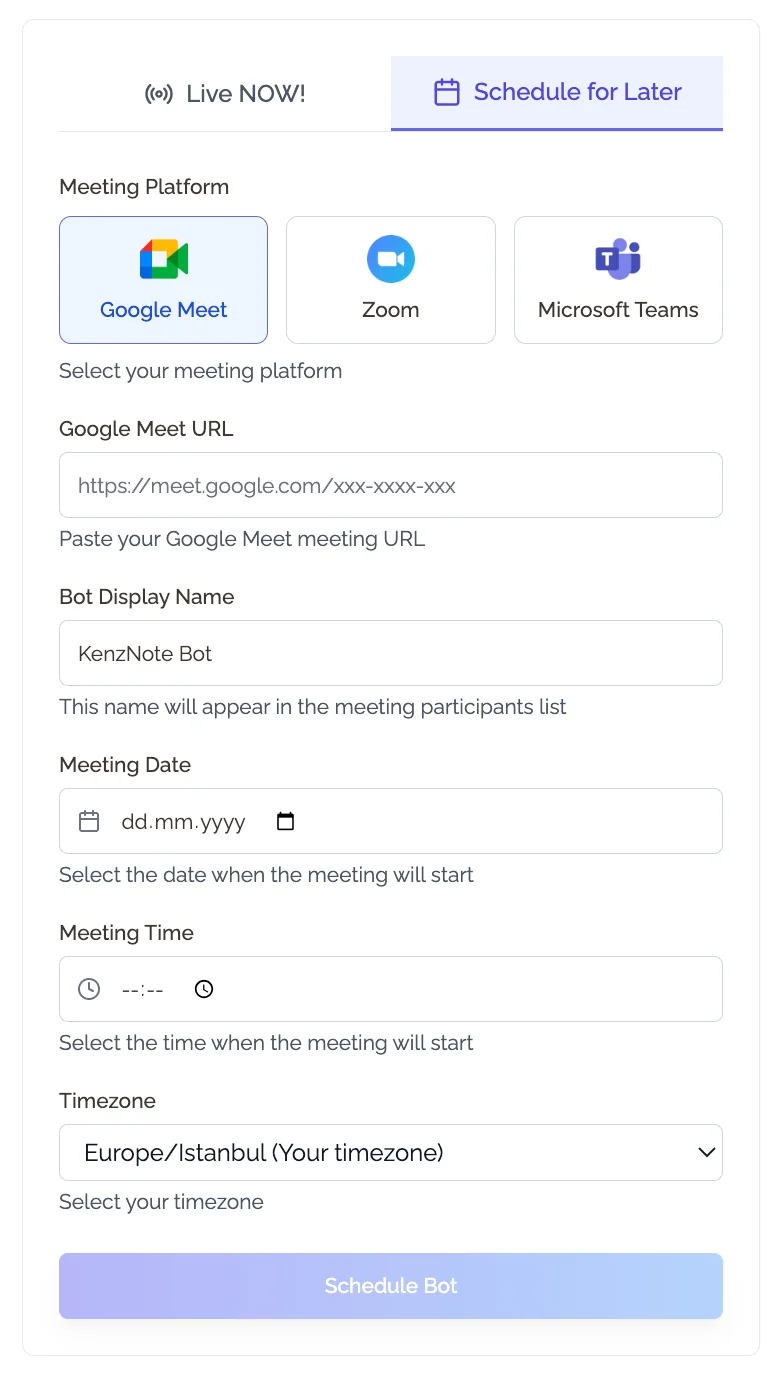
Pricing: $0.99 per meeting Platforms: Zoom, Google Meet, Microsoft Teams CRM integration: No native integration Calendar access: Not required
KenzNote takes a fundamentally different approach to sales call recording. Instead of a subscription you pay regardless of usage, you pay $0.99 per meeting, only when you actually record.
For sales teams, this model makes unusual sense. Discovery calls cluster around certain weeks. Slow months between campaigns see far fewer calls. Paying a flat $18-25 per user per month for those slow stretches is money that simply disappears. At $0.99 per meeting, a rep doing 12 calls in a month pays $11.88. The same rep doing 3 calls in a quiet month pays $2.97.
The other differentiator is privacy. KenzNote does not require calendar access, and it does not send a bot into your meeting as a named participant. This matters more in sales than in any other context: clients who see "KenzNote Bot" join their call may feel surveilled before the first word is spoken. KenzNote's approach keeps the experience clean and professional.
What you get per meeting:
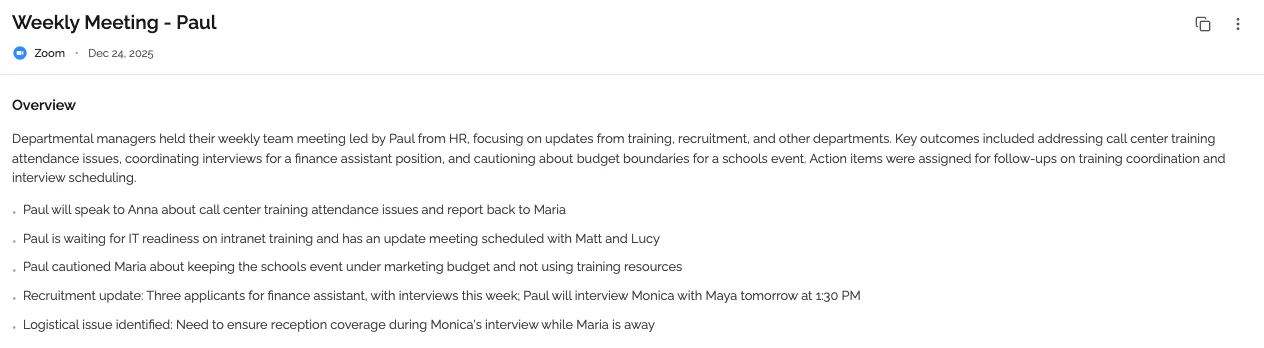
- Full transcript with speaker labels
- AI-generated summary and key takeaways
- Extracted action items
- Permanent storage, no expiration
- Export any time
Ideal for: SMB sales teams, independent sales reps, consultative sellers, teams with fluctuating call volume, reps whose clients are sensitive to recording bots
Limitation: No native CRM push. Teams that need automatic Salesforce or HubSpot sync will need to copy notes manually or use a workflow tool.
2. Fireflies.ai - Best for CRM-Connected Sales Teams
Pricing: Free (limited); Pro from $18/user/month; Business from $29/user/month Platforms: Zoom, Google Meet, Teams, Webex, and more CRM integration: Salesforce, HubSpot, Pipedrive, Zoho, and others Calendar access: Required
Fireflies.ai is the strongest mid-market option for sales teams that need CRM sync. Its integrations with Salesforce and HubSpot are genuine: not just export links, but structured pushes that populate contact records with call summaries, action items, and sentiment data.
The AI Notetaker joins calls automatically via calendar connection, generates a post-call summary, and can push that summary directly to the relevant CRM deal or contact. For teams running high-volume outbound or managing complex accounts across multiple reps, this eliminates a significant layer of manual data entry.
Fireflies also offers basic conversation analytics on paid plans: talk-to-listen ratio, topic detection, and a searchable library of all recorded calls. These fall short of Gong's depth, but they are meaningful for teams that do not need a full revenue intelligence platform.
Best features for sales:
- CRM sync (Salesforce, HubSpot, Pipedrive, and more)
- Searchable call library across the team
- AI summaries and action item extraction
- Topic tracking and conversation analytics
- Slack integration for post-call notifications
Ideal for: Growing SMB and mid-market sales teams with established CRM workflows
Limitation: Monthly subscription cost adds up quickly for small teams or reps with variable call volume. The free plan has a hard lifetime cap of 800 minutes total; not a sustainable option for ongoing use.
3. Gong - Best for Enterprise Revenue Intelligence
Pricing: ~$1,200-$1,600 per user per year (custom contracts, minimum seats apply) Platforms: Zoom, Google Meet, Teams, Webex, phone dialer integrations CRM integration: Deep Salesforce and HubSpot integration, custom API Calendar access: Required
Gong is the category leader in revenue intelligence, and it earns that position. No other tool on this list does what Gong does at scale: real-time deal risk scoring, pipeline health analysis, rep performance benchmarking, and AI-driven coaching recommendations, all built on top of a comprehensive call recording and analysis engine.
For enterprise sales organizations with dedicated RevOps teams, Gong is transformative. Managers can see exactly which deals are at risk before the rep is aware. Reps get personalized feedback on call behaviors tied to close rate data. Leadership gets a single dashboard that connects call quality to revenue outcomes.
The catch is cost and complexity. Gong typically requires a multi-year contract, a minimum number of seats, and an implementation period to configure properly. Smaller teams often find they are paying for capabilities they cannot operationalize.
Best features for sales:
- Deal risk scoring and pipeline analytics
- Talk-to-listen ratio and behavioral benchmarking
- Objection and competitor mention tracking
- Coaching playlists and rep scorecards
- Deep CRM sync with bidirectional data flow
Ideal for: Enterprise sales teams (50+ reps), organizations with RevOps functions, teams where revenue intelligence directly justifies the cost
Limitation: Price puts it out of reach for most SMBs. Implementation requires dedicated resources. ROI takes time to realize.
4. tl;dv - Best for Sales Coaching and Call Libraries
Pricing: Free (limited AI credits); Pro at $18/user/month; Business at $59/user/month Platforms: Zoom, Google Meet; Teams on paid plans CRM integration: Salesforce, HubSpot (paid plans) Calendar access: Required
tl;dv (too long; didn't view) was built with a specific insight: most people never watch recorded calls because they are too long. Its core feature is the ability to clip specific moments from recordings (objection-handling, pricing discussions, discovery questions) and share them as short video highlights.
For sales managers who want to build a coaching library, this is genuinely valuable. Instead of telling a new rep to watch a two-hour call, you share the four-minute clip where your top performer handled a competitor comparison. tl;dv makes curating and sharing these moments easy.
The platform has expanded into CRM sync and call analytics on paid plans, making it a credible all-in-one option for sales teams that prioritize coaching workflows.
Best features for sales:
- Video clip creation and highlight sharing
- Call tagging and searchable library
- AI summaries and timestamped notes
- CRM integration on paid plans
- Multi-language transcription (30+ languages)
Ideal for: Sales managers focused on rep development, teams building call coaching libraries, international sales teams
Limitation: AI credits are limited on the free plan. Teams on Google Meet or Zoom get the most from the platform; Teams support requires a paid plan.
5. Otter.ai - Best for Basic Sales Transcription
Pricing: Free (300 min/month); Pro at $16.99/user/month; Business at $30/user/month Platforms: Zoom, Google Meet, Microsoft Teams CRM integration: Limited (Salesforce on higher tiers) Calendar access: Required
Otter.ai is the most widely recognized name in AI transcription, and it does that job reliably. For sales teams that primarily need accurate call records and summaries without advanced analytics, Otter is a cost-effective starting point.
Its AI features have expanded in recent years: summaries, action item extraction, and a conversational AI that lets you ask questions about a transcript. CRM integration is available on higher-tier plans, though it is less robust than Fireflies or Gong.
Where Otter falls short for sales-specific use cases is in conversation analytics. There is no objection tracking, no behavioral benchmarking, and no deal intelligence. It is a transcription and note-taking tool, not a revenue intelligence platform.
Best features for sales:
- Reliable transcription across all three major platforms
- AI summaries and action item capture
- Conversational AI for transcript Q&A
- Real-time transcription during meetings
- Accessible pricing for individual reps
Ideal for: Individual sales reps, small teams starting with AI transcription, organizations not yet ready for a full sales intelligence platform
Limitation: 300 minutes per month on the free plan disappears quickly. Limited conversation analytics compared to sales-focused tools.
6. Transgate - Best for International and Multilingual Sales Teams
Pricing: Free trial (20 min); Pay As You Go at $1.49/hour; Premium from $14/month (20 hrs); Business from $21/month (40 hrs) Platforms: Any platform via browser tab capture or direct file upload (MP3, WAV, MP4, and 20+ formats) CRM integration: No native integration Calendar access: Not required
Transgate takes a different angle from every other tool on this list. Rather than joining your meetings as a bot, it captures audio directly from your browser tab or accepts uploaded recordings after the fact. For international sales teams operating across time zones, this architecture means no scheduling constraints and no risk of a bot appearing in high-stakes prospect calls.
The biggest differentiator is language support. With 50+ languages and >95% accuracy targets across all of them, Transgate is the clear choice for sales teams running calls in multiple languages or serving non-English-speaking markets. No other tool on this list matches that breadth.
Pricing scales with usage: $1.49/hour on the pay-as-you-go plan, or a flat monthly subscription if call volume is consistent. The Premium plan at $14/month includes 20 hours of transcription, enough for roughly 40 thirty-minute calls. A free trial gives you 20 minutes with no credit card required.
AI features go beyond transcription: Transgate generates summaries and highlights automatically, and offers an interactive chat interface where reps can ask questions about any transcript, useful for quickly pulling out a specific objection or commitment without reading the full document.
Best features for sales:
- 50+ language transcription with high accuracy
- AI summaries, smart highlights, and interactive transcript chat
- Browser tab audio capture (no bot joins the call)
- File upload support (MP3, WAV, MP4, and all major formats)
- Pay-as-you-go pricing with no subscription lock-in
- No file length limits
Ideal for: International sales teams, reps selling into non-English markets, teams that record calls locally and upload for transcription, organizations with HIPAA or GDPR requirements
Limitation: No native CRM push. Tab capture requires Chrome and a desktop browser. Not designed for auto-joining scheduled calendar meetings.
Comparison Table
| Tool | Pricing | Platforms | CRM Integration | Calendar Required | Best For |
|---|---|---|---|---|---|
| KenzNote | $0.99/meeting | Zoom, Meet, Teams | No | No | Variable call volume, privacy-sensitive sales |
| Fireflies.ai | From $18/user/month | Zoom, Meet, Teams, Webex+ | Yes (Salesforce, HubSpot, Pipedrive) | Yes | CRM-connected SMB teams |
| Gong | ~$1,400/user/year | Zoom, Meet, Teams, phone | Deep (Salesforce, HubSpot) | Yes | Enterprise revenue intelligence |
| tl;dv | From $18/user/month | Zoom, Meet (free); Teams paid | Salesforce, HubSpot (paid) | Yes | Sales coaching and call libraries |
| Otter.ai | From $16.99/user/month | Zoom, Meet, Teams | Limited (higher tiers) | Yes | Basic transcription, individual reps |
| Transgate | Free trial; $1.49/hr PAYG; from $14/month | Any platform (tab capture or file upload) | No | No | International teams, multilingual sales, file-based transcription |
How to Choose the Right Tool for Your Team
By team size
1-3 reps: KenzNote or Transgate. Low call volume, no need to pay per seat. KenzNote at $0.99/meeting if you use multiple platforms or want no-bot recording. Transgate if your calls span multiple languages or you prefer to upload recordings after the fact.
4-15 reps: Fireflies.ai or tl;dv. At this size, CRM sync becomes critical for account continuity, and you need a shared call library so managers can coach from real data. Fireflies offers the stronger CRM integration; tl;dv wins on coaching workflows.
15+ reps: Gong or Fireflies Business. Once you have the team size to generate meaningful performance data and a manager who can act on it, revenue intelligence tools start to pay for themselves. Gong is the benchmark if budget allows; Fireflies Business is the strongest mid-market alternative.
By CRM stack
Salesforce: All major tools integrate, but Gong and Fireflies offer the deepest bidirectional sync. tl;dv supports Salesforce on paid plans.
HubSpot: Fireflies, Gong, and tl;dv all offer HubSpot integration. Fireflies tends to get the highest marks for HubSpot usability.
Pipedrive / Zoho / other: Fireflies has the broadest CRM coverage. Verify integration depth before committing.
No CRM or lightweight CRM: KenzNote. You are getting clean notes and summaries; no need to pay for integration features you will not use.
By budget
Under $5/month per rep: KenzNote for teams with fewer than 5 meetings per rep per month. Transgate pay-as-you-go ($1.49/hour) for teams with variable volume or multilingual needs.
$15-30/month per rep: Fireflies Pro, tl;dv Pro, or Otter.ai Business. This tier gives you CRM sync, analytics, and team features.
$100+/month per rep: Gong. Justifiable only with the team size, deal size, and RevOps maturity to use it fully.
The ROI Case for AI Meeting Assistants in Sales
Fact Box: AI Meeting Tool ROI for Sales Teams
- $1,920/month in selling capacity recovered per rep at 5 hours/week saved (at $200K annual quota)
- 50%+ reduction in post-call admin time reported by most teams using AI notetakers
- 15-25% win rate improvement reported by teams using structured call analysis vs. manual notes
- $18/month per rep vs. $1,920/month in recovered selling capacity: over 100x ROI at conservative estimates
- Faster follow-ups: Teams with AI notes send follow-up emails 3x faster after calls
Sources: Revenue intelligence vendor data, HBR Sales Productivity Research, Salesforce State of Sales 2025
The productivity math is straightforward. A sales rep spending 2 hours per day on post-call admin (CRM updates, follow-up emails, call summaries) is spending 40 hours a month not selling.
AI meeting tools reduce that by at least 50% for most teams. Generous estimates from platforms like Gong and Fireflies put time savings at 10-15 hours per rep per week on documentation and admin. More conservative estimates from independent surveys suggest 5-8 hours per week for teams with existing CRM discipline.
At the low end, 5 hours per week saved per rep: that is 20 hours per month returned to selling activities. For a rep with a $200,000 annual quota, each working hour is worth roughly $96 in pipeline potential. Twenty hours per month is $1,920 in monthly selling capacity per rep.
Set against a $18/month Fireflies subscription or $0.99 per call with KenzNote, the return on a good AI meeting tool is not a rounding error. It is one of the most efficient investments a sales manager can make.
Beyond time savings, there is deal conversion impact. Teams using AI tools for post-call follow-up consistently report faster follow-up email response times, better meeting notes shared with prospects, and stronger CRM data for deal reviews. Industry data from revenue intelligence vendors suggests win rate improvements of 15-25% for teams using structured call analysis versus those relying on manual notes.
The mechanism is simple: better information captured in the moment leads to better follow-up, which leads to more deals won. The tool does not close the deal. The rep does, but with better information and less administrative friction.
Frequently Asked Questions
What is the best AI meeting assistant for sales teams in 2026?
It depends on team size and budget. Gong is the best enterprise option for revenue intelligence at scale. Fireflies.ai is the top pick for SMBs that need CRM integration. KenzNote is the best choice for teams with variable call volume or reps who want to record without a visible bot joining the call. Transgate is the top pick for international or multilingual sales teams needing 50+ language support at flexible pay-as-you-go pricing.
Do AI meeting assistants integrate with Salesforce and HubSpot?
Most paid plans do. Gong and Fireflies offer the deepest Salesforce and HubSpot integrations, including bidirectional sync that pushes call summaries and action items directly to deal records. tl;dv supports both CRMs on paid plans. KenzNote and Transgate do not currently offer native CRM integration.
Will clients know they are being recorded if I use an AI meeting assistant?
Most tools send a bot into the meeting as a named participant, which alerts all attendees. This is also a legal best practice; most jurisdictions require disclosure. KenzNote takes a different approach: it records without sending a visible bot. You are still responsible for informing clients that the call is being recorded, but the experience for your client is a normal meeting without a third-party bot name appearing in the participant list.
How much does an AI meeting assistant cost for a sales team of 10 reps?
At the mid-market tier (Fireflies Pro at $18/month, tl;dv Pro at $18/month), a 10-person team pays $180/month or $2,160/year. Gong at enterprise pricing runs $12,000-$16,000/year for 10 users. KenzNote scales with usage: 10 reps each doing 15 calls per month equals 150 meetings, or $149/month. Transgate's Business plan at $21/month per user (40 hours of transcription) makes it cost-effective for teams with consistent volume and multilingual needs.
Can AI meeting tools help with sales coaching?
Yes, and this is one of the strongest use cases. tl;dv excels at creating short video clips from specific call moments, useful for building coaching libraries without watching hours of recordings. Gong offers the most comprehensive coaching infrastructure, including rep scorecards and behavioral benchmarking. Fireflies provides searchable call archives that managers can review without sitting in on every call live.
Is it legal to record sales calls with an AI assistant?
Recording laws vary by jurisdiction. In the US, federal law allows one-party consent (one person on the call must consent). However, states like California, Florida, and Illinois require all-party consent. The safest practice is to disclose recording to all participants before the call begins; most teams include a note in the meeting invitation. Always check the specific requirements for your jurisdiction and consult legal counsel for compliance across different states or countries.
What is the difference between an AI notetaker and a revenue intelligence platform?
An AI notetaker (KenzNote, Otter.ai, Transgate) transcribes calls, generates summaries, and extracts action items. A revenue intelligence platform (Gong, Chorus) does all of that plus analyzes conversation patterns across your entire sales team, scores deal risk, benchmarks rep behavior against close rate data, and surfaces coaching opportunities. Revenue intelligence tools cost significantly more and require team-level adoption to generate meaningful insights.
Can I use an AI meeting assistant without giving it access to my calendar?
Most tools require calendar access to auto-join meetings. KenzNote is the exception: it does not require calendar integration. You manually send a meeting link when you want the session recorded. This makes KenzNote the only option among major tools that gives you full control over which meetings are recorded without granting ongoing calendar permissions.
Related Resources
- Meeting Notetaker for Sales - Deep dive into how AI notetaking fits the sales workflow
- Conversation Intelligence Sales Guide - How to use call data to improve close rates
- AI Follow-Up Email After Meeting - Automate the follow-up that most reps forget
- Fireflies vs Otter AI 2026 - Head-to-head comparison of the two most popular tools
- Best AI Meeting Note Taker Apps - Broader roundup across all meeting types
Ready to cut post-call admin in half?
Try KenzNote at $0.99/meeting with no subscription and no calendar access required. Your next sales call, fully captured and summarized.
Questions? Email [email protected] or visit our Help Center.

About Muhammad Abuelenin
Muhammad is the co-founder of KenzNote, passionate about building tools that enhance productivity and collaboration. With expertise in full-stack development and AI-powered solutions, he's dedicated to helping teams work smarter through innovative technology.
Ready to transform your meetings?
KenzNote automatically captures meeting insights, extracts action items, and generates summaries so you can focus on the conversation instead of taking notes.
Try KenzNote Free