
Quick Answer
AI meeting notes can replace or dramatically shorten recurring status update meetings by automatically distributing meeting summaries, enabling natural language search across past meetings, and giving anyone on the team the ability to answer "what is the status of X?" without calling another meeting. The practical result for most teams: eliminate 2 to 4 status meetings per week without losing any information.
The status update meeting is a symptom, not a requirement. What teams actually need is access to current information. AI meeting notes deliver that without requiring everyone to stop working at the same time.
Key Takeaways
- Status meetings exist because information is trapped in people's heads or scattered across tools, not because synchronous status-sharing is inherently valuable
- AI meeting summaries distributed automatically give every stakeholder the status update without a meeting
- Meeting chat replaces "what is the status of X?" Slack messages by letting anyone query the meeting archive directly
- A realistic team can eliminate 2 to 4 hours of status meetings per week without changing their actual work process
- The transition requires a two-week adjustment period as the team learns to pull information rather than wait for it in a meeting
- Not all status meetings should be eliminated: some serve relationship or alignment purposes that go beyond information sharing
Table of Contents
- Why Status Meetings Persist Despite Being Inefficient
- What Status Meetings Are Actually Trying to Do
- Workflow 1: Replace Weekly Standup With Auto-Distributed Summary
- Workflow 2: Use Meeting Chat to Answer "What Is the Status of X?"
- Workflow 3: Replace Project Status Call With Shared Archive
- Before and After: A Realistic Team Example
- Which Status Meetings Should NOT Be Eliminated
- Making the Transition: A Two-Week Plan
- Frequently Asked Questions
- Related Resources
How AI Meeting Notes Can Replace Status Update Meetings
Your calendar has a daily standup, a weekly project status call, and a cross-team sync. Each one takes 20 to 45 minutes. Most of the time, you are listening to updates that do not affect your work, waiting for the two minutes that do.
That pattern is not a sign of a well-run team. It is a sign that information is not flowing unless everyone stops working at the same time. Status update meetings are the workaround, not the solution.
AI meeting notes change the equation. When every project meeting produces an automatic summary, action items, and a searchable archive, the status call becomes optional. This guide walks through three concrete workflows to replace or shorten status meetings, a realistic before-and-after example, and a phased transition plan your team can start this week.
Why Status Meetings Persist Despite Being Inefficient
Status update meetings are widely recognized as low-value. Ask any team and they will tell you the weekly project status call feels like reading from a spreadsheet out loud. Yet most teams run at least two or three of them every week.
They persist for a few reasons:
No alternative infrastructure exists. Without a searchable, reliable record of what is happening across projects, the meeting is the only mechanism that guarantees everyone has the same information at the same time.
Managers use them for accountability. When there is no other visible record of progress, the status meeting doubles as a check-in that creates social accountability. If you know you have to report on it Friday, you are more likely to do the work Thursday.
They fill information anxiety. Stakeholders and leaders who are not close to day-to-day work use status meetings to reduce uncertainty. The meeting itself produces the feeling of control, regardless of whether the information exchanged was actually useful.
Gallup's State of the Global Workplace report consistently shows that meeting overload is one of the top workplace frustrations. Status meetings that could be replaced by documentation are a primary contributor.
AI meeting notes address all three root causes: they create the infrastructure for information access, they create a more durable accountability record than a meeting, and they satisfy the need for current information on demand rather than on a fixed schedule.
 Status update meetings are the most commonly cited source of meeting overload for hybrid and remote teams.
Fact Box: Why Status Meetings Stick Around
- 71% of meetings are considered unproductive by attendees (Atlassian)
- 250% increase in meeting time since 2020 for remote and hybrid workers (Microsoft)
- 21.5 hours per week spent in meetings by the average professional in 2026
- 2.1 hours per week saved on status meetings when teams switch to async AI summaries
Sources: Atlassian, Microsoft Work Trend Index, Meeting Productivity Statistics 2026
See our meeting fatigue solutions guide for the broader context on how meeting overload affects team performance.
What Status Meetings Are Actually Trying to Do
Before designing a replacement, it is worth being precise about what a status meeting delivers. Most status meetings serve three functions:
1. Information distribution. Making sure everyone has the same picture of project progress, blockers, and next steps.
2. Blocker surfacing. Creating a moment where people who are stuck can say so in front of the people who can help them get unstuck.
3. Alignment signaling. A social ritual that reinforces shared goals and team cohesion, particularly useful in distributed or hybrid teams.
AI meeting notes replace the first function almost entirely. They partially replace the second. They do not replace the third.
Any strategy for eliminating status meetings needs to account for which function each specific meeting is actually serving. The project status call that is 90% information distribution can probably be eliminated. The weekly leadership sync that is 40% alignment-building probably cannot.
 Before eliminating a status meeting, identify whether it is primarily distributing information or building alignment.
Workflow 1: Replace Weekly Standup With Auto-Distributed Summary
The daily standup, in its classic form, asks three questions of each participant: what did you do yesterday, what are you doing today, what is blocking you?
When AI meeting notes are active across all your project meetings, the answers to the first two questions already exist in the meeting archive. Action items extracted from yesterday's meetings show what each person committed to. The auto-generated summary of this morning's planning or sync shows what is in progress.
The replacement workflow:
-
At the end of each working day, KenzNote automatically generates a consolidated summary of all meetings that occurred that day, with action items listed by owner.
-
This summary is distributed to the team channel (Slack, Teams, or email) automatically, without anyone having to write or send it.
-
The next morning, team members read the summary instead of attending a standup. Anyone who has a blocker messages the relevant person directly or posts in the team channel.
-
The standup call either does not happen, or is reduced to 5 minutes for the specific people who need to discuss blockers.
What this saves: A 15-person team running a 15-minute daily standup spends 3.75 team-hours per day on status sharing. Even cutting the standup to 5 minutes saves 2.5 team-hours per day, or 12+ hours per week.
What you need to make it work:
- Consistent meeting naming so the auto-summaries are clearly labeled by project or workstream
- A team norm that people read the summary each morning before asking "what's the status of X?"
- A 2-week explicit transition period where you explicitly ask people to try the async approach before falling back to the full standup
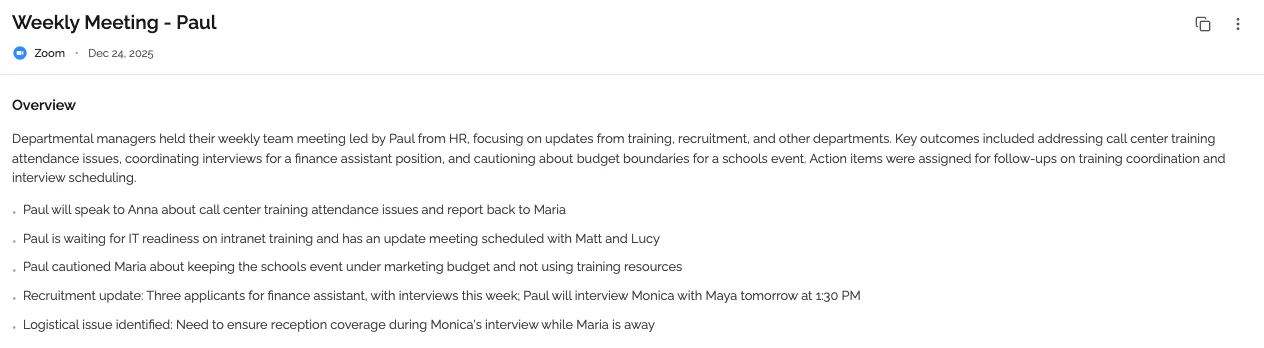 Auto-distributed summaries replace the information-sharing portion of daily standups without anyone writing a recap.
For the full context on how automatic meeting notes work, see automatic meeting notes.
Workflow 2: Use Meeting Chat to Answer "What Is the Status of X?"
The most common trigger for a status meeting is an information request: "I need to know where the Henderson project stands before my call with them tomorrow." Historically, the only way to get that information was to ask someone, which sometimes turned into a meeting.
KenzNote's meeting chat changes this dynamic entirely. It lets you query your entire meeting archive in natural language. You type the question, the meeting chat searches across all your transcripts and summaries, and returns an answer with a source citation.
Example queries:
- "What is the current status of the Henderson project?"
- "What blockers did the engineering team mention this week?"
- "What did we decide about the Q3 launch date?"
- "Who owns the contract review action item?"
Each answer comes with a link to the specific meeting and timestamp where the relevant information was discussed. You can click through to the full context if the answer raises more questions.
The productivity shift: This eliminates the round of Slack messages, the follow-up call, and the summary that someone had to write from memory. The archive answers the question directly, accurately, and in seconds.
Microsoft WorkLab research on hybrid work identifies information access latency (the time between needing information and getting it) as one of the key bottlenecks in distributed team productivity. Meeting chat reduces that latency from hours to seconds.
 A searchable meeting archive lets any team member pull current status information without scheduling a meeting or interrupting a colleague.
 Meeting topics are grouped automatically, making it fast to find status updates across multiple project calls.
See our article on meeting productivity statistics for data on how information latency affects team output.
Workflow 3: Replace Project Status Call With Shared Archive
The weekly or biweekly project status call is the highest-value target for elimination. These meetings typically last 30 to 60 minutes, involve 6 to 15 people, and are primarily information distribution: who reports what progress, what is on track, what is at risk.
The information in a status call already exists. It was discussed in the sprint review, the design crit, the customer call, the planning session. The status call is an aggregation ritual, not an information creation event.
With AI meeting notes across all project meetings, the aggregation happens automatically. Every meeting produces a summary. Action items track across meetings. The archive contains the current state of every project, updated after every meeting.
The replacement structure:
Instead of a weekly status call, the project team gets:
-
An auto-generated weekly digest of all project meetings from the past week, with a summary of decisions made, action items outstanding, and blockers raised.
-
A shared KenzNote meeting folder for the project that any stakeholder can access to read meeting summaries and search the archive.
-
A standing option to call a synchronous meeting if there is something that genuinely requires real-time discussion. The key shift: the meeting is the exception, not the default.
What the manager or project lead does differently: Instead of facilitating a status call, they review the auto-generated weekly digest, identify any items that require decisions or escalations, and address those directly with the relevant people. The hour-long weekly call becomes 20 minutes of async review plus targeted conversations as needed.
This is the workflow that McKinsey's analysis of generative AI productivity identifies as one of the highest-leverage uses of AI in knowledge work: replacing synchronous aggregation activities with AI-generated digests.
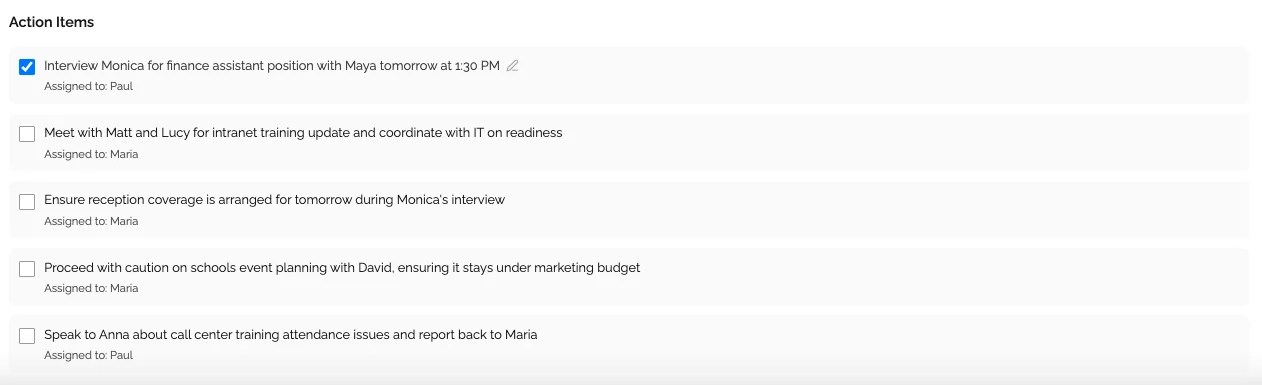 Action items tracked across meetings give project leads a live accountability view without a status call.
Before and After: A Realistic Team Example
Consider a 10-person product team with the following recurring status meetings:
| Meeting | Frequency | Duration | Attendees | Weekly cost |
|---|---|---|---|---|
| Daily standup | 5x/week | 20 min | 10 | 16.7 hrs |
| Weekly project status | 1x/week | 45 min | 8 | 6 hrs |
| Cross-team sync | 1x/week | 30 min | 6 | 3 hrs |
| Total | 25.7 hrs/week |
After adopting AI meeting notes and the three workflows above:
| Meeting | Frequency | Duration | Attendees | Weekly cost |
|---|---|---|---|---|
| Daily standup | 5x/week | 5 min (blockers only) | 4 avg | 1.7 hrs |
| Weekly project status | Eliminated | - | - | 0 hrs |
| Cross-team sync | Biweekly | 20 min | 6 | 1 hrs |
| Total | 2.7 hrs/week |
That is a reduction from 25.7 hours to 2.7 hours per week for this team. Even if your results are half as dramatic, you are looking at 10+ hours recovered per week.
These are not hours where people were working. They were hours where people were sitting in meetings waiting for the 2 minutes relevant to them. The reclaimed time goes back to actual work.
Fact Box: Status Meeting Replacement ROI
- 23 hours per week recovered in the example 10-person team above
- 71% productivity increase when teams reduce meetings by 40% (Nature Human Behaviour, 2022)
- 2.1 hours per week saved specifically on status meetings via async AI summaries
- $0.99 per meeting with KenzNote, making selective recording practical for any team size
Sources: Nature Human Behaviour, Meeting Productivity Statistics 2026, KenzNote pricing
For ideas on how to use recaptured meeting time productively, see never take meeting notes again and our one-on-one meeting template for how to restructure the meetings you do keep.
Which Status Meetings Should NOT Be Eliminated
The framework above is powerful, but it is not a mandate to eliminate every status meeting. Some meetings serve purposes that AI notes cannot replace.
Keep the weekly team meeting if it serves relationship and alignment functions. A weekly all-hands or team meeting where people share wins, challenges, and context beyond task status builds team cohesion. Eliminate the status reading portion; keep the human connection portion.
Keep escalation reviews. When a project is in trouble, real-time discussion with decision-makers is often necessary. The AI archive can surface the problem, but the conversation about how to solve it still benefits from synchronous interaction.
Keep external stakeholder meetings. Client and partner status calls often serve relationship and trust functions as much as information functions. Replacing them with async summaries can damage client relationships. Use AI notes to prepare for these calls and reduce their frequency, but do not eliminate them entirely.
Keep one-on-ones. The manager-report relationship requires direct conversation. AI notes for one-on-ones help with accountability and follow-through, but the meeting itself should stay.
The decision test: ask whether the meeting is primarily information distribution or relationship-building. If it is primarily information distribution, it is a candidate for replacement. If it serves relationship functions, it probably should not be replaced, only made more efficient.
Making the Transition: A Two-Week Plan
Teams that try to eliminate all status meetings at once tend to revert within a few weeks because the transition is jarring. A phased approach works better.
Week 1: Add AI notes to all existing meetings without changing anything else
Let the AI notes run alongside your current meeting schedule. After one week, everyone has experienced the summaries and the archive. They can see what information is now available without a meeting.
Week 2: Shorten the standup
Cut the daily standup from its current length to 5 to 10 minutes. Announce that the standup is only for blockers that cannot be resolved async. Encourage people to read the prior day's AI summary before the standup.
Week 3: Convert the project status call
Replace the weekly project status call with the auto-generated weekly digest. Send it at the same time the meeting would have occurred. Keep the meeting on the calendar as an optional drop-in for 30 minutes, available to anyone who needs to discuss something that was not resolved async. Expect most weeks to have zero attendees within a month.
Week 4 onward: Continuous refinement
Track which meetings still feel necessary versus which feel like habits. Use the data from the first three weeks to have an honest conversation with your team about what is actually adding value.
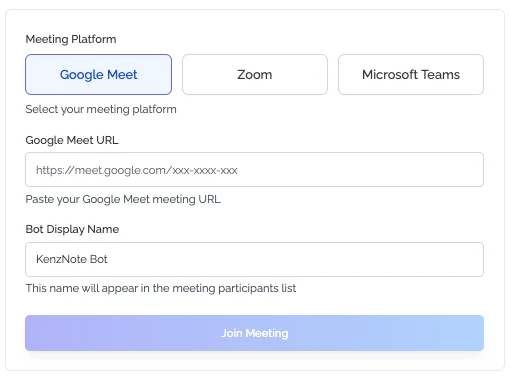 Start by recording existing meetings. No calendar integration required: paste the link when you want a summary.
Frequently Asked Questions
Won't people feel out of the loop without regular status meetings?
Briefly, during the first two weeks. The adjustment is from a push model (information arrives in a meeting at a fixed time) to a pull model (information is available anytime you want it). Once people experience the pull model and realize they can get answers faster than waiting for the next status call, the feeling of being out of the loop disappears.
What if some team members do not read the AI-generated summaries?
This is the most common adoption challenge. A few strategies help: make the summary format scannable (KenzNote's summaries use bullet points with clear headers), send them to a channel people check anyway (Slack, email), and briefly reference the summary in conversations rather than answering questions from scratch. If someone asks "what's the status of X?" respond with "it's in yesterday's summary, here's the link." The habit forms within 2 to 3 weeks.
How do we handle time zones in a global team where the auto-summary arrives at 3am for some people?
Configure the summary distribution time to align with the start of the working day for the majority of the team. Team members in different time zones read the summary when they start their day rather than waiting for a scheduled meeting. This is actually an improvement over synchronous status calls, which force someone to attend at an inconvenient hour.
Can AI meeting notes replace the accountability function of status meetings?
Partially. The AI-extracted action item list with owner names creates a more durable accountability record than a meeting recap. Project leads can see every week which items were committed to and whether they were completed. What it does not replicate is the social pressure of reporting to peers in real time. For teams where that social pressure is important for accountability, consider keeping a shortened synchronous touchpoint rather than going fully async.
How does this work for external-facing projects where clients expect status calls?
Use AI meeting notes to make those calls shorter and better-prepared, rather than eliminating them. Before each client status call, query the meeting archive to prepare a comprehensive update. After the call, the AI summary goes to your internal team. Over time, you can propose shifting from weekly calls to biweekly calls with a shared status dashboard in between, using your AI-generated summaries as the dashboard content.
What is the fastest way to demonstrate value to a skeptical manager?
Pick one status meeting and propose a two-week trial: replace it with AI-generated summaries and give everyone access to the meeting archive. Track three metrics: time saved, questions that get answered async (versus via meeting), and whether any information was actually lost. Two weeks of data is usually more persuasive than any argument in advance.
The Bottom Line
Status update meetings are not a requirement of good project management. They are a workaround for information that is not accessible when people need it. AI meeting notes fix the underlying problem: summaries arrive automatically, action items persist across meetings, and meeting chat answers status questions in seconds.
You do not need to eliminate every standing meeting on Monday. Start with one status call, run a two-week trial with auto-distributed summaries, and measure what changes. Most teams find the data speaks for itself.
Ready to Replace Status Meetings With AI Summaries?
Stop spending hours in meetings that only repeat information already discussed elsewhere. Let AI capture every project meeting so your team stays aligned without another status call.
Start with KenzNote:
- No bot joins your calls unless you paste the link
- No calendar connection required
- $0.99 per meeting, no subscription
- Full transcript, AI summary, and action items delivered in minutes
Questions? Reach out at [email protected]
Last updated: May 2026. Pricing and feature availability change frequently. Always verify current details on each tool's official pricing page.
Related Resources
- Meeting Fatigue Solutions
- Meeting Productivity Statistics 2026
- Automatic Meeting Notes: How They Work
- One-on-One Meeting Template
- Never Take Meeting Notes Again
References & Citations
- [1]The Economic Potential of Generative AIMcKinsey & Company. June 14, 2023https://www.mckinsey.com/capabilities/mckinsey-digital/our-insights/the-economic-potential-of-generative-ai-the-next-productivity-frontier
- [2]Hybrid Work Is Just Work. Are We Doing It Wrong?Microsoft WorkLab. September 22, 2022https://www.microsoft.com/en-us/worklab/work-trend-index/hybrid-work-is-just-work
- [3]State of the Global Workplace ReportGallup. June 1, 2022https://www.gallup.com/workplace/349484/state-of-the-global-workplace.aspx
All external sources have been reviewed for accuracy and relevance. Last verified: September 2026.

About KenzNote Team
The KenzNote team is dedicated to helping teams capture better meeting insights and transform how they collaborate. With backgrounds in AI, product design, and enterprise software, we're building the future of meeting productivity.
Ready to transform your meetings?
KenzNote automatically captures meeting insights, extracts action items, and generates summaries so you can focus on the conversation instead of taking notes.
Try KenzNote Free