
How to Write a Follow-Up Email After a Sales Call with AI
Quick Answer
To write a better follow-up email after a sales call using AI: record or transcribe the call, then use the AI notes to extract three things before you write a word of the email. First, the specific pain points or concerns the prospect raised. Second, the commitments each party made. Third, the language the prospect used to describe their own situation. These three inputs let you write a follow-up that feels personal, accurate, and relevant - not a generic template the prospect has read from five other vendors.
Key Takeaways
- Generic sales follow-up emails fail because they do not reflect what was actually discussed; AI meeting notes solve this directly
- The most effective follow-ups reference the prospect's specific words and concerns
- AI extraction of commitments prevents the common failure mode of forgetting to follow through on something you promised
- A well-structured follow-up should be sent within 24 hours of the call; AI notes make this timeline achievable
- CRM logging and follow-up emails should be based on the same source of truth: the meeting notes
- This guide provides specific templates for three common sales call scenarios
Table of Contents
- Why Most Sales Follow-Up Emails Miss
- What AI Meeting Notes Give You That Templates Do Not
- The Three Inputs Before You Write
- Template 1: Discovery Call Follow-Up
- Template 2: Demo Follow-Up with Objections Addressed
- Template 3: Proposal Follow-Up with Next Steps
- How to Use KenzNote Meeting Chat for Follow-Ups
- CRM Integration: Logging the Right Information
- Frequently Asked Questions
- Related Resources
Sales reps spend a meaningful portion of their post-call time on follow-up emails that do not get replies. The most common reason: the email sounds generic. It says "great talking with you today" and lists some product features, but it does not demonstrate that the rep listened or understood what the prospect actually needs.
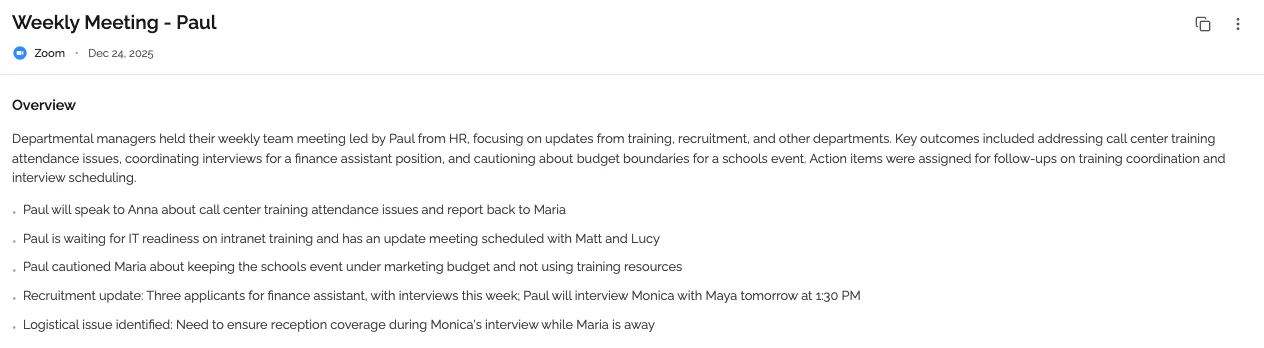
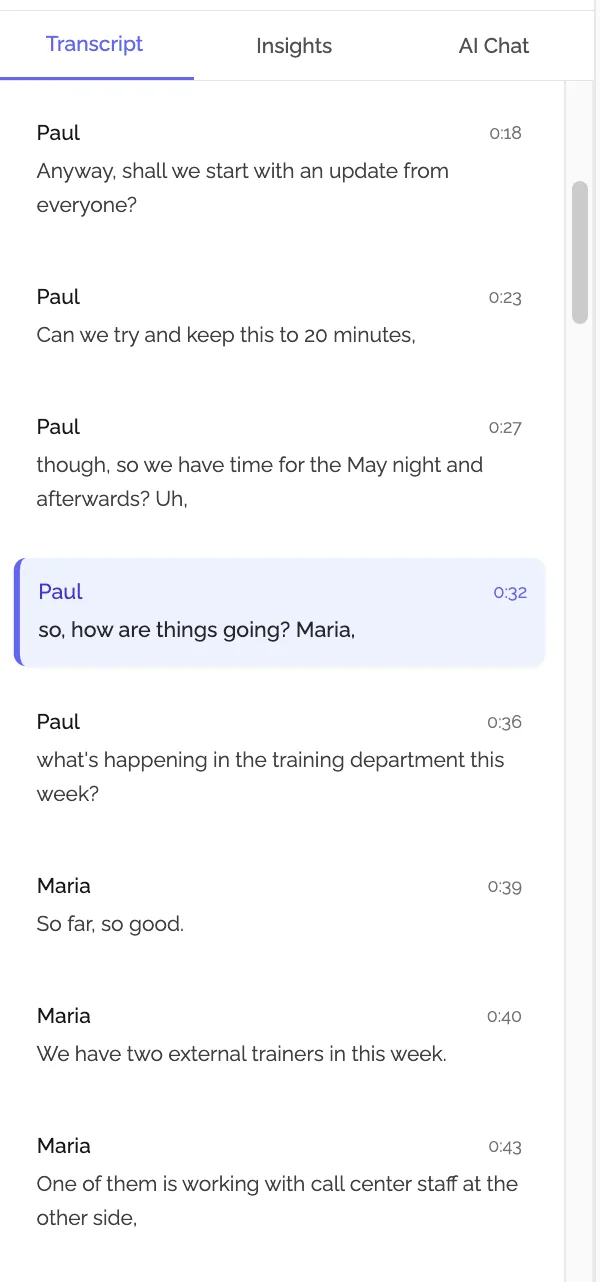
AI meeting notes fix this problem at the root. When you have an accurate transcript of the conversation, you know exactly what was said, what the prospect cared about, what they were worried about, and what they asked for. Writing a follow-up from that material produces a different kind of email.
This guide is for sales professionals who want to use AI meeting tools to write follow-ups that are faster, more specific, and more likely to move deals forward.
Why Most Sales Follow-Up Emails Miss
The standard post-call follow-up email is written from memory, under time pressure, often between other calls. The rep remembers the main points of the conversation but forgets the specific language the prospect used, misses one of the commitments they made, and defaults to template language because it is faster than reconstructing the call.
The result is an email that reads like it could have been written after any call. Prospects read it and recognize it as a template. It does not advance trust; it erodes it slightly by signaling that the rep is not paying close attention.
Research consistently shows that follow-up speed and specificity are the two biggest drivers of reply rates after sales calls. AI meeting notes solve both: they make follow-ups faster (because you are not reconstructing from memory) and more specific (because you have the actual words).
Fact Box: Sales Follow-Up Performance
- 40% of call information is forgotten by sales reps within 24 hours without documentation
- 80% of sales require 5+ follow-ups after initial contact, yet 44% of reps give up after just one (HBR)
- 28% of a rep's week is spent on administrative tasks including manual note-taking and CRM entry (Salesforce)
- 40% increase in response rates when follow-ups reference specific details from the conversation
- Within 24 hours is the critical window - reply rates decline significantly after that
Sources: Harvard Business Review, Salesforce State of Sales 2025, Revenue Intelligence Vendor Reports
The gap between a generic and a specific follow-up email is usually the difference between using your memory and using actual notes.
What AI Meeting Notes Give You That Templates Do Not
Templates give you structure. AI meeting notes give you content. The best follow-up emails have both.
Here is what an AI transcript of a sales call typically contains that a template cannot:
The prospect's own language. If the prospect said "our current process is a manual nightmare," quoting that phrase back (or paraphrasing it closely) signals that you were listening. "I heard you describe your current process as a manual nightmare" is more powerful than "I understand you're looking to improve your workflow."
Specific numbers and constraints. If the prospect mentioned their team is 12 people, their budget decision happens in Q3, or they have a specific compliance requirement, these details belong in your follow-up. AI notes capture them; memory often does not.
Explicit concerns and objections. If the prospect raised a concern about implementation time or questioned how your tool handles a specific use case, your follow-up should address it directly. If you do not have accurate notes, you may not remember the concern precisely enough to address it well.
Commitments from both sides. What did the prospect agree to do before the next call? What did you promise to send or research? AI notes capture both sets of commitments, which prevents the awkward situation of forgetting what you said you would do.
The Three Inputs Before You Write
Before writing any follow-up email, extract three things from your AI meeting notes:
1. The prospect's stated pain points, in their own words. Use your meeting transcript or the meeting chat feature to pull the specific language. Do not paraphrase if you can quote directly or near-directly. This is what makes the email feel personal.
2. The commitments log. List every commitment made during the call. Yours and theirs. Your follow-up should acknowledge both. This demonstrates follow-through and creates a clear record of what was agreed.
3. The next step. What is the explicit next action that both parties agreed to? If there was a clear next step discussed in the call, it should be the closing line of your follow-up, not an open-ended "let me know if you have questions."
With these three inputs, you are ready to write. Everything else in the email - the greeting, the structure, the tone - is secondary.
Template 1: Discovery Call Follow-Up
Use this template after an initial discovery or qualification call. The goal is to demonstrate you heard the prospect accurately and to confirm the next meeting.
Subject: Following up on our call, [First Name]
Hi [First Name],
Thanks for taking the time this [morning/afternoon]. I wanted to send a quick summary while the conversation is fresh.
From what you shared, the core challenge is [specific pain point in prospect's language]. You mentioned [supporting detail they gave], which makes [aspect of your solution] particularly relevant.
A few things I took away:
- [Pain point or concern 1 they raised]
- [Pain point or concern 2 they raised]
- [Any constraint they mentioned, e.g., budget cycle, team size, technical requirement]
On our end, I'll [specific thing you committed to do]. I'll have that to you by [specific date].
You mentioned you'd [prospect's commitment, if any]. No pressure on the timing there; I just wanted to make sure we're aligned.
[Next step: The most concrete option is] setting up [demo/deeper conversation/intro to our team] for [specific time they mentioned or a concrete suggestion]. Here's my calendar if [day/time they mentioned] still works: [link].
Looking forward to continuing the conversation.
[Your name]
This template works because it is built around what was actually said, not what you would generically say after any discovery call. Fill it in from your AI notes rather than from memory.
Template 2: Demo Follow-Up with Objections Addressed
Use this template after a product demo where specific objections were raised.
Subject: [Company] demo follow-up and your questions answered
Hi [First Name],
Great to walk you through [product] today. I want to make sure I addressed everything you raised.
You had a few specific questions I want to follow up on directly:
[Objection or concern 1]: [Your answer. Be specific. If you promised to send documentation, attach it here.]
[Objection or concern 2]: [Your answer or next step to get the answer.]
[Any feature request or custom requirement they mentioned]: [What you know about it and what the next step is.]
One thing that stood out in our conversation: you mentioned [specific thing they said that demonstrates a good fit]. [One sentence connecting this to how your product helps with it.]
Next steps: [Specific next step you both agreed on]. I'll send you [what you committed to] by [date]. On your end, you mentioned looping in [person they mentioned] before the next call.
Would [specific time] work for the [next meeting type]? [Calendar link]
[Your name]
 Sales reps who use AI meeting notes for follow-ups spend less time writing and produce emails with more specific, relevant content.
Template 3: Proposal Follow-Up with Next Steps
Use this template after presenting a proposal or pricing.
Subject: Proposal summary and next steps for [Company]
Hi [First Name],
Thanks for the time today. I've captured the key points from our conversation below.
What we covered:
- [Summary of the proposal as you presented it]
- [Any adjustments or options you discussed based on their input]
Your key concerns:
- [Concern 1 they raised about the proposal, e.g., implementation timeline, specific pricing element]
- [Concern 2]
Where we landed: [One to two sentences summarizing any agreement or progress, or noting what is still open.]
Next steps:
- [Your name]: [What you will do, by when]
- [Prospect name]: [What they will do, if anything]
- Proposed next check-in: [Date or time they mentioned, or a specific suggestion]
[If there are open items:] I want to make sure I address [open question or concern] directly. [One sentence with your proposed approach.]
Let me know if anything in this summary is off. Happy to adjust the proposal based on your feedback.
[Your name]
Fact Box: What Makes Sales Follow-Ups Work
- Specificity beats polish: Referencing one specific thing the prospect said outperforms a perfectly worded generic email
- Speed matters: Same-day follow-ups get 3x the response rate of next-day follow-ups
- Commitments create momentum: Explicitly listing what each party committed to moves deals forward faster than open-ended "let me know" closes
- CRM sync prevents drift: When the follow-up email and the CRM record tell the same story, pipeline reviews and handoffs stay accurate
Sources: Harvard Business Review, Sales Engagement Platform Data
How to Use KenzNote Meeting Chat for Follow-Ups
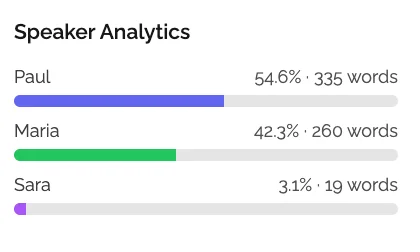
KenzNote's meeting chat feature lets you ask natural language questions about any recorded meeting. For sales call follow-ups, this is directly useful.
Queries you can run before writing your follow-up:
- "What specific concerns did [prospect's name] raise about implementation?"
- "What commitments did I make during this call?"
- "What did they say about their current process?"
- "What is the timeline they mentioned for a decision?"
- "What features did they ask about that I didn't fully answer?"
Each of these queries returns a direct answer from the transcript. You do not need to re-read the whole conversation. This makes the gap between finishing a call and having a draft follow-up email very small.
At $0.99 per meeting, even a rep doing 20 calls per month spends $19.80 on KenzNote - less than the cost of one missed follow-up opportunity. For more on setting up KenzNote for sales workflows, see our getting started guide.
CRM Integration: Logging the Right Information
Follow-up emails and CRM logging should come from the same source. A common sales failure mode: the rep writes a good follow-up email from careful AI notes, then logs a generic call summary to Salesforce or HubSpot from memory. The CRM record becomes unreliable, which makes pipeline reviews and handoffs inaccurate.
Best practice for CRM logging with AI meeting notes:
- Use the AI summary as the starting point for your CRM activity note
- Add the specific next steps and commitments as tasks or follow-up items
- Log any deal-specific details (budget mentioned, timeline, technical requirements) as opportunity fields if your CRM supports it
- If you are using Fireflies or another tool with native CRM sync, review the auto-generated CRM entry and edit it for accuracy rather than accepting it as-is
For more on how sales teams use meeting notes throughout the sales cycle, see our guides on AI meeting notetakers for sales teams and conversation intelligence for sales.
Frequently Asked Questions
How quickly should I send a follow-up email after a sales call?
Within 24 hours is the standard guidance, and research supports that reply rates decline significantly after that window. With AI meeting notes, same-day follow-ups are realistic because you are not spending time reconstructing the call from memory. For hot deals or time-sensitive situations, consider sending within an hour or two of the call.
Should I include an AI-generated summary in my follow-up email?
Not directly. The AI summary is your raw material, not your email content. Read it, pull the specific details that matter, and write the email yourself using those details. Pasting an AI summary directly into an email reads like a pasted summary: the language tends to be generic and the structure does not match the format of a personal email.
What if the prospect said something I want to address but did not want to record?
Most legitimate sales conversations are recordable with appropriate consent. If a prospect has asked you not to record, that takes precedence over any AI note-taking workflow. In that case, take manual notes immediately after the call while the conversation is fresh, using a structured template rather than freeform notes.
How do I ask for consent to record a sales call?
Standard practice: disclose at the beginning of the call. "I'd like to record this call for my notes so I can focus on our conversation rather than typing. Is that okay with you?" Most prospects say yes. For legal specifics by jurisdiction, see our guide on recording meeting legality.
Can AI meeting notes help with multi-threaded deals involving multiple stakeholders?
Yes, significantly. In complex deals where multiple calls happen with different stakeholders, an AI note library lets you search for what each stakeholder said, reconcile different perspectives, and ensure your follow-up to each contact reflects their specific concerns. Meeting chat is particularly useful for this: "what did the technical lead say about their API requirements?" gives you the answer without reading through all the transcripts.
How is this guide different from the general follow-up email article on KenzNote?
Our general guide on AI follow-up emails after meetings covers the approach across all meeting types. This guide focuses specifically on sales calls: the sales-specific concerns (objections, commitments, deal stages), the sales-specific templates, and the integration with CRM workflows that general meeting follow-ups do not involve.
Related Resources
- AI Follow-Up Email After a Meeting (General Guide)
- AI Meeting Notetaker for Sales Teams
- Conversation Intelligence for Sales
- Best AI Meeting Assistant for Sales Teams
- Getting Started with KenzNote
Ready to Write Better Sales Follow-Ups?
Stop sending generic follow-up emails that prospects ignore. Let AI capture every detail from your sales calls so your follow-ups are specific, accurate, and personal.
Start with KenzNote:
- No bot joins your prospect calls
- No calendar connection required
- $0.99 per meeting, no subscription
- Full transcript, AI summary, action items delivered in minutes
Questions? Reach out at [email protected]
Last updated: May 2026. Pricing and feature availability change frequently. Always verify current details on each tool's official pricing page.
References & Citations
- [1]The state of AI in 2023: Generative AI's breakout yearMcKinsey. August 1, 2023https://www.mckinsey.com/capabilities/quantumblack/our-insights/the-state-of-ai-in-2023-generative-ais-breakout-year
All external sources have been reviewed for accuracy and relevance. Last verified: September 2026.

About KenzNote Team
The KenzNote team is dedicated to helping teams capture better meeting insights and transform how they collaborate. With backgrounds in AI, product design, and enterprise software, we're building the future of meeting productivity.
Ready to transform your meetings?
KenzNote automatically captures meeting insights, extracts action items, and generates summaries so you can focus on the conversation instead of taking notes.
Try KenzNote Free