
Quick Answer
A meeting recorder is software that captures audio/video from online meetings, converts speech to text, and organizes everything into searchable documentation. Modern AI-powered recorders go beyond basic video files; they provide 95-98% accurate transcription, automatic summaries, action item extraction, and intelligent organization.
Instead of watching hour-long recordings, you get structured notes highlighting decisions and tasks. With executives spending 23 hours weekly in meetings according to Harvard Business Review, meeting recorders save 7-15 hours weekly by eliminating manual note-taking, enabling full meeting engagement, and making information instantly searchable across your entire meeting archive.
Key Takeaways
- 100% capture eliminates missed details: Every word, decision, and commitment documented automatically without manual effort
- 7-15 hours saved weekly: Eliminate note-taking during (60min), cleanup after (25min), and searching later (10min) per meeting
- Full engagement improves outcomes: Focus completely on conversations instead of dividing attention between typing and listening
- AI beats basic recording: Modern tools provide transcripts, summaries, and action extraction vs. unwatchable video files
- Three recorder types exist: Built-in platform tools, AI-powered specialists, and industry-specific solutions serve different needs
- 95%+ transcription accuracy standard: Modern AI handles multiple speakers, accents, and technical terms with professional-grade quality
- Searchable archive builds value: Find any past conversation detail in seconds six months later
- Transparency builds trust: When you explain benefits, 95%+ of participants willingly consent to recording for better documentation
Meeting Recorder: Your Complete Guide to Recording Meetings in 2026
Picture this: you just finished a critical strategy meeting with your leadership team. Three major decisions were made, five action items were assigned, and someone shared brilliant insights about the competitive landscape. Now it's an hour later, and you're staring at your scattered notes trying to remember exactly what was decided and who's responsible for what.
Sound familiar?
This frustrating scenario plays out in offices and remote teams everywhere, multiple times per day. Important details slip through the cracks. Action items get forgotten. Team members remember different versions of what was decided. The result? Confusion, missed deadlines, and wasted time.
A meeting recorder solves this problem completely. Instead of relying on fragmented notes and fading memory, you capture every word, every decision, and every commitment automatically. No details lost. No confusion about what was said. Just complete, accurate documentation you can reference anytime.
Here's everything you need to know about meeting recorders and how they transform the way teams work in 2026.
What Is a Meeting Recorder?
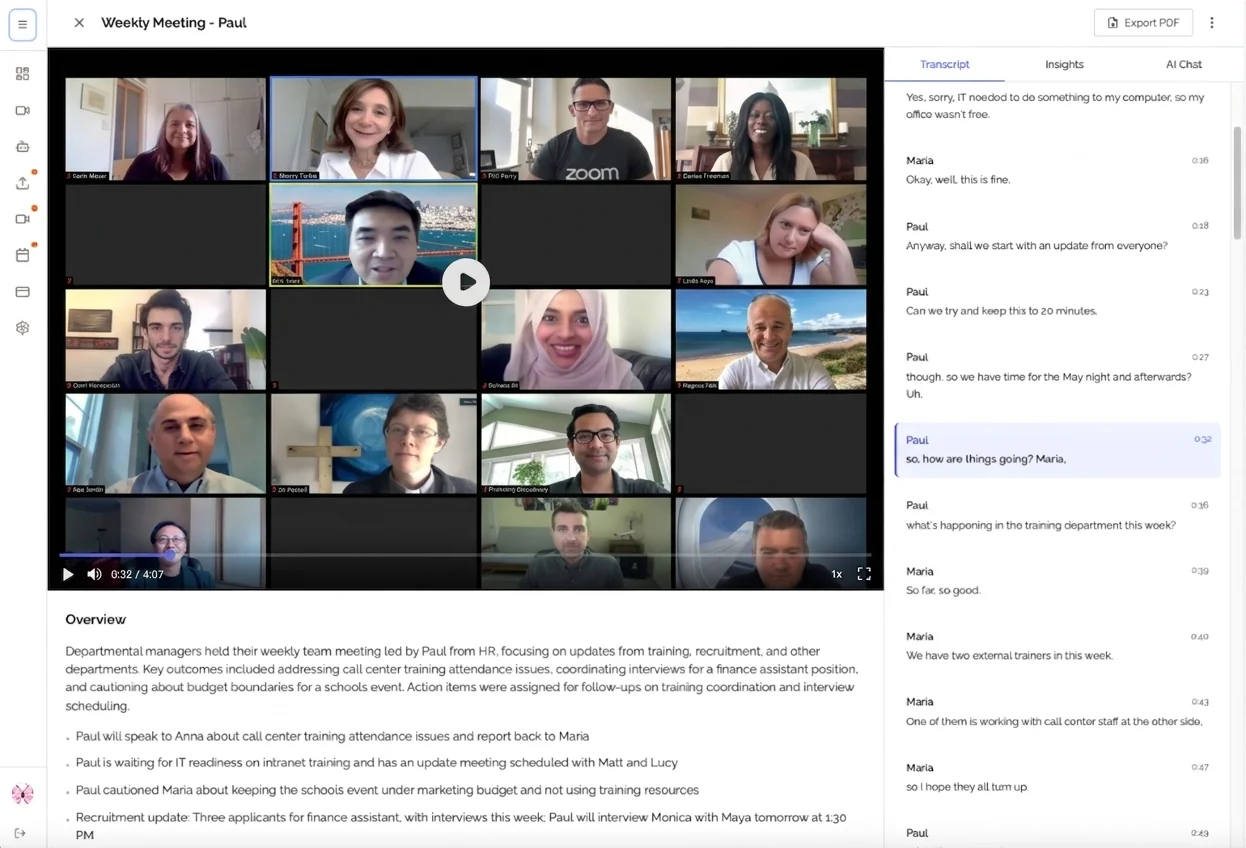
A meeting recorder is software that captures audio and video from your online meetings, converts the conversation to text, and organizes everything into searchable, shareable documentation. Modern meeting recorders go far beyond simple recording to provide AI-powered transcription, automatic summaries, and intelligent features that make your meeting information actually useful.
Think of it as having a perfect memory for every meeting you attend, with the ability to instantly find any detail from any conversation.
The Evolution of Meeting Recording
Early meeting recording meant pressing "record" in Zoom or Google Meet and getting a video file you'd probably never watch again. Useful for compliance or legal purposes, but not practical for day to day work.
Today's meeting recorders are completely different. They combine several technologies to create documentation that's more useful than the notes any human could take:
Advanced Speech Recognition Modern AI transcribes conversations with 95-98% accuracy, handling multiple speakers, accents, technical terms, and background noise remarkably well.
Natural Language Processing The system understands context, identifies key topics, extracts decisions automatically, and recognizes action items without any manual tagging.
Intelligent Organization Instead of dumping raw transcripts, meeting recorders create structured summaries, highlight important moments, and make everything instantly searchable.
The result is comprehensive meeting documentation that actually gets used, not video files gathering digital dust in cloud storage.
Why Use a Meeting Recorder?
Never Miss Important Details Again
Human memory is unreliable, especially when you're juggling 10-15 meetings per week. A meeting recorder captures 100% of what's discussed:
- ✅ Every decision made, with full context
- ✅ All action items assigned, with exact wording
- ✅ Technical details you couldn't write down fast enough
- ✅ Casual insights that turn out to be important later
- ✅ Exact quotes when someone asks "What did I say about that?"
Six months from now, when someone asks "Why did we decide to change the pricing model?", you can search your meeting archive and find the exact conversation in seconds.
Focus Fully on the Conversation
When you're not frantically typing notes, something remarkable happens: you can actually participate in your meetings.
In client calls, you build better relationships when you're truly listening instead of staring at your notepad. You catch subtle cues about concerns and opportunities.
In team meetings, you contribute more thoughtfully because you're engaged with the discussion, not distracted by documentation.
In brainstorming sessions, you can build on ideas in real time instead of trying to capture everything being said.
According to Harvard Business Review research, executives spend an average of 23 hours per week in meetings. Making those hours more effective through full engagement creates massive value.
Save Hours Every Week
Let's talk about real time savings with a meeting recorder:
| Task | Without Meeting Recorder | With Meeting Recorder | Time Saved |
|---|---|---|---|
| Taking notes during meeting | 60 min | 0 min | 60 min |
| Cleaning up notes after | 25 min | 0 min | 25 min |
| Sharing notes with team | 15 min | 2 min | 13 min |
| Finding specific information | 10 min | 30 sec | 9.5 min |
For a single one hour meeting, you save approximately 1.5 hours of work. Multiply that by 5-10 meetings weekly, and you're looking at 7-15 hours reclaimed every week.
That's nearly two full workdays you can spend on actual productive work instead of administrative overhead.
Improve Team Alignment
Miscommunication causes more project failures than almost any other factor. When team members remember different versions of what was decided, work goes in wrong directions.
A meeting recorder eliminates this problem. Everyone has access to the same accurate record. No more "I thought you said..." or "That's not what I understood." Just clear documentation everyone can reference.
Types of Meeting Recorders
Not all meeting recorders work the same way. Understanding the differences helps you choose the right solution.
Built-In Platform Recorders
Zoom, Google Meet, and Microsoft Teams all include basic recording features. These capture video and audio but provide limited transcription and no AI analysis.
Best for:
- Simple video archiving
- Compliance requirements
- Teams already using these platforms
Limitations:
- Basic transcription quality
- No automatic summaries or action items
- Video files are large and hard to search
- Must watch entire recording to find information
AI-Powered Meeting Recorders
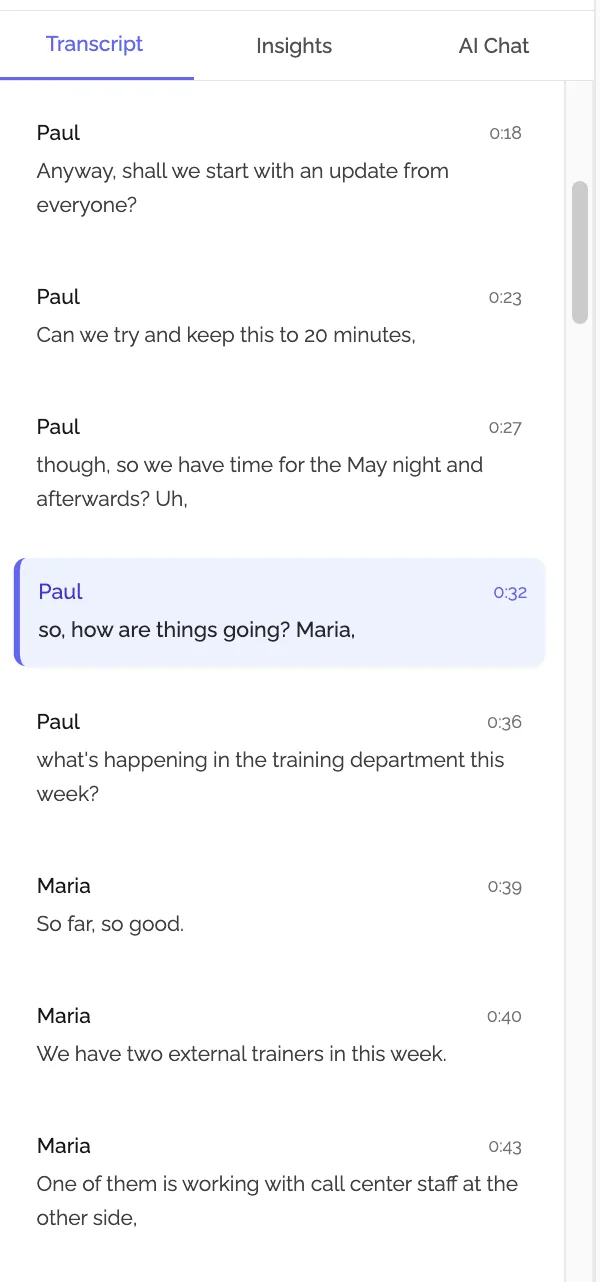
Modern solutions like KenzNote, Otter.ai, and Fireflies.ai focus on making meeting information useful, not just captured. They provide transcription, summaries, action items, and searchable archives.
Best for:
- Teams who need to reference meeting information regularly
- Organizations with many meetings per week
- Remote and hybrid teams across time zones
- Anyone who wants to spend less time on documentation
Advantages:
- Professional-grade transcription (95-98% accuracy)
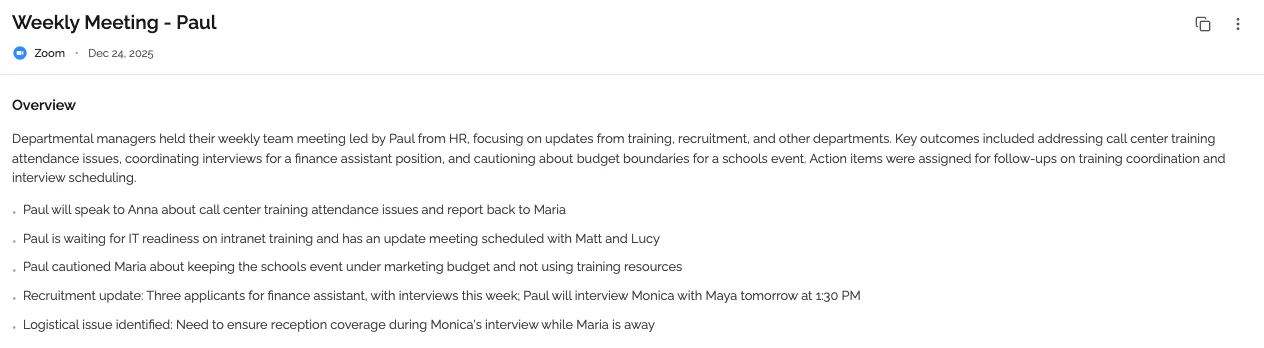
- Automatic extraction of action items and decisions
- Structured summaries highlighting key topics
- Fully searchable across all your meetings
- Easy sharing with team members
Specialized Industry Recorders
Some meeting recorders target specific use cases like sales calls, customer support, or legal depositions. These include industry specific features and integrations.
Best for:
- Sales teams needing CRM integration
- Support teams analyzing customer conversations
- Legal teams requiring certified transcripts
How to Choose the Right Meeting Recorder
With dozens of options available in 2026, choosing the right meeting recorder depends on your specific needs:
Consider Your Meeting Platforms
Make sure your meeting recorder works with the platforms you use:
- Google Meet
- Zoom
- Microsoft Teams
- Other video conferencing tools
Most modern solutions support all major platforms, but it's worth verifying before committing.
Evaluate Transcription Quality
Transcription accuracy varies significantly between solutions. Look for meeting recorders that achieve 95% or higher accuracy with:
- Multiple speakers and speaker identification
- Various accents and speaking styles
- Technical terminology relevant to your industry
- Background noise handling
Check for AI Features
The most valuable meeting recorders go beyond transcription to provide:
- Automatic summaries organized by topic
- Action item extraction with assignments and deadlines
- Decision tracking highlighting important choices
- Topic segmentation for easy navigation
- Smart search that finds concepts, not just keywords
Review Integration Options
Consider how your meeting recorder fits into your existing workflow:
- Does it integrate with your task management system?
- Can you export to your preferred formats?
- Does it work with your CRM or documentation tools?
- How easy is sharing with team members?
Understand the Pricing Model
Meeting recorders use different pricing approaches:
Subscription-based (monthly per user): Good for teams with consistent meeting volume Pay-per-meeting: Better for variable usage or seasonal businesses Freemium: Limited features free, upgrade for advanced capabilities
Choose the model that matches your meeting frequency and budget.
Best Practices for Using a Meeting Recorder
To get maximum value from your meeting recorder, follow these proven practices:
Always Inform Participants
Transparency builds trust. Let meeting participants know you're recording before starting. Most platforms make this obvious, but verbally acknowledging it shows respect.
Simple approach: "Hey everyone, I'm recording this meeting so we can all reference the details later. Is everyone okay with that?"
In thousands of meetings, teams find that when you explain the benefit (better documentation, nothing forgotten), participants are overwhelmingly supportive.
Review Recordings Promptly
Meeting recordings are most valuable when reviewed quickly:
- Scan the AI summary (2-3 minutes) to verify key points
- Check action items for accuracy and clarity
- Add context if needed for anything the AI might miss
- Share within 24 hours while the meeting is fresh
This quick review ensures accuracy and keeps momentum going.
Create a Searchable Archive
One of the most powerful long-term benefits is the searchable knowledge base you build. Organize your meeting recordings by:
- Project or team
- Meeting type
- Date ranges
- Participants
- Topics discussed
When someone asks "When did we discuss changing vendors?", you can find that conversation in seconds instead of searching through scattered notes or relying on memory.
Extract Action Items to Your Task Manager
Your meeting recorder identifies action items brilliantly, but don't let them live only in meeting notes. Transfer important tasks to your project management system to ensure they actually get completed.
Many meeting recorders integrate directly with tools like Asana, Monday, Jira, or Linear for seamless task creation.

Common Questions About Meeting Recorders
Is recording meetings legal?
Recording legality varies by location. In most places, you need consent from all participants for recording. The good news: most meeting recorders make this obvious, and when you explain the benefit, people typically agree.
Always check local laws and company policies before recording meetings with external participants or in sensitive situations.
How much storage do meeting recordings use?
This depends on the type of meeting recorder:
- Video recordings: 200-400 MB per hour
- Audio only: 20-40 MB per hour
- Text transcripts: Less than 1 MB per hour
AI-powered meeting recorders that focus on transcripts and summaries use minimal storage compared to video-based solutions.
Can I edit meeting recordings?
Most meeting recorders allow editing transcripts to correct errors or add context. Some also support video editing to trim recordings or remove sensitive sections.
The best meeting recorders make editing simple, though with 95%+ transcription accuracy, you'll rarely need significant corrections.
Do meeting recorders work for in-person meetings?
Yes! While most meeting recorders are designed for online meetings, many also work for in-person gatherings:
- Use your laptop or phone to capture audio
- Upload the recording for transcription
- Get the same automatic summaries and action items
This makes meeting recorders valuable for all meeting types, not just video calls.
What about privacy and security?
Choose meeting recorders with strong security practices:
- Encryption for data in transit and at rest
- Clear data processing policies
- Ability to permanently delete recordings
- No use of your data to train AI models (unless you opt in)
- Compliance with relevant regulations (GDPR, CCPA, etc.)
For sensitive discussions, verify your meeting recorder meets your organization's security requirements.
Getting Started with a Meeting Recorder
Ready to stop losing important meeting details and start building a searchable knowledge base?
Start with High-Value Meetings
You don't need to record everything immediately. Begin with meetings where documentation matters most:
- Important client calls where details are critical
- Team planning sessions with multiple action items
- Cross-functional meetings with many stakeholders
- Meetings where you're presenting (impossible to take notes while presenting)
After experiencing the benefits, you'll naturally expand to more meetings.
Choose a Simple Solution
For a meeting recorder that works without complex setup, KenzNote offers the most straightforward approach:
What makes KenzNote simple:
- 📝 Paste your meeting link, get complete transcription and summary
- 🎯 Automatic action item and decision extraction
- 📊 AI-generated summaries highlighting key topics
- 🔍 Searchable across all your meetings
- 💰 Pay-per-meeting pricing with no subscription required
How it works:
- Copy your Google Meet, Zoom, or Teams link
- Paste into KenzNote and choose "Send Now" or schedule
- The bot joins automatically and records everything
- Get your transcript and summary minutes after the meeting ends
No calendar integration required. No complex permissions. No monthly fees for months you barely have meetings.
Try KenzNote free for your next meeting and see the difference a meeting recorder makes.
Measure the Impact
Track results over your first month:
- How many hours did you save on note-taking and cleanup?
- How many action items got completed that might have been forgotten?
- How much faster can you find information from past meetings?
- How did your meeting engagement improve?
Most teams find they save 5-10 hours per person weekly. That's transformative.
Conclusion
Meetings consume 23+ hours weekly for most professionals, yet critical details still slip through the cracks. Manual note-taking divides your attention, captures less than 60% of what's discussed, and requires hours of cleanup work.
A meeting recorder changes everything. You capture 100% of meeting details automatically, participate fully in conversations, and build a searchable knowledge base that makes finding information instant.
What you gain with a meeting recorder:
- ✅ Complete capture of every meeting detail
- ✅ 7-15 hours saved weekly on documentation
- ✅ Full attention for better engagement and relationships
- ✅ Improved follow-through on commitments
- ✅ Instant access to past discussions and decisions
- ✅ Better team alignment from shared understanding
What you leave behind:
- ❌ Scattered, incomplete notes
- ❌ Forgotten action items and commitments
- ❌ Hours spent on manual documentation
- ❌ Confusion about what was actually decided
The technology is proven. The benefits are clear. The best meeting recorder for your team is the one you'll actually use consistently.
Your next meeting is the perfect place to start capturing everything that matters.
Related Resources
Want to learn more about meeting productivity and documentation?
- Automatic Meeting Notes: Complete Guide
- AI Meeting Notes: Everything You Need to Know
- How to Organize Meeting Notes
- Getting Started with KenzNote
- Is It Legal to Record Meetings? State-by-State Guide
- tl;dv Review 2026: Features, Pricing & Alternatives
Questions? Contact our team at [email protected]
References & Citations
- [1]
All external sources have been reviewed for accuracy and relevance. Last verified: September 2026.

About KenzNote Team
The KenzNote team is dedicated to helping teams capture better meeting insights and transform how they collaborate. With backgrounds in AI, product design, and enterprise software, we're building the future of meeting productivity.
Ready to transform your meetings?
KenzNote automatically captures meeting insights, extracts action items, and generates summaries so you can focus on the conversation instead of taking notes.
Try KenzNote Free