
Quick Answer
Meeting minutes are the official structured record of discussions, decisions, and action items that serve as organizational truth. Unlike informal notes, minutes require standardized format, comprehensive coverage, and broad stakeholder distribution. They must include meeting metadata, objectives, discussion summaries, decisions made, action items with owners/deadlines, and next steps.
With employees spending 28% of their workweek in meetings (11.3 hours weekly), effective minutes prevent the $375 billion annually wasted on poor meeting documentation. Modern AI tools like KenzNote automatically generate professional minutes with 95%+ accuracy, saving 60-90 minutes per meeting while ensuring nothing falls through cracks.
Key Takeaways
- Minutes differ from notes: Official organizational record requiring structure, not personal informal documentation for individuals
- Seven essential components required: Metadata, objectives, agenda, discussion summary, decisions, action items, and next steps
- Distribute within 24 hours: Quick sharing improves action completion rates and prevents costly clarification meetings
- Capture the "why" with decisions: Include 1-2 sentence reasoning to prevent rehashing same discussions repeatedly
- Focus on outcomes over debates: Document conclusions and key reasoning, not the entire path to agreement
- Extract actions to task systems: Transfer immediately to Asana, Jira, or Monday for 90%+ completion rates
- AI automation eliminates manual work: Modern tools transcribe, extract actions, and format minutes in minutes automatically
- Review process ensures accuracy: Draft minutes, organizer reviews, distribute within 24 hours, accept corrections, then finalize
Meeting Minutes: Complete Guide to Taking Effective Minutes
Three days after your team's critical strategy meeting, someone asks, "Wait, what exactly did we decide about the Q1 budget?" You scramble through your notes. Was it $150K or $175K? Did we approve the new hires or postpone them? Who was supposed to follow up with the client?
Without proper meeting minutes, these questions become archaeological expeditions through messy notes, scattered emails, and fading memories. Important decisions get questioned. Action items disappear. Teams waste time in follow-up meetings trying to reconstruct what was already discussed.
This isn't just frustrating; it's expensive. With employees spending 11.3 hours per week in meetings, nearly 28% of their workweek, effective meeting minutes become essential for ensuring all that time actually drives results.
Here's everything you need to know about creating meeting minutes that your team will actually use, reference, and act on.
What Are Meeting Minutes? (And Why They Matter)
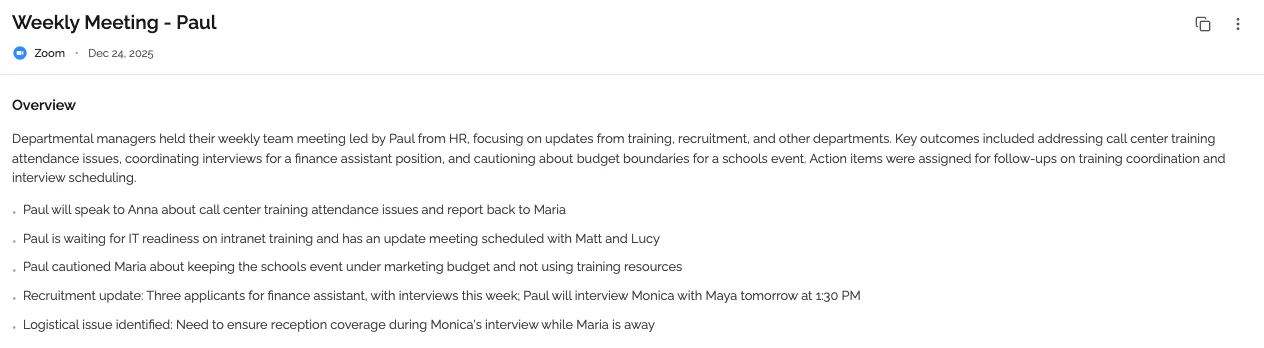
Meeting minutes are the official written record of what happened during a meeting. They document discussions, decisions, action items, and outcomes in a structured format that serves as the authoritative source of truth.
Meeting Minutes vs. Meeting Notes: What's the Difference?
Many people use these terms interchangeably, but there's an important distinction:
Meeting Notes:
- Personal documentation for individual reference
- Can be informal and scattered
- May capture only what matters to the note-taker
- Not typically shared broadly
- Focus on capturing information during the meeting
Meeting Minutes:
- Official organizational record
- Structured and standardized format
- Comprehensive coverage of all key topics
- Shared with all stakeholders
- Focus on decisions, actions, and accountability
- May have legal significance in some contexts
When you need meeting minutes instead of just notes:
- Board meetings and executive sessions
- Formal committee meetings
- Meetings where decisions have legal or compliance implications
- Cross-functional meetings with multiple stakeholders
- Client meetings requiring documentation
- Any meeting where clear accountability matters
For most professional meetings, properly formatted meeting minutes provide significantly more value than informal notes. They create accountability, ensure alignment, and build institutional knowledge.
What Should Be Included in Meeting Minutes?
Effective meeting minutes strike a balance: comprehensive enough to be useful, concise enough to be readable. Here's exactly what to include.
Essential Components Every Meeting Minute Should Have
1. Meeting Metadata
The header information that provides context:
Meeting: [Specific meeting name or purpose]
Date: [YYYY-MM-DD]
Time: [Start time - End time, including timezone]
Location: [Physical location or virtual meeting link]
Attendees: [Names and roles/titles]
Absent: [Expected attendees who couldn't make it]
Minute Taker: [Name of person documenting]
Why this matters: Six months from now, you need to know exactly when this meeting happened, who was there, and who might have missed important decisions.
2. Meeting Objectives
A clear statement of the meeting's purpose:
Purpose: Finalize Q1 marketing budget and approve hiring plan
Why this matters: Objectives keep the minutes focused and help readers quickly determine if this meeting is relevant to their search.
3. Agenda Items
List of topics discussed, in order:
Agenda:
1. Q1 Marketing Budget Review (15 min)
2. Hiring Plan Discussion (20 min)
3. Campaign Timeline Approval (15 min)
4. Open Questions and Concerns (10 min)
Why this matters: Provides structure and makes scanning for specific topics easy.
4. Discussion Summary
For each agenda item, capture the key points discussed (not a verbatim transcript, but the essential information):
## Q1 Marketing Budget Review

Marketing team presented revised budget of $175K (up from initial $150K
proposal). Additional $25K requested for:
- Expanded LinkedIn advertising campaign ($15K)
- Trade show booth upgrade ($7K)
- Content creation contractor ($3K)

Team discussed ROI projections showing 3:1 return based on Q4 performance.
Finance raised concerns about cash flow in February. Marketing committed
to phased spending with major expenses in March.
Why this matters: Provides context for decisions and helps future teams understand the reasoning behind choices.
5. Decisions Made
This is arguably the most important section. Clear, unambiguous documentation of what was decided:
## Decisions Made

1. APPROVED: Q1 marketing budget of $175K with phased spending plan
2. APPROVED: Two new marketing hires (Content Manager, Performance Marketer)
3. POSTPONED: Trade show participation decision until February budget review
4. DECIDED: Campaign launch moves to March 15 (previously March 1)
Why this matters: Decisions are why meetings happen. This section prevents the "wait, what did we decide?" questions.
6. Action Items
Specific tasks assigned to specific people with specific deadlines:
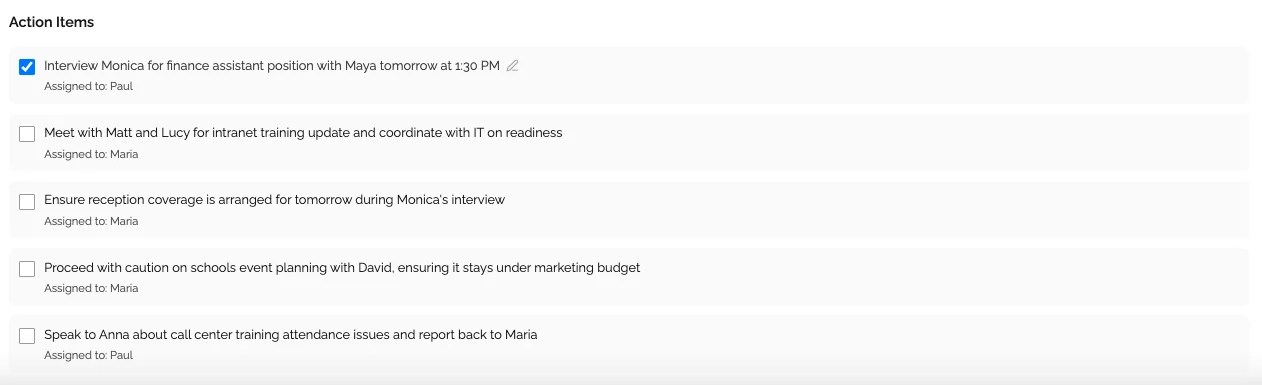
## Action Items

- [ ] Finalize phased budget spending timeline - @Lina (CFO) - Due: Feb 20
- [ ] Post job descriptions for two marketing roles - @Mike (HR) - Due: Feb 17
- [ ] Revise campaign timeline and share with stakeholders - @Emma (Marketing) - Due: Feb 16
- [ ] Schedule follow-up budget review - @Lina (CFO) - Due: Feb 22
Why this matters: Over 26% of meetings end without concrete action items. Clear action items with ownership and deadlines prevent tasks from falling through the cracks.
7. Next Steps and Follow-Up
What happens after this meeting:
## Next Steps

- Next meeting: March 1, 2026 at 2:00 PM EST
- Follow-up budget review: February 24, 2026
- Campaign launch date: March 15, 2026
Why this matters: Ensures continuity and keeps projects moving forward.
Optional Components (When Appropriate)
Parking Lot Items
Topics raised but not discussed due to time constraints:
## Parking Lot (For Future Discussion)

- Potential partnership with Design Agency X
- Q2 event strategy brainstorm
- Marketing automation tool evaluation
Key Metrics or Data
If specific numbers were discussed and are relevant:
## Key Metrics Discussed

- Current customer acquisition cost: $127
- Target for Q1: Reduce to $95
- Email open rate goal: 28% (currently 22%)
Votes and Voting Results
For formal meetings requiring documented votes:
## Voting Results

Motion: Approve $175K Q1 marketing budget
- In Favor: 7
- Against: 1
- Abstain: 1
RESULT: Motion passes
Meeting Minutes Format: Templates and Examples
Different meeting types require different formats. Here are proven templates for the most common scenarios.
Template 1: Standard Team Meeting Minutes
Perfect for recurring team meetings, department updates, and project check-ins.
# [Team Name] Meeting Minutes

**Date:** February 15, 2026
**Time:** 2:00 PM - 3:00 PM EST
**Location:** Conference Room B / Zoom
**Attendees:** Lina Johnson (Team Lead), Mike Chen, Emma Rodriguez, David Park
**Absent:** Lisa Kim (on PTO)
**Minute Taker:** Emma Rodriguez

## Meeting Objective
Weekly team sync to review project status, address blockers, and plan next week's priorities.

## Agenda
1. Project Status Updates (20 min)
2. Blocker Discussion (15 min)
3. Next Week Planning (15 min)
4. Open Discussion (10 min)

## Discussion Summary

### Project Status Updates
- **Project Alpha** (Mike): 85% complete, on track for Feb 28 delivery
- **Project Beta** (Emma): Delayed due to API integration issues, revised timeline needed
- **Project Gamma** (David): Ahead of schedule, launching Feb 20

### Blocker Discussion
Main blocker: Third-party API documentation incomplete for Project Beta integration.
Team discussed workarounds including direct contact with vendor support and
alternative API approaches. Decided to escalate to vendor account manager.

### Next Week Planning
Focus areas: Complete Project Alpha testing, resolve Project Beta blocker,
begin Project Gamma post-launch monitoring.

## Decisions Made
1. APPROVED: Project Alpha testing phase begins Feb 18
2. APPROVED: Project Beta timeline extension to March 7
3. DECIDED: Lina to escalate API issues to vendor account manager

## Action Items
- [ ] Complete Alpha UAT testing - @Mike - Due: Feb 22
- [ ] Escalate API documentation issues to vendor - @Lina - Due: Feb 16
- [ ] Document alternative API approaches - @Emma - Due: Feb 17
- [ ] Set up Gamma monitoring dashboard - @David - Due: Feb 20

## Next Meeting
February 22, 2026 at 2:00 PM EST
Template 2: Executive/Board Meeting Minutes
For formal meetings requiring detailed documentation and potential legal significance.
# Board of Directors Meeting Minutes

**Company:** [Company Name]
**Date:** February 15, 2026
**Time:** 10:00 AM - 12:00 PM EST
**Location:** Corporate Headquarters, Board Room
**Present:** [List all board members with titles]
**Absent:** [Any absent board members with reasons]
**Also Present:** [Executives, advisors, legal counsel]
**Secretary:** [Name]

## Call to Order
The meeting was called to order at 10:05 AM EST by [Chair Name], Chair of the Board.

## Approval of Previous Minutes
Motion to approve the minutes from the January 15, 2026 meeting.
Moved by: [Name]
Seconded by: [Name]
Vote: Unanimous approval

## CEO Report
[CEO Name] presented Q4 2025 results and Q1 2026 outlook:
- Revenue: $12.4M (target: $12M)
- Customer growth: 34% YoY
- Key challenges: Competitive pressure in enterprise segment
- Opportunities: New product launch planned for Q2

## Financial Report
[CFO Name] presented financial statements for Q4 2025:
- Operating expenses: Within budget
- Cash position: $8.2M (healthy runway)
- Burn rate: Decreased 15% vs Q3

## Strategic Initiatives

### Motion: Approval of Series B Funding Round
Discussion of proposed Series B funding of $15M at $75M valuation.
After discussion of terms, investor quality, and use of funds:

Motion: Approve Series B funding round as presented
Moved by: [Name]
Seconded by: [Name]
Vote: 6 in favor, 0 against, 1 abstention
RESULT: Motion approved

### Motion: Approval of New Market Expansion
Proposal to enter European market in Q3 2026 with initial focus on UK and Germany.

Motion: Approve European expansion strategy with $2M budget
Moved by: [Name]
Seconded by: [Name]
Vote: 7 in favor, 0 against
RESULT: Motion approved

## Action Items
- [ ] Finalize Series B term sheet - @CFO - Due: Feb 28
- [ ] Present detailed Europe expansion plan - @CEO - Due: March 15
- [ ] Update FY2026 financial projections - @CFO - Due: March 1

## Next Meeting
March 15, 2026 at 10:00 AM EST

## Adjournment
Meeting adjourned at 12:10 PM EST.

---
Minutes respectfully submitted by: [Secretary Name]
Date: February 15, 2026
Template 3: Client Meeting Minutes
For external meetings requiring clear documentation of agreements and commitments.
# Client Meeting Minutes: [Client Company Name]

**Date:** February 15, 2026
**Time:** 11:00 AM - 12:00 PM EST
**Meeting Type:** Project Status Update
**Location:** Video Conference (Google Meet)

**Attendees:**
- From [Your Company]: Lina Chen (Account Manager), Mike Rodriguez (Project Lead)
- From [Client Company]: Jennifer Park (VP Operations), David Kim (IT Director)

**Minute Taker:** Lina Chen

## Meeting Objective
Review Project Phoenix progress, address client concerns, and align on next phase timeline.

## Topics Discussed

### Project Progress Review
Mike presented current status:
- Phase 1: Completed successfully, all deliverables met
- Phase 2: 60% complete, on track for March 1 delivery
- Phase 3: Scoping in progress

Client expressed satisfaction with Phase 1 results and quality of deliverables.

### Client Concerns Addressed
Jennifer raised concerns about Phase 2 timeline due to internal resource constraints.
Discussed options for adjusting timeline vs. reducing Phase 2 scope.

Client team needs additional time for UAT due to upcoming company-wide system upgrade.

### Next Phase Planning
Reviewed Phase 3 scope. Client requested additional features:
- Advanced reporting dashboard (estimated +2 weeks)
- Integration with new CRM system (estimated +1 week)

## Agreements Reached
1. AGREED: Phase 2 delivery extends to March 15 (no additional cost)
2. AGREED: Phase 3 scope additions approved with $45K budget increase
3. AGREED: Weekly check-in calls continue through project completion
4. AGREED: Client provides UAT feedback within 5 business days of delivery

## Client Action Items
- [ ] Confirm availability for Phase 2 UAT week of March 15 - @Jennifer - Due: Feb 20
- [ ] Provide CRM API documentation for integration planning - @David - Due: Feb 18
- [ ] Review and approve Phase 3 revised SOW - @Jennifer - Due: Feb 22

## Our Action Items
- [ ] Update project timeline and share revised schedule - @Mike - Due: Feb 17
- [ ] Prepare Phase 3 revised SOW with pricing - @Lina - Due: Feb 20
- [ ] Schedule Phase 2 UAT planning meeting - @Lina - Due: Feb 16

## Next Steps
- Next meeting: February 22, 2026 at 11:00 AM EST (Weekly Check-in)
- Phase 2 delivery: March 15, 2026
- Phase 3 kickoff: March 22, 2026

---
Minutes prepared by: Lina Chen
Distributed to: All attendees
Date: February 15, 2026
How to Take Meeting Minutes Effectively: Step-by-Step Process
Creating useful meeting minutes is a skill. Follow this proven process to capture everything that matters without getting overwhelmed.
Before the Meeting: Preparation
1. Get the Agenda in Advance
Request the meeting agenda at least 24 hours before the meeting. If there isn't one, create a draft based on the meeting invite description and share with the organizer.
2. Review Previous Minutes
For recurring meetings, read the previous meeting's minutes to understand context and check if action items were completed.
3. Set Up Your Template
Open your meeting minutes template and pre-fill:
- Meeting title and date
- Expected attendees
- Agenda items
- Any known discussion points
4. Test Your Tools
If recording or using transcription software, test that it's working properly. Check audio quality and ensure you have proper access/permissions.
5. Clarify Your Role
Make sure everyone knows you're taking official minutes. This encourages people to speak clearly and ensures they'll help you capture accurate information.
During the Meeting: Active Documentation
1. Focus on Substance, Not Verbatim Transcription
Don't try to capture every word spoken. Instead, focus on:
- Key points made
- Decisions reached
- Action items assigned
- Important context or reasoning
2. Use a Consistent Structure
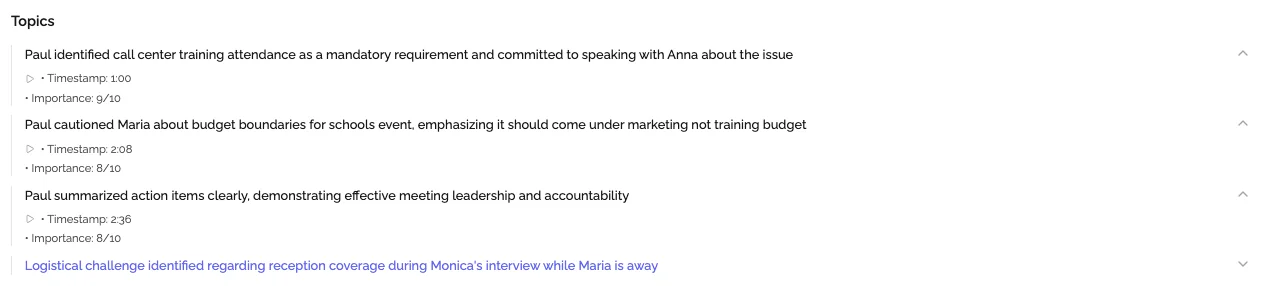
As topics are discussed, immediately organize information into your template sections:
- What's being discussed → Discussion Summary
- What's being decided → Decisions Made
- What needs to happen → Action Items
3. Capture Decisions in Real-Time
When you hear a decision being made, interrupt if necessary to confirm:
- "Just to confirm, we're approving the $175K budget?"
- "So the deadline is March 15, correct?"
- "Mike, you're taking ownership of this action item?"
This real-time verification prevents confusion later.
4. Get Specific with Action Items
Every action item needs three things:
- What: Specific, actionable description
- Who: Clear owner (tag them: @Name)
- When: Specific deadline (not "soon" or "next week")
If these aren't clear during the meeting, ask for clarification before moving on.
5. Note What's NOT Decided
Document important questions or topics that were discussed but not resolved. These often need follow-up and shouldn't be forgotten.
6. Use Shorthand and Abbreviations
During the meeting, speed matters. Use abbreviations you'll understand later:
- AI = Action Item
- D = Decision
- Q = Question
- FU = Follow-up needed
You'll expand these during post-meeting processing.
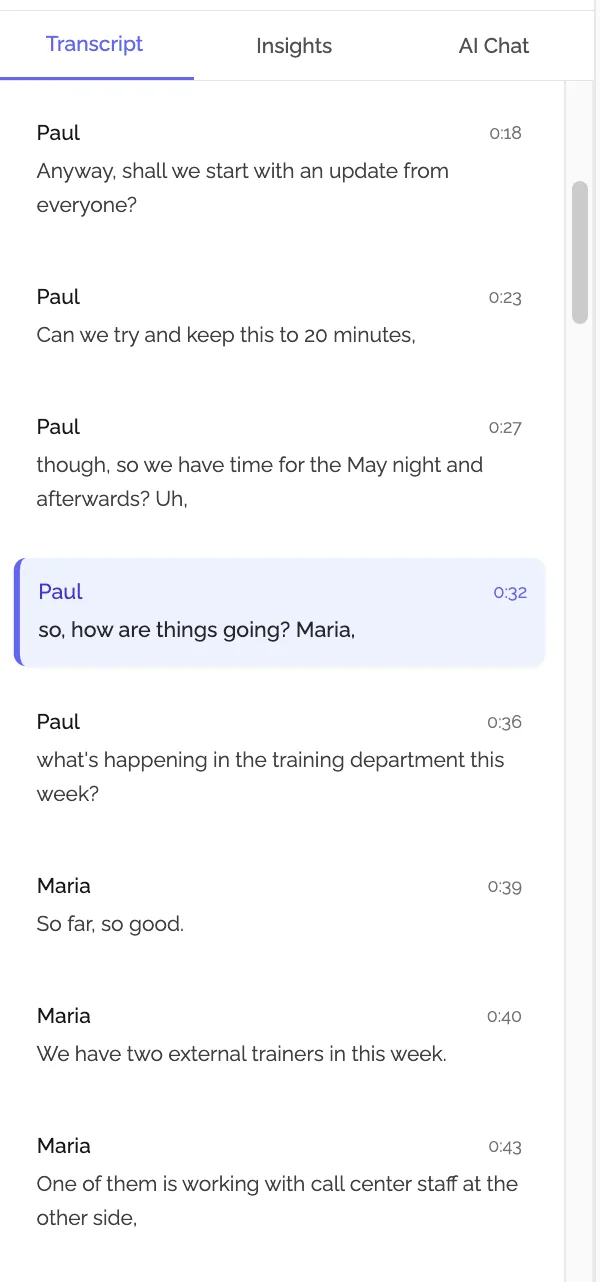
7. Timestamp Key Moments
For longer meetings, add timestamps to major topics or decisions. This makes it easier to reference specific discussions if the meeting was recorded.
After the Meeting: Processing and Distribution
1. Process Immediately (Within 2 Hours)
The longer you wait, the more details you forget and the harder it is to decipher your shorthand. Block 15-20 minutes immediately after the meeting for processing.
2. Expand and Clarify
- Convert abbreviations to full words
- Expand bullet points into complete thoughts
- Add context you remember but didn't capture during the meeting
- Verify names, numbers, and dates
3. Structure for Scannability
Use formatting to make minutes easy to scan:
- Bold key decisions
- Use bullet points liberally
- Break long paragraphs into shorter ones
- Add subheadings to long sections
4. Verify Ambiguous Information
If you're unsure about a decision, deadline, or action item owner, reach out to the meeting organizer or relevant attendees to confirm before distributing.
5. Distribute Promptly
Send meeting minutes to all attendees (and relevant stakeholders who couldn't attend) within 2-4 hours while the meeting is still fresh in everyone's mind.
Email subject line format:
Meeting Minutes: [Meeting Topic] - [Date]
Email body should include:
- Quick summary (2-3 sentences)
- Link to full minutes
- Highlighted action items with owners
- Next meeting date/time
6. Request Confirmation
Ask attendees to review the minutes and notify you of any corrections within 24 hours. If there are no objections, the minutes become the official record.
7. Archive Properly
Store minutes in your centralized system with proper naming and tagging so they're findable later. Link to previous and next meetings in the series.
Best Practices for Meeting Minutes That People Actually Use
The difference between meeting minutes that gather dust and minutes that drive results comes down to following these proven practices.
1. Be Objective and Neutral
Meeting minutes are official records, not editorials.
Do:
- "Team discussed pros and cons of both approaches"
- "Lina raised concerns about timeline feasibility"
- "After discussion, group decided to proceed with Option B"
Don't:
- "Lina was obviously wrong about the timeline"
- "The team wisely chose Option B"
- "Mike's confusing explanation led to more questions"
Your opinion doesn't belong in official minutes. Stick to facts.
2. Use Action-Oriented Language
Minutes should drive action, not just document discussion.
Weak:
- "Marketing was talked about"
- "Budget was discussed"
- "Timeline came up in conversation"
Strong:
- "DECIDED: Marketing campaign launches March 15"
- "APPROVED: $175K marketing budget"
- "ASSIGNED: Timeline revision to @Lina, due Feb 20"
Action verbs (approved, decided, assigned, postponed) make minutes scannable and actionable.
3. Focus on Outcomes, Not Debates
Capture the conclusion and key reasoning, not the entire debate.
Too much detail:
Mike suggested Option A. Lina disagreed and proposed Option B.
David asked about costs. Mike said Option A costs $50K. Lina
said Option B costs $75K but provides more value. Jennifer agreed
with Lina. Mike pointed out timeline concerns. After 20 minutes
of discussion...
Right amount of detail:
Team evaluated Option A ($50K, faster) vs Option B ($75K, more comprehensive).
After discussing costs, timeline, and long-term value, decided on Option B
due to superior functionality and better alignment with annual goals.
4. Separate Facts from Actions from Decisions
Use clear sections to avoid confusion:
## Discussion
[What was talked about and why]

## Decisions
[What was decided]

## Action Items
[What needs to happen now]
This structure makes it easy to find specific types of information.
5. Make Action Items Impossible to Miss
Use formatting to ensure action items stand out:
## ACTION ITEMS

✅ HIGH PRIORITY:
- [ ] Finalize budget proposal - @Lina - Due: Feb 20 ⚠️
- [ ] Present to board - @CEO - Due: Feb 25 ⚠️

📋 STANDARD PRIORITY:
- [ ] Update project timeline - @Mike - Due: Feb 22
- [ ] Schedule follow-up meeting - @Emma - Due: Feb 20
Consider sending a separate "Action Items Only" summary to make absolutely sure everyone knows their responsibilities.
6. Include Context for Future Reference
Six months from now, you'll need to understand why decisions were made. Include just enough context:
Without context:
DECIDED: Delay product launch to April
With context:
DECIDED: Delay product launch to April (from March) due to integration
testing requiring additional 3 weeks. Engineering identified critical
bugs in payment flow that must be resolved before launch.
The extra sentence provides valuable context without excessive detail.
7. Link to Supporting Documents
Minutes shouldn't include everything; they should point to detailed resources:
## Budget Discussion

Reviewed detailed Q1 budget proposal (see: Budget_Q1_2026_v3.xlsx).
Main changes from previous version:
- Marketing budget increased to $175K (+$25K)
- Two new marketing hires approved
- Event budget reduced to $50K (-$15K)
This keeps minutes concise while ensuring access to full detail.
8. Establish a Review Process
For important meetings, implement a quick review cycle:
- Minute-taker drafts minutes (within 2 hours)
- Meeting organizer reviews (within 4 hours)
- Final minutes distributed (within 24 hours)
- Corrections accepted (24-hour window)
- Minutes finalized (become official record)
This catches errors while maintaining quick distribution.
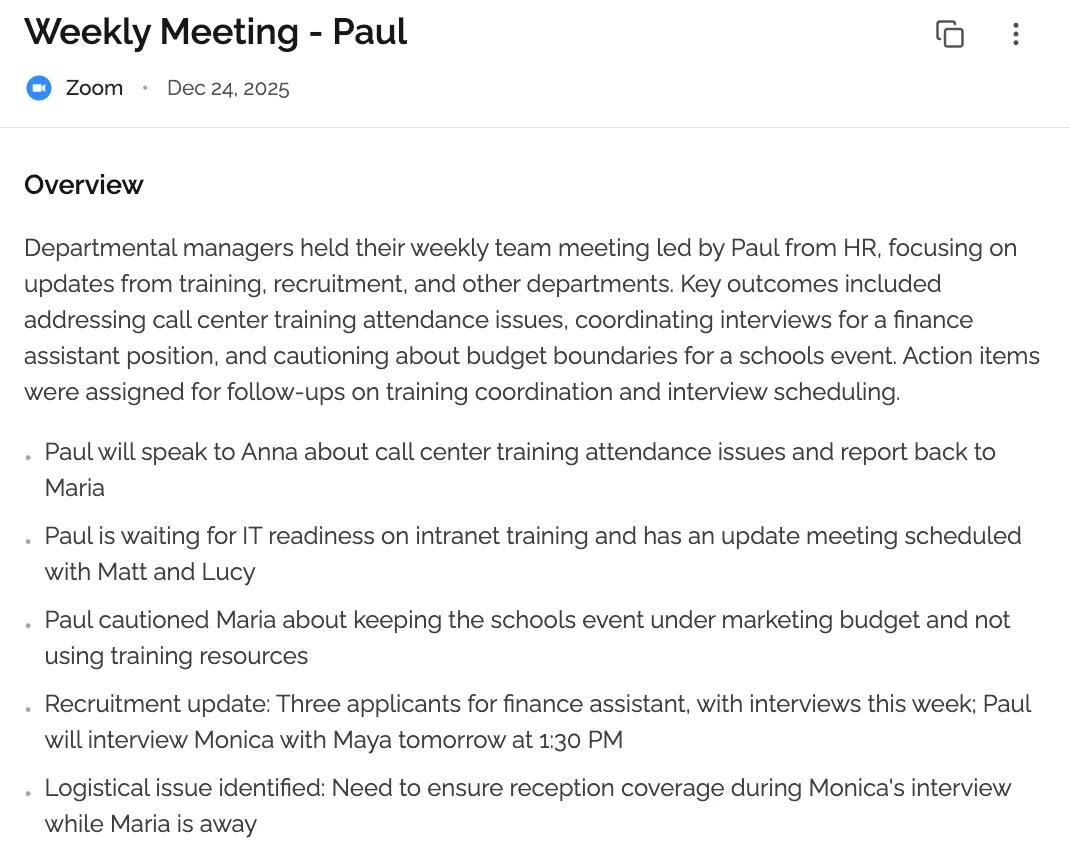
Common Meeting Minutes Mistakes (And How to Avoid Them)
Even experienced minute-takers make these errors. Here's how to avoid them.
Mistake 1: Recording Too Much Detail
The Problem: Trying to capture everything results in pages of text nobody will read. The meeting minutes become overwhelming and unusable.
The Solution: Follow the "30-second scan rule": Anyone should be able to understand the key outcomes in 30 seconds. Use this structure:
- Summary: 2-3 sentences at the top capturing essence
- Decisions: Bullet list, clear and concise
- Action Items: Clear ownership and deadlines
- Discussion: Brief context, not verbatim transcript
If your minutes exceed 2 pages for a 1-hour meeting, you're capturing too much.
Mistake 2: Using Ambiguous Language
The Problem: Vague language creates confusion and prevents accountability.
Ambiguous:
- "Team should look into budget options soon"
- "Someone needs to follow up with the client"
- "We'll probably launch in early March"
Clear:
- "Lina to analyze three budget options and present recommendation by Feb 20"
- "Mike to follow up with client regarding timeline by Feb 17"
- "Product launches March 8, 2026 at 10:00 AM EST"
The Solution: Be ruthlessly specific. Every action needs who, what, when. Every decision needs to be definitive.
Mistake 3: Failing to Capture the "Why"
The Problem: Minutes document what was decided but not why, making decisions easy to question later.
Incomplete:
DECIDED: Choose vendor B for CRM implementation
Complete:
DECIDED: Choose vendor B for CRM implementation. While $50K more expensive
than vendor A, vendor B offers superior Salesforce integration, 24/7 support,
and proven implementation track record in our industry. ROI projections show
payback within 18 months vs 24 months for vendor A.
The Solution: For major decisions, capture the key reasoning in 1-2 sentences. This prevents rehashing the same discussion in future meetings.
Mistake 4: Distributing Minutes Too Late
The Problem: When minutes arrive days after the meeting, details have faded, action items may be forgotten, and momentum is lost.
Research shows people forget approximately 40% of new information within 24 hours. Delayed minutes compound this memory loss.
The Solution:
- Process minutes within 2 hours of meeting end
- Distribute within 24 hours maximum
- For critical meetings, aim for same-day distribution
- Block processing time immediately after meetings
Consider AI-powered tools like KenzNote that generate structured minutes automatically within minutes of meeting completion.
Mistake 5: No Follow-Up on Action Items
The Problem: Beautiful meeting minutes mean nothing if action items don't get completed. Without follow-up, over 26% of meetings end without concrete outcomes.
The Solution: Create an action item tracking system:
- Extract action items to task manager (Asana, Jira, Monday, etc.)
- Send individual confirmations to each action item owner
- Set automatic reminders 2 days before due dates
- Review action items at the start of next meeting
- Track completion rates and address patterns of missed deadlines
Mistake 6: Inconsistent Format
The Problem: When every meeting uses a different format, information becomes hard to find and minutes become unpredictable.
The Solution: Create standardized templates for:
- Regular team meetings
- Executive/board meetings
- Client meetings
- Project status meetings
- One-on-ones (when formal minutes needed)
Use the same template every time. Consistency makes information findable and sets clear expectations.
Mistake 7: Not Identifying the Minute-Taker
The Problem: When minutes have no identified author, there's no one to ask for clarification and no accountability for accuracy.
The Solution: Always include:
**Minute Taker:** [Your Name]
**Date Prepared:** [Date]
**Distributed to:** [Distribution list]
This establishes accountability and makes it clear who to contact with questions.
Modern Tools for Taking Meeting Minutes
Technology has transformed meeting documentation. Here are the most effective tools for 2026.
Traditional Note-Taking Tools
Microsoft Word / Google Docs
- Best for: Teams comfortable with standard word processors
- Pros: Universal access, familiar interface, good for formal minutes
- Cons: Requires manual typing, no automation, limited organizational features
- Cost: Free (Google) or included with Microsoft 365
Notion
- Best for: Teams wanting databases and templates
- Pros: Templates, cross-linking, flexible organization, collaborative
- Cons: Learning curve, can be overwhelming for simple needs
- Cost: Free for individuals, $10/user/month for teams
Evernote
- Best for: Individual note-takers preferring dedicated note apps
- Pros: Excellent organization, tagging, search capabilities
- Cons: Limited collaboration features, better for personal use
- Cost: Free tier available, $10/month for premium
AI-Powered Meeting Documentation Tools
KenzNote
- Best for: Teams wanting comprehensive automated meeting documentation
- Pros: Automatic transcription, AI-generated summaries, action item extraction, no calendar integration needed
- Cons: Requires meeting recording/link
- Cost: Pay-per-meeting pricing (no subscription overhead)
- Try KenzNote free
Otter.ai
- Best for: Real-time transcription during meetings
- Pros: Live transcription, speaker identification, mobile apps
- Cons: Transcripts need manual organization into structured minutes
- Cost: Free tier available, $16.99/month for Pro
Fireflies.ai
- Best for: Sales teams needing CRM integration
- Pros: Automatic recording, transcription, CRM integration
- Cons: Calendar integration required, focuses on sales use cases
- Cost: Free tier available, $10/user/month for Pro
Collaboration Platforms with Meeting Features
Microsoft Teams
- Best for: Microsoft 365 organizations
- Pros: Integrated with calendar, recordings, transcription available
- Cons: Transcripts need manual organization into formal minutes
- Cost: Included with Microsoft 365
Slack (with Huddles)
- Best for: Teams already using Slack for communication
- Pros: Integrated workflow, easy sharing, threaded discussions
- Cons: Limited formal minute-taking features
- Cost: Free tier available, $8/user/month for Pro
Choosing the Right Tool for Your Needs
For formal board meetings or legal documentation:
- Use traditional word processors (Word/Google Docs)
- Provides necessary formatting control and formality
- Easy to create official, shareable PDFs
For regular team meetings with action tracking:
- Use Notion or similar database tools
- Enables linking, templates, action item tracking
- Good balance of structure and flexibility
For meetings requiring comprehensive documentation without manual work:
- Use AI-powered tools like KenzNote
- Automatic transcription saves 60+ minutes per meeting
- AI extracts action items and decisions automatically
- Enables full participation instead of divided attention
For quick standups and informal check-ins:
- Use simple note apps or collaboration tools
- Less structure needed for brief meetings
- Focus on capturing action items only
Interestingly, despite the power of modern tools, nearly 50% of professionals still rely on handwritten notes during meetings. While handwritten capture can work, digitizing minutes afterward is essential for sharing, searching, and long-term value.
The Future of Meeting Minutes: AI-Powered Automation
Here's where meeting documentation is heading, and why early adopters are gaining significant advantages.
How AI is Transforming Meeting Minutes
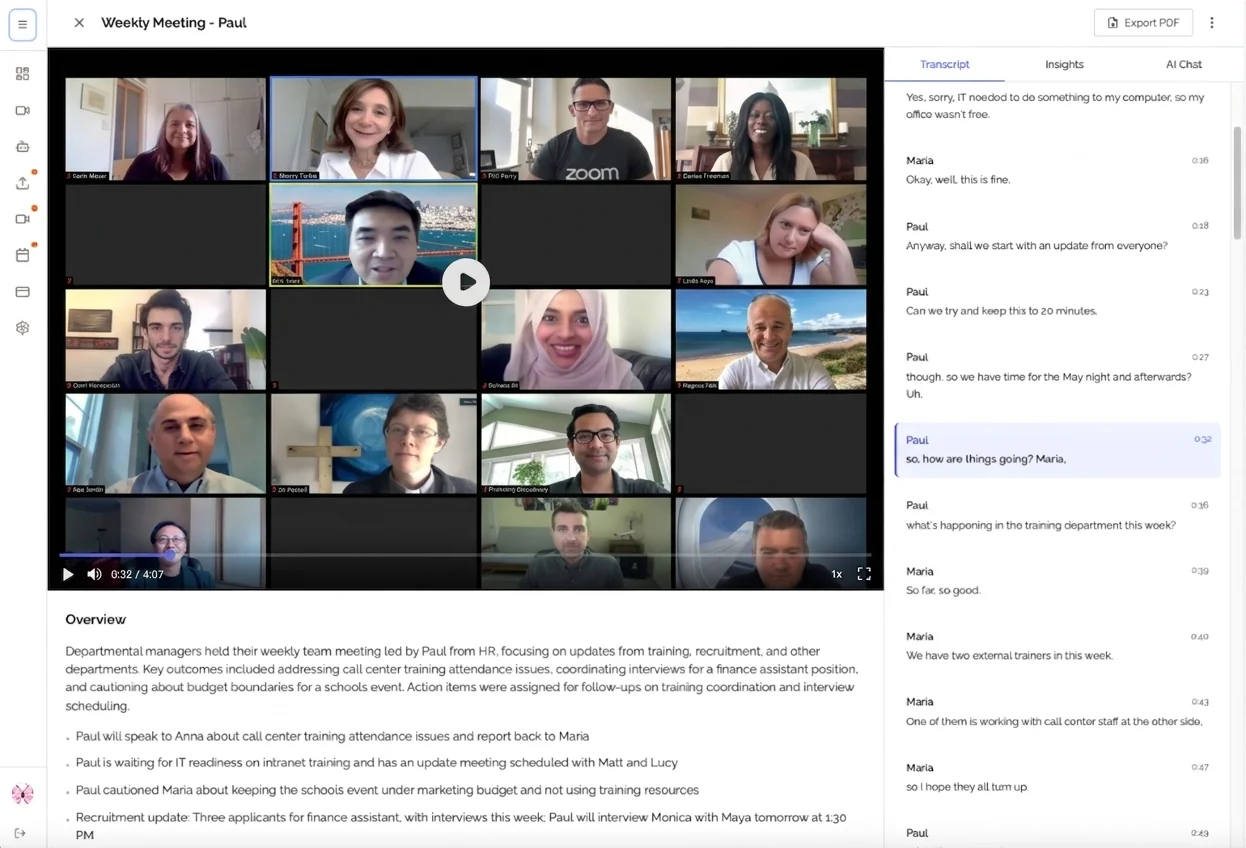
Automatic Transcription
AI-powered speech recognition captures every word spoken with 95-98% accuracy. No more frantically typing while trying to participate. The technology handles:
- Multiple speakers with identification
- Technical terminology and industry jargon
- Various accents and speech patterns
- Background noise filtering
Intelligent Summarization
Modern AI doesn't just transcribe; it understands context. It can:
- Identify key topics discussed
- Extract main points from each section
- Recognize decisions vs. general discussion
- Highlight important questions or concerns
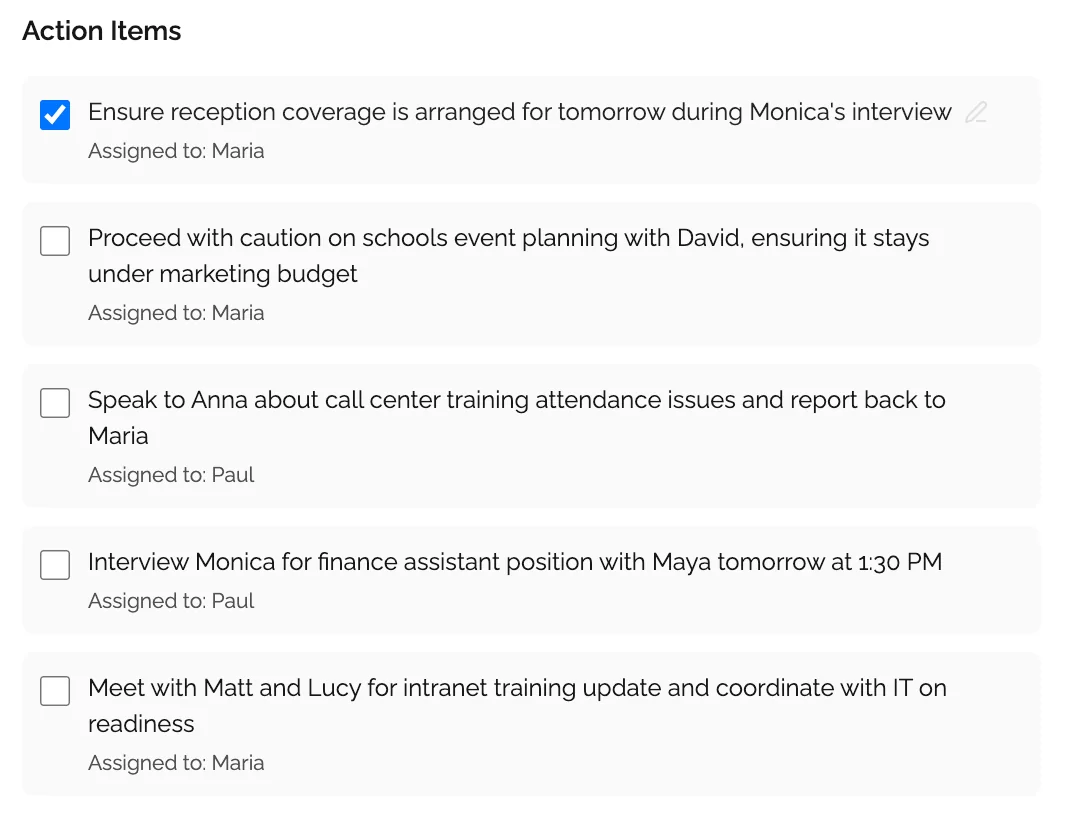
Action Item Extraction
AI recognizes task-oriented language and automatically extracts:
- What needs to be done
- Who is responsible (when mentioned)
- When it's due (deadlines referenced)
- Context for why it matters
This automation eliminates the manual work of combing through transcripts to identify action items.
Structured Formatting
AI tools automatically organize information into standard formats:
## Key Topics Discussed
- [AI-identified main topics]

## Decisions Made
- [Automatically extracted decisions]

## Action Items
- [Automatically extracted tasks with owners]

## Important Questions
- [Open questions requiring follow-up]
Real Benefits Teams Are Experiencing
Time Savings
Teams using AI-powered meeting minutes report saving:
- 60 minutes per meeting: No manual note-taking during meeting
- 20 minutes per meeting: No post-meeting cleanup and formatting
- 10 minutes per meeting: No distribution and sharing overhead
For a team with 5 meetings per week, that's 7.5 hours saved weekly per person.
Better Meeting Engagement
When you're not distracted by documentation, you can:
- Listen more carefully to nuances and concerns
- Ask better follow-up questions
- Build stronger relationships with participants
- Contribute more thoughtfully to discussions
Teams using automated minutes report 30% higher meeting engagement scores.
Improved Accuracy
Human minute-takers capture approximately 60% of important details. They miss information while writing, make transcription errors, and forget context.
AI-powered systems capture 100% of what's said, providing complete, accurate records.
Better Accountability
When every meeting has comprehensive, searchable minutes:
- Decisions can't be disputed or forgotten
- Action item ownership is crystal clear
- Historical context is always accessible
- New team members can quickly get up to speed
Getting Started with AI-Powered Meeting Minutes
Step 1: Try It with One Meeting Type
Don't automate everything at once. Start with:
- Important client meetings where full attention matters most
- Weekly team meetings with lots of action items
- Cross-functional meetings with multiple stakeholders
Step 2: Choose the Right Tool
For comprehensive meeting documentation without complexity, KenzNote offers the simplest path:
What you get:
- Automatic transcription with 95%+ accuracy
- AI-extracted action items and decisions
- Structured summaries highlighting key topics
- Fully searchable archive across all meetings
- Easy sharing with team members
How it works:
- Copy your meeting link (Google Meet, Zoom, or Teams)
- Paste into KenzNote and click "Send Now" or schedule
- Attend meeting and focus on the conversation
- Get complete meeting minutes minutes after the meeting ends
No calendar integration. No complex setup. No subscription overhead.
Step 3: Establish a Review Process
Even with AI automation, implement a quick human review:
- AI generates draft minutes (2-3 minutes after meeting)
- Meeting organizer reviews for accuracy (5 minutes)
- Distribute to attendees (immediate)
- Make corrections if needed (rare)
This combines automation speed with human oversight.
Step 4: Measure the Impact
Track these metrics over your first month:
- Hours saved on meeting documentation
- Action item completion rates
- Time to find information from past meetings
- Meeting engagement (ask team for feedback)
Most teams find 5-10 hours saved per person per week. That's transformative.
Meeting Minutes FAQ
How long should meeting minutes be?
For a 1-hour meeting, aim for 1-2 pages of well-organized minutes. The key is capturing all essential information (decisions, action items, key discussion points) while remaining scannable. Anyone should be able to understand the key outcomes in 30 seconds and get full context in 3-5 minutes of reading.
Do I need to record everything said in meeting minutes?
No. Meeting minutes should capture substance, not verbatim transcription. Focus on: decisions made, action items assigned, key discussion points, and important context. Skip: small talk, repeated points, and conversational filler. Save complete transcripts for specialized cases (legal proceedings, formal hearings).
Who should take meeting minutes?
Ideally, assign a dedicated minute-taker so the meeting leader can focus on facilitation. Rotate the responsibility among team members for regular meetings. For important meetings (board meetings, client meetings, strategic planning), consider using a professional minute-taker or AI-powered tools to ensure quality and let everyone participate fully.
How soon should meeting minutes be distributed?
Distribute meeting minutes within 24 hours maximum, ideally within 2-4 hours while the meeting is fresh in everyone's mind. Quick distribution improves action item completion rates and prevents the "wait, what did we decide?" questions. For critical decisions, same-day distribution is ideal.
What's the difference between meeting minutes and meeting transcripts?
Meeting minutes are structured summaries highlighting decisions, action items, and key discussion points, typically 1-2 pages. Meeting transcripts are complete word-for-word records of everything said, often 20+ pages. Minutes are for reference and action; transcripts are for comprehensive documentation when legally required or when every detail matters.
Should meeting minutes include names of who said what?
Include names for: action item owners, decision-makers (when relevant), and people presenting specific topics. Skip names for general discussion participants. Example: "DECIDED: Approve $175K budget (motion by Lina, seconded by Mike)" or "Marketing team (presented by Emma) shared campaign results."
How do you take meeting minutes for virtual meetings?
Virtual meetings are actually easier for minute-taking. Use AI-powered tools like KenzNote that automatically join, record, transcribe, and summarize. If taking manual notes, use a dual-monitor setup with your template on one screen and the video call on the other. Request that participants use clear audio and identify themselves when speaking.
What if I disagree with a decision being made in the meeting?
Your role as minute-taker is to document decisions objectively, not to insert your opinion. Document what was decided and the key reasoning. If you need to voice a disagreement, do so during the meeting as a participant (pause minute-taking to contribute), then return to documenting objectively. Never let your opinion bias the official minutes.
Should meeting minutes be approved by attendees?
For formal meetings (board meetings, legal proceedings), yes; establish an approval process where attendees review and approve minutes (usually at the next meeting). For regular team meetings, a lighter process works: distribute minutes with a 24-hour window for corrections. No response = approval. This balances accuracy with efficiency.
How do you handle confidential information in meeting minutes?
Create two versions when necessary: full minutes (with confidential details, restricted distribution) and redacted minutes (confidential portions removed, broader distribution). Clearly mark confidential sections. For highly sensitive meetings, consider: not recording, restricted access to minutes, or verbal-only discussion of sensitive topics with no documentation.
Conclusion: Transform Your Meetings with Effective Minutes
Poor meeting documentation isn't just frustrating; it's expensive. When decisions get questioned, action items disappear, and teams spend hours searching for information that was already discussed, productivity suffers dramatically.
Effective meeting minutes solve this by:
- ✅ Creating an authoritative record of decisions
- ✅ Ensuring clear ownership of action items
- ✅ Providing searchable knowledge that builds over time
- ✅ Improving accountability and follow-through
- ✅ Reducing time wasted in "clarification meetings"
- ✅ Enabling better decisions through historical context
The key elements of valuable meeting minutes are:
- Standardized format that's consistent across all meetings
- Clear documentation of decisions with supporting context
- Specific action items with owners and deadlines
- Distribution within 24 hours while details are fresh
- Searchable archive for long-term knowledge building
Modern AI tools have transformed what's possible. Instead of dividing your attention between participating and documenting, you can now:
- Engage fully in meetings while AI handles transcription
- Get structured, comprehensive minutes automatically
- Save 60-90 minutes per meeting on documentation
- Never miss important details or action items
With employees spending nearly 28% of their workweek in meetings, effective meeting documentation isn't optional; it's essential for productivity and results.
Start Creating Better Meeting Minutes Today
Ready to transform how your team documents meetings?
KenzNote makes professional meeting minutes effortless:
What you get with KenzNote:
- Automatic transcription capturing every word
- AI-extracted action items with clear ownership
- Structured summaries highlighting decisions and key topics
- Searchable archive across all your meetings
- Easy sharing with stakeholders and team members
- Pay-per-meeting pricing (no subscription overhead)
How it works:
- Copy your meeting link (Google Meet, Zoom, or Microsoft Teams)
- Paste into KenzNote and click "Send Now" or schedule
- Attend your meeting and focus on participation
- Get comprehensive meeting minutes within minutes of meeting completion
No calendar permissions. No complex integrations. No monthly subscriptions for months you barely have meetings.
Try KenzNote free for your next meeting and experience the difference professional meeting minutes make.
Stop scrambling through messy notes and start building a searchable knowledge base that drives results.
Related Resources
Want to learn more about transforming your meeting productivity?
- How to Organize Meeting Notes
- Automatic Meeting Notes: Save Hours Every Week
- AI Meeting Notes: Complete Guide
- Meeting Productivity Statistics 2026
Have questions? Reach out to our team at [email protected]
References & Citations
- [1]100 Surprising Meeting Statistics for 2026Flowtrace. January 1, 2026https://www.flowtrace.co/collaboration-blog/50-meeting-statistics
All external sources have been reviewed for accuracy and relevance. Last verified: October 2026.

About Muhammad Abuelenin
Muhammad is the co-founder of KenzNote, passionate about building tools that enhance productivity and collaboration. With expertise in full-stack development and AI-powered solutions, he's dedicated to helping teams work smarter through innovative technology.
Ready to transform your meetings?
KenzNote automatically captures meeting insights, extracts action items, and generates summaries so you can focus on the conversation instead of taking notes.
Try KenzNote Free