
Quick Answer
Fireflies.ai is the stronger fit for sales-heavy teams that need CRM integrations, conversation analytics, and a platform built around revenue workflows. It is a capable, well-established tool with a large ecosystem.
KenzNote is the better fit for people who want to pay only for what they use, record meetings for free from the browser with nothing to install, do not want to give a notetaker access to their calendar, or just want clean meeting notes without a sales intelligence platform attached.
On privacy, the two are closer than most comparisons suggest: both state that they do not train AI models on your meeting content. The real differences are the pricing model, how the bot gets into your meetings, and how deep the integrations go.
Key Takeaways
- Fireflies wins on CRM integrations (Salesforce, HubSpot, Pipedrive), conversation analytics, and ecosystem maturity
- KenzNote wins on pay-as-you-go pricing ($0.99/hour, no seats), calendar-free setup, and simplicity for non-sales teams
- Both tools say they do not train AI on your meeting content; Fireflies extends this to its vendors, and so does KenzNote
- Both can record without a bot: Fireflies through its desktop app or Chrome extension, KenzNote straight from the browser with nothing to install
- KenzNote's own bot joins only when you paste a link or schedule it, and never reads your calendar
- On KenzNote, recording is always free and the first 2 meetings are transcribed free; Fireflies has a free plan with a storage cap
- If your team holds daily sales calls and needs Salesforce sync, Fireflies is probably the better tool
Table of Contents
- Fireflies.ai: What It Is and Who It Is For
- KenzNote: What It Is and Who It Is For
- Feature Comparison Table
- Pricing Comparison
- Privacy: Closer Than You Might Think
- Where Fireflies Wins
- Where KenzNote Wins
- Who Should Choose Which
- The Catch: What Fireflies' Plans Really Limit
- Frequently Asked Questions
- Related Resources
The AI meeting notetaker market has grown crowded, and Fireflies.ai is one of its most recognized names. If you are evaluating KenzNote as an alternative, or evaluating Fireflies and wondering whether KenzNote is worth a look, this comparison gives you an honest side-by-side.
We will not pretend KenzNote wins every category. It does not. Fireflies is a mature, well-funded product with a large feature set. But there are specific situations where KenzNote is the better choice, and we will be direct about what those are.
Fireflies.ai: What It Is and Who It Is For
Fireflies.ai launched in 2016 and has built a product primarily oriented around sales teams and revenue operations. Its core workflow: an AI bot joins your calls (usually automatically, based on your calendar), records and transcribes them, then syncs the summary and key points to your CRM.
The platform includes:
- Bot-based recording for Zoom, Google Meet, and Microsoft Teams
- Automatic CRM sync (Salesforce, HubSpot, Pipedrive, and others)
- Conversation analytics: talk-time ratios, keyword tracking, sentiment
- Searchable transcript archive
- Team collaboration features and comment threads on transcripts
- API access on higher tiers
Fireflies is genuinely good at what it does for sales teams. If your team's primary use case is tracking customer conversations, coaching reps, and logging call summaries to Salesforce automatically, Fireflies handles that workflow well.
 Fireflies is built around sales workflows; KenzNote is built around simplicity and pay-as-you-go pricing.
KenzNote: What It Is and Who It Is For
KenzNote is an AI meeting assistant built around three principles: simplicity, privacy, and pricing flexibility. It supports Google Meet, Zoom, and Microsoft Teams, transcribes meetings with AI-generated summaries and action items, and lets you ask questions about your meetings in natural language.
The core differentiators:
- Pay-as-you-go pricing ($0.99/hour) with no subscription or seats required
- No calendar access needed: paste a meeting link or schedule the assistant manually, and it joins only that meeting
- A clearly named assistant ("Kenz"), so participants know what is recording
- Ask Kenz: ask "what did we decide about the Q3 budget?" across one meeting or a whole folder, and every answer jumps to the exact moment
- A free screen recorder: record any call from your browser with no bot, and transcribe only what you need
- Meetings that switch between up to 3 languages
- Share by email with "Can view" or "Can edit"
- A written commitment in its privacy policy never to train AI models on your meetings
KenzNote is not trying to be Fireflies. It is not built specifically for sales teams, and it does not have Salesforce sync. It is built for anyone who wants accurate, searchable meeting notes without committing to a subscription.
Feature Comparison Table
Green marks the rows where KenzNote is ahead. Rows without color are a tie or Fireflies' strength.
| Feature | Fireflies.ai | KenzNote |
|---|---|---|
| How you pay | Per seat: Pro $10/seat/month (annual), $18 monthly | Pay as you go: $0.99 per transcribed hour, hours last a year. No seats, no subscription |
| Just record, no transcript | Recordings are transcribed against your plan; bot-free mode reportedly doesn't keep the audio | Totally free: record from your browser and keep the recording; transcribe only if you need to |
| Record without a bot | Desktop app or Chrome extension | In the browser, nothing to install |
| How the bot gets in | Typically auto-joins from your calendar | Only when you paste a link or schedule it |
| Calendar access | Typically connected | Never needed |
| Free plan | 400 minutes of storage per team, limited AI credits | Recording always free; first 2 meetings transcribed free (up to 120 minutes) |
| Questions about meetings | AskFred across meetings, with timestamps | Ask Kenz across a folder; answers cite the moment, like [12:34 · Sarah], and jump to it |
| Meetings that switch languages | Mixed-language calls reported as a Business-plan feature | Up to 3 languages in one meeting, on every plan |
| Share notes | Yes | By email, "Can view" or "Can edit" |
| AI summary and action items | Yes | Yes |
| Trains AI on your meetings | No (per its policy) | No (stated in our privacy policy) |
| CRM integrations | Salesforce, HubSpot, Pipedrive, 20+ | No native CRM sync |
| Conversation analytics | Yes (talk time, sentiment) | Basic |
Fireflies details from its published plans and third-party reviews, November 2026. Check fireflies.ai/pricing for current numbers.
Pricing Comparison
Fireflies.ai pricing (at the time of writing; check fireflies.ai/pricing for current numbers):
- Free: unlimited transcription with a capped amount of storage
- Pro: $10/seat/month billed annually, or $18 month-to-month
- Business: $19/seat/month billed annually, or $29 month-to-month
- Enterprise: $39/seat/month, annual billing
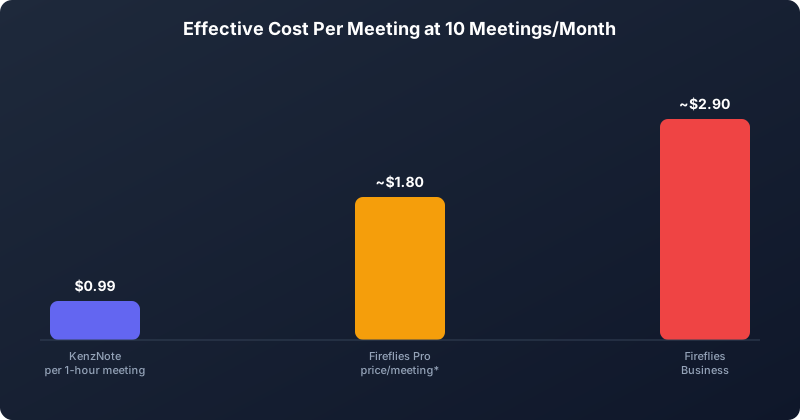 At 10 one-hour meetings a month, KenzNote's pay-as-you-go pricing stays well below either Fireflies monthly tier.
KenzNote pricing:
- Free: 2 meetings (no credit card required)
- Pay-as-you-go: $0.99 per hour of meetings, hours valid for a year
- Unlimited: $11.99/week, $39.99/month, or $359.99/year
The biggest structural difference is seats. Fireflies charges per person; KenzNote charges for the hours you record. A team of three sharing 10 one-hour meetings a month pays about $9.90 with KenzNote, versus $30 to $54 a month for three Fireflies Pro seats. For one person recording a lot, the math flips: past roughly 10 hours a month, Fireflies Pro on an annual plan becomes cheaper than paying by the hour.
Privacy: Closer Than You Might Think
Many comparisons, including older versions of our own content, claimed Fireflies trains its AI on customer meetings. Based on its current published policy, that is not the case. In its 2026 privacy update, Fireflies states that it does not use your meeting content or personal data to train AI models, and that its vendors are contractually prohibited from doing so.
KenzNote makes the same commitment. Its privacy policy states that it does not use your meetings, recordings, or transcripts to train its own or third-party AI models, and that its AI service providers are contractually restricted from doing so.
So training policy is not the deciding factor between these two. The privacy difference that does remain is access:
- Calendar access. Fireflies typically connects to your calendar so its bot can auto-join meetings. That means the vendor sees your schedule, attendee lists, and event titles. KenzNote never needs calendar access; you send it to specific meetings.
- Default recording behavior. Auto-join is convenient, but it can capture meetings you forgot were being recorded. KenzNote records only what you explicitly send it to.
If either of those matters to your team, KenzNote has the edge. If you want hands-off automation, Fireflies' approach is the more convenient one. For a broader look at how vendors handle meeting data, see our guide on whether AI meeting assistants train on your data.
Where Fireflies Wins
Fireflies is the stronger choice in several specific situations.
Sales-intensive teams. If your primary use case is logging call summaries to Salesforce, coaching reps on talk-time ratios, and building a searchable library of customer objections, Fireflies is purpose-built for that workflow. KenzNote does not have native CRM sync.
High-volume individual users. At $10/seat/month on the annual Pro plan, Fireflies is cost-competitive for people who record many hours each month.
Hands-off automation. If you want every meeting on your calendar recorded without thinking about it, Fireflies' calendar-driven bot does that. With KenzNote, you paste a link or schedule each meeting.
Integrations. Fireflies connects to Slack, Notion, Asana, HubSpot, Salesforce, and many more tools. KenzNote has a more focused footprint. If your workflow depends on automatic sync to specific tools, check whether KenzNote supports them before switching.
Established track record. Fireflies has been around since 2016 with a large user base, more community documentation, and more third-party reviews.
Where KenzNote Wins
Free recording. Record any meeting from your browser at no cost and transcribe only the ones you need. Nothing to install.
Infrequent or irregular meeting schedules. If you transcribe 5 to 10 hours of meetings a month, paying $0.99 per hour is far cheaper than a monthly subscription. There is no penalty for slow months, and purchased hours stay valid for a year.
Teams that do not want per-seat pricing. KenzNote does not charge per person, so a small team can share one account's hours instead of paying for a seat each.
Calendar privacy. If you do not want a third-party vendor reading your calendar, KenzNote works entirely from meeting links.
Non-sales teams. Fireflies is optimized for sales workflows. For product, engineering, HR, legal, and consulting teams, KenzNote's simpler interface and meeting chat are a better fit, without paying for sales features you will never use.
Flexible plans. Busy week? Switch to the $11.99 weekly unlimited plan, then drop back to pay-as-you-go. No annual commitment required.
Who Should Choose Which
Choose Fireflies if:
- Your team runs a high volume of sales calls and needs CRM sync
- You need deep integrations with Salesforce, HubSpot, or Pipedrive
- You want conversation analytics built for sales coaching
- You want every calendar meeting recorded automatically
Choose KenzNote if:
- Your meeting volume is irregular and a per-seat subscription is wasteful
- You do not want to grant calendar access to a notetaker
- You are not a sales team and do not need sales intelligence features
- You want to ask questions about past meetings in natural language
For a broader comparison of the AI meeting tool landscape, see our guide to the best AI meeting note-taker apps.
The Catch: What Fireflies' Plans Really Limit
Fireflies.ai looks free or unlimited at first glance, but the plans have limits you usually find only after you hit them.
| Tool | Price | The catch |
|---|---|---|
| Fireflies.ai | Pro $10 per seat a month billed yearly, $18 monthly | Free says unlimited transcription, but storage is 400 minutes, there are no exports, and free accounts opened since September 2026 get 3 meetings unless auto-join is on. Recordings stop at 2 hours on Free and Pro |
| KenzNote | Recording is free. Transcripts $0.99 per hour, hours last a year. No seats, no monthly minute cap. Unlimited is $39.99/month | Free plan transcribes 2 meetings (up to 120 minutes). Pay as you go starts at 5 hours ($4.95). The recorder needs desktop Chrome, Edge or Brave |
Red marks limits that are easy to miss on the pricing page. Green marks where KenzNote is ahead. Limits from each vendor's plans and 2026 reviews (for example Fireflies, Fathom, Krisp), November 2026. Plans change often, so check before you buy.
Not sure a plan fits how often you meet? Record your next meeting free with KenzNote and pay only for the hours you transcribe.
Frequently Asked Questions
Does Fireflies.ai train its AI on my meeting content?
According to its current published policy, no. Fireflies states that it does not use your meeting content or personal data to train AI models, and that its vendors are contractually prohibited from doing so. KenzNote makes the same commitment in its privacy policy. Always check the current policy and your plan's terms before recording sensitive meetings.
Does KenzNote have CRM integrations like Fireflies?
Not at the same depth. KenzNote focuses on transcription, summaries, and meeting chat rather than sales intelligence workflows. If native Salesforce or HubSpot sync is essential, Fireflies offers more in that area.
How does KenzNote's pricing compare to Fireflies for small teams?
KenzNote charges by recorded hour, not by seat. A team of five recording 40 one-hour meetings a month in total pays about $39.60 on pay-as-you-go (or $39.99 for unlimited). Five Fireflies Pro seats cost $50 a month on the annual plan, or $90 month-to-month.
Does KenzNote use a bot?
Yes. KenzNote's assistant joins your Zoom, Google Meet, or Teams call as a participant named "Kenz". Unlike calendar-driven bots, it joins only the meetings you paste or schedule, and it never needs calendar access. If you don't want a bot at all, record the call from your browser with KenzNote's free screen recorder, or upload an audio or video file.
Is Fireflies better than KenzNote for non-English meetings?
Both tools support multiple languages, though accuracy varies by language. For multilingual teams, see our guide on AI notetakers for multilingual teams.
How do I get started with KenzNote after using Fireflies?
See our getting started guide. Setup takes under five minutes, no calendar sync is required, and your first 2 meetings are free.
Related Resources
References & Citations
- [1]Updates to Our Privacy Policy, Terms of Service & Data Processing AddendumFireflies.ai. March 6, 2026https://guide.fireflies.ai/articles/6892479029
- [2]Gartner HR Survey Finds 65% of Employees are Excited to use AI at WorkGartner. December 16, 2025https://www.gartner.com/en/newsroom/press-releases/2025-12-16-gartner-hr-survey-finds-65-percent-of-employees-are-excited-to-use-ai-at-work
All external sources have been reviewed for accuracy and relevance. Last verified: November 2026.

About KenzNote Team
The KenzNote team is dedicated to helping teams capture better meeting insights and transform how they collaborate. With backgrounds in AI, product design, and enterprise software, we're building the future of meeting productivity.
Ready to transform your meetings?
KenzNote automatically captures meeting insights, extracts action items, and generates summaries so you can focus on the conversation instead of taking notes.
Try KenzNote Free