
Quick Answer
AI meeting summaries fail in five predictable ways: speaker misidentification, action item drift (task attributed to the wrong person), ambiguous pronoun resolution, number and date hallucinations, and missed context from crosstalk or heavy accents. None of these is a reason to avoid AI meeting notes. All of them are catchable with a brief review process. Understanding where AI fails makes you a smarter user of the technology, not a skeptic.
AI meeting notes are substantially more accurate than human memory and often more complete than manual notes. But "substantially more accurate" is not the same as "infallible." Here is the honest guide to where errors happen and what to do about them.
Key Takeaways
- Speaker misidentification happens most often with similar-sounding voices or when multiple people speak simultaneously
- Action item drift is when a task is attributed to the wrong person due to conversational ambiguity
- Pronoun resolution errors appear as "they agreed to do X" with no clear referent for who "they" is
- Number and date hallucinations are rare but high-stakes: the AI can mishear or misformat specific figures
- Crosstalk and accent gaps cause the AI to miss or mangle words in high-energy or non-standard-accent speech
- A 5-minute post-meeting review catches the vast majority of these errors before they propagate
- Good meeting hygiene reduces errors proactively: speak decisions clearly, state names when assigning tasks
5 Ways AI Meeting Summaries Can Be Wrong (And How to Fix)
Table of Contents
- Why AI Accuracy Matters More Than People Realize
- Error 1: Speaker Misidentification
- Error 2: Action Item Drift
- Error 3: Ambiguous Pronoun Resolution
- Error 4: Number and Date Hallucinations
- Error 5: Crosstalk and Accent Gaps
- A Simple Review Process That Catches Most Errors
- Meeting Habits That Reduce Errors Proactively
- How KenzNote Handles Accuracy
- FAQ
Why AI Accuracy Matters More Than People Realize
Most people evaluating AI meeting notes focus on accuracy in terms of word-for-word transcription. That is one dimension of accuracy. But for the practical value of meeting notes, the more important dimension is semantic accuracy: does the summary correctly represent who said what, who owns what task, and what was actually decided?
A transcript can be 98% accurate at the word level and still contain a consequential error if it attributes a commitment to the wrong person. "Rachel will handle the budget review" means something completely different if Rachel did not say it and was not in the room when it was decided.
Harvard Business Review research on meeting accountability identifies unclear action item ownership as one of the primary reasons meetings fail to produce outcomes. An AI error in attribution directly creates the problem that AI meeting notes are supposed to solve.
Understanding the five specific failure modes below gives you the knowledge to catch errors quickly and, more importantly, to run meetings in ways that reduce errors from the start.
 Understanding where AI meeting summaries can fail is the first step toward using them reliably.
Error 1: Speaker Misidentification
What it looks like: The transcript shows "Marcus: I'll take care of the contract review" when it was actually Mariana who said it. Or two back-to-back statements are attributed to the same person when they were said by different speakers.
Why it happens: Speaker identification relies on voice pattern recognition. Errors occur most often when:
- Two participants have similar vocal characteristics (pitch, cadence, accent)
- Someone joins with poor audio quality and their voice profile is inconsistent
- Multiple people speak closely together or one person finishes another's sentence
- The same participant sounds noticeably different across meetings (sick, different microphone, noisy environment)
- Remote participants join through a phone dial-in rather than a computer mic
How to catch it: When reviewing the transcript after a meeting, flag any action item or decision where the speaker attribution would be surprising. If the transcript says someone committed to something you do not remember them committing to, check the audio timestamp. This takes about 30 seconds per flagged item.
How to prevent it: Encourage participants to use good-quality microphones and stable internet connections. For critical meetings, have participants state their name before a key comment: "This is James, and I want to flag a concern about the timeline." This gives the AI a strong voice-label anchor.
Error 2: Action Item Drift
What it looks like: The meeting notes say "Tom will send the updated proposal by Thursday" but what actually happened was the team agreed that someone should send it, Tom said "sure, I can do that," and the AI picked up Tom as the owner. Meanwhile, the more complete conversation established that Tom was only going to help, and Sarah was the actual lead.
Why it happens: Action item attribution depends on the AI correctly interpreting conversational context, not just the most recent statement before the task is mentioned. Natural conversation is messy. Tasks are often implied, partially assigned, or collaboratively negotiated. The AI grabs the most syntactically obvious assignment and may miss the nuance.
This is the failure mode that most directly creates operational problems: someone else thinks Tom has it covered, Tom thinks Sarah is in the lead, and the proposal does not get sent.
How to catch it: After each meeting, review the action item list with this question: for each task, does the assigned owner match what you remember from the meeting? If any attribution feels off, check the transcript around that item.
How to prevent it: The single most effective prevention is being explicit in meetings when assigning tasks. Rather than "we should probably have someone follow up on that," say: "Tom, can you own that action item? You'll send the updated proposal to Sarah by Thursday?" When the assignment includes the person's name and a confirmation, the AI captures it clearly.
For a broader view of how AI extracts action items, see our automatic meeting notes guide.
Error 3: Ambiguous Pronoun Resolution
What it looks like: The meeting summary reads: "They agreed to move the deadline to Q3, and they will notify the client." Who is "they"? The engineering team? The two account managers who were discussing it? The AI summarized correctly what was said but lost the referent that makes it actionable.
Why it happens: Human conversation relies heavily on shared context and pronouns that reference people or groups established earlier in the discussion. "They" might have been perfectly clear to the meeting participants who had spent 20 minutes discussing the client relationship. But in a summary extracted from the transcript, the pronoun floats free of its context.
This error is particularly common in summaries rather than transcripts. The full transcript usually preserves enough context to infer the referent. The summary compresses the information and loses the context that made the pronoun interpretable.
How to catch it: When reading a summary, any pronoun that refers to a group or unnamed party is a yellow flag. "They will handle" or "the team agreed" or "it was decided" without a clear subject should be checked against the transcript.
How to prevent it: In meetings, name the group or person explicitly when making decisions: "The engineering team will own the deployment timeline" rather than "they'll handle the deployment." This takes minor effort in the moment and dramatically improves summary clarity.
 Reviewing the transcript for pronoun ambiguity takes less than two minutes and catches most attribution errors before they cause problems.
Error 4: Number and Date Hallucinations
What it looks like: The meeting transcript says the budget figure discussed was $47,000 when the actual number mentioned was $74,000. Or the deadline is recorded as the 13th when the discussion clearly established it was the 30th. Or the percentage mentioned was 15% but the transcript reads 50%.
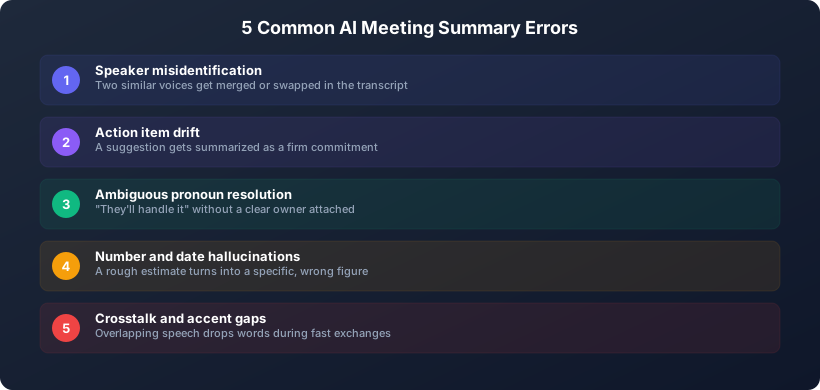 The five failure patterns that show up most often in AI-generated meeting summaries.
Why it happens: Numbers are phonetically ambiguous. "Fourteen" and "forty" are easily confused in fast speech. "Thirteen" and "thirty" are nearly identical to a statistical model working from audio features. Dates are particularly vulnerable because the conversational context often does not fully constrain which number is correct.
This is the lowest-frequency but highest-stakes error category. A wrong date or wrong dollar figure in your meeting notes can cause real operational or financial problems if it goes unchecked.
McKinsey analysis of AI productivity tools consistently flags numerical accuracy as an area requiring human oversight in AI-generated documents, particularly in financial and legal contexts.
How to catch it: Establish a rule: any number, date, dollar figure, or percentage in an AI-generated meeting summary requires a manual check against the source. This is a non-negotiable step for any meeting that involves financial figures, legal timelines, or contractual commitments.
How to prevent it: When key numbers are discussed in a meeting, say them slowly and distinctly. Consider repeating critical figures: "So we are aligned on $74,000, seven-four thousand dollars, as the project ceiling." This redundancy sounds slightly formal but it eliminates the most consequential error category.
Error 5: Crosstalk and Accent Gaps
What it looks like: A section of the transcript reads "[inaudible]" or contains garbled text. Or a participant's contributions are consistently less well-captured than others. Or a key moment where two people were talking at once is missing from the transcript entirely.
Why it happens: Crosstalk, where multiple people speak simultaneously, creates overlapping audio signals that are genuinely difficult to separate and transcribe. AI transcription handles single-speaker audio very well. Simultaneous speech is harder for any transcription system.
Accent gaps are a separate but related issue. AI transcription models are trained on audio data that may not fully represent all accents, dialects, and speaking styles. Non-native English speakers, particularly those with strong regional accents or phonological patterns from their first language, may see lower transcription accuracy than native English speakers with standard accents. This is a known limitation of current AI transcription technology and an area of active improvement.
How to catch it: When reviewing a transcript, look for [inaudible] tags, gaps, or sections where the text seems to jump mid-thought. These are signals that audio quality degraded. For any decision or action item that was discussed during a period with transcription gaps, verify the outcome directly rather than relying on the AI's reconstruction.
How to prevent it: Establish a norm against crosstalk in important meetings. A meeting facilitator who signals when two people are speaking simultaneously reduces this error significantly. For participants with accents that the AI handles less well, a post-meeting quick read of their attributed statements ensures their contributions are accurately captured.
For a comprehensive look at transcription accuracy across tools, see our best AI transcription services comparison.
A Simple Review Process That Catches Most Errors
Most of the errors described above are catchable in a 5-minute post-meeting review. Here is a structured process:
Step 1: Scan action items for attribution accuracy (2 minutes) Read each action item. Ask: does the assigned person match what you remember? Flag any that feel off and check the transcript timestamp.
Step 2: Check all numbers and dates (1 minute) Identify every specific figure in the summary: dollar amounts, dates, percentages, timelines. Verify each against either the transcript audio or your own recollection. Do not trust AI on numbers without a check.
Step 3: Resolve floating pronouns (1 minute) Read the summary for "they," "the team," "it was decided," and similar constructions without clear subjects. Replace them with specific names or groups before distributing the summary.
Step 4: Check for [inaudible] gaps (1 minute) Open the full transcript and search for any gaps or inaudible markers. If a gap occurred during a decision or assignment, follow up directly with the relevant participants.
This process takes approximately 5 minutes per meeting and catches the large majority of errors before they propagate into task management systems, email threads, or stakeholder communications.
Meeting Habits That Reduce Errors Proactively
The best way to deal with AI errors is to reduce their frequency at the source. These meeting habits improve AI accuracy without requiring extra work after the meeting.
Name people explicitly when assigning tasks. "Can you handle that, David?" generates a cleaner attribution than "someone should handle that."
State decisions explicitly before moving on. "So the decision is X" gives the AI a clean sentence to extract rather than requiring it to infer a decision from a diffuse discussion.
Repeat critical numbers. Say dollar figures, dates, and percentages twice, or spell them out if they are ambiguous. "The budget cap is thirty thousand, $30,000."
Avoid crosstalk during key moments. If a critical decision or assignment is being made, ensure one person is speaking. The rest of the meeting can have normal conversational overlap.
Use participant names, not roles. "Product will own that" is harder for AI to resolve than "James will own that."
For a deeper look at AI meeting assistants and how they process meetings, see what is an AI meeting assistant.
How KenzNote Handles Accuracy
KenzNote uses high-accuracy transcription optimized for multi-speaker meeting audio. The speaker identification model improves over time as it accumulates voice profiles for your recurring meeting participants. Participants who appear in multiple meetings are identified with increasing accuracy.
For action item extraction, KenzNote's AI is trained to flag ambiguous assignments rather than guessing. When an action item cannot be confidently attributed to a specific person, it is marked for review rather than auto-assigned to the most syntactically proximate speaker. This design choice prioritizes accuracy over the appearance of completeness.
KenzNote's privacy model is relevant here: your meeting audio and transcripts are never used to train AI models, including the transcription and summary models. Your meetings are your data. For a detailed look at how AI meeting tools handle your data, see our complete guide to AI meeting notes and the AI meeting notes accuracy section.
FAQ
What is a realistic accuracy rate for AI meeting transcription?
Leading AI transcription tools achieve 95% to 98% word-level accuracy in good audio conditions, with single speakers. In multi-speaker meetings with typical audio quality, 90% to 95% is a more realistic expectation. Accuracy drops meaningfully with poor audio, heavy crosstalk, or strong accents not well-represented in training data.
Is AI transcription accurate enough to use for legal or compliance documentation?
Not without human review. AI-generated meeting notes are excellent for operational documentation: action items, summaries, decision logs. For legal transcripts or compliance records where precision is contractually or legally required, a human review of the AI output is necessary. The 5-minute review process described above is not sufficient for high-stakes legal contexts.
Will the AI improve accuracy if I use it for the same recurring meeting group over time?
Yes. Speaker identification improves as the AI accumulates more voice samples from each participant. For a team with weekly recurring meetings, accuracy for that team's meetings tends to improve noticeably within the first 4 to 6 weeks.
Can I correct the AI's errors in the transcript and will it learn from those corrections?
Transcript editing corrects the record for that specific meeting. Whether those corrections feed back into the AI model depends on the tool. In KenzNote's case, your meeting data is not used for model training, so corrections improve the document but do not retrain the system.
Is it worth using AI meeting notes for meetings where accuracy is critical, like board meetings?
Yes, with an appropriate review process. The AI captures far more than any human note-taker would, and the complete transcript is available for reference. The errors described in this article are real but manageable. The alternative, relying on a human note-taker's selective attention and memory, introduces its own errors that are less systematic and harder to catch.
How do other AI meeting tools compare on accuracy?
There is meaningful variation across tools. Our best AI transcription services comparison covers accuracy benchmarks for leading tools including KenzNote, Fireflies, Otter, and others. Audio quality and meeting conditions affect all tools similarly, so the relative comparisons are more useful than the absolute numbers.
Related Resources
References & Citations
- [1]The Economic Potential of Generative AIMcKinsey & Company. June 14, 2023https://www.mckinsey.com/capabilities/mckinsey-digital/our-insights/the-economic-potential-of-generative-ai-the-next-productivity-frontier
- [2]How to Design an Agenda for an Effective MeetingHarvard Business Review. March 19, 2015https://hbr.org/2015/03/how-to-design-an-agenda-for-an-effective-meeting
All external sources have been reviewed for accuracy and relevance. Last verified: September 2026.

About KenzNote Team
The KenzNote team is dedicated to helping teams capture better meeting insights and transform how they collaborate. With backgrounds in AI, product design, and enterprise software, we're building the future of meeting productivity.
Ready to transform your meetings?
KenzNote automatically captures meeting insights, extracts action items, and generates summaries so you can focus on the conversation instead of taking notes.
Try KenzNote Free