
Quick Answer
Granola is a bot-free AI notepad. Instead of sending a bot into your call, it runs on your Mac, Windows PC, or phone and transcribes the audio your device hears. You type rough notes during the meeting, and Granola merges them with the transcript into clean, structured notes afterwards.
It is excellent for individuals who want notes that sound like their notes, and who dislike bots in the participant list. The free plan works but only shows a limited history, and the Business plan costs $14 per user per month at the time of writing. If you want shared team workflows, CRM sync, or pay-as-you-go pricing, look at the alternatives below. If you want to pay only for what you use, KenzNote records meetings from your browser for free, with no bot and no app, and charges $0.99 per hour only when you want a transcript.
Key Takeaways
- Granola captures audio on your device, so no bot joins your meeting
- Its standout idea is "enhanced notes": your own jottings plus the transcript, combined by AI
- Free (Basic) works for testing but shows only about your last 30 days of notes
- Business is about $14/user/month; Enterprise starts around $35/user/month
- Because there is no bot, participants get no automatic signal that the meeting is being transcribed, so you need to tell them
- Model-training opt-out is described as an Enterprise feature; check Granola's current privacy terms if that matters to you
- Granola doesn't keep audio, so you can't replay a moment or record without transcribing. If you want that, or pay-as-you-go pricing, see Granola vs KenzNote
Table of Contents
- What Is Granola AI?
- How Granola Works
- Granola Pricing in 2026
- Privacy and Consent
- What Granola Does Well
- Where Granola Falls Short
- Granola vs KenzNote
- Who Should Use Granola
- The Catch: What Granola's Plans Really Limit
- Frequently Asked Questions
What Is Granola AI?
Granola is an AI meeting notepad that launched for Mac and has since expanded to Windows and mobile. It sits on your desktop like a notes app. When a meeting starts, it begins transcribing what your computer hears: your microphone and the system audio from Zoom, Google Meet, Teams, or any other call app.
It has become one of the fastest-growing names in AI note-taking, largely because of one design decision: it treats your own notes as the backbone and uses AI to fill in the gaps, rather than replacing your notes with a generic summary.
How Granola Works
- Open Granola when the meeting starts. It typically detects meetings from your calendar and prompts you.
- Take light notes as you normally would. A few words per topic is enough.
- Granola transcribes in the background from your device's audio. Nothing joins the call.
- After the meeting, click to enhance. The AI expands your shorthand using the transcript, adds what you missed, and structures it into sections.
- Share or export the notes, or chat with them to ask follow-up questions.
The result reads more like a sharp human's notes than a transcript summary, because it follows the structure you started.
Granola Pricing in 2026
Pricing at the time of writing (check granola.ai for current numbers):
| Plan | Price | What you get |
|---|---|---|
| Basic (free) | $0 | Core AI notes; only about the last 30 days of notes visible |
| Business | $14/user/month, billed monthly only | Full history, advanced AI models, integrations, API access |
| Enterprise | From ~$35/user/month | SSO, admin controls, team-wide model-training opt-out, priority support |
A few things worth knowing:
- The free plan's real limit is history. Third-party reviews describe it as showing only recent notes (around the last 30 days, or a capped number of notes), so it is fine for trying Granola but awkward as your permanent archive.
- Business and Basic bill monthly. Annual billing is reported as Enterprise-only.
- Per-seat pricing adds up for teams. Ten people on Business is roughly $140 a month.
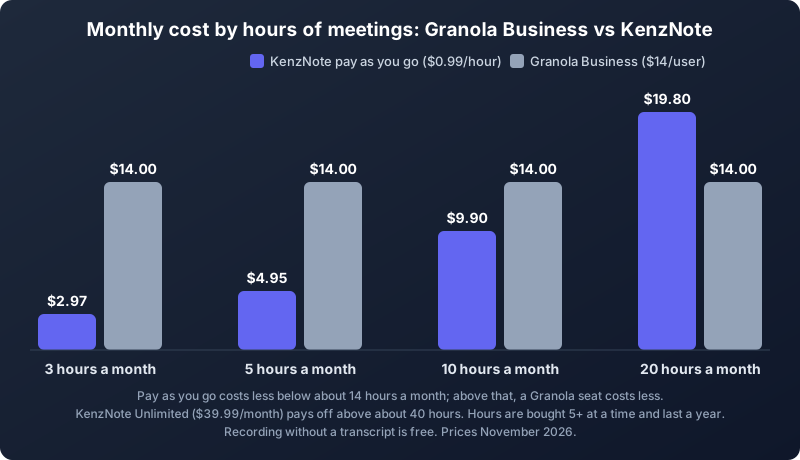 If you meet less than about 14 hours a month, paying per hour costs less than a Granola seat. Heavy users are better off with a flat plan.
Privacy and Consent
Granola's bot-free design cuts both ways.
The upside: no third-party participant in the call, no "Notetaker has joined" moment, and nothing for a client's IT policy to block.
The responsibility: because nothing visible joins the meeting, other participants have no automatic cue that the conversation is being transcribed. In many jurisdictions, and under GDPR, you need to tell people. Make it a habit to say so at the start of the call or add a line to the invite. Our guide to recording consent laws covers the rules by region.
Training: third-party reviews describe a "team-wide model training opt-out" as an Enterprise feature, which suggests training is not opted out by default on lower plans. Policies change, so read Granola's current privacy policy before recording sensitive meetings. For how other tools compare, see does your AI meeting assistant train on your data?
What Granola Does Well
- The notes feel like yours. Enhancing your own shorthand produces more relevant notes than a generic summary.
- No bot. Great for external calls where a bot would feel awkward.
- Works with any call app. Because it listens to device audio, it is not tied to Zoom, Meet, or Teams.
- Polished, fast app. Reviewers consistently praise the design.
Where Granola Falls Short
These come up again and again in public reviews. Several are written by competitors (we are one too), so we only list points that more than one source reports or that Granola's own docs confirm.
- No audio, so no replay. Granola's desktop apps transcribe live and don't store meeting audio (Granola). You can't play back a moment to check what was really said, and transcript mistakes can't be verified later (tl;dv, BuildBetter).
- No uploads. Reviewers note it can't import a recording you already have (ryza).
- Speaker labels in bigger meetings. Several reviewers say speaker attribution gets unreliable with three or more people, and that numbers and technical terms are a weak spot (Product Hunt reviews, Krisp, Jamie). Newer tests report improvements, so check with your own meetings.
- Missed captures. Some users report finding out after a call that nothing was recorded (anarlog).
- You have to be there, on a device with the app installed.
- Seats. Regular use means a $14/user/month Business seat, and the strongest admin and privacy controls sit at Enterprise.
- Consent is on you. Nothing visible joins the call. A proposed class action filed in July 2026 alleges Granola recorded without notice and used data for training by default (Sigma Law Group). These are allegations, not findings.
Granola vs KenzNote
We make KenzNote, so read this as our side of the story. Green marks the rows where KenzNote is ahead. Rows without color are a tie or Granola's strength.
| Granola | KenzNote | |
|---|---|---|
| How you pay | Per seat: free Basic, then Business about $14/user/month | Pay as you go: $0.99 per transcribed hour, hours last a year. No seats, no subscription |
| 5 hours of meetings a month | About $14 every month | $4.95 once, for 5 hours |
| Just record, no transcript | Not possible: audio isn't kept | Totally free. Record any meeting from your browser and transcribe later only if you need to |
| Replay a moment | No: no audio is stored | Yes: play the recording in the app (kept 30 days) |
| Ask questions, check the answer | Chat with citations to the meeting notes | Ask Kenz answers cite the exact moment, like [12:34 · Sarah]. Click to jump there in the transcript and recording |
| Ask across a folder of meetings | Yes | Yes: a folder per client, project or course |
| Do you need to attend? | Yes | No: send the "Kenz" bot to the link, even when you're away |
| Install | Desktop or iPhone app | Nothing: runs in desktop Chrome, Edge or Brave |
| Upload a recording you already have | Not supported (reported) | Yes: audio or video files |
| Your own typed notes | Enhances what you jot down (Granola's best feature) | Writes the summary for you, no typing needed |
| On your phone | iPhone app | No mobile recorder; upload a recording instead |
| Meetings that switch languages | Supported | Up to 3 languages in one meeting |
| AI training on your meetings | Team-wide opt-out reported as an Enterprise feature | Never, stated in writing in our privacy policy |
| Do others see it's recording? | No, you tell them | With the bot, yes, by name. With the recorder, you tell them |
Granola details from Granola's docs and the public reviews linked above, November 2026. Check granola.ai for current plans.
Pick Granola if you attend every meeting, like typing your own notes, want a phone app, and are happy paying for a monthly seat.
Pick KenzNote if you want to pay only for what you use, record meetings for free, replay and verify what was said, get notes from meetings you can't attend, or can't install apps on your work computer.
Record your next meeting free. Pay only if you want the transcript.
Record Zoom, Google Meet or Teams from your browser at no cost, with no bot. Need notes? Transcripts are $0.99 per hour, with no seats and no subscription.
Record a meeting free →No credit card. Your first 2 meetings are transcribed free.
Looking at other tools too? See our Granola alternatives guide, which compares Jamie, Krisp, Fathom, Fireflies and Otter.
Who Should Use Granola
Choose Granola if:
- You attend your own meetings and like to jot notes as you go
- You want no bot in the participant list
- You use a mix of call apps, or take calls outside Zoom/Meet/Teams
- You are happy to tell participants yourself that you are transcribing
Choose something else if:
- You need notes from meetings you cannot attend (a bot-based tool can go without you)
- You want bot-free recording without installing a desktop app
- You want visible, automatic disclosure to participants
- You meet irregularly and would rather pay per hour than per seat
- You need CRM sync and sales coaching (look at Fathom or Fireflies)
The Catch: What Granola's Plans Really Limit
Granola looks free or unlimited at first glance, but the plans have limits you usually find only after you hit them.
| Tool | Price | The catch |
|---|---|---|
| Granola | Free Basic; Business $14 per user a month | Free shows only about your last 30 days of notes. Business is billed monthly only, per user |
| KenzNote | Recording is free. Transcripts $0.99 per hour, hours last a year. No seats, no monthly minute cap. Unlimited is $39.99/month | Free plan transcribes 2 meetings (up to 120 minutes). Pay as you go starts at 5 hours ($4.95). The recorder needs desktop Chrome, Edge or Brave |
Red marks limits that are easy to miss on the pricing page. Green marks where KenzNote is ahead. Limits from each vendor's plans and 2026 reviews (for example Fireflies, Fathom, Krisp), November 2026. Plans change often, so check before you buy.
Not sure a plan fits how often you meet? Record your next meeting free with KenzNote and pay only for the hours you transcribe.
Frequently Asked Questions
Is Granola AI free?
Yes, Granola has a free Basic plan. It covers core AI notes but shows only about your last 30 days of notes, so most regular users eventually move to the Business plan at about $14 per user per month.
Does Granola join my meetings as a bot?
No. Granola runs on your computer or phone and transcribes the audio your device hears. No participant is added to the call, which also means other attendees get no automatic notice that you are transcribing.
Does Granola work with Zoom, Google Meet, and Teams?
Yes. Because it captures device audio rather than integrating with a specific platform, it works with Zoom, Google Meet, Microsoft Teams, and most other call apps.
Does Granola train AI on my meetings?
Third-party reviews describe a team-wide model-training opt-out as an Enterprise feature, which suggests training is not automatically opted out on lower plans. Check Granola's current privacy policy for the exact terms before recording sensitive conversations.
What is the best Granola alternative?
It depends on what you are missing. For bot-free notes with EU data residency, look at Jamie. For noise cancellation plus notes, Krisp. For a strong free plan, Fathom. For free bot-free recording in your browser, plus a bot for meetings you cannot attend, with pay-as-you-go transcripts and no calendar access, KenzNote.
Can Granola take notes if I'm not in the meeting?
No. Granola only hears what your own device hears, so you have to be in the meeting. Bot-based tools such as KenzNote can join a call on your behalf.
Is there a free bot-free alternative to Granola?
Yes. KenzNote's screen recorder runs in desktop Chrome, Edge or Brave and records a meeting tab's audio plus your microphone without a bot or an app. Recording is free; transcription costs $0.99 per hour, and the first 2 meetings are free.
Related Resources

About KenzNote Team
The KenzNote team is dedicated to helping teams capture better meeting insights and transform how they collaborate. With backgrounds in AI, product design, and enterprise software, we're building the future of meeting productivity.
Ready to transform your meetings?
KenzNote automatically captures meeting insights, extracts action items, and generates summaries so you can focus on the conversation instead of taking notes.
Try KenzNote Free