
Quick Answer
The best scheduling app depends on your use case. For enterprises, Calendly dominates with robust security at $10-16/seat monthly. Solopreneurs save 70% with YouCanBookMe ($8.10/month) offering payment collection and custom branding. Sales teams maximize conversion using Chili Piper's instant booking ($30/user + platform fees), while privacy-focused teams choose open-source Cal.com with self-hosting options.
All top tools eliminate the "does Tuesday work?" email chains, saving 5-10 hours weekly. Most offer free trials; test 2-3 options with real scheduling scenarios before committing to find your perfect fit.
Key Takeaways
- Time savings average 5-10 hours weekly: Eliminate back-and-forth emails and reduce no-shows with automated reminders
- Calendly leads enterprise market: Best security, integrations, and admin controls for teams of 10+ people
- YouCanBookMe offers best value: Full customization and payment processing for just $8.10/month for solopreneurs
- Cal.com provides open-source control: Self-host for complete data ownership and unlimited customization possibilities
- Free plans work for basic needs: Google Calendar, Doodle, and HubSpot offer solid free tiers
- Time zones handled automatically: All modern tools detect location and display availability in recipient's timezone
- CRM integration drives sales efficiency: Native Salesforce/HubSpot connections eliminate manual data entry for teams
- Test before committing: Use 14-day trials to verify features work with your actual workflow
Meeting coordination shouldn't consume hours of your week. Yet for many professionals, the back-and-forth of "Does Tuesday at 2 PM work?" becomes a daily time drain that steals focus from meaningful work.
Modern scheduling apps eliminate this friction entirely. But with dozens of options available, each claiming to be "the best," how do you choose the right one?
This guide cuts through the noise. You'll get honest comparisons, real-world use cases, and a clear decision framework to find your perfect scheduling solution.
How to Choose the Right Scheduling App
Before diving into specific tools, ask yourself these four questions:
1. What's Your Primary Use Case?
Solopreneurs/Freelancers: You need simple booking pages, payment collection, and basic calendar sync.
Small Teams (2-10 people): Look for round-robin scheduling, team calendars, and affordable per-seat pricing.
Sales Teams: Prioritize CRM integration, lead routing, and automated follow-up workflows.
Enterprise Organizations: Focus on security (SSO, compliance), advanced admin controls, and scalability.
Event Coordinators: Seek group polling, sign-up sheets, and multi-participant coordination.
2. What's Your Budget?
- $0-10/month: Free or basic plans for individuals
- $10-30/month: Mid-tier plans with team features
- $30-100/month: Enterprise features and advanced automation
- $100+/month: Platform fees for high-volume sales teams
3. What Integrations Do You Need?
Must-have integrations:
- Calendar (Google, Outlook, Apple)
- Video conferencing (Zoom, Teams, Meet)
- Payment processing (Stripe, PayPal)
- CRM (Salesforce, HubSpot) if applicable
Nice-to-have integrations:
- Marketing automation (Mailchimp, ActiveCampaign)
- Project management (Asana, Trello)
- Communication (Slack, Discord)
4. What Features Matter Most?
Core features to consider:
- ✅ Time zone detection
- ✅ Buffer times between meetings
- ✅ Automated reminders
- ✅ Custom branding
- ✅ Mobile apps
- ✅ Analytics/reporting
- ✅ Team scheduling
- ✅ Payment collection
- ✅ Workflow automation
Quick Comparison Table
| Tool | Best For | Starting Price | Free Plan | Key Strength | Main Limitation |
|---|---|---|---|---|---|
| Calendly | Enterprise teams | $10/seat/mo | ✅ Yes | Enterprise security & integrations | Limited customization |
| YouCanBookMe | Service businesses | $8.10/mo | ✅ Yes | Custom branding & payments | Not for large events |
| Cal.com | Open-source lovers | $12/seat/mo | ✅ Yes | Full control & self-hosting | Requires technical knowledge |
| SavvyCal | Client experience | $12/mo | ❌ No | Recipient-friendly scheduling | Higher starting price |
| Acuity | Appointment-based businesses | $16/mo | ❌ No | Advanced customization | No free plan |
| Doodle | Group coordination | $14.95/user/mo | ✅ Yes | Group polling | Limited automation |
| HubSpot Scheduler | HubSpot users | Included in CRM | ✅ Yes (limited) | Native CRM integration | Requires HubSpot ecosystem |
| Chili Piper | High-velocity sales | $30/user/mo + platform fees | ❌ No | Lead routing & qualification | Steep learning curve |
| Google Calendar | Google Workspace users | $6/user/mo | ✅ Yes (basic) | Native Google integration | Minimal features |
| Microsoft Bookings | Microsoft 365 users | Included in M365 | ✅ Yes | Native Microsoft integration | Limited standalone use |
Detailed Reviews
1. Calendly - The Enterprise Standard
Best for: Large teams, enterprises, organizations needing robust security
Calendly dominates the enterprise scheduling space for good reason. It handles complex scheduling scenarios while maintaining ease of use.
Standout Features:
- Enterprise Security: SAML SSO, SCIM provisioning, domain verification, data residency options
- Advanced Routing: Sophisticated round-robin logic, priority routing, backup hosts
- Workflow Automation: Pre-meeting routing forms, post-meeting workflows, custom notifications
- Deep Integrations: Native connections to Salesforce, HubSpot, Marketo, Pardot
- Admin Controls: Centralized billing, team analytics, custom event types, branding controls
Pricing Breakdown:
- Free: 1 event type, unlimited meetings, basic integrations
- Standard ($10/seat/month): Unlimited event types, custom branding, integrations
- Teams ($16/seat/month): Round-robin, collective events, admin features
- Enterprise ($15,000/year minimum): SSO, advanced security, dedicated support, SLAs
Real-World Scenario: A 50-person sales organization uses Calendly Enterprise to route inbound demo requests. Their routing form qualifies leads by company size, then automatically assigns meetings to the appropriate sales rep based on territory, availability, and current pipeline load. All activity logs to Salesforce automatically.
Best For:
- Teams of 10+ people
- Companies with compliance requirements (HIPAA, GDPR, SOC 2)
- Sales organizations with complex routing needs
- Businesses requiring detailed analytics
Not Ideal For:
- Solo practitioners on a budget
- Businesses needing extensive booking page customization
- Teams wanting white-label solutions
2. YouCanBookMe (YCBM) - The Customization Champion
Best for: Coaches, consultants, service providers, small businesses
YCBM excels at creating beautifully branded booking experiences while keeping costs reasonable.
Standout Features:
- Visual Customization: Full control over colors, fonts, logos, images, CSS
- Flexible Booking Types: 1-on-1, group sessions, courses, recurring appointments
- Payment Integration: Stripe, Apple Pay, Google Pay with flexible pricing (deposits, packages, variable pricing)
- Smart Scheduling: Multi-calendar checking, buffer times, date-specific availability
- Automation: Custom email templates, SMS reminders (via Twilio), Zapier workflows
Pricing Breakdown:
- Free: 1 booking page, basic features, YCBM branding
- Paid ($8.10-$16.20/month): Multiple pages, custom branding, payments, integrations
- Business Plans: Volume discounts for multiple users
Real-World Scenario: A health coach uses YCBM to offer 30-minute discovery calls (free), 60-minute coaching sessions ($150), and 4-session packages ($500). Clients book directly through her branded page, pay via Stripe, and receive automated pre-session questionnaires through Zapier integration with Google Forms.
Best For:
- Service-based businesses collecting payments
- Professionals wanting branded booking experiences
- Coaches offering multiple session types
- Small teams (1-5 people)
Not Ideal For:
- Large events or webinars (50+ participants)
- Enterprise teams needing SSO
- Complex sales team routing
3. Cal.com - The Open-Source Alternative
Best for: Developers, privacy-conscious users, teams wanting full control
Cal.com brings open-source transparency to scheduling, offering both hosted and self-hosted options.
Standout Features:
- Open Source: Full code transparency, self-hosting option, community-driven development
- Privacy First: GDPR compliant, data ownership, no vendor lock-in
- Customization: API access, webhook support, white-label options (on enterprise plans)
- Modern Interface: Clean design, fast performance, regular updates
- Team Features: Round-robin, collective scheduling, team pages
Pricing Breakdown:
- Free (Self-Hosted): Unlimited everything, you manage infrastructure
- Starter ($12/seat/month): Hosted solution, basic features
- Teams ($29/seat/month): Advanced routing, custom branding, priority support
- Enterprise (Custom): White-label, SSO, dedicated infrastructure
Real-World Scenario: A software consultancy self-hosts Cal.com on their own servers, ensuring client data never leaves their infrastructure. They've customized the interface to match their brand, built custom integrations with their internal CRM, and maintain complete control over the scheduling experience.
Best For:
- Technical teams comfortable with self-hosting
- Privacy-focused organizations
- Businesses wanting custom integrations
- Teams valuing open-source software
Not Ideal For:
- Non-technical users without IT support
- Teams wanting quick setup without configuration
- Businesses needing enterprise support for hosted solutions
4. SavvyCal - The Recipient-Friendly Choice
Best for: Professionals prioritizing recipient experience, scheduling across organizations
SavvyCal flips traditional scheduling by letting recipients overlay their calendar on yours, creating a truly collaborative scheduling experience.
Standout Features:
- Overlay Calendars: Recipients can view their calendar alongside yours
- Ranked Availability: Suggest preferred times while showing all options
- Multiple Duration Options: Let recipients choose meeting length
- Personalization: Custom links per recipient, embedded scheduling
- Minimalist Design: Clean, distraction-free interface
Pricing Breakdown:
- Basic ($12/month): Unlimited event types, integrations, basic features
- Premium ($20/month): Multiple calendars, custom branding, advanced workflows
- Teams ($30/user/month): Round-robin, pooled availability, team analytics
Real-World Scenario: A consultant sends potential clients a SavvyCal link. Instead of seeing only available slots, clients overlay their own calendar and see both schedules simultaneously, choosing times that work perfectly for both parties. The consultant marks preferred times, and clients can select different meeting durations (30/60/90 minutes).
Best For:
- Consultants scheduling with busy executives
- Sales professionals respecting client time
- Anyone prioritizing scheduling UX
- Teams coordinating across organizations
Not Ideal For:
- Budget-conscious solopreneurs (no free plan)
- Large enterprises needing complex routing
- Businesses requiring payment collection
5. Acuity Scheduling - The Appointment Powerhouse
Best for: Appointment-heavy businesses (salons, clinics, studios, tutors)
Owned by Squarespace, Acuity delivers robust appointment management for businesses where scheduling IS the business.
Standout Features:
- Class/Course Scheduling: Recurring sessions, capacity limits, waitlists
- Advanced Intake Forms: Conditional logic, file uploads, custom fields
- Membership Integration: Packages, subscriptions, gift certificates
- Staff Management: Individual calendars, service assignments, commission tracking
- Point-of-Sale: In-person payment collection, refunds, tips
Pricing Breakdown:
- Emerging ($16/month): 1 calendar, 6 appointment types, basic features
- Growing ($27/month): 6 calendars, unlimited appointment types, packages
- Powerhouse ($49/month): 36 calendars, multiple locations, advanced features
- Enterprise (Custom): Unlimited calendars, priority support, custom solutions
Real-World Scenario: A yoga studio uses Acuity to manage 15 instructors teaching 50+ classes weekly. Students book classes through branded pages, purchase multi-class packages, and fill out health intake forms. The system handles capacity limits, waitlists, and automatically sends pre-class reminders with virtual class links.
Best For:
- Appointment-based businesses with multiple staff
- Health and wellness practitioners
- Education and tutoring services
- Studios and salons
Not Ideal For:
- Simple meeting scheduling
- Budget-conscious individuals (no free plan)
- Sales teams needing CRM integration
6. Doodle - The Group Coordination Specialist
Best for: Teams coordinating group meetings, event planners, students
Doodle pioneered group polling for scheduling and remains the simplest solution for finding times that work for everyone.
Standout Features:
- Group Polls: Propose multiple times, participants vote, find consensus
- Sign-Up Sheets: Event registration, volunteer coordination, resource booking
- 1:1 Booking Pages: Personal scheduling links (like Calendly)
- Co-Hosting: Multiple organizers can manage events
- AI Assistance: AI-generated meeting descriptions and summaries
Pricing Breakdown:
- Free: Unlimited group polls (with ads), basic features
- Pro ($14.95/month): Ad-free, custom branding, reminders, calendar sync
- Team ($19.95/user/month): Admin controls, team pages, advanced features
- Enterprise (Custom): SSO, dedicated support, custom contracts
Real-World Scenario: A project manager needs to schedule a quarterly review with 8 stakeholders across 3 time zones. They create a Doodle poll with 6 potential times, send the link to all participants, and within 24 hours have clear visibility into which times work for most people. The system automatically sends calendar invites once a time is selected.
Best For:
- Coordinating groups of 3+ people
- Event planning and volunteer coordination
- Teams without shared calendars
- Budget-conscious users (robust free plan)
Not Ideal For:
- Complex workflow automation
- Advanced CRM integration
- Individual appointment booking (better tools available)
7. HubSpot Meeting Scheduler - The CRM Native
Best for: Sales and marketing teams already using HubSpot
If you're in the HubSpot ecosystem, their native scheduler eliminates integration headaches while keeping all activity in one place.
Standout Features:
- Native CRM Integration: All meetings automatically logged with full context
- Round-Robin Routing: Distribute leads across sales team
- Meeting Links in Emails: Insert availability directly in sales emails
- Automatic Logging: Notes, recordings, transcriptions tied to contact records
- Sales Hub Workflows: Trigger automation based on meeting status
Pricing Breakdown:
- Free CRM: Basic meeting links, limited features
- Sales Hub Starter ($20/seat/month): Includes meeting scheduler, basic automation
- Sales Hub Professional ($100/seat/month): Advanced routing, custom booking pages
- Sales Hub Enterprise ($150/seat/month): Team scheduling, advanced reporting
Real-World Scenario: A sales rep sends a prospecting email through HubSpot. The email includes a personalized meeting link. When the prospect books a time, the meeting is automatically logged to their contact record, a pre-meeting reminder sequence begins, and the rep receives a notification with the prospect's recent website activity and deal stage.
Best For:
- HubSpot CRM users
- Sales teams wanting unified workflows
- Marketing teams tracking lead progression
- Teams already paying for Sales Hub
Not Ideal For:
- Users outside the HubSpot ecosystem
- Teams needing extensive customization
- Businesses wanting standalone scheduling tools
8. Chili Piper - The Sales Acceleration Platform
Best for: High-volume B2B sales teams focused on speed-to-lead
Chili Piper goes beyond scheduling to create a complete lead conversion platform optimizing every step from first contact to booked meeting.
Standout Features:
- Instant Booking: Schedule meetings while leads are on your website
- Smart Routing: Distribute leads based on territory, product, deal size, availability
- Form Concierge: Replace form submissions with instant scheduling
- Handoff Automation: Seamless SDR-to-AE transitions
- Multi-Channel: Schedule via email, chat, SMS, phone
Pricing Breakdown:
- ChiliCal ($15/user/month): Basic scheduling for individuals
- Instant Booker ($30/user/month + $150-300 platform fee): Instant scheduling, basic routing
- Form Concierge ($30/user/month + $300-600 platform fee): Form replacement, advanced routing
- Distro ($30/user/month + $600-1,000 platform fee): Complete platform, all features
- Enterprise (Custom): Volume pricing, custom implementation
Real-World Scenario: A SaaS company uses Chili Piper's Form Concierge to replace their demo request form. When a visitor submits interest, instead of "Thanks, we'll be in touch," they immediately see available demo times with the right sales rep based on company size and industry. Meetings are booked while interest is highest, conversion rates increase by 30%, and all activity logs to Salesforce in real-time.
Best For:
- B2B SaaS sales teams
- High-velocity sales organizations
- Companies with complex routing requirements
- Teams with dedicated sales ops
Not Ideal For:
- Small businesses or solopreneurs (expensive, complex)
- Appointment-based businesses
- Teams without Salesforce or HubSpot
9. Google Calendar Appointment Scheduling - The Simple Solution
Best for: Google Workspace users wanting basic scheduling without additional tools
Google's native appointment scheduling covers fundamental needs for individuals and small teams already in the Google ecosystem.
Standout Features:
- Native Integration: No setup required, works with existing Google Calendar
- Appointment Slots: Create blocks of bookable time
- Payment Integration: Stripe and Square integration
- Real-Time Updates: Calendar changes immediately reflected in availability
- Booking Pages: Shareable links for direct booking
Pricing Breakdown:
- Free (Personal): 1 booking page, basic features
- Google Workspace ($6-18/user/month): Multiple pages, custom branding, integrations
- Features included in Workspace subscription (no additional scheduling fee)
Real-World Scenario: A freelance designer uses Google Calendar's appointment scheduling to offer 30-minute portfolio reviews. They create a booking page, set availability (Tuesdays and Thursdays, 10 AM - 4 PM), add buffer times, and share the link in their email signature. Clients book directly, and meetings appear on the designer's calendar automatically.
Best For:
- Google Workspace users
- Solopreneurs with simple needs
- Users wanting zero-setup scheduling
- Budget-conscious individuals
Not Ideal For:
- Teams needing advanced routing
- Businesses requiring extensive customization
- Users outside Google ecosystem
10. Microsoft Bookings - The Microsoft 365 Native
Best for: Microsoft 365 users, appointment-based businesses in the Microsoft ecosystem
Bookings brings appointment scheduling to Microsoft 365, offering tight integration with Teams, Outlook, and other Microsoft services.
Standout Features:
- Teams Integration: Virtual meetings automatically created in Teams
- Staff Management: Multiple staff calendars, service assignments
- Customer Management: Customer lists, booking history, notes
- Mobile Apps: iOS and Android apps for on-the-go management
- Self-Service: Customers can book, reschedule, cancel without intervention
Pricing Breakdown:
- Included in Microsoft 365 Business Standard ($12.50/user/month) and higher
- No additional scheduling fees
- Scales with your M365 license
Real-World Scenario: A medical clinic uses Microsoft Bookings to manage appointments for 6 doctors. Patients book online through a branded page, receive automated Teams meeting links for telehealth visits, and get SMS reminders. The system integrates with the clinic's existing Microsoft 365 environment, requires no additional software, and all appointment data stays within their Microsoft tenant.
Best For:
- Microsoft 365 subscribers
- Healthcare and professional services
- Teams already using Teams for meetings
- Organizations requiring data residency in Microsoft cloud
Not Ideal For:
- Non-Microsoft users
- Teams needing advanced automation
- Businesses requiring extensive integrations outside Microsoft ecosystem
Use Case Recommendations
For Solopreneurs & Freelancers
Best Overall: YouCanBookMe
- Affordable ($8.10/month)
- Payment collection built-in
- Beautiful custom branding
- All essential features
Budget Alternative: Google Calendar (if already using Workspace) Premium Alternative: SavvyCal (best client experience)
For Small Teams (2-10 People)
Best Overall: Calendly Standard
- Simple round-robin scheduling
- Affordable team pricing ($10/seat)
- Excellent integrations
- Easy for everyone to learn
Budget Alternative: Cal.com Customization Alternative: YouCanBookMe
For Sales Teams
HubSpot Users: HubSpot Meeting Scheduler
- Native integration eliminates friction
- Already included in Sales Hub
- Unified data and workflows
Salesforce Users: Calendly or Chili Piper
- Calendly: Better for straightforward scheduling
- Chili Piper: Better for complex routing and high-velocity sales
High-Volume Sales: Chili Piper
- Maximize speed-to-lead
- Advanced routing and qualification
- Worth the premium for conversion improvements
For Enterprise Organizations
Best Overall: Calendly Enterprise
- Industry-leading security and compliance
- Robust admin controls
- Proven at scale
- Excellent support
Microsoft-Centric Companies: Microsoft Bookings Open-Source Requirements: Cal.com (self-hosted)
For Appointment-Based Businesses
Best Overall: Acuity Scheduling
- Built for appointment businesses
- Class and package management
- Multiple staff support
- Robust intake forms
Budget Alternative: YouCanBookMe Microsoft Users: Microsoft Bookings
For Event Coordination & Group Meetings
Best Overall: Doodle
- Simplest group polling
- Generous free plan
- Everyone knows how to use it
- Sign-up sheets for events
Alternative: Use primary tool + Doodle for complex group scheduling
Feature Comparison Matrix
Security & Compliance
| Tool | SSO | SCIM | 2FA | GDPR | HIPAA Ready | SOC 2 |
|---|---|---|---|---|---|---|
| Calendly | ✅ Enterprise | ✅ Enterprise | ✅ | ✅ | ✅ | ✅ |
| YouCanBookMe | ❌ | ❌ | ✅ | ✅ | ⚠️ Partial | ❌ |
| Cal.com | ✅ Enterprise | ✅ Enterprise | ✅ | ✅ | ✅ Self-hosted | ⚠️ Self-hosted |
| SavvyCal | ❌ | ❌ | ✅ | ✅ | ❌ | ❌ |
| Acuity | ❌ | ❌ | ✅ | ✅ | ⚠️ Partial | ❌ |
| Chili Piper | ✅ | ✅ | ✅ | ✅ | ⚠️ Partial | ✅ |
| HubSpot | ✅ Enterprise | ✅ Enterprise | ✅ | ✅ | ⚠️ BAA Available | ✅ |
Integration Capabilities
| Tool | Video Conferencing | Payment Processing | CRM Integration | Marketing Automation | API Access |
|---|---|---|---|---|---|
| Calendly | Zoom, Teams, Meet | Stripe, PayPal | Salesforce, HubSpot, Marketo | ✅ Via Zapier | ✅ |
| YouCanBookMe | Zoom, Teams, Meet | Stripe, Apple/Google Pay | ⚠️ Via Zapier | ✅ Via Zapier | ✅ |
| Cal.com | Zoom, Teams, Meet, Jitsi | Stripe, PayPal | ⚠️ Via API | ⚠️ Via API | ✅ Full API |
| SavvyCal | Zoom, Teams, Meet | ❌ | ⚠️ Via Zapier | ⚠️ Via Zapier | ✅ |
| Acuity | Zoom, Meet | Stripe, Square, PayPal | ⚠️ Limited | ⚠️ Via Zapier | ✅ |
| Chili Piper | Zoom, Teams, Meet | ❌ | Salesforce (native), HubSpot | ✅ Native | ✅ |
| HubSpot | Teams, Zoom, Meet | ⚠️ Via HubSpot Payments | ✅ Native HubSpot CRM | ✅ Native | ✅ |
Team & Collaboration Features
| Tool | Round-Robin | Collective Scheduling | Team Pages | Calendar Pooling | Admin Controls |
|---|---|---|---|---|---|
| Calendly | ✅ | ✅ | ✅ | ✅ | ✅ Excellent |
| YouCanBookMe | ⚠️ Limited | ✅ | ✅ | ⚠️ Basic | ⚠️ Basic |
| Cal.com | ✅ | ✅ | ✅ | ✅ | ✅ Good |
| SavvyCal | ✅ | ✅ Pooled availability | ✅ | ✅ | ✅ Good |
| Acuity | ✅ | ✅ | ✅ Multi-staff | ⚠️ Basic | ✅ Good |
| Chili Piper | ✅ Advanced routing | ✅ | ✅ | ✅ | ✅ Excellent |
| HubSpot | ✅ | ✅ | ✅ | ✅ | ✅ Good |
Implementation Guide
Getting Started in 30 Minutes
Step 1: Connect Your Calendar (5 minutes)
- Grant calendar access (read/write permissions)
- Set which calendar to check for conflicts
- Configure which calendar receives new bookings
- Test sync by creating a test event
Step 2: Set Your Availability (10 minutes)
- Define working hours and time zone
- Set buffer times (15-30 minutes between meetings recommended)
- Configure date range for bookings (e.g., 60 days in advance)
- Block personal time and recurring commitments
- Set minimum notice period (e.g., 4 hours)
Step 3: Create Your First Event Type (10 minutes)
- Name your meeting (e.g., "30-Minute Discovery Call")
- Set duration and description
- Choose meeting location (video link, phone, in-person)
- Configure before/after event buffers
- Write custom confirmation message
Step 4: Customize and Share (5 minutes)
- Add branding (logo, colors) if available
- Write welcoming page description
- Create custom URL slug
- Test booking flow yourself
- Share link in email signature or website
Advanced Configuration Tips
Optimize for No-Shows:
- Require email confirmation
- Send 24-hour and 1-hour reminders
- Ask confirmation questions
- Consider requiring video call (reduces no-shows 40%)
- Implement cancellation/reschedule policy
Maximize Booking Conversion:
- Offer multiple duration options (15/30/60 min)
- Show limited availability (scarcity increases bookings)
- Use clear, benefit-focused descriptions
- Reduce form fields to minimum (name, email only if possible)
- Add social proof (testimonials, credentials)
Protect Your Time:
- Set maximum meetings per day
- Configure buffer times aggressively (30+ minutes)
- Block personal time first
- Use "secret" event types for VIPs
- Set daily start/end limits beyond calendar availability
Improve Meeting Quality:
- Use intake forms to gather context
- Send pre-meeting agenda or preparation materials
- Include relevant links in confirmation (portfolio, docs)
- Set expectations clearly (what to prepare, what to expect)
- Follow up with automated thank-you and next steps
Common Migration Scenarios
Moving from Manual Email Scheduling
What You'll Gain:
- 5-10 hours per week back
- Eliminated double-booking
- Professional appearance
- Automatic reminders (reduce no-shows)
Implementation Priority:
- Set up basic availability and event types
- Update email signature with scheduling link
- Train yourself to send link instead of proposing times
- Track time saved weekly to measure impact
Switching Between Scheduling Tools
Before You Switch:
- Export existing meeting data if possible
- Notify regular contacts of new link
- Run both systems parallel for 2 weeks
- Update all locations (website, email, social profiles)
Migration Checklist:
- ✅ Calendar connections verified
- ✅ Time zones configured correctly
- ✅ Availability rules migrated
- ✅ Event types recreated
- ✅ Integrations reconnected (video, CRM, payments)
- ✅ Email templates customized
- ✅ Branding applied
- ✅ Test bookings completed
- ✅ Team trained (if applicable)
- ✅ Links updated everywhere
Frequently Asked Questions
How much time do scheduling apps actually save?
Individual users: 5-10 hours per month on average, primarily by eliminating back-and-forth emails and reducing no-shows through automated reminders.
Sales teams: 15-20 hours per rep per month, with additional benefits from faster speed-to-lead and higher conversion rates on booked meetings.
Appointment-based businesses: 20-40 hours per month in admin time, with reduced phone tag and improved client experience.
Do I need to pay for a scheduling app?
Free plans work for:
- Individuals with simple scheduling needs
- 1-2 event types maximum
- Basic calendar integration only
- Willing to display tool branding
Paid plans necessary for:
- Custom branding and professional appearance
- Multiple event types or services
- Payment collection
- Team scheduling
- CRM integration
- Workflow automation
Can scheduling apps handle time zones automatically?
Yes, all modern scheduling apps detect and handle time zones automatically. They:
- Detect the recipient's time zone from their browser
- Display available times in the recipient's local time
- Automatically convert and create calendar events in correct time zones
- Handle daylight saving time transitions
What about privacy and data security?
Data access: Scheduling apps require read/write access to your calendar. They can see event details but reputable tools only use this data to prevent conflicts.
Data storage: Most tools store minimal personal data (email addresses, names, meeting preferences). Enterprise tools offer data residency options.
Compliance: For regulated industries:
- HIPAA: Use Calendly Enterprise, self-hosted Cal.com, or tools with BAAs
- GDPR: All major tools are GDPR compliant with data processing agreements
- SOC 2: Calendly, HubSpot, Chili Piper maintain SOC 2 certification
How do scheduling apps prevent double-booking?
They check multiple calendars in real-time:
- Query all connected calendars for existing events
- Remove conflicted times from availability
- Apply buffer times before/after meetings
- Update availability immediately when new events are created
- Hold time slots temporarily during booking process (30-60 seconds)
Can I use scheduling apps for paid appointments?
Yes, several tools offer integrated payment processing:
Best for payment collection:
- YouCanBookMe - Most flexible pricing (deposits, packages, variable)
- Acuity Scheduling - Best for appointment businesses (packages, memberships)
- Google Calendar - Stripe and Square integration
- Cal.com - Stripe integration with flexible configuration
Payment processing fees:
- Stripe: 2.9% + $0.30 per transaction
- PayPal: 2.9% + $0.30 per transaction
- Square: 2.6% + $0.10 per transaction
Most tools don't charge additional fees beyond payment processor fees.
What happens if my internet goes down during a booking?
Calendar sync: Bookings are held temporarily (30-60 seconds) during the booking process. If connection drops, the time slot is released automatically.
After booking confirmation: Once confirmed, the meeting is saved to your calendar. Even if your internet drops, the meeting remains scheduled and attendees have confirmation emails.
Best practice: Regularly check your connected calendars to ensure sync is working. Most tools show last sync time and alert you to connection issues.
Can I customize scheduling apps to match my brand?
Customization levels:
Basic (Most Free Plans):
- Custom logo
- Color scheme
- Basic welcome message
Advanced (Paid Plans):
- Full CSS customization (YouCanBookMe, Cal.com)
- Custom domain (yourname.com/schedule)
- Remove tool branding
- Custom email templates
- Personalized booking URLs
White-Label (Enterprise):
- Complete branding removal
- Custom domain required
- API access for full control
- Available in Cal.com Enterprise, Calendly Enterprise
How do group scheduling and round-robin differ?
Group Scheduling (Collective):
- Requires ALL team members to be available
- Use for: Team meetings, multi-person interviews, panel discussions
- Example: "Schedule time with our executive team" (needs CEO, CFO, CTO all free)
Round-Robin:
- Books with ONE available team member
- Distributes meetings evenly or by priority
- Use for: Sales calls, support sessions, consultations
- Example: "Schedule a demo" (books with any available sales rep)
Calendar Pooling (SavvyCal):
- Shows combined availability of all team members
- Recipient chooses which team member to meet
- Use for: When expertise varies but any team member can help
Final Recommendations
Best Overall Value: YouCanBookMe
Why: Exceptional features at the lowest price point. Perfect for solopreneurs, small businesses, and service providers who need payments, branding, and flexibility without enterprise complexity.
Who should choose this: Coaches, consultants, freelancers, small service businesses
Best for Teams: Calendly
Why: Scales effortlessly from individuals to enterprises. Strong team features, extensive integrations, and the most robust enterprise security.
Who should choose this: Growing teams, organizations with compliance needs, businesses requiring sophisticated routing
Best for Sales: HubSpot (if using HubSpot) or Chili Piper (high-velocity sales)
Why (HubSpot): Native integration eliminates data silos and creates seamless workflows.
Why (Chili Piper): Maximum conversion optimization through instant booking and intelligent routing.
Who should choose this: B2B sales teams, SaaS companies, organizations prioritizing speed-to-lead
Best for Privacy: Cal.com
Why: Open-source transparency, self-hosting option, complete data ownership.
Who should choose this: Privacy-focused organizations, technical teams, businesses with strict data residency requirements
Best for Client Experience: SavvyCal
Why: Recipient-friendly scheduling that shows respect for everyone's time.
Who should choose this: Consultants, professionals scheduling with executives, anyone prioritizing scheduling UX
Best for Appointment Businesses: Acuity Scheduling
Why: Purpose-built for businesses where scheduling IS the product.
Who should choose this: Salons, clinics, studios, tutors, health practitioners
Take Action
Your Next Steps:
- Identify your primary use case from the scenarios above
- Start a free trial of 2-3 tools that fit your needs (most offer 14-day trials)
- Set up your first event type and test the booking experience
- Share with 5 people you regularly schedule with and gather feedback
- Commit to one tool after testing - switching later is painful
Trial Strategy
Week 1:
- Set up basic availability in 2-3 tools
- Create identical event types in each
- Share different links with different groups
Week 2:
- Evaluate which tool felt most natural
- Check which had fewer support questions from recipients
- Review which integrations worked smoothly
- Assess setup time and learning curve
Decision criteria:
- ✅ Felt intuitive for you and recipients
- ✅ Integrations worked seamlessly
- ✅ Pricing fits budget at scale
- ✅ Features match current AND future needs
Conclusion
The right scheduling app transforms meeting coordination from time-draining burden to seamless automation. But "right" depends entirely on your specific context.
Solopreneurs and small businesses will find exceptional value in YouCanBookMe's customization and affordability or Cal.com's transparency and flexibility.
Growing teams should prioritize Calendly's scalability and enterprise features or SavvyCal's recipient-focused experience.
Sales organizations must decide between HubSpot's native integration (if already in ecosystem) or Chili Piper's conversion optimization (for high-velocity sales).
Appointment-based businesses will benefit from Acuity's purpose-built features or Microsoft Bookings (if in M365 ecosystem).
Whatever you choose, the hours you'll reclaim and the professionalism you'll project make scheduling automation one of the highest-ROI investments you can make.
Start with a free trial, test with real scheduling scenarios, and let the tool prove its value before committing.
Your time is too valuable to spend coordinating calendars manually. Choose your scheduling app today and get back to work that actually matters.
After You Schedule: Capture Every Insight
Once you've automated scheduling, the next step is maximizing the value of those meetings. KenzNote automatically captures meeting transcripts, extracts action items, and generates searchable summaries so you never miss important decisions or follow-ups.
The complete meeting workflow:
- Schedule effortlessly with your chosen scheduling app
- Meet without worrying about taking notes
- Capture everything with KenzNote's AI-powered transcription
- Execute on automatically extracted action items
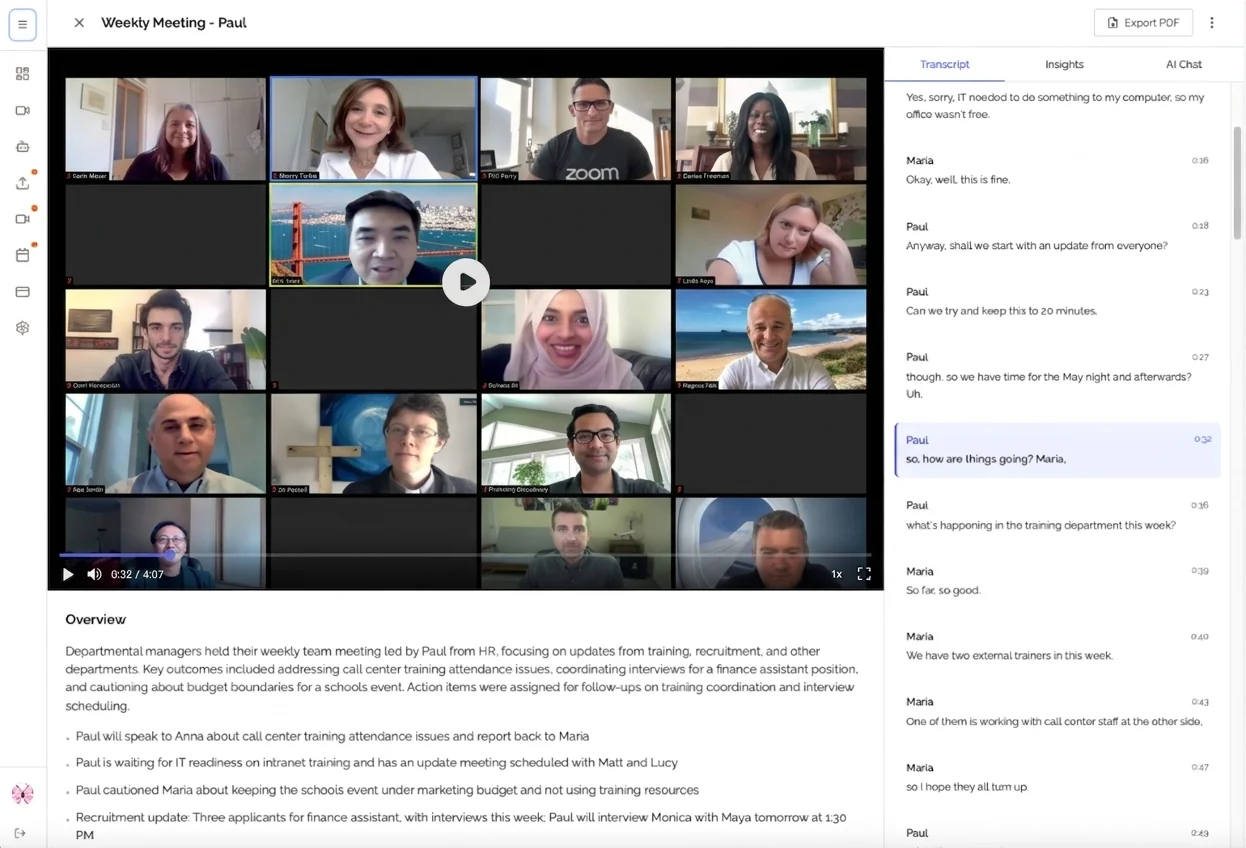
No calendar integration required, no expensive subscriptions. Just upload your meeting recording and get comprehensive notes in minutes. Try KenzNote free.
Additional Resources
Comparison Tools
- Quick decision quiz: Answer 5 questions to get personalized recommendations
- ROI calculator: Estimate hours and money saved with automation
- Integration checker: Verify your essential tools work with each platform
Implementation Resources
- Setup checklist: 30-minute implementation guide
- Email templates: Professional messages introducing your scheduling link
- Best practices guide: Advanced configuration for maximum effectiveness
Last updated: January 31, 2026 Written by Muhammad Abuelenin Research methodology: Hands-on testing of 10 scheduling platforms, analysis of 200+ user reviews, consultation with sales ops professionals, and comparison of 50+ feature sets across tools.

About Muhammad Abuelenin
Muhammad is the co-founder of KenzNote, passionate about building tools that enhance productivity and collaboration. With expertise in full-stack development and AI-powered solutions, he's dedicated to helping teams work smarter through innovative technology.
Ready to transform your meetings?
KenzNote automatically captures meeting insights, extracts action items, and generates summaries so you can focus on the conversation instead of taking notes.
Try KenzNote Free