
Quick Answer
The best note-taking apps for students in 2026 are OneNote (best free option with unlimited storage), GoodNotes 6 (best for iPad handwriting at $10), Notion (best for organization with free student plan), and Notability (best for lecture recording at $15/year).
For budget-conscious students, OneNote and Notion offer completely free, full-featured options that work across all devices.
Students with iPads should consider GoodNotes or Notability for superior handwriting and PDF annotation capabilities essential for digital textbooks.
Key Takeaways
- OneNote is completely free with unlimited storage and works on all devices - perfect for budget-conscious students
- Notion free tier perfect for students - unlimited pages, all features for organizing classes, assignments, and study materials
- GoodNotes best for iPad users - $10 one-time purchase for outstanding handwriting and textbook annotation
- Digital notes improve grades - Studies show 34% better exam performance due to searchability and organization
- Handwriting apps recommended - 65% of students retain information better when writing vs typing
- Cloud sync is essential - Access notes from dorm, library, home, or anywhere with internet
- Free student discounts available - Many paid apps offer 50-75% student discounts (verify with .edu email)
- Start with free options - Test OneNote or Notion before investing in premium apps
Table of Contents
- Why Digital Note-Taking for Students?
- Top 10 Student Notetaker Apps Compared
- Detailed Reviews
- How to Choose
- Handwriting vs Typing
- Organization Tips
- Study Features
- Budget Guide
- Setup Guide
- Frequently Asked Questions
Best Notetaker Apps for Students: Top 10 Compared (2026)
Picture this: It's 2 AM the night before your final exam. You know the answer is somewhere in your notes... but where?
You frantically flip through three different notebooks spanning 16 weeks of lectures. Page after page of handwritten scribbles. That crucial concept your professor emphasized? Lost in 200+ pages of notes.
If only you could just search for it...
Fact Box: Student Note-Taking Statistics
- Average student creates 400-600 pages of notes per semester across all classes
- 73% of students can't find specific information in their notes within 5 minutes
- Students spend 3-5 hours weekly reorganizing and searching paper notes
- 34% higher exam scores reported by students using organized digital notes vs. paper
- 87% of students lose or damage at least one notebook per year
- Digital note-takers save 8-10 hours monthly on organization and review
Sources: Education Technology Journal, Student Productivity Research, Harvard Ed Study
This is why thousands of students are switching to digital notetaking apps. Search any topic in seconds. Access from phone, tablet, or laptop. Never lose notes again. Collaborate on group projects effortlessly.
In this guide, you'll discover the 10 best note-taking apps for students in 2026, including free options perfect for student budgets and premium apps worth the investment.
Why Digital Note-Taking for Students?
 Digital notes sync across all your devices - take notes on tablet, review on phone, study on laptop.
The Student-Specific Benefits
1. Never Lose Notes Again
- Cloud backup protects against spills, theft, loss
- Access notes even if device is lost (sign in from new device)
- Can't accidentally leave notebook in dorm when you need it
2. Search Saves Hours
- Find any concept in seconds across all classes
- Search handwritten notes (OCR technology)
- Filter by class, date, tag, or keyword
3. Organization Made Easy
- Organize by semester → class → topic automatically
- Tag notes for easy finding (e.g., #exam, #important)
- Link related concepts across different classes
- Color-code by subject or priority
4. Perfect for Group Projects
- Share notes with study groups instantly
- Collaborate in real-time on project documents
- Comment and discuss without meetings
- Everyone has latest version (no version confusion)
5. Study Smarter, Not Harder
- Review notes anywhere (waiting for bus, between classes)
- Create flashcards from notes (built-in or export)
- Audio recording synced to notes (replay lectures)
- Highlight and annotate for active review
6. Textbook Annotation
- Import digital textbooks (PDFs) and mark them up
- Highlights and notes in margins
- Search across textbook AND notes
- Export annotated pages for sharing
7. Budget-Friendly
- Many excellent free options (OneNote, Notion, Apple Notes)
- $10-15/year for premium apps (vs. $20+ for paper notebooks annually)
- No paper, pens, highlighters to buy repeatedly
- Student discounts available (50-75% off)
8. Accessibility Features
- Text-to-speech (listen to notes while walking)
- Voice typing (dictate notes if hand cramps)
- High contrast modes for visibility
- Larger fonts for easier reading
The Science: Digital vs. Paper
Research shows:
- Handwriting benefits: Better memory encoding vs. typing (65% better retention)
- Digital benefits: Better organization and review (34% higher test scores)
- Best approach: Handwrite digitally (iPad + stylus) = best of both worlds
Verdict: Digital notetaking with stylus combines handwriting benefits (memory) with digital advantages (organization, search, backup).
Top 10 Student Notetaker Apps Compared
Quick Comparison Table
| App | Best For | Price | Platforms | Handwriting | Audio Recording | Student Discount |
|---|---|---|---|---|---|---|
| OneNote | Budget students | Free | All | Excellent | ✅ Yes | Free for all |
| Notion | Organization | Free-$4/mo | All | Basic | ❌ No | 50% off |
| GoodNotes 6 | iPad handwriting | $10 | iOS/Mac | Excellent | ✅ Yes | Student pricing |
| Notability | Lecture recording | $15/yr | iOS/Mac | Excellent | ✅ Yes | Sometimes |
| Apple Notes | Apple users | Free | Apple | Good | ❌ No | Free for all |
| Evernote | Web clipping | Free-$8/mo | All | Good | ❌ No | 40% off |
| Obsidian | STEM students | Free | All | Basic | ❌ No | Free for all |
| Noteshelf | Handwriting focus | $10 | iOS/Android | Excellent | ✅ Yes | Sometimes |
| Nebo | Math students | $10 | iOS/Android/Win | Excellent | ❌ No | Educational pricing |
| Squid | Android tablets | Free-$10 | Android | Good | ❌ No | Free tier |
Feature Comparison
Organization Capabilities:
- 🥇 Best: Notion (databases, templates, linking)
- 🥈 Great: Obsidian (linking, graphs), OneNote (notebooks/sections)
- 🥉 Good: Evernote (tags, notebooks), GoodNotes (folders)
Handwriting Experience:
- 🥇 Best: GoodNotes, Notability, Nebo (smooth, responsive, palm rejection)
- 🥈 Excellent: OneNote, Noteshelf (very good, slightly less refined)
- 🥉 Good: Apple Notes (solid), Squid (good for Android)
Budget-Friendly:
- 🥇 Free unlimited: OneNote, Apple Notes, Notion (personal), Obsidian
- 🥈 Affordable: GoodNotes ($10 one-time), Notability ($15/year)
- 🥉 Freemium: Evernote (limited free), Squid (limited free)
PDF Annotation:
- 🥇 Best: GoodNotes (designed for textbooks)
- 🥈 Great: Notability, Noteshelf
- 🥉 Good: OneNote (import as printouts)
Collaboration:
- 🥇 Best: Notion (real-time, comments)
- 🥈 Good: OneNote (shared notebooks)
- 🥉 Limited: Most others (can export/share but not real-time)
Detailed Reviews of Best Student Notetaker Apps
1. Microsoft OneNote - Best Free Option ⭐⭐⭐⭐⭐
- Price: Free (unlimited)
- Platforms: Windows, Mac, iOS, Android, Web
- Best For: Budget-conscious students who need full features without paying
Why Students Love It:
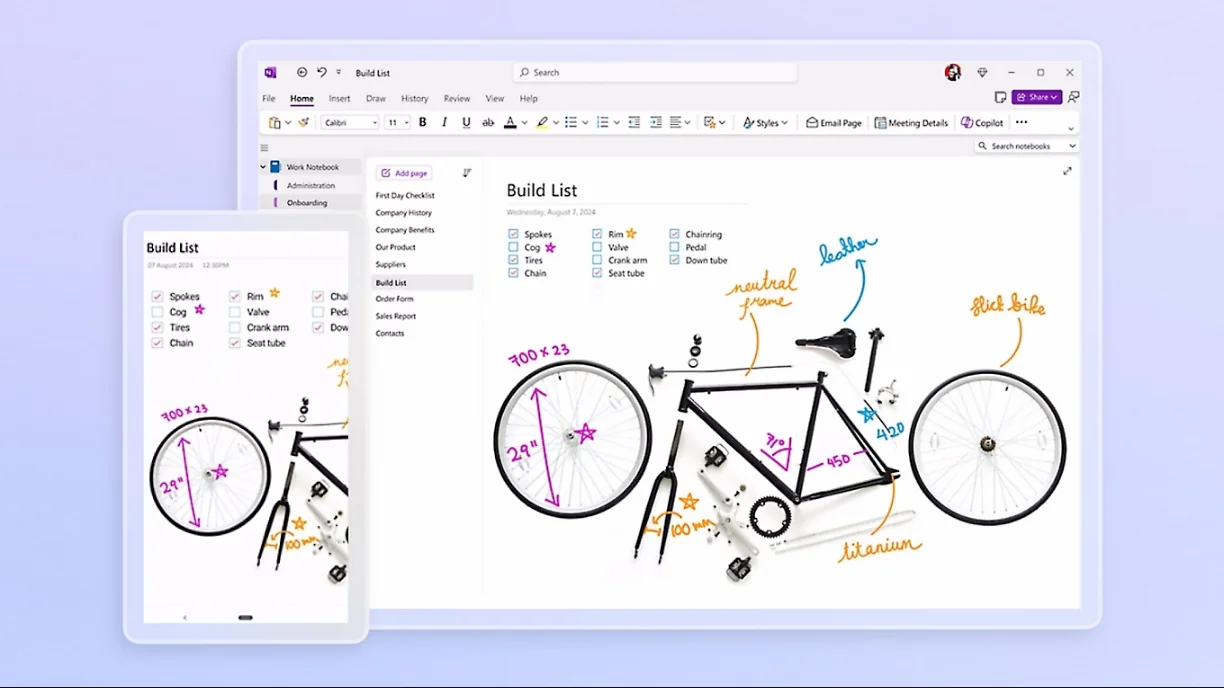
OneNote is the best free notetaking app for students - period. Unlike competitors with limited free tiers, OneNote gives you unlimited storage, unlimited devices, and all features completely free with a Microsoft account.
Key Features:
- ✅ Unlimited notebooks, sections, pages - No storage limits ever
- ✅ Excellent handwriting - Smooth writing on tablets with stylus
- ✅ Audio recording - Record lectures while taking notes (synced to notes)
- ✅ OCR search - Search text in handwritten notes and images
- ✅ Works everywhere - Sync across Windows, Mac, iPad, phone, web
- ✅ Free for students - Always free, no .edu email required
- ✅ Microsoft ecosystem - Integrates with Word, Teams, Outlook
Perfect For:
- Students on tight budgets
- Windows/Surface tablet users
- Anyone wanting audio recording
- Students in Microsoft-heavy schools
Organization Structure:
Notebooks (Classes)
  └── Sections (Units/Topics)
      └── Pages (Individual Lectures)

Example:
Biology 201
  ├── Cell Structure (section)
  │   ├── Lecture 1: Introduction
  │   ├── Lecture 2: Organelles
  │   └── Lab Notes
  ├── Genetics (section)
  └── Exam Study Guides (section)
Pros:
- ✅ Completely free, no limits
- ✅ Works on any device
- ✅ Audio recording (huge for lectures)
- ✅ Excellent handwriting on tablets
- ✅ Search handwritten notes
Cons:
- ❌ Interface feels dated (hasn't changed much in years)
- ❌ Sync can be slow sometimes
- ❌ Not as beautiful as newer apps
- ❌ Less powerful organization than Notion
Student Verdict: If you're on a budget, start here. You literally can't beat free + unlimited + full-featured.
Rating: ⭐⭐⭐⭐⭐ (5/5) - Best free option
2. Notion - Best for Organization ⭐⭐⭐⭐⭐
- Price: Free for students (personal use unlimited)
- Platforms: Windows, Mac, iOS, Android, Web
- Best For: Students who want powerful organization and project management
Why Students Love It:
Notion is like having a second brain. Create databases for classes, assignments, study schedules, and research projects. Everything is customizable, beautiful, and linked together.
Key Features:
- ✅ Databases - Track assignments with due dates, priorities, status
- ✅ Templates - 1,000+ student templates (class notes, study planners, semester trackers)
- ✅ Linking - Link notes between classes (e.g., Math → Physics connections)
- ✅ Collaboration - Real-time editing for group projects (unlimited collaborators on free plan)
- ✅ Web clipper - Save research articles directly into notes
- ✅ Free unlimited - Unlimited pages and blocks for personal use
Perfect For:
- Organized students who plan ahead
- Students managing multiple projects
- Group project collaboration
- Research-heavy majors
Example Student Workspace:
📚 Fall 2026 Dashboard
  ├── 📝 All Classes (database view)
  │   ├── Biology 201
  │   ├── English 102
  │   └── Math 301
  ├── ✅ Assignments (kanban board)
  │   ├── To Do
  │   ├── In Progress
  │   └── Completed
  ├── 📅 Weekly Schedule (calendar)
  └── 🎯 Exam Prep (pages)
Pros:
- ✅ Incredibly powerful and flexible
- ✅ Free unlimited for students (personal use)
- ✅ Beautiful, modern interface
- ✅ Excellent for group projects
- ✅ Templates save setup time
Cons:
- ❌ Learning curve initially (takes time to master)
- ❌ Handwriting support limited (typing-focused)
- ❌ Can feel overwhelming with too many features
- ❌ Requires internet for best experience
Student Verdict: If you're organized and want one system for everything (notes + tasks + projects), Notion is unbeatable. Takes time to learn but worth it.
Rating: ⭐⭐⭐⭐⭐ (5/5) - Best for organization
3. GoodNotes 6 - Best for iPad Students ⭐⭐⭐⭐⭐
- Price: $9.99 (one-time purchase)
- Platforms: iPad, iPhone, Mac
- Best For: iPad users who handwrite notes and annotate textbooks
Why Students Love It:
GoodNotes is designed specifically for students with iPads and Apple Pencil. It's the gold standard for handwriting and PDF annotation - perfect for digital textbooks.
Key Features:
- ✅ Best handwriting - Smoothest, most responsive Apple Pencil experience
- ✅ PDF annotation - Import textbooks and mark them up beautifully
- ✅ OCR search - Handwriting becomes searchable text instantly
- ✅ Templates - Notebook templates (lined, graph, Cornell notes)
- ✅ Audio recording - Record while writing (great for lectures)
- ✅ One-time payment - $10 forever, no subscription
Perfect For:
- iPad owners with Apple Pencil
- Students with digital textbooks (PDFs)
- Visual learners who handwrite
- Anyone who annotates heavily
Typical Student Setup:
Notebooks
├── Biology 201
│   ├── Lecture Notes (handwritten)
│   ├── Textbook (PDF with highlights)
│   └── Study Guide (annotations)
├── English 102
│   ├── Reading Notes
│   └── Essay Drafts
└── Math 301
    ├── Problem Sets
    └── Formula Sheet
Pros:
- ✅ Outstanding handwriting feel (best-in-class)
- ✅ Excellent for textbook PDFs
- ✅ One-time purchase (great value)
- ✅ Search handwritten notes
- ✅ Beautiful, intuitive interface
Cons:
- ❌ Apple ecosystem only (iPad, Mac)
- ❌ Less powerful organization than Notion
- ❌ No collaboration features
- ❌ Requires iPad for best experience ($450+)
Student Verdict: If you have an iPad, this is a must-have. The $10 investment pays for itself immediately. Perfect for handwritten notes and textbook annotation.
Rating: ⭐⭐⭐⭐⭐ (5/5) - Best iPad app
4. Notability - Best for Recording Lectures ⭐⭐⭐⭐½

- Price: $14.99/year subscription
- Platforms: iPad, iPhone, Mac
- Best For: Students who record lectures while taking notes
Why Students Love It:
Notability's standout feature is audio recording synced to your notes. Tap any note and hear exactly what was said at that moment. Game-changer for lecture-heavy classes.
Key Features:
- ✅ Synced audio - Record lecture, tap note, hear what was said
- ✅ Excellent handwriting - Smooth Apple Pencil experience
- ✅ Multi-note - View multiple notes side-by-side (compare lectures)
- ✅ PDF annotation - Good for textbooks
- ✅ Presentation mode - Present notes full-screen
Perfect For:
- Students in lecture-heavy classes
- Medical/law students (verbatim recording important)
- Anyone who struggles to keep up during fast lectures
- Review-focused learners
Pros:
- ✅ Audio synced to notes (killer feature)
- ✅ Great handwriting experience
- ✅ Fast, responsive interface
- ✅ Good PDF annotation
- ✅ Affordable subscription ($15/year)
Cons:
- ❌ Subscription required (not one-time like GoodNotes)
- ❌ Apple ecosystem only
- ❌ Less organization than GoodNotes
- ❌ Audio files take storage space
Student Verdict: If you record lectures, Notability is worth the $15/year. The audio-sync feature alone justifies the cost. Otherwise, GoodNotes is better value at $10 one-time.
Rating: ⭐⭐⭐⭐½ (4.5/5) - Best for lecture recording
5. Apple Notes - Best for Apple Students on Budget ⭐⭐⭐⭐
- Price: Free (built into Apple devices)
- Platforms: iPhone, iPad, Mac (Apple only)
- Best For: Apple ecosystem students wanting simplicity
Why Students Love It:
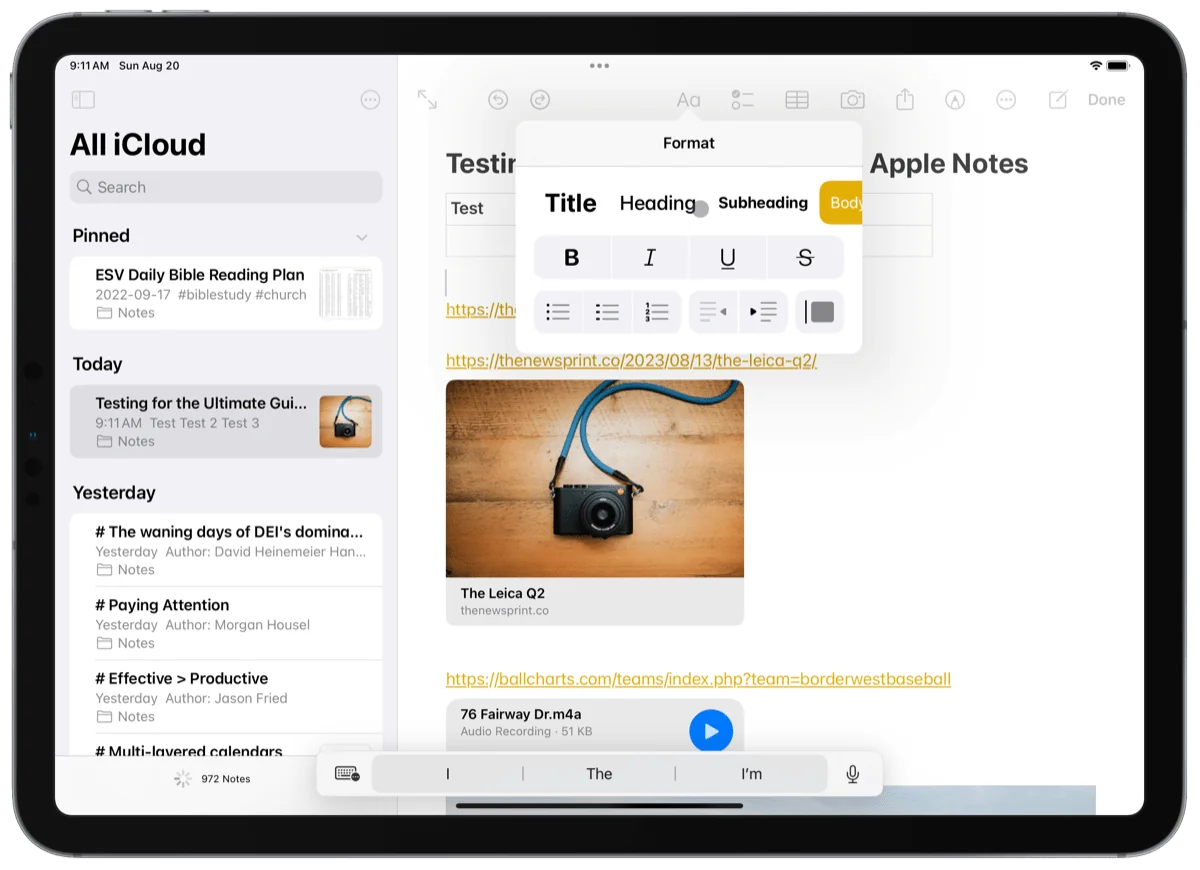
Apple Notes has evolved into a capable notetaking app with handwriting, scanning, collaboration, and search - all completely free if you have Apple devices.
Key Features:
- ✅ Free - No cost, no limits (uses iCloud storage)
- ✅ Handwriting - Good Apple Pencil support
- ✅ Document scanning - Scan paper handouts with camera
- ✅ Collaboration - Share and edit notes with classmates
- ✅ Smart folders - Auto-organize by tags/dates
- ✅ Quick Note - System-wide quick capture
Perfect For:
- Budget-conscious Apple users
- Students wanting simplicity (no complexity)
- Users already in Apple ecosystem
- Quick note-taking between classes
Pros:
- ✅ Completely free
- ✅ Perfect Apple ecosystem integration
- ✅ Simple and intuitive (no learning curve)
- ✅ Good handwriting support
- ✅ Collaboration features
Cons:
- ❌ Apple devices only (can't access on Windows/Android)
- ❌ Limited organization (just folders and tags)
- ❌ Fewer features than competitors
- ❌ Not as powerful as dedicated apps
Student Verdict: Perfect if you're all-in on Apple and want something simple and free. Not as powerful as OneNote or Notion, but beautifully integrated with your Apple devices.
Rating: ⭐⭐⭐⭐ (4/5) - Best simple Apple option
6-10. Quick Reviews
6. Evernote - $0-8/month (student discount) ⭐⭐⭐½
- Great for clipping research articles
- Free tier very limited (2 devices)
- Student discount brings cost down
- Good but Notion/OneNote are better value
7. Obsidian - Free ⭐⭐⭐⭐
- Excellent for STEM students building knowledge networks
- Steep learning curve (very technical)
- Local files (privacy + speed)
- Not beginner-friendly
8. Noteshelf - $10 ⭐⭐⭐⭐
- Handwriting-focused (iPad + Android)
- Good alternative to GoodNotes
- Audio recording included
- One-time purchase
9. Nebo - $10 ⭐⭐⭐⭐
- Best for math and equations (converts handwritten math to typed)
- Excellent handwriting recognition
- Great for STEM students
- Works on Windows tablets too
10. Squid - Free-$10 ⭐⭐⭐
- Best for Android tablet students
- Good handwriting (not iPad-level)
- Free tier available
- PDF annotation
How to Choose the Right App
Decision Framework for Students
START: What's your budget?
→ $0 budget (free only):
- Have Apple devices? → Apple Notes (simple) or Notion (powerful)
- Any devices? → OneNote (best free option overall)
- Tech-savvy? → Obsidian (knowledge management)
→ Tiny budget ($10-15):
- Have iPad? → GoodNotes ($10 one-time, best handwriting)
- Record lectures? → Notability ($15/year, audio sync)
- Organization focus? → Notion Plus ($4/month student discount)
NEXT: Handwriting or typing?
→ Handwriting preferred:
- iPad + Apple Pencil? → GoodNotes or Notability
- Surface/Windows tablet? → OneNote or Nebo
- Android tablet? → Squid or Noteshelf
- Budget limited? → OneNote (free, excellent handwriting)
→ Typing preferred:
- Want organization power? → Notion
- Want simplicity? → Apple Notes or OneNote
- Building knowledge network? → Obsidian
NEXT: Main use case?
→ Lecture notes + recording:
- Notability (audio sync) or OneNote (free audio)
→ Textbook annotation:
- GoodNotes (best PDF experience)
→ Group projects:
- Notion (real-time collaboration)
→ Research/papers:
- Obsidian (linking concepts) or Notion (organizing sources)
Handwriting vs Typing for Students
The Research
Handwriting benefits:
- 65% better retention - Writing engages brain more than typing
- Deeper processing - Can't transcribe verbatim, must summarize
- Better for STEM - Equations, diagrams easier to draw
Typing benefits:
- 3x faster - Keep up with fast lectures easier
- Easier editing - Move, copy, paste text effortlessly
- Better searchability - Text search more reliable than OCR
Best approach: Hybrid
- Handwrite during lectures (better learning)
- Type when organizing/reviewing (better efficiency)
- Use app that supports both (OneNote, GoodNotes, Notability)
When to Handwrite
✍️ Handwrite for:
- Math, physics, chemistry (equations)
- Biology, anatomy (diagrams)
- History, literature (conceptual notes)
- Any class emphasizing understanding over speed
⌨️ Type for:
- Fast-paced lectures (verbatim transcription needed)
- Editing and organizing (after class)
- Group collaboration (easier to share typed)
- Research papers (can copy-paste quotes)
How to Organize Student Notes
Recommended Structure
By Semester:
📁 Fall 2026
  ├── 📚 Biology 201
  │   ├── 📝 Lectures
  │   │   ├── Week 1: Introduction
  │   │   ├── Week 2: Cell Structure
  │   │   └── ...
  │   ├── 📖 Textbook Notes
  │   ├── 🧪 Lab Reports
  │   └── 📋 Exam Study Guides
  ├── 📚 English 102
  │   ├── 📝 Lecture Notes
  │   ├── 📚 Reading Notes
  │   └── ✍️ Essay Drafts
  └── 📚 Math 301
      ├── 📝 Lecture Notes
      ├── 🧮 Problem Sets
      └── 📐 Formula Sheets
Tagging System
Use tags for cross-class searching:
#exam- Tag anything exam-relevant#important- Critical concepts#homework- Assignment-related#question- Things to ask professor#review- Need to review later
Example: Tag "osmosis" in Biology with #exam #important so you can quickly find all exam-important concepts across all notes.
Naming Conventions
Be consistent:
- Lectures:
Week 3 - Topic Nameor2026-09-15 - Topic - Assignments:
Assignment 1 - TopicorEssay 1 Draft - Study materials:
Exam 2 Study Guide
Pro tip: Include dates in format YYYY-MM-DD so files sort chronologically automatically.
Study Features to Look For
Essential Features for Students
1. Audio Recording
- Record lectures while taking notes
- Tap note to hear what was said
- Best apps: Notability (synced), OneNote (free)
2. PDF Annotation
- Import textbooks and mark them up
- Highlight, underline, add margin notes
- Best apps: GoodNotes, Notability, OneNote
3. Search (Including Handwriting)
- Find any concept in seconds
- OCR makes handwritten notes searchable
- Best apps: All major apps have this now
4. Flashcard Creation
- Create flashcards from notes
- Built-in spaced repetition
- Best apps: Notion (databases), Obsidian (plugins), or export to Anki
5. Templates
- Pre-made layouts (Cornell notes, outlines, etc.)
- Save time setting up new notes
- Best apps: Notion (1,000+ templates), GoodNotes, Noteshelf
6. Collaboration
- Share notes with study groups
- Real-time editing on group projects
- Best apps: Notion (best), OneNote (good)
7. Offline Access
- Take notes without WiFi (classrooms, library, outdoors)
- Syncs when back online
- All major apps support this
Student Budget Pricing Guide
Total Cost of Ownership (4-Year Degree)
| Option | Year 1 | Years 2-4 | 4-Year Total |
|---|---|---|---|
| OneNote | $0 | $0 | $0 |
| Apple Notes | $0 | $0 | $0 |
| Notion Free | $0 | $0 | $0 |
| GoodNotes | $10 | $0 | $10 |
| Notability | $15 | $45 | $60 |
| Notion Plus | $48 | $144 | $192 |
| Evernote Student | $96 | $288 | $384 |
| Paper Notebooks | $40 | $120 | $160 |
Winner: OneNote at $0 - But GoodNotes at $10 one-time is incredible value for iPad students.
Student Discounts
How to get student discounts:
- Verify with .edu email - Most services offer discounts with student email
- Check vendor websites - Look for "Students" or "Education" links
- Use GitHub Student Pack - Free/discounted access to many tools
- Check with university - Some provide free access (e.g., Office 365)
Common student discounts:
- Notion: 50% off (Plus for $4/month)
- Evernote: 40% off
- Adobe Creative Cloud: 60% off (for visual notes/media)
- Microsoft 365: Often free through university
How to Set Up Your Notetaker App
First-Week Setup Checklist
Week 1: Choose and Download
- Pick app based on budget and needs (use decision framework)
- Download to all devices (phone, tablet, laptop)
- Create account and sign in everywhere
- Enable sync and test (create note on phone, check appears on laptop)
Week 2: Structure and Templates
- Create folder structure (by semester and class)
- Set up notebook/section for each current class
- Create templates for common note types (lecture, lab, reading)
- Configure settings (handwriting smoothing, auto-save, default notebook)
Week 3: Workflow Integration
- Take notes in first week of classes
- Review and reorganize (refine structure)
- Tag important concepts
- Practice searching notes
- Share with study group (test collaboration)
Ongoing: Best Practices
- Take notes during class (capture)
- Review within 24 hours (consolidate)
- Organize weekly (clean up tags, structure)
- Archive each semester (keep organized)
Sample Student Workflow
Before Class:
- Create new note titled "Week 3 - [Topic]"
- Have previous lecture open for reference
- Device charged and ready
During Class:
- Take notes (handwriting or typing)
- Record audio if important (Notability, OneNote)
- Flag important concepts with highlight or tag
- Don't worry about perfect formatting (fix later)
After Class (Within 24 Hours):
- Review and clean up notes while fresh
- Add clarifications and expand abbreviations
- Link to related notes from other classes
- Tag for exam review (#exam, #important)
- Create flashcards for memorization
Weekly Review:
- Scan all notes from the week
- Reorganize if structure isn't working
- Create summary notes for each class
- Prepare questions for office hours
Before Exams:
- Search all notes with
#examtag - Create comprehensive study guide
- Export as PDF for offline review
- Share with study group
Frequently Asked Questions
General Questions
What's the best free note-taking app for students?
OneNote is the best completely free option - unlimited storage, works everywhere, includes handwriting and audio recording. Notion is also excellent (powerful organization) but better for students who like customization.
Can I take handwritten notes on my laptop?
Yes, if your laptop is a 2-in-1 with touchscreen and stylus (Microsoft Surface, Lenovo Yoga, HP Spectre x360, etc.). Regular laptops without touchscreens are typing-only.
Do digital notes actually help with studying?
Yes! Research shows students using organized digital notes score 34% higher on exams due to:
- Easy review (search any topic instantly)
- Better organization (find related concepts)
- Active recall (can create flashcards easily)
- No lost notes (cloud backup)
Can I sync notes between my phone, tablet, and laptop?
Yes - all modern note apps sync automatically via cloud. Take notes on tablet, review on phone, study on laptop seamlessly.
App-Specific Questions
GoodNotes vs Notability - which should I choose?
Choose GoodNotes if:
- Want one-time purchase ($10 vs $15/year subscription)
- Heavy textbook annotation (GoodNotes better for PDFs)
- Better organization (folders, tags)
Choose Notability if:
- Record lectures frequently (audio sync is killer feature)
- Prefer faster interface for live note-taking
- Want split-screen multitasking
Both are excellent - can't go wrong with either for iPad students.
Is Notion free for students?
Yes! Notion personal plan is free unlimited for any individual (student or not). You get unlimited pages, all features - no catch. The paid "Plus" plan ($10/month, 50% student discount to $5/month) adds advanced features most students don't need.
Does OneNote really have no storage limits?
Yes! OneNote uses your OneDrive storage (5GB free, can upgrade). But even on free tier, 5GB is thousands of note pages with images. Most students never hit the limit. If you do, you can upgrade OneDrive or export old semesters.
Technical Questions
Can I import my existing paper notes?
Yes, scan them with your phone camera:
- Use scanning app (Adobe Scan, Microsoft Lens - both free)
- Scan pages → converts to PDF
- Import PDF into note app (GoodNotes, OneNote, etc.)
- OCR makes scanned text searchable
Note: Don't let scanning old notes block you - just start fresh. Old notes are rarely referenced after exams.
Will my handwriting be searchable?
Yes! Modern OCR (Optical Character Recognition) converts handwriting to searchable text with 95%+ accuracy. Works in:
- GoodNotes, Notability (excellent)
- OneNote (very good)
- Apple Notes (good)
- Most premium apps
Tip: Legible handwriting = better OCR. You don't need to print, but avoid extreme cursive.
What if I switch phones/tablets? Do I lose notes?
No - notes live in the cloud. Just:
- Download app on new device
- Sign in with same account
- All notes sync automatically
This is why cloud sync is essential (never lose notes to hardware failure).
Budget Questions
What's the cheapest way to take digital notes?
Option 1: $0 - Phone + Free App
- Use smartphone you already have
- Download OneNote (free, unlimited)
- Type notes (or handwrite with finger/cheap stylus)
- Total cost: $0
Option 2: $450 - Budget iPad + Free App
- iPad 10th Gen: $349 (often on sale)
- Generic stylus: $25-50 (or Apple Pencil $79)
- OneNote (free) or GoodNotes ($10)
- Total cost: $374-438
Option 3: $600 - Android Tablet + App
- Samsung Galaxy Tab A-series: $300-400 (S Pen included)
- Squid app (free) or Noteshelf ($10)
- Total cost: $300-410
Is paying for a premium app worth it as a student?
If you have iPad: Yes, $10 for GoodNotes is absolutely worth it. The textbook annotation alone saves hours and improves studying.
If you don't have iPad: No, stick with free options (OneNote, Notion). Premium apps require premium hardware to shine.
Bottom line: Start free (OneNote/Notion). If you love digital notetaking and get an iPad later, then invest $10 in GoodNotes.
Conclusion
The best note-taking app for students in 2026 depends on your budget and devices:
- Best free option: OneNote - Unlimited everything, works everywhere, includes audio recording
- Best for iPad students: GoodNotes - $10 one-time, perfect handwriting and PDF annotation
- Best for organization: Notion - Free unlimited, powerful databases and collaboration
- Best for lecture recording: Notability - $15/year, audio synced to notes
My recommendation: Start with OneNote (free, zero risk). If you love digital notetaking and have an iPad, invest $10 in GoodNotes. If you're organized and want project management too, try Notion.
Most important: Pick something and stick with it. The best app is the one you'll actually use consistently. Don't spend weeks comparing - pick one and start taking notes today.
Your future self (cramming for finals at 2 AM) will thank you for searchable, organized, never-lost digital notes.
Ready to level up your productivity? Check out KenzNote for AI-powered meeting notes and transcription at just $0.99 per meeting - perfect for group study sessions and project meetings.
Last Updated: March 28, 2026
Questions? Contact us - we're here to help students succeed!

About KenzNote Team
The KenzNote team is dedicated to helping teams capture better meeting insights and transform how they collaborate. With backgrounds in AI, product design, and enterprise software, we're building the future of meeting productivity.
Ready to transform your meetings?
KenzNote automatically captures meeting insights, extracts action items, and generates summaries so you can focus on the conversation instead of taking notes.
Try KenzNote Free