
Quick Answer
To summarize a meeting with AI, you need a transcript and a tool that turns it into a summary. There are three ways:
- Use an AI meeting assistant that records and summarizes for you. With KenzNote you send a notetaker, record your screen with no bot, or upload a recording, then get a transcript, summary and action items. It costs $0.99 per hour, and your first 2 meetings are free.
- Paste the transcript into ChatGPT, Claude or Copilot with a clear prompt. The prompts are below.
- Use the AI built into your meeting app: Zoom AI Companion, Copilot in Microsoft Teams or Gemini in Google Meet, if your plan includes it.
Whichever you use, check names, numbers and deadlines before you send the summary. AI is good at structure and weaker at who promised what.
Key Takeaways
- No transcript, no summary. Every method starts with a recording or a transcript
- An AI meeting assistant is the least work: recording, transcript, summary and action items in one place
- ChatGPT or Copilot work well if you already have a transcript. The prompt decides the quality
- A good meeting summary has 4 parts: decisions, action items with owners and dates, open questions, and a short overview
- Always check owners, numbers and dates. These are where AI summaries go wrong most often
Table of Contents
- Method 1: An AI Meeting Assistant
- Method 2: ChatGPT, Claude or Copilot With a Prompt
- Method 3: Zoom, Teams and Meet Built-In AI
- Prompts to Summarize a Meeting Transcript
- What a Good Meeting Summary Includes
- How to Check an AI Meeting Summary
- How to Summarize Meeting Minutes
- Frequently Asked Questions
Method 1: An AI Meeting Assistant
An AI meeting assistant records the meeting and writes the summary, so you skip the copy and paste.
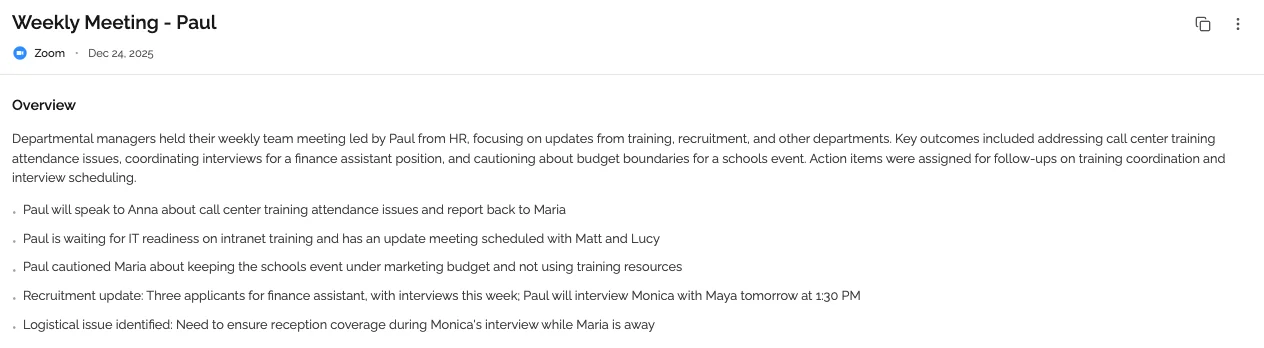 A KenzNote meeting summary: overview, topics, decisions and action items.
How to do it in KenzNote:
- Get the meeting in. Paste the Zoom, Google Meet or Teams link to send a visible notetaker. Or click Record screen in desktop Chrome, Edge or Brave to record without a bot. Or upload a recording you already have, including in-person meetings recorded on a phone.
- Transcribe after the meeting. Click Transcribe. If the meeting mixed languages, turn on "Audio has more than one language" and pick up to 3.
- Read the summary. You get a transcript with speakers, a summary, topics, and action items with owners and deadlines.
- Ask follow-up questions. Ask Kenz "What did we decide about the budget?" and the answer links to the exact moment, such as [23:10 · Omar].
- Share it by email with "Can view" or "Can edit", even with people who don't have an account.
Best for: regular meetings, client calls, and anyone who doesn't want to handle transcripts by hand. Compare tools in our guide to the best AI note taker in 2026.
Method 2: ChatGPT, Claude or Copilot With a Prompt
If you already have a transcript, a general AI chat tool can summarize it.
- Get the transcript. Download it from Zoom, Teams or Meet if transcription was on, or export it from your meeting assistant.
- Remove what you shouldn't share. Check your company's policy before pasting confidential meetings into a public AI tool.
- Paste the transcript with one of the prompts below. Tell the AI the meeting type and who the summary is for.
- Split very long meetings. If the tool rejects the length, summarize each half, then ask for one combined summary.
- Check the result against the transcript (see below).
Watch out for: transcripts without speaker names. If the transcript says "Speaker 1", the AI can't assign action items correctly. Add names first, or use a tool that labels speakers.
Method 3: Zoom, Teams and Meet Built-In AI
- Zoom AI Companion writes a meeting summary on paid Zoom plans. On free Zoom it covers 3 meetings a month, and free meetings end at 40 minutes. Compare it with other tools in our guide to the best AI note taker for Zoom.
- Copilot in Microsoft Teams can recap a meeting if your company has a Copilot license and transcription or recording was on.
- Gemini in Google Meet can take notes on eligible Google Workspace plans.
Built-in AI is convenient but stays inside one platform, and the host usually controls it. If you meet across Zoom, Meet and Teams, or a guest is running the call, an independent assistant gives you one place for every summary.
Prompts to Summarize a Meeting Transcript
Copy a prompt, replace the parts in [brackets], and paste the transcript after it. They work in ChatGPT, Claude, Gemini and Copilot.
1. Standard meeting summary
Summarize this [team meeting] transcript for [people who missed it].
Use these sections:
1. Overview (3 sentences max)
2. Decisions made
3. Action items: task, owner, deadline. Write "no deadline" if none was said
4. Open questions
Only use what is in the transcript. If something is unclear, say so instead of guessing.

Transcript:
[paste transcript]
2. Action items only
List every action item in this meeting transcript as a table with columns:
Task | Owner | Deadline | Quote from the transcript.
Include only tasks someone clearly agreed to do. Do not invent owners or dates.

Transcript:
[paste transcript]
3. Meeting minutes format
Turn this transcript into formal meeting minutes with: meeting title, date,
attendees, agenda items discussed, decisions, action items with owners,
and next meeting date if mentioned. Use neutral, factual language.

Transcript:
[paste transcript]
4. Client or sales call summary
Summarize this client call for my team. Include: the client's goals,
problems they mentioned, objections, what we promised, next steps with
dates, and any numbers (budget, timeline, team size) exactly as said.

Transcript:
[paste transcript]
5. Three-bullet executive summary
Give me the 3 most important points from this meeting for a busy executive,
one sentence each, then one line on what needs their decision.

Transcript:
[paste transcript]
Copilot prompt in Teams: "Recap this meeting with decisions, action items with owners, and open questions" works on a meeting that had transcription on.
In KenzNote you can ask the same things in Ask Kenz, across one meeting or a whole folder, with each answer linked to the moment it came from.
What a Good Meeting Summary Includes
| Part | What to write | Example |
|---|---|---|
| Overview | 2–3 sentences on purpose and outcome | "We agreed the Q1 launch moves to March 3." |
| Decisions | What was decided, not what was discussed | "Use the annual plan for the pilot." |
| Action items | Task, owner, deadline | "Lina sends the contract by Friday." |
| Open questions | What still needs an answer, and who owns it | "Legal review: Omar checks by Tuesday." |
Keep it short enough to read on a phone. Link to the full transcript for anyone who needs detail. For ready-made formats, see our meeting notes templates.
How to Check an AI Meeting Summary
Two minutes of checking saves an awkward correction email:
- Owners. Did that person really agree to the task, or was it suggested?
- Numbers and dates. Prices, deadlines and figures are easy to garble.
- Decisions vs discussion. "We talked about raising prices" is not "we decided to raise prices."
- Missing items. Skim the transcript for "I'll", "we will" and "by Friday."
- Names. Check spelling, especially for names from other languages.
More on where summaries go wrong: AI meeting summary errors and how to catch them.
How to Summarize Meeting Minutes
Meeting minutes are the formal record; a summary is the short version people read. To summarize minutes:
- Pull out the decisions and action items first.
- Add one sentence of context per agenda item.
- Drop the discussion detail, attendance and procedural notes, unless your organization requires them.
With AI, use prompt 3 above to create the minutes, then prompt 5 to summarize them. See our guide to meeting minutes for formats and examples.
Frequently Asked Questions
How do I summarize a meeting with AI?
Get a transcript, then use an AI tool to turn it into a summary. An AI meeting assistant like KenzNote records the meeting and writes the transcript, summary and action items for you. If you already have a transcript, paste it into ChatGPT, Claude or Copilot with a prompt that asks for decisions, action items and open questions.
What is the best AI to summarize a meeting transcript?
An AI meeting assistant is the most reliable because it has the recording and speaker labels. KenzNote does it for $0.99 per hour with no subscription. For a transcript you already have, ChatGPT, Claude and Copilot all work well with a clear prompt.
What is a good ChatGPT prompt to summarize a meeting transcript?
Ask for an overview, decisions, action items with owner and deadline, and open questions, and tell it to use only what is in the transcript and flag anything unclear. The full prompt is in this article.
Can Copilot summarize a Teams meeting?
Yes, if your company has a Copilot license and the meeting had transcription or recording turned on. Without that, record the meeting with an AI meeting assistant or upload the recording to one.
Can AI summarize a meeting recording without a transcript?
The AI makes the transcript first. Upload the audio or video file to an AI meeting assistant such as KenzNote, and it transcribes and summarizes it.
How do I summarize meeting notes I took by hand?
Paste or type your notes into an AI chat tool and ask for decisions, action items and open questions. The summary can only be as complete as your notes, which is why recording the meeting gives better results.
Related Resources

About Muhammad Abuelenin
Muhammad is the co-founder of KenzNote, passionate about building tools that enhance productivity and collaboration. With expertise in full-stack development and AI-powered solutions, he's dedicated to helping teams work smarter through innovative technology.
Toplantılarınızı dönüştürmeye hazır mısınız?
KenzNote toplantı içgörülerini otomatik olarak yakalar, aksiyon maddelerini çıkarır ve özetler oluşturur; böylece not almak yerine konuşmaya odaklanabilirsiniz.
KenzNote'u Ücretsiz Deneyin